



Security Vulnerabilities  security advisory authentication
security advisory authentication We often view OpenSSH security updates through the lens of standard patch management. When a new CVE hits, we scramble to update, check our versions, and return to business as usual. But recent vulnerabilities tied to distribution-added OpenSSH GSSAPI patches are a reminder that the danger doesn't always lie in the core code; it often resides in the "convenience" features we layer on top. . These recent issues shouldn't just trigger an apt upgrade or dnf update; they should trigger a...
 Jul 06, 2026

Security Trends privilege escalation Linux security
privilege escalation Linux security Linux security teams are drowning. Patches, kernel updates, new CVEs every week. SSH exposed here, an old web service there, and a forgotten cron job running as root. On top of that, SIEM dashboards blink all day with alerts that all claim to be “high priority.” . It’s no surprise that people stop paying attention. The real problem isn’t a lack of data. It’s the opposite. Too much noise, not enough signal. Security teams see huge lists of vulnerabilities and thousands of alerts, but very...
Jul 06, 2026

Cloud Security incident response Linux administration
incident response Linux administration Over the span of just 14 days, threat actors unleashed more than 81 million login attempts against Microsoft’s Azure command-line interface (CLI). The campaign , which security researchers at Huntress identified as an ongoing, automated password-spraying effort, successfully compromised at least 78 Microsoft accounts across 64 organizations between June 12 and June 26, 2026. . While the scale is massive, the underlying strategy is surprisingly surgical. Attackers aren't exploiting a flaw in...
Jul 01, 2026
Security Trends security update mobile security
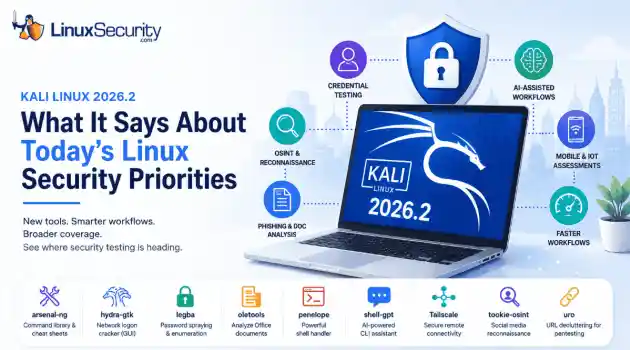
security update mobile security Offensive Security just dropped Kali Linux 2026.2 , and at first glance, it looks like a standard quarterly refresh. You’ve got the usual kernel bumps, desktop environment updates, and a handful of new utilities. But don't write this off as just another routine version update. If you look past the changelog, this release highlights several capabilities that continue to be important in offensive security. From AI-assisted workflows to credential testing and mobile assessments, Kali Linux 2026.2...
Jun 30, 2026
Security Projectssecurity advisory vulnerability management
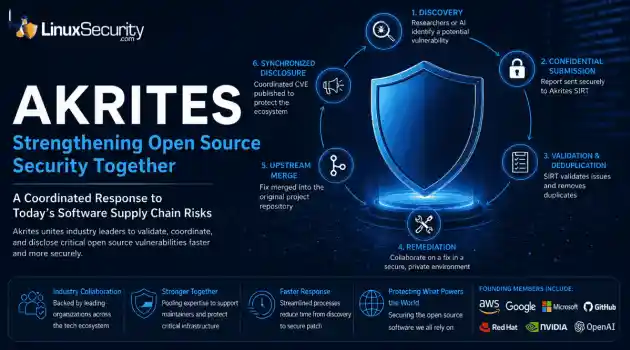
security advisory vulnerability management The Linux Foundation has officially launched Akrites , a coordinated industry initiative designed to improve how critical open source vulnerabilities are validated, coordinated, and disclosed before patches reach downstream users. Backed by a diverse coalition—including AWS, Google, Microsoft/GitHub, Red Hat, NVIDIA, and OpenAI—Akrites establishes a shared Security Incident Response Team (SIRT) to streamline the validation, remediation, and disclosure of vulnerabilities in the foundational...
Jun 29, 2026
 Refine news
X Clear Filters
Get the latest News and Insights
Get the latest Linux and open source security news straight to your inbox.
Community Poll
Is application sandboxing truly safe?
Loading...
Explore Latest Linux Security news
We found 17 articles for you...
78
 security advisorydata protectionsecurity updates
Mozilla Firefox 135: Critical Security Updates and Performance Boosts
Mozilla Firefox 135 has just been released, bringing essential updates and critical security improvements vital for maintaining a secure and private online environment. This latest update fortifies your browser against emerging threats and introduces enhancements that elevate your control over data privacy and tracking protection. . In addition to the security boosts, Firefox 135 comes packed with various bug fixes and performance optimizations, ensuring a smoother and more reliable browsing experience. Updating to the latest version ensures you leverage all the newest defenses and functionalities. Ensuring your system meets the updated prerequisites will streamline this transition, making sure that your administration duties continue without a hitch. With all these enhancements, Firefox 135 robustly equips you to maintain high web security and privacy standards on your Linux systems. Let's take a closer look at the key updates and improvements you can expect in Firefox 135. Enhanced Security Features The release of Firefox 135 brings a series of vital security updates designed to safeguard users from the latest online threats. Mozilla has a solid reputation for promptly addressing vulnerabilities, and this Firefox version is no exception. Ensuring that your team and end-users are using the latest version of Firefox means that everyone benefits from these enhancements, reducing the risk of security breaches or exploits. Security is a continuous race against malicious actors who constantly evolve their tactics. By deploying Firefox 135, you’re taking a proactive step in staying ahead. The update includes patches for known vulnerabilities that, if left unaddressed, could potentially be exploited. For a security administrator, keeping software up-to-date is the first line of defense. This update ensures your browsers are fortified with the latest security measures, minimizing potential entry points for hackers and automated exploits. Privacy Improvements Privacy is becomingincreasingly important as users grow more aware of tracking technologies and data misuse. Firefox 135 continues Mozilla's trend of enhancing user privacy. The browser offers improved tracking protection, blocking more third-party trackers that follow users across different websites. This protection is invaluable for maintaining privacy and ensuring that web activities are not unnecessarily tracked or logged . Enhanced privacy settings allow for more granular control over what data is shared and how it is managed. For security administrators, these features are crucial in maintaining compliance with privacy regulations and safeguarding against unauthorized data collection. Using Firefox 135, Linux admins can assure their users that their private data is better protected from external tracking and potential internal mishaps. Streamlined Performance and Stability In addition to security and privacy, Mozilla’s engineers have worked on improving Firefox's overall performance and stability. With each new release, performance optimizations are made to ensure faster and more efficient browsing. These updates mean less downtime and a more responsive browser experience for users, which is always a significant boost in any IT environment. Bugs and performance issues can be a notable source of frustration and productivity loss. Just recently, Firefox 134 was released to mitigate eleven critical security flaws that could expose sensitive data and give malicious actors full access to compromised systems. Firefox 135 includes numerous bug fixes that address critical vulnerabilities that could lead to spoofing attacks, service disruption, privacy leaks, and attackers gaining complete control over impacted systems. By ensuring that all systems are running the latest browser version, you can avoid the disruptions caused by these issues, leading to a smoother experience for all users involved. Feedback and Involvement Mozilla has a rich history of community involvement, encouraging users, developers,and security professionals to contribute to the ongoing improvement of Firefox. With the release of Firefox 135, this tradition continues. The ability to provide feedback , report bugs , and suggest enhancements allows security admins to play a direct role in shaping the future of the browser. Community participation helps improve the software and provides valuable learning and networking opportunities. Ensuring Compatibility and Compliance Verifying that they align with your existing systems and structures is essential to deploying new software updates. Firefox 135 introduces new features and requirements that must be checked against your system’s existing configuration. As an admin, ensuring compatibility prevents interruptions in service and ensures that all tools and extensions you rely on continue functioning seamlessly. Moreover, keeping up with these updates helps maintain compliance with various cybersecurity frameworks and standards. Whether you’re following internal policies or external regulations, staying current with software updates is a requirement. Firefox 135’s commitment to security and privacy aligns well with these frameworks, so ensuring all users are updated minimizes your compliance concerns. Practical Tips for Deployment Deploying Firefox 135 across a network of Linux machines can be straightforward if approached methodically. Start by testing the new release in a controlled environment to catch compatibility issues before a full rollout. This step helps identify potential conflicts with other software or configurations unique to your network. Plan the deployment during a maintenance window to minimize disruption. Communicate the update schedule clearly with your users so they know and are prepared for downtime. Ensure you have backups and a rollback plan if unforeseen issues arise during the update process. Educate your users about the changes in Firefox 135, highlighting the security and privacy benefits. This can help gain user buy-in and encourageprompt adoption of the new version. Training sessions or informational emails explaining the latest features and improvements can be beneficial in smoothing the transition. You can download the Linux binaries for Firefox 135 from Mozilla's FTP download server. How Secure Am I Using Firefox? What Are Secure Web Browser Alternatives I Should Consider? As a Linux admin, you understand the significance of maintaining a secure digital environment. Firefox offers an impressive level of protection thanks to its open-source nature and strong community that continuously works on identifying and patching vulnerabilities. Features like Enhanced Tracking Protection , Sandboxing, and regular updates help minimize risks associated with web browsing. Extensions such as NoScript and HTTPS Everywhere offer additional protection. Though Firefox boasts robust defenses against vulnerabilities, no browser is impenetrable to attack. These vulnerabilities in Firefox could expose your system to data breaches or botnets - risks that could compromise not only personal data but also the systems under your administration. It is, therefore, essential for us Linux admins to stay aware of any emerging issues as soon as they arise and update our browsers regularly to remain protected against potential risks. If you're considering secure web browser alternatives, two great options are Brave and Tor . Brave, built on Chromium, was created with privacy in mind by blocking trackers, ads, and any potentially invasive scripts by default while offering fast browsing and upholding strong security protocols. Tor is perfect if anonymity is a top priority. Routing all browsing through multiple encrypted layers via Tor's network makes tracing users' online activities virtually impossible. Although the focus on privacy and security may slightly affect speed, both browsers offer unique advantages. Carefully consider these browsers according to your needs before deciding between them. Our Final Thoughts on the Advantagesof Firefox 135 The release of Firefox 135 is a significant step forward in securing and enhancing your web browsing experience on Linux. As a security administrator, leveraging these updates not only boosts the protection and privacy of your users but also aligns with best practices and compliance requirements. By staying proactive, engaging with the community, and ensuring a smooth deployment process, you can maximize the benefits of Firefox 135 for your organization. Staying informed and prepared in the fast-paced world of cybersecurity ensures you and your users are always a step ahead of potential threats. Firefox 135, with its robust security improvements and enhanced privacy settings, is a valuable tool in your arsenal, helping you maintain a secure, efficient, and user-friendly browsing environment. . The latest release of Chrome 100 brings significant enhancements, improving stability, usability, and safety protocols for MacOS users.. Firefox updates, Linux browser security, Mozilla features. . Brittany Day
 Feb 11, 2025
•
Feb 11, 2025
• Vendors/Products
210
security advisoryFedoraDebianFirefox 134: High-Impact Security Fixes and Usability Upgrades for Linux
As a Linux security admin, staying ahead of the latest updates is crucial for maintaining a secure environment, and the recent release of Firefox 134 brings a host of significant changes you shouldn't miss. This update enhances touchpad support on Linux, making everyday browsing smoother with new gestures like stopping a scroll motion, and also packs several critical security fixes. With Firefox 134, eleven security vulnerabilities have been patched, including three high-impact issues that could otherwise expose your systems to arbitrary code execution risks. . In addition to these improvements, Firefox ESR versions 128 and 115 have been updated, providing essential fixes and ensuring extended stability and security for enterprise users. And if you're using Tor Browser , the 14.0.4 release is based on the updated Firefox ESR 128.6.0 and includes necessary updates for legacy systems. By promptly updating your systems to Firefox 134, you will enhance usability and fortify your defenses against potential security threats, making this upgrade a no-brainer for savvy admins. In this article, we’ll delve into what these updates mean for you and why staying current is essential for maintaining a secure browsing environment. Improved Touchpad Support on Linux One of the most notable user experience improvements in Firefox 134 is the enhanced touchpad support on Linux. This update introduces a new gesture that allows you to stop a scrolling action by placing two fingers on the touchpad. This might seem like a minor change, but it's a significant usability enhancement for users who rely on touchpad navigation that can make everyday browsing smoother and more intuitive. For Linux security admins, this is more than just a quality-of-life improvement. Verifying that this new feature is compatible with existing Linux configurations and does not interfere with other critical functions or custom settings is essential. Testing and validation should ensure that this enhancement integrates seamlessly withoutcausing any disruptions to user workflows or system stability. Addressing Security Vulnerabilities Security is always a focus with new software releases, and Firefox 134 is no exception. This version addresses eleven security vulnerabilities , with three classified as high-impact. These vulnerabilities could potentially be exploited for arbitrary code execution, a serious concern that could compromise the security of your systems and sensitive information. Understanding the specific vulnerabilities addressed in this update is crucial. For instance, vulnerabilities like CVE-2025-0242 , CVE-2025-0243 , and CVE-2025-0247 were discovered internally. This proactive approach by Mozilla highlights its commitment to identifying and fixing security issues before malicious actors can exploit them. By updating to Firefox 134, you’re essentially closing doors that hackers might otherwise use to gain unauthorized access to your systems. Debian , Debian LTS , Fedora , Mageia , Oracle, openSUSE, Rocky Linux , Slackware , SUSE, and Ubuntu have released security advisory updates addressing these issues and urging users to update to Firefox 134 immediately. Updates to Firefox ESR Firefox Extended Support Releases (ESR) are especially important for enterprise environments where stability and long-term support are critical. Firefox ESR versions 128 and 115 have also been updated in line with the new security patches in Firefox 134. This means that even environments relying on ESR versions, which prioritize stability over new features, can benefit from the latest security enhancements. Specifically, Firefox ESR 128.6.0 addresses seven security vulnerabilities, while ESR 115.19.0 resolves two. These updates ensure that even systems that cannot immediately update to the latest mainline Firefox version are still protected against known vulnerabilities. As an admin, scheduling these updates in your maintenance windows is essential to ensure that all endpoints remain secure without causingsignificant disruptions to business operations. Updates for Tor Browser If you also manage Tor Browser for enhanced privacy and anonymity, there are additional updates to be aware of. Tor Browser 14.0.4 is based on Firefox ESR 128.6.0. This updated version includes the same security fixes and improvements, ensuring Tor Browser users are not left vulnerable to the issues addressed in the latest Firefox updates. There’s also an update for Tor Browser 13.5 to version 13.5.11 aimed at legacy Windows and macOS systems. Keeping these systems updated is particularly important, given the unique security needs of Tor Browser users. Staying proactive with these updates ensures that the Tor network’s integrity is maintained and that users enjoy enhanced security and stability. Looking Ahead to Future Firefox Releases While Firefox 134 provides critical updates and improvements, looking ahead is also essential. Mozilla has already announced the expected release of Firefox 135 on February 4, 2025. Staying informed about upcoming releases allows you to plan and prepare for future updates, ensuring your systems remain protected against the latest threats. Planning for these updates involves rolling out new versions, continuously monitoring for new vulnerabilities , and ensuring that all security patches are applied promptly. Maintaining a proactive approach to updates significantly reduces the risk of exploitation and provides a robust defense against emerging threats. Practical Steps for Applying Updates When it's time to apply updates to your systems, here are a few practical tips to keep things running smoothly. First, make sure you backup all your critical data and configurations before diving in—this way, you can recover everything if something goes sideways. It's also a great idea to test the updates in a controlled environment to catch any compatibility hiccups before they hit your production systems. Schedule your updates during known maintenance windows to keep disruptions minimal,and be sure to let your users know what to expect. After everything's up and running, monitor the system performance and security logs for any weird behavior and get user feedback to fix any new issues ASAP. These steps will help you apply updates smoothly while keeping your Linux systems secure and stable. Our Final Thoughts on the Security Improvements in Firefox 134 The release of Firefox 134 brings significant enhancements and critical security updates that every Linux security admin should prioritize. Improved touchpad support on Linux enhances usability while resolving multiple security vulnerabilities and fortifies defenses against potential exploits. Firefox ESR updates ensure enterprise environments benefit from these enhancements without compromising stability. For those using the Tor Browser, staying on top of updates ensures continued security and privacy. Looking ahead to future Firefox releases and planning updates proactively will keep your systems resilient against emergent threats. By staying informed and applying these updates diligently, you'll maintain a secure browsing environment for your users, ensuring that both usability and security are optimized in your Linux infrastructure. . Keep abreast of the latest security patches and usability improvements in Firefox 134, crucial for Linux administrators to secure their environments.. Firefox security updates, Linux browser improvements, touchpad enhancements. . Brittany Day
Feb 04, 2025
•
Security Vulnerabilities

79
 security updatesanonymitydigital protection
Tails 6.9: Major Updates for Anonymity and Digital Security
Privacy and anonymity in today's digital era are critical, making Tails OS an invaluable tool for protecting user data. Tails OS stands out as an integral component in safeguarding data by offering anonymity through Tor and USB stick/DVD usage of Tails to ensure personal information remains shielded from prying eyes. Its ability to run from its operating system adds another level of protection, leaving no trace of its use behind. . With its recent release of version 6.9, Tails brings an array of updates, changes, and fixes that further enhance user experience and security measures. This makes Tails an even more indispensable tool for privacy-minded users, ranging from journalists working under oppressive regimes to everyday users seeking to evade surveillance. To help you understand the significance of this existing release, I'll explain what's new and how you can upgrade to or download Tails 6.9 on your systems. Let's begin by understanding Tails in a bit more detail. Introduction to Tails OS Amnesic Incognito Live System (Tails) is a Debian-based Linux distribution designed to protect users' privacy and anonymity . It uses Tor to encrypt online activities and safeguard personal data. Tails users may run it from a USB stick or DVD independent from their original operating system for optimal privacy and anonymity protection. As it operates as a live operating system after shutting down, Tails ensures no trace of its use is left on hardware - thus decreasing any risk associated with data recovery forensics. Understanding the Security and Privacy Benefits of Tails OS Understanding Tails OS's security and privacy benefits unveils several compelling features designed to protect its users. One such benefit is anonymity via Tor, with all network connections passing through this network, thus hiding user traffic and masking IP addresses. Tails is designed as a live operating system that runs directly from a USB stick or DVD, leaving no digital traces on its host computer. Additionally,Tails offers encrypted storage through its "Persistent Storage" feature. Users can securely save specific files across reboots. Tails is designed with amnesia in mind. By default, it will not store personal information or settings unless explicitly set by the user, thus protecting all sensitive data that might otherwise remain behind. Tails has an extensive suite of privacy tools, including Tor, Thunderbird for secure email, and VeraCrypt for file encryption. All these features combined make Tails an invaluable resource for those attempting to maintain digital security and privacy in today's society. Changes, Updates, and Fixes in Tails 6.9 Tails 6.9 includes numerous updates, changes, and fixes designed to strengthen security and user experience. This release also introduces an updated Tor Browser - version 14.0.1 - with improved performance, security patches, and support for recent web standards. Tor has also been upgraded to version 0.4.8.13, improving network performance and security. At the same time, the Thunderbird email client was updated to version 115.16.0 so users can access all the latest features and security fixes. Within these updates are critical fixes, including one addressing Issue #20593 that allows automatic upgrades to continue without interruption from errors such as "The upgrade could not be downloaded," even after being successfully downloaded. Together, these updates continue reinforcing Tails as an ideal and secure choice for privacy-driven users, offering enhanced functionality and improved stability. How to Download or Upgrade to Tails 6.9 Tails 6.9 can be acquired and installed through various methods, depending on whether users upgrade from an earlier version or set it up from scratch. If you own a Tails USB stick with persistent storage and are upgrading from Tails 6.0 or later, using the Tails Upgrader tool to upgrade automatically can perform an upgrade to Tails 6.9. Ensure an active internet connection and follow its on-screen instructions tocomplete this upgrade process. In cases of automatic upgrades causing issues failing to start post-upgrade or Tails failing to start after an upgrade, users should opt for a manual upgrade by downloading and following the instructions on the Tails website. If followed correctly, this method will preserve Persistent Storage. Users wanting to install Tails 6.9 for the first time or on a brand-new USB stick should follow the installation instructions based on their operating system. Guides are available to create Tails USB sticks on Windows, macOS, Linux, or the command line with GnuPG for advanced users on Debian or Ubuntu. However, installing Tails from scratch will delete existing Persistent Storage on their USB stick, so they should back up any important files before initiating this installation process. Tails 6.9 is available via direct download links for users who don't require detailed installation or upgrade instructions. This includes USB image downloads from the Tails website for use on USB sticks and ISO images for burning DVDs or virtual machines. Visit the official Tails website for complete installation or upgrade instructions and to download Tails 6.9. Our Final Thoughts on the Significance of this Release for Privacy-Conscious Linux Users Tails 6.9 is another testament to the project's continuing dedication to creating an operating system with maximum privacy and security in mind. Packed with updates for Tor Browser, Tor client, and Thunderbird, as well as substantial bug fixes, Tails 6.9 ensures an improved and more secure user experience - whether upgrading from an earlier version or installing Tails for the first time, its new features and improvements will help you maintain digital privacy and security. Have you tried Tails 6.9? We'd love to hear your thoughts! Please reach out to us on X @lnxsec and share your experience. . Tails 6.9 introduces significant upgrades, boosting user confidentiality and online safety via advanced Tor and Thunderbird enhancements..Tails OS, privacy software, anonymity features, digital security tools, live system. . Brittany Day
Oct 31, 2024
•
Security Projects
81
 open sourcesecurity updatesuser experience
Explore Tor Browser 14.0: Key Privacy Improvements and Linux Setup Guide
Tor Browser has long been recognized for providing anonymity online and is considered essential by privacy-minded users instead of conventional methods like VPNs (Virtual Private Networks) . Now, with its latest release of 14.0 , there is much to celebrate regarding privacy, security, and usability enhancements! . To help you understand the significance of this release and how downloading and testing out Tor 14.0 will improve your digital security, privacy, and anonymity, I'll explain the notable updates and improvements introduced in this monumental release and then walk you through how to download Tor 14.0 on your Linux systems. Let's begin by understanding Tor Browser and how it differs from a VPN. Understanding Tor Browser & How It Differs From a VPN Tor is built upon onion routing technology for anonymous communication across computer networks. Tor uses over seven thousand relays as its encryption layer of choice. Each relay adds additional encryption layers that protect users and obscure their source and identity. While both provide users with anonymity online, their methods vary considerably. VPN providers create tunnels through which you access internet traffic masked with IP addresses belonging to them, but providers can still see your traffic. However, due to its multilayer encryption approach, Tor prevents anyone from learning your location or browsing habits - including relays. Tor Browser 14.0: What's New? The Tor Browser 14.0 release contains numerous changes designed to empower users with enhanced privacy, security, performance, and usability. The most notable updates and improvements include: Upgraded Foundations Tor Browser 14.0 has upgraded its foundation by migrating to Firefox Extended Support Release 128 (ESR 128) . This is an important milestone, as it ensures the browser has integrated one year's worth of Firefox updates into its architecture and becomes even stronger against online threats while offering a more user-friendly experience. EnhancedSecurity Tor has improved security by addressing over 200 vulnerabilities found in Firefox code that could threaten user security. Furthermore, new typography aims to enhance both readability and accessibility to make Tor more secure and easier on the eyes. One of the update's core features is Encrypted Client Hello (ECH) . As its successor to Server Name Indication encryption, ECH seals gaps that allow network observers to monitor which websites users are accessing despite using HTTPS encryption . Tor's developers have also enhanced its user agent spoofing capabilities, which obscure a user's browser and operating system. This makes it harder for websites or individuals to track them across various websites (cross-site tracking) or identify them through browser fingerprinting, a technique in which websites collect data about your device for identification purposes. Usability Improvements Tor Browser 14.0 introduces a new circuit feature for Android, increasing flexibility and control. Suppose users experience connectivity issues with a website. In that case, they can now request a relay circuit directly within the app without needing new identification, improving both accessibility and usability of the browser on the go for all. Known Issues and Transparency Tor Project's commitment to transparency extends to their disclosure of known issues with each release. Users running their browser in compatibility mode on Windows may experience discrepancies in OS reporting that make Windows 10 and 11 appear as Windows 7. Therefore, switch off compatibility mode before updating to ensure a smooth transition during any updates. Tor 14.0 offers excellent support for legacy systems, providing critical updates for older versions of Windows and macOS. Installing Tor Browser 14.0 on Linux Linux users, known for their dedication to open-source software and privacy, tend to take the lead when adopting security-focused updates such as Tor Browser 14.0 on Linux machines. Installing it shouldbe relatively straightforward: just follow the steps below. Navigate to Tor Project's official website and locate its download section for Linux systems. Install the Tor Browser package compatible with your Linux distribution. Extract the archive. Ensure that LANG corresponds with your preferred language abbreviation and that x64 becomes x32 if running a 32-bit Linux system. Access the newly extracted Tor Browser folder and initiate its setup by double-clicking on its icon or running start-tor-browser.desktop from within a terminal session. This setup will guide you through a quick configuration process to help ensure optimal privacy settings based on your requirements. Once completed, you can browse privately and securely using Tor Browser 14.0. Have you given Tor Browser 14.0 a try? How has your experience been so far? We'd love to hear what you think of these updates and improvements! Reach out to us on X @lnxsec and let us know. Our Final Thoughts on the Tor Browser 14.0 Release Tor Browser 14.0 marks an impressive step forward in the browser's evolution, strengthening privacy, security, and user experience for every platform user. This latest iteration further illustrates Tor's dedication to online anonymity while assuring users' digital footprints remain secure across devices. Linux users can use Tor's straightforward installation process to stay ahead of privacy and security threats. With Tor 14.0, users gain a comprehensive toolset to navigate online while confidently keeping their identities hidden. . Discover key improvements in Tor Browser 14.0 for privacy and security, plus installation guidance for Linux users!. Tor Browser, Privacy Features, Security Improvements, Linux Installation, Open Source Browser. . Anthony Pell
Oct 28, 2024
•
Privacy
79
 linux distributionsecurity updatesuser experience
Parrot OS 6.0 Overview: Enhancements for Ethical Hacking and Security
The recently released Parrot OS 6.0 has garnered attention among Linux administrators, infosec professionals, internet security enthusiasts, and sysadmins. This latest version of the security-oriented distribution for ethical hacking and penetration testing brings several significant updates and improvements. In this analysis, we will delve into the key features and implications of Parrot OS 6.0, consider its long-term consequences, and explore its impact on security practitioners. . What's New in Parrot OS 6.0? Parrot OS 6.0, built on the Debian GNU/Linux 12 "Bookworm" series, introduces a range of enhancements. Including the Linux 6.5 kernel series ensures better hardware support, particularly through backporting DKMS modules for Wi-Fi drivers. Additionally, the Calamares installer streamlines the installation experience, rendering it more user-friendly. Parrot OS 6.0 also adopts PipeWire as the default audio system, replacing PulseAudio, and incorporates GRUB fail-safe boot options for improved reliability. The release offers updated penetration testing tools, ensuring access to the latest hacking methods and techniques. Moreover, an experimental containerization feature has been implemented to enhance flexibility and tool compatibility. Parrot OS 6.0 presents a compelling proposition for security professionals by introducing the new libc6 library and Python 3.11, enabling the integration of previously deprecated or complex-inclusion tools. The latest Parrot OS release signifies the project's commitment to delivering a sophisticated and accessible environment for ethical hackers, developers, and privacy enthusiasts. The decision to employ the Linux 6.5 kernel series instead of the Debian Bookworm's long-term supported Linux 6.1 LTS kernel reflects the team's dedication to ensuring optimal hardware support. This choice raises questions about the potential trade-offs between adopting newer kernel versions versus relying on more established LTS variants. Will this shift lead to a moreefficient and stable Parrot OS, or might it risk introducing unforeseen vulnerabilities? The introduction of PipeWire as the default audio system, replacing PulseAudio, offers an intriguing development. While this change aims to enhance audio support, one must consider the potential impact on existing workflows and compatibility with third-party software. The developers must ensure a seamless transition and mitigate any unintended consequences that might arise from this modification. The containerization feature's incorporation into Parrot OS 6.0 highlights a concerted effort to improve tool flexibility and expand supported applications. However, the experimental nature of this feature invites scrutiny. How will the project handle potential security risks associated with unsupported tools within containers? Striking the right balance between openness and security remains paramount, particularly in ethical hacking distributions. The inclusion of the new libc6 library and Python 3.11 is a promising development that allows for the integration of the latest upstream versions of various tools. This paves the way for future Parrot OS releases and enables the inclusion of previously unattainable tools due to integration complexities. The continuous evolution of Parrot OS encourages security practitioners to stay updated with the latest advancements in the field, thereby enhancing their knowledge and capabilities. You can download Parrot OS 6.0 here. Our Final Thoughts on the Parrot OS 6.0 Release Parrot OS 6.0 represents a significant milestone in the ethical hacking and penetration testing landscape. With its comprehensive updates, enhanced hardware support, and containerization feature, this release demonstrates the project's commitment to providing a robust, user-friendly environment for security practitioners. However, the choice of a newer kernel, the adoption of PipeWire, and the experimental nature of containerization raise questions about the potential implications and long-termconsequences of these decisions. As security practitioners, it is crucial to stay informed about these developments and assess their suitability for specific use cases. The Parrot OS 6.0 release continues to empower security professionals, inviting them to explore the ever-evolving realm of ethical hacking. . Parrot Security OS 6.0 brings major enhancements for ethical hackers, showcasing a refined kernel and a revamped graphical interface.. Parrot OS Updates, Ethical Hacking Tools, Linux Pentesting Features. . LinuxSecurity.com Team
Jan 25, 2024
•
Security Projects
76
 patch managementsystem administrationsecurity updates
Efficient Linux Patching at Hyperscale by Meta for Admins
It's no secret that Linux is the most popular operating system in the world. It's also no secret that it's a very secure OS, but many things can go wrong. It's hard to keep up with all the patches and vulnerabilities, especially when you must patch tens of thousands of servers without downtime. But Meta has a system for doing so! . Meta's system of patching Linux at hyperscale makes it possible to apply patches to your entire collection of packages at once rather than just one at a time. This means that if someone finds a vulnerability in one package (say, OpenSSH), you can patch all of your packages and be done with it—no need to worry about whether or not any other packages might be affected by this vulnerability because they'll already be patched by the time you install it! This will make life so much easier for sysadmins everywhere, who will now have more time to focus on security issues rather than worrying about whether or not they've applied all their latest patches. I found the article linked below very helpful in understanding Meta's efficient approach to Linux patching, and I thought you would as well. Check it out! . Meta's approach to enhancing Linux on a broad scale streamlines the update implementation process across numerous servers effortlessly.. Linux Patching, Hyperscale Security, Efficient Updates. . Brittany Day
Dec 02, 2023
•
Organizations/Events
74
cybersecuritysecurity updatesLinux distributionKali Linux 2023.3: New Tools And Infrastructure Enhancements
Kali Linux 2023.3, the third version of 2023, is now available for download, with nine new tools and internal optimizations. Kali Linux is a Linux distribution created for ethical hackers and cybersecurity professionals to perform penetration testing, security audits, and research against networks. . With this release, the Kali Team says there are not many new features, with most of the changes done internally to increase the overall reliability and optimization of the project. However, that does not mean that Kali Linux 2023.3 does not have anything new, with the changes listed below: Revamping of the internal infrastructure Kali Autopilot development Kali NetHunter Updates Nine new tools - As always, various new packages added . Kali Linux 2023.4 features eleven additional utilities alongside essential internal enhancements aimed at improving speed and stability.. Kali Linux 2023.3, Penetration Testing Tools, Ethical Hacking Tools, Cybersecurity Innovations. . Brittany Day
Aug 24, 2023
•
Network Security
79
 bug fixsecurity updateskernel upgrade
Linux Kernel 6.3 End Of Life: Upgrade To 6.4 For Security Fixes
The Linux 6.3 kernel series is now marked as EOL on the kernel.org website and the last release is 6.3.13. . The time has come to say goodbye to the Linux 6.3 kernel series as it’s now marked as EOL (End of Life) on the kernel.org website, meaning it will no longer be supported with bug and security fixes. Earlier today, renowned Linux kernel maintainer Greg Kroah-Hartman announced the release of Linux kernel 6.3.13 as the thirteenth maintenance update to the Linux 6.3 kernel series, an update that brings quite a lot of changes (481 files changed, 4919 insertions, and 2870 deletions). However, Greg Kroah-Hartman also marked the Linux kernel 6.3 series as EOL (End of Life) on the kernel.org website, noting the fact that Linux kernel 6.3.13 is the last update in the series and urging users to upgrade their Linux systems to the latest Linux 6.4 kernel as soon as possible. The link for this article located at 9 to 5 Linux is no longer available. . The Linux 6.3 kernel series is now officially retired; users are encouraged to transition to Linux 6.4 to ensure ongoing support and enhanced security.. Linux Kernel Upgrade, Kernel Maintenance Update, Linux 6.4 Security. . LinuxSecurity.com Team
Jul 12, 2023
•
Security Projects

Get the latest News and Insights
Get the latest Linux and open source security news straight to your inbox.
Community Poll
Is application sandboxing truly safe?
Search Topics
Powered By

Linux Security - Your source for Top Linux News, Advisories, HOWTOs and Feature Releases
QUICK LINKS
subscribe to newsletters!
Like staying secure? So do we.
Sign up for updates, tips, and alerts!
Discover faster search, smarter navigation, and deeper Linux security insights. Read More