


Security Vulnerabilities  security advisory authentication
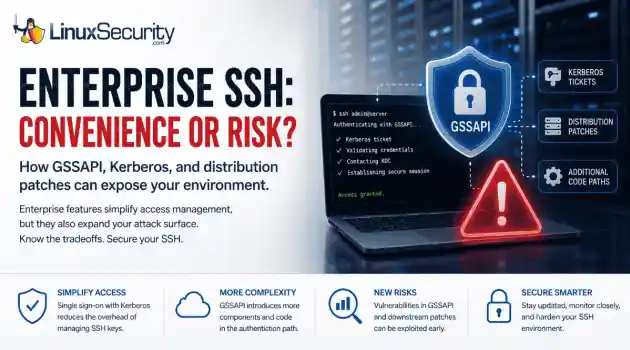
security advisory authentication We often view OpenSSH security updates through the lens of standard patch management. When a new CVE hits, we scramble to update, check our versions, and return to business as usual. But recent vulnerabilities tied to distribution-added OpenSSH GSSAPI patches are a reminder that the danger doesn't always lie in the core code; it often resides in the "convenience" features we layer on top. . These recent issues shouldn't just trigger an apt upgrade or dnf update; they should trigger a...
 Jul 06, 2026

Security Trends privilege escalation Linux security
privilege escalation Linux security Linux security teams are drowning. Patches, kernel updates, new CVEs every week. SSH exposed here, an old web service there, and a forgotten cron job running as root. On top of that, SIEM dashboards blink all day with alerts that all claim to be “high priority.” . It’s no surprise that people stop paying attention. The real problem isn’t a lack of data. It’s the opposite. Too much noise, not enough signal. Security teams see huge lists of vulnerabilities and thousands of alerts, but very...
Jul 06, 2026

Cloud Security incident response Linux administration
incident response Linux administration Over the span of just 14 days, threat actors unleashed more than 81 million login attempts against Microsoft’s Azure command-line interface (CLI). The campaign , which security researchers at Huntress identified as an ongoing, automated password-spraying effort, successfully compromised at least 78 Microsoft accounts across 64 organizations between June 12 and June 26, 2026. . While the scale is massive, the underlying strategy is surprisingly surgical. Attackers aren't exploiting a flaw in...
Jul 01, 2026
Security Trends security update mobile security
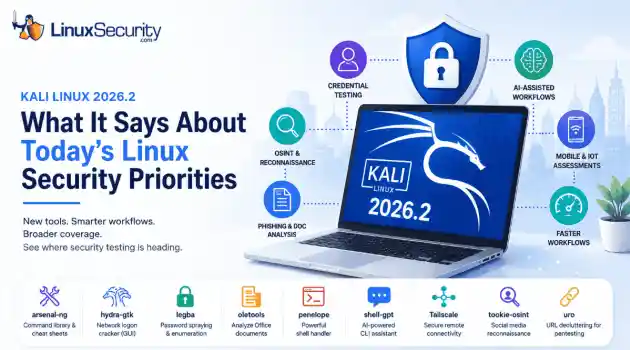
security update mobile security Offensive Security just dropped Kali Linux 2026.2 , and at first glance, it looks like a standard quarterly refresh. You’ve got the usual kernel bumps, desktop environment updates, and a handful of new utilities. But don't write this off as just another routine version update. If you look past the changelog, this release highlights several capabilities that continue to be important in offensive security. From AI-assisted workflows to credential testing and mobile assessments, Kali Linux 2026.2...
Jun 30, 2026
Security Projectssecurity advisory vulnerability management
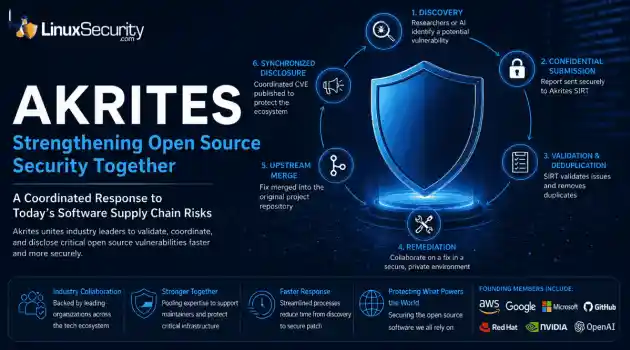
security advisory vulnerability management The Linux Foundation has officially launched Akrites , a coordinated industry initiative designed to improve how critical open source vulnerabilities are validated, coordinated, and disclosed before patches reach downstream users. Backed by a diverse coalition—including AWS, Google, Microsoft/GitHub, Red Hat, NVIDIA, and OpenAI—Akrites establishes a shared Security Incident Response Team (SIRT) to streamline the validation, remediation, and disclosure of vulnerabilities in the foundational...
Jun 29, 2026
 Refine news
X Clear Filters
Get the latest News and Insights
Get the latest Linux and open source security news straight to your inbox.
Community Poll
Is application sandboxing truly safe?
Loading...
Explore Latest Linux Security news
We found 49 articles for you...
209
 security advisoryimportantauthentication
Enhancing Login Security and User Experience for Authentication Safety
You have probably signed into a service and felt that mix of relief and irritation. Relief that your account is safe. Irritated that it took so many steps to get in. The line between secure and annoying can be thin, especially when users expect everything to work instantly. . If you add too many security layers, people may get frustrated. If you don’t add enough, you risk becoming the next headline for a breach. Did you know that nearly 60% of users abandon an app or site because of a poor login experience? That’s a huge loss for something so early in the journey. This article breaks down how you can keep your authentication strong without slowing people down. The Login Screen Sets the Tone The first time someone interacts with your product, they usually land on the login or sign-up page. That moment shapes how they view your entire brand. If the experience is smooth, it builds confidence. But moving fast is not enough. A quick login that skips key security steps can be risky. That is where so many companies miss the mark. A well-designed entry point shows that you care about both ease and safety. People are quick to judge based on how something feels, especially during the first few seconds. You may never get another chance to make that impression count. Choosing the Right Framework for Your Needs Your authentication setup plays a bigger role than just guarding the login screen. It affects how users sign in, how quickly your team can ship updates, and how well your system adapts as you grow. Popular tools like Auth0 and Clerk approach this differently. Auth0 gives more control for customized flows, while Clerk focuses on simplicity with ready-to-use components that speed up development. If you are deciding between them, a detailed comparison like Auth0 vs Clerk can help you see how each one handles flexibility, setup, and the overall user experience. You might also consider options like SuperTokens, which offer a good balance of control and ease of use. It supportssecure, customizable flows and is flexible enough for both small teams and complex products that need more than an out-of-the-box solution. Weak Sign-ins Are a Big Risk It is easy to assume that fewer steps mean a better user experience. But when it comes to security, shortcuts can backfire. Basic logins using only a password offer little protection anymore. Passwords are easy to guess, often reused, and many have already been exposed through data breaches . Your users may not know this, but they expect you to take care of it. That is why a smarter system is necessary. The real danger is not what users see but what happens behind the scenes. One weak access point can compromise entire networks . If your protection fails early, fixing it later will cost far more than a few seconds of extra login time. Make Authentication Smarter, Not Slower Adding layers to security doesn’t mean you have to slow everything down. What works better is an approach that pays attention to context. Is the user on a familiar device? Are they logging in from their usual location? Do their actions match past behavior? When something feels off, the system can step in and ask for a little more. But when everything checks out, there’s no reason to add extra steps. It’s about knowing when to stay quiet and when to speak up. Over time, smarter systems learn from how people interact. They adapt. They notice patterns. That means even as threats change, your platform stays one step ahead—quietly doing its job without getting in the user’s way. Do Not Sacrifice Thoughtfulness for Speed It is easy to think that faster is always better, especially with login screens. But speed without care can backfire . A good system knows when to step aside and when to step in. If someone is logging in the same way they always do, let it be quick. No one wants to jump through hoops when nothing’s changed. But if that same person logs in from a new phone in another state, a second look is worth it. This isn’tabout slowing people down. It is about knowing when to be careful and when to get out of the way. That’s how you stay both smart and user-friendly. Let Security Speak Through Simplicity People expect things to just work. A seamless login flow that blends into the background builds trust without demanding attention. It should feel effortless—familiar when it needs to be, invisible when it can be. When security does its job quietly, users feel safe without being slowed down. That kind of thoughtful execution sends a clear message: you respect their time and protect their data. A login that does its job quietly helps users feel like they are in the right place. It should not stand out. It should just work. When something feels that natural, it shows there was real care behind it. Strong systems are not always the ones you notice. Often, they are the ones you never have to worry about. That is the kind of experience worth aiming for. . Strengthening the harmony between protective measures and user convenience in authentication procedures for maximum safety and contentment.. login security, user experience, authentication design, password management. . MaK Ulac
 Sep 10, 2025
•
Sep 10, 2025
• Security Trends
81
 security advisoryuser experienceanonymity
Tails 6.11: Key Updates on Security, Manual Upgrades, and Privacy Tools
The Tails 6.11 release is here as the latest version of the privacy- and anonymity-centric OS , and it brings several critical updates that you need to be aware of to maintain the utmost security and privacy in your workflows. This release is packed with crucial security patches addressing vulnerabilities identified by an external security audit, ensuring that attackers can no longer compromise your applications and track your activities. With significant updates to the Tor Browser , Thunderbird , and other integrated tools, Tails 6.11 enhances your user experience, offering early warnings for potential partition errors and more intuitive troubleshooting features. . One of the standout security measures in this release is the emphasis on the manual upgrade. This step is essential to clear out any malicious software that may have exploited previous vulnerabilities. Additionally, the phased-out support for Trezor hardware wallets aligns with Debian 12 compatibility, indicating Tails' commitment to staying updated with current security standards. These changes mean you can confidently manage and deploy Tails, knowing that your systems are safeguarded against advanced threats and equipped with the latest privacy tools. Let's examine this release's defining features and updates and how it could benefit the privacy and security of your Linux systems. Addressing Critical Security Flaws One of the most significant takeaways from the Tails 6.11 release is the focus on resolving critical security vulnerabilities. These vulnerabilities were uncovered during a comprehensive external security audit conducted by Radically Open Security. While these flaws could not be easily exploited, they exposed systems to a range of threats if infiltrated by a potent attacker who had already compromised an application within Tails. The implications of these vulnerabilities were significant enough to warrant immediate attention, underscoring the critical role that proactive security measures play in system integrity. This release is tailored to mitigate several risks, including preventing permanent malicious software installations, protecting against monitoring activities, and safeguarding persistent storage settings from unauthorized changes. For Linux security admins, particularly those responsible for managing Tails environments, this means enhanced peace of mind with reinforced defenses against sophisticated attacks. The Importance of Manual Upgrades In a starkly practical recommendation, the Tails 6.11 release emphasizes the need for manual upgrades , especially for users who have not updated their systems since January 9, 2025. This requirement stems from some updates that may have been compromised due to vulnerabilities in the Tails Upgrader. By conducting a manual upgrade, you can ensure the removal of any potentially malicious software lingering from prior vulnerabilities. The necessity of manual updates highlights an often-overlooked aspect of system administration: the vigilance required in regularly updating security measures. While automatic updates provide convenience, they are not failsafe. This release serves as a reminder for all administrators to manually verify the integrity and efficacy of security updates periodically. Enhanced User Experience and Functionality Beyond security patches, Tails 6.11 integrates various user experience improvements that further align with the needs of security-focused administrators. Users will appreciate the updated versions of key tools like the Tor Browser and Thunderbird, ensuring you have access to the latest features and security protocols. Source: Tails.net Furthermore, a new feature that detects partitioning errors early is handy for admins' workflows. Imagine running critical operations only to experience disruptions due to persistent storage failures. This enhancement lets you promptly identify, remediate, and resolve potential partitioning issues, saving valuable time and resources. Another noteworthy change is the decision to phase outsupport for Trezor hardware wallets . While this might initially seem restrictive, it illustrates the commitment of Tails to maintaining compatibility with the latest Debian 12 standards. Trezor wallet users must adapt, but safeguarding compatibility ensures that Tails remains a reliable option for secure Linux environments. Improved Interface and Troubleshooting While security and performance improvements take center stage, the Tails 6.11 release introduces intuitive interface enhancements that simplify administrative tasks. For example, GNOME Text Editor's update prevents it from automatically reopening the last opened file. This seemingly minor tweak offers greater control over document management, and in a security context, it ensures sensitive information is not inadvertently exposed. Moreover, for those overseeing multi-user environments, the Tor Connection Assistant now features a direct link accessible from the status icon menu. This provides quick, efficient navigation to essential connection settings, streamlining the process and increasing operational efficiency. When issues arise, swift resolution is paramount. Tails 6.11 includes improved WhisperBack reports to simplify troubleshooting. With more intuitive and detailed diagnostics, administrators can quickly identify the root causes of problems, reducing downtime and maintaining secure operations. Maximizing Security Potential As a Linux security admin, your primary goal is maintaining the highest security standards while ensuring operational smoothness. Tails 6.11 addresses current vulnerabilities and focuses on creating a more efficient, user-friendly environment. These updates play a significant role in fortifying the security architecture, requiring an understanding of technical improvements and practical implementations. To maximize these enhancements, you should view the Tails 6.11 release as part of a broader, ongoing security strategy. Consistently integrating the latest updates is just one aspect; fostering asecurity culture that emphasizes awareness and adaptability in the face of evolving threats is equally crucial. Using tools and updates effectively requires a comprehensive understanding of the overall security landscape and the specific context in which your systems operate. Final Thoughts & Looking Forward: The Future Is Bright for Tails OS The release of Tails 6.11 serves as a reminder of the continuous evolution required to maintain robust security postures in Linux environments. As administrators, the challenge is two-fold: keeping abreast of new updates and ensuring our broader infrastructure remains secure. Tails 6.11 represents a significant step forward in privacy tooling, offering reassurance and new challenges as we seek further secure and privacy-oriented solutions. Moving forward, it’s essential to remain adaptable and informed about further developments in privacy-conscious security applications. As technologies and threats evolve, so must the strategies and tools employed to counteract them. This proactive approach ensures that your systems remain secure while contributing to the broader goal of maintaining digital privacy and protection across Linux environments. Tails 6.11 offers an array of compelling updates essential for any Linux security admin dedicated to privacy and security. This release underscores the importance of staying current and vigilant in managing secure Linux environments by addressing critical vulnerabilities, enhancing user interactions, and providing a more robust platform. Whether you manage systems for a small organization or a vast network, applying the insights from this release will undoubtedly fortify your defenses and enhance your operations. Have you given Tails 6.11 a try? Let us know what you think @lnxsec! . Tails 6.11 brings significant enhancements tailored for Linux system administrators, emphasizing robust security, user anonymity, and improved efficiency in everyday operations.. Tails 6.11, Linux security updates, privacy-focused OS,user experience improvements. . Brittany Day
Jan 10, 2025
•
Privacy

81
 open sourcesecurity updatesuser experience
Explore Tor Browser 14.0: Key Privacy Improvements and Linux Setup Guide
Tor Browser has long been recognized for providing anonymity online and is considered essential by privacy-minded users instead of conventional methods like VPNs (Virtual Private Networks) . Now, with its latest release of 14.0 , there is much to celebrate regarding privacy, security, and usability enhancements! . To help you understand the significance of this release and how downloading and testing out Tor 14.0 will improve your digital security, privacy, and anonymity, I'll explain the notable updates and improvements introduced in this monumental release and then walk you through how to download Tor 14.0 on your Linux systems. Let's begin by understanding Tor Browser and how it differs from a VPN. Understanding Tor Browser & How It Differs From a VPN Tor is built upon onion routing technology for anonymous communication across computer networks. Tor uses over seven thousand relays as its encryption layer of choice. Each relay adds additional encryption layers that protect users and obscure their source and identity. While both provide users with anonymity online, their methods vary considerably. VPN providers create tunnels through which you access internet traffic masked with IP addresses belonging to them, but providers can still see your traffic. However, due to its multilayer encryption approach, Tor prevents anyone from learning your location or browsing habits - including relays. Tor Browser 14.0: What's New? The Tor Browser 14.0 release contains numerous changes designed to empower users with enhanced privacy, security, performance, and usability. The most notable updates and improvements include: Upgraded Foundations Tor Browser 14.0 has upgraded its foundation by migrating to Firefox Extended Support Release 128 (ESR 128) . This is an important milestone, as it ensures the browser has integrated one year's worth of Firefox updates into its architecture and becomes even stronger against online threats while offering a more user-friendly experience. EnhancedSecurity Tor has improved security by addressing over 200 vulnerabilities found in Firefox code that could threaten user security. Furthermore, new typography aims to enhance both readability and accessibility to make Tor more secure and easier on the eyes. One of the update's core features is Encrypted Client Hello (ECH) . As its successor to Server Name Indication encryption, ECH seals gaps that allow network observers to monitor which websites users are accessing despite using HTTPS encryption . Tor's developers have also enhanced its user agent spoofing capabilities, which obscure a user's browser and operating system. This makes it harder for websites or individuals to track them across various websites (cross-site tracking) or identify them through browser fingerprinting, a technique in which websites collect data about your device for identification purposes. Usability Improvements Tor Browser 14.0 introduces a new circuit feature for Android, increasing flexibility and control. Suppose users experience connectivity issues with a website. In that case, they can now request a relay circuit directly within the app without needing new identification, improving both accessibility and usability of the browser on the go for all. Known Issues and Transparency Tor Project's commitment to transparency extends to their disclosure of known issues with each release. Users running their browser in compatibility mode on Windows may experience discrepancies in OS reporting that make Windows 10 and 11 appear as Windows 7. Therefore, switch off compatibility mode before updating to ensure a smooth transition during any updates. Tor 14.0 offers excellent support for legacy systems, providing critical updates for older versions of Windows and macOS. Installing Tor Browser 14.0 on Linux Linux users, known for their dedication to open-source software and privacy, tend to take the lead when adopting security-focused updates such as Tor Browser 14.0 on Linux machines. Installing it shouldbe relatively straightforward: just follow the steps below. Navigate to Tor Project's official website and locate its download section for Linux systems. Install the Tor Browser package compatible with your Linux distribution. Extract the archive. Ensure that LANG corresponds with your preferred language abbreviation and that x64 becomes x32 if running a 32-bit Linux system. Access the newly extracted Tor Browser folder and initiate its setup by double-clicking on its icon or running start-tor-browser.desktop from within a terminal session. This setup will guide you through a quick configuration process to help ensure optimal privacy settings based on your requirements. Once completed, you can browse privately and securely using Tor Browser 14.0. Have you given Tor Browser 14.0 a try? How has your experience been so far? We'd love to hear what you think of these updates and improvements! Reach out to us on X @lnxsec and let us know. Our Final Thoughts on the Tor Browser 14.0 Release Tor Browser 14.0 marks an impressive step forward in the browser's evolution, strengthening privacy, security, and user experience for every platform user. This latest iteration further illustrates Tor's dedication to online anonymity while assuring users' digital footprints remain secure across devices. Linux users can use Tor's straightforward installation process to stay ahead of privacy and security threats. With Tor 14.0, users gain a comprehensive toolset to navigate online while confidently keeping their identities hidden. . Discover key improvements in Tor Browser 14.0 for privacy and security, plus installation guidance for Linux users!. Tor Browser, Privacy Features, Security Improvements, Linux Installation, Open Source Browser. . Anthony Pell
Oct 28, 2024
•
Privacy
215
 security advisorysystem administrationsystem security
EndeavorOS Gemini: Arch Linux Desktop with Basic Security Features
EndeavorOS Gemini is a captivating and charming desktop operating system based on Arch Linux. The new release includes a kernel upgrade, 3D graphics libraries, an updated Welcome app, and enough polish to make users feel like they're using something special. We must commend this release on its user-friendliness, beauty, security, stability, and reliability. . Let's highlight the features that make EndeavorOS Gemini stand out from other operating systems. By the end of this article, you'll want to give it a try! What Sets EndeavorOS Gemini Apart from Other OSes? EndeavorOS boasts several features that set it apart from other OSes. One key differentiator of EndeavorOS Gemini is how the Welcome app simplifies updating the Arch-based distribution. Another interesting feature is the inclusion of the Firewall Applet, which allows users to easily enable the shields and notifications. This puts system security front and center in a way anyone can use. As security professionals, the EndeavorOS Gemini operating system has several implications and long-term consequences. While it may be beautiful and user-friendly, the challenge with any open-source operating system is to ensure comprehensive security. Linux, especially Arch, has a reputation for being a secure operating system . However, the operating system is only as secure as how it is configured. The system administrator is responsible for installing additional security measures to enhance security features like the Firewall Applet in EndeavorOS. For practical advice on improving Linux system security, explore this LinuxSecurity must-read article. EndeavorOS Gemini with KDE Plasma provides plenty of configurations and eye candy, but it is worth noting that not all of the applications that might be needed for productivity or entertainment come with the OS. The Welcome app makes locating and installing the necessary applications easy; however, ensuring their security is also the system administrator's responsibility. Our Final Thoughtson EndeavorOS Gemini EndeavorOS Gemini is an outstanding desktop operating system with all the security, stability, and reliability of a rocket ship ready to take users to the moon and back. It provides a great opportunity for users to explore an alternative to more commercial operating systems such as Windows and Mac OS. However, in security practitioners' hands, EndeavorOS Gemini requires proper configuration and additional security measures to facilitate comprehensive security. You can download EndeavorOS Gemini here. . EndeavourOS Gemini merges robust security with user-friendly features, delivering an accessible Arch Linux experience equipped with seamless updates and customizable options. EndeavorOS, Arch Linux, Desktop Security, User Friendly, KDE Plasma. . Brittany Day
Jun 03, 2024
•
Desktop Security
76
 user experienceLinux ecosystemopen source evolution
Canonical's 20th Anniversary: Ubuntu's Evolution and Future Challenges
Canonical , the parent company of Ubuntu Linux , has reached its 20th anniversary. To honor this monumental birthday, we'll delve into Canonical's history and impact on the Linux ecosystem.. A Brief History of Canonical Canonical Founder Mark Shuttleworth aimed to create an open-source community project that could rival proprietary operating systems. Ubuntu quickly gained a reputation for being user-friendly, stable, and secure, thus bridging the gap between Linux's power and end-users' usability demands. Canonical's influence in various areas has been significant, with developing Unity, bringing Snap packaging to Linux, and becoming the leading cloud operating system. A Look at Canonical's Impact on the Open Source World Canonical's journey over the past two decades is a remarkable example of the positive impact of open-source software on the technology landscape. Ubuntu's rise to prominence is mainly due to the company's commitment to creating an operating system that caters to end-users' needs while embracing the principles of free and open-source software. Linux admins, infosec professionals, internet security enthusiasts, and sysadmins can see the practicality and security benefits offered by Ubuntu and Canonical's approach. Canonical's attempt to influence the trajectory of Linux has been monumental. For instance, the introduction of Unity, a new default desktop, sought to provide a unified user experience across Linux desktops, smartphones, and tablets. However, user adoption was limited despite its potential, which led Canonical to refocus on the GNOME desktop environment. This raises questions about balancing innovation and user expectations in the Linux ecosystem. How can open-source projects strike the right balance between experimentation and stability without alienating their user base? Another point of interest is the emergence of Snap packaging. Ubuntu Snap and its rival Red Hat's Flatpak present containerized solutions that simplify software installation and expandapplication choices for Linux desktop users. This development holds significant implications for security practitioners. While it offers convenience and flexibility, concerns about security vulnerabilities in containerization technologies are also worth considering. How can Ubuntu and other Linux distributions ensure the robustness of these packaging technologies to safeguard users' systems and data? The growing dominance of Ubuntu Linux as the number one cloud operating system must be highlighted. Linux admins and sysadmins, particularly those involved in cloud infrastructure management, must pay attention to this trend. Canonical's commitment to supporting cloud, server, and IoT use cases indicates the importance of understanding and leveraging Ubuntu's strengths. What are the long-term consequences for organizations that rely heavily on Ubuntu in their cloud deployments? How does this impact the skill sets and knowledge required by Linux admins and sysadmins in the cloud space? What Does the Future Hold for Canonical? Looking ahead, Canonical's potential decision to go public raises questions about the company's future direction. As a significant player in the Linux ecosystem, its actions could have far-reaching consequences. Security practitioners should consider how this shift might impact the governance and direction of Ubuntu Linux. Will a public Canonical align more closely with commercial interests, potentially affecting the principles of openness and community-driven development? How can security practitioners ensure that Ubuntu's security and privacy-centric focus remains intact amidst potential company structure shifts? Our Final Thoughts on Canonical's Canonical's 20-year journey has shaped the Ubuntu Linux world, providing a robust and user-friendly alternative to proprietary operating systems. As security practitioners familiar with open-source and Linux security, it is essential to analyze the implications, ask critical questions, and consider the long-term consequences.Canonical's influence on user experience, packaging technologies, and the cloud landscape demands our attention as we navigate the ever-evolving Linux ecosystem. . Delving into Canonical's two-decade journey and its profound influence on the Ubuntu Linux ecosystem and the broader open-source movement.. Ubuntu Development, Open Source Innovation, Cloud Infrastructure, Canonical Anniversary. . Anthony Pell
Mar 06, 2024
•
Organizations/Events
81
security advisorydata protectionsecurity enhancementsTails 6.0: Major Security Enhancements and User Experience Upgrades
The release of Tails 6.0 brings many improvements that cater to new and seasoned users, emphasizing security, usability, and privacy for those passionate about online security. The new features introduced in this version highlight the project's commitment to enhancing user experience while maintaining robust security protocols. . Let's look at this exciting release's notable updates and improvements and their implications for Tails users. What's New in Tails 6.0? What Are the Implications of These Changes? One of the key improvements in Tails 6.0 is the implementation of error detection on the Persistent Storage, ensuring users are promptly alerted to potential read or write errors on their USB stick. This feature enables users to take timely action, such as backing up their data , thus mitigating the risk of data loss due to hardware failures. Moreover, the integration of automatic mount for external devices in Tails 6.0 streamlines user experience by simplifying processes related to external hardware. With support for automatically unlocking encrypted partitions, user convenience is enhanced without compromising security. Security enhancements in Tails 6.0 also include protection against malicious USB devices, which aims to prevent unauthorized access by ignoring any USB devices plugged in while the screen is locked. This feature is essential for thwarting potential security breaches and ensuring that only trusted devices can connect to the system during active usage. The critical security update safeguards users and their data by only allowing trusted devices to interact with the system. Furthermore, Tails 6.0 adds Dark Mode and Night Light, which offer users more control over their visual environment while reducing eye strain and improving accessibility. These additions give users a customizable experience tailored to different lighting conditions and preferences. Additionally, Tails 6.0 offers usability enhancements such as streamlined configuration for Gmail accounts inThunderbird and including Diceware passphrases in multiple languages to facilitate strong password generation globally. You can install Tails 6.0 here. Our Final Thoughts on the Significance of the Tails 6.0 Release The improvements in Tails 6.0 enhance user experience and security measures and reflect the project's commitment to progress and innovation. As security practitioners, it's essential to stay abreast of advancements like those introduced in Tails 6.0 to ensure the robustness of your systems and data protection strategies. Tails 6.0 marks a milestone in reinforcing security practices and enhancing usability in Linux and open-source software . . Discover the features of Tails 6.0, showcasing significant enhancements aimed at boosting user experience, safeguarding security, and elevating privacy protocols for superior online defense.. Tails 6.0, Security Updates, User Experience Enhancements, Privacy Improvements. . Dave Wreski
Mar 01, 2024
•
Privacy
79
 linux distributionsoftware managementcommunity support
A Comprehensive Analysis of Security and User Experience: Ubuntu vs Fedora
Ubuntu and Fedora are two prominent Linux distributions, each offering its own set of strengths and features. Ubuntu, created by Canonical Ltd ., boasts a user-friendly interface, stable performance, and a vast repository of pre-installed and downloadable software. On the other hand, Fedora prides itself on being an innovative and secure platform, perfect for experienced Linux users who desire the latest technological advancements. . We'll delve into the key characteristics and strengths of each distro, allowing you to make an informed decision based on your individual needs and preferences. Ubuntu vs. Fedora: What Sets These Distros Apart? As Linux administrators, infosec professionals, and sysadmins, we must analyze the implications of choosing an operating system for our organizations or personal use. Both Ubuntu and Fedora have loyal user bases and merit careful consideration when evaluating their performance, security, and ease of use. Ubuntu, being one of the most recognized Linux distributions, offers a simple and pleasant user experience. The distro comes with pre-installed software covering various needs, from web browsing to multimedia. Additionally, Ubuntu's regular updates and security patches contribute to its stability and protection against potential attacks. Fedora, backed by Red Hat , stands out for its innovation and commitment to security. With its frequent releases, Fedora ensures access to the latest technologies and software advancements. Its advanced security mechanisms protect against malware and other threats. Furthermore, Fedora's wide range of applications caters to users at every level, from beginners to experts. One intriguing point raised by the article is the significance of the package management systems used by each distribution. Ubuntu utilizes DEB format with the APT package manager, known for its speed and ease of use. In contrast, Fedora uses the RPM format with the DNF package manager, providing efficient package management operations. It isessential to understand these differences and choose an operating system that aligns with your workflow and administrative requirements. As security practitioners, it is critical to consider the long-term consequences of our choices. Ubuntu's long-term support (LTS) releases, providing five years of support, makes it an attractive option for organizations seeking stability. Another long-term implication to consider is community support. Ubuntu's large and active community provides abundant resources, such as forums and tutorials, making it a popular choice for those seeking assistance. Fedora's community, while kind and collaborative, does not receive the same level of attention. This discrepancy may impact users' ability to find timely support and guidance when facing challenges or security concerns. Our Final Thoughts on Choosing Between Ubuntu & Fedora Choosing between Ubuntu and Fedora ultimately depends on individual needs and goals. Users seeking a user-friendly and stable experience may find Ubuntu to be their best fit, while those desiring the latest technological advancements and customizable options might prefer Fedora. However, it is essential to assess long-term consequences, such as support cycles and the availability of assistance from the community. Both distributions have their strengths and weaknesses, and the decision should be made carefully considering these critical factors. Which distro are you using? What factor(s) influenced your decision? Connect with us on X @lnxsec and let's have a discussion! . When comparing Ubuntu and Fedora, key differences in security, performance, and user experience should guide your choice based on individual needs and expertise. Ubuntu Strengths,Fedora Features,Linux Distributions,Security Comparison,User-Friendly Linux. . Brittany Day
Feb 18, 2024
•
Security Projects
79
linux distributionsecurity updatesuser experienceParrot OS 6.0 Overview: Enhancements for Ethical Hacking and Security
The recently released Parrot OS 6.0 has garnered attention among Linux administrators, infosec professionals, internet security enthusiasts, and sysadmins. This latest version of the security-oriented distribution for ethical hacking and penetration testing brings several significant updates and improvements. In this analysis, we will delve into the key features and implications of Parrot OS 6.0, consider its long-term consequences, and explore its impact on security practitioners. . What's New in Parrot OS 6.0? Parrot OS 6.0, built on the Debian GNU/Linux 12 "Bookworm" series, introduces a range of enhancements. Including the Linux 6.5 kernel series ensures better hardware support, particularly through backporting DKMS modules for Wi-Fi drivers. Additionally, the Calamares installer streamlines the installation experience, rendering it more user-friendly. Parrot OS 6.0 also adopts PipeWire as the default audio system, replacing PulseAudio, and incorporates GRUB fail-safe boot options for improved reliability. The release offers updated penetration testing tools, ensuring access to the latest hacking methods and techniques. Moreover, an experimental containerization feature has been implemented to enhance flexibility and tool compatibility. Parrot OS 6.0 presents a compelling proposition for security professionals by introducing the new libc6 library and Python 3.11, enabling the integration of previously deprecated or complex-inclusion tools. The latest Parrot OS release signifies the project's commitment to delivering a sophisticated and accessible environment for ethical hackers, developers, and privacy enthusiasts. The decision to employ the Linux 6.5 kernel series instead of the Debian Bookworm's long-term supported Linux 6.1 LTS kernel reflects the team's dedication to ensuring optimal hardware support. This choice raises questions about the potential trade-offs between adopting newer kernel versions versus relying on more established LTS variants. Will this shift lead to a moreefficient and stable Parrot OS, or might it risk introducing unforeseen vulnerabilities? The introduction of PipeWire as the default audio system, replacing PulseAudio, offers an intriguing development. While this change aims to enhance audio support, one must consider the potential impact on existing workflows and compatibility with third-party software. The developers must ensure a seamless transition and mitigate any unintended consequences that might arise from this modification. The containerization feature's incorporation into Parrot OS 6.0 highlights a concerted effort to improve tool flexibility and expand supported applications. However, the experimental nature of this feature invites scrutiny. How will the project handle potential security risks associated with unsupported tools within containers? Striking the right balance between openness and security remains paramount, particularly in ethical hacking distributions. The inclusion of the new libc6 library and Python 3.11 is a promising development that allows for the integration of the latest upstream versions of various tools. This paves the way for future Parrot OS releases and enables the inclusion of previously unattainable tools due to integration complexities. The continuous evolution of Parrot OS encourages security practitioners to stay updated with the latest advancements in the field, thereby enhancing their knowledge and capabilities. You can download Parrot OS 6.0 here. Our Final Thoughts on the Parrot OS 6.0 Release Parrot OS 6.0 represents a significant milestone in the ethical hacking and penetration testing landscape. With its comprehensive updates, enhanced hardware support, and containerization feature, this release demonstrates the project's commitment to providing a robust, user-friendly environment for security practitioners. However, the choice of a newer kernel, the adoption of PipeWire, and the experimental nature of containerization raise questions about the potential implications and long-termconsequences of these decisions. As security practitioners, it is crucial to stay informed about these developments and assess their suitability for specific use cases. The Parrot OS 6.0 release continues to empower security professionals, inviting them to explore the ever-evolving realm of ethical hacking. . Parrot Security OS 6.0 brings major enhancements for ethical hackers, showcasing a refined kernel and a revamped graphical interface.. Parrot OS Updates, Ethical Hacking Tools, Linux Pentesting Features. . LinuxSecurity.com Team
Jan 25, 2024
•
Security Projects

Get the latest News and Insights
Get the latest Linux and open source security news straight to your inbox.
Community Poll
Is application sandboxing truly safe?
Search Topics
Powered By

Linux Security - Your source for Top Linux News, Advisories, HOWTOs and Feature Releases
QUICK LINKS
subscribe to newsletters!
Like staying secure? So do we.
Sign up for updates, tips, and alerts!
Discover faster search, smarter navigation, and deeper Linux security insights. Read More