Audit Linux privileges now to limit compromise, escalation, and system-wide damage. Review Linux Privileges×


Stay Ahead With Linux Security Features

 security advisory path traversal
 Two newly fixed storage bugs in Kubernetes showed more than just a problem with path traversal. They found a common security flaw in the cloud: powerful parts often think that requests accepted by a higher system are safe to run. This is a simple lesson for the platform and security teams: RBAC can accept a request without showing that its parameters will stay within a certain filesystem boundary. This is clear from a new study from SentinelLabs into flaws in the Kubernetes CSI drivers for NFS...
 Jul 24, 2026
 security advisory update
 A large volume of Linux security updates and advisories this week across major distributions once again, but it wasn't just the volume that was the story. Where maintainers and security teams focused their attention was evident in the concentration of fixes targeting Linux kernel updates, identity services, DNS infrastructure, and internet-facing software. . Instead of looking at each advisory in isolation, administrators gain more value from the general trends they reveal about Linux security...
Jul 23, 2026
 identity management security tactics
 For years, we secured our Linux infrastructure by building walls: VPCs, security groups, and hardened SSH configurations. We treated the cloud like a virtual data center, assuming that if we kept the "bad guys" out of the network, our workloads were safe. . That model is no longer sufficient. Today, one of the most common paths from an initial compromise to a major cloud breach is the identity assigned to your Linux workload. When an attacker gains code execution on a Linux instance—through a...
Jul 17, 2026
 security practices patch management
 Most of us don't hear about a kernel vulnerability until a CVE lands in our inbox or the vulnerability scanner starts complaining. By then, the patch isn't new anymore. Kernel developers may have been passing it around for review, arguing over the implementation, or revising it for days before anyone outside that community noticed it. None of those discussions are secret. They're sitting in mailing list archives, Git commits, and patch reviews where they've been the whole time. The strange...
Jul 14, 2026
 Linux security cyber attacks
 Every Linux server in your fleet produces thousands of events every minute. From journald logs and auditd records to kernel-level eBPF hooks, your systems are constantly talking. Most of that noise is just the mundane churn of system services, CI/CD runners, or routine administrative automation. But among that noise, an attacker might be establishing a foothold, moving laterally, or setting up persistence. The challenge for any security team is: how do you separate the routine from the...
Jul 13, 2026
 Refine features
X Clear Filters
Get the latest News and Insights
Get the latest Linux and open source security news straight to your inbox.
Community Poll
Should Linux servers automatically install security updates?
Loading...
Explore Latest Linux Security features
We found -2 articles for you...
102
 security advisoryattacklinux
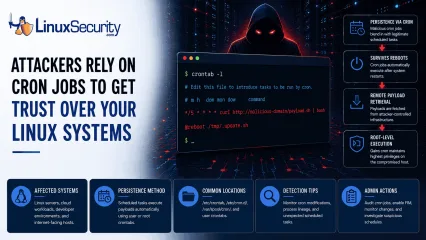
Cron Job Abuse For Linux Persistence Mechanisms Detection
A Linux server gets cleaned up after an intrusion. The suspicious process is terminated, credentials are rotated, and the system is rebooted during maintenance. Everything seems secure. A few hours later, the same outbound connection appears again. . Situations like that point to persistence . The attacker no longer needs the original exploit because something on the host continues restoring access behind the scenes. Finding that mechanism is often more important than understanding how the compromise started in the first place. Linux attackers rarely need complicated malware for this. Built-in operating system features already provide reliable ways to execute code, survive reboots, and maintain a foothold. cron sits near the top of that list. It is trusted, widely deployed, and present on almost every Linux distribution. For an attacker, that combination is hard to ignore. Why Attackers Use Cron to Maintain Access Attackers spend a lot of time looking for ways to keep access after the initial compromise. Getting into a system is one thing. Staying there after a password reset or a reboot is the harder part. MITRE ATT&CK tracks this behavior under T1053.003: Scheduled Task/Job: Cron , which documents how adversaries use cron jobs for both persistence and execution on Linux systems. The functionality is already there. It is native to the OS. Because scheduled tasks are expected and necessary, creating a new job requires very little effort. Most defenders spend their time reviewing login events, suspicious processes, or malware alerts. They rarely spend the same amount of time reviewing the configuration files that control scheduled activity. That environment helps malicious entries blend in . A scheduled downloader or persistence script sits beside legitimate backup jobs, log maintenance scripts, and monitoring tasks. It hides in plain sight, often going unnoticed for months. What Cron Abuse Looks Like Creating cron-based persistence is straightforward. The approach usuallydepends on the level of access the attacker controls. User Crontabs When an attacker only controls a standard user account, they often start with their own crontab. They run crontab -e . From there, they add a task that runs every few minutes. The job might reconnect to command-and-control infrastructure, launch a payload, or download additional tooling. None of it requires elevated privileges. Root-Level Access Root access changes the equation entirely. A scheduled task running as root inherits whatever control root already has. An attacker who reaches this level can create access that survives reboots while maintaining the ability to execute commands with the highest privileges available on the system. At that point, the cron job is no longer supporting the intrusion. It becomes part of how the attacker keeps control. The /etc/cron.d/ Directory Not every cron entry lives inside a user crontab. Linux systems use the /etc/cron.d/ directory to store separate scheduling files for applications and services. Attackers like this location because a new configuration file can blend into an already crowded directory. Investigators often review the main crontabs while overlooking a file tucked away in this folder. That gap is all an attacker needs. The @reboot Directive Sometimes attackers do not care about the recurring execution every hour. They just want their code to run whenever the host comes back online. The @reboot directive handles this. The configured command launches automatically after startup. Maintenance windows, patch cycles, and power outages become opportunities for the payload to execute again. The entry may sit quietly for weeks. Then a reboot happens and the payload returns. Remote Payload Retrieval Attackers do not always store malware locally on disk. The cron entry acts as a delivery mechanism. Commands using curl , wget , or python retrieve content from remote infrastructure at regular intervals. Updating thepayload becomes as simple as changing a file on the attacker's server. The cron entry never changes. The payload behind it can. How to Hunt for Malicious Cron Jobs If you suspect persistence, stop hunting for active processes and start auditing configuration files. You need to see what is scheduled to run. Manual Audit Commands Start by checking the crontabs for the current user and for root: crontab -l sudo crontab -l Next, inspect the common system-wide locations. A quick way to list these files is: ls -la /etc/cron.* /etc/crontab /var/spool/cron/ Commands are easy. Interpretation is harder. Inspecting Locations Do not just look for files. Look at their contents. You are trying to identify scheduled commands that do not belong. If you find a file in /etc/cron.d/ that does not match a known application, open it and read the command. If it launches a script, follow the path and see what that script actually does. A surprising number of investigations stop after locating the cron entry. The useful evidence is usually one step further down the chain. Questions to Ask During a Cron Investigation Finding a cron job is only the beginning. The next step is determining whether the scheduled task is legitimate or suspicious. When reviewing an entry, ask: Does the command connect to an external IP address or domain? Is the script owned by an unexpected user? Does the job execute from temporary directories such as /tmp , /dev/shm , or /var/tmp ? Does the command contain encoded content, such as base64 strings? Was the cron entry created outside normal change-management windows? Does the task run more frequently than expected? Can the entry be tied to a known application, service, or administrative process? The more unusual characteristics a cron job displays, the higher its investigative priority should become. How to Detect Cron Abuse at Scale Large environments require continuous monitoring rather than periodic reviews.Security teams should treat cron configuration files as high-value assets and monitor them the same way they monitor sensitive system binaries. At that point, the goal shifts from finding cron jobs to monitoring the activity they create. Elastic Security Labs includes cron among the Linux persistence mechanisms defenders should routinely monitor when investigating post-compromise activity. Monitoring Modifications Use tools such as auditd or File Integrity Monitoring (FIM) to track changes. You want an alert whenever someone modifies /etc/crontab or creates a new file inside /etc/cron.d/ . These locations rarely change on stable systems. Any unexpected modification deserves attention. A cron entry has to be created somewhere. Catching that change early is often easier than detecting the payload later. Analyzing Process Lineage If you have EDR telemetry or system logs, look at parent-child process relationships. A legitimate maintenance script may launch a shell. What deserves attention is cron consistently spawning network-facing utilities, scripting engines, or unexpected binaries. Examples include: cron → curl cron → wget cron → python cron → bash Detection engineers frequently hunt for these execution chains because cron spawning network utilities or scripting interpreters can indicate activity. Elastic maintains a public hunting rule focused specifically on cron-based persistence . Indicators That Deserve Immediate Review Certain findings consistently move to the top of the queue during a cron investigation. None prove malicious activity on their own, but they appear often enough that they deserve immediate review. Network Activity: Any cron job calling curl , wget , nc , or ssh . Encoded Commands: Obfuscated strings, heavy use of base64 , or long bash one-liners. Execution Paths: Scripts or binaries running from /tmp/ , /dev/shm/ , or /var/tmp/ . New Entries: Any cron file with a recent modificationtimestamp that cannot be explained through patching or change management. Root-Owned Tasks: Unexpected scheduled tasks running as root that do not tie back to a known service or administrative process. Why Cron Still Works Cron remains one of the most reliable persistence mechanisms available on Linux systems because it is simple and effective. Attackers continue using it because they do not need anything more complicated. Most cron-based persistence is not particularly sophisticated. It works because nobody is looking for it. That makes visibility more valuable than complexity. Related Reading Linux Persistence Hunting: Essential Detection Techniques Detecting Systemd Abuse on Linux Servers for Better Security Linux Attackers Use SSH and Legitimate Tools to Evade Detection Auditd vs eBPF: Modern Approaches to Linux System Monitoring . Situations like that point to persistence. The attacker no longer needs the original exploit because. linux, server, cleaned, intrusion, suspicious, process, terminated, credentials. . Dave Wreski
 Jun 08, 2026
•
Jun 08, 2026
•
218
 attackransomwaresecurity awareness
Understanding Linux Ransomware Attack Steps and Protection Strategies
Ransomware has been making life miserable for IT folks for years now, and you’ve probably heard plenty about how it hits Windows systems . But Linux? Yeah, that’s not off-limits anymore. In fact, attackers are seeing Linux as an appealing target—servers running critical enterprise networks, government systems, and big databases that power everything from websites to operations. Anything important enough to cause chaos if it’s compromised, especially where someone’s willing to shell out money to get it back, gets a big bullseye on it. Sure, the majority of ransomware still goes after Windows machines, but if you’re thinking, “Linux is safe because fewer people target it,” that’s a gamble you don’t want to take these days. The methods attackers use are evolving, and even though Linux ransomware is still less common, the attacks themselves are clever, nasty, and diverse. . What’s scary here isn’t just the damage these attacks cause—encrypted files, downtime, reputation hits, and recovery costs—it’s how they sneak their way onto Linux systems in the first place. They exploit vulnerable setups, outdated software, misconfigurations, and anything careless or overlooked. The attack process itself is almost methodical, like breaking into a house and systematically going through every room. But knowing how these attacks work—and, more importantly, how to stop them—can make a big difference. Let’s break down what’s happening in these Linux-targeted ransomware attacks step by step so you have a clearer picture of the threat. Plus, we’ll talk about how to lock things down and avoid being the next “news headline.” Anatomy of a Linux Ransomware Attack Linux ransomware has become known for the sophistication and diversity of its tactics, methods, and techniques to compromise systems and generate profits for its operators. Ransomware attacks targeting Linux systems are generally carried out in a series of clearly defined steps, beginning with exploiting one or multipleunpatched vulnerabilities and ending with a payday for the attackers. Let’s take a closer look at the anatomy of a Linux ransomware attack, broken down step-by-step, to help you better understand this growing threat to your systems and your data. Step 1: Infection Unlike Windows ransomware variants, which spread via email or mall advertising, Linux ransomware infection relies on vulnerability exploitation. Linux ransomware exploits either unpatched system vulnerabilities or flaws in a service, such as a web server or email server, to obtain access to a target system and compromise files. For instance, the infamous Lilocked ransomware exploits out-of-date versions of the Exim message transfer agent to gain a foothold in a target environment. Rex, another dangerous strain of Linux ransomware, uses vulnerability scanners specific to Drupal, WordPress, Magento, Kerner, Airos, Exagrid, and Jetspeed to detect SQL injection vulnerabilities that can be exploited to gain admin credentials. Reliable backups remain one of the most effective defenses against ransomware, and for Linux-hosted e-commerce platforms, a well-planned Magento 2 backup approach is essential to restoring operations without paying attackers. Once in the target environment, the ransomware operator “phones home” to download a hidden executable by connecting to a predefined list of IP addresses that host the command-and-control (C2) server. At this point, the attacker typically copies the malicious executable to a local directory, such as the Temp folder, and then terminates and removes the script. The malicious payload is now executed in the target environment. Linux ransomware strains often possess privilege escalation capabilities, such as those seen in the notorious Lucifer and NotPetya variants. These advanced features enable ransomware operators to access parts of a system that would be inaccessible without privileged access. While Linux ransomware typically only affects those using the web server that is compromised,privilege escalation can magnify both the scope of an attack and its overall impact. Step 2: Staging This step can be seen as the “housekeeping” portion of a Linux ransomware attack. The ransomware sets itself up for smooth operation by attending to various items, including moving itself to a new folder and establishing persistence in the target environment, giving it capabilities such as the ability to run at boot, to run when in recovery mode, and to disable recovery mode altogether. At this stage of the attack, the ransomware communicates with the C2 server to negotiate its public key, which the operator generates and places in the ransomware to encrypt the randomly generated symmetric key. Step 3: Scanning Now that ransomware has established persistence and set itself up for success. It is prepared to encrypt target files. The ransomware scans compromised systems for a predefined list of file extensions and cloud file storage repositories of interest, mapping the locations of these files and repositories. Step 4: Encryption The encryption phase of an attack is when the real damage is done. Up until this point, nothing potentially irreversible has happened - the malware has simply set itself up and surveyed the target environment. Now, the ransomware creates an encrypted version of the target files using a random symmetric key. It generates and encrypts the symmetric key with its public key. It then deletes the original version of the files it has encrypted. For every location where files have been encrypted, copies of auto-generated ransom notes are created in multiple formats. Step 5: Extortion Once the encryption process is complete, a ransom note providing explicit payment instructions is displayed as the victim's desktop wallpaper. At this point, the ransomware terminates and deletes itself, as its mission in the target environment is complete. Meanwhile, ransomware operators wait for ransom to be paid in untraceable Bitcoin to a wallet they own. The victim must decideif he or she is willing to pay the ransom in exchange for the decryption of locked files or accept the fact that the files encrypted in the attack are permanently inaccessible. It is often helpful to enlist a ransomware recovery firm at this point, as they can offer advice and, in some cases, locate a decryption key that can be used to recover locked files. Final Thoughts & Best Practices for Protecting Against Linux Ransomware Let’s be real—Linux ransomware might not dominate headlines the way Windows ransomware does, but it’s a growing problem, and ignoring it is a mistake. The good news is that you’re already a step ahead by understanding how these attacks work and what they typically target. But here’s the thing: a lot of these compromises boil down to unpatched systems or sloppy administration. It’s not flashy, but staying on top of patches , cleaning up permissions, and verifying your configurations regularly can go a long way. Don’t assume your server’s safe just because it’s running Linux—that mindset’s outdated. Even small gaps, like a forgotten web server vulnerability or a missed security audit, create an opening for ransomware. And trust me, when ransomware hits, it’s not just a technical headache—it’s scrambling to fix broken systems while everyone else is demanding answers. So, what can you do today? Start with backups —seriously, I’ve seen too many people regret half-baked backup strategies when things go south. Make backups solid, spread them across different media, and test them once in a while. Then, tighten up access controls . If users don’t need access, they shouldn’t have it. IDS and IPS tools might sound like overkill for some setups, but they can be game-changers in spotting weird traffic early. And don’t forget regular audits—it’s boring, I know, but they can unearth issues before attackers do. This isn’t about chasing perfection; it’s about minimizing risk and staying prepared. Linux is resilient, sure, but ransomwaredoesn’t care about all that—it cares about the cracks. So, close them up! . Discover how Linux ransomware attacks occur and effective strategies to prevent and recover from them.. Linux Ransomware, Attack Strategies, Mitigation Techniques, Security Awareness, System Protection. . Brittany Day
Jun 05, 2025
•

102
 network securitycyber threatsopen-source
Massive Phishing Campaign Targets Open-Source Repositories and Users
Researchers have identified that unknown threat actors uploaded about 144,294 phishing-related packages using open-source package repositories, including NPM, PyPi, and NuGet. Automation allowed for these large-scale attacks in network security that promoted fake apps, prize-winning surveys, gift cards, giveaways, and more. Hackers utilized naming schemes with similar features in the descriptions to host over 65,000 phishing pages across 90 domains. . A Massive Example of the Growing Phishing Problem Phishing exploits in cybersecurity impact the open-source software ecosystem by accounting for over 90% of today’s cyberattacks in network security, posing a threat to all users and organizations. The quantities for malicious package uploads are as follows: NuGet had 136,258, PyPI had 7,894, and NPM had 212 infections. The package descriptions contained phishing site URLs and urged users to click links for details about alleged gift card codes, applications, and hacking tools. Security professionals discerned that attackers were focusing on increasing the SEO of their phishing sites. Almost all of these sites request visitors to enter their email, username, and account passwords, causing victims to share sensitive data that hackers monetize for personal and financial gain. The system then initiates a series of redirects to survey sites, landing on legitimate e-commerce websites using affiliate links that generate revenue for the malicious actors. If victims made purchases on these sites while the referral codes were active, the threat actors would receive referral awards, making the safe website a distraction for this secondary exploitation scheme of stealing a victim’s login credentials. The Bottom Line Online repositories removed these phishing campaign packages from their sites, but NuGet unlisted them from search results, meaning they are still available but difficult to access. However, these automation methods for phishing raise concern for security professionals, who worry thatcybercriminals could reintroduce these network security threats easily and work quickly to harm data and network security once more. Linux security expert Dave Wreski advises, “To protect their digital security, users should always engage in cybersecurity best practices and remain vigilant when browsing package repositories.” Check out this IoC text file on GitHub for the complete list of URLs used in this campaign. Be sure to visit LinuxSecurity.com frequently and subscribe to our weekly newsletters to stay up-to-date on the latest security news and information impacting the open-source community! . This extensive operation pushed fraudulent applications, questionnaires, and vouchers to take advantage of individuals within public code repositories.. phishing campaign, open-source security, malicious packages, cybersecurity threats. . Brittany Day
Dec 15, 2022
•

Get the latest News and Insights
Get the latest Linux and open source security news straight to your inbox.
Community Poll
Should Linux servers automatically install security updates?
Search Topics
Powered By

Linux Security - Your source for Top Linux News, Advisories, HOWTOs and Feature Releases
QUICK LINKS
subscribe to newsletters!
Like staying secure? So do we.
Sign up for updates, tips, and alerts!