Explore top 10 tips to secure your open-source projects now. Read More
×


Stay Ahead With Linux Security Features

 identity management security tactics
 For years, we secured our Linux infrastructure by building walls: VPCs, security groups, and hardened SSH configurations. We treated the cloud like a virtual data center, assuming that if we kept the "bad guys" out of the network, our workloads were safe. . That model is no longer sufficient. Today, one of the most common paths from an initial compromise to a major cloud breach is the identity assigned to your Linux workload. When an attacker gains code execution on a Linux instance—through a...
 Jul 17, 2026
 security practices patch management
 Most of us don't hear about a kernel vulnerability until a CVE lands in our inbox or the vulnerability scanner starts complaining. By then, the patch isn't new anymore. Kernel developers may have been passing it around for review, arguing over the implementation, or revising it for days before anyone outside that community noticed it. None of those discussions are secret. They're sitting in mailing list archives, Git commits, and patch reviews where they've been the whole time. The strange...
Jul 14, 2026
 Linux security cyber attacks
 Every Linux server in your fleet produces thousands of events every minute. From journald logs and auditd records to kernel-level eBPF hooks, your systems are constantly talking. Most of that noise is just the mundane churn of system services, CI/CD runners, or routine administrative automation. But among that noise, an attacker might be establishing a foothold, moving laterally, or setting up persistence. The challenge for any security team is: how do you separate the routine from the...
Jul 13, 2026
 open-source infrastructure risk
 Security scanners flag exposed API keys in public repositories every day. The initial response is usually predictable: delete the commit, revoke the credential, and move on. That’s a mistake. . In a real Linux environment, an API key never stays in one place. By the time it hits a public repo, it’s already everywhere. It’s in the CI/CD pipeline. It’s in your container registry. It’s in the build logs. It’s in the backups. Git makes this worse because the history never dies. Deleting a file in...
Jul 11, 2026
 open-source rootkit
 Most of us think of Linux rootkits as ancient history—the stuff of 90s hacking forums and clunky malware that would crash your system if you looked at it the wrong way. But if you think they’ve gone away, you’re mistaken. They’ve just gotten smarter. . Modern attackers aren't using the noisy tools of the past. Today’s threats are surgical. Many of today’s most advanced Linux rootkits operate at the kernel level or abuse legitimate system features to blend in with normal traffic. They’re...
Jul 09, 2026
 Refine features
X Clear Filters
Get the latest News and Insights
Get the latest Linux and open source security news straight to your inbox.
Community Poll
Is continuous patching actually viable?
Trending Features
Loading...
Explore Latest Linux Security features
We found 1 articles for you...
102
 security advisoryattacklinux
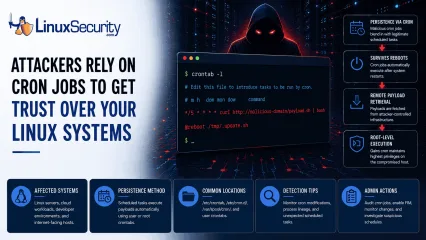
Cron Job Abuse For Linux Persistence Mechanisms Detection
A Linux server gets cleaned up after an intrusion. The suspicious process is terminated, credentials are rotated, and the system is rebooted during maintenance. Everything seems secure. A few hours later, the same outbound connection appears again. . Situations like that point to persistence . The attacker no longer needs the original exploit because something on the host continues restoring access behind the scenes. Finding that mechanism is often more important than understanding how the compromise started in the first place. Linux attackers rarely need complicated malware for this. Built-in operating system features already provide reliable ways to execute code, survive reboots, and maintain a foothold. cron sits near the top of that list. It is trusted, widely deployed, and present on almost every Linux distribution. For an attacker, that combination is hard to ignore. Why Attackers Use Cron to Maintain Access Attackers spend a lot of time looking for ways to keep access after the initial compromise. Getting into a system is one thing. Staying there after a password reset or a reboot is the harder part. MITRE ATT&CK tracks this behavior under T1053.003: Scheduled Task/Job: Cron , which documents how adversaries use cron jobs for both persistence and execution on Linux systems. The functionality is already there. It is native to the OS. Because scheduled tasks are expected and necessary, creating a new job requires very little effort. Most defenders spend their time reviewing login events, suspicious processes, or malware alerts. They rarely spend the same amount of time reviewing the configuration files that control scheduled activity. That environment helps malicious entries blend in . A scheduled downloader or persistence script sits beside legitimate backup jobs, log maintenance scripts, and monitoring tasks. It hides in plain sight, often going unnoticed for months. What Cron Abuse Looks Like Creating cron-based persistence is straightforward. The approach usuallydepends on the level of access the attacker controls. User Crontabs When an attacker only controls a standard user account, they often start with their own crontab. They run crontab -e . From there, they add a task that runs every few minutes. The job might reconnect to command-and-control infrastructure, launch a payload, or download additional tooling. None of it requires elevated privileges. Root-Level Access Root access changes the equation entirely. A scheduled task running as root inherits whatever control root already has. An attacker who reaches this level can create access that survives reboots while maintaining the ability to execute commands with the highest privileges available on the system. At that point, the cron job is no longer supporting the intrusion. It becomes part of how the attacker keeps control. The /etc/cron.d/ Directory Not every cron entry lives inside a user crontab. Linux systems use the /etc/cron.d/ directory to store separate scheduling files for applications and services. Attackers like this location because a new configuration file can blend into an already crowded directory. Investigators often review the main crontabs while overlooking a file tucked away in this folder. That gap is all an attacker needs. The @reboot Directive Sometimes attackers do not care about the recurring execution every hour. They just want their code to run whenever the host comes back online. The @reboot directive handles this. The configured command launches automatically after startup. Maintenance windows, patch cycles, and power outages become opportunities for the payload to execute again. The entry may sit quietly for weeks. Then a reboot happens and the payload returns. Remote Payload Retrieval Attackers do not always store malware locally on disk. The cron entry acts as a delivery mechanism. Commands using curl , wget , or python retrieve content from remote infrastructure at regular intervals. Updating thepayload becomes as simple as changing a file on the attacker's server. The cron entry never changes. The payload behind it can. How to Hunt for Malicious Cron Jobs If you suspect persistence, stop hunting for active processes and start auditing configuration files. You need to see what is scheduled to run. Manual Audit Commands Start by checking the crontabs for the current user and for root: crontab -l sudo crontab -l Next, inspect the common system-wide locations. A quick way to list these files is: ls -la /etc/cron.* /etc/crontab /var/spool/cron/ Commands are easy. Interpretation is harder. Inspecting Locations Do not just look for files. Look at their contents. You are trying to identify scheduled commands that do not belong. If you find a file in /etc/cron.d/ that does not match a known application, open it and read the command. If it launches a script, follow the path and see what that script actually does. A surprising number of investigations stop after locating the cron entry. The useful evidence is usually one step further down the chain. Questions to Ask During a Cron Investigation Finding a cron job is only the beginning. The next step is determining whether the scheduled task is legitimate or suspicious. When reviewing an entry, ask: Does the command connect to an external IP address or domain? Is the script owned by an unexpected user? Does the job execute from temporary directories such as /tmp , /dev/shm , or /var/tmp ? Does the command contain encoded content, such as base64 strings? Was the cron entry created outside normal change-management windows? Does the task run more frequently than expected? Can the entry be tied to a known application, service, or administrative process? The more unusual characteristics a cron job displays, the higher its investigative priority should become. How to Detect Cron Abuse at Scale Large environments require continuous monitoring rather than periodic reviews.Security teams should treat cron configuration files as high-value assets and monitor them the same way they monitor sensitive system binaries. At that point, the goal shifts from finding cron jobs to monitoring the activity they create. Elastic Security Labs includes cron among the Linux persistence mechanisms defenders should routinely monitor when investigating post-compromise activity. Monitoring Modifications Use tools such as auditd or File Integrity Monitoring (FIM) to track changes. You want an alert whenever someone modifies /etc/crontab or creates a new file inside /etc/cron.d/ . These locations rarely change on stable systems. Any unexpected modification deserves attention. A cron entry has to be created somewhere. Catching that change early is often easier than detecting the payload later. Analyzing Process Lineage If you have EDR telemetry or system logs, look at parent-child process relationships. A legitimate maintenance script may launch a shell. What deserves attention is cron consistently spawning network-facing utilities, scripting engines, or unexpected binaries. Examples include: cron → curl cron → wget cron → python cron → bash Detection engineers frequently hunt for these execution chains because cron spawning network utilities or scripting interpreters can indicate activity. Elastic maintains a public hunting rule focused specifically on cron-based persistence . Indicators That Deserve Immediate Review Certain findings consistently move to the top of the queue during a cron investigation. None prove malicious activity on their own, but they appear often enough that they deserve immediate review. Network Activity: Any cron job calling curl , wget , nc , or ssh . Encoded Commands: Obfuscated strings, heavy use of base64 , or long bash one-liners. Execution Paths: Scripts or binaries running from /tmp/ , /dev/shm/ , or /var/tmp/ . New Entries: Any cron file with a recent modificationtimestamp that cannot be explained through patching or change management. Root-Owned Tasks: Unexpected scheduled tasks running as root that do not tie back to a known service or administrative process. Why Cron Still Works Cron remains one of the most reliable persistence mechanisms available on Linux systems because it is simple and effective. Attackers continue using it because they do not need anything more complicated. Most cron-based persistence is not particularly sophisticated. It works because nobody is looking for it. That makes visibility more valuable than complexity. Related Reading Linux Persistence Hunting: Essential Detection Techniques Detecting Systemd Abuse on Linux Servers for Better Security Linux Attackers Use SSH and Legitimate Tools to Evade Detection Auditd vs eBPF: Modern Approaches to Linux System Monitoring . Situations like that point to persistence. The attacker no longer needs the original exploit because. linux, server, cleaned, intrusion, suspicious, process, terminated, credentials. . Dave Wreski
 Jun 08, 2026
•
Jun 08, 2026
•
102
 security advisoryrootkitlinux
Linux Kernel eBPF Monitoring Rootkit Threats and Evasion Techniques
Linux runtime security increasingly depends on watching what the operating system is doing in real time. Security tools use eBPF (extended Berkeley Packet Filter) to attach probes within the Linux kernel, recording events such as new processes starting, files being opened, or network connections being created. Those events are then sent to detection engines such as Falco and other Linux runtime monitoring tools, which analyze the activity and alert when something suspicious is detected. This approach works because it lets defenders observe system behavior directly inside the kernel rather than relying only on logs written after the fact. The problem is that it assumes the monitoring pipeline inside the kernel can be trusted. Modern Linux rootkits are beginning to target that pipeline directly by intercepting functions in the eBPF event path and filtering or dropping records before they reach the buffer that security tools read from. When that happens, the activity still occurs on the system, but the monitoring tool never sees it. Experimental research such as SPiCa explores what this looks like in practice by demonstrating how kernel malware can manipulate the event stream produced by eBPF monitoring and effectively silence parts of the security stack while the tools themselves continue running normally. If attackers can tamper with the signals that monitoring tools rely on, defenders face a difficult problem because any security system that depends on those signals may be operating with blind spots. . Why eBPF Became Central to Linux Runtime Security eBPF became central to Linux runtime security because it lets defenders observe what the kernel is doing in real time. Instead of relying on logs written after an event happens, security tools can capture process execution, file access, and network connections directly inside the kernel as they occur. That changed how Linux runtime monitoring works. Security platforms attach eBPF probes to tracepoints and system calls, collecting eventsas the kernel handles them and streaming that kernel telemetry to user-space analysis engines. Those engines evaluate the activity and decide whether something looks suspicious. Most modern runtime tools rely on this model. Falco, Cilium Tetragon, and KubeArmor all use eBPF probes to watch system behavior from inside the kernel rather than trying to reconstruct activity later from logs. Because the instrumentation runs at the kernel level, eBPF security monitoring sees events before user-space software can hide them or filter them out. Researchers have also examined this architecture in depth. Work on eBPF runtime monitoring research describes pipelines where kernel probes continuously stream telemetry into external analysis engines designed to detect anomalies across running workloads. Over time, that telemetry pipeline became the backbone of modern Linux kernel security tools. This also means attackers have started looking for ways to interfere with it. How eBPF Monitoring Pipelines Work Most runtime monitoring built on eBPF follows the same event pipeline. Activity occurs inside the kernel, probes capture the event, and the resulting telemetry is forwarded to the user space, where the monitoring engine evaluates it. The flow usually looks like this: Kernel Event A process executes, opens a file, or creates a network connection The kernel triggers a tracepoint or syscall hook eBPF Probe The attached eBPF program collects metadata about the event Process ID, command, file path, and other execution context Ring Buffer Transport The probe writes the event into the BPF ring buffer (a shared memory queue used to move events from the kernel to user-space monitoring tools). The buffer acts as the communication channel between kernel space and user space User-Space Analysis A monitoring engine reads events from the buffer Detection logic evaluates whether the behavior is suspicious This pipeline creates a single point wheretelemetry leaves the kernel and becomes visible to monitoring systems. If events are filtered or dropped before they reach the ring buffer, the monitoring engine continues running but receives incomplete data. That boundary between kernel event generation and ring buffer submission is exactly where some rootkits attempt to interfere. Why Rootkits Target Observability Systems Kernel rootkits are designed to operate without being detected, which means their success depends less on what they can execute and more on whether monitoring systems can see the activity. Once malicious code reaches kernel space, hiding the evidence becomes the primary objective. Modern Linux runtime monitoring tools made that harder by observing activity directly inside the kernel. Security platforms attach probes that capture process execution, file access, and network events as they occur, then forward that telemetry to detection engines in user space. Rootkits have started adapting to that model by targeting the telemetry path instead of trying to hide every action individually. One technique involves intercepting the bpf_ringbuf_submit function that eBPF programs use to push events into the ring buffer. When a rootkit filters or drops those events before they reach the buffer, the activity still occurs on the system, but the monitoring engine never receives the record that would trigger an alert. Other stealth techniques avoid the monitoring hooks entirely. The “Curing” proof-of-concept demonstrated how attackers could use io_uring asynchronous I/O paths to perform operations that bypass traditional syscall tracing, which allows file operations and other actions to occur without triggering the probes many monitoring tools depend on. These techniques expose a structural problem in kernel security monitoring because rootkits and detection systems operate at the same privilege level. When both the attacker and the monitoring system run inside the kernel, the rootkit has the ability to manipulate the telemetrypipeline that security tools depend on to understand system behavior. The SPiCa Experiment and eBPF Telemetry Evasion The SPiCa project explores what happens when kernel malware begins manipulating the eBPF telemetry pipeline itself. Researchers tested the approach against the Singularity LKM rootkit, focusing on whether monitoring systems could still detect activity when a rootkit attempts to filter events before they leave the kernel. The design relies on a cross-view monitoring model that collects system signals from two independent perspectives and compares the results. Platform engineers may recognize the pattern because it resembles the sidecar architecture used in service meshes, where a sidecar (a small helper process that runs alongside an application to handle tasks like logging, security, or networking without modifying the application itself) observes the workload from outside the main process and reports behavior independently. SPiCa applies the same idea at the kernel level. Instead of trusting a single telemetry stream, the system introduces a second observer that monitors activity through a separate perspective and compares the output against the primary monitoring pipeline. You can think of it as a sidecar for the kernel, watching the same system activity while reporting through an independent path that a rootkit cannot easily manipulate. The experiment demonstrates several techniques that expose weaknesses in rootkit telemetry filtering. PID Obfuscation to Bypass Rootkit Filters The Singularity rootkit attempts to suppress telemetry by filtering out events associated with specific process identifiers. Many rootkits rely on this approach because monitoring systems often include the PID in kernel event metadata, which allows malware to drop events tied to protected processes. SPiCa avoids this filter by masking process identifiers with a 64-bit XOR value (a simple mathematical transformation that hides the original value) derived from /dev/urandom, a Linux system sourceused to generate random numbers, before the telemetry enters the monitoring pipeline. Kernel events still contain the process identifier The identifier is XOR-masked before the event is exported The monitoring system reverses the mask in userspace Because the rootkit expects predictable PID values, the masked identifiers appear as random data and pass through the filtering logic. Filtering Weakness in Rootkit Event Suppression Rootkit filtering mechanisms typically depend on recognizable values such as known PIDs or command names. When SPiCa injects masked identifiers into the telemetry stream, the filtering logic fails to recognize the events it was designed to remove. The result is simple but effective. The event reaches the user space normally, the monitoring system decodes the identifier, and the activity becomes visible again. Hardware Validation Using Non-Maskable Interrupts SPiCa also introduces a hardware verification signal using CPU non-maskable interrupts (NMIs). These interrupts originate from the processor itself and cannot be disabled by software running in the kernel. NMIs generate a high-frequency system heartbeat The signal confirms CPU activity independently of kernel telemetry The monitoring system compares hardware activity with reported events If the kernel telemetry indicates that no suspicious processes are running but the hardware observer shows active execution associated with hidden workloads, the discrepancy reveals that something inside the kernel is manipulating the telemetry pipeline. Cross-View Monitoring Exposes Telemetry Manipulation The key idea behind the SPiCa experiment is differential monitoring. Software telemetry from eBPF probes represents one view of system behavior, while hardware signals such as NMIs provide another. When those views disagree, the mismatch indicates that the telemetry pipeline may be compromised. The experiment highlights an important shift in Linux runtime security. If attackers caninterfere with kernel telemetry, monitoring systems may need independent signals outside the software pipeline to verify that the system is reporting events honestly. Why This Matters If a rootkit filters a process event before it reaches the ring buffer, the monitoring system never receives the record that something happened. The malicious process can continue running on the system, but the security dashboard remains green and shows zero alerts because the event was removed before the monitoring tool could see it. Hardware Signals vs Software Telemetry Software monitoring inside the kernel can be manipulated. Hardware signals are much harder to fake. The SPiCa experiment uses CPU non-maskable interrupts (NMIs) as an independent signal. These interrupts originate from the processor and fire at a fixed rate, typically around f = 1000\ \text{Hz} which creates a continuous hardware heartbeat that kernel software cannot disable. That difference matters when telemetry becomes unreliable. Monitoring Method Source Tamper Resistance Attacker Countermeasure eBPF Tracepoints Kernel software Moderate Hook bpf_ringbuf_submit Ring Buffer Telemetry Memory structures Moderate Filter or mute events in memory Hardware NMIs CPU mechanism High None outside hardware or microcode The security implication is straightforward. If the monitoring system reports that no suspicious processes are running but the hardware signal shows continuous CPU activity, the mismatch reveals that something inside the kernel is suppressing telemetry. Why Linux Runtime Security Can’t Fully Trust Kernel Telemetry The SPiCa experiment highlights both the strength and the weakness of modern Linux runtime monitoring. eBPF-based systems provide deep visibility into process execution, file access, and network behavior while maintaining lowoverhead, which is why the model became widely adopted across container security and cloud runtime protection tools. The research also shows that most monitoring platforms depend on a telemetry pipeline that can be manipulated inside the kernel. If a rootkit filters events before they reach the ring buffer or user-space analysis engine, the monitoring system continues running normally while the activity it relies on is silently removed from the event stream. Some of these blind spots already exist in production environments. Operations performed through io_uring asynchronous I/O paths can bypass traditional syscall tracing used by many monitoring tools, and kernel malware that intercepts functions responsible for exporting eBPF events can suppress telemetry before it leaves the kernel. The Falco kernel event monitoring documentation explains that runtime detection relies on kernel-generated events being exported to the user space, where security rules evaluate system activity. When those events are filtered or modified inside the kernel, the monitoring engine receives an incomplete view of the system. For Linux defenders, the practical takeaway is straightforward. eBPF monitoring remains extremely valuable, but it should not be treated as a single source of truth. Combining kernel telemetry with other signals, such as Linux Security Module hooks or hardware indicators, makes it significantly harder for attackers to hide activity inside the kernel monitoring pipeline. The Future of Linux Rootkit Detection Linux rootkits have always tried to hide inside the operating system. What is changing now is where they hide. Instead of only masking processes or files, newer techniques focus on manipulating the monitoring systems that defenders rely on to understand what the kernel is doing. Research like SPiCa shows how fragile that assumption can be. When a rootkit interferes with the telemetry pipeline, the monitoring tools may still be running normally while the events they depend on arefiltered or suppressed before reaching user space. That basically changes the security model for Linux runtime monitoring. Defenders can no longer assume that kernel telemetry represents the full picture of system activity. Monitoring systems increasingly need independent signals that verify what the software reports, whether that comes from hardware mechanisms such as NMIs, deeper kernel hooks like Linux Security Modules, or other observation paths that operate outside the standard event pipeline. The direction is becoming clearer as these experiments evolve. Linux runtime security is moving toward a trust but verify model where software telemetry is treated as one signal among several, and independent observers are used to confirm that the kernel is reporting events honestly. . Understand how eBPF monitoring can be compromised by rootkits, impacting Linux security systems significantly.. Linux Runtime Security, eBPF Monitoring, Kernel Rootkits, Telemetry Security, Cyber Threat Detection. . MaK Ulac
Mar 16, 2026
•

102
 security advisorycompliancelinux
OSSEC for Linux: What It Means for Your Monitoring and Risk Posture
You probably already have firewall rules in place, regular patching cycles, and logs flowing into a SIEM. That covers a lot. What it does not tell you is whether /usr/bin/ssh was replaced last night, whether /etc/sudoers changed outside of a maintenance window, or whether someone added a quiet backdoor account and cleaned up the auth logs afterward. . This is where OSSEC enters the picture. It runs on the host itself, not on the network. That sounds small, but it shifts what you can verify. Most monitoring pipelines focus on traffic patterns or aggregated events. A host-based intrusion detection system, or HIDS, looks inward. It watches file integrity, parses local logs, checks for rootkit indicators, and evaluates policy state directly on the machine that could be compromised. OSSEC does not replace your firewall. It does not patch systems. It is not an EDR platform. What it does is give you a way to validate trust at the file and log level on each Linux host. You start to see things that were previously invisible because they never crossed a network boundary. If you are already shipping logs to a SIEM, you might wonder what you are missing. The short answer is file integrity state, local correlation, and baseline enforcement. If you need file integrity monitoring for audits, the question becomes whether you can manage the signal without drowning in it. If you are worried about overlap with endpoint detection and response (EDR) platforms, that depends on how deep your existing tooling goes into host-level change tracking. In this article, we will look at what OSSEC actually monitors, how it works internally, what day-to-day operations look like once it is deployed, and where it fits into compliance and risk decisions. By the end, you should be able to decide whether adding OSSEC strengthens your monitoring posture or just creates another alert stream that no one has time to review. What Is OSSEC and Where Does It Fit in a Linux Security Stack? When people first hear about OSSEC ,they often lump it in with whatever security tooling they already have. Firewall, SIEM, maybe EDR. It helps to slow that down. OSSEC is a host-based intrusion detection system. A HIDS. That category matters because it tells you where it operates and what it can realistically see. OSSEC runs an agent on each monitored system. That agent collects local logs, monitors file integrity, performs rootkit checks, and evaluates certain policy conditions. Those events are sent to a central manager, which applies rules and generates alerts. Nothing about it inspects raw network packets. It does not watch east-west traffic. It lives inside the operating system. That distinction is practical. A firewall can block an inbound connection. A SIEM can correlate events across systems. An EDR platform can monitor process behavior and memory activity. OSSEC focuses on the state of the host itself. File changes. Authentication patterns. Configuration drift that was not approved. You start thinking less about “did traffic look strange” and more about “did this machine change in a way we did not authorize.” In a typical Linux environment, OSSEC sits alongside your existing logging and security stack. Agents run on the servers. The manager aggregates events. Alerts are often forwarded to a SIEM for centralized visibility. It does not replace those tools. It fills in a gap at the file and log layer that network-based controls simply cannot see. This changes how you reason about trust. Without a HIDS like OSSEC, you are mostly trusting that if something serious happened, it would generate visible traffic or obvious log anomalies. With it, you can validate whether core binaries, configuration files, and privilege assignments remain in the state you expect. That is a different kind of assurance. More granular, and sometimes more uncomfortable. From a stack perspective, OSSEC is not your perimeter defense, and it is not your incident response platform. It is a visibility layer on the host. If you are deciding whereit fits, start by mapping what you currently monitor at the file and configuration level. If the answer is “nowhere,” then this is likely a gap. How Does OSSEC Work Under the Hood? Before you decide whether to deploy it, you need to understand what OSSEC is actually doing on the system. Otherwise, it just becomes another agent you hope behaves. At a high level, the OSSEC architecture is straightforward. Each Linux host runs an agent. That agent reads local log files, monitors configured directories for file changes, and performs periodic checks. Events are sent to a central manager over an encrypted channel, where rules are applied, and alerts are generated. The manager is where correlation happens. The agent is mostly a collector and forwarder with some local logic. That division matters when you think about scale. A quiet file server behaves very differently from a busy web node, throwing thousands of log lines per minute. Manager sizing depends on event volume, not just agent count. If you underestimate that, queue backlogs start to build, and alerts get delayed. You will not notice it immediately. Then you will. File Integrity Monitoring is one of the core pieces. OSSEC builds a baseline of selected directories, typically /etc, /usr/bin, /bin, sometimes application paths like /var/www. It calculates checksums and records permissions, ownership, and metadata. On subsequent scans, it compares the current state to the stored baseline. If a binary hash changes or permissions shift unexpectedly, it raises an alert. This sounds simple, but the baseline is everything. If you initialize it on a system that is already compromised, you just captured a bad state as trusted. If you run it right before a large patch cycle, you will trigger a wave of integrity changes that are technically correct but operationally noisy. Timing matters more than people expect. Log analysis is the other major component. The agent reads local logs such as /var/log/auth.log, /var/log/secure, web server logs, andothers you define. Decoders parse those logs into structured events. Rules then evaluate patterns. A single failed SSH login might be low severity. Twenty from the same IP in a short window escalates. That correlation happens at the manager level, which is why accurate time synchronization across hosts is not optional. There is also rootkit detection and policy checking. OSSEC can look for known rootkit signatures, suspicious kernel modules, hidden processes, and certain configuration states. It is not deep behavioral detection. It is signature and rule-driven. Useful, but not magical. Active response is available as well. You can configure OSSEC to block an IP via firewall rules or execute scripts when certain thresholds are met. This is where caution comes in. Automated responses based on log patterns can backfire if rules are not tuned carefully. I have seen environments where legitimate traffic patterns triggered temporary blocks because someone trusted defaults too quickly. Operationally, you cannot treat this as set-and-forget. You need reliable time sync. You need to understand which directories are monitored and why. You need to tune rules to match your environment, especially around authentication noise and package upgrades. Poor tuning leads directly to alert fatigue, and once people start ignoring OSSEC alerts, the value drops fast. If you are evaluating it, start by mapping what data it will actually collect on your systems. Then look at how that flows through the manager and into your existing alerting pipeline. The mechanics are not complicated, but the impact on daily operations depends entirely on how deliberately you configure it. What OSSEC Looks Like in Day-to-Day Operations The theory sounds clean. Baselines, rules, correlation. In practice, what you see are alerts, patterns, and sometimes silence where there should not be any. One of the first things that shows up after deploying OSSEC is authentication noise. Repeated SSH failures from a single IP get grouped andescalated. On an internet-facing server, that can be constant background radiation. It is useful to see, especially if the pattern shifts or targets a specific account, but it quickly teaches you that not every alert is an incident. File integrity alerts are where things get more interesting. A change to /etc/passwd, /etc/sudoers, or a binary under /usr/bin stands out immediately. During a routine patch cycle, you will see bursts of file modifications. That is expected. The important part is whether those changes align with your maintenance window and change records. If they do not, you stop and ask why. Web servers make this even clearer. When a file under /var/www/html changes at 2:17 AM and there was no deployment scheduled, that is not theoretical. That is either a developer working outside process or something worse. OSSEC alerts give you that timestamped signal without relying on network logs. You also start to notice what is not happening. An agent that goes silent is easy to miss unless you monitor agent health. No events can mean a quiet system, or it can mean the agent crashed, the service was stopped, or communication to the manager broke. Silence is not always good news. Configuration management tools introduce another layer. If Ansible, Puppet, or another system is regularly enforcing state, OSSEC will see those file changes. If you do not scope monitoring carefully, you generate predictable noise. Over time, teams either tune it properly or begin ignoring categories of alerts, which defeats the purpose. Baseline timing shows up here again. If you built the file integrity baseline before hardening was complete, you will see a wave of expected changes. If you built it after an unnoticed compromise, you will not see anything wrong because the altered files are now considered normal. That is the uncomfortable edge of file integrity monitoring. This is where OSSEC alerts stop being abstract. They become part of patch planning, change management, and after-hours review. If you deployit, you need to align maintenance windows, baseline updates, and alert review processes. Otherwise, it becomes just another stream of notifications competing for attention. Risk, Compliance, and Policy Implications At some point, this stops being about features and starts being about accountability. Most teams do not deploy OSSEC because they are curious. They deploy it because they need evidence, or because they are tired of not knowing what changed on a host after an incident. From a compliance perspective, file integrity monitoring is not optional in certain frameworks. PCI DSS, for example, explicitly requires monitoring of critical system files and alerting on unauthorized changes. If you are responsible for systems in scope, you need a way to demonstrate that /etc, key binaries, and security configurations are monitored consistently. Screenshots of firewall rules are not enough. OSSEC gives you structured visibility at the file and log layer. That visibility translates into audit artifacts. You can show that privileged user additions were logged. You can show that changes to sensitive files generated alerts. You can demonstrate that monitoring is continuous, not periodic. Policy enforcement is the other half. It is one thing to document that logging must remain enabled or that sudo access is restricted. It is another to verify it. OSSEC can surface: Changes to critical configuration files such as /etc/ssh/sshd_config Modifications to /etc/sudoers or group membership affecting privilege Disabling or tampering with logging services Creation of new local user accounts Repeated authentication anomalies that suggest lateral movement None of this prevents exploitation. That is important to say clearly. OSSEC does not block an attacker by default, and it does not patch a vulnerable service. What it does is reduce the time between “something changed” and “someone noticed.” In post-incident reviews, that time gap is usually where the real damage accumulates. Thereis also overhead. More monitoring means more events to triage. If your change management process is informal, file integrity alerts will expose that quickly. You either tighten the process or accept a steady stream of “expected but undocumented” changes. Over time, auditors tend to ask about those patterns. If you are evaluating this from a risk angle, start by listing which systems require demonstrable file integrity monitoring and privileged access tracking. Then map how you currently prove that control works. If the answer depends on manual review or trust, OSSEC changes that conversation. It turns policy statements into verifiable signals, which is uncomfortable at first but ultimately more defensible. When OSSEC Makes Sense and When It Doesn’t Not every Linux environment benefits equally from OSSEC. That is usually clear a few months after deployment, sometimes sooner. If you are operating in a compliance-heavy space, especially where file integrity monitoring is explicitly required, OSSEC is a practical fit. It gives you traceable evidence that critical files are monitored and that privileged actions are surfaced. On internet-facing servers, particularly those exposed over SSH or running public web applications, the added visibility into authentication patterns and file changes tends to justify the overhead. It is also useful in environments that do not have a full EDR platform. OSSEC can provide a baseline level of host visibility where, otherwise, you might only have centralized logs. It is not behavioral detection in the modern sense, but it is better than trusting that nothing changed locally. Where it becomes less compelling is in short-lived infrastructure. If your workloads are mostly ephemeral containers rebuilt frequently from clean images, file integrity monitoring at the host level may not add much value. The same applies to heavily managed PaaS environments where you do not control the underlying system state. There is also a staffing reality. If your team does nothave the capacity to review alerts consistently, adding another signal source can degrade overall monitoring quality. Alert streams that are not reviewed become background noise. Once that happens, even high-severity OSSEC alerts risk being ignored. There is overlap with some EDR platforms as well. Many modern endpoint tools already track file modifications, suspicious privilege changes, and authentication anomalies. In those environments, OSSEC deployment needs to be justified by specific gaps, not by the assumption that more monitoring is automatically better. If you are deciding whether to move forward, look at three things. First, do you have a compliance requirement that mandates host-level file integrity monitoring? Second, do you have clear gaps in visibility at the file and configuration level? Third, do you have the operational discipline to tune and maintain it? If the answer to all three is yes, OSSEC deployment likely strengthens your posture. If not, it may just redistribute your attention without improving your response time. Our Final Thoughts: What OSSEC Changes for You as a Linux Admin When you step back from the feature list, OSSEC changes something simple but important. It shifts part of your security model from trusting the perimeter to verifying the host. With OSSEC in place, you are no longer assuming that core binaries, configuration files, and privilege assignments remain untouched unless proven otherwise. You are actively checking. That alters how you think about patch cycles, maintenance windows, and even routine configuration work. “Expected change” stops being a vague idea and becomes something you have to define clearly. It also changes your monitoring workflow. File integrity alerts, authentication correlations, and agent health become part of your operational picture. You have to decide which directories truly matter, how often baselines are updated, and how alerts are routed. If you do not tune it deliberately, alert volume will climb, and confidence willfall. That part is predictable. From a compliance standpoint, OSSEC strengthens your position. It gives you defensible evidence that critical files are monitored and that suspicious changes generate alerts. During audits or post-incident reviews, that visibility becomes tangible. You can point to timestamps, rule triggers, and response actions instead of relying on assumptions. At the same time, it is important to keep expectations realistic. OSSEC is detection-focused. It does not prevent exploitation. It does not replace patching, hardening, or EDR. It adds a layer of host-level verification. Nothing more, nothing less. If you are considering it, the real question is not whether OSSEC works. It does what it is designed to do. The question is whether you are prepared to own the monitoring it introduces. If you are willing to treat host integrity as something to be continuously verified rather than implicitly trusted, then it has a clear place in your stack. If not, it becomes another agent running quietly in the background, generating signals that no one fully uses. . Explore OSSEC's role in monitoring Linux systems, file integrity checks, and compliance for better risk management.. OSSEC File Integrity Host Intrusion Detection Linux Monitoring. . Brittany Day
Feb 19, 2026
•
102
 security advisoryencryptionrisk assessment
What Is TLS (Transport Layer Security) in Linux Security?
Most Linux outages that get labeled as “security issues” are not breaches. They are TLS failures that sit quietly until a renewal expires, a client updates, or a service starts refusing connections for reasons that look unrelated at first. By the time users notice, traffic has already stopped, and the only clue is a vague handshake error buried in a log file. . Transport Layer Security is everywhere in a modern Linux environment. Web servers rely on it. APIs assume it. Mail servers negotiate it. Package managers trust it. Even internal services that never leave a private network depend on TLS in ways that often go unexamined. Because it usually works, it fades into the background. You stop thinking about it until it breaks. What makes TLS tricky is that it is not just encryption. It is a set of decisions about trust, identity, compatibility, and how much failure you are willing to tolerate in the name of security. Those decisions are spread across libraries, daemons, configs, and defaults that change over time. If you inherit a system, you inherit those choices, whether you agree with them or not. You start to see the trend after a few incidents. A cert renews automatically, but one service was pinned to an old chain. A scanner flags a weak cipher that nobody remembers enabling. An internal API fails because a client finally stopped accepting legacy TLS. Nothing was “hacked,” yet availability and trust still took a hit. This article is meant to slow that down. We’ll walk through what TLS actually protects in Linux environments, where it quietly does not, and how it behaves in real service stacks. The goal is not to turn you into a cryptography expert. It’s to help you decide how strict your defaults should be, what you need to monitor before you trust it, and which risks still exist even when TLS is technically enabled. What Does TLS Actually Do in a Linux Environment? TLS protects data while it is moving between two endpoints. That sounds simple, but most misunderstandingsstart right there. It does not protect data once it lands on disk. It does not protect what lives in memory. It does not clean up logs or sanitize application behavior. If traffic is encrypted on the wire but everything else around it is loose, TLS has still done its job. In Linux, TLS usually shows up through libraries like OpenSSL or GnuTLS and through the services that sit on top of them. The kernel is not making trust decisions. Your web server, mail daemon, package manager, or client library is. That matters because each of those components can enable TLS in slightly different ways, with different defaults and different failure modes. A common assumption is that enabling TLS automatically means both sides are authenticated. In practice, authentication is often one-sided. The server proves its identity; the client does not. For public services, that may be fine. For internal APIs or service-to-service traffic, it quietly changes the risk model. You may have encryption without strong identity. Another piece people underestimate is integrity. TLS is not just about hiding data from eavesdroppers. It also protects against modification in transit. That becomes critical for things like package downloads, update channels, and API calls, where a small change can have a large impact. Confidentiality gets most of the attention, but integrity failures tend to hurt faster. To make this concrete, here’s what TLS actually gives you and what it does not, regardless of how many checkboxes say “enabled”: Encryption of data in transit between endpoints Optional authentication, often only of the server Integrity checking to prevent tampering in transit No protection for data at rest, in memory, or in logs No validation of application logic or authorization No guarantee that peers are who you think they are unless you enforce it This is the part that changes how you classify risk. Internal traffic on a flat network may be encrypted, but if clients are not verified and defaults allownegotiation down to weaker settings, the trust boundary is thinner than it looks. When someone says, “It’s fine, it’s using Transport Layer Security,” this is where you decide whether that statement actually holds up. Where TLS Sits in Common Linux Services Once you move past the definition, the real question becomes where TLS actually lives in your stack. On Linux, it is rarely end-to-end in the way people assume. It starts in one process, stops in another, and often hands off to something that was never designed with strong trust guarantees in mind. For web services, TLS usually terminates at the web server or a reverse proxy . nginx or Apache handles the handshake, decrypts the traffic, and passes plain HTTP to the application. That is not a flaw. It is a design choice. But it means the security boundary is at the web tier, not the app, and everything behind it needs to be treated accordingly. Mail servers add another layer of confusion. SMTP commonly uses opportunistic TLS, where encryption is attempted but not required. If the remote side cannot negotiate, mail still flows. From a delivery standpoint, that is useful. From a Linux security standpoint, it means encryption is conditional unless you explicitly enforce it. Many environments never revisit that default. Internal APIs and service-to-service traffic are where assumptions creep in. Because traffic stays on a private network, verification is often skipped. Certificates are accepted without hostname checks. Self-signed certs get copied around. Encryption exists, but identity does not. You start to notice this only when a client library tightens its defaults and something that “worked forever” suddenly fails. Package managers and update systems are another quiet dependency. apt, dnf, and similar tools rely on TLS trust chains to fetch metadata and packages. When trust stores change, or certificates rotate, updates can fail in ways that look like network issues. This is one of the few places where TLS failures directlyaffect patching, which makes the risk very real, very quickly. Proxies, load balancers, and container platforms complicate things further. TLS may terminate at a load balancer, re-encrypt to a backend, or not be used at all internally. Containers do not remove the need for TLS. They just add more places where termination can happen without being obvious. This is why Linux security discussions around TLS tend to get abstract. The same host can be terminating TLS for one service, passing it through for another, and ignoring it entirely for a third. Once you map where TLS actually starts and stops, you are forced to decide where termination is acceptable and where it creates exposure you did not intend. TLS Versions, Ciphers, and Why Defaults Drift Over Time TLS configurations age in a way that most Linux services do not. A web server can run for years with the same basic settings and behave predictably. TLS sits underneath that, evolving through library updates, client behavior, and deprecations that happen whether you plan for them or not. TLS versions move on faster than most Linux lifecycles. What was considered safe when a system was built often becomes legacy long before the host is retired. Older versions stick around because they do not break anything immediately. Clients still connect. Monitoring stays quiet. The risk increases slowly, which makes it easy to ignore. Ciphers follow a similar pattern. Weak options linger because negotiation allows the connection to succeed. Nothing fails fast. You only see the problem when a scanner flags it, a compliance review asks questions, or a modern client refuses to talk to you. By then, the config may have been inherited through multiple upgrades. Library updates add another layer. OpenSSL and GnuTLS adjust defaults over time, sometimes tightening behavior, sometimes removing support outright. From the service’s point of view, nothing changed. From the client’s point of view, everything did. That mismatch is behind a lot of “it broke afterpatching” tickets. Clients and servers will also negotiate down unless you tell them not to. Compatibility wins by default. That is intentional, but it means you are accepting the weakest option both sides support unless you set boundaries. In environments with a mix of old and new systems, this becomes a policy decision whether you acknowledge it or not. You usually feel this section during upgrades. Disabling legacy TLS versions or ciphers eventually breaks something. An old monitoring agent. A forgotten integration. A third-party system nobody owns anymore. That breakage is not a failure of TLS. It is delayed feedback. This is where decisions start to matter. Minimum versions, allowed ciphers, and deprecation timelines determine whether you absorb that pain gradually or all at once. If the answer to “what versions do we allow” is “whatever the default is,” the default will keep changing without you. Certificates, Trust Chains, and the Parts That Fail First Certificates are often treated like an on-off switch for encryption, but in practice, they are how identity is expressed in TLS. When something goes wrong here, services do not degrade gracefully. They stop talking to each other, usually without a clear explanation. On Linux, trust is fragmented. Different distributions ship different trust stores. Applications sometimes bundle their own. Language runtimes may ignore the system store entirely. A certificate that works in one place can fail in another, even on the same host. You only really notice this when a renewal or rotation exposes the mismatch. Expiration is the most predictable failure and still the most common. The date is known in advance, yet renewals regularly break services. Automation helps, but it also hides problems until the moment a new certificate is actually used. A chain changes. A client does not trust the issuer. A pinned fingerprint no longer matches. The failure shows up as a handshake error, not a reminder. Wildcards and internal certificateauthorities reduce day-to-day work, but they widen the impact when something goes wrong. A single bad issuance or misconfiguration can affect many services at once. That tradeoff is usually acceptable, but it needs to be understood. Convenience always concentrates risk somewhere. Revocation is another area where expectations and reality diverge. Many admins assume compromised certificates can be revoked, and clients will refuse them. In practice, revocation checking is inconsistent and often disabled for performance or reliability reasons. Once a certificate is trusted, it may stay trusted until it expires. All of this ties back to Transport Layer Security because trust is what makes encryption meaningful. Without a clear chain and clear ownership, TLS becomes fragile. This section tends to fail first because it sits at the intersection of automation, human process, and assumptions that nobody revisits until something breaks. Monitoring TLS So You Know It’s Working TLS failures rarely announce themselves cleanly. They show up as connection timeouts, generic client errors, or retries that mask the real problem. If you only rely on configuration reviews or periodic scans, you usually find out too late. The earliest signals are almost always in logs. Handshake failures, protocol mismatches, and certificate errors appear long before users report outages. On Linux systems, these messages are easy to miss because they look like noise mixed in with normal connection churn. You start to recognize them once you have chased a few incidents back to their source. Certificate expiration is the one thing everyone agrees to monitor, but the timing matters. Alerts that fire a day or two before expiration are not useful. By then, you are already in reactive mode. Weeks of lead time give you room to catch trust chain issues, not just renew the leaf certificate. Another thing worth watching is what actually gets negotiated. The protocol version and cipher in use tell you whether your policy is being enforcedor quietly bypassed. This is especially important for internal services, where older clients can pull everything down to the lowest common denominator without anyone noticing. Client verification failures deserve attention as well. When you start enforcing stronger identity checks, these failures surface quickly. They are not always attacks. More often, they are undocumented dependencies that were relying on permissive defaults. Packet capture comes up a lot in troubleshooting conversations. It has its place, but it should not be your primary signal. By the time you are decrypting traffic to understand a TLS issue, you have already missed earlier, cheaper indicators. From a Linux security perspective, this is where trust becomes operational. Monitoring tells you whether TLS is behaving the way you think it is, not the way a config file suggests. What you choose to alert on here directly shapes how much risk you are carrying without realizing it. TLS Policy Decisions Linux Admins Actually Own At some point, TLS stops being a technical setting and starts being a judgment call. Defaults can carry you only so far. After that, the outcomes depend on what you decide to enforce and what you allow to slide for the sake of compatibility or uptime. One of the first questions is whether TLS is required everywhere or only at the edges. External traffic is usually clear-cut. Internal traffic is not. Allowing plaintext inside a trusted network can simplify troubleshooting and legacy integrations, but it also assumes that trust never erodes. Once you have seen lateral movement in a real incident, that assumption becomes harder to defend. Mutual TLS is another decision that sounds obvious on paper and complicated in practice. It raises the bar for identity, especially for internal APIs, but it adds operational weight. Certificates need ownership. Rotations need coordination. When it breaks, it tends to break loudly. Whether that cost is worth paying depends on how much you need a strong service identityversus how much complexity you can absorb. Cipher and version strictness sit in the same category. Tighter policies reduce exposure but surface hidden dependencies. Looser policies preserve compatibility but accumulate risk quietly. There is no neutral choice here. Even doing nothing is a decision that inherits whatever the libraries decide next. Certificate ownership is often overlooked until something fails. Shared platforms, load balancers, and common services end up with certificates that nobody feels responsible for. When a renewal fails or a trust chain changes, the lack of a clear owner turns a routine task into an incident. Upgrades are where all of this becomes visible. Every environment has a breaking point where “good enough” stops being acceptable. That point is different for every organization, but it should be chosen deliberately. TLS forces that conversation because it will keep changing, whether you plan for it or not. What TLS Does Not Protect You From Once TLS is in place, it is easy to let it absorb more trust than it deserves. Encryption in transit feels comprehensive, and that can hide gaps until something slips through them. TLS does nothing for a compromised endpoint. If an attacker controls a system, traffic can be encrypted and still fully exposed. Credentials, tokens, and session data move through TLS just like legitimate traffic. The protocol cannot tell the difference. It also does not validate application behavior. Authorization bugs, logic errors, and unsafe defaults all survive intact inside an encrypted connection. When something goes wrong here, TLS can actually make investigation harder by reducing visibility unless you have the right logging in place. Encrypted traffic can still carry malicious content. Malware downloads , command and control traffic, and data exfiltration all work fine over TLS. Without inspection or context, encryption simply hides the payload, not the intent. Insider access bypasses transport protections almost entirely.Admins, service accounts, and automation already sit on the trusted side of the connection. TLS protects the path, not the person using it. Misissued or improperly trusted certificates are another quiet failure mode. If a client trusts the wrong issuer, encryption still succeeds. The connection looks healthy, even though trust has been undermined. All of this creates monitoring blind spots. As more traffic moves to TLS, tools that rely on plaintext lose signal unless they adapt. That is not a reason to avoid encryption, but it is a reason to understand what visibility you are trading away. What This Means for Your Linux Environment Going Forward Once you understand how TLS actually behaves, it stops feeling like a feature and starts feeling like ongoing work. Not busywork, but something that needs attention in the same way patching or backups do. It changes slowly, then all at once. TLS is not something you enable and forget. Certificates expire. Trust stores evolve. Libraries tighten defaults. Clients get less tolerant over time. None of that is a failure. It is the environment moving forward without waiting for your change window. Every TLS choice carries a tradeoff, even when it looks like a default. Allowing older versions keeps legacy systems alive. Enforcing newer ones forces cleanup. Both are valid in the right context, but only one is intentional. The same applies to internal traffic. Treating it with the same scrutiny as external traffic feels excessive until the day it isn’t. Ownership matters more than configuration perfection. Certificates, trust chains, and termination points need a named human or team. When that ownership is clear, renewals and changes become routine. When it is not, small issues turn into outages because nobody is sure who should act. Monitoring is what keeps this from becoming theoretical. Seeing what versions are negotiated, where handshakes fail, and how close certificates are to expiring tells you whether your assumptions match reality. A cleanconfig without visibility is just optimism. Upgrades will still break things. They always have. The difference is how you interpret that breakage. If TLS changes surface undocumented dependencies or brittle integrations, that is useful information. It is feedback you can act on, not a reason to loosen controls indefinitely. Transport Layer Security does its job when you treat it as part of the system, not a checkbox. Once you do, the quiet failures become visible earlier, the loud ones become rarer, and the risk you are carrying becomes something you chose rather than something you inherited. . Gain insights on Transport Layer Security in Linux, its risks, and monitoring for enhanced security.. Transport Layer Security, Linux security, TLS monitoring, data encryption, network security. . Brittany Day
Feb 07, 2026
•
102
 security advisorycommand executionconfiguration
When Monitoring Turns Risky: SNMP Exposure in Linux Infrastructure
A recent command-execution flaw in the CACTI monitoring framework underscores a broader risk that keeps repeating. SNMP is routinely treated as passive plumbing, yet it exposes real control paths that attackers continue to abuse. . Misconfigured or outdated instances of the Simple Network Management Protocol remain low-effort entry points, especially in Linux environments. SNMP often arrives indirectly through monitoring stacks or embedded agents, then persists untouched, which is why its impact tends to surface late and hit hard. What Is the SNMP Protocol? The snmp protocol , short for Simple Network Management Protocol, is a way for systems to observe and manage devices without logging into them directly. It was built for visibility. You poll a device for counters, status, or configuration state, and the device answers through a small background service called an agent. In practice, SNMP works by exposing structured data known as MIBs. Management systems query that data over the network, usually through port 161, and receive responses that describe things like interface usage, uptime, or error rates. Devices can also push notifications, called an SNMP trap, when certain conditions occur, such as a link going down or a threshold being crossed. The design favors reach and simplicity over strict security controls. Early versions rely on a shared secret, the SNMP community string, and assume the network itself is trusted. Later revisions, like SNMPv3 , add authentication and encryption, but the protocol still reflects its original goal. Make monitoring easy, even if that means security depends heavily on how carefully it’s deployed. Understanding Core Flaw Mechanics & SNMP Configuration Gaps Behind Recent Exploits The command-execution issue uncovered in CACTI did not stem from a novel technique. It emerged where protocol behavior, aging code, and permissive deployment habits overlap, which is where snmp problems usually live. At the technical level, improper input validationin SNMP request handling allowed malformed packets to reach unsafe code paths. When an agent fails to parse a request defensively, buffer handling errors and weak bounds checks can turn what should be a read-only monitoring interface into an execution surface. Configuration choices widen that window. SNMPv1 and v2c rely on cleartext community strings, so anyone who can observe traffic or guess the value effectively inherits the same access as the monitoring system. SNMPv3 improves this with authentication and encryption, but it is frequently disabled or only partially deployed due to compatibility constraints and legacy tooling that still expects older behavior. These technical and operational gaps reinforce each other. Default community strings like “public” persist, SNMP services are exposed without ACLs, and agents run for years without updates that address known parsing flaws. SNMP continues to be treated as background infrastructure rather than an exposed service, which is why the same failure patterns keep resurfacing across different platforms and incidents. Impact and Context of SNMP Flaws for Linux Environments This is where snmp moves from a design discussion to an operational risk. The danger is not tied to clever exploitation, but to how quietly the protocol embeds itself into Linux environments and then persists, trusted and largely untouched, as systems evolve around it. Network devices, Linux servers , and appliances frequently ship with SNMP enabled by default. Monitoring frameworks such as CACTI bring in legacy SNMP modules that expand the attack surface without much visibility, and once enabled, those services tend to survive rebuilds, migrations, and ownership changes. From an attacker’s perspective, exploitation is usually straightforward. Many deployments still allow unauthenticated queries, and internet-facing SNMP ports are easy to identify with basic scanning. When the protocol exposes topology, counters, and configuration data by design, there is little needfor novel techniques. This behavior has a long history. Large-scale scans abusing default SNMP community strings have been documented for years, and publicly available tools can enumerate MIBs, inject SNMP traps, or deliberately trigger faults in poorly hardened agents. The tooling is mature, and the failure modes are predictable. The real impact often shows up after initial access. An SNMP foothold can support lateral movement by revealing interface layouts, routing paths, and configuration fragments that reduce uncertainty. That visibility shortens attack paths, which is why SNMP-related weaknesses so often appear early in broader Linux compromise chains. SNMP Mitigation and Response Strategies for Admins Mitigation around SNMP rarely hinges on a single fix. It’s usually the accumulation of small, unglamorous decisions that either leave the door open or quietly close it over time. For Linux administrators, this work lives at the intersection of patching discipline , configuration hygiene, and basic network restraint. The steps are familiar, but SNMP has a habit of slipping past them unless you look for it directly. Patching and Agent Maintenance Apply vendor fixes for SNMP parsing flaws promptly. Verify that updates cover all deployed agents and modules, not just the primary monitoring server. Stale binaries are common in SNMP stacks. Configuration Hardening Disable SNMP anywhere it isn’t pulling its weight, because idle agents become forgotten attack surface fast. Where SNMP is still required, move fully to SNMPv3 and actually enable encryption and authentication, not auth-only configs that leak data in transit. Use authPriv mode with strong credentials, per-user accounts, and modern algorithms, and confirm older v1 and v2c listeners are shut off instead of assumed gone. Default and shared community strings should be removed entirely, not renamed, and any legacy strings that remain need rotation on a schedule and the same handling as service credentials. For CACTIspecifically, patch to the fixed release and review how SNMP responses are consumed, since the underlying issue came down to insufficient input validation before data was passed into command execution paths. SNMP output should be treated as untrusted input, even when it comes from internal devices, with strict validation, type checks, and allowlists enforced before values ever touch shell commands, templates, or plugins. Network-Level Controls Restrict SNMP access with ACLs and firewall rules . Keep management services on isolated networks rather than general-purpose segments. If an SNMP listener does not need broad reachability, remove it. Detection and Monitoring Alert on unusual SNMP traffic patterns. Log authentication failures and unexpected GET or SET activity. SNMP failures are often silent unless you choose to watch them. Vendor and Platform Guidance Track advisories for device-specific SNMP behavior and quirks. Regularly review firmware and agent versions across managed assets. Older hardware often carries the highest risk. The Broader Takeaway on SNMP Risk in Linux Environments SNMP persists as a blind spot in asset inventories because it feels passive. Misconfiguration and legacy defaults drive recurring exploitation more than zero-day flaws. Regular configuration audits reduce exposure. The protocol’s design limits make defense-in-depth necessary, not optional. Mitigating SNMP risk must be a top priority among Linux admins and security teams because it continues to resurface in incident chains. Engaging with it deliberately, rather than inheriting it quietly, is how that pattern finally breaks. . Misconfigured Simple Network Management Protocol instances represent low-effort entry points for attackers in Linux environments.. Linux security issues, SNMP monitoring risks, CACTI command execution. . Brittany Day
Dec 20, 2025
•
102
 security issueLinux securitykernel
Linux eBPF Security Advisory Addresses Kernel Visibility Concerns
The Extended Berkeley Packet Filter (eBPF) was created to make Linux more observable and secure. It extends kernel functionality without requiring new modules or recompilation, enabling precise monitoring, tracing, and policy enforcement at runtime. For defenders, it promised transparency. For attackers, it opened a new space to hide. . Over the past decade, researchers have confirmed that eBPF’s legitimate capabilities can be turned against the systems they protect. Proofs-of-concept and targeted campaigns have shown that eBPF can intercept traffic, mask activity, and manipulate kernel behavior without surfacing in user-space logs. Operating inside trusted kernel space, eBPF sits below the reach of most audit frameworks and endpoint agents — invaluable for observability, but difficult to monitor once it’s abused. The Linux kernel community has responded with verifier improvements, privilege restrictions, and ongoing hardening efforts. These changes have made unprivileged attacks far less practical, but they haven’t closed the visibility gap. Defenders still struggle to see what happens inside the kernel once eBPF programs are loaded and running. Our research explores that gap: how eBPF became an essential Linux feature, how misuse developed, and why detection continues to lag behind. It draws on verified CVEs, public proofs-of-concept, and 2025 campaign analyses to map eBPF’s evolution from a trusted instrumentation layer into a security blind spot at the core of the Linux kernel. From Observability to Attack Surface eBPF entered the Linux kernel as a leap forward for observability . It lets administrators run verified code directly in kernel space safely, in theory, to trace events, monitor performance, and enforce policy without adding modules or recompiling. The verifier was built to keep that promise, checking every instruction before it could touch kernel memory. But over time, the verifier itself became part of the problem. As new features were added, the logic grewharder to reason about. A single arithmetic slip or pointer check could open paths the verifier was meant to close. What started as a safety net turned into a recurring source of privilege bugs. Key Vulnerabilities Across Kernel Versions CVE-2016-4557 – A flaw in BPF_PROG_LOAD allowed unprivileged users to inject crafted bytecode and gain kernel-level access. CVE-2017-16995 – Pointer mismanagement in the verifier enabled local privilege escalation. CVE-2018-18445 and CVE-2019-7308 – Out-of-bounds and bounds-checking issues exposed kernel memory and granted read/write primitives. CVE-2021-3490 – ALU32 bounds miscalculations reopened escalation paths even in modern kernel versions. Each generation of these flaws followed the same pattern: as eBPF grew more capable, the verifier’s attack surface expanded with it. More complexity meant more places to hide a mistake, and attackers learned how to find them. How eBPF Moved from Research to Real-World Abuse As eBPF matured, researchers began testing how far its capabilities could stretch. What started as observability experiments evolved into controlled demonstrations of stealth and persistence inside the Linux kernel. These weren’t active attacks; they were technical proofs showing what an attacker could do once root access was already obtained. The turning point came with Black Hat’s With Friends Like eBPF, Who Needs Enemies? , which showed how eBPF could run hidden logic directly in kernel space. After that, open-source rootkits appeared: Boopkit, TripleCross, and ebpfkit, each built to test how much control could be achieved without modifying the kernel itself. What These Experiments Exposed Legitimate code, hidden intent. These rootkits stayed within verifier-approved rules, running as sanctioned eBPF programs instead of suspicious modules. Stealth through system design. They used normal kernel hooks, tracepoints, kprobes, and maps for stealth. Persistence, not entry. Noneof these tools exploited eBPF to gain access. They showed how a privileged attacker could remain undetected once inside. For defenders, that’s where the blind spot came into focus. Programs operating at this layer don’t appear in /proc, system logs, or audit trails. Even a secured Linux host can run hostile logic beneath the view of traditional EDR or forensics. This phase didn’t mark a new attack wave. It marked a visibility failure. Once the security community saw how legitimate kernel logic could be repurposed for stealth, the question changed from “Is eBPF dangerous?” to “Why can’t we see it?” How the Linux Security Community Turned eBPF Into a Defensive Tool By the time eBPF-based rootkits moved from research to real deployments, the Linux security community had started to adapt. The first responses weren’t about containment — they were about visibility. If attackers could hide in the kernel, defenders needed a way to see there, too. Red Canary’s analysis of eBPF-based malware captured this shift clearly. It marked eBPF implants as a distinct Linux malware class, noting that they operated entirely within verifier-approved boundaries. No kernel modules, no syscall hooks, and no traces in /proc. The problem wasn’t access; it was observability. That insight shaped the next wave of defensive innovation. Aqua Security’s Tracee used eBPF itself to instrument the kernel for runtime detection, surfacing process creation, privilege changes, and network events without invasive hooks. Red Canary expanded that approach with eBPFmon, designed to watch eBPF activity in real time and flag unapproved programs or maps before they could be abused. The eBPF Foundation’s threat model and verifier audit were built on those lessons, calling for token-based verifier access and stricter limits on unprivileged use. The Linux kernel community, meanwhile, continued to harden verifier logic and tighten boundaries around privileged loading. Together, these changes reflected acoordinated awareness: eBPF wasn’t a threat by design. It was a visibility challenge by omission. eBPF was no longer an obscure subsystem buried in kernel docs. It became part of the active threat landscape and the toolkit used to defend it. Progress is visible but uneven. Many SOC pipelines still can’t correlate eBPF behavior or state across hosts, leaving partial sight lines into the kernel. Linux security isn’t about isolating eBPF; it’s about integrating it responsibly. Visibility, not restriction, remains the real defense. eBPF in the Wild: What BPFDoor Reveals About Linux Visibility Gaps Our latest research confirms that eBPF-based persistence is no longer confined to demonstrations or security conferences. BPFDoor represents the first observed case of an eBPF backdoor operating on production Linux systems — not through kernel exploits, but through legitimate hooks repurposed for control. The implant constructs its communication channel using packet filters, allowing it to monitor and manipulate network traffic directly within the kernel. Commands and responses blend seamlessly with normal traffic. Because it uses eBPF itself as the delivery mechanism, there’s no module load, no filesystem artifact, and almost no process-level footprint. Traditional detection tools that monitor binaries and syscalls see nothing unusual. Forensic review of confirmed infections shows a consistent pattern: persistence through pinned eBPF maps, command execution via hidden network triggers, and control traffic masquerading as routine system activity. Each component fits within verifier-approved behavior, meaning even hardened kernels allow it to run as designed. In response, new community frameworks now focus on surfacing eBPF state in real time. Early prototypes can list loaded programs, trace active maps, and compare signatures against baseline system behavior. They’re not perfect, but they mark a shift toward kernel-layer observability that defenders haven’t had before. The keyinsight from this stage of research isn’t just that eBPF can be abused; it’s that the boundary between instrumentation and intrusion is thinner than anyone expected. BPFDoor didn’t exploit a vulnerability; it exploited design trust. That’s the real challenge for Linux security moving forward: building visibility into the parts of the kernel that were never designed to hide, yet now can. The Visibility Gap: Why Linux Defenders Miss eBPF Activity Most Linux defenses still look in the wrong place. Antivirus and EDR tools monitor user-space processes, file activity, and network sockets, but eBPF operates at a lower level. Once a program attaches to the kernel, it can operate quietly through tracepoints, kprobes, traffic control, or XDP hooks without ever triggering a user-space alert. That invisibility is built into the design. Syslog and auditd don’t log eBPF activity. Even when malicious code runs in kernel space, nothing looks out of place. A defender checking system logs will see silence. Run bpftool prog show, however, and the truth appears: active programs that don’t exist anywhere else in process listings or endpoint dashboards. The LinuxSecurity.com research team confirmed this gap while reviewing open detection frameworks such as Windshock, which notes plainly: “Linux antivirus solutions cannot monitor in-kernel eBPF activity.” The issue isn’t a lack of sensors; it’s that existing telemetry doesn’t reach deep enough to see where eBPF runs. This visibility problem is uniquely Linux. On other platforms, comparable hooks are exposed through monitored APIs or signed driver models. eBPF executes inside trusted kernel space, under the same permissions as the system itself. That makes it both powerful and opaque, a place where normal defensive tooling simply can’t see. Safe Enumeration and Detection Building visibility into eBPF activity doesn’t require intrusive scans or exploit testing — it starts with basic enumeration. Every Linux defender should be able tolist what’s loaded into kernel space and confirm that what’s running matches what should be there. Step 1 — Enumerate Active Programs and Maps Use bpftool to list loaded programs and pinned maps directly from kernel space: bpftool -j prog show > /tmp/ebpf-progs.json bpftool -j map show > /tmp/ebpf-maps.json ls /sys/fs/bpf These commands capture every active eBPF object, even those invisible to user-space process listings or traditional endpoint agents. Step 2 — Correlate Activity with Runtime Tools Pair bpftool with runtime detectors such as Tracee or Falco to flag load and attach events in real time. Compare that telemetry with system logs or audit data to confirm what conventional visibility misses. Step 3 — Establish a Baseline Export eBPF program and map data as JSON artifacts and track them over time. Regular snapshots help identify unauthorized loads or configuration drift before they turn into persistence. All of these steps are non-invasive and safe to run on production systems. They don’t modify kernel state or interfere with running workloads. For enterprise Linux environments, this method is the foundation of eBPF visibility — a low-friction way to prove what’s really running at the kernel level and start closing one of Linux security’s most persistent blind spots. Linux Security Controls to Apply Visibility only matters if it leads to action. Once defenders understand how to identify eBPF activity, the next step is to minimize its potential for abuse without disabling it entirely. These are Linux-native controls that keep eBPF functional for observability while closing the paths attackers use most. Restrict Capabilities and Privileges Limit what processes can do before they ever reach the kernel. Drop CAP_SYS_ADMIN from containers and user namespaces wherever possible. Disable unprivileged eBPF loading with: echo 1 > /proc/sys/kernel/unprivileged_bpf_disabled This ensures only trusted, privilegedprocesses can load kernel-level programs. Hardened Kernel Configuration Enforce mandatory access controls that limit direct BPF system calls. SELinux and AppArmor can both confine eBPF execution through targeted policy modules. These settings block unauthorized probes and ensure only approved daemons can attach to tracepoints or sockets. Enhance Monitoring and Detection Extend runtime monitoring with tools like Tracee or Falco. Create or import rules that flag unexpected eBPF program loads, unloads, or unusual attachment events. When correlated with baseline data, those alerts mark the difference between legitimate observability and suspicious kernel activity. Validate with Forensic Snapshots When compromise is suspected, virtualization or hypervisor snapshots provide a clean way to examine persistent kernel-resident eBPF programs. Memory forensics has proven effective for uncovering these implants in controlled environments. Periodic forensic validation ensures that visibility doesn’t stop when systems are offline. Apply Trusted Guidance The eBPF Foundation’s threat model and verifier audit outlines clear deployment recommendations, including tokenized verifier access and limited unprivileged BPF operations. Following those guidelines keeps implementations aligned with upstream security priorities. With these controls in place, Linux defenders can maintain the visibility eBPF was built for while denying attackers the invisibility they’ve learned to exploit. The Future of eBPF in Linux Security eBPF isn’t going away; it’s becoming essential. Modern observability and security frameworks depend on it to trace kernel events in real time. But as adoption grows, so does attacker opportunity. Malicious eBPF programs can blend with legitimate telemetry agents, making detection harder for defenders focused only on the user space. Future defenses will hinge on stronger verification and provenance controls — kernel-level signing, token-based verifier access, andcontinuous inspection of runtime eBPF state. Research is already exploring these directions, including kernel-level hidden rootkit detection using eBPF itself, where the same framework that attackers abuse becomes the engine for defense. For that to work, Linux needs consistent telemetry standards that reach the kernel layer. SOCs and enterprise defenders must treat kernel-space observability as a first-class requirement, not a niche tool for debugging. eBPF’s future isn’t about restriction; it’s about clarity. The more transparent its operation becomes, the harder it is to hide within it. Securing the Kernel’s Own Security Engine eBPF was built to strengthen Linux visibility and control. It succeeded, but that same capability has created new terrain for attackers. What began as an observability framework has evolved into a critical security surface, one that defenders can no longer afford to ignore. The evidence forms a clear arc from verifier flaws and public rootkits to modern detection frameworks and confirmed operations like BPFDoor. Each phase reinforces one message: Linux security no longer stops at the kernel boundary. Defenders now face a dual responsibility: to use eBPF for visibility while ensuring that visibility extends to eBPF itself. The technology isn’t a threat to be removed, but rather a system to understand, instrument, and monitor. eBPF is the kernel’s own security engine. The challenge, and opportunity, for the Linux community is learning how to secure it with the same precision it was designed to provide. . Research reveals the potential misuse of eBPF in Linux; security measures are evolving to close these visibility gaps.. extended, berkeley, packet, filter, (ebpf), created, linux, observable, secure. . MaK Ulac
Oct 10, 2025
•

Get the latest News and Insights
Get the latest Linux and open source security news straight to your inbox.
Community Poll
Is continuous patching actually viable?
Trending Features
Search Topics
Powered By

Linux Security - Your source for Top Linux News, Advisories, HOWTOs and Feature Releases
QUICK LINKS
subscribe to newsletters!
Like staying secure? So do we.
Sign up for updates, tips, and alerts!