


Stay Ahead With Linux Security Features

 threat detection scalability
 Building a SIEM is easier than scaling one. Most open-source deployments start as a simple "all-in-one" server. It is easy to set up, but that design rarely survives the transition from a lab to a production workload. . A SIEM watching 20 endpoints is not doing the same job as one watching 500. More endpoints mean more logs; more logs require more storage; more storage makes search heavier. Eventually, the very architecture that made your lab easy to deploy becomes the reason your production...
 Jun 04, 2026
 security advisory apache
 A newly disclosed attack technique called HTTP/2 Bomb is drawing attention because it targets the software that sits at the front of much of the Linux internet. Apache HTTP Server, NGINX, Envoy, and the ingress layers that many Kubernetes environments depend on can be forced into consuming disproportionate amounts of memory using relatively small amounts of attacker traffic. . For Linux administrators, the concern is not the HTTP/2 protocol itself. It is the possibility that a single...
Jun 04, 2026
 security advisory important
 The compromise of Nx Console shows how much infrastructure now sits behind a single developer account. GitHub repositories, CI/CD pipelines, container build systems, Terraform projects, Kubernetes deployments. None of those systems was the initial target. The workstation was. . Attackers did not need a Linux privilege escalation bug or a remote code execution chain. They needed developers to trust a tool they were already using. For many organizations, that was enough. What Happened? Federal...
Jun 03, 2026
 security advisory open-source
 You remove the malware. You rotate the compromised credentials. You patch the original vulnerability and close the ticket. Two weeks later, the attacker is back. . What happened? You didn't lose the battle at the exploit; you lost it at the cleanup. In many modern Linux intrusions, the malware you found wasn't the main problem—it was the fallback mechanisms left behind. These hooks quietly restore attacker access the moment you look away. If you clean a host but miss these persistence layers,...
Jun 02, 2026
 security advisory Red Hat
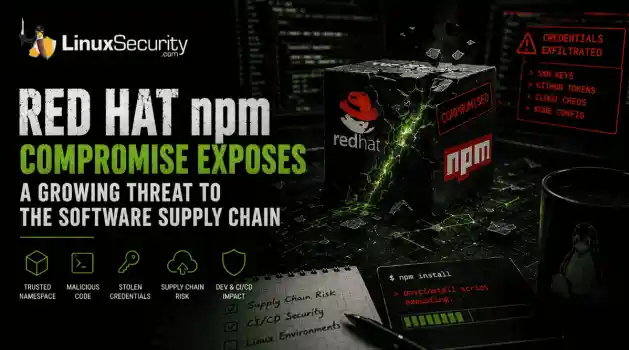
 Researchers investigating a campaign now tracked as Miasma found that more than 30 packages in Red Hat's @redhat-cloud-services npm namespace had been altered to deliver credential-stealing malware. . The packages weren't being used to deploy ransomware or sabotage systems. From what has been reported so far, the objective appears to have been much simpler: collect credentials from developer environments and use that access elsewhere. GitHub tokens, cloud credentials, SSH keys, and other...
Jun 02, 2026
 Refine features
X Clear Filters
Get the latest News and Insights
Get the latest Linux and open source security news straight to your inbox.
Community Poll
What got you started with Linux?
Loading...
Explore Latest Linux Security features
We found -2 articles for you...
102
 Linux securitysecurity complianceautomation tools
Effective IT Asset Management Strategies for Linux Administrators
Have you ever wondered why your organization needs IT asset management? ITAM or IT asset management ensures your organization's assets are deployed, upgraded, maintained, accounted for, and disposed of in due time. It ensures that your organization's valuable items (both tangible and intangible) are being used and tracked. . Before exploring IT asset management further, let's first understand IT assets. These typically include all software systems, hardware, and organization-value information. They often have a finite period of use, so to maximize their value, they must be proactively managed. This is where IT asset management comes into play. Read on as we discuss IT asset management and security in Linux and provide practical advice Linux admins can implement for secure IT management. Understanding IT Asset Management in Linux In the context of Linux environments, ITAM manages hardware (servers, workstations, networking equipment), software (operating systems, applications, libraries), and related infrastructure (cloud instances, containers). The Scope of ITAM in Linux includes: Track physical servers and workstations, ensuring optimal utilization and timely maintenance. Maintain and document system configurations. Ensure all assets comply with regulatory requirements and organizational policies. Manage licenses, versions, and configurations of Linux distributions and installed software. Why Is ITAM Challenging and Crucial in Linux Environments? Some of the challenges that ITAM faces in a Linux environment include its open-source nature, which leads to a high volume of unmanaged, potentially outdated, or redundant applications. Linux environments often span various distributions, each with different management tools and conventions. They also frequently use complex package management systems with numerous dependencies, making software tracking and updating intricate. Users with root or sudo access can install or modify software independently, complicatingcentralized asset management. Most importantly, unmanaged or poorly managed assets increase the risk of security vulnerabilities and breaches. However, ITAM plays a crucial role in identifying redundant or unused assets, which helps optimize costs by reallocating or disposing of them. It ensures all assets are accounted for and up to date, helping minimize security risks and ensuring compliance with regulations. Its accurate asset data provides insights that support strategic planning and investment decisions. Essential ITAM Best Practices Tailored for Linux Administrators. Here are some IT asset management best practices . Centralized asset repository : Consider establishing a centralized system for tracking all hardware and software assets. You can also use tools like Ansible for configuration and asset management. Asset discovery and inventory: Implement automated discovery tools to keep track of assets and their configurations. Regular audits and compliance checks: Conduct regular audits to ensure all assets comply with policies and standards. Consider tools like The OpenSCAP for automated vulnerability checking, allowing you to be proactive. What Are Security Challenges in Managing Linux IT Assets? Some of the common vulnerabilities associated with Linux systems are: Privilege escalation vulnerabilities that allow users to gain unauthorized access. Configuration errors, such as weak passwords, unnecessary services running, and not restricting access to sensitive areas, create vulnerabilities that attackers can exploit. Malware , viruses, trojans, and worms can affect Linux systems, compromising system security. Physical attacks such as tampering and theft. There is also a massive risk of unmanaged and unpatched assets, which are more likely to contain security vulnerabilities that attackers can exploit, especially if they are not current. Such issues can lead to data breaches and expose sensitive information, such as aclient’s personal or credit card information. They also target intellectual property. Unpatched systems are also prime targets for malware and ransomware attacks , which can disrupt your organization’s operations and cause significant financial damage. Open-source software licenses are complex and difficult to manage for various reasons. First, there are legal risks, as failure to comply with open-source licenses can result in legal actions, financial penalties, and reputational damage. Secondly, open-source projects often rely on numerous dependencies, each with its licensing requirements. Dependencies refer to frameworks, external libraries, or modules a software project needs to function. Thirdly, to avoid legal conflicts, you also must ensure compatibility between different open-source licenses. This means checking if you can modify, use, or distribute code under another license’s terms. Lastly, your organization must create, Implement, and enforce organizational policies regarding open-source software use and distribution. What Is The Role of ITAM in Enhancing Security Posture in Linux Environments? IT asset management plays a crucial role in enhancing Linux’s security posture. Framework for Identifying and Mitigating Security Risks. ITAM maintains a detailed and up-to-date inventory of the organization's hardware, software, and network assets. It helps identify the most critical assets you must prioritize for security and tracks dependencies between different software components to understand potential risk points. Additionally, it can further identify anomalies indicating security breaches or vulnerabilities. An updated inventory will allow you to accurately and quickly respond to security incidents, minimize damage, and speed up recovery. Managing Software Versions and Patches Efficient asset management helps manage software versions and patches by implementing automated patch management tools to ensure the timely application of security patches andmaintaining a log of patches to ensure traceability and accountability. ITAM is also essential in assessing the risk posed by unpatched systems and prioritizing patching based on severity. It regularly scans systems for known vulnerabilities and applies patches or mitigations as necessary. It will also keep track of software versions to ensure that all systems are running supported and secure versions. Compliance With Security Standards and Policies Your organization needs to define security policies that align with regulatory requirements and industry standards, and you can use IT asset management tools to automate policy enforcement across all assets. It will also conduct regular security audits and continuously monitor systems to ensure compliance with security policies. ITAM can even help Identify and address gaps in compliance to improve your organization’s overall security posture. What Are the Benefits of Automation in IT Assets? It isn't enough just to have an ITAM; you must also apply automation to your IT asset management program. Here's why: Enhancing Accuracy and Timeliness of Asset Inventories An automated system will monitor and update your asset inventory in real time, ensuring data is always current. When you add a new hardware or software asset, it can be quickly detected and recorded, which reduces the lag between inventory update and asset deployment. Automated ITAM can routinely schedule maintenance checks so each asset operates in peak conditions, reducing downtime. It also makes troubleshooting more straightforward and faster, helping minimize workflow disruptions. Reducing Manual Effort and Minimizing Human Error Perhaps the most significant advantage is its ability to reduce human error associated with manual data entry. It can also provide more comprehensive details about each asset, including configurations, versions, and relationships with other assets, which manual processes often overlook. Similarly, it can free up your IT staff to focus on morestrategic and complex tasks rather than spending time on repetitive manual activities. Automatically Enforcing Security Policies and Compliance Requirements Automated tools can continuously check for compliance with security policies and regulatory requirements, ensuring that all assets adhere to established standards. If automated ITAM detects non-compliance or a security policy violation, it can immediately take corrective actions, such as applying patches or reconfiguring settings. How Can I Integrate ITAM with Linux Security Tools and Strategies? Integrating ITAM with Linux security tools enhances IT assets' visibility, control, and security. What better way to understand this than with the help of case studies? For example, a financial institution wanted to enhance its Linux infrastructure with thousands of servers and endpoints. It integrated Red Hat Satellite for ITAM and OpenSCAP for compliance scanning, which automated asset discovery and inventory management, ensured continuous compliance scanning against regulatory standards, and automated patch management for all Linux servers. It saw results such as achieving real-time visibility into asset inventory, reducing manual effort in managing and securing assets, and significantly decreasing unpatched vulnerabilities and faster incident response times. Automation in Linux Systems for ITAM You can automate the following IATM practices in Linux: Automated asset discovery and inventory management: Continuously scan the network for new and existing assets, ensuring the inventory is always up-to-date Configuration management: Automating systems deployment, configuration, and management Patch management: Automate the downloading and application of patches across all systems, ensuring timely updates and reducing vulnerabilities. Lifecycle management: Automate the entire lifecycle of assets from procurement to decommissioning, ensuring efficient management and disposal. The benefits of leveraging Linuxsystems for ITAM and automation include: Efficiency and productivity Reduce human error Standardized configurations High scalability Timely patch management Reduced labor costs Optimize Resource Utilization Tools and Scripts for Automating ITAM Processes in Linux Here’s an overview of open-source ITAM and security tools which are compatible with Linux: Tools for Automating ITAM Processes in Linux Here are a few examples of open-source tools for automating ITAm process in Linux: Snipe-IT Snipe-IT ensures transparency, oversight, and security across the board. Its powerful REST API allows organizations to develop custom automation based on their needs. For Linux environments, Snipe-IT helps maintain an accurate inventory of physical and virtual assets, ensuring all devices and components are accounted for and appropriately managed throughout their lifecycle. OpenVAS The Open Vulnerability Assessment System is an open-source vulnerability scanning and management framework that provides a comprehensive suite of tools for detecting security vulnerabilities in systems and applications. It also assists by scanning Linux servers and devices for known vulnerabilities, generating detailed reports, and suggesting remediation actions. Rundeck Rundeck allows administrators to define, schedule, and execute jobs on any number of nodes via a web-based or command-line interface. Rundeck automates repetitive tasks such as software deployment, daily reports, system updates, file transfers, and backups for Linux asset management, improving efficiency and consistency. AWX/Ansible Tower AWX provides a web-based user interface, REST API, and task engine for managing Ansible automation tasks. Ansible Tower centralizes IT automation, making it easier to manage large-scale environments. Linux allows administrators to manage playbooks, inventory, and variables from a central location, enhancing control, visibility, and consistency across all managedassets. Puppet Puppet is a configuration management tool that automates the provisioning, configuration, and management of servers and other IT resources. In Linux systems, it helps maintain desired state configurations, reduce configuration drift, and improve operational efficiency by managing large numbers of servers with minimal manual intervention. Chef Chef transforms infrastructure into code, automating infrastructure configuration, deployment, and management. Linux asset management ensures that all systems are consistently configured according to best practices and security policies, reducing the risk of human error. SaltStack Saltsack can automate repetitive tasks, deploy applications, and manage complex IT environments. SaltStack automates system configuration, software installation, and patch management in Linux asset management, enhancing operational efficiency and consistency. Foreman Foreman is an open-source lifecycle management tool for physical and virtual servers. It offers provisioning, configuration management, and monitoring capabilities. In Linux, it automates the provisioning of new servers, manages configuration changes, and monitors system health and performance. Scripts for Automating ITAM Processes in Linux The following scripts can be used for automating ITAM processes in Linux: Custom Bash scripts Custom Bash scripts are powerful tools for automating various ITAM tasks in Linux environments. For instance, a Bash script can be written to scan the network, compile a list of active assets, and check the versions of installed software. Once created, you can schedule these scripts to run regularly using Cron jobs, ensuring continuous asset tracking and up-to-date inventory data. Python Python , with its rich ecosystem of libraries, is an excellent choice for more complex ITAM automation tasks. Libraries like Paramiko allow automated SSH (Secure Shell) connections to gather system information. Requests can interact with RESTAPIs to collect and update asset data, and Pandas offers powerful data manipulation and analysis capabilities. Example Script Repositories Script repository examples include: GitHub GitHub is a valuable resource for finding open-source ITAM scripts. In Linux, these scripts provide a solid foundation and can be tailored to meet specific organizational needs, speeding up the implementation of automated ITAM processes. Cron Cron is a time-based job scheduler in Unix-like operating systems, ideal for scheduling and automating script execution. Using Cron, administrators can ensure that their custom ITAM scripts run at specified intervals, such as daily, weekly, or monthly. This regular execution helps maintain an up-to-date and accurate asset inventory. How Can I Combine Tools with Scripts? Automation's true power comes from effectively combining these tools and scripts to create a cohesive ITAM automation strategy. This could involve using Ansible to automatically deploy and configure Rundeck with your custom scripts, which are scheduled to collect IT asset data regularly. You can then manage the output data through an asset database like Snipe-IT for a clear and up-to-date view of IT assets. By utilizing these tools and scripts, Linux administrators can automate a significant portion of their ITAM tasks, reducing error, saving time, and ensuring compliance. With Linux’s strong support for open-source solutions, most of these tools can be adopted without substantial upfront investment, making them suitable for businesses of all sizes. Our Final Thoughts on the Importance of ITAM for Linux Admins & Organizations IT asset management (ITAM) is essential for helping organizations effectively manage and secure their hardware, software, and network assets, especially in Linux environments. ITAM ensures you readily comply with regulations and organizational policies by maintaining accurate inventories and configurations. . Enhance security and manage IT assets in Linux byimplementing strategies like inventory management, patch management, and user access controls, among others. IT Asset Management, Linux Security Tools, Automation Strategies, Compliance Standards. . Brittany Day
 Jul 27, 2024
•
Jul 27, 2024
•
102
 data protectionweb applicationrisk assessment
Linux Web Apps: Achieve SOC 2 Compliance and Secure Your Applications
Security is vital for your Linux web apps, but keeping up with the latest exploits and meeting compliance standards can quickly become overwhelming. . This article breaks down the essentials of locking down your Linux web apps and simplifies the process of meeting essential compliance standards like SOC 2. You'll learn the key steps to safeguarding your web apps using proven security controls and get pointers for tackling SOC 2 requirements . Whether you're a startup looking to assure customers or an enterprise preparing for an audit, you'll learn how easy it is to protect your apps and prove your security posture. What Vulnerabilities and Attacks Threaten Linux Web Apps? Web app vulnerabilities refer to weaknesses or flaws within web applications that attackers can exploit to compromise the security of the application, its data, or its users. These vulnerabilities can exist in various web application components, including the frontend user interface, backend server logic, and the interaction between different components. Common types of web app vulnerabilities include: Injection: Attackers can inject malicious code into the application to steal data or disrupt operations. Broken Authentication: Attackers can gain unauthorized access to accounts by exploiting weaknesses in authentication procedures. Sensitive Data Exposure: Sensitive data can be exposed if not adequately secured. Broken Access Control: Attackers can gain access to data they shouldn't be able to see. Security Misconfiguration: Applications can be vulnerable if not correctly configured. Cross-Site Scripting : Attackers can inject malicious scripts into an application to steal data or hijack user sessions. Insecure Direct Object References: Attackers can access data they shouldn't be able to see by exploiting weaknesses in how applications handle object references. Cross-Site Request Forgery: Attackers can trick users into performing actions in an application they don't intend toperform. Failed Logging & Monitoring: Organizations may be unable to detect attacks if they don't correctly log and monitor activity. What Is SOC 2 Compliance and Why Does It Matter? If you manage a web application, data security must be a top priority. One of the best ways to do that is to achieve SOC 2 compliance with the help of SOC 2 compliance automation, which ensures your controls and safeguards meet industry standards. SOC 2, short for Service Organization Control 2, is a comprehensive framework designed to assess the security, availability, processing integrity, confidentiality, and privacy of data handled by service providers. Achieving SOC 2 compliance means that a company's systems and processes meet rigorous American Institute of Certified Public Accountants (AICPA) standards. This certification assures customers that their data is handled carefully and meets industry best practices. Failing to meet SOC 2 compliance standards can have several repercussions for an organization, particularly those that deal with sensitive data or provide services to other businesses. Some potential repercussions include loss of customer trust and confidence, increased risk of data breaches and security incidents, and difficulty obtaining contracts with new customers and forming partnerships. How Can I Achieve SOC 2 Compliance for My Linux Web Apps? Admins and organizations should implement the following best practices to ensure their Linux web apps are secure and compliant with industry standards and regulations: Conduct a risk assessment. The first step is identifying potential risks and threats to your web app infrastructure and data. This involves evaluating an organization's information systems, infrastructure, and processes to identify vulnerabilities, assess risks, and recommend measures to mitigate those risks (like unauthorized access, data breaches , and system failures). Evaluating your risk exposure will help determine the appropriate SOC 2 controls to implement. Thisevaluation typically involves the following key steps: 1. Identifying Assets : This involves identifying all the assets within the web application infrastructure, including hardware, software, data, and personnel. 2. Risk Assessment: In this step, the identified threats and vulnerabilities are assessed to determine their potential impact and likelihood of occurrence. Risk assessment helps prioritize security measures based on the level of risk they pose to the organization. 3. Vulnerability Scanning and Penetration Testing: Vulnerability scanning involves using automated tools to scan the web application for known vulnerabilities such as outdated software versions, misconfigurations, or insecure coding practices. Penetration testing , however, involves simulating real-world attacks to identify security weaknesses that automated tools may not detect. 4. Remediation: Based on the assessment's findings, organizations should prioritize and implement remediation measures to address the identified security vulnerabilities and weaknesses. 5. Continuous Monitoring and Review: Security is an ongoing process, and continuous monitoring and review of the web application infrastructure are essential to detect and respond to new threats and vulnerabilities as they emerge. Establish and document security policies. You'll need written policies covering data access, storage, transmission, and disposal. These should map to the SOC 2 Trust Service Criteria, which, in summary, are the following: Security: This principle focuses on protecting the system against unauthorized access, both physical and logical. It involves implementing safeguards to prevent unauthorized access to data and ensuring the confidentiality and integrity of information. Availability: Availability concerns the system's accessibility, ensuring it is reliably available for operation and use as agreed upon or required. This includes measures to prevent and mitigate downtime and disruptions impacting service availability. Processing Integrity: Processing integrity ensures system processing is complete, valid, accurate, timely, and authorized. It encompasses controls to prevent errors, inaccuracies, or unauthorized alterations during data processing. Confidentiality: Confidentiality addresses the protection of sensitive information from unauthorized disclosure. It involves controls to restrict access to data only to authorized individuals or entities and to prevent unauthorized disclosure or exposure. Privacy: Privacy focuses on the collection, use, retention, disclosure, and disposal of personal information by an organization's privacy notice and regulatory requirements. It involves implementing controls to safeguard individual's personal data and ensure compliance with applicable privacy laws and regulations. Implement robust access control. Organizations should employ password protection, two-factor authentication (2FA), role-based access control, and user activity monitoring to restrict access to sensitive data and systems. Password protection involves enforcing strong password policies, encrypting passwords, and implementing multi-factor authentication (MFA) for an added layer of security. 2FA requires users to provide a second verification form, like a code sent to their phone and their password. Role-based access ensures that users only have access to the resources relevant to their roles within the organization, reducing the risk of unauthorized access. User activity monitoring involves logging and analyzing user actions to detect suspicious behavior, allowing for timely responses to potential security threats. Encrypt sensitive data. Any confidential information stored or transmitted by your web app should be encrypted. Several crucial measures should be implemented to safeguard encryption keys effectively. Firstly, robust industry-standard encryption algorithms such as AES (Advanced Encryption Standard) must be employed to secure the keys. Utilize hardware security modules (HSMs) ortrusted execution environments (TEEs) to provide a secure key generation, storage, and operations environment. Implement proper key management practices, including regular key rotation and securely storing keys in a centralized key management system. Additionally, strict access controls and authentication mechanisms should be enforced to restrict access to the keys only to authorized users and services. Audit and monitor key usage and access regularly for suspicious activities. By implementing these measures, organizations can significantly enhance the protection of encryption keys and safeguard sensitive data from unauthorized access or compromise. Conduct employee training. Educating your staff on security best practices and policies is crucial for safeguarding your organization's data. Train them on password hygiene, phishing awareness, and proper data handling procedures to minimize the risk of security breaches. Regular refreshers will reinforce the importance of data security and compliance. Additionally, LinuxSecurity offers excellent educational resources and newsletters specifically tailored to educate users on topics related to Linux security, providing valuable insights and updates to enhance your organization's security posture. Use web app pentesting to identify threats. Web application penetration testing, commonly known as web app pentesting, is a proactive approach to identifying and addressing security vulnerabilities within web applications. It involves simulating real-world attacks on a web application to uncover weaknesses that malicious actors could exploit. The primary goal is to identify and mitigate security flaws before attackers can exploit them. During a web app pentesting process, trained security professionals, known as penetration testers or ethical hackers, systematically assess the application's security. This assessment typically involves the following steps: Reconnaissance: Gather information about the web application, infrastructure,technologies, and potential attack vectors. Scanning: Identify all the entry points, functionality, and endpoints exposed by the web application, such as forms, input fields, APIs, and URLs. Vulnerability Assessment: Perform automated and manual testing to identify common security vulnerabilities, including but not limited to injection flaws (e.g., SQL injection, XSS), authentication bypass, insecure direct object references (IDOR), insecure deserialization, and misconfigurations. Gain Access: Attempt to exploit the identified vulnerabilities to demonstrate their impact and severity. This step involves validating vulnerabilities by executing attacks within a controlled environment without causing harm to the application or its users. Post-Access Analysis: Analyze the penetration test results, prioritize vulnerabilities based on their severity and potential impact, and provide actionable recommendations for remediation. Reporting: Document the findings, including detailed descriptions of identified vulnerabilities, their potential impact, and recommended remediation steps. The report should be comprehensive and understandable to technical and non-technical stakeholders and include evidence of successful exploitation where applicable. Implement advanced secure coding practices. Implementing advanced secure coding practices is essential for improving Linux web app security. These practices help prevent vulnerabilities that attackers could exploit. By following these practices, developers can significantly reduce the risk of security breaches and protect sensitive data from unauthorized access or manipulation. Some key advanced secure coding practices for Linux web app security include: Input Validation: Validate all user input to prevent attacks such as SQL injection and Cross-Site Scripting (XSS). Use libraries or frameworks that offer built-in input validation functions to ensure data integrity. Authentication and Authorization: Implement robust authenticationmechanisms, such as multi-factor authentication (MFA), and enforce proper authorization controls to restrict access to sensitive resources based on user roles and permissions. Session Management: Use secure session management techniques, such as generating unique session IDs, encrypting session data, and implementing session expiration policies to prevent session hijacking and fixation attacks. Encryption: Use HTTPS with TLS encryption to secure data transmission between clients and servers. Employ strong cipher suites, enable HSTS (HTTP Strict Transport Security), and implement certificate pinning to protect against man-in-the-middle attacks. Error Handling: Implement proper error handling mechanisms to avoid leaking sensitive information to attackers. Provide informative error messages to users without revealing internal system details that could be exploited. Prevent Injection Attacks: Use parameterized queries and input validation to prevent injection attacks, such as SQL injection and command injection. Regular Security Audits and Penetration Testing: Conduct routine security audits and penetration tests to identify vulnerabilities and assess security measures' effectiveness. How Can I Automate SOC 2 Compliance Processes for Efficiency? Automating essential parts of the SOC 2 compliance process can save your team considerable time and effort. Rather than manual data collection and report generation, automation tools can handle many of these tasks for you. Continuous Compliance Monitoring With automation, you can continuously monitor your web apps and systems. Automated scans will check for vulnerabilities or configuration issues that could impact security or compliance on an ongoing basis. You'll get alerts when problems are detected so you can address them immediately. Streamlined Audit Preparation When it's time for your annual SOC 2 audit, much of the work will already be done. Automated tracking of risks, controls, and processes means you'll have readyevidence for auditors. Rather than scrambling to gather documentation, your team can focus on higher-value initiatives. Automated report generation also simplifies creating materials for your auditors. Optimized Control Testing Control testing procedures ensure your web apps meet all necessary compliance standards. However, testing controls manually can require significant time and resources. Automation tools can execute control tests on your behalf and provide detailed results, allowing your team to optimize control testing processes. What Tools Can Help with Automated Vulnerability Scanning? Automated vulnerability scanning tools are crucial in identifying security weaknesses within Linux web applications. These tools streamline the process of detecting vulnerabilities and provide actionable insights for remediation. Some popular tools can be found in this list . Final Thoughts: Are Your Web Apps SOC 2 Compliant? So, in closing, you've got this. Keeping your web apps secure and compliant may feel daunting, but taking it step-by-step and leveraging frameworks like SOC 2 can make it very manageable. Start by speaking to an expert to see where you stand before proceeding with the audit. You'll meet essential compliance standards and protect sensitive data in no time. The peace of mind and trust you'll build with customers will be worth the effort. . Lock down your Linux web apps with essential security steps and ensure compliance with SOC 2 standards effectively.. security, vital, linux, keeping, latest, exploits, meeting, compl. . Brittany Day
May 18, 2024
•

102
 access managementsecurity complianceendpoint security
Key Factors for Choosing Remote Access Software in Linux Environments
Choosing the right software for your enterprise can be a critical decision to make. With multiple remote access software out on the market, it can be perplexing to narrow down to one solution for your enterprise environment. By considering major business use cases and essential security factors, we have compiled a quick checklist to simplify your decision-making process. . Security Software without security features and basic authentications will make your enterprise ecosystem vulnerable to threats and hacks. Ensure the software you choose is coupled with robust authentications like SSO - how SSO works is particularly important for Linux environments since it enables users to access multiple services with a single set of credentials - along with 2FA/MFA, end-to-end encryption, and role-based access, as well as exhaustive recording and reporting features. Compliance It is essential organizations adhere to laws and regulations, which is why most of the industry sectors are compliant to mandates and policies like HIPPA, GDPR, and PCI-DSS. When picking a solution, check whether the software will be compliant with these mandates, as well as your specific organizational policies. One thing to look out for is that the software doesn't establish a remote connection without prompting confirmation on the remote device. Simple to Use In most scenarios you would want to connect to a remote device instantly. A user-friendly interface and simplified workflow are additional factors you must look into before purchasing the software. Installation and initiating remote sessions must be a seamless process and no additional training should be required. Scalable & Flexible Industries and enterprise businesses are growing everyday, resulting in an ever-increasing amount of endpoints that need to be managed. Server and space outages must never be an issue for your organization. The software you choose should be scalable for unlimited endpoints and be available all the time. When it comes to remoteaccess, the major goal is to control a device from anywhere, at any time, even while on the go. Compatible Not all devices in your enterprise run Linux OS. There will be a mix of Windows, Mac, and other OSs to consider, so it is essential to ask "will I be able to access a Linux machine from a Windows or Mac device, or vice versa?" If the software lets you access from an Android and iOS device as well, then that's a bonus. Unlimited & Unbounded Pricing must not limit the number of remote sessions you are allowed to take. Even from the tip of an iceberg, if you have internet connectivity, you must be able to access your endpoints remotely. A secure remote access solution with communication feature like chat and calls will make your troubleshooting process simple. To make the right business decision for your enterprise, all you need is a boundless and reasonably priced solution. "If a remote access solution checks each of these, then that's the one you're looking for." How Remote Access Plus Covers this List! > Remote Access Plus is a robust remote access and troubleshooting solution for an enterprise ecosystem. It double ticks the checklist by prioritizing security and unifying a solution for various business use cases. Exclusive trusted communication between endpoints and servers. End-to-end encryption during remote sessions, file transfer etc. HIPPA, GDPR, PCI-DSS compliant access from desktops and mobile apps. Authenticate with SSO, MFA/2FA, SAML, and more. Configure instant notifications for data breaches. Provide confined access based on roles. Secure servers from vulnerabilities by automating security patches. Cloud-based solution to scale up seamlessly. Initiate unlimited remote sessions to your endpoints. Made user-friendly with a simple web based console. Access your Linux computers from Mac, Windows, Android, and iOS devices in a matter of minutes. It can be confusing to make the right decision when consideringdifferent features, various pricing estimations, and perplexing editions provided by vendors. But choosing the right secure remote access solution will simplify your work rather than increasing your burden. So create an exclusive checklist, evaluate multiple solutions and pick out the one that best suits your Linux environment. . Security Software without security features and basic authentications will make your enterprise ecos. choosing, right, software, enterprise, critical, decision. . Brittany Day
Oct 17, 2022
•

Get the latest News and Insights
Get the latest Linux and open source security news straight to your inbox.
Community Poll
What got you started with Linux?
Search Topics
Powered By

Linux Security - Your source for Top Linux News, Advisories, HOWTOs and Feature Releases
QUICK LINKS
subscribe to newsletters!
Like staying secure? So do we.
Sign up for updates, tips, and alerts!
Discover faster search, smarter navigation, and deeper Linux security insights. Read More