Overly broad permissions can turn one compromised account into a much larger security problem. Learn how to reduce unnecessary access, review privileges, and apply least privilege across modern Linux systems. Review Linux Privileges×


Plague: A Stealthy PAM-Based Backdoor Targeting Linux Systems
 Aug 04, 2025
•
Aug 04, 2025
•
 Brittany Day
4 - 7 min read


Topics Covered
Alright, let’s talk Plague. If you’re a Linux admin or someone knee-deep in securing systems, this little beast of a backdoor should have your full attention. It’s not like the typical brute-force, ransomware-type malware that makes headlines. This one’s subtle — it creeps into the very thing that defines user authentication on Linux machines: PAM (Pluggable Authentication Modules). And, to add insult to injury, it does so while keeping its tracks covered so well that no major antivirus solutions have been able to flag it.
That’s bad news. Really bad news. PAM isn’t just some optional component of your Linux server setup. It’s the core stack of authentication — practically the gateway to SSH access, sudo privileges, and even basic login functionality. An attacker leveraging a compromised PAM module isn’t just knocking on the door; they’ve found the spare key hidden under your mat and can walk in at will. Let’s dig into what “Plague” does, how it operates, and most importantly, what you can do about it.
What Is the Plague Linux Backdoor Malware?
 To sum it up, “Plague” is Linux malware disguised as a PAM module. Think of PAM as the decision-maker in your Linux system that controls who gets in and who doesn’t. This particular backdoor hooks into PAM so it can bypass normal authentication flows entirely. With Plague installed, attackers can gain persistent SSH access using hardcoded static passwords — stuff like Mvi4Odm6tld7 or IpV57KNK32Ih — effectively giving them their own permanent VIP pass to your system.
And here’s the kicker: Plague doesn’t run wild or make a racket when it’s inside. It’s quiet. Obfuscated. It’s built to blend in and erase its fingerprints. Variables like SSH_CONNECTION? Wiped clean. User shell history (HISTFILE)? Redirected to oblivion (/dev/null). It’s like the attacker never logged in; their session might as well have existed in a parallel dimension.
How Has Plague Flown Under the Radar?
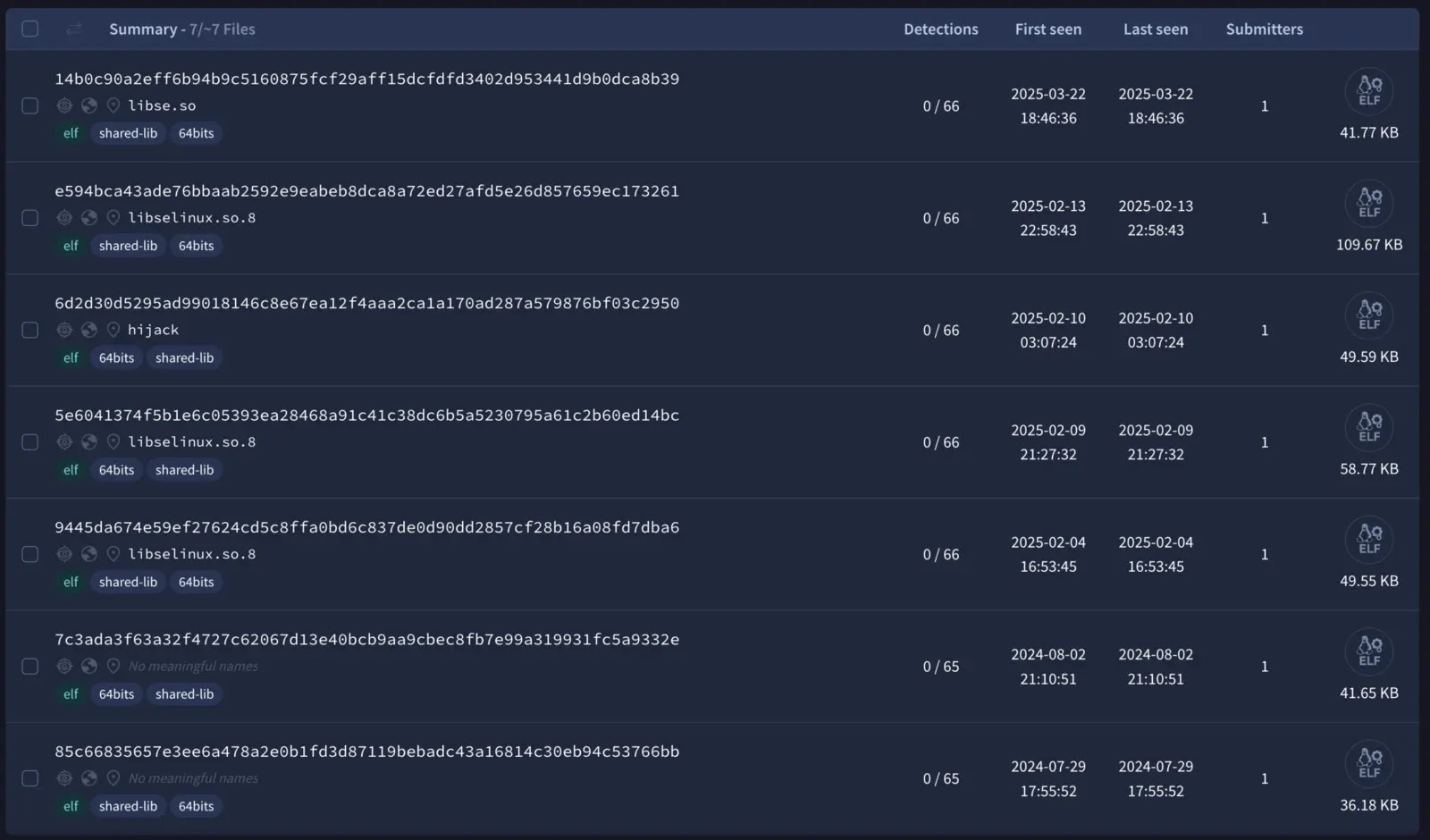 VirusTotal Submissions of Plague SamplesHere’s the standout feature of Plague: stealth. Antivirus engines? They’ve got nothing — no flags, no alerts. Over the past year, multiple samples of Plague have been uploaded to VirusTotal, and still, not a single AV tool has identified them as malicious. That’s no accident; whoever authored this backdoor clearly knows how to slip past traditional defenses.
Plague uses three-layer string obfuscation — XOR’d, PRGA-like routines, and pseudo-random generation. What does that mean, exactly? It means even the sensitive strings and memory offsets inside its code are scrambled in ways that make reverse engineering painfully tedious. Combine that with anti-debugging techniques (i.e., checking for renamed binaries or preload anomalies), and you’ve got malware built to evade analysis. Good luck figuring out where it’s hiding or how it’s behaving without some serious digging.
Why PAM?
This isn’t just some run-of-the-mill exploit hitting files or configuration settings. It’s PAM — the literal backbone bridging Linux’s authentication mechanism for everything from SSH sessions to sudo commands. Once PAM’s trust is breached, the attacker can redefine how authentication works without getting caught. That’s far more impactful than simply brute-forcing an SSH password or exploiting a forgotten service that nobody patched. Why mess with the front door when you can just alter the lock itself?
The Real Danger: Persistence and Control
 Let’s paint the worst-case scenario: an attacker deploys Plague on a multi-user Linux server. They’ve now got static passwords baked into authentication flows, meaning they can log in repeatedly without tripping alarms. And even if you patch something upstream or restart processes, Plague sticks around. It survives system updates, integrates with PAM so deeply it feels native, and doesn’t leave behind loose ends for your forensic tools to discover.
At that point, it’s not just a matter of unauthorized access. Your system becomes a resource for data theft, lateral movement attacks, or manipulation of sensitive operations. Maybe they’re grabbing corporate data quietly — nothing loud enough to alert your IDS. Maybe they’re pivoting from your machine to cloud infrastructure or external resources. The possibilities expand fast when the underlying system is fully compromised.
Okay, So How Do I Spot Plague?
Detecting Plague isn’t simple, but it’s doable if you know where to look. Here are some things worth focusing on:
Hunt for Strange PAM Modules
Suspicious binaries masquerading as system files are a clue. File names like libselinux.so.8 or binary metadata linked to GCC toolchains from Debian, Ubuntu, or Red Hat might raise eyebrows. If it doesn’t belong, investigate.
Use YARA Rules
Security researchers have developed a YARA rule targeting the backdoor’s ELF files. Specifically, it looks for strings like decrypt_phrase or init_phrases in files less than 1MB with ELF headers. Run scans periodically, and flag any hits for deeper review.
Behavioral Red Flags
Weird SSH activity isn’t normal. If you spot gaps in connection logs or unexplained anomalies in authentication flows, don’t shrug it off. These are signs that something’s altering PAM behavior behind your back.
Prevention Instead of Panic
 Taking steps to harden your system against Plague isn’t rocket science; it’s really about cleaning house and locking things down. Here’s how you can make life harder for malware like this:
- Audit PAM Regularly: Don’t assume PAM modules are untouchable. Compare their binaries against known good states, hash them, and keep backups. If something looks off, dig deeper.
- Restrict PAM Modifications: Don’t let just anyone mess with authentication configurations. PAM should only be accessible to admins with verified credentials. Lock it down tighter than a drum.
- Harden SSH: Static passwords? No thanks. Enable multi-factor authentication (MFA), and disable unused methods to cut down on attack surfaces. If you’re still relying on basic password-only SSH setups, it’s time for a rethink.
- Log Everything: If authentication is happening, you should be logging it. Keep access logs properly secured so attackers don’t erase them. Spotting an anomaly early can save you from dealing with the aftermath later.
And seriously, patch your systems. Not just core packages but every dependency that interacts with your authentication stack. Plague might evade detection, but staying current on security updates reduces vulnerability windows and limits other entry points.
What If You Find Plague?
Discovering Plague in your system isn’t fun, but it’s also not the time to panic. Immediate steps like isolating the machine from your network should stop the attacker from pivoting elsewhere. From there:
- Analyze it: Custom deobfuscation scripts can help you understand what’s actually happening on your system. Reverse engineer, study its hooks, and figure out its scope.
- Rebuild your OS: Once Plague compromises critical modules like PAM, the safest route is a full system rebuild. Don’t cut corners — start fresh, rotate all credentials, and lock things down better than before.
- Share your findings: This part’s optional but crucial. Malware like this spreads because admins don’t report it or share indicators of compromise (IOCs). By publishing your insights to threat intel platforms, you contribute to faster global detection.
Our Final Thoughts on Preparing for & Mitigating Plague Malware
 Plague isn’t your garden-variety malware. It’s the kind that slides past antivirus engines, alters core authentication mechanics, and makes life miserable for sysadmins once it digs in. And while viruses, worms, and trojans may dominate headlines, the subtle nature of PAM-based threats like Plague could pose even greater risks to Linux systems moving forward.
You don’t need magic to defend against this stuff — just sharp detection habits, rigorous PAM auditing, and a healthy dose of paranoia about where and how authentication happens. Lock it down, stay vigilant, and maybe check in with your PAM config files more often than you’ve been doing. Threats like Plague grow in the cracks, and it’s your job to seal those up tight!
 PREVIOUS

 NEXT
NEXT


Powered By

Linux Security - Your source for Top Linux News, Advisories, HOWTOs and Feature Releases
QUICK LINKS
subscribe to newsletters!
Like staying secure? So do we.
Sign up for updates, tips, and alerts!