Overly broad permissions can turn one compromised account into a much larger security problem. Learn how to reduce unnecessary access, review privileges, and apply least privilege across modern Linux systems. Review Linux Privileges×


Linux Servers Under Siege: CVE-2025-31324 & the Auto-Color Backdoor Malware Explained
 Jul 31, 2025
•
Jul 31, 2025
•
 Brittany Day
4 - 7 min read


Topics Covered
If you’re an admin managing Linux machines, you’ve got a couple of things on your radar right now. One is CVE-2025-31324, a vulnerability that’s got the potential to turn your well-behaved servers into someone else’s playground. The other is Auto-Color, a backdoor that’s sneaky, persistent, and ruthless when it gets into your systems.
This isn’t just theory—we’re talking ongoing exploitation in the wild. Fair warning: once you understand what Auto-Color does, you’re not going to look at /var/log the same way ever again.
Let me walk you through this, step by step, so you’re not just better informed—you’re better equipped to keep your systems out of the crosshairs.
The Skinny on CVE-2025-31324: What’s the Big Deal?
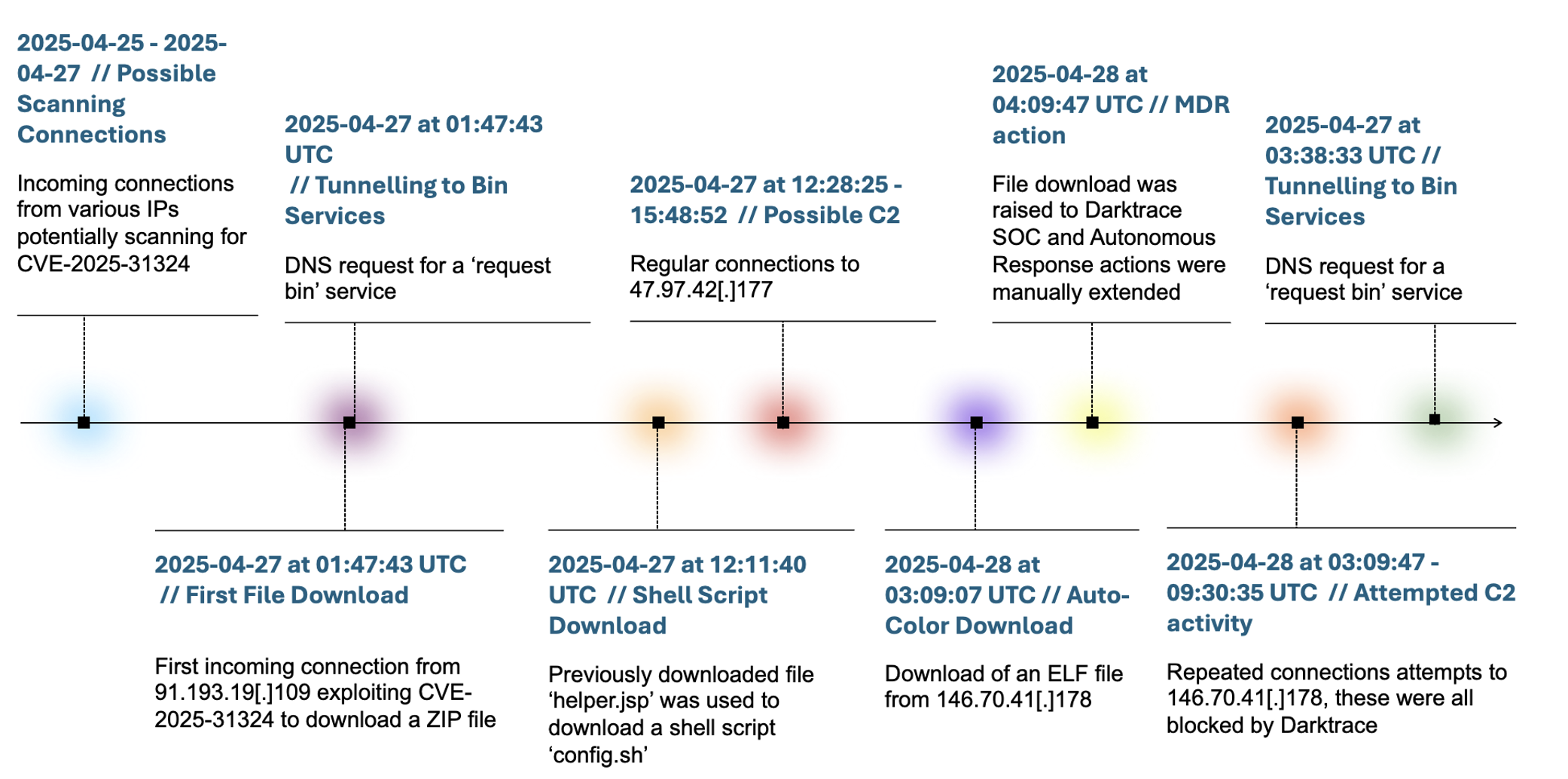 Auto-Color Malware Attack Stages (Source: Darktrace)Here’s what we know: CVE-2025-31324 is a critical vulnerability in SAP NetWeaver, disclosed in April 2025. It allows attackers to upload files directly to the application server. Sounds tame? It’s not. Those files can trigger remote code execution (RCE), giving attackers a foothold on your Linux system—think persistence, lateral movement, and full compromise if they get their way.
Security researchers have already observed threat actors exploiting this in the wild. They’re not just testing the waters, either—they’re deploying payloads like the Auto-Color backdoor to gain long-term control.
If your network has anything SAP-related running, especially if it’s accessible from outside, it’s time to hit pause on whatever you were doing and shore up your defenses. Critical vulnerabilities like these aren’t theoretical. The bad guys are ahead of you—they’re already using it.
What Is the Auto-Color Backdoor Malware?
Let’s talk about the charming piece of malware that’s been popping up as part of CVE-2025-31324 attacks: Auto-Color. First discovered toward the end of 2024, it’s a Remote Access Trojan (RAT) that has a thing for Linux systems, especially ones in environments like universities, government networks, and organizations in the U.S. and Asia. But don’t assume you're in the clear if you’re not one of those—you could end up in its sights anyway.
The name “Auto-Color” probably sounds harmless. Don’t let it fool you. Once this thing lands on your box, it renames itself to /var/log/cross/auto-color, blending into log directories like it belongs there. Its tactics are deliberate, its mechanisms slick, and it’s got some clever quirks that make it incredibly slippery. This is not low-tier script-kiddie malware—it’s something you take seriously.
The Nitty-Gritty: How Does Auto-Color Operate?
Auto-Color is no ordinary malware—it's a master of adaptation and stealth, leveraging tools like /etc/ld.so.preload to infiltrate systems and maintain persistence without raising suspicion. As a Linux admin, understanding how it operates is crucial to uncovering its tricks and securing your environment.
It Adapts
The first thing Auto-Color does is check what it’s up against. Is it running as a non-root user? No problem—the malware tones things down, limits its actions, and behaves like it’s genuinely trying to fly under the radar. But if it’s got root? Game on. That’s when it digs in, modifies critical files for persistence, and sets up camp.
It Hides in Plain Sight
 One of the clever tricks in its toolkit is using
 /etc/ld.so.preload. Familiar with it? If not, now’s the time to be. It’s a mechanism that forces the loader to preload specific libraries. Auto-Color uses this to inject a shared object file (libcext.so.2) into your system calls, effectively hijacking them. The shared library is disguised as something innocent—just a utility library for C programs—but there’s nothing innocent about what it’s doing.
By hooking into /etc/ld.so.preload, the malware ensures its code gets loaded into every process that starts. Every single one. That’s system-wide persistence without the mess of modifying binaries or core utilities. It’s clean, efficient, and… terrifying.
Cloak-and-Dagger Tactics
Here’s where things get slick: if Auto-Color can’t connect to its command-and-control (C2) server, it dials everything down. The RAT goes dormant, suppressing its malicious activities to avoid drawing attention. No suspicious network traffic. No obvious malicious processes. It just waits. This makes it a nightmare to analyze in isolated environments or sandboxes, as it behaves like a perfectly benign (if invisible) guest until the C2 server says otherwise.
What Should You Watch For?
If you’re managing Linux systems, you’ll want to keep your eyes peeled for a few specific red flags:
- Odd Directories: Check for anything resembling
/var/log/cross/auto-color.It’s not a directory you should see, period. - Modified Config Files: Keep an eye on
/etc/ld.so.preload. Normal usage for this file is rare. If it’s been modified—or exists at all—you need to investigate. - Suspicious Files: Look for unusual shared objects (e.g.,
libcext.so.2) pretending to be runtime libraries. - Strange Network Activity: Auto-Color establishes outbound connections over TLS to hardcoded IPs. If your firewall or network monitoring tools flag connections to, say, IPs like
146.70.41.178, don’t shrug it off.
It’s also worth beefing up your process monitoring. Anything acting out of character—unexpected renames, odd privilege changes—deserves your attention.
The Path Forward: Prevention and Practical Mitigation
Alright, now that we know what we’re dealing with, how do we keep this kind of thing out of our systems—or kick it out if it’s already there?
 Apply SAP’s Patches (Like, Yesterday): CVE-2025-31324 is your entry point here. Close this hole before an attacker finds it. Simple as that.
 - Revisit
/etc/ld.so.preload: Unless you’re explicitly using this (for legitimate reasons only you know about!), consider disabling it entirely. Yes, it’s that risky. - Harden User Access: Root access shouldn’t be anyone’s default. Enforce principles like least privilege. The harder it is for malware to operate as root, the more restricted malware like Auto-Color becomes.
- Segment Your Network: Keep sensitive systems—like SAP NetWeaver—isolated. The less accessible they are from outside, the better. Require VPN connections, whitelist IPs, and set up firewalls to block untrusted connections.
- Run File Integrity Monitoring (FIM): Keeping an eye on critical directories and files can make it easier to detect malicious modifications before they have time to embed themselves.
- Stay Updated on Threat Intel: Indicators of compromise (IOCs) for Auto-Color include the aforementioned IP addresses and certain file artifacts. Keep your tools loaded with the latest signature databases.
Our Final Thoughts on Navigating the Auto-Color Linux Malware Threat
Auto-Color isn’t just another “interesting malware story” you’ll skim in a security report. It’s actively exploiting Linux systems, hiding in plain sight, and using tactics that outpace many traditional defense mechanisms. Combine it with a vulnerability like CVE-2025-31324, and you’re dealing with a real, present danger.
But you’ve got everything you need to put up a good fight. Patch your systems, monitor the activity that matters, and make it hard for malware like Auto-Color to leave its mark. The smarter and more vigilant you are now, the less cleanup you’ll have to do later.
And look—while it’s tempting to hope these things won’t happen to you, good sysadmins don’t bank on luck. So roll up your sleeves, check your logs, and keep the bad guys out.
 PREVIOUS

 NEXT
NEXT



Powered By

Linux Security - Your source for Top Linux News, Advisories, HOWTOs and Feature Releases
QUICK LINKS
subscribe to newsletters!
Like staying secure? So do we.
Sign up for updates, tips, and alerts!