Explore top 10 tips to secure your open-source projects now. Read More
×


Security Vulnerabilities  security advisory authentication
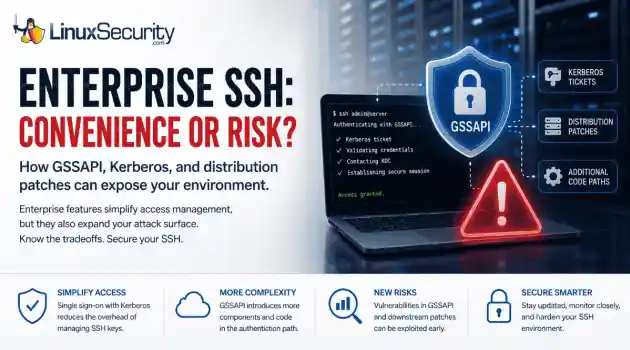
security advisory authentication We often view OpenSSH security updates through the lens of standard patch management. When a new CVE hits, we scramble to update, check our versions, and return to business as usual. But recent vulnerabilities tied to distribution-added OpenSSH GSSAPI patches are a reminder that the danger doesn't always lie in the core code; it often resides in the "convenience" features we layer on top. . These recent issues shouldn't just trigger an apt upgrade or dnf update; they should trigger a...
 Jul 06, 2026

Security Trends privilege escalation Linux security
privilege escalation Linux security Linux security teams are drowning. Patches, kernel updates, new CVEs every week. SSH exposed here, an old web service there, and a forgotten cron job running as root. On top of that, SIEM dashboards blink all day with alerts that all claim to be “high priority.” . It’s no surprise that people stop paying attention. The real problem isn’t a lack of data. It’s the opposite. Too much noise, not enough signal. Security teams see huge lists of vulnerabilities and thousands of alerts, but very...
Jul 06, 2026
Cloud Security incident response Linux administration
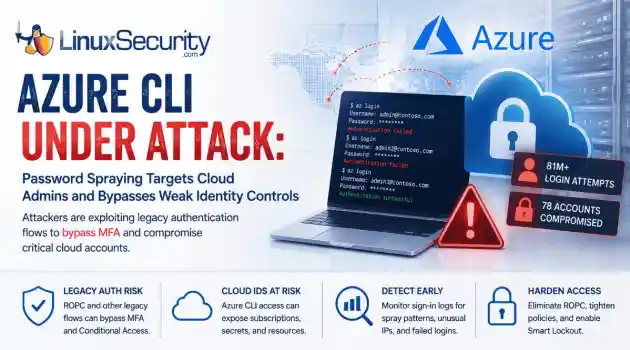
incident response Linux administration Over the span of just 14 days, threat actors unleashed more than 81 million login attempts against Microsoft’s Azure command-line interface (CLI). The campaign , which security researchers at Huntress identified as an ongoing, automated password-spraying effort, successfully compromised at least 78 Microsoft accounts across 64 organizations between June 12 and June 26, 2026. . While the scale is massive, the underlying strategy is surprisingly surgical. Attackers aren't exploiting a flaw in...
Jul 01, 2026
Security Trends security update mobile security
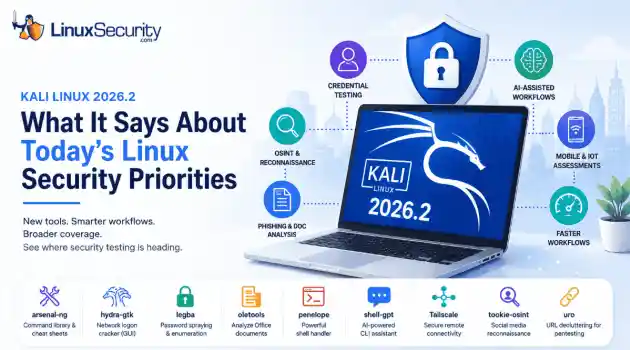
security update mobile security Offensive Security just dropped Kali Linux 2026.2 , and at first glance, it looks like a standard quarterly refresh. You’ve got the usual kernel bumps, desktop environment updates, and a handful of new utilities. But don't write this off as just another routine version update. If you look past the changelog, this release highlights several capabilities that continue to be important in offensive security. From AI-assisted workflows to credential testing and mobile assessments, Kali Linux 2026.2...
Jun 30, 2026
Security Projectssecurity advisory vulnerability management
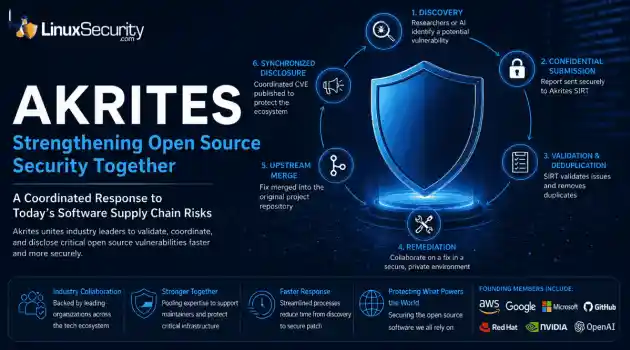
security advisory vulnerability management The Linux Foundation has officially launched Akrites , a coordinated industry initiative designed to improve how critical open source vulnerabilities are validated, coordinated, and disclosed before patches reach downstream users. Backed by a diverse coalition—including AWS, Google, Microsoft/GitHub, Red Hat, NVIDIA, and OpenAI—Akrites establishes a shared Security Incident Response Team (SIRT) to streamline the validation, remediation, and disclosure of vulnerabilities in the foundational...
Jun 29, 2026
 Refine news
X Clear Filters
Get the latest News and Insights
Get the latest Linux and open source security news straight to your inbox.
Community Poll
Is application sandboxing truly safe?
Loading...
Explore Latest Linux Security news
We found 1,153 articles for you...
79
 security advisoryvulnerability managementopen source initiative
Linux Foundation Launches Akrites to Strengthen Software Supply Chain Security
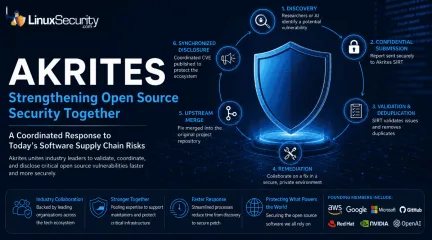
The Linux Foundation has officially launched Akrites , a coordinated industry initiative designed to improve how critical open source vulnerabilities are validated, coordinated, and disclosed before patches reach downstream users. Backed by a diverse coalition—including AWS, Google, Microsoft/GitHub, Red Hat, NVIDIA, and OpenAI—Akrites establishes a shared Security Incident Response Team (SIRT) to streamline the validation, remediation, and disclosure of vulnerabilities in the foundational code that underpins the modern digital economy. . AI Is Changing Software Supply Chain Security One detail in the Linux Foundation announcement stands out more than the launch itself. The organization isn't suggesting that open source projects suddenly need more vulnerability reports. They already receive plenty. The problem is volume. AI-assisted analysis has made it possible to review large codebases much faster than before. Researchers can identify suspicious patterns, compare projects, and generate vulnerability reports in a fraction of the time that manual analysis once required. That is good news for open-source security, but it has also exposed a weakness in the current response model. Every report still has to be reviewed by a person. Someone has to reproduce the issue, determine whether it affects supported releases, understand its severity, decide whether a CVE is appropriate, develop a patch, and move that fix through coordinated vulnerability disclosure before technical details become public. None of those tasks has become significantly easier simply because AI can produce findings more quickly. According to Endor Labs, one of Akrites' founding members, fewer than 5% of recently validated open source vulnerabilities have been patched . Whether that percentage changes over time, it illustrates the same trend. Discovery is accelerating faster than remediation. Why Existing Open Source Security Processes Are Under Pressure The reality for many maintainers looks verydifferent from how people imagine open-source security working. A widely used library isn't necessarily maintained by a large engineering team. In many cases, it's a handful of contributors or even a single developer balancing maintenance with a full-time job. Now imagine that the project suddenly receives dozens of reports describing the same underlying issue. One submission comes from a commercial scanner. Another is generated by an AI coding assistant. A third arrives through a bug bounty program. None are identical, but all require investigation. The difficult part isn't opening the email. It's figuring out whether the report is accurate, whether the vulnerability can actually be reproduced, whether downstream users are affected, and how the issue should move through vulnerability disclosure without exposing organizations before a fix is available. Akrites is intended to reduce that burden by acting as a shared Security Incident Response Team. Instead of every organization independently contacting maintainers, the initiative provides a coordinated process for validating reports, removing duplicates, and helping projects prepare fixes before disclosure begins. Recent Incidents Showed Why Coordination Matters Recent security incidents have demonstrated that identifying a vulnerability is often only the beginning. Log4Shell became a global response effort almost overnight. The challenge wasn't limited to understanding the vulnerability itself. Linux distributions, software vendors, cloud providers, security teams, and enterprise administrators all had to coordinate patches, advisories, testing, and deployment under intense time pressure. The XZ Utils backdoor exposed a different weakness. It showed how much critical infrastructure still depends on software maintained by very small teams. When one upstream project experiences a security problem, the consequences spread through Linux distributions, enterprise products, containers, cloud platforms, and countless applications built ontop of that code. Akrites would not have prevented either incident. The Linux Foundation isn't making that claim. Instead, the initiative attempts to strengthen the coordination that happens after a vulnerability is discovered and before it reaches the wider ecosystem. What Akrites Means for Open-Source Security Akrites represents a clear realization: open source security can no longer rely solely on the efforts of individual maintainers. Every critical project eventually hits the same wall: the software becomes indispensable long before the maintenance team has the resources to manage it. One interesting aspect of this initiative isn't just the technology—it's the list of founding members. Organizations like Citi, JPMorgan Chase, Ericsson, and Cisco rarely launch joint initiatives unless they share a massive, systemic problem. In this case, they do. Modern infrastructure shares an enormous amount of upstream code, which means one overwhelmed maintainer is now a systemic risk for banks, power grids, and cloud providers alike. What This Means for Linux Administrators Linux administrators rarely work directly with upstream maintainers, yet they depend on them every day. Enterprise distributions such as Red Hat Enterprise Linux, Ubuntu, Debian, SUSE, AlmaLinux, and Rocky Linux package software only after upstream projects have investigated reports, developed patches, and coordinated disclosure. Improvements at the upstream level can ripple through the entire software supply chain, ultimately affecting how quickly organizations receive trusted updates. : Faster upstream patch coordination: Verified fixes land in your distribution’s repositories sooner because the "middle work" of validation and deduplication is handled upstream. More consistent security advisories: Standardized reports make it easier to track and prioritize updates across your fleet. Better support for widely used components: Akrites says it can serve as a "maintainer of last resort" for certain criticalprojects by helping coordinate remediation when active maintenance is no longer sufficient. How Akrites Coordinates Vulnerability Response The initiative formalizes the vulnerability disclosure lifecycle to ensure confidentiality and speed. Instead of maintainers fielding reports from hundreds of sources, they have one predictable partner. Discovery: A researcher or AI surfaces a potential flaw. Confidential Submission: The report is sent to the Akrites SIRT, not a public bug tracker. Validation & Deduplication: The SIRT verifies the issue and removes duplicates. Remediation: Maintainers and industry engineers collaborate on a fix in a secure environment. Upstream Merge: The fix is merged into the original project's repository. Synchronized Disclosure: A coordinated CVE is published to alert the ecosystem. Akrites Won't Replace Vulnerability Management It is vital to note that Akrites is an upstream coordination body, not an enterprise security product. Organizations still need robust internal programs, including vulnerability management processes, asset inventories, and monitoring tools to detect threats within their specific environments. Akrites improves the upstream coordination of security, but the responsibility for securing the downstream enterprise environment remains with the organization. Akrites complements existing vulnerability management programs rather than replacing them. Organizations will still need scanners, patch management workflows, asset inventories, and software bills of materials (SBOMs) to identify affected systems and deploy updates. Akrites focuses on the upstream coordination that happens before those updates reach enterprise environments. Conclusion For years, the industry invested heavily in tools designed to identify software vulnerabilities faster. Akrites reflects a strategic recognition that discovery is no longer the limiting factor. As AI continues to accelerate vulnerability research, the challenge hasbecome how quickly maintainers can validate reports, coordinate fixes, and deliver patches before attackers exploit them. Whether Akrites succeeds will ultimately be measured not by the number of vulnerabilities it processes, but by whether it successfully shortens the time between discovery and remediation across the open source ecosystem. By professionalizing the "messy middle" of the response process, Akrites is attempting to build the operational infrastructure needed to keep our most critical software secure in an age of AI-accelerated threats. Want more Linux security news, open source security analysis, and software supply chain insights? Subscribe to the LinuxSecurity Newsletter for the latest vulnerability disclosures, security advisories, threat analysis, and expert coverage of the technologies shaping the Linux ecosystem. Related Reading Why Linux Supply Chain Attacks Are Becoming a Nightmare for DevOps Teams Targeted Attacks on Open Source Maintainers Highlight Security Risks . The Linux Foundation's Akrites aims to improve the response and management of open source vulnerabilities through collaborative efforts.. Linux Foundation, Akrites, Open Source Security, Vulnerability Coordination, Software Supply Chain. . MaK Ulac
 Jun 29, 2026
•
Jun 29, 2026
• Security Projects
79
 Linux securitysecurity assessmentautomation
How AI Is Changing Open Source Penetration Testing
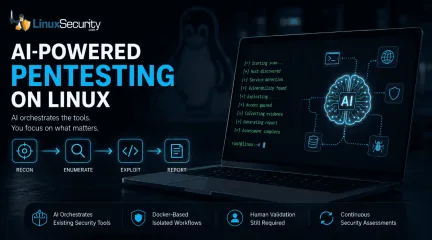
AI is beginning to reshape how penetration testing workflows are organized. For years, the penetration tester’s workflow has been a labor-intensive ritual: scan, enumerate, research, exploit, and report. But new frameworks are attempting to codify that intuition, turning the "human-in-the-loop" process into a machine-coordinated workflow. But is this a genuine evolution in how we secure Linux environments, or just a sophisticated wrapper around the same old tools? . Dark Moon is an open-source autonomous penetration testing framework that combines large language models with established offensive security tools. It supports assessments against web applications, APIs, Active Directory, Kubernetes environments, content management systems, and other common enterprise targets while orchestrating scans through Docker-based tooling. The "Conductor" Philosophy For the uninitiated, Dark Moon doesn’t aim to replace the core toolkit—tools like Nmap, sqlmap, or Nuclei—that Linux security professionals have relied on for decades. Instead, it positions itself as an "AI-powered conductor." In a traditional manual assessment, a tester has to constantly context-switch, analyzing the output of one tool to decide which flag to pass to the next. One open source implementation attempts to solve this via agentic reasoning. It doesn’t just scan; it interprets the HTTP response, determines if a CMS fingerprint is present, and proposes and executes the next stage of testing based on its reasoning model. For instance, imagine exposing a new Ubuntu web server. Traditionally, you might begin with Nmap, move to ffuf after discovering an HTTP service, fingerprint the application, then manually decide whether sqlmap or nuclei makes the most sense to run next. The Darkmoon project attempts to automate those transitions by using the output from one stage to dynamically determine what happens next. It can also consolidate findings into a structured report, sparing the operator from parsing dozens ofdisconnected tool outputs. Linux as the Working Environment for AI Security Tools One of the best things about these new security agents is that they’re built on the tools we’ve been using for years. The project leverages Docker for isolation, which is a massive win for Linux admins and DevOps folks who are already living in containers. It solves that classic "dependency hell" we’ve all dealt with—you know, trying to get some niche Python-based scanner to play nice with your system’s existing libraries. Because the framework runs everything in its own container, it keeps your host OS clean and stable while the AI manages the heavy lifting. For those of us who spend most of our day in a terminal, it’s not really about learning a whole new system. It’s more like getting an extra pair of hands to handle the repetitive, manual "grunt work" of orchestration, leaving us to actually dig into the interesting findings/ The Reality Check: Where AI Fits It is crucial to set expectations here. The AI is not a magic bullet. As noted in industry discussions on autonomous pentesting platforms , the real value lies in the reasoning layer. The AI isn’t discovering new exploits on its own; it is managing the execution of existing ones. This brings a specific set of limitations: Contextual Blindness: An AI can easily misinterpret a non-standard login portal or a specific network quirk that a human would recognize instantly. The "Hallucination" Risk: Some frameworks attempt to reduce hallucination risk by routing actions through controlled tool execution, the risk remains that the AI might prioritize the wrong path. Human Validation: The consensus among security researchers is that AI currently functions best as a "force multiplier." It handles the reconnaissance and the monotonous chaining of tools, allowing the professional to focus on the high-stakes analysis. Why It Matters for the Linux Community For sysadmins, researchers, and home-lab enthusiasts, these frameworksrepresent a shift in the security paradigm. We are moving away from "point-in-time" assessments—where you scan a network once a year—toward continuous security validation. The useful part is repeatability. The same checks can run after changes, after deployments, or against lab systems where configuration drift tends to show up first. While many people will use Dark Moon as a research or lab platform, the same orchestration model could eventually fit into CI/CD pipelines or scheduled internal assessments. It effectively turns your security posture from a static checkbox into a living component of your environment. Final Thoughts These frameworks don't replace tools like Nmap, ffuf, sqlmap, or the rest of the Linux security toolkit. Those tools remain the engines doing the work. What's changing is the orchestration layer sitting above them. As AI becomes better at interpreting results and coordinating workflows, frameworks like Dark Moon offer a glimpse of how future penetration testing may evolve while still relying on the open-source tools the Linux community has trusted for years. Whether you use it in production or just as a sandbox tool to explore the future of AI-driven red teaming, it’s a project that builds on the open-source spirit rather than trying to hide it behind a black-box paywall. Want more Linux security news, vulnerability analysis, and software supply chain updates? Subscribe to the LinuxSecurity Newsletter and get the latest threats, advisories, and expert insights delivered directly to your inbox. Related Reading Understanding Linux Privilege Escalation Patterns and Security Measures How Secure Is Linux? Exploring Security Design and User Privilege Models Optimizing Linux Security: Strategies for Modern Threats . Explore the capabilities of Dark Moon, an AI-powered framework transforming penetration testing workflows on Linux systems.. AI Penetration Testing, Automation Framework, Open Source Security, Linux Tools, Dark Moon. . MaK Ulac
Jun 26, 2026
•
Security Projects

79
 security advisorysecurity updateencryption
FreeRDP 3.27 Raises the Baseline for Secure Remote Access
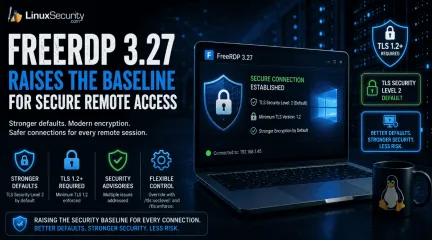
Remote access tools do not need dramatic new features to improve security. Sometimes the more useful change is quieter, like stronger defaults that make weak encryption harder to use by accident. . What FreeRDP Is and Why This Release Matters FreeRDP is an open-source implementation of Microsoft’s Remote Desktop Protocol, used as both a library and a set of clients across Linux, Windows, macOS, Android, and other systems. In Linux environments, it is often the practical RDP client administrators reach for when they need console access to Windows hosts, jump systems, lab machines, or remote desktops without moving through a full Windows workstation. FreeRDP 3.27 matters because it changes the floor for encrypted remote access. The release sets the default TLS security level to 2 and requires at least TLS 1.2 , while still leaving client-side override options through /tls:seclevel: and /tls:enforce: for environments that have not caught up yet. That is the operational detail. A Linux RDP client connecting with safer defaults creates fewer accidental weak sessions, fewer legacy negotiation surprises, and less cleanup later when remote access security gets reviewed after a finding. What Changed in FreeRDP 3.27 FreeRDP 3.27 is not a feature-heavy release. The important changes are in the defaults that control encrypted connections and RDP security. TLS security level 2 is now the default. TLS 1.2 or newer is required by default. Multiple security advisories were addressed as part of the release. Environments that still rely on older TLS configurations should be tested before deployment. In practical terms, FreeRDP now makes it harder to fall back to weaker encryption settings and easier to force TLS 1.2 or newer across remote access deployments. For administrators using FreeRDP as a Linux RDP client, the change is mostly about reducing the number of weak connection paths that remain available simply because nobody disabled them. Why Stronger Remote AccessSecurity Defaults Matter Remote access tools tend to accumulate compatibility settings over time. They stay around because somebody still has an old server, an old gateway, or a forgotten system that breaks when defaults change. That flexibility comes with a cost. Permissive settings can keep weak remote access security configurations alive for years. Secure remote access becomes harder to enforce when legacy encryption remains available by default. Weak TLS settings often persist long after they should have been retired. Raising the minimum requirement removes many of them by default. TLS 1.2 is still a valid baseline. The problem is usually what sits below it. When admins look up TLS 1.2 end of life or a TLS 1.2 vulnerability, they are usually trying to understand whether old TLS support is still exposed anywhere in the environment. TLS 1.2 vs 1.3 is a separate decision. TLS 1.3 is better where both sides support it, but FreeRDP’s change is simpler than that. Requiring TLS 1.2 or newer, it cuts off older negotiation paths that still show up during remote desktop security reviews and remote access assessments. What Admins Should Check Before Updating FreeRDP 3.27 raises the default security baseline, but stronger defaults do not replace existing remote access security controls. Before updating, administrators should verify a few things: Test connections to older RDP servers, gateways, and legacy systems that may not fully support TLS 1.2 or newer. Review Azure AD (Entra ID) and authentication-related changes if those features are part of the deployment. Confirm that logging, MFA, access restrictions, and patch management processes continue to operate as expected. Validate that existing remote access security solutions still behave correctly after the upgrade. The release aligns with common remote access security best practices, but it is only one layer. Secure remote access depends on authentication controls, monitoring, patching, and accessmanagement. FreeRDP can support those efforts, but it is not a complete answer to how to secure remote access by itself. FreeRDP Reflects the Secure-by-Default Shift FreeRDP 3.27 is part of a broader move toward stronger remote access security defaults. The release does not introduce a new security model. It removes more of the weak negotiation paths that tend to survive in long-lived environments simply because nobody revisited the configuration. For organizations using FreeRDP, the change is straightforward. Secure remote access becomes less dependent on manual hardening and less likely to inherit outdated settings by default. Administrators still need to test systems, validate compatibility, and maintain their remote access security controls, but FreeRDP 3.27 raises the baseline in the right direction. Want more Linux security news, vulnerability analysis, and remote access security updates? Subscribe to the LinuxSecurity Newslette r for the latest threats, advisories, and practical guidance on Linux systems. Related Reading Securing Remote Access to Linux Servers: Best Practices for 2026 Mastering SSH for Secure Linux Remote Server Management How Secure Is Linux? Exploring Security Design and User Privilege Models Oracle Linux 10 FreeRDP Important Security Update ELSA-2026-5939 . FreeRDP 3.27 emphasizes stronger remote access defaults with TLS 1.2 level security for enhanced protection.. FreeRDP remote access encryption TLS Linux. . MaK Ulac
Jun 16, 2026
•
Security Projects
79
 security assessmentsecurity testingLinux application
Boost Linux Security Using These 10 Vital Testing Tools Now
Linux admins rarely deal with one fixed system anymore. A single environment may include public-facing web apps, internal services, containers, cloud workloads, code repositories, and third-party packages pulled into production. That mix creates more places for weak points to hide. . Security testing tools help admins find those weak points before they turn into outages, data leaks, or full system compromise. Some tools scan networks. Others check code, container images, web apps, or exposed credentials. Used together, they give teams a more complete view of risk across the stack. This list covers ten security testing tools Linux admins should know for network checks, web testing, vulnerability scanning, code review, and secrets detection. Mindgard AI features are starting to show up in Linux-hosted applications. Internal automation tools, customer portals, support bots. Traditional vulnerability scanners were never designed to test how machine learning systems behave when someone intentionally feeds them hostile input. That leaves a blind spot in many security testing workflows. What It Helps Test Mindgard focuses on applications that include AI components like large language models or machine learning pipelines. A standard scanner might flag outdated packages or configuration problems, but it won’t tell you what happens when a model receives a manipulated prompt or unexpected data. This becomes important when applications pass information between models, APIs, and internal services. Weak logic anywhere in that chain can introduce security issues even when the infrastructure itself is properly hardened. Where It Fits in Modern Security Workflows Mindgard works best as a specialized layer within a broader testing process. Network scanners, web testing tools, and static analyzers still cover most traditional attack surfaces. Teams evaluating different offensive security tools often notice that many focus heavily on infrastructure and application flaws. AI behaviortesting is a newer territory. Mindgard focuses on how AI-driven features interact with software systems and user input. AI features are moving into production systems quickly. Testing how they react to hostile input is becoming part of a normal security review. Nmap Understanding what is exposed on a network is the first step in securing it. Nmap remains one of the most widely used tools for mapping systems, services, and open ports across Linux environments. Network Discovery and Attack Surface Mapping Nmap scans networks to identify live hosts, open ports, and service versions. Those results often reveal risks that configuration files alone might not show. An SSH service exposed to the internet, an outdated web server, or an unexpected management port can all signal potential trouble. In long-running environments, forgotten systems and temporary services tend to accumulate. Test machines, staging containers, or misconfigured applications may remain accessible long after their intended purpose ends. Network discovery scans make those exposures visible. How It Supports Security Assessments Nmap frequently appears at the beginning of security reviews and penetration tests. It verifies what systems are actually exposed to the network instead of relying solely on documentation or firewall rules. Once reachable systems are identified, deeper vulnerability scans or manual testing can begin. That reconnaissance step usually shapes where the rest of the assessment goes. OWASP ZAP Most web application problems don’t show up in the infrastructure. They show up in the application logic. Login forms, session cookies, API parameters, and request handling. That’s where OWASP ZAP spends its time. Instead of scanning packages or configuration files, the tool sits in the traffic path and interacts with the application directly. Detecting Weak Points in Web Applications ZAP performs dynamic application security testing. It runs against a live application and observeshow requests and responses behave. During a scan, it crawls the site, maps available endpoints, and starts sending modified requests back to the server. Parameters in forms, headers, cookies, and query strings. Anything the backend might process. Problems tend to surface there: injection flaws , broken authentication logic, missing headers, and weak session handling. Those issues rarely appear in static analysis. Flexible for Manual and Automated Testing Some teams use ZAP interactively. A tester proxies traffic through it, inspects requests, and tweaks them during the session. Other environments treat it more like a pipeline step. The scanner runs during a build or staging deployment, produces a report, and the findings land alongside the rest of the testing results before the application goes live. Nikto Nikto focuses on a narrow but useful job. Quickly identifying known issues in web server configurations. Fast Checks for Web Infrastructure The scanner looks for dangerous files, outdated server components, misconfigurations, and publicly exposed paths that should not be accessible. These checks are straightforward but often reveal problems introduced during server setup or deployment. Default files left behind after installation and unpatched components are common findings. Practical Early Warning Nikto works well as an early-stage diagnostic tool. It does not replace deeper vulnerability testing, but it frequently highlights areas that deserve closer inspection. Run it after deploying a server or moving an application. Misconfigurations tend to show up quickly. OpenVAS When environments grow beyond a handful of machines, manual vulnerability reviews become difficult to maintain. OpenVAS provides a way to scan large groups of systems for known security issues. Broad Vulnerability Coverage The scanner analyzes servers, services, applications, and network devices. Results are compared against vulnerability databases to identify knownweaknesses. Automated assessments allow teams to monitor many systems at once instead of inspecting each one individually. Supporting Vulnerability Prioritization Security teams rarely have the resources to fix every issue immediately. OpenVAS organizes scan results by severity, helping teams identify which weaknesses pose the greatest risk. Internet-facing systems, outdated services, and critical vulnerabilities usually rise to the top. That short list is where patching usually starts. Trivy Modern infrastructure rarely runs as a single server anymore. Containers, dependency chains, and infrastructure templates all sit in the stack now, and each layer brings its own security problems. Trivy focuses on scanning those layers. It checks container images, operating system packages, language dependencies, and configuration files for known vulnerabilities. An image can look clean on the surface while still carrying outdated libraries or vulnerable packages pulled in through dependencies. That tends to happen quietly during builds. A base image updates, a dependency shifts version, and suddenly a container ships with software nobody reviewed closely. Trivy catches those cases before images move into production. Metasploit Framework Finding a vulnerability in a scan report does not always mean it matters. Plenty of issues look serious on paper, but go nowhere once someone actually tries to use them. Metasploit helps answer that question. Security teams use it to simulate real attack techniques against a known weakness. If an exposed service or outdated component appears during scanning, a matching module can test whether the flaw leads anywhere useful. Sometimes it works. Sometimes it fails immediately. Either outcome tells you more than the report alone. Semgrep A lot of security problems start during development. Long before anything runs in production. Semgrep looks directly at source code instead of live systems. It scans for patterns that tend tointroduce vulnerabilities. Weak input validation, unsafe functions, and credentials hardcoded into scripts. The kind of mistakes that slip through code review when teams are moving quickly. Teams usually start with default rules and then tune them for the languages and frameworks they actually use. The rule sets tend to evolve along with the codebase. SQLMap Databases sit behind a large percentage of web applications. When input handling breaks down, SQL injection is usually close behind. SQLMap automates the testing process. It probes how applications handle user input and database queries, looking for signs that injected commands can alter the query flow. If the weakness exists, the tool can push further to test whether data extraction or modification is possible. Older applications tend to expose these issues first. Legacy database logic is often where the cracks appear. Gitleaks Not every security incident begins with an exploit. Sometimes it begins with a password sitting in a repository. Gitleaks searches code repositories for secrets. API keys, tokens, certificates, and credentials are committed during development. Automation scripts and infrastructure configuration files are common sources. Once credentials land in version control, they spread quickly through forks, clones, and cached builds. The longer they sit there, the harder the cleanup becomes. Early detection keeps the damage contained. Conclusion Linux environments used to be simpler. A few servers, maybe a database, a web service in front. The stack is wider now. Networks, containers, APIs, dependency chains, CI pipelines, internal tooling. AI features are starting to appear in some platforms as well. Each layer introduces its own failure points. Security testing tools tend to focus on different slices of that surface. Nmap maps exposed services. ZAP and SQLMap focus on application behavior. OpenVAS scans the infrastructure for known vulnerabilities. Trivy checks container images anddependency layers. Gitleaks looks for credentials that leaked into repositories. Semgrep operates earlier in the pipeline, inside the code itself. Metasploit helps verify whether a vulnerability actually leads to compromise. Mindgard enters where older tools struggle. Testing how AI-enabled features behave when someone intentionally feeds them hostile input. No single tool sees everything. Most teams end up running several together just to keep visibility across the Linux security environment. . Explore top security testing tools for Linux admins to enhance security checks and identify potential risks. Stay protected!. Linux Admin Tools, Security Testing, Vulnerability Assessment, Network Security Tools, Application Security. . MaK Ulac
Mar 13, 2026
•
Security Projects
79
 security advisoryrisk managementsupply chain
New Rust Tool Traur Analyzes Arch Linux AUR Packages for Hidden Risks
Most of us have pulled something from the AUR because it was faster than packaging it ourselves. You need a tool; it’s there, it builds cleanly, and the system keeps moving. No alerts. No obvious red flags. That’s usually how supply chain issues begin, not with explosions but with convenience. . The Arch Linux AUR is one of the reasons people like the ecosystem. It is flexible, fast, and community-driven. But it is also a collection of user-submitted build scripts that execute on your machine, often with elevated privileges. There is no central security review board. There is no vendor QA pipeline. What you have is transparency, version history, and whatever scrutiny the community happens to apply. Many admins skim the PKGBUILD, check the version, glance at the source URL, maybe verify the checksum, and move on. If it compiles and installs without errors, it feels fine. The problem is that supply chain security rarely fails in obvious ways. It fails in small changes that blend in with normal updates. Traur is interesting in that context. Not because it is written in Rust, and not because it promises to catch everything. It is interesting because it forces a closer look at how thin most AUR review processes really are. When you run a scanner, and it flags behavior you did not notice in your own quick review, that tells you something about your process, not just the package. If you run Arch Linux in a lab, this is an educational issue. If you run it on developer workstations, build servers, or anything tied to production, it becomes a supply chain security question. What you allow to build locally can shape what eventually ships. In this article, we are going to look at where AUR risk actually shows up in real environments, how malicious PKGBUILDs slip through casual review, what you should audit before installing, and what this means for policy and monitoring. The goal is not to scare you off the AUR. It is to make sure you are using it with intent rather than habit. The OngoingRisk in the Arch Linux AUR Ecosystem When people talk about AUR risk, it often sounds like an occasional incident. A compromised package here, a bad maintainer there. In practice, the risk in the Arch Linux AUR is structural. It comes from how it works, not from a few bad actors. AUR packages are build scripts. They are not vetted binaries signed by a central authority. A PKGBUILD can fetch source from almost anywhere, apply patches, run arbitrary shell logic in prepare(), build(), or package(), and install files with post-install hooks. That flexibility is the feature. It is also the exposure. Popularity does not change that. Votes, comments, and install counts are signals of usefulness, not of safety. You will see packages with thousands of votes and no formal security review. You start to notice that social proof becomes a substitute for verification, especially on busy teams. Maintainer turnover is another quiet factor. Accounts can be hijacked. Packages can become orphaned and then adopted by someone new. A small change in a source=() array, a new install scriptlet, or a checksum update that aligns with a fork instead of the original upstream can slide through without much attention. In the context of supply chain security, those small edits are where problems hide. In the real world, it looks ordinary. A package that has worked for years suddenly pulls from a different Git repository. A maintainer update adds a curl call in prepare() that pipes output to a local script. A dependency you never reviewed introduces a post_install that tweaks user configuration files. Nothing crashes. Nothing screams malware. It just changes behavior slightly. What I watch for first is history. Maintainer changes in the AUR Git log. Source URL drift over time. New pre or post hooks that were not there in previous releases. Sudden checksum updates without a corresponding upstream version bump. If you track a package for long enough, you begin to see what normal looks like. Deviations stand out. What breaksis the assumption that automation equals safety. Automated fleet provisioning that pulls AUR packages directly without pinning commits. CI systems that build from the live AUR repository instead of a known snapshot. Blind trust in votes because the package has been around forever. Before I trust an AUR package in anything tied to production, I verify a few basics. I look at the full commit history of the PKGBUILD. I confirm that the source origin is consistent with the official upstream project. I check that checksums match a real release artifact. I build in a controlled environment and watch for unexpected network calls during the build process. Here is what you need to do. Treat every AUR package as executable instructions from the internet, because that is exactly what it is. From an admin standpoint, this means defining where AUR usage is allowed and under what conditions. A habit of “I reviewed it quickly” is not a policy. If Arch Linux is part of your production or CI story, you need an explicit position on how community packages fit into your supply chain security model. How Malicious PKGBUILDs Slip Through Casual Review Most malicious PKGBUILDs do not look malicious at first glance. They build. They install. They pass a quick skim. That is usually enough to get them onto a developer workstation or into a CI job. The problem is not dramatic malware. It is subtle behavior tucked inside normal-looking shell logic. In the context of AUR packages and supply chain security, attackers do not need something flashy. They need something that blends in with routine maintenance. You start to notice trends once you review enough of these. Abuse of prepare(), build(), or package() to execute additional shell commands. Network calls during the build process that fetch more than the declared source. Conditional logic that only triggers under specific environment variables. Install scriptlets that modify user configuration files or system-wide settings. Typosquatted packagenames that resemble popular tools. Obfuscated variable expansion to hide the real command being executed. None of that looks extreme on its own. It looks like shell scripting. And most of us are used to shell scripts doing messy things. In practice, this is how it shows up. A PKGBUILD verifies a checksum, and if it fails, it quietly pulls a fallback binary from a different location. A post_install script appends a line to ~/.bashrc to “enable” something. A dependency points to a personal GitHub fork rather than the official project, but the name is close enough that you do not notice on first pass. If you are only checking the version and checksum, you will miss it. If you review diffs but do not expand every function, you will miss it. If you assume makepkg contains everything safely, you are trusting the script to behave. What I look for first is any use of curl, wget, or git clone beyond fetching the declared source. I look for dynamic URLs built from variables. I check whether anything writes outside $pkgdir. I pay attention to output redirection to /dev/null, because that is often used to suppress warnings that would otherwise look suspicious. This is the part people skip. They glance at the top of the file, see familiar metadata, and move on. Before I trust a PKGBUILD, I want to confirm that the build steps are deterministic. That running the same build twice produces the same result. I want to confirm there is no runtime persistence being introduced through install hooks. I want to see that global configuration is not being modified unless that is the explicit and documented purpose of the package. If you are seeing complex shell logic in a PKGBUILD, slow down. Complexity is not proof of compromise, but it increases the surface area for abuse. From a team perspective, this is where an informal review process falls apart. You need a documented checklist for auditing AUR packages, not just “someone looked at it.” That shift alone changes how seriously your organizationtreats supply chain security in Arch Linux environments. Why Community Repositories Remain a Supply Chain Target Once you look at this from an attacker’s perspective, the appeal becomes obvious. Community repositories sit outside formal vendor signing pipelines. They rely on transparency and shared oversight, which works well for functionality, but is softer from a supply chain security standpoint. In the Arch Linux ecosystem, the AUR is especially attractive because it lives so close to development workflows. Developers install compilers, language runtimes, database clients, and niche tooling from it every day. Those machines are not isolated toys. They often hold SSH keys , API tokens, cloud credentials, and access to CI systems. That is the real incentive. A compromised developer workstation is rarely the end goal. It is a pivot point. From there, lateral movement is practical. Steal an SSH key. Extract a Git token. Modify a build pipeline. None of that requires loud malware. It requires patience and access. You see a few recurring scenarios: A developer installs a small helper tool from the AUR, which later introduces a malicious update. A CI pipeline builds directly from the live AUR repository without pinning a commit. An orphaned package is adopted by a new maintainer who quietly alters the source URL. A dependency of a dependency changes behavior, and no one notices because it is two layers deep. What I watch for is simple but telling. AUR usage on build servers. Tokens stored on systems that regularly install community packages. Packages that touch compilers, interpreters, shells, or system libraries. Those have a higher potential impact if something goes wrong. What breaks is the assumption that developer endpoints are low-risk. They are often treated as flexible environments where convenience matters more than control. That works until those same endpoints are connected to production systems. Before I trust AUR usage in a given environment, I verifyboundaries. Which machines are allowed to install from the AUR. Whether builds are isolated from the rest of the network. Whether artifacts are reproducible and then signed internally before distribution. If a build server pulls directly from the internet and pushes artifacts into production, that is not a small gap. It is a direct path. Do not waste time debating whether the AUR is safe in abstract terms. Decide where it is allowed, and contain the impact if something slips through. For Arch Linux deployments beyond a personal machine, that usually means separating dev and production, restricting AUR access on sensitive systems, and treating community packages as external code entering your supply chain. Once you frame it that way, the controls you need become clearer. What Traur Changes in a Practical Workflow Up to this point, the pattern is clear. The risk is not theoretical, and the review most teams apply to AUR packages is lighter than they think. This is where a tool like Traur fits in, but it helps to be precise about what it changes and what it does not. Traur analyzes PKGBUILDs and looks for patterns that tend to correlate with risky behavior. Suspicious commands. Unexpected network access. Install hooks that reach beyond normal packaging boundaries. It is written in Rust, which matters from an implementation standpoint, but operationally, what matters is consistency. You get the same scrutiny every time. That consistency is the real value. In a practical workflow, this usually means: Running Traur against a PKGBUILD before approving it for internal use. Integrating it into CI jobs that build from AUR sources. Using its findings as part of a documented review process. Storing scan results alongside the approved PKGBUILD in version control. When you do that, you reduce reliance on memory and individual expertise. You stop depending on whether the one person reviewing the package happens to notice an odd curl invocation buried in prepare(). But there arelimits. Pattern-based analysis can flag obvious red flags, yet it does not understand intent. A legitimate package might fetch additional resources during build. A complex but safe PKGBUILD might look noisy. You will see false positives. You will also see clean reports that still deserve human review. This is where people get it wrong. They treat scanner output as a verdict instead of input. What I watch for is overconfidence. Teams that stop reading the PKGBUILD because the tool did not complain. Or worse, teams that silence warnings to make the pipeline green. At that point, the tool becomes theater. Before I trust a Traur result, I verify that someone has actually reviewed the flagged items. I confirm that automated scanning is paired with manual sign-off. I make sure the version of the tool and its rule set are maintained, not forgotten after initial rollout. Here is what you need to do. Treat Traur like a fast junior analyst. It can surface patterns quickly, it can standardize part of your supply chain security review, but it cannot make the final call for you. In Arch Linux environments that depend on AUR packages, that shift alone matters. You move from ad hoc review to repeatable analysis. Not perfect security. Just fewer blind spots, applied the same way every time. What You Should Actually Audit Before Installing an AUR Package At some point, the conversation has to move from theory to practice. If you are about to install an AUR package on an Arch Linux system that matters, what are you really checking? The first thing I try to confirm is simple. Is this package doing only what it claims to do. That sounds obvious, but most problems show up when a package does one small extra thing that was not part of the stated purpose. I start with the full PKGBUILD, not just the diff from the last version. Diffs are useful, but they hide context. I read through prepare(), build(), and package() carefully, especially if there is nontrivial shell logic. I look at the source=() array andtrace each URL back to an official upstream release or repository. If the source suddenly points to a personal fork, that is not automatically malicious, but it deserves a reason. Maintainer history matters more than people think. A quick review of the AUR Git log tells you whether the package has been stable for years or has changed hands recently. A maintainer switch combined with structural changes in the PKGBUILD is where I slow down. You start to see it once you review enough of them. Stable packages tend to evolve predictably. Abrupt shifts stand out. Checksums are not just a box to tick. I confirm that the checksum matches a known upstream artifact, not just whatever file happens to be served at the URL today. Running makepkg --verifysource is part of that, but I also want to know what I am verifying against. If the upstream project publishes signed releases, I prefer to validate against those rather than trust a random tarball. Install and post-install scriptlets deserve separate attention. Anything that writes to user home directories, modifies global configuration, enables services, or adjusts permissions should be explicit and documented. Silent changes to ~/.bashrc or system-wide config files are a red flag, even if the package itself is legitimate. Dependencies are where things quietly expand. An AUR package that depends on several other AUR packages multiplies your review surface. I map that dependency tree before installation and decide whether I am comfortable inheriting all of it. Building in a clean chroot using the Arch devtools helps here, because it makes unexpected dependencies more obvious and avoids contamination from your local environment. Here is the workflow I rely on. I define a clear question first. Is this package limited to its stated function. Then I review the PKGBUILD in full, confirm source origin and checksums against upstream releases, examine scriptlets for side effects, and build in isolation. What good looks like is a simple, deterministic build that placesfiles where expected and does not reach outside its boundaries. What broken looks like is dynamic downloads, obfuscated commands, unexplained hooks, or writes outside $pkgdir. If this feels too clean, you are probably not looking at the full dependency chain or you are building in an environment that hides network behavior. For teams, this cannot live in one person’s head. It needs to become an internal standard. A written audit checklist, clean chroot builds for anything destined for production, and a rule that no one installs directly from the AUR on sensitive systems without review. That is how you move from habit to control without abandoning the flexibility that makes Arch Linux useful in the first place. Policy and Monitoring Changes for Arch Linux Environments Once you accept that AUR packages are external code entering your environment, policy stops being optional. It becomes the structure that keeps convenience from quietly turning into exposure. In many Arch Linux deployments, AUR usage grows organically. A developer installs a helper tool. Another team member copies the setup. Eventually, the package is assumed to be part of the standard build. No one formally approved it. No one documented why it is there. That is how informal decisions harden into production dependencies. If supply chain security is part of your mandate, you need a clear position on where AUR is allowed. Not a cultural norm. A written rule. Developer workstations might be permitted with review. CI systems might require pinned commits and automated scanning. Production systems might prohibit direct AUR installs entirely and rely only on internally built artifacts. Monitoring is the part people skip. Pacman activity should be logged centrally, especially on systems tied to production. If a new AUR package appears on a build server, that should not be invisible. Over time, you want to be able to answer simple questions. Which systems have community packages installed. When were they added. Who approved them. Drift is subtle. A package approved six months ago may no longer match the PKGBUILD currently in the AUR repository. If you are not mirroring and pinning approved versions internally, you are trusting that upstream state remains benign. That is not control. That is hope. What I verify in environments that take this seriously is straightforward. Only approved PKGBUILDs live in an internal repository. CI builds artifacts once, in isolation, and those artifacts are what get distributed. No production system builds directly from the internet. Logs for package installation and upgrades are retained long enough to support real audits, not just troubleshooting. What breaks is ad hoc privilege use. Someone runs an AUR helper with sudo on a sensitive system because it is faster than going through review. Or logging is local only, so there is no visibility into when community packages are added. Those are process failures, not technical limitations. Start with policy. Then enforce it technically. Restrict direct AUR access where it does not belong. Require review and scanning before approval. Monitor installation activity the same way you monitor authentication or configuration changes. At that point, Arch Linux remains flexible, but it operates within defined boundaries. That is the difference between unmanaged convenience and intentional supply chain security. Our Final Thoughts: Treat the AUR Like Code You’re About to Run as Root If you strip this down to fundamentals, the AUR is a distribution channel for shell scripts that execute on your system. Sometimes, as your user. Sometimes effectively as root. That framing alone changes how you think about it. Nothing in this discussion says you should stop using the AUR. For many Arch Linux users, it is essential. The issue is not usage. It is posture. Casual review is not enough once systems connect to something larger than a personal lab. A PKGBUILD does not need to contain obvious malware to create risk. A small upstream change, a newmaintainer, an extra network call during build, that is often all it takes. Quiet adjustments compound over time. Tools like Traur help because they introduce consistency. They surface patterns you might overlook after a long day of reading shell scripts. They make it easier to standardize part of your supply chain security process. What they do not do is understand your environment, your trust boundaries, or your tolerance for risk. That judgment stays with you. In practice, the real exposure usually starts on developer machines. A helper tool pulled from the AUR works fine for months. Then it updates. The workstation holds SSH keys, API tokens, maybe access to CI. If that package introduces unexpected behavior, the impact does not stay local. You see the path only after you map it out. So the decision is straightforward, even if the implementation is not. Are AUR installs treated as informal conveniences or as external code that must pass review before entering your environment? Once you answer that honestly, policy, monitoring, and tooling fall into place. If you run Arch Linux beyond a personal system, start small. Define where AUR is allowed. Require review and scanning. Build in isolation. Log what gets installed. Expand those controls gradually instead of assuming the community will catch every issue for you. Boring controls tend to age well. Unexamined trust does not. . The Arch Linux AUR is one of the reasons people like the ecosystem. It is flexible, fast, and commun. pulled, something, because, faster, packaging, ourselves. . Brittany Day
Feb 17, 2026
•
Security Projects
79

Fedora 44 vs. Linux Kernel Exploits: Inside the Move to Strengthen Linux Security Settings
If you’re running Linux systems, you know that Linux kernel security is a constant, evolving challenge. New attack surfaces emerge, and keeping up with hardening techniques can feel like a never-ending sprint. . Fedora 44 is making important strides in this area by proposing to enable additional kernel hardening configurations by default . These tweaks aim to make your systems safer from common exploits and emerging threats. If you’re a Linux admin or security professional, here’s the rundown on what’s changing, what it means for you, and why it matters. More Restrictions for ptrace , BPF, and Linux Kernel Symbol Access Fedora 44 plans to flip a few kernel parameters to strengthen security. Here’s the gist: kernel.yama.ptrace_scope This parameter restricts debugging tools like ptrace from attaching to processes unless explicitly allowed. The new default likely sets this to 1 (some discussions even lean towards 2 for stricter enforcement). Why? ptrace is a doorway that attackers have leveraged to spy on or manipulate processes. Tightening this forcefully shuts that door unless you consciously open it. kernel.kptr_restrict This parameter limits access to kernel symbol memory addresses in /proc/kallsyms . These symbols often help attackers craft kernel exploits using leaked information. By default, Fedora will likely set this to 1 (possibly 2 for those who love stronger fortifications). net.core.bpf_jit_harden This adds security to the JIT (just-in-time) compilation used by the Berkeley Packet Filter (BPF) . A default of 1 enables hardening for unprivileged users, though Fedora might go for 2 , which applies the same protections to privileged users—locking things down tightly. These individual changes target real-world threats, all while aligning Fedora with security best practices already embraced by other distributions like Arch and Ubuntu. Why These Linux Kernel Security Hardening Measures? Fedora isn’t hardening at random—it’sresponding to how modern exploits work. Here are the key problems these tweaks solve: Symbol Leaks Attackers have historically scoured /proc/kallsyms for kernel memory addresses to launch precise attacks. Blocking this access denies them one of their favorite tools. BPF JIT Exploits As much as we love the performance benefits of JIT compilation, it’s also a target for abuse. Hardening the JIT processes makes it harder to exploit, especially in applications where BPF features are becoming more common. Process Hijacking Unrestricted ptrace allows processes to attach to each other, which is a debugging bonanza—or an attacker’s dream. By default, Fedora wants to clamp this down, leaving you in charge of any exceptions. Who Benefits—and What to Watch For These changes make Fedora a safer out-of-the-box operating system for almost everyone. But yes, no hardening comes without trade-offs. Potential benefits include: Stronger Defaults: Casual users and organizations relying on Fedora will be less likely to fall victim to kernel exploits or user-land code hijacking. Simpler Ops: Instead of manually enabling these options as part of your hardening guide, the system will do it for you. Alignment with Security Best Practices: Arch Linux and Ubuntu have similar settings in place already—Fedora’s becoming part of the herd. However, it is also important to be aware of the drawbacks: Performance Tradeoffs: JIT hardening ( bpf_jit_harden ) can introduce very slight overhead for workloads tied to high-performance networking. If you’re running sensitive edge workloads, test before rolling to production. Developer Frustration: The tighter ptrace restrictions could trip up developers debugging apps (or admins diagnosing issues). Think gdb or strace workflows. You might need to adjust ptrace_scope manually here. Breaking Old Practices: Expect some legacy confusion. For example, the removal of the elfutils-default-yama-scope packagecould cause surprises for workflows relying on looser ptrace configurations. No surprises if these configurations trigger some grumbling. Developers and testers might feel the impact most. But in security, that’s often the cost of closing the door on attackers. Fedora’s Move Mirrors Other Linux Distros Fedora is far from alone in rolling these changes into its defaults. Here’s how it stacks up: Ubuntu: ptrace_scope=1 has been the norm for a while now, striking the right balance between safety and usability. Arch Linux: Known for its hardened kernel options, Arch defaults to tighter restrictions like kptr_restrict=2 and bpf_jit_harden=2 . RHEL/CentOS: These enterprise-focused distros encourage strict performance of bpf_jit_harden and ptrace_scope in secure environments. Fedora is playing catch-up in a good way. These aren’t radical shifts—they build on security practices already user-tested in other distributions. What Linux Security Admins Should Do As Fedora moves toward making these default, it’s worth prepping your systems and workflows. Here’s your to-do list: Test These Settings Now Don’t wait until Fedora 44 is in your data center. Throw these parameters into your staging or dev environments: echo 1 > /proc/sys/kernel/yama/ptrace_scope echo 1 > /proc/sys/kernel/kptr_restrict echo 2 > /proc/sys/net/core/bpf_jit_harden Pay attention to debugging tools, performance under load, and user applications. Plan Overrides if Necessary If your workflows depend on debugging, you can tune these values or selectively override them. Document these steps for your developers and teams. Educate Users Be proactive. Every time defaults evolve, there’s a chance users will write off crashes or debugging issues as "odd glitches." Get ahead of this—set expectations and explain how these enhancements work. Stay Consistent Across Distros Manage hybrid environments? Check if other distributions you use are alreadyenforcing similar settings. Aligning kernels across systems saves you from inconsistencies—and headaches. Our Final Thoughts on Why This Proposal Matters for Linux Kernel Security As Linux admins, we’re the guardians of code, data, and services. Every enhancement to Linux kernel security makes sure attackers don’t have open windows to climb through. Fedora 44’s proposed changes might add minor hurdles for debugging or performance-critical systems, but they bring critical safeguards that block some of the most common kernel exploitation techniques. This isn't just about Fedora; it's about shifting the default security posture of Linux systems as a whole. For sysadmins and security professionals alike, being ahead of the curve here isn’t optional—it's a necessity. Dive in, test the configs, and make sure your systems are ready. Hardening is worth it. . Explore Fedora 44's enhancements to Linux kernel security with new hardening measures aimed at protecting systems effectively.. linux, you’re, running, systems, kernel, security, constant, evolving, chall. . Brittany Day
Sep 11, 2025
•
Security Projects
79

Fine-Tuning Security with Attack Vector Controls in Linux Kernel 6.17-rc2
Managing CPU security mitigations has always been one of those balancing acts that systems administrators live and breathe but rarely get applause for. After all, striking the right trade-off between performance and protection is easier said than done, especially when speculative execution vulnerabilities—those infamous flaws with names like Spectre and Meltdown—linger in the mix. . Enter Linux 6.17 and its new "Attack Vector Controls" feature, a welcome addition that’s about to make your life managing these mitigations a lot simpler—or at least a lot more case-specific. With the second release candidate (rc2) for 6.17 , this feature takes on Speculative Return Stack Overflow, or SRSO, refining the way the kernel chooses which mitigations to apply and how. The result? Leaner operations without throwing security out the window. If you’ve been plagued by unnecessary performance hits from one-size-fits-all mitigations, here’s where things start looking sharper. Let’s dig in. What Are Attack Vector Controls & How Do They Improve Linux Kernel Security? If you’ve been running Linux for a while, you know the Linux kernel is pretty defensive . Especially in the post-Spectre era, the developers have layered in a host of CPU mitigations to curb speculative execution vulnerabilities: side-channel exploits that prey on how modern processors guess ahead in code execution to speed things up. Great in theory, those mitigations have two downsides. First, they can be heavy-handed—blanketing your system in protections it might not even need. Second, navigating those mitigations as a sysadmin often comes with a side serving of frustration. Here’s where Attack Vector Controls flips the script. Instead of applying every available mitigation across the board, this feature tailors mitigations based on configurable profiles tied to your system’s workload. Running a general-purpose desktop? You’ll get one set of mitigations. Hosting a dedicated web server? That’s another, more focused package. Think of it as letting the kernel make an informed choice about what to defend against—without dragging system performance through the mud. SRSO Mitigation Gets a Precision Tune-Up Speculative Return Stack Overflow (SRSO) might sound obscure, but its potential impact is anything but. This particular subtype of speculative execution vulnerability allows malicious code to exploit the predicted return address stack (used by CPUs to remember where to go next after executing a function). The result? Leaking sensitive data and opening the door to even more sophisticated attacks. In Linux 6.17-rc2, the way SRSO mitigation is applied gets smarter. The kernel avoids a blanket application of mitigation techniques that could slow things down unnecessarily. Instead, it applies carefully scoped protections—only where they’re relevant. This refinement isn’t just theoretical. By narrowing the scope of these mitigations through Attack Vector Controls, most workloads can breathe easier. Systems don’t have to deal with the overhead of mitigations they won’t ever realistically need while still tightening defenses against real-world exploitation risks. The Balancing Act: Impact and Responsibility So, what does this mean for you, as someone who runs systems for a living? The good news is that you’ll likely see tangible gains in both performance and security management. One of the biggest wins here is performance optimization. By shifting from “apply all the mitigations, all the time” to a nuanced, profile-driven approach, unnecessary performance degradation takes a backseat. That’s significant for resource-intensive workloads, particularly in performance-sensitive environments like database servers or containerized infrastructures. But there’s a catch—you’re still the one in the driver’s seat when it comes to choosing the right mitigation profile. Misconfiguring this could introduce gaps in your system’s defenses or blunt performance gains. It’s not necessarily tricky,but it’s worth taking the time to dig into the available profiles and align them tightly to your use case. Testing is another critical piece of the puzzle. You’ll want to test how the new mitigation logic interacts with your most critical workloads. Kernel adjustments always come with that risk: what works beautifully in one scenario might have unintended side effects somewhere else. This is doubly important in production, where a sudden drop in performance—or worse—could create operational headaches and security gaps. Keep One Eye Open While Attack Vector Controls are undoubtedly a thoughtful evolution of Linux’s mitigation approach, the landscape of CPU vulnerabilities isn’t static. Just like kernel updates, speculative execution exploits keep advancing. Attackers find new side channels, and mitigation strategies must evolve to meet those. Staying vigilant— keeping your systems patched , following kernel development closely—is still part of the job. It’s also worth remembering that these kinds of kernel advancements are best seen as tools to improve system management, not cure-alls. They reduce complexity, sure. But they don’t eliminate the need for regular audits and good old-fashioned security hygiene. Our Final Thoughts: How Will Adding Attack Vector Controls to the Kernel Benefit Linux Security? Security is rarely about the extremes. It’s about carefully calibrating systems to meet unique operational and threat landscapes. Linux 6.17 seems to get that, introducing a way to target CPU mitigations in a way that’s practical, efficient, and workload-specific. If I’m honest, features like Attack Vector Controls and the refined SRSO mitigation logic feel like a step toward making Linux kernel security management a little less arcane. I’m cautiously optimistic. Just don’t forget: with great kernel power comes great responsibility. Get comfortable with the mitigation profiles, test thoroughly, and remain adaptive. Because at the end of the day, security is amoving target—and the admin who plans ahead wins. . Discover how Linux 6.17's Attack Vector Controls enhance CPU mitigations for better security and performance management.. managing, security, mitigations, always, those, balancing, systems, administr. . Brittany Day
Aug 18, 2025
•
Security Projects
79
Clear Linux Departs: Security-First Vision Fades with Intel’s Exit
Here’s the thing about Clear Linux OS: it was never your everyday Linux distribution. It had this razor-sharp focus on performance, security, and Intel hardware optimization, making it feel like a race car built for a very specific track. For those of us who appreciate fast, efficient systems—especially ones tailored to Intel gear—it wasn’t just another Linux distro. . It was ambitious, streamlined, and sometimes quirky. That’s why the news of its discontinuation stings a bit—well, okay, a lot. If you’ve used it, you know what I mean. And even if you didn’t, Clear Linux represented a philosophy of "less is more" that left its mark, even if only on a niche audience. But, here we are—Intel has dropped the project, GitHub repos are now in read-only mode, and the community is left reflecting on what’s next. Why Did Intel Pull the Plug? Intel’s official announcement didn’t lay everything out. They mentioned a shift in focus, resource commitments, and community size, but we all know how these things tend to go. Building and maintaining a Linux distribution isn’t just about the code—it’s about the people, the infrastructure, and the long-term vision. From a business perspective, Clear Linux always sat in an unusual spot. It was a highly specialized distro, designed to be the best at running on Intel hardware. But outside of its enthusiastic niche user base, it never achieved the huge numbers that warrant consistent investment. Maybe Intel just couldn’t justify it anymore. Maybe the resources are more valuable elsewhere—working on projects like kernel contributions or oneAPI. Or maybe it was just too far off from mainstream attention to fit their strategic goals anymore. Whatever the reasons, the result is the same: Clear Linux users need to start looking elsewhere. What Are The Risks of Staying on an Abandoned Distro? Let’s not sugarcoat this: sticking with an unsupported distro is risky. It’s like continuing to live in a house with no smoke alarms—and aleaky roof during hurricane season. Without security patches , the door is wide open for vulnerabilities. And those vulnerabilities? They never stay secret for long. When hackers catch wind of an unsupported system, they tend to see it as an opportunity. Clear Linux users face two kinds of trouble here. First, the lack of updates means unpatched exploits. Second, the distro’s unique configurations—especially its stateless architecture—might make migrating harder if you have workflows tightly integrated with its quirks. And while some power users might try clinging to the existing image as long as they can, that’s just delaying the inevitable. The clock’s ticking. It’s time to move on. What Made Clear Linux Special? Before we get into alternatives, let's take a moment to appreciate what Clear Linux brought to the table. For one, it's an aggressive approach to security. Remember the default hardening features? Compiler-based mitigations like stack protection and pointer obfuscation—it was like security was baked straight into its DNA. The stateless design? Separation of user configurations from the core OS files made for clean, isolated environments that felt bulletproof during updates. (And let’s be honest, a lot of us wish more distros would fully embrace that idea.) Plus, it deliberately avoided bloating systems with unnecessary packages, keeping the attack surface slim. And the updates—Intel wasn’t kidding when they said “frequent.” It wasn’t uncommon to see Clear Linux users brag about how up-to-date their systems were, often outpacing others in performance benchmarks. It may not have had mass appeal, but for people who cared about squeezing every last ounce of performance out of Intel hardware, this was the choice. What’s Next? Alternative Distros to Consider If you’re a Clear Linux user, moving forward will mean making some compromises. There’s no one-to-one replacement. But there are some excellent distros out there that can fill most gaps, depending onwhat you valued most about Clear Linux. Fedora Fedora is an obvious contender. It’s known for embracing new technologies and maintaining a balance between bleeding-edge and stability. While it’s not stateless, it can be customized to work similarly to Clear Linux. Plus, its hardware optimizations are solid, and it’s backed by Red Hat, so you know the community and support system are there for the long haul. openSUSE MicroOS or Fedora Silverblue If you liked the stateless part of Clear Linux, these deserve a look. Both are immutable systems designed for secure and consistent deployments. openSUSE MicroOS leans into cloud and containerized environments , whereas Fedora Silverblue shines on the desktop with GNOME integration. They’re not quite “performance-obsessed” like Clear Linux, but their immutability and stability will appeal to those who valued similar qualities in Clear Linux. Arch Linux Arch Linux might not seem like an obvious choice at first—it’s nowhere near as plug-and-play as Clear Linux. But its customizability opens the door for users who want to build a lean, performance-focused system. It doesn’t come with Intel-specific optimizations built in, but with some manual tweaking, it’s a great option for power users. Ubuntu, AlmaLinux, or Oracle Linux These are more traditional distributions, but their stability and extensive community support make them safe bets. Ubuntu , in particular, is a reliable all-rounder with a massive ecosystem of applications. AlmaLinux and Oracle Linux , while primarily enterprise-focused, offer robust security and long-term maintenance, though they lack Clear Linux’s bleeding-edge approach. Could the Community Revive Clear Linux? There’s already some chatter about this on the Clear Linux forums, with users suggesting it could be handed over to the community. It’s not an impossible idea—other projects have made the transition. But realistically, spinning Clear Linux back up would take a lot. You’dneed dedicated developers, financial backing, and a clear roadmap. And without Intel’s support, the “Intel optimization” angle—the distro’s soul—might be hard to maintain. Wrapping Things Up It’s sad to see Clear Linux go. It wasn’t just another project on Intel’s long list of contributions to open source—it was something ambitious, unique, and thoughtfully designed in a way few Linux distributions are. For those who used it, we’ll miss its stateless simplicity, its focus on minimalism, and how it squeezed out benchmark-worthy performance from Intel systems. But life moves on, and Linux users are nothing if not adaptable. Whether you jump to Fedora, Arch, or one of the immutable distros, the important thing is to plan your next steps soon. Back up your data , test migration paths, and make sure you’re not leaving your systems vulnerable by sticking with an unsupported distro. Clear Linux taught us plenty about optimization and security. Now it’s time for the next chapter. Whatever’s next, let’s keep the innovative spirit alive! . Clear Linux OS's discontinuation highlights risks for users on abandoned systems and explores community alternatives.. linux, here’s, thing, about, clear, never, everyday, distribution. . Brittany Day
Jul 23, 2025
•
Security Projects

Get the latest News and Insights
Get the latest Linux and open source security news straight to your inbox.
Community Poll
Is application sandboxing truly safe?
Search Topics
Powered By

Linux Security - Your source for Top Linux News, Advisories, HOWTOs and Feature Releases
QUICK LINKS
subscribe to newsletters!
Like staying secure? So do we.
Sign up for updates, tips, and alerts!