



Security Vulnerabilities  security advisory authentication
security advisory authentication We often view OpenSSH security updates through the lens of standard patch management. When a new CVE hits, we scramble to update, check our versions, and return to business as usual. But recent vulnerabilities tied to distribution-added OpenSSH GSSAPI patches are a reminder that the danger doesn't always lie in the core code; it often resides in the "convenience" features we layer on top. . These recent issues shouldn't just trigger an apt upgrade or dnf update; they should trigger a...
 Jul 06, 2026

Security Trends privilege escalation Linux security
privilege escalation Linux security Linux security teams are drowning. Patches, kernel updates, new CVEs every week. SSH exposed here, an old web service there, and a forgotten cron job running as root. On top of that, SIEM dashboards blink all day with alerts that all claim to be “high priority.” . It’s no surprise that people stop paying attention. The real problem isn’t a lack of data. It’s the opposite. Too much noise, not enough signal. Security teams see huge lists of vulnerabilities and thousands of alerts, but very...
Jul 06, 2026

Cloud Security incident response Linux administration
incident response Linux administration Over the span of just 14 days, threat actors unleashed more than 81 million login attempts against Microsoft’s Azure command-line interface (CLI). The campaign , which security researchers at Huntress identified as an ongoing, automated password-spraying effort, successfully compromised at least 78 Microsoft accounts across 64 organizations between June 12 and June 26, 2026. . While the scale is massive, the underlying strategy is surprisingly surgical. Attackers aren't exploiting a flaw in...
Jul 01, 2026

Security Trends security update mobile security
security update mobile security Offensive Security just dropped Kali Linux 2026.2 , and at first glance, it looks like a standard quarterly refresh. You’ve got the usual kernel bumps, desktop environment updates, and a handful of new utilities. But don't write this off as just another routine version update. If you look past the changelog, this release highlights several capabilities that continue to be important in offensive security. From AI-assisted workflows to credential testing and mobile assessments, Kali Linux 2026.2...
Jun 30, 2026
Security Projectssecurity advisory vulnerability management
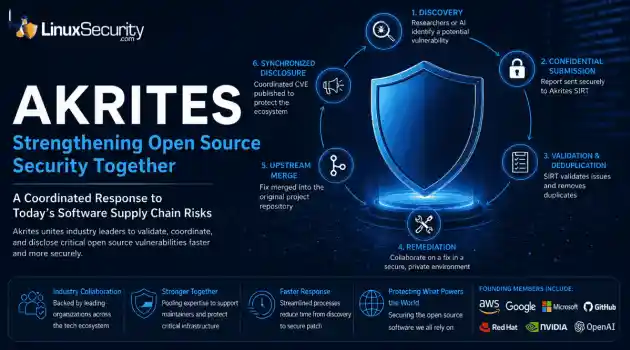
security advisory vulnerability management The Linux Foundation has officially launched Akrites , a coordinated industry initiative designed to improve how critical open source vulnerabilities are validated, coordinated, and disclosed before patches reach downstream users. Backed by a diverse coalition—including AWS, Google, Microsoft/GitHub, Red Hat, NVIDIA, and OpenAI—Akrites establishes a shared Security Incident Response Team (SIRT) to streamline the validation, remediation, and disclosure of vulnerabilities in the foundational...
Jun 29, 2026
 Refine news
X Clear Filters
Get the latest News and Insights
Get the latest Linux and open source security news straight to your inbox.
Community Poll
Is application sandboxing truly safe?
Loading...
Explore Latest Linux Security news
We found 48 articles for you...
74
 intrusion detectionsecurity risksbest practices
Intrusion Detection System Auto Response Risks and Best Practices
An intrusion detection system can identify suspicious activity. Once an alert is generated, a decision has to be made. The alert can be logged, escalated, or used to trigger some form of response. Each option carries different levels of risk, and acting too quickly can be as damaging as not acting at all. This is the space where post-detection response decisions are made. . Response feels like the logical next step. In practice, it introduces operational complexity, trust issues, and failure modes that detection alone does not. What Happens After an IDS Detects a Threat Detection has already occurred. An alert exists from intrusion detection systems (IDS) . Nothing has been blocked yet. What follows is a decision. After detection, response workflows introduce operational risk: An alert forces a choice: log it, escalate it, or respond Not every detection is accurate or actionable Automatic response is where most IDS failures occur Response is optional by design. Treating every alert as something that must trigger action is how response logic causes outages instead of stopping attacks. A common example illustrates the problem. An IDS flags unusual outbound traffic from a server late at night. No traffic has been blocked. The activity could be data exfiltration, or it could be a scheduled backup. Automatically responding could disrupt legitimate operations. Ignoring the alert could allow malicious activity to continue. This gap between seeing activity and acting on it is well established in research on post-detection response , which is treated as a distinct and complex phase rather than an extension of detection alone. What Happens After Detection: Alerting and Response Detection is already complete. Post-detection workflows begin only once an alert exists. Detection: Activity has been observed and classified. This step is finished before any response is considered. Alerting: The system records the event or notifies operators. Alerting createsvisibility. It does not mitigate risk. Response: Action may be taken automatically or deferred. This is where intrusion detection methods, after detection, introduce enforcement, and where intrusion detection's active response creates the highest potential for failure. Follow-up: Human review or downstream systems validate the alert, contain the issue, or dismiss it. Problems arise when these steps are collapsed. Treating alerting as prevention shifts decision-making into automation and removes context. This separation between visibility and mitigation is a core principle in work on intrusion response systems , where response is treated as a distinct post-detection phase rather than an extension of alerting. IDS Alerting vs Blocking: What’s the Difference? Alerting and blocking get lumped together because they sit close in the workflow. Operationally, they are distinct actions with different blast radii. Action Blast Radius Risk of Outage Best Use Case Alerting None Zero Low-confidence or high-noise signals Shunning Localized Medium Known-bad scanners or repeat sources Session Reset Session-only Low–Medium Disrupting active misuse Firewall Rule Network-wide High High-confidence, critical events Deception None Low High-value targets with unclear attribution Alerting provides visibility. Blocking intervenes. Confusing the two is how IDS deployments drift into enforcement without the controls that enforcement requires. IDS Alerting (Low Risk, High Confidence) Alerting records and surfaces activity without changing traffic flow. It is passive by design. Events are logged for review and correlation Notifications are sent to analysts or SOC tooling Alerts feed workflows without enforcing decisions This is where intrusion detection active response is least dangerous. Mistakes create noise, not outages. IDS Blocking (High Risk, High Consequence) Blocking changes system behavior. Traffic is interrupted based on the detection output. Network traffic may be dropped or redirected Access can be denied to users or services Active sessions may be terminated mid-stream At this point, intrusion detection active response becomes enforcement. Detection errors turn into user impact, broken services, or self-inflicted denial of service. Alerting scales safely. Blocking scales failure. Automated IDS Response Techniques Used After Detection Automated response is where intrusion detection's active response moves from observation into intervention. These techniques are applied only after an alert exists and are often triggered without human review. The mechanics vary. The risk profile does not. Shunning (Temporary Source Blocking) Shunning applies short-lived blocks to sources associated with an alert. Enforcement is usually limited by time, protocol, or scope, and is often carried out through external controls. The approach looks contained, but the failure modes are familiar. IP addresses are reused. Source information can be spoofed. Legitimate traffic can be caught in the same net. What starts as a narrow response can turn into collateral damage. Connection Resets and Session Termination Some systems attempt to disrupt active communication rather than block future traffic. This is typically done by forcing connection resets or tearing down sessions in progress. These actions do not stop attacks. They attempt to interrupt them. Success depends on timing, protocol behavior, and whether both endpoints honor the termination. Partial resets and failed teardowns are common, leaving attackers connected while operators assume the issue is contained. Deceptive Response (Redirection and Decoys) Deceptive response avoids blocking entirely. Instead of denying access,suspicious activity is redirected to controlled decoy environments. This approach limits the blast radius. Legitimate users are not interrupted, and production traffic is left untouched. When confidence is low, but visibility is valuable, deception allowsa response without enforcement. Deception works best when attribution is unclear, and outages are unacceptable. It trades interruption for intelligence, which is often the safer option. Firewall Integration After IDS Alerts In more aggressive setups, IDS alerts trigger rule changes in firewalls or other enforcement systems. Detection output is translated directly into access control. This is where intrusion detection active response methods carry the highest risk. Detection errors become enforcement errors. Delays, synchronization issues, and unreliable control paths all compound the problem. Once rules are pushed, rollback and accountability become operational concerns, not theoretical ones. How these response techniques are implemented depends on IDS deployment and configuration. Why Automated IDS Response Can Fail Automated response breaks when the detection output is treated as truth. Alerts are signals, not verdicts. Acting on them without friction turns uncertainty into impact. False positives stop being a tuning issue once enforcement is attached. A noisy signature that only generates alerts wastes time. The same signature tied to a response can block traffic, reset sessions, or cut off users. IDS false positives scale damage fast. In most enterprise environments, the majority of IDS alerts never represent a real compromise. When the response is automated, that noise turns into action. The cost imbalance matters. A missed alert may or may not become a breach. A self-inflicted outage causes immediate loss due to downtime, operational disruption, and SLA breaches. This asymmetry is why human review remains part of the response, even in mature programs. Spoofing pushes this further. If response logic trusts sourceattributes that can be forged, an attacker doesn’t need access to your network. They just need your IDS to react. Blocking based on spoofed packets is an easy way to cause a self-inflicted denial-of-service. Not every detection should ever trigger a response. Some signatures are meant for visibility. Others work in aggregate but fail at the event level. Ignoring trust boundaries between detection and enforcement is where intrusion detection response risks show up in production. These failure patterns are well documented in work on automated intrusion response risks , where false positives, spoofing, and over-automation consistently undermine otherwise effective detection. When IDS Should Not Respond Automatically Automatic response is not a default. In many environments, it’s the wrong move. There are clear cases where IDS should stop at alerting and hand off to a human. These are situations where confidence is low, impact is high, or attribution can’t be trusted. Automating response here increases IDS active response risks without reducing attacker capability. Common examples include: High-volume, low-confidence alerts Noise scales faster than accuracy. Automating response just amplifies false decisions. Easily spoofed traffic If source identity can’t be trusted, response logic can be turned against you. Internet-facing services with shared dependencies Blocking one signal can break unrelated users, applications, or upstream services. These cases reinforce why a human-in-the-loop still matters. Judgment, context, and awareness of downstream impact don’t compress well into rules. Newer detection models attempt to reduce noise and improve confidence, but even modern IDS approaches don’t eliminate the need for restraint. Automation may get better. The risk tradeoff doesn’t disappear. IDS vs IPS: Why Automated Response Changes the Security Model Detection and prevention are often discussed together. Operationally, they serve different roles. The distinction is straightforward: IDS provides visibility and detection IPS performs inline enforcement and prevention Automated response collapses this boundary and pulls detection closer to IDS and intrusion prevention systems behavior, even when the deployment was never designed for inline control. When an IDS starts blocking traffic or terminating sessions, it inherits enforcement risks without enforcement guarantees. Latency, fail-open behavior, and traffic integrity become concerns, even though the system was built for observation. This shift matters. Adding response to detection changes trust boundaries, failure modes, and accountability. It moves the system from visibility into control, whether that was intended or not. Operational Risks of IDS Active Response Active response adds moving parts to systems that were built to observe, not enforce. The risk isn’t theoretical. It shows up in timing, reliability, and ownership. Latency and race conditions are common. Alerts fire faster than enforcement channels can react, or arrive out of order. A response that lands late can miss the window entirely or hit the wrong target. At scale, these edge cases stop being rare. Enforcement paths also fail. Firewalls, controllers, and external systems don’t always respond when asked or respond partially. When the response is automated, there’s no pause to verify whether the action actually took effect. IDS operational risk grows when detection assumes enforcement succeeded. Change control is another pressure point. Automated actions modify live systems without the guardrails used for planned changes. Rollback is often manual, slow, or undefined. When automation fails, accountability becomes unclear, which is where intrusion detection response risks turn into organizational ones. Best Practices for Using IDS Response Safely Safe use of response starts with restraint. Alerting should be the default. Blocking should be the exception. Automation is mostdefensible when it’s limited to narrow conditions: High-confidence events with a consistent signal High-impact incidents where delay clearly increases damage Scenarios with low spoofing and attribution risk Even then, the response must be easy to disable. Systems change, traffic patterns shift, and yesterday’s safe automation can become today’s outage trigger. IDS active response best practices favor reversibility over speed. Takeaway: Detection Is Not Prevention IDS works best as a decision-support system. It provides visibility, context, and early warning. It does not provide control. Automated response trades speed for certainty. Acting faster often means acting with less context. When response logic is poorly designed, it increases risk instead of reducing it, even if detection quality is high. Detection and prevention serve different roles. Blurring them without intent or safeguards turns a visibility tool into an unreliable control point. Detection should inform decisions, not replace them. . Understand the complexities of IDS active response, risks involved and best practices to implement for effective security measures.. Intrusion Detection System, Automated Response, Security Risks, IDS Best Practices, Alert Response. . MaK Ulac
 Feb 02, 2026
•
Feb 02, 2026
• Network Security
74
 intrusion detectionbest practicessystem updates
Best Practices: Securing Linux from Bots, DDoS, and Threats
Linux systems have long been an indispensable asset to businesses and individuals alike. From running servers and cloud infrastructure to powering personal computers, Linux provides companies and individuals with unparalleled stability, flexibility, and security - making it the ideal platform for future development. . One of Linux's key advantages lies in its open-source nature. Since the code behind Linux has been made publicly accessible, developers and security professionals worldwide can use it to constantly audit, optimize, and reinforce systems for their specific needs - helping them stay ahead of everything from productivity to security issues. Linux is an attractive and secure solution, but that doesn't make it foolproof. Though its open-source nature makes Linux appealing, its vulnerability has allowed attackers to study its source code and devise exploits targeted explicitly against it. Understanding Linux Threats: How Malicious Bots Target Your System One of the most pressing threats to Linux systems today is malicious bots, which automate attacks such as brute-force login attempts, data scraping, and DDoS . Because cybercriminals have access to the same information ethical bodies do, there has been a constant race between security professionals and malicious actors ever since Linux grew popular, as both work to patch or exploit vulnerabilities as fast as possible. Because of these risks, it’s up to businesses and individuals using Linux to take a proactive approach to security, implementing all of the best practices to protect their Linux environments and ensure they can’t be successfully targeted. So, what are the best practices? Effective DDoS Prevention Strategies for Linux Systems When bots disrupt traffic, one of the best DDoS prevention strategies is combining advanced technology like AI with real-time threat analysis, creating a robust protection environment that can fight both simple and complex DDoS attacks. Looking at more straightforward attacks,security can be achieved by implementing multi-layered authentication or utilizing content delivery networks. CDNs work well to distribute traffic across multiple servers and absorb unexpected traffic spikes. But in 2025, things have become a little more complicated. Nowadays, it’s become necessary to utilize advanced software processes – processes that can analyze 5 trillion signals a day to detect and block known malicious bots and emerging threats. In the cybersecurity industry, speed is everything, and the right software will ensure you have the speed and accuracy to protect your Linux system. Boost Your Linux Security with Network Segmentation Techniques One of the big problems with cyber criminals is that they utilize lateral movement to infiltrate your network. By this, we mean if there are no barriers or segmentation between different parts of a Linux system, cybercriminals can easily access one part of the network and then most laterally or horizontally escalate their privileges. This allows them to exploit a single vulnerability to reach other critical systems across your entire network. By implementing network segmentation , however, you will mitigate this risk by dividing your network into smaller, isolated sections – or subnets. Each subnet can have its security policies and access controls, ensuring that even if a bot compromises one part of the network, reaching other areas without additional authentication is impossible. In addition to this, you should also be implementing firewalls to control inbound and outbound traffic. A well-configured firewall, for instance, can block unwanted visitors in the first place, limiting access to critical system resources and mitigating these initial attempts to exploit vulnerabilities. Stay Secure: The Importance of Regular Linux System Updates Lastly, the best practice we recommend for businesses and individuals is regularly updating their Linux systems . Even in 2025, simply keeping your Linux systems up to date is one of the mosteffective ways to protect them from malicious bots – particularly unpatched software that bots can easily leverage to compromise a network. Regularly applying security patches and updates from trusted sources ensures that your system remains strong, reliable, and consistently resistant to threats, which can ultimately minimize the risk of malicious bots exploiting any outdated components. Even without a fully-fledged IT team, this is doable. For instance, plenty of companies out there offer automated Linux patch management, helping to prevent delays in updates and ensuring they happen behind the scenes, eliminating the risk of human error and updates being missed. Implement Intrusion Detection Systems (IDS) Intrusion Detection Systems (IDSs) can help Linux administrators increase security by monitoring network traffic and system activity to detect any sign of malicious behavior or policy violations. Popular tools among Linux users for IDS use include Snort and OSSEC - two open-source network intrusion prevention systems using rule-driven language analysis of traffic while OSSEC offers a comprehensive host-based solution that integrates log analysis, integrity checking and alerting functionality - these allow administrators to quickly detect suspicious activities before any damage caused by malware infections occurs. Conduct Security Audits and Penetration Testing Conducting periodic security audits and penetration testing ensures a secure Linux environment. Security audits entail carefully reviewing your system's security posture to assess policy compliance while identifying weaknesses. Linux users can use tools like Lynis and Tiger to monitor security issues on their system, such as user accounts, software patch levels, and file permissions. Lynis is a security auditing tool, while Tiger performs in-depth system checks, including file permissions. Tiger is another Unix security checker that scans your system and provides detailed reports. Penetration testing helps identifyvulnerabilities before attackers exploit them, giving security teams time to discover them before attacks occur. Metasploit Framework and Nmap are invaluable for penetration testing on Linux systems. Metasploit provides a complete environment for writing and executing exploit code, while Nmap aids network discovery and security auditing. With these practices and tools in their arsenal, Linux users can proactively identify and mitigate security risks to safeguard themselves against potential malware attacks. Keep Learning about Best Practices for Securing Linux Systems Applying this – and the other best practices we discussed – will put you in the best position to earn all of the benefits of Linux systems without any of the negatives. We’re not saying you won’t still get targeted. Thousands of businesses and individuals are targeted every day. But through being proactive and applying these practices, you’ll be well placed to deal with the threats and keep your Linux systems operating smoothly and sufficiently. . Safeguarding Linux systems from invasive bots requires adopting best practices like regular software updates, firewalls, strong passwords, and two-factor authentication. Linux Security Practices, Malicious Bots Defense, DDoS Prevention Methods, Network Segmentation Strategies, Security Audits Tools. . MaK Ulac
Jan 31, 2025
•
Network Security

215
 best practicesdesktop securitycyber hygiene
Essential Security Guidelines for Linux Users New to the OS
You don't have to be a sysadmin to keep your Linux desktop distribution safe from cybersecurity threats. But you do have to follow a few best practices. . It is no secret that Linux is a far more secure option than Windows . From the ground up, Linux was designed to be highly secure. Since I started using Linux (back in '97), I've only had one cybersecurity threat arise, which was a rootkit on a server I inherited. Sadly, that server was so badly compromised that I had to re-install the OS and start from scratch. That was the only instance, in decades, of having to suffer the consequence of a security breach. Otherwise, it's been smooth sailing. You, too, can enjoy the heightened security that comes with the Linux OS. However, you shouldn't just assume that you can install Linux and never worry about security again. My take on security is if a device is connected to a network, it's vulnerable. To that end, I thought I'd share some advice that even those who are brand new to Linux can easily follow. Don't worry, I'm not going to have you editing init scripts, issuing complicated iptables commands, or installing software like fail2ban. Instead, this is all about what new users can do to help prevent malware, ransomware, or other attacks. . Explore basic techniques to bolster your Linux desktop defenses, ensuring protection against a range of online dangers.. Linux Security Best Practices, Desktop Security Tips, Cyber Hygiene for Users. . Brittany Day
Oct 09, 2023
•
Desktop Security
210
 security advisorycyber threatbest practices
Understanding WordPress Vulnerabilities and Protection Techniques
Thank you to Ruth Webb for contributing this article. WordPress stands tall as one of the most popular content management systems (CMS), empowering millions of websites worldwide in the ever-evolving digital landscape. Its flexibility and user-friendliness have made it a top choice for bloggers, businesses, and individuals. However, with great popularity comes great responsibility, and WordPress, like any other platform, is not immune to security vulnerabilities. . This article delves into the latest WordPress vulnerabilities, equipping website owners, developers, and administrators with the knowledge to fortify their digital fortresses and fend off potential threats. We will explore common vulnerabilities and best practices to safeguard your WordPress website from cyber attacks. Understanding WordPress Vulnerabilities WordPress vulnerabilities often arise from coding errors, plugin weaknesses, theme vulnerabilities, or outdated software. Hackers exploit these weaknesses to gain unauthorized access, deface websites, steal sensitive data, or launch more sinister attacks. Being aware of these vulnerabilities is crucial for maintaining a secure online presence. Top WordPress Vulnerabilities Outdated Software: Neglecting updates for your WordPress core, themes, and plugins can expose your website to known vulnerabilities. Regularly update your software to patch security holes. Weak Passwords: Using weak passwords or not implementing two-factor authentication can make it easier for hackers to gain unauthorized access to your website's admin area. Insecure Plugins and Themes: Third-party plugins and themes may have security flaws. Only download and install them from reputable sources, and keep them up to date. SQL Injection (SQLi): Poorly sanitized inputs in WordPress forms or plugins can lead to SQL injection attacks, where attackers manipulate databases and gain control. Cross-Site Scripting (XSS): XSS vulnerabilitiesenable attackers to inject malicious scripts into your website, potentially compromising user data or spreading malware. Brute Force Attacks: Hackers use automated tools to systematically try various login combinations until they find the right one. Implement login attempt limitations to mitigate brute force attacks. File Upload Vulnerabilities: Insecure file upload forms can allow hackers to upload malicious files, leading to devastating consequences. Best Practices to Strengthen WordPress Security Update, Update, Update: Regularly update WordPress core, themes, and plugins to fortify your site against known vulnerabilities. Secure Passwords: Use strong, unique passwords and employ two-factor authentication for additional protection. Vet Third-Party Plugins and Themes: Verify the credibility of plugins and themes before installation, and uninstall any unused or outdated ones. Firewalls and Security Plugins: Implement firewalls and security plugins specifically designed for WordPress to ward off potential attacks. Back-Up Regularly: Frequently back up your website's data and files, allowing for a quick recovery in case of a breach. Limit Login Attempts: Set up login attempt restrictions to thwart brute-force attacks. Implement Content Security Policy (CSP): CSP headers help protect your site from XSS attacks. Final Thoughts on WordPress Vulnerabilities In a world where the digital realm is ever-expanding, WordPress websites must stand firm against the looming threat of cyber attacks. By understanding and proactively addressing the latest WordPress vulnerabilities, website owners can ensure their online presence remains a safe haven for users. Remember, securing your WordPress website is an ongoing process that requires vigilance and dedication. Embrace best practices, stay informed about emerging threats, and prioritize security. By doing so, you can confidently navigate the digital landscape, knowing yourWordPress fortress is impenetrable. . Delve into recent WordPress security weaknesses and learn effective strategies to protect your website from online threats.. wordpress security,best practices,website vulnerabilities. Ruth Webb. Brittany Day
Jul 28, 2023
•
Security Vulnerabilities
82
 security guidancebest practicessoftware security
Guide Overview: NSA And CISA Supply Chain Security Recommendations
The NSA and CISA released the guide “ Securing the Software Supply Chain: Recommended Practices Guide for Developers ” last month and while David Wheeler, the director of open-source supply chain security at the Linux Foundation and OpenSS, welcomes it, he said there are some questionable requirements. . The guide covers aspects of security such as how to develop secure code, how to verify third-party components, and how to harden the build environment, among other things. It’s also part of the government’s effort to bolster supply chain security stemming from last year’s Executive Order, which aims to curb the 650% growth in supply chain attacks, according to Sonatype’s 2021 State of the Software Supply Chain. The guide encourages developers to take regular and relevant security training and that they should be evaluated periodically, at least annually. The security training for the development team is ideally conducted by a centralized, expert security team that can help product teams grow their expertise in secure development. . The framework addresses elements of safety such as software crafting, external assessments, and educational resources for programmers.. Software Supply Chain,Cybersecurity Best Practices,Developer Security Training. . Brittany Day
Oct 22, 2022
•
Government
209
system managementbest practicesLinux best practicesEffective Alternatives to Deprecated Linux Commands for Better Management
Believe it or not, you might be using a deprecated Linux command. It’s not really your fault. You are either habitual of using those commands or learned them through old, obsolete tutorials on the web. . This is especially true for networking commands as several of them have been replaced or going to be replaced with newer commands. In this article, I am going to list a few such Linux commands. You may still find a few of them in your distribution. It’s possible that your distribution is still providing it for backward compatibility or has created a new implementation underneath or plans to remove it in the newer versions. . Stay current with Linux system management by avoiding outdated commands. Learn their modern alternatives to enhance efficiency and functionality. Linux Commands, Command Alternatives, Networking Commands, System Management, Command Best Practices. . Brittany Day
Jul 04, 2022
•
Security Trends
212
 security guidancebest practicescloud security
Kubernetes Hardening Guidance From NSA And CISA For Cloud Security
Hardening guidance from the NSA and CISA seeks to educate IT administrators about cloud security risks and best practices for implementing and maintaining Kubernetes. . Earlier this week, the US National Security Agency (NSA) and the Cybersecurity and Infrastructure Security Agency (CISA) issued a joint document entitled Kubernetes Hardening Guidance. Kubernetes is an open-source orchestration system that relies on containers to automate the deployment, scaling and management of applications, usually in a cloud environment. According to the most recent State of Kubernetes Security report by RedHat, more than half the security professionals surveyed said they delayed deploying Kubernetes applications into production due to security. . The NIST and DOC have published updated Docker security best practices to assist system operators in reducing vulnerabilities in cloud environments efficiently.. Kubernetes Hardening, Cloud Security Practices, NSA Guidance, CISA Security Advisory. . Brittany Day
Aug 05, 2021
•
Cloud Security
76
 software practicesbest practicesopen source security
Open Source Security Foundation Drives Initiatives For Better Practices
The newly formed Open Source Security Foundation includes technology giants such as Google, Intel, Microsoft, IBM, among others. The organization aims to improve the security of OSS through the creation of "targeted initiatives," streamlining recommended best practices, and more. . Open-source code has become integral for global organizations across. In 2019, Red Hat's initial State of Enterprise Open Source survey found that 69% of IT professionals surveyed believed open-source software to be very important or extremely important. In the 2020 Red Hat survey , more than three-quarters (77%) of IT leaders believed the use of open source solutions in the enterprise will continue to see growth. Today, the creation of the Open Source Security Foundation (OpenSSF). The newly formed organization is intended to unite leaders across industries to enhance open-source software (OSS) security. To do so, this multi-industry collaborative will focus on creating "targeted initiatives," streamlining recommended best practices, and more. Overall, the partnership involves efforts from major players in the tech industry including IBM, Google, GitHub, Microsoft, Okta, Intel, and others. . The recently established Collaborative Software Safety Alliance seeks to improve application security via cutting-edge solutions and proven methodologies.. Open Source Security, Software Foundation, Security Initiatives, Technology Collaboration, Best Practices. . Brittany Day
Aug 04, 2020
•
Organizations/Events

Get the latest News and Insights
Get the latest Linux and open source security news straight to your inbox.
Community Poll
Is application sandboxing truly safe?
Search Topics
Powered By

Linux Security - Your source for Top Linux News, Advisories, HOWTOs and Feature Releases
QUICK LINKS
subscribe to newsletters!
Like staying secure? So do we.
Sign up for updates, tips, and alerts!
Discover faster search, smarter navigation, and deeper Linux security insights. Read More