Overly broad permissions can turn one compromised account into a much larger security problem. Learn how to reduce unnecessary access, review privileges, and apply least privilege across modern Linux systems. Review Linux Privileges×


Stay Ahead With Linux Security Features

 identity management security tactics
 For years, we secured our Linux infrastructure by building walls: VPCs, security groups, and hardened SSH configurations. We treated the cloud like a virtual data center, assuming that if we kept the "bad guys" out of the network, our workloads were safe. . That model is no longer sufficient. Today, one of the most common paths from an initial compromise to a major cloud breach is the identity assigned to your Linux workload. When an attacker gains code execution on a Linux instance—through a...
 Jul 17, 2026
 security practices patch management
 Most of us don't hear about a kernel vulnerability until a CVE lands in our inbox or the vulnerability scanner starts complaining. By then, the patch isn't new anymore. Kernel developers may have been passing it around for review, arguing over the implementation, or revising it for days before anyone outside that community noticed it. None of those discussions are secret. They're sitting in mailing list archives, Git commits, and patch reviews where they've been the whole time. The strange...
Jul 14, 2026
 Linux security cyber attacks
 Every Linux server in your fleet produces thousands of events every minute. From journald logs and auditd records to kernel-level eBPF hooks, your systems are constantly talking. Most of that noise is just the mundane churn of system services, CI/CD runners, or routine administrative automation. But among that noise, an attacker might be establishing a foothold, moving laterally, or setting up persistence. The challenge for any security team is: how do you separate the routine from the...
Jul 13, 2026
 open-source infrastructure risk
 Security scanners flag exposed API keys in public repositories every day. The initial response is usually predictable: delete the commit, revoke the credential, and move on. That’s a mistake. . In a real Linux environment, an API key never stays in one place. By the time it hits a public repo, it’s already everywhere. It’s in the CI/CD pipeline. It’s in your container registry. It’s in the build logs. It’s in the backups. Git makes this worse because the history never dies. Deleting a file in...
Jul 11, 2026
 open-source rootkit
 Most of us think of Linux rootkits as ancient history—the stuff of 90s hacking forums and clunky malware that would crash your system if you looked at it the wrong way. But if you think they’ve gone away, you’re mistaken. They’ve just gotten smarter. . Modern attackers aren't using the noisy tools of the past. Today’s threats are surgical. Many of today’s most advanced Linux rootkits operate at the kernel level or abuse legitimate system features to blend in with normal traffic. They’re...
Jul 09, 2026
 Refine features
X Clear Filters
Get the latest News and Insights
Get the latest Linux and open source security news straight to your inbox.
Community Poll
Should Linux servers automatically install security updates?
Loading...
Explore Latest Linux Security features
We found 9 articles for you...
102
 open-sourcesecurity risksautomation
Microsoft Just Showed How Easily Trusted Software Pipelines Can Be Abused
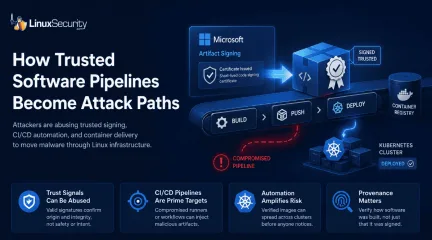
Microsoft announced this week that it disrupted a malware-signing operation that helped cybercriminals distribute ransomware disguised as legitimate software. According to the company, a threat actor called Fox Tempest abused Microsoft Artifact Signing to generate short-lived code-signing certificates for malicious payloads. . The operation highlights a growing problem across modern Linux infrastructure. Signed packages, trusted repositories, container registries, and automated CI/CD pipelines now move software through production environments with almost no friction. If an artifact is signed and passes verification checks, most systems assume it belongs there. Attackers are learning how to abuse that trust directly. Instead of bypassing security controls, they are starting to move through the same trusted software channels administrators rely on every day. Modern Linux Infrastructure Was Built to Trust Signed Software Modern Linux ecosystems run on layers of cryptographic trust. RPM and DEB packages rely on GPG verification. OCI image signing is now common across Kubernetes environments. GitHub Actions, GitLab CI, and Jenkins pipelines automatically build and publish software into production registries with very little manual review once workflows are established. Most of the time, this works exactly as intended. The problem is that signatures only verify origin and integrity. They do not guarantee that software is safe, that a build pipeline was uncompromised, or that a maintainer account upstream was not hijacked. In many environments, malicious code no longer needs to break into production directly. It only needs to arrive through infrastructure that the organization already trusts. That shift matters because Linux environments increasingly deploy software automatically. GitOps workflows, Kubernetes image verification policies, OCI registries, and CI/CD automation were all designed to remove friction from delivery pipelines. Attackers have started treating that automation itselfas the attack surface. Attackers Are Weaponizing Trusted Software Pipelines The Fox Tempest operation arrives alongside a growing wave of software supply chain security incidents targeting ecosystems that Linux teams use every day. Threat actors continue poisoning npm and PyPI packages, compromising developer environments, abusing CI/CD infrastructure , and hijacking dependencies trusted by thousands of downstream systems. Recent campaigns tied to malicious PyPI packages, the Shai-Hulud npm compromise, and repository hijacks involving VS Code extensions all followed the same pattern. Attackers inserted malicious code into trusted delivery paths and let automation handle the distribution. These attacks succeed because modern infrastructure trusts software automatically . If a package is signed or published through a recognized pipeline, many security controls treat it as legitimate before any deeper inspection occurs. Attackers understand this now. Instead of trying to evade trust systems, they are beginning to weaponize them. Why Kubernetes and CI/CD Pipelines Became Supply Chain Attack Paths Containerized infrastructure sped the entire cycle up. CI/CD pipelines now push workloads directly into Kubernetes clusters, cloud registries, and GitOps workflows with barely any human interaction once deployment logic is wired together. Signed OCI images move between development, staging, and production continuously. In many environments, nobody touches the release path unless something fails. The issue is that container signing only proves identity. A Sigstore Cosign signature confirms who signed the image . It does not prove the container was built securely or that the contents are trustworthy. Vulnerable dependencies, exposed secrets, poisoned build artifacts, and malicious packages can still move through the pipeline fully signed and fully verified. A compromised GitHub Action inside a production CI/CD pipeline could inject cloud credentials into a container layer during build time,sign the final image automatically, and push it into an internal registry trusted by Kubernetes admission policies. From there, GitOps automation may deploy the workload across clusters before anyone realizes the pipeline itself was compromised. That is what modern software supply chain attacks actually look like operationally. The pipeline stays green. The deployment succeeds. Kubernetes pulls and runs the image exactly the way it was designed to. Production just inherits the compromise automatically. Why SBOMs Are Not Enough Software bills of materials became the industry's answer to visibility problems. SBOMs help organizations track dependencies inside applications and containers, which is useful, especially in large Kubernetes environments where dependency sprawl gets out of control quickly. But SBOMs only describe contents. They do not prove build provenance, software attestation, or CI/CD pipeline integrity. An SBOM can tell you a malicious package exists inside an image after the fact. It cannot prove whether the build runner was compromised, whether a maintainer account upstream was hijacked, or whether a trusted release workflow injected something malicious during artifact generation. Verification without context creates blind trust. That is increasingly where attackers operate. CI/CD Pipelines Are Now Prime Targets for Supply Chain Attacks Build infrastructure quietly became one of the most sensitive attack surfaces in modern Linux environments. GitHub Actions runners, GitLab pipelines, Jenkins servers, artifact signing systems, and Kubernetes deployment automation often hold privileged access across entire organizations. Compromising one part of the release chain can allow attackers to distribute malware through systems already trusted by production workloads. Attackers no longer need to bypass security controls if they can become part of the trusted software delivery process itself. This is why building provenance and software attestation frameworks like SLSAis getting more attention. Organizations are realizing that verifying software signatures alone is no longer enough. They also need to verify how the software was built, where it originated, and whether the release workflow itself remained trustworthy. How Linux Teams Should Secure Their Software Pipelines The answer is not abandoning software signing or automated deployments. Linux ecosystems still depend on them. But organizations need to stop treating “signed and verified” as the end of the security conversation. Teams running Kubernetes should start enforcing Kubernetes image verification and OCI image signing policies at admission time instead of relying solely on registry trust. Tools like Kyverno and OPA Gatekeeper can block unsigned or untrusted container images before they ever reach production clusters. CI/CD pipeline security also needs stronger isolation. GitHub Actions runners and GitLab CI systems should be treated like production infrastructure, not disposable automation. Immutable runners, short-lived credentials, restricted secrets access, and hardened build environments reduce the blast radius when pipelines get compromised. Container scanning needs to continue after deployment as well. Trivy and Grype help detect vulnerable packages during build stages, but runtime visibility matters just as much. Falco can detect suspicious process execution, shell access, privilege escalation attempts, or unexpected network activity inside running Kubernetes containers. Linux teams should also verify software provenance directly. Sigstore Cosign, in-toto attestations, and the SLSA framework provide ways to validate how software was built, where artifacts originated, and whether release workflows were tampered with somewhere inside the CI/CD pipeline. Most importantly, organizations need to reduce automatic trust wherever possible. Signed software should still be inspected. Build systems should still be monitored. Deployment pipelines should still be treated as attack surfaces. Because attackers already are. The Dangerous Assumption Linux Needs to Rethink For years, signatures served as one of the strongest trust signals in software distribution. If code was signed, verified, and distributed through a recognized repository or trusted OCI registry, many organizations assumed it was safe enough to deploy automatically. Linux infrastructure was built around that assumption. Attackers are increasingly learning how to hide inside it. The next major supply-chain compromise probably will not arrive as an obviously malicious binary or a noisy intrusion attempt. It will arrive the same way trusted software always does: signed, verified, pushed through CI/CD automation, and deployed into production by infrastructure designed to trust it. Related Reading Linux Supply Chain Attacks Threaten DevOps Teams and Security Why CI/CD Pipelines Became Targets in Software Supply Chain Attacks RubyGems Attack Highlights Open Source Supply Chain Risks for Linux Teams The Next Wave of Supply Chain Attacks: NPM, PyPI, and Docker Hub Incidents Set the Stage for 2026 Why Software Supply Chain Security Matters in Linux Systems Understanding Security Threats In Open-Source Software Supply Chains . The operation highlights a growing problem across modern Linux infrastructure. Signed packages, trus. microsoft, announced, disrupted, malware-signing, operation, helped, cybercrimina. . MaK Ulac
 May 20, 2026
•
May 20, 2026
•
102
 system managementLinux securityopen-source
Exploring AI Agents' Influence on Linux Security Threats and Administration
AI didn’t invent hacking, and it didn’t make attackers smarter. It removed friction. Tasks that once required patience, focus, and a fair amount of context now run unattended, looping quietly until something gives or someone notices. . Most AI agents run on Linux. Most of the infrastructure they interact with runs on Linux, too. CI runners, container platforms, build systems, cloud control planes. You start to see the pattern once you trace where agent frameworks live and what they need to touch to be useful. The same agent models show up in red team automation, blue team hygiene checks, and criminal tradecraft. The mechanics don’t change much between those uses. The intent does, and intent is rarely obvious in logs or telemetry when everything looks like normal administrative activity. In this article, we’ll look into what AI agents have changed for hacking, where they still fall short, and why Linux and open source sit at the center of both the opportunity and the risk. This isn’t a prediction about some distant future. It’s an attempt to make sense of the tools already in use, and what they mean for admins responsible for securing Linux systems today. Why Do AI Agents Change the Threat Model? AI agents don’t replace attackers. They remove delay and fatigue. Once you hand an agent a goal, it doesn’t wait for coffee, context switching, or a free afternoon. It keeps going, even when nothing works the first time. That changes the shape of attacks. Instead of a scan here and an exploit attempt there, you get continuous recon, execution, and retry loops that run until they’re stopped or succeed. In Linux environments, where misconfigurations tend to be small and layered, persistence matters more than cleverness. Linux admins tend to feel this shift first. Most agent infrastructure runs on Linux, and most of the services agents probe or control do as well. Containers, SSH access , internal APIs, build systems. The result is activity that looks familiar at a glance, butbehaves differently over time, steady, repetitive, and unconcerned with how long it takes. What Is an AI Agent? An AI agent isn’t just a script with better syntax. It’s a task-driven system that can plan a sequence of actions, execute them, look at the output, and adjust before moving on. That feedback loop is the important part, not the language model behind it. Most agents lean heavily on existing Linux and open-source tooling. Shell commands, API clients, scanners, cloud CLIs. There’s usually nothing novel in the tools themselves, which is why their activity blends so easily into normal administrative workflows. The difference shows up mid-run. A script follows a path until it fails and then stops. An AI agent notices the failure, tries another option, changes parameters, or pivots to a related target. Over time, that adaptability turns routine automation into something closer to an operator that doesn’t need to log off. ARTEMIS: A Neutral Example of AI Hacking ARTEMIS wasn’t built as an attack framework. It’s a general-purpose AI agent designed to break down objectives, call tools, and iterate based on what comes back. In normal use, that means automating complex workflows that would otherwise take a human hours to coordinate. A simple example makes this clearer. Given an objective to assess a Linux service, ARTEMIS might start by enumerating exposed endpoints, then pivot to pulling related configuration files or repository metadata when something looks misaligned. If a scan returns limited results, it adjusts. Different ports, different credentials, a related host. Each result feeds the next action, without a human deciding every step. From a security perspective, it’s useful precisely because nothing about it is malicious by default. Change the objective, point it at exposed Linux services, public repositories, or loosely protected APIs, and the behavior shifts without any change to the core system. Recon becomes just another task. So does persistence. That’swhat makes intent hard to reason about. The same ARTEMIS run can look like legitimate administration, testing, or maintenance in logs and telemetry. Code doesn’t carry motive, and AI agents don’t announce why they were told to act. By the time behavior stands out, the work is often already done. What Do AI Agents Give Hackers? The biggest advantage AI agents bring to hacking is speed, but not the obvious kind. It’s not about one exploit running faster. It’s about many small actions running at the same time, without pauses, across systems that were never meant to be examined in parallel. Where that speed shows up first: Recon across services, repositories, containers, and configuration files happening simultaneously Correlating small signals that would normally be ignored or reviewed later Revisiting the same targets repeatedly without fatigue or loss of focus In Linux environments, exposure often lives in the gaps between tools and teams. That consistency matters. An AI agent doesn’t get distracted or decide something is probably fine and move on. Agents also execute long attack chains reliably. They don’t skip steps or lose patience halfway through a process. For less experienced attackers, that reliability is the real shift. Syntax, sequencing, and tool choice get abstracted away, leaving the human to define an outcome rather than understand every command that leads there. Where Do AI Agents Still Struggle? For all their persistence, AI agents are bad at understanding history. They see what’s there now, not why it exists. In Linux environments shaped by years of migrations, quick fixes, and half-finished projects, that gap shows up quickly. They struggle most with things that only make sense to the people who lived through them: Bespoke workflows and hand-rolled scripts with no documentation Systems whose behavior reflects past incidents or temporary workarounds Inconsistent configurations that were never meant to be permanent Agents assume a level of consistency that rarely exists. They also trust tool output more than they should, especially when permissions or ownership don’t tell the full story. That overreliance on current state leads to quiet mistakes. Misread permissions. Incorrect assumptions about control. False confidence that a path is closed when it’s merely hidden. Humans still catch those faster, mostly because they remember breaking them before. Linux and Open Source as the Amplifier of AI Hacking AI hacking scales because Linux and open source make it easy to build on existing work. Most AI agent frameworks are open. So are the scanners, API clients, and orchestration tools they rely on. An attacker doesn’t need to invent new techniques when the building blocks are already there. The same tools Linux admins use to manage systems show up in agent workflows. SSH libraries, container runtimes, package managers, cloud CLIs. Used one way, they keep infrastructure running. They enumerate, pivot, and persist. From the outside, the commands often look identical. That transparency cuts both ways. Defenders can read the same code, understand the same execution paths, and anticipate how agents behave. In practice, many don’t. Linux and open source don’t create the risk, but they do make it easier for AI agents to move quickly once someone points them in the wrong direction. Ethical vs Malicious Use in Practice In practice, AI agents don’t announce whether they’re being helpful or harmful. The same mechanics show up on both sides, which is why this line keeps getting blurred in real environments rather than in theory. Red teams use AI agents to increase coverage. They let an agent enumerate systems, test configurations, and follow up on weak signals without burning human time. Blue teams are starting to do the same thing for drift detection, exposed secrets, and forgotten services, especially in large Linux estates where manual review never really scales. Criminal use lookssimilar on the surface, which is the problem. When everything runs through standard tooling, intent doesn’t show up cleanly in logs. Common patterns across all three uses include: Automated discovery of hosts, services, and trust relationships Repeated low-impact actions that test assumptions over time Use of standard Linux administration tools rather than custom malware From an operational view, logs and telemetry rarely separate these cases on their own. Context matters, and context usually lives outside the system doing the logging. AI Hacking Trends Emerging Right Now The most noticeable trend is where AI agents spend their time. Instead of hammering production systems first, many start by pulling at public and semi-public artifacts. Git repositories, CI output, container registries, and documentation pages tend to leak just enough detail to make the next step easier. Post-access automation is growing as well. Once an AI agent gets a foothold, it doesn’t rush. It enumerates. It maps permissions. It tests escalation paths slowly and repeatedly, blending into normal Linux activity in a way that’s hard to flag without baseline behavior. Another shift is away from single, critical exploits. AI hacking favors chaining small weaknesses together. A permissive repo here, a stale credential there, a misconfigured service that was never meant to be public. None of these matters much alone. Together, they’re often enough. What the Next Phase of AI Hacking Likely Looks Like The next change isn’t about smarter exploits. It’s about memory. AI agents are starting to persist context across runs, learning how an environment behaves instead of treating every scan like a fresh start. That’s when activity gets quieter. Cost plays into this as well. As agent frameworks get cheaper to run, volume goes up first. More attempts. More noise. Over time, that noise drops as operators tune objectives and filters, leaving behind fewer actions that look increasinglyintentional. The hardest part to spot will be familiarity. Future AI hacking activity is likely to resemble normal Linux administration, using the same tools, the same access paths, and the same schedules. The difference won’t be what runs, but why it runs and how often it comes back. The Broader Takeaway: What Linux Security Admins Should Keep in Mind About AI Hacking AI agents don’t require a new security model as much as they expose weak ones. Most of what they exploit already exists. Forgotten services, permissive defaults, scripts no one owns anymore. Automation just reaches those gaps faster and more consistently. Chasing AI-specific indicators tends to miss the point. What matters is behavior over time. Repetition, timing, and actions that don’t quite line up with human workflows. Linux environments generate enough noise that these patterns are easy to ignore until you start looking for them deliberately. The practical takeaway is simple and uncomfortable. Any task you can automate, someone else already has. That doesn’t mean locking everything down to the point of paralysis. It means tightening fundamentals, understanding your own automation, and assuming that persistence, not sophistication, is what most AI hacking relies on today. . Explore how AI agents impact hacking in Linux environments and what it means for system security.. AI agents, Linux security, automation, threat model, open source. . Brittany Day
Dec 29, 2025
•

102
 data protectionbackup solutionautomation
Top Backup Tools for Linux: Prevent Data Loss from Ransomware Attacks
Linux ransomware is on the rise , and an attack on your system could result in the loss of critical data and significant downtime - if important files have not been backed up frequently and stored securely. . The Linux ransomware attacks rise, which can threaten to compromise your data security and cause operational downtime and data loss. To prevent this, a backup strategy becomes necessary. This article outlines reliable techniques to securely back up your Linux systems to guarantee that your data remains intact even in the face of a cyber attack. We present six top backup software for Linux desktops, servers, and enterprise systems. These tools allow you to automate backups, minimize risks, and protect information. These solutions offer convenience, guarantee the security of your backups, and enable swift recovery and continuity in your operations. In this article, you'll learn about our six favorite Linux backup solutions and how they compare: Timeshift Kbackup Rsync Duplicati Amanda Bacula Top Linux Backup Tools Comparison Table What Is Data Backup & How Can It Mitigate the Risk of Data Loss from a Ransomware Attack? Data backup involves copying critical files to secure and high-performing external systems to prevent a single point of failure (SPOF). A recent backup survey highlights the importance of backups; it found that while 78% of users back up their data, only 33% do so regularly. So, backing up your desktop and server regularly is critical to protect against data loss during a ransomware attack. You also should check that these files are not corrupted and that they are stored securely. This guarantees that your backups are immediately available for restoration, which allows quick recovery and minimal downtime after an attack. However, while the digital cloud is a popular storage option, as administrators can automate the backup process, statistics indicate that about 50% of users do not use physical backups for their stored data. Consequently, it is advisable to complement cloud backupswith physical storage solutions to improve security and provide data protection. It should be noted that if users implement a proactive, defense-in-depth security strategy and adhere to security best practices, they can greatly reduce their ransomware risk—but cannot eliminate it entirely. Users must maintain up-to-date servers and endpoints, implement the principle of least privilege for user accounts, closely monitor network activity and system logs, and audit systems regularly. Thus, a backup plan should be considered a critical “layer” of any successful cybersecurity strategy. 4 Top Tips for Secure Data Backup While 85% of ransomware attacks still target Windows systems, Linux is becoming an increasingly popular target due to the high value of the devices it powers, such as enterprise and government servers, web services, and large databases. Organizations capable of paying ransoms to restore operations and data are especially at risk. These attacks, which often use advanced encryption and extortion tactics, can lead to serious consequences such as data loss, damage to reputation, high recovery costs, and extensive downtime. Data backup remains the best defense against data loss should you suffer a ransomware attack. 56% of organizations recover their data from backups, compared to 26% that pay the ransom. So why are ransomware victims often unable to restore their systems from their backups? Nearly every admin and organization has backups; however, certain principles must be followed to implement a secure, successful data backup strategy. Data should be backed up frequently to meet recovery point objectives and keep potential data loss acceptable. Recovery time objectives should be established based on an acceptable period of downtime, as restore time will often determine the true impact of a ransomware attack. We recommend using folder comparison and synchronization software like FreeFileSync to resolve the differences between a source and a target folder so that only the minimum amount of datanecessary is transferred. Ransomware attacks can spread across networks, affecting backups as well. To protect backups, use a backup solution that creates unchangeable snapshots and keeps them in a read-only state to prevent encryption by ransomware. Alternatively, an “air-gapped” backup system, isolated from the rest of the IT environment, can also protect backups from malware. However, this method may be costly and complex, and there’s a risk that backups may capture the ransomware if a backup occurs before an attack is detected. Therefore, it’s necessary to check backups regularly to confirm they are not corrupted. Diversification is also a key consideration when it comes to creating and implementing a successful data backup strategy. Admins and organizations are quickly learning the importance of defense-in-depth in any type of security. Redundancy and resilience of backups can be accomplished with a “three-two-one” backup strategy, which guarantees that three copies of data are kept, with two on different media formats, one of which is off-site. This strategy makes it highly difficult for a malicious actor to encrypt and lock up every copy of their target’s data. Finally, you must restore and recover data from backups with minimal downtime in the event of a ransomware attack. This technical and time-consuming process requires that sysadmins and IT teams practice regularly to identify and improve any potential weaknesses. Luckily, the cloud facilitates easy recovery testing and makes data readily accessible. Bonus: Comparative Table of The Best Linux Backup Tools This article is extensive and contains a wealth of information. To assist you in navigating through the Linux backup software we have reviewed, we have compiled a general comparative table. We understand the importance of clear, accessible information, and this table aims to provide concise comparisons. Rsync Duplicati Timeshift Kbackup Amanda Bacula Easy to set up & configure? Yes (for simpleinstances) Yes Yes Yes Yes No Full client-side encryption? No Yes Yes Yes Yes Yes Supports file compression? Yes Yes Yes Yes Yes Yes Creates automated backups? Yes (with shell scripting) Yes Yes Yes Yes Yes Supports full backups? No Yes Yes Yes Yes Yes Supports incremental backups? Yes Yes Yes Yes Yes Yes Command-Line? Yes Yes Yes Yes Yes Yes GUI? Yes (Grsync) Yes Yes Yes Yes Yes Continuous data protection? No Yes Yes No No Yes Best suited for: Servers Desktops & servers Desktops Desktops Enterprise servers Enterprise servers Open-source version available? Yes Yes Yes Yes Yes Yes 6 Best Linux Backup Tools to Mitigate Data Loss Now that you understand the importance of data backups, we will analyze six top backup solutions for Linux. We provide a detailed overview of each tool, including general descriptions and highlighting their advantages. This analysis will help you compare the features and benefits of each tool. We recommend that you review all the tools sequentially, assess their capabilities, and then select the one that best suits your needs. Timeshift (for Desktops) Timeshift is one of the most popular Linux desktop backup tools, and LinuxSecurity users and team members rave about it. It is quick and easy to use, comes pre-installed with many popular Linux distros, and is available in the distribution repository. Timeshift supports Btrfs, a modern copy-on-write filesystem that is out of the box. Its Setup Wizard makes configuration simple, and setting up a backup configuration in Timeshift takes less than a minute. Additionally, Timeshift for Linux offers functionality similar to the System Restore feature in Windows and the Time Machine tool in MacOS. To protect systems, it takes incremental snapshots of the filesystem at regular intervals. These snapshots can later be restored to reverse any changes made to the system. It is important that Timeshift is designed to protect only system files and settings. User files such as documents, images, and music are notprotected. ✅ Why do we love Timeshift? Timeshift is ideally suited for backing up Linux desktop environments. The tool is fast and easy to navigate, which makes it accessible to users of all skill levels. Timeshift supports the Btrfs filesystem right out of the box, which improves the security and reliability of backups. Setup Wizard makes setup and configuration simple and quick. Users can create system snapshots at any moment ( Timeshift allows for multiple levels of snapshots, including Hourly, Daily, Weekly, Monthly, and Boot). 📆 Last update: The last update to Timeshift was made three years ago. 📥 Install Timeshift: For detailed instructions on how to install Timeshift, please visit the Timeshift GitHub page. These guidelines will help you set up and start using Timeshift on your system. Kbackup (for Desktops) Kbackup is a user-friendly, highly portable backup tool for both Linux and Unix that enables users to create automated, unattended backups. It creates archives, compresses them using the tar and gzip utilities, and then creates backups. Kbackup is highly reliable and supports full or incremental backups. It also offers encryption and double buffering for added security, support for tape drives, floppies, or removable media, and remote backup across networks. Kbackup has a menu-driven interface and a Command Line interface that can be included in automated scripts. ✅ Why do we love Kbackup? The software provides high reliability for securely storing data. It is designed to perform automated backups, which makes the process of data protection easier. The software supports full and incremental backups for flexibility, depending on your data protection needs. It can handle backups on various storage media, including tape drives and removable media, and also supports remote backups over networks. Features such as compression, encryption, and double buffering are available to enhance the security and efficiency of backups. The software has a user-friendly menu-driven interface and acommand line interface, ideal for integration into automated scripts. It can be easily adapted across different environments. 📆 Last update: January 9th, 2025. 📥 Install Kbackup: Visit the project’s GitHub page for detailed installation instructions. Rsync (for Desktops & Servers) Rsync is a simple but powerful utility that comes pre-installed with many popular Linux distros or is available in the repository. It is memory-friendly and can do anything a file manager can do from the Command Line, using a user-friendly command syntax. For instance, you can synchronize two directories by deleting existing files from the destination directory and copying all files from the backup directory using the command rsync -av --delete /backup/ /destination/. While rsync isn’t strictly a backup application, it’s the foundation for many of them. It’s quite possibly the most versatile file transfer application available. It was designed years ago to synchronize two files efficiently. But now, it has evolved into a powerful command-line tool to maintain files across different systems. Rsync supports any Cloud storage destination available online, including Google Cloud and an Amazon AWS instance. You can transfer backup files to remote storage using rsync with SSH ( from most modern desktops, this will automatically use SSH, but if it doesn’t, you can manually tunnel the file transfer through SSH). 🔴 Note: Rsync also has a GUI called Grsync that can be installed from your distro repository. ✅ Why do we love Rsync? These tools are ideal for backing up both Linux desktops and servers, which provide complete data protection across your entire infrastructure. Users can perform any action that a file manager can from the Command Line with a user-friendly command syntax. The tool supports incremental backups, which facilitates easy adaptation to an increased backup schedule and minimizes the storage footprint. It offers the option to tunnel through SSH, which adds an extra layer of security to protectdata during transfer. This tool supports both local and remote backups. It preserves file permissions and ownership settings during the backup process. Updates the file system and the directory tree after an operation that backs up new files on an already-established backup directory structure. They support both anonymous and authenticated rsync daemons, which is ideal for mirroring data across different locations. 📆 Last update: April 6th, 2024. 📥 Install Rsync: To install Rsync, you can find complete installation instructions on the Rsync GitHub page. Duplicati (for Desktops & Servers) Duplicati is a free and open-source Linux backup software that supports many popular third-party storage providers, including Google Drive, Dropbox, OneDrive, Amazon S3, and Google Cloud. It also stores backups on various remote file servers using SSH, making it easy to use an off-site destination far away from the original data—an important component of securing backups against ransomware. This feature also makes it a viable solution for desktop users. Duplicati supports incremental backups, so only changed parts need to be transferred. Theol features a built-in scheduler and auto-updater. It protects data privacy with AES-256 encryption and supports GPG encryption for backups. It also regularly tests backup content to detect broken backups on corrupt storage systems before it’s too late. ✅ Why do we love Duplicati? Duplicati provides data security by encrypting it before upload, which protects your information against unauthorized access. The software compresses files and supports incremental backups, which reduce both storage space requirements and bandwidth usage. Duplicati includes an integrated scheduler that automatically updates backups to keep your data protection up-to-date without manual intervention. It is available as a user-friendly graphical application and a command-line tool. Under Linux, Duplicati utilizes the Logical Volume Manager (LVM) to back up open or locked files. Users can adapttheir backup operations with various filters, deletion rules, and options for data transfer and bandwidth management. Duplicati regularly tests the integrity of backups to identify and address storage issues that may lead to corrupted data. 📆 Last update: Duplicati received its last software update in November 2024. 📥 Install Duplicati: Duplicati can be downloaded from the project’s GitHub page for free. Amanda Community (for Enterprise Servers) Amanda Community Edition is a free version of Amanda, the popular open-source data Linux backup and recovery software. It enables IT administrators to set up a single master backup server to back up many servers and workstations running multiple versions of Linux or Unix. Amanda Community Edition provides a rapid installer to minimize installation time. It also has an intelligent scheduler to automate backups. Amanda offers database, application, broad platform protection, and automated data retention in the event of transmission faults. Backup fault tolerance guarantees that initiated backups will remain synced in the case of network interference and will not compromise the entire backup. 🔴 Note: Amanda Community is available for free, while its professional version, Zmanda Pro, is a paid service that offers additional features and functionalities. ✅ Why do we love Amanda? This system enables the configuration of a single master backup server that backs up numerous servers and workstations using various Linux or Unix versions. An intelligent scheduler automates the backup process for timely updates without manual intervention. Amanda guarantees that backups remain uninterrupted and synchronized, even in network disruptions, which eliminates the need to restart the process. Users can choose from various storage media options to meet their backup needs. Maintains secure communication between the server and client via OpenSSH to allow secure backup of machines in a DMZ or on the Internet. Automated disposition policies streamline the management ofbackup lifecycles and simplify compliance and data control. 📆 Last update: Amanda was last updated on August 15th, 2023. 📥 Install Amanda: Amanda binary packages can be downloaded from the project’s website. Source packages can be downloaded from the project’s SourceForge page. Bacula (for Enterprise Servers) Bacula is a popular enterprise-level Linux backup solution available in all major Linux distro repositories. Linux security admins report that it can be difficult to set up, but once you do, you can easily manage its settings via a GUI or the Command Line. Bacula can create automatic backups on a remote or local server, manage backups using a CLI or a GUI, add volume pools, add storage blocks, include or exclude files, and more. It uses Transport Layer Security (TLS) authentication, supports virtual backup and duplicate job control, and can create accurate backups with compression support. ✅ Why do we love Bacula? This software provides an enterprise-level backup solution for data protection that is suitable for large-scale operations. It enables automatic backups on both remote and local servers. The software can be easily managed through a graphical user interface (GUI) or the Command Line. It employs Transport Layer Security (TLS) authentication to secure data transfers and improve the integrity and confidentiality of your backups. The system supports virtual backups, which allow seamless data protection in virtualized environments. It includes support for cloud storage and provides scalable and accessible backup storage options. The software offers duplicate job control to manage backup tasks and prevent redundant data storage. It allows data compression to increase the accuracy of backups, reduce storage requirements, and speed up data transfer. 📆 Last update: The software received its latest update on September 12th, 2023. 📥 Install Bacula: While the open-source tools required to build a Bacula enterprise backup system can be downloaded for free, Bacula also offerssubscription-based enterprise data backup solutions that combine Snapshots, advanced deduplication, single file restores, single mailbox restores, and data verification into one platform. Bacula Enterprise also includes assistance with onboarding and implementation and customized, ongoing support. Key Takeaways for Secure Data Backup on Linux The ransomware threat is here to stay and must be proactively addressed—but also prepared for. Data backup is an important part of secure Linux administration and can enable you to restore your system in the event of ransomware. While keeping on top of backups is difficult for most admins, using one of the automated, cloud-based tools introduced in this article can save time and improve your system's security. When choosing a Linux backup tool, admins should consider functionalities like database support, the nature of the backup media, encryption support, and supported data or file formats. It is critical to do your research and select a reliable backup solution, such as one of the tools featured in this article, to prevent the potential compromise of sensitive information. Remember, prevention is far better than reaction when it comes to ransomware and other cyber threats. Invest in your backup strategy now. Should something ever go wrong, you’ll be very thankful you did! Have additional questions about secure data backup on Linux? Are you using one of these tools in your backup strategy or another tool you think we should cover? Please reach out to us on Twitter, ask questions, and share your experience. We love to discuss topics like this with others who share our passion for Linux and security! Top Linux Backup Tools Comparison Table Timeshift Kbackup Rsync Duplicati Amanda Bacula For Desktops? Yes Yes Yes Yes No No For Servers? No No Yes Yes Yes Yes Easy to set up & configure? Yes Yes Yes (for simple instances) Yes Yes No Full client-side encryption? Yes Yes No Yes Yes Yes Supports filecompression? Yes Yes Yes Yes Yes Yes Creates automated backups? Yes Yes Yes (with shell scripting) Yes Yes Yes Supports full backups? Yes Yes No Yes Yes Yes Supports incremental backups? Yes Yes Yes Yes Yes Yes Command-Line? Yes Yes Yes Yes Yes Yes GUI? Yes Yes Yes (Grsync) Yes Yes Yes (Baculum) Continuous data protection? Yes No No Yes No Yes Best suited for: Desktops Desktops Servers Desktops & servers Enterprise servers Enterprise servers Open-source version available? Yes Yes Yes Yes Yes Yes. The Linux ransomware attacks rise, which can threaten to compromise your data security and cause ope. linux, ransomware, attack, system, critical. . Brittany Day
Feb 24, 2025
•
102
 cybersecurityrisk assessmentcompliance
Enhancing Risk Management: Automating Third-Party Relationships in Linux
As more vendors, suppliers, and contractors become integral to an organization's operation, the need to identify and mitigate risks associated with such external partners is significant. Third-party risk management automation (TPRM) is essential in this process. TPRM involves integrating technology that streamlines and automates various methods for identifying, assessing, and mitigating risks from external partners. . In this article, I’ll explore the transformative potential of TPRM process automation in detail, showing how technology can help improve accuracy and efficiency while enabling organizations to make speedier, data-driven decisions without compromising compliance and focusing on Linux distro solutions. What is Third-Party Risk Management Automation? Third-party risk management automation (TPRM) means integrating technology that streamlines and automates various processes for identifying, assessing, and mitigating risks from external partners. Most traditional methods rely on manual work: spreadsheets, emails, and phone calls. Such an approach is not only very resource-consumptive but also prone to errors. TPRM automation helps an organization load these activities into one single central ecosystem, thus enhancing its overall risk management strategies. Automation allows for the constant monitoring of third parties for signs of risk on an automated basis. At the same time, more productive data analysis and timely updates are ensured accordingly. According to an IBM report, organizations that use automation in their risk management processes can save up to 30% of their time on such activities. This allows them to free up resources to help drive efforts toward more strategic activities. This process of enterprise risk management is proactive rather than reactive. The Importance of TPRM Automation in the Current Threat Landscape One thing that characterizes the digital landscape is its particular challenges and opportunities for organizations. According to theCybersecurity and Infrastructure Security Agency, "Supply chain vulnerabilities can provide threat actors with a vector of entry into an organization's network and result in significant security breaches-making robust, effective risk management practices all the more critical.” A Forbes report in 2022 estimated that 63% of organizations experience a data breach caused by third-party vendors. These figures point to the dire need for effective TPRM strategies. The very interconnectedness that's the hallmark of modern business means that the failure of one vendor can cascade down the links of an entire supply chain . Therefore, it is incumbent upon every business to make the identification of potential risks within third-party relationships paramount. In addition to automating the risk assessment process, TPRM will go a long way in positioning an organization to identify and mitigate its risks before they become significant. Key Capabilities of TPRM Automation Tools When assessing TPRM automation, a core set of functionalities could make all the difference in business processes. While each automation tool has its respective functionalities, some make all the difference in third-party risk management by offering the following capabilities. Open-source TPRM scanning tools like OpenVAS provide: Continuous Monitoring The most critical capability of any TPRM automation tool involves ongoing, continuous monitoring of third-party relationships. Even in cases where the initial risk assessment of vendors has been performed, the system periodically assesses whether changes in a vendor's profile may indicate a higher level of risk. In this respect, continuous monitoring may involve a variety of risk indicators, including financial instability, inability to comply with regulatory requirements , or the emergence of new cybersecurity threats. This proactive approach enables corporations to steer clear of conditions that could be problematic and put them at an advantage in managing risk. Risk Scoring by Automation This builds on another powerful feature: automatic risk scoring, which aids organizations in determining the quick assessment of the risk level for every third party. Systems will have a generality of data, including data points from financial health to compliance records and performance history, providing a risk score. These scores help an organization filter those vendors or partners that may demand greater attention or extra controls to minimize risks. Companies can protect themselves from questionable third-party relationships by automating processes around risk assessment, enabling them to make more informed decisions based on real-time data. Custom Workflows Each organization has different needs when it comes to managing third-party risk. This is where customizable workflows emerge, meaning an organization can adapt the automation process in many ways to suit its specific needs. This can include setting risk thresholds, automating approval processes, and even system integrations. Be it whichever, the customizable workflow will ensure that TPRM automation only complements the company's overall risk management strategy. This level of flexibility will significantly enhance an organization's response to changed circumstances and risks. Central Risk Management Dashboard A Centralized Dashboard enables an enterprise to maintain real-time visibility into its third-party risk management activities. It shows current risks, pending assessments, and ongoing continuous monitoring activities. All this information in one place enables executive leadership to examine the overall risk landscape quickly and aids timely decisions for more effective risk management. According to Wikipedia , centralized dashboards can facilitate significant communication and coordination among stakeholders involved, allowing better integration of risk management strategies. Notable Benefits of Automating TPRM Among several other benefits, automation of TPRM processes offers variousadvantages to an entity in its quest to solidify its risk management capabilities. Some of the main advantages include: Enhanced Efficiency Automation affects labor-intensive operations, allowing the core business to focus on value addition in high-priority activities. A study conducted by the Institute of Risk Management used input from organizations that had already started automating their TPRM processes. It reported a 40% reduction in time spent on risk assessments. Improved Accuracy By minimizing human intervention, automated systems reduce the potential for mistakes from manual processes; hence, they are more accurate and can provide more dependable risk assessments with better-informed decisions. Proactive Risk Management With continuous monitoring capabilities, automated TPRM systems allow an organization to identify potential risks before they get out of hand. In this respect, the business would not suffer from the negative consequences of expensive disruption. Still, it would be able to maintain operational resilience. Regulatory Compliance Maintaining compliance with industry regulations is critical for any business. Automation tools can help a company ensure that each third-party relationship maintains all the standards of essential compliance and reduces the risk associated with regulatory fines and reputational damage. Challenges with TPRM Automation Despite the many benefits of automating the TPRM process, implementing such systems may pose several challenges to an organization. Some common challenges are: Integration with Existing Systems Integrating new automation tools with legacy systems can often be cumbersome and extended. In addition, an organization should ensure that its automation solution is well integrated with an existing platform. Data Quality And Accuracy Success in automating TPRM is tied to the quality of the data analyzed. Therefore, organizations must invest more in robust data management practices to ensure the information feedingthe automated systems is correct and reliable. Change Management Transitioning to an automated process can also be a cultural change. Employees must be adequately trained to accept the new tools and workflow, which often creates resistance and loss of productivity in its initial stages. Our Final Thoughts on Automating Third-Party Risk Management in Linux Environments Automating third-party risk management processes is a significant development in how organizations can identify, assess, and mitigate risks associated with their external partners. A business can bring efficiency, accuracy, and compliance into proactive risk management through technology. Organizations that embrace such developments will be better positioned to navigate the complexities associated with contemporary business operations and secure their assets against potential threats. All business entities should include TPRM automation tools in their future investment plans. The key is smoothing risk management processes to prepare businesses for success in an increasingly dynamic and competitive landscape. . Explore the potential of TPRM automation for improving risk management in organizations, enhancing efficiency and accuracy.. vendors, suppliers, contractors, become, integral, organization', operation. . Brittany Day
Nov 11, 2024
•
102
 risk managementdata integritycompliance
Streamlining Third-Party Risk Management: Benefits and Best Practices
Managing third-party risks is critical to business operations, especially in today’s interconnected global economy. With organizations relying on vendors, suppliers, and contractors more than ever, identifying and mitigating risks associated with these external parties is essential. . Meanwhile, keeping up with the latest advancements in linux security and linux news is crucial for IT departments to protect their systems. Traditionally, third-party risk management (TPRM) processes have been manual, resource-intensive, and error-prone. However, technological advancements have ushered in a new era: TPRM automation . Incorporating automation into third-party risk management enhances accuracy and efficiency, helping businesses make faster, data-driven decisions without compromising on compliance. This article explores how TPRM automation can revolutionize risk management and why businesses should automate third-party risk processes. What Is Third-Party Risk Management Automation? Third-party risk management (TPRM) automation refers to using technology to streamline and automate the processes involved in identifying, assessing, and mitigating risks associated with external partners. Instead of relying on manual methods such as spreadsheets, emails, and phone calls, TPRM automation allows companies to centralize and automate these tasks. Automated systems can continuously monitor third parties for risk indicators, analyze data more efficiently, and provide real-time updates. This not only reduces the time spent managing risks but also helps in the early identification of potential issues, allowing businesses to act proactively. Benefits of Automating TPRM There are several advantages to implementing TPRM automation for businesses of all sizes. Let’s dive into some of the key benefits: Increased Efficiency and Speed Manual risk management processes often involve tedious tasks that can slow down the entire workflow. Automation eliminates the need for repetitive data entry,cross-referencing, and manual follow-ups. With automation tools, you can set predefined workflows, enabling quicker identification and resolution of risks. This increased speed allows businesses to respond to potential threats in real-time rather than after the damage has been done. Cost Savings Reducing manual labor leads to significant cost savings. Organizations can reduce the number of employees required to manage risk by automating third-party risk management processes. The system handles much of the legwork, such as gathering information, assessing risks, and generating reports, freeing up employees to focus on higher-level strategic tasks. Furthermore, automation reduces human error, which can be costly in risk management scenarios. Correcting mistakes often requires additional time, effort, and resources, but automation minimizes this risk, ensuring that the processes are carried out accurately the first time. Improved Accuracy and Data Integrity Manual processes are not only time-consuming but also prone to mistakes. Automating TPRM ensures that data is captured consistently and accurately. This means fewer errors in risk assessments and a more reliable system for tracking risks. Automation tools can integrate with multiple data sources to gather relevant information, ensuring the data you’re working with is up-to-date and precise. Scalability As a business grows, so does its network of third-party relationships. Managing the associated risks can become overwhelming if relying on manual processes. TPRM automation provides scalability, allowing companies to efficiently manage an increasing number of third parties without additional administrative burden. Automated systems can handle large volumes of data and scale to meet your business needs. Key Features of TPRM Automation Tools When considering TPRM automation, it’s essential to understand the features that will impact your business most. While each automation tool may differ, certain features are particularly valuablein open-source third-party risk management tools like OpenVAS: Continuous Monitoring One of the most critical features of a TPRM automation tool is the ability to monitor third-party relationships continuously. This means that even after an initial risk assessment, the system will regularly check for any changes in the vendor’s profile that might indicate increased risk. Whether it's financial instability, regulatory non-compliance, or cybersecurity threats, continuous monitoring helps businesses avoid potential problems. Automated Risk Scoring Automated risk scoring is a valuable feature that allows businesses to assess the risk levels of each third party quickly. The system analyzes various factors such as financial health, compliance records, and past performance to assign a risk score. This helps prioritize which vendors or partners need closer scrutiny or additional risk mitigation strategies. Customizable Workflows Every business has unique needs when it comes to third-party risk management. Customizing workflows allows businesses to tailor the automation process to fit their specific requirements. Whether setting different risk thresholds, automating approval processes, or integrating with other systems, customizable workflows ensure that TPRM automation aligns with the company’s risk management strategy. Centralized Risk Management Dashboard A centralized dashboard gives businesses a real-time view of all third-party risk management activities. This feature overviews current risk levels, pending assessments, and ongoing monitoring efforts. With all information in one place, it’s easier for decision-makers to take action and manage risks more effectively. Challenges of Implementing TPRM Automation While the benefits of TPRM automation are significant, businesses may face certain challenges during implementation. Understanding these challenges can help organizations plan accordingly and mitigate any potential obstacles. Integration with Existing Systems One ofthe biggest challenges is ensuring that TPRM automation tools integrate seamlessly with existing systems. Businesses often have multiple platforms handling different aspects of operations, and integrating a new system can sometimes cause disruptions. Companies need to ensure that the automation tool they choose is compatible with their current infrastructure to avoid any implementation hiccups. Data Security and Privacy Concerns Automating third-party risk management involves handling large amounts of sensitive data. While automation tools are designed to improve security, businesses must still be mindful of potential data breaches or privacy concerns. Implementing strong cybersecurity measures and ensuring compliance with data protection regulations is essential when automating TPRM. Initial Costs and Resource Allocation Although automation can lead to long-term cost savings, the initial implementation costs can be significant. Companies must invest in the right technology, train staff, and allocate resources for successful deployment. However, these costs are a necessary investment for improved risk management in the long run. Best Practices for Adopting TPRM Automation For businesses considering automating their third-party risk management processes, here are some best practices to ensure a smooth transition: Assess Your Current TPRM Program Before implementing automation, it’s crucial to assess your current TPRM program. Identify the manual processes that consume the most time and resources and consider how automation can streamline them. Understanding your business's pain points will help you choose the right automation tool. Choose the Right Automation Tool Not all TPRM automation tools are created equal. Research different options to find one that suits your business’s needs, integrates with your existing systems and offers the features that are most important to you, such as continuous monitoring, risk scoring, and customizable workflows. Train Your Team Automation won’t be effective if your team isn’t equipped to use it. Provide training to your staff to ensure they understand how the system works, how to interpret automated risk reports, and how to respond to alerts. Automation Tool Selection Not all TPRM automation tools are created equal. Research different options to find one that suits your business’s needs integrates with your existing systems, and offers the most important features, such as continuous monitoring, risk scoring, and customizable workflows. For instance, staying updated with linux security and linux news can help you choose automation tools that comply with the latest security standards and technological trends. Ensure that the selected tool seamlessly integrates with your business's IT infrastructure, which might be based on Linux environments. Security Considerations While automation tools are designed to improve security, businesses must still be mindful of potential data breaches or privacy concerns . Implementing strong cybersecurity measures and ensuring compliance with data protection regulations is essential when automating TPRM. Following linux security best practices can provide additional layers of protection. Additionally, keeping up with linux news can inform you about the latest vulnerabilities and patches , helping to keep your automated TPRM systems secure. Our Final Thoughts on Streamlining Third-Party Risk Management Third-party risk management automation is no longer a luxury but a necessity for businesses looking to stay competitive in a fast-paced, risk-laden environment. Automating TPRM helps companies save time, reduce costs, and improve accuracy, all while enhancing their ability to mitigate risks effectively. As the business world becomes increasingly complex, adopting TPRM automation ensures that companies can manage third-party risks with greater confidence and agility. . Keeping up with Linux security advancements safeguards business operations and boosts third-party risk managementefficiency.. managing, third-party, risks, critical, business, operations, especially, today’s, interconnecte. . Brittany Day
Oct 11, 2024
•
102
 security managementincident responseconfiguration management
Integrating Ansible Into Linux Security Management for Automation
The US government reported the OPM Breach, one of the country's greatest hacks, in 2015. Over 22 million past and present employees' personnel records were compromised by hackers believed to be based in China. According to experts, the consequences of such a large-scale breach may persist for almost 40 years. . Breaches like this are why many firms are starting to automate their cybersecurity operations. If institutions try to manually protect themselves against these attacks, the fight becomes man vs. machine, with the organization facing extremely bleak chances. In short, studies suggest that it could be prudent to let the machines fight it out regarding cybersecurity. Linus Torvalds and his colleagues created Linux in 1991 to manage several services in a computer system. This open-source system has proven helpful to cybersecurity professionals for its safety functions and customizability. Ansible, on the other hand, was developed to automate IT processes. We are happy to announce that when Linux’s defensive features combine with Ansible’s automation abilities, the result is a digital stronghold. Thus, to address everything from workflow optimization to security improvements, we’ll discuss four essential methods for integrating Ansible with Linux security administration. Integration With Artificial Intelligence For Enhanced Automation Whether interested in tech development or being a usual internet user, many of us already know that the Artificial Intelligence industry rides on a superpower. This power is its ability to transform the structures and procedures that have molded how things are done in all spheres of life. When it comes to security automation, AI has genuinely upped the game. Cybersecurity teams can increase insights, effectiveness, and economies of scale through artificial intelligence-driven automation. AI can be integrated with Linux and Ansible for command interpretation, anomaly detection, forecasting analytics, or even self-learning automation tasks. WhenAnsible and AI-driven monitoring tools are combined, abnormalities and performance problems can be proactively detected, allowing for automatic repair measures. Additionally, AI approaches can handle regulatory and security processes within Ansible automation workflows, improving threat detection, vulnerability assessment , and compliance inspections. You may not grasp the advantage of the automated workflow regarding security protection, but it’s more than necessary in the current age, when the human eye may not detect some patterns. A friend works in an IT company and recently shared his story about how their AI-powered anomaly detection system identified and eliminated a potential data breach in real time. This system integrates with its Linux-based infrastructure and Ansible automation workflows and continuously monitors network traffic and user behavior patterns. By leveraging advanced Machine Learning algorithms , it can quickly spot any deviations from the norm and trigger automatic containment measures. In this incident, the AI system detected an unusual spike in data transfers from a specific user account outside regular business hours. Within seconds, it flagged the activity as a potential threat and initiated a predefined incident response playbook through Ansible. Integration with Security Information and Event Management (SIEM) Systems Ansible's automation capabilities can seamlessly integrate with Security Information and Event Management (SIEM) systems to enhance an organization's security protection. SIEM systems are designed to collect, analyze, and correlate security events from various sources, providing a centralized view of an organization's security landscape. By integrating Ansible with SIEM systems, security teams can automate collecting and feeding relevant security data into the SIEM platform. For instance, Ansible playbooks can extract log files from Linux servers, network devices, and applications and transform and normalize the data before ingesting it intothe SIEM system. This automation saves time, reduces the risk of human error, and ensures that the SIEM system has access to comprehensive and up-to-date security data for analysis. Continuous Security Testing and Vulnerability Management It is not a secret that by integrating Ansible with security testing tools and vulnerability scanners, organizations can automate identifying and remediating security weaknesses in their systems and applications. For example, Ansible playbooks can schedule and execute regular vulnerability scans across the Linux infrastructure using popular tools such as Nessus or OpenVAS , which can identify known vulnerabilities, misconfigurations, and outdated software versions. Once the scans are complete, Ansible can automatically show the results and generate in-detail reports highlighting the identified vulnerabilities and their levels. Furthermore, Ansible can implement security testing in the software development lifecycle (SDLC) . Security tests can be automatically executed whenever new code changes are pushed by integrating Ansible with continuous integration and continuous deployment (CI/CD) pipelines. This allows for early detection and remediation of security issues before they enter production environments. By embracing continuous security testing and vulnerability management with Ansible, organizations can proactively identify and address security weaknesses, ensuring their Linux systems remain secure and resilient against evolving cyber threats. Secure Configuration Management Let’s say you have dozens or even hundreds of Linux servers, each needing to be configured with the same security settings. Keeping track of all those configurations manually would be a nightmare, and you would definitely need a flexible management system. Ansible lets you define reusable instructions, called playbooks, that specify the desired security settings for your Linux systems. It can include password complexity requirements, file permissions restricting access, andnetwork configurations blocking unauthorized connections. By running these playbooks across all your servers, Ansible ensures that all systems have the same secure configuration, eliminating any inconsistencies that attackers could exploit, which is an intuitive functionality I love the most. One of the most powerful things about Ansible, in terms of flexibility and intuitiveness, is that it guarantees the desired state of your systems. Even if someone accidentally changes a server's configuration, it can detect and automatically fix the difference to match your defined secure configuration. This ensures that your systems stay secure, even in the face of human error. By using Ansible for secure configuration management and hardening, you can lay a solid foundation for the security of your Linux environment. This proactive approach helps prevent security breaches, reduces the risk of unauthorized access, and ensures your systems comply with industry best practices and regulations. Incident Response and Forensic Analysis Automation Imagine a security crisis - alarms blaring and time ticking. You need to act fast and find a solution. This is where the role of automated solutions seems priceless for security teams. To explain how this process works, let’s start by saying that a tool like Ansible can be programmed to jump into action when a security threat is detected. It can automatically collect evidence for forensic analysis, such as system logs, network traffic, and even snapshots of the affected devices' memory and hard drives. Ansible securely stores this evidence in a central location, ensuring it stays tamper-proof and can be used for later investigation. Ansible can also be your secret weapon for analyzing the evidence. It can run specialized programs to recover deleted files, identify suspicious processes, or even analyze network traffic for unusual activity. By automating these tasks, Ansible helps security teams quickly understand what happened and reconstruct the timeline of theattack. But it doesn't stop there. Ansible can also automate steps to contain and eliminate the threat. Once the culprit is identified, it isolates compromised systems, blocks malicious connections, and patches vulnerabilities to prevent further attacks. This automation ensures a fast and consistent response, minimizing the damage caused by the incident. I love that Ansible can even improve communication and collaboration during a crisis. By connecting with platforms like Slack or Teams, it can automatically notify the right people, keep everyone updated on the situation, and share critical information throughout the incident response process. This ensures everyone is on the same page and can work together effectively. Patch Management Patch management is the systematic process of identifying and fixing security flaws in an organization by applying updates to various technology systems. It is crucial as it helps companies maintain network security and lower cyber risk by fixing vulnerabilities in sensitive assets. You might not understand how tedious this process can be, especially when done manually until you ask IT Admins, who tell you it can take entire weekends. The good news is that Ansible playbooks can speed up the process and help you check for bugs and other threats. At the end of the day, it is a win-win situation for everyone: Patches are fixed, system engineers do not have to do those tedious installations, and the business’s data is protected. Configuration Management Here is your 101 guide to server configuration management with Ansible. Since its provisioning scripts are written in YAML , Ansible is a simple IT automation tool with an easy user experience. Numerous integrated modules allow you to simplify chores such as dealing with templates and updating applications. Its easily understandable vocabulary and streamlined system requirements make it a suitable option for newbies in configuration management. As of now, you can see how Ansible is a simple tool with alot of power. With modules, you can handle many configuration management responsibilities; all you need is SSH access to the host. You have the option to use arbitrary commands in situations where a module is unable to accomplish the task at hand. However, playbooks are where Ansible shines. You can specify system settings and plan installations using playbooks, a configuration management tool. Compliance Monitoring Tasks related to compliance monitoring can also be automated using Ansible in conjunction with security monitoring technologies. Monitoring compliance entails comparing system configurations to industry standards and legal requirements. By automating compliance monitoring tasks, organizations can guarantee they are fulfilling compliance responsibilities and spot possible security vulnerabilities. More specifically, Ansible can be used to check Linux system configurations and report on compliance status. Our Final Thoughts on Integrating Linux Security Automation With Ansible Combining Ansible with Linux security automation is a strong way to improve system security, speed up tedious administrative tasks, and guarantee system design. By using Ansible's powerful automation features, organizations can set compliance standards, automate repetitive operations, adopt preventive safety precautions, and act promptly regarding safety concerns. Implementing the abovementioned methods can help teams improve their offensive strategy and reduce vulnerabilities. Integrating Ansible and Linux security automation offers an efficient and successful way to protect private information , strengthen infrastructure, and maintain operational stability, which will strengthen and sustain business operations. . Combining Ansible with Linux security enhances automation, regulatory adherence, and threat mitigation for robust safeguarding.. Ansible Automation, Linux Security, Security Workflow, Incident Response. . Brittany Day
Jun 29, 2024
•
102
security advisorynetwork protectionautomationProactive Tips for Linux Security Against Rising Cyber Attacks
Do you love Linux because of its user-friendly, exceptionally secure , heavy-duty, and open-source features that are easy to customize and maintain? If so, you’re not alone. It is no wonder Linux has captured the lion's share of the IT market. . Business leaders and IT decision-makers have poured their trust into Linux. ZDNet reports that 96.3% of the top web servers run on Linux. Unfortunately, attacks in network security on Linux are steadily rising as cybercriminals have come to recognize the OS as an increasingly viable attack target. This might seem far-fetched if you've always believed Linux is secure. But plenty of malware services target Linux machines , and some campaigns have gone under the radar for years, like Emotet's botnet, whose infrastructure is still being used in network security threats on Linux systems today despite being shut down in 2021. Let’s examine your security as a Linux user and tips and tricks you can implement today to beat the threats targeting your systems. Are Linux Security Components Really Secure? Since its inception, Linux has been considered one of the most secure operating systems. Here are a few reasons why: Restricted access to root privileges: This reduces the threat landscape, as there are fewer chances of attacks in network security that can successfully steal stored data. Memory management: Linux has a well-defined memory management system that helps you keep your data and network security intact. Data integrity: Security-Enhanced Linux (SELinux) helps you protect data by isolating and segregating content. These protocols were developed even before cybersecurity itself was clearly defined. However, cybersecurity and cybercriminals have come a long way. AI is here to help cybercriminals take down organizations cunningly, and IT teams must gear up with advanced network security toolkits that can evolve alongside AI technology. This shift can be seen with organizations moving from essential antivirus solutions toEndpoint Detection and Response (EDR), next-gen antivirus, and much more. Let's explore why Linux is insecure and how you can fortify it and win the game against cybercriminals. Decoding the Robust Privileges in Linux: Are Cybersecurity Vulnerabilities Still a Threat? Privilege elevation cyber security vulnerabilities in Linux are rising, with network security threats like StackRot and Dirty Pipe creating a lot of noise in the IT world. Dirty Pipe attacks in network security occur when a cybercriminal enters the network through brute force or credential abuse. They elevate privileges by installing malware and disabling your SELinux. The malware hides itself while expanding its presence through lateral movement across multiple payloads. Dirty Pipe has been added to the growing list of attacks targeting privilege-based cyber security vulnerabilities in Linux. Dirty COW application security vulnerabilities, patched back in 2017, escalated privileges, giving the attacker root access, with which they could not only export data but misuse CPU and processing power, effectively executing a Denial of Service (DoS) attack, causing lags and outages. Cybercriminals are using AI to develop cyber threats that can penetrate your network in creative ways that can be hard to anticipate. This is an issue since phishing attacks have grown more sophisticated than ever through AI. The conventional attack pattern of installing binaries on a machine to allow for data exploits in cyber security is no longer a common practice. Cybercriminals are more careful now and can use AI more effectively to evade notice. Even if it's becoming harder to discover how a network security threat originates, you can implement the following proactive strategies to keep your company secure. Visibility: Because You Can't Drive a Car Without a Windshield Linux involves applications, configurations, credentials, services, and more like any OS. You can build a secure IT environment only when you have a clear picture of its boundaries andhow they can help you protect your company with the latest cybersecurity trends. Defining boundaries through privilege allocation and restrictions prevents mishaps from occurring through unauthenticated sessions. In addition, visibility will help you classify assets based on the risk level, and real-time insights will help you track your data better. Security Always Starts with Patching When it comes to keeping your machines safe, security patching is essential. However, IT administrators often do not efficiently utilize patching in cyber security to protect their machines. This is a result of the real-time challen ges admins face as opposed to having a negative opinion regarding patch management . Regardless, as the number of Linux exploits grows, IT admins can fall behind in security patching, resulting in cyber security vulnerabilities. On the other hand, IT admins deploy patches at breakneck speed without analyzing their compatibility, which can lead to a breakdown of their Linux services. So, machine patching in cyber security effectively is essential. Here is how: Automate your patch deployment: With new patches and cyber security vulnerabilities cropping up regularly, it is difficult to manually track them all, categorize them based on severity, and patch them accordingly. IT admins should embrace automation by drawing a workflow for the patch deployment process, using AI- and ML-enabled tools to help. Risk-based vulnerability assessment and patching can help you significantly reduce the possibility of attacks on network security. Validate your patches: Though timely deployment is imperative, it is equally essential to ensure that the machines don't stop functioning as a result. Sometimes, the patch installed will corrupt or damage your machine due to compatibility network security issues with the hardware. Therefore, before deploying your patches, validate if they suit your company’s environment. This eliminates possible downtime for your machines and maintains high productivitywith no compromise in security. Customize your security patching deployment: Enabling flexible deployment will help IT teams patch their networks effectively. Creating separate windows for patches based on severity and environmental conditions can help form a basis for business use cases, yielding better results. Conditions include rebooting, deployment duration, file size, and timing. All these efforts contribute to patch compliance, which indicates a secure network. These techniques can help you develop a proactive patch management strategy to stay on top of Linux cyber security vulnerabilities. Securing Linux on the Fly? Your security measures for Linux won't end here. There are a lot of use cases that cannot be covered with standard network security toolkits but can be facilitated by custom scripts. For instance, securing code repositories and CI/CD tools varies from business to business. When such ad-hoc cases are compiled, IT teams must do a lot of scripting to address their system's particular concerns. Unfortunately, not all IT admins excel at writing custom scripts, and relying on scripts from the internet is not the ideal solution. IT admins must use scripts from trusted parties for smooth and reliable performance. Final Thoughts on Enhancing Linux Security Linux is an integral part of many organizations' ecosystems, and it's up to business leaders and IT decision-makers to get the most out of it. In today's landscape, IT admins should keep Linux operations light and easy on the machines while keeping them secure and productive. Security protocols should blend seamlessly with user experience. To yield the best results, prioritize security and empower end users with productivity boosters. The need for security doesn't stop with Linux, and it's the responsibility of an IT admin to keep their entire network security websites highly productive. Rather than loading your endpoints with dozens of agents, use a unified network security toolkit covering every use case. ManageEngine EndpointCentral is a unified solution for your endpoint security and management operations. Endpoint Central empowers IT teams to build a secure environment, offering an elevated experience to end users. With Endpoint Central, you can manage and secure your Linux and all major operating systems. Try a 30-day free trial to build a secure and highly productive network security toolkit with Endpoint Central. Ready to explore Endpoint Central? Get started today! . In today’s digital age, securing Linux systems is vital for safeguarding data and resources. Explore key strategies for enhancing Linux security and mitigating threats. Linux Security Tips, Malware Management, Network Protection, Privilege Escalation, Automated Patching. . Brittany Day
Sep 26, 2023
•
102
 network securitycyber threatsopen-source
Massive Phishing Campaign Targets Open-Source Repositories and Users
Researchers have identified that unknown threat actors uploaded about 144,294 phishing-related packages using open-source package repositories, including NPM, PyPi, and NuGet. Automation allowed for these large-scale attacks in network security that promoted fake apps, prize-winning surveys, gift cards, giveaways, and more. Hackers utilized naming schemes with similar features in the descriptions to host over 65,000 phishing pages across 90 domains. . A Massive Example of the Growing Phishing Problem Phishing exploits in cybersecurity impact the open-source software ecosystem by accounting for over 90% of today’s cyberattacks in network security, posing a threat to all users and organizations. The quantities for malicious package uploads are as follows: NuGet had 136,258, PyPI had 7,894, and NPM had 212 infections. The package descriptions contained phishing site URLs and urged users to click links for details about alleged gift card codes, applications, and hacking tools. Security professionals discerned that attackers were focusing on increasing the SEO of their phishing sites. Almost all of these sites request visitors to enter their email, username, and account passwords, causing victims to share sensitive data that hackers monetize for personal and financial gain. The system then initiates a series of redirects to survey sites, landing on legitimate e-commerce websites using affiliate links that generate revenue for the malicious actors. If victims made purchases on these sites while the referral codes were active, the threat actors would receive referral awards, making the safe website a distraction for this secondary exploitation scheme of stealing a victim’s login credentials. The Bottom Line Online repositories removed these phishing campaign packages from their sites, but NuGet unlisted them from search results, meaning they are still available but difficult to access. However, these automation methods for phishing raise concern for security professionals, who worry thatcybercriminals could reintroduce these network security threats easily and work quickly to harm data and network security once more. Linux security expert Dave Wreski advises, “To protect their digital security, users should always engage in cybersecurity best practices and remain vigilant when browsing package repositories.” Check out this IoC text file on GitHub for the complete list of URLs used in this campaign. Be sure to visit LinuxSecurity.com frequently and subscribe to our weekly newsletters to stay up-to-date on the latest security news and information impacting the open-source community! . This extensive operation pushed fraudulent applications, questionnaires, and vouchers to take advantage of individuals within public code repositories.. phishing campaign, open-source security, malicious packages, cybersecurity threats. . Brittany Day
Dec 15, 2022
•

Get the latest News and Insights
Get the latest Linux and open source security news straight to your inbox.
Community Poll
Should Linux servers automatically install security updates?
Search Topics
Powered By

Linux Security - Your source for Top Linux News, Advisories, HOWTOs and Feature Releases
QUICK LINKS
subscribe to newsletters!
Like staying secure? So do we.
Sign up for updates, tips, and alerts!