Audit Linux privileges now to limit compromise, escalation, and system-wide damage. Review Linux Privileges×


Stay Ahead With Linux Security Features
 security advisory vulnerability
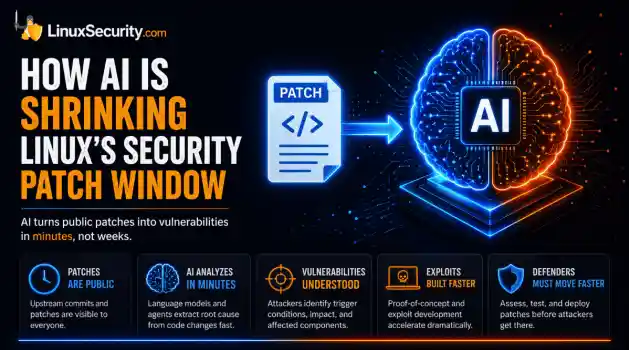
 For decades, Linux defenders relied on a comfortable assumption: a public security patch did not imply an imminent vulnerability. While open-source openness made vulnerability fixes public to everyone on kernel.org or the Linux Kernel Mailing List (LKML), converting a raw commit into a weaponized exploit took a significant amount of manual effort. This delay, estimated in weeks or months, gave businesses enough time to assess exposure, organize testing windows, and push changes across...
 Jul 27, 2026
 security advisory path traversal
 Two newly fixed storage bugs in Kubernetes showed more than just a problem with path traversal. They found a common security flaw in the cloud: powerful parts often think that requests accepted by a higher system are safe to run. This is a simple lesson for the platform and security teams: RBAC can accept a request without showing that its parameters will stay within a certain filesystem boundary. This is clear from a new study from SentinelLabs into flaws in the Kubernetes CSI drivers for NFS...
Jul 24, 2026
 security advisory update
 A large volume of Linux security updates and advisories this week across major distributions once again, but it wasn't just the volume that was the story. Where maintainers and security teams focused their attention was evident in the concentration of fixes targeting Linux kernel updates, identity services, DNS infrastructure, and internet-facing software. . Instead of looking at each advisory in isolation, administrators gain more value from the general trends they reveal about Linux security...
Jul 23, 2026
 identity management security tactics
 For years, we secured our Linux infrastructure by building walls: VPCs, security groups, and hardened SSH configurations. We treated the cloud like a virtual data center, assuming that if we kept the "bad guys" out of the network, our workloads were safe. . That model is no longer sufficient. Today, one of the most common paths from an initial compromise to a major cloud breach is the identity assigned to your Linux workload. When an attacker gains code execution on a Linux instance—through a...
Jul 17, 2026
 security practices patch management
 Most of us don't hear about a kernel vulnerability until a CVE lands in our inbox or the vulnerability scanner starts complaining. By then, the patch isn't new anymore. Kernel developers may have been passing it around for review, arguing over the implementation, or revising it for days before anyone outside that community noticed it. None of those discussions are secret. They're sitting in mailing list archives, Git commits, and patch reviews where they've been the whole time. The strange...
Jul 14, 2026
 Refine features
X Clear Filters
Get the latest News and Insights
Get the latest Linux and open source security news straight to your inbox.
Community Poll
Are host-based firewalls still worth using?
Loading...
Explore Latest Linux Security features
We found -1 articles for you...
102
 network securitydata protectionbackup strategies
Essential Cybersecurity Practices for Businesses to Protect Data
In this increasingly digital era, every business, no matter the size, has to be vigilant about its cybersecurity. Data breaches have become rampant over the past several years, costing even the top companies millions of dollars in damages. Hackers are always scheming to steal critical data and so, it is best to stay ahead of the game. . When it comes to protecting sensitive business and customer data, you need to implement the best and latest security solutions. Even if your business is small and consider it the last target for hackers, or use DIY security practices, it is important to ensure your security systems and applications are up-to-date in cases of a data breach. If you don’t know where to start, do not fret as this read will provide simple but powerful cybersecurity tips that you can implement today. What is Cybersecurity and Why Should I Bother? If you're a small business ownersmall business owner , you probably already know the importance of cybersecurity. Cyber attacks can bring down entire websites or critical network infrastructure. While larger companies can often withstand a DDoS attack, small businesses typically don't have the resources to recover from such an event. As a result, 60% of small businesses will close after suffering a cyber-attack. To minimize your risks, take the time to train your employees on basic Internet best practices. Despite the importance of cybersecurity awareness for small businesses, it's important to note that many small companies ignore the importance of cybersecurity. These companies have numerous devices connected to the internet at any given time, and a single breach can result in a major data breach. While you might not have any data on your own, you should invest in cybersecurity software and hardware to keep your data safe. Businesses are increasingly becoming the prime target of cybercriminals, and it's important to protect yourself and your business. Use Firewalls A firewall is usually the first line of defense againsthackers and cybercriminals. You’ll want to make sure you have both internal and external firewalls to protect your network and data. If you have employees working remotely, ensure they have firewalls in their devices as well. To ascertain compliance, consider providing them with firewall support. Firewalls have a number of benefits. They filter traffic and alert the user when a threat is detected. These devices are especially useful if the connection has a static IP address or is always on. They are generally installed alongside antivirus software. A personal firewall is usually a standalone product, a piece of software, or a hardware device with firewall firmware embedded. The latter is often used to set restrictions between in-home devices. If you don't need a separate firewall, a hardware firewall may be the best option. What Is Shorewall? If you have never heard of Shorewall, you should read this. Shorewall can also be useful for a network administrator, preventing access from malicious websites. Before installing Shorewall, read the documentation. Once you have installed it, you will need to run dos2unix against the configuration files to make sure they are correct. You can also find some sample configuration files in the Samples/one-interface directory. Once you've installed Shorewall, you will need to configure it. There are several settings you can adjust, including how to allow traffic and how to block access. First, you need to set the rules. These settings will allow or block traffic on certain ports. In this example, a firewall will block access to port 22000, which is a modified SSH port. In the next example, we'll use a custom configuration to allow SSH forwarding from an external TCP port 3022 to an internal server on a private network using standard SSH port 22. Document the Cybersecurity Policies Next, you’ll want to make sure you document all your company protocols for determining the practices as well as policies for cybersecurity. If you own a small business but are newto IT security compliance, check the Small Business Administration Cybersecurity portal for checklists, online information, and other relevant information. A cybersecurity policy can be an essential part of any company's information security strategy. It is important to follow guidelines that address both the general threat environment and the needs of the industry. Almost every company has proprietary data and employees' personal information at risk. Linux Cybersecurity Education & Training is Integral to Growing Your Career There are many benefits to a career in cyber security, including an excellent work-life balance. Most cybersecurity professionals work less than 40 hours per week and have the flexibility to enjoy their personal lives. This is because cybersecurity jobs are highly sought-after. Cybersecurity training programs can help you get the necessary skills. In addition to the excellent pay, careers in cyber security also offer lots of job security. These positions are in high demand and can be rewarding, too. Today's cybersecurity industry is booming. According to the U.S. Bureau of Labor Statistics, there are approximately 3.5 million open positions in the cyber security field. According to the Enterprise Service Group, 51% of IT decision-makers will struggle to fill open positions in the field by 2021. According to the World Economic Forum, cyber-attacks and data breaches are among the top five global concerns. Therefore, a career in cybersecurity is an exciting option for students interested in advancing their careers and helping others. Make Backups Regularly Having backups of your important documents is essential. In addition to digital backups, you should also maintain physical copies of all your documents. This way, you'll have a complete backup. For your data to be fully protected, you should organize and store the backup documents in an organized manner. Once you have the files organized, you can easily retrieve the data if necessary. The third step in data backup is tokeep a copy of each important document in a safe place off-site. Backing up your data is a must, regardless of the size and type of your business. If you don't back up your data, you could lose years of work and memories. A data backup is like a digital parachute in case of an emergency. Unfortunately, only 30% of people back up their data on a regular basis. The best backup practices are only followed by about 20% of IT professionals and personal computer users. A full 93% of companies will not survive one year without a recovery plan, so you need to be prepared. Cybersecurity is critical in this day and age using SIEM tools or alike. Data breaches come with hefty fines when customer information is breached and a simple attack can ruin your business. Avoid becoming a victim by implementing the security measures above. Implement Passwords and Multi-Factor Authentication When it comes to making passwords, there will always be that one person who uses their middle name or birthday. Hackers have powerful tools with algorithms that are able to guess millions of passwords in seconds. So, if your password falls in the easy or obvious category, you become potential prey. It is advisable to use a strong password of at least 12 characters, with a mix of capital and lowercase letters, numbers, and symbols. In addition, use multi-factor authentication to add a layer of security to your network. When you log into an application, a website, or the cloud, you'll probably be prompted to enter a second authentication factor. This may be something as simple as a password or OTP. But what if you don't have any of these tools? How can you be sure you're being authenticated? Luckily, multi factor authentication can help keep your identity secure. Here are some examples of situations where this technique might be the right solution for your needs. Linux Two-factor Authentication For Linux users, installing two-factor authentication can be a good way to prevent login-based attacks. The two-step verificationprocess also protects against social engineering attacks, as a victim's password is no longer enough to gain access to information. However, many Linux users are not happy with the default implementation of the two-factor authentication (TFA) feature. The two-factor authentication process is particularly important for people who use digital passwords to log in to their accounts. Passwords are often just the first stumbling block in a cybercriminal's journey to access personal information. The COVID-19 pandemic is an example of how a password-only system can be breached. But with two-factor authentication, hackers can't use stolen passwords against you. Secure the Business Wi-Fi Network Wi-Fi networks are one of those points where people can gain access to your system and install malicious software. Ensure your business network is secure, encrypted, and hidden from the public. Staff members should also safely encrypt their personal networks as their security is vital to your company’s safety. Make sure that your wireless router uses a secure password. This password should be at least 8 characters long and should contain uppercase, lowercase, numbers, and symbols. A firewall is also a good option to protect your wireless network from malware. These tools prevent hackers from accessing your network, preventing unauthorized access and minimizing the risk of a wifi attack. Most wireless devices are shipped with default administrator passwords, which can be easily obtained from the Internet. In addition, you should disable remote administration of your network to make it harder for an attacker to connect. To do this, set your router to require users to log in using a username and password that is unique to their network. Once you do this, you can rest easy knowing that your wireless network is protected from WiFi attacks. Install Robust Anti-Virus Software Regardless of how trained and experienced you and the employees are, you are prone to mistakes at some point. Installing robust anti-virusand anti-malware software on all your devices adding an extra layer of protection, particularly against phishing will go a long way in protecting your company. Know Your Company Inside Out Proper cybersecurity begins with proper knowledge of your company and points where hackers are likely to target. Think hard or use an IT professional to figure out whether hackers would be more interested in your employee's personal information, customer data, or intellectual property. Once you figure out the points of interest, ensure those areas have a high level of security and have a maintenance plan to ensure that remains the case. Conclusion The Linux operating system is used on most cloud servers, and this fact is important to know. More companies are moving their data to the cloud. A good Linux cybersecurity professional will have a deep understanding of the key areas of this operating system to ensure that their system is secure. You should protect the integrity of your data. This ensures that no one can alter it or corrupt it. Data should be available when a user needs it. This requires securing your system from the outside world by implementing strong user authentication. Keeping your system secure also means enforcing all privacy laws. When choosing your software, make sure that you choose a system with strong security features. . Safeguard critical enterprise information through fundamental Linux security methodologies, guaranteeing strong defenses against unauthorized access.. Cybersecurity Strategies, Linux System Security, Data Security Practices, Business Data Protection. . Justice Levine
 Jun 01, 2026
•
Jun 01, 2026
•
102
 backup strategiessecurity policiesmonitoring tools
Enhancing WordPress Security with Containerization and Optimal Practices
Keeping WordPress secure can be challenging, especially when considering Linux security concerns in a typical LAMP stack setup. Most WordPress security issues stem from third-party plugins, insecure coding, and server-level vulnerabilities in a typical LAMP stack setup-Linux, Apache, MySQL, PHP-to build and deploy WordPress. . So, malicious attackers could gain an undue advantage if you don't ensure proper care and security for these weaknesses. This makes it more important than ever to fortify WordPress security. That's where containerization comes in. Nowadays, most WordPress development companies use containers and tools like dockers for robust security. Containerization is a virtual process where all application components are packed as a single unit, supporting Linux cyber security through isolation. On the other hand, Docker allows us to run WordPress in isolated containers, reducing the chances of conflicts and security breaches and making it much easier to manage updates and dependencies. So, knowing how to set up, secure, and manage WordPress and containers is essential. This article will guide you through the basics of containerizing WordPress and explore best practices for maximizing Linux container security and ensuring streamlined management. Let's begin! Benefits of Containerizing WordPress Using containerization for WordPress has a lot of advantages: Isolation and Consistency: Containers allow each application, such as PHP, MySQL , and WordPress, to run in its isolated environment, avoiding conflicts between them. Portability: Containers can operate seamlessly in various environments, including a user’s local machine, cloud servers, or on-premises servers. Scalability and Resource Efficiency: Unlike virtual machines (VMs), which use a separate operating system, containers share the host operating system's kernel. This shared kernel approach makes containers lightweight and easier to deploy and scale. Overall, containerization forWordPress is the best thing you can do because it makes the application more easy to manage, and you can scale independently as per use. Setting Up a Secure WordPress Container To set up a WordPress container, you'll first need to install both Docker and Docker Compose. A basic handle on Linux cyber security commands and system management is a plus, especially configuring permissions, handling files, and troubleshooting activities. With these basics in place, you’re ready to begin setting up your containerized WordPress environment. Step 1: Install Docker and Docker Compose Install Docker and Docker Compose on your system by following the instructions on Docker’s official website. Step 2: Define Containers in Docker Compose You can manage multiple containers in one file. For a WordPress setup, create containers for: WordPress : Runs the WordPress application. MySQL (or MariaDB): Stores WordPress data. Step 3: Start the Containers Run your WordPress environment with the following: bash docker-compose up -d To improve security, it is recommended to use non-root users in containers to minimize risks and limit container permissions to essential access only. Implementing Security Policies with Kubernetes If you’re ready to take security a step further, Kubernetes brings additional tools for container management and protection. When securing your WordPress deployment, Kubernetes offers a powerful way to manage and safeguard containers efficiently. In addition to strong security, Kubernetes provides robust management features. Embedding WordPress containers in a Kubernetes cluster allows you to take advantage of load balancing, auto-scaling, and rolling updates over Kubernetes infrastructure. You can also use Helm Charts, a Kubernetes package manager, to make deployments faster and more customizable by bundling Kubernetes resources into single packages that are easy to configure and reuse. Network Policies to Isolate Workloads Isolatingworkloads helps protect your network by reducing exposure to potential threats. This approach prevents unauthorized containers from accessing sensitive components, strengthening your overall security. Using Security Contexts To Define And Enforce Container-Level Security Measures Security Contexts in Kubernetes allow you to set permissions and security configurations for individual containers or pods. Role-Based Access Control (RBAC) for Managing Permissions and Access Control Role-based access Control (RBAC) allows you to manage who has access to specific resources within a cluster. You can also assign roles and permissions to trusted identities so they can modify or access sensitive configurations. Managing and Monitoring Secure WordPress Containers Engaging in WordPress security best practices is essential to secure your WordPress environment and support Linux vulnerability mitigation. Practical measures for securely managing and monitoring WordPress containers include: Regular Security Audits and Updates Database backups are essential for WordPress sites, and regularly applying Linux security patches is equally crucial to maintaining security. Schedule regular backups of your MySQL or MariaDB data and store them securely. You can automate backups by creating cron jobs on the host system or using a backup container. Regular updates are essential for applying the latest Linux security patches, which keep your containers secure and up-to-date. Keep containers updated with the latest Linux security patches because new vulnerabilities are discovered daily for vulnerability mitigation. For effective Linux vulnerability mitigation, update your WordPress or database container by pulling the latest image and restarting your containers: bash docker-compose pull docker-compose up -d Note: If you are not technical, hire WordPress developers to handle the updates and maintenance professionally. Here’s an example of running a MySQL dump command in a separatecontainer: bash docker run --rm --network container:db -v $(pwd)/backup:/backup mysql:5.7 bash -c \ "mysqldump -h localhost -u user -password wordpress > /backup/backup.sql" This command creates a dump of the WordPress database and saves it in the specified backup directory. Monitoring Tools As with most other things in life, catching issues before they escalate keeps your application running smoothly. Tools such as Prometheus and Grafana are good for monitoring CPU, memory, and network usage in real-time, while Docker's built-in docker stats command gives a live view of container resource usage, so it would be pretty easy to spot any potential problems before they escalate. Tools like WPScan enable WordPress site admins to protect their websites from malware and other security threats. By scanning for malware and potential attacks, WPScan allows admins to detect potential risks like outdated plugins, vulnerable themes, and weak passwords that must be addressed. Installing WPScan is quick and easy, and its vulnerability database updates regularly to safeguard against emerging threats, making your administrative life simpler and more secure. Backup and Disaster Recovery A robust backup and disaster recovery strategy is critical in responding to potential issues and mitigating damage. Admins should know how to properly handle database connection issues and file permission errors they may encounter. These issues should be dealt with in the following way: Database Connection Issues If you see “Error establishing a database connection,” verify that the WordPress container’s WORDPRESS_DB_HOST environment variable points to the correct database container. File Permission Errors WordPress requires specific permissions to upload files and install plugins. If you encounter permission errors, update the volume’s permissions on the host system. Real-World Example of the Benefits of Containerizing WordPress Skybound faced challenges scaling its virtualmachines during peak traffic and struggled with complex code changes. The vast codebase contains many images and other resources, leading to delays and excessive manual effort in setting up new deployments. Solution and Result Skybound used containerization to manage its WordPress site and source code. It leveraged AWS services like ECS, Fargate, and CloudFormation to save each environment as a Docker image in Amazon ECR, efficiently handle resource scaling, and provision infrastructure. Additionally, they adopted Azure's serverless architecture for their database, removing the complexity of traditional database management. This setup allows Skybound to manage high-traffic loads smoothly, deploy code updates seamlessly across environments, and reduce manual infrastructure tasks. Our Final Thoughts on Securely Containerizing WordPress Containerization is necessary to keep any WordPress website safe today. However, using best practices to make your WordPress site more manageable and secure is what matters most . Your WordPress container ecosystem needs regular updates, monitoring, and maintenance for optimal operation. Lastly, if you want a robust and scalable WordPress website, we recommend consulting an experienced WordPress development company to provide further insight and guidance. If you have further questions, please do not hesitate to reach out to us @lnxsec - we're here to help! . Fortify your WordPress security against attackers and learn to securely containerize your application using best practices.. keeping, wordpress, secure, challenging, especially, considering, linux, security, concerns. . Brittany Day
Dec 18, 2024
•

102
 security advisorybackup strategiesransomware
Strengthening WordPress Security on Linux: Key Strategies & Threats
Did you know that 43.1% of websites on the Internet run on WordPress, according to W3Techs? Most WordPress websites run on Linux servers, which makes them prime targets for hackers—these servers experience approximately 90,000 attacks each minute! . As the owner or admin of a WordPress website, security should always be your top priority. You must monitor vulnerabilities within WordPress and third-party plugins for potential vulnerabilities and exploits that could result in website defacement, malware infections , data breaches, downtime, and other damaging repercussions. Luckily, there are proven strategies for securing your WordPress website, which we'll discuss here. Why Is WordPress Security Critically Important? Maintaining the security of a WordPress site is paramount, whether for personal or professional use. Unfortunately, many beginners overlook security when setting up new WordPress sites, which can prove costly in terms of reputation damage and lost business revenue. WordPress security risks are on the rise mainly because it's so popular, making it a prime target for cybercriminals. Many sites rely on a lot of third-party plugins for added features, but if these plugins aren't updated regularly or properly vetted, they can introduce vulnerabilities. Many WordPress sites are running outdated plugins that haven't been patched in years. Even when patches are available, not everyone updates right away. The enormous variety of themes and plugins, all created by different developers, adds to the difficulty in maintaining robust security across the entire WordPress ecosystem. Worse yet is the persistent ransomware threat to WordPress sites. Hackers can gain entry to vulnerable WordPress sites and lock up all files before demanding payment to unlock them. Worse yet, sometimes these attackers can’t even unlock these files themselves, leaving you with financial damage and a broken site! Below, we will examine some common WordPress vulnerabilities and security threats thatadmins face. What Are Common WordPress Vulnerabilities? To protect your WordPress site from persistent and emerging attacks, you must first understand some common vulnerabilities that hackers exploit. The following are the most prevalent and problematic WordPress vulnerabilities that may lurk within a typical WordPress installation. Outdated Software The most common vulnerability you'll find in WordPress websites is outdated software. This may include the use of an outdated WordPress version, as well as the use of outdated plugins inside the CMS. You need to update a WordPress installation and its plugins to ensure your site is secure from software flaws that newer versions don't have. Worse still, many of those flaws become common knowledge to hackers once developers issue a software update, placing outdated sites at even greater risk. Despite the risk, over 21% of known WordPress websites still use older, unsupported versions of the CMS. Vulnerable Plugins & Themes Vulnerable WordPress plugins can be a real headache and danger for users because they open the door to various security problems. Imagine these plugins like unlocked windows in your house—hackers can easily slip through to wreak havoc. They might install other dodgy plugins without you knowing or even mess with your website’s code to do harmful things like steal data. It's essential to monitor your plugins and ensure they're updated to the latest, safest versions. Otherwise, you're leaving your site vulnerable to an array of attacks. A recent critical vulnerability in the Hunk Companion plugin (tracked as CVE-2024-11972 ) demonstrates the risk of vulnerable WordPress plugins. This flaw, found by WPScan, is being actively exploited to install vulnerable plugins, creating significant security risks. This flaw, which affects all versions of Hunk Companion before 1.9.0 and has a CVSS score of 9.8, enables attackers to exploit Remote Code Execution (RCE), SQL Injection, Cross-Site Scripting (XSS) , and other maliciousactivities by installing or reactivating compromised or outdated plugins. Despite the availability of the fix, only 11.6% of users have upgraded, leaving approximately 8,800 sites still at risk. Another critical vulnerability was recently found in the popular WordPress security plugin Really Simple Securit, which has put over four million websites at risk. This bug allows attackers to log in as any user, including admins, without needing a password, thereby gaining full access to the site's permissions. The ease of exploitation and potential for severe consequences, such as malware injection, unauthorized content changes, and attacks on visitors, have earned this vulnerability a CVSS score of 9.8 out of 10. Just recently, some big security holes were found in the Woffice WordPress theme, used on thousands of websites. These issues could let bad actors take control of your site by registering with admin privileges or logging in as any user - including you! Weak Passwords Weak passwords are also a persistent vulnerability for WordPress websites. Hackers exploit weak passwords by targeting administrator accounts that can grant them complete control of a WordPress site. From there, nothing stops them from wreaking havoc and making whatever changes they wish. Shared Hosting Although shared hosting is popular for WordPress website owners, it has significant security vulnerabilities . If an attacker manages to execute a privilege escalation attack on the underlying server, they gain unfettered access to every WordPress website it hosts, too. Lack of Server Hardening Another common vulnerability present in WordPress websites is a lack of server hardening. The default installation of the WordPress CMS leaves various features turned on for the convenience of the site's owner. However, some of those features, such as the built-in file editor, the hotlinking function, PHP execution, and directory browsing, can be powerful weapons in the hands of an attacker. Using those functions, an attackercould execute malicious code, conduct a cross-site scripting attack , or enable a denial-of-service attack. Incorrect File Permissions Misconfigured file permissions are another common vulnerability found in WordPress websites. Generally speaking, the underlying wp-content and wp-admin folders that house most of a WordPress site's files should have restricted file permissions, including a restriction on who can write to them. However, plenty of novice admins change those default permissions while trying to troubleshoot configuration issues and fail to change them back, creating a major vulnerability. Essential WordPress Security Tips & Best Practices for Linux Users To combat the vulnerabilities discussed above, owners and operators of WordPress Websites must follow established WordPress security best practices to the letter. Here's what they are and some other tips on keeping WordPress sites secure. Keep Software & Plugins Updated The most important way to keep a WordPress website secure is to update the CMS to the latest version and enable auto-updates for the future. Plus, it's equally important to keep all installed plugins up to date, too. This means checking with plugin developers regularly or installing software that can check for new plugin versions and make the necessary updates for you. Keeping WordPress plugins up-to-date will protect against bugs like the previously mentioned CVE-2024-11772 and the recently identified critical flaw in the Really Simple Security WordPress plugin. Admins must monitor security advisories vigilantly and apply the latest WordPress software and plugin patches as soon as they are released. Be Wary of the Software Packages You Install WordPress users should be vigilant about the software packages they install, preferably sticking to direct downloads from verified sources. A recent sophisticated yearlong supply-chain attack reported by security firms Checkmarx and Datadog demonstrates the importance of this WordPress security best practice. The attack involves malicious actors distributing Trojanized versions of open-source software, specifically through the NPM repository and GitHub, to infect devices. One such package, @0xengine/xmlrpc, masquerades as a legitimate JavaScript implementation but contains a backdoor that activates malicious code, resulting in attackers stealing credentials and other sensitive information, including SSH private keys and AWS access keys. A second package, yawpp, indirectly installs this malware by requiring @0xengine/xmlrpc as a dependency. This malware campaign has resulted in approximately 390,000 stolen WordPress credentials and has persisted due to its subtlety and strategic updates. Install & Configure a Firewall Installing a firewall is another excellent way to keep a WordPress website secure. WordPress-specific firewall software can monitor incoming and outgoing data for signs of malicious activity. Plus, many can halt DDoS attacks in progress and block vulnerability scans that alert hackers to exploitable site vulnerabilities. We recommend focusing on WordPress plugins to keep the process of adding a firewall as simple as possible. Using add-ons will be the most straightforward option. WordPress Firewall Rules to adhere to when configuring your firewall can be found here. Scan for Malware & Security Threats It's also good to perform periodic scans of your WordPress website to detect any malware or security threats that may have slipped by your site's defenses. Various tools can scan WordPress sites for such things, and many of the best ones are totally free, too. WPScan is an invaluable tool for Linux administrators looking to protect their WordPress sites from malware and other persistent threats. By scanning for malware and security risks, WPScan allows admins to identify issues such as outdated plugins, vulnerable themes, and weak passwords that need fixing. Installation is quick and painless, and its vulnerability database updates regularly to protect against new threats,making life simpler for administrators who want to maintain secure, healthy websites. Secure WordPress Usernames & Passwords Defining and enforcing a secure password policy is another best practice for securing a WordPress website. At a minimum, the policy should insist on passwords of at least 20 characters, which include letters, numbers, symbols, and a mix of capital and lowercase letters. Installing a two-factor security plugin that adds a time-limited one-time password to every login into the WordPress front-end or back-end is also advisable. Set Up Off-Site Backups Maintaining complete and current offsite backups of a WordPress website is a critical bulwark against malware intrusions and ransomware attacks. Having multiple backup versions of a WordPress website spanning a reasonable amount of time is important. This allows you to restore a version of your WordPress website before malware or ransomware infiltration. Plus, having the backup copies offsite eliminates any chance that a successful server-side attack will compromise them, too. Limit Login Attempts Limiting login attempts is another best practice for guarding a WordPress website against brute-force password attacks. To do it, you can configure your website to lock a user account after a reasonable number of login attempts. You can also set it to ban connections from the IP address associated with the failed login attempts. While these measures alone won't stop a hacker in their tracks, they will significantly slow their efforts to harm your site. Use HTTPS for Encrypting Data Switching your WordPress site over to HTTPS is vital for security and trust. HTTPS protects information by encrypting data sent between visitors, making it hard for hackers to intercept and read personal details like passwords or sensitive financial data. In addition, it ensures users communicate directly with your authentic website, protecting against man-in-the-middle attacks. Plus, search engines prefer sites using HTTPS, as they won't appear as"Not Secure" in browsers - improving both search rankings and trust among visitors. To enable HTTPS on your site, purchase and install an SSL certificate from your hosting provider. Afterward, modify WordPress settings so your URL includes s:// rather than ://. Additionally, force all traffic through HTTPS while simultaneously addressing mixed content issues with plugins like Really Simple SSL for enhanced peace of mind for both visitors and you alike. Secure File Permissions & Ownership As previously mentioned, it's important to set the proper file permissions and ownership for the files associated with a WordPress website. Most WordPress folders should be 755, and most individual files should be 644. Of course, there are always exceptions to those generalities, so it's important to follow all relevant WordPress and plugin documentation and to check trustworthy guides on the subject. Use an Uptime Monitor Uptime monitors can be a useful security tool because they can alert you to a problem with your WordPress site as soon as it happens. When there's any possibility of a malicious intrusion, every second counts. An uptime monitor could warn to block an attack in progress or at least blunt its damage. Add ReCAPTCHA in WordPress Login In addition to the aforementioned two-factor authentication, it's also advisable to add ReCAPTCHA functionality to your WordPress site's login pages and user forms. Various plugins make this easy, and installing one can safeguard your site against botnets, spam, and attacks from sketchy shared IP addresses. Conduct Security Audits & Penetration Testing Since no WordPress security scheme will ever be perfect, conducting regular security audits is an excellent way to ensure your site complies with the previously covered security best practices. It is also good to perform penetration testing to ensure your security measures work as intended. Implement Robust Monitoring & Logging Practices Finally, every WordPress website should include robustmonitoring and logging . The logs generated by the WordPress installation and any plugins can be treasure troves of useful data. For example, your site logs may reveal intrusion attempts by hackers and even clue you into specific vulnerabilities they may be looking to exploit. Various plugins will aggregate your logs into a single interface and even send you alerts based on predefined preferences. Our Final Thoughts on Improving WordPress Security on Linux Webservers At the end of the day, WordPress, running on one Linux variant or another, is and will continue to be the backbone of the Internet. However, it's incumbent upon every WordPress website owner to do their part to keep their sites safe from exploitation. With knowledge of the most common vulnerabilities and the best practices to mitigate them, securing your WordPress site is easier than you think! With a bit of effort and vigilance, running a secure WordPress website is well within reach of even a beginner web admin. Have additional questions? Reach out to us @lnxsec - we’re here to help! . Safeguard your Linux-based WordPress platform by adhering to optimal strategies regarding firewalls, malware defenses, and regular software maintenance.. WordPress Security Best Practices, Linux Server Protection, Web Threat Mitigation. . Duane Dunston
Dec 17, 2024
•
102
 data securitybackup solutionsbackup strategies
Protecting Linux Users Against Ransomware: Essential Backup Strategies
Data security in a modern business environment is considered one of the most critical factors for any company. The digitalization of the world has led to more and more data being generated daily, including very sensitive data, such as internal business plans, customer payment data, etc. . The number of data breaches worldwide has been growing at an alarming pace for over a decade now, and it shows no signs of stopping any time soon. New and improved versions of malware and ransomware are being developed regularly, finding all kinds of loopholes in virtual security perimeters for malicious purposes. In this context, it should not be surprising to see cybersecurity becoming the forefront of a company’s development strategy since everyone now understands the cost of a single data breach and what it could do to an unprepared business. The Rise in Linux Ransomware & Its Implications Ransomware has also been one of the most significant cybersecurity issues and a massive headache for practically every IT professional. The primary purpose of ransomware is to find sensitive data to render it inaccessible via encryption – while demanding ransom from the data owner for the decryption key. Since ransomware was not designed to steal data in the first place, it became a massive issue for most traditional security systems not designed with ransomware in mind. Add that to the fact that ransomware has been developing and evolving for over a decade, and it becomes clear why cybersecurity is so important for companies of all sizes. A single unfortunate data breach or ransomware attack can completely paralyze any business. This same average attack can cause days, if not weeks, of issues for large-scale companies, usually resulting in millions of dollars of lost revenue. As if that was not problematic enough, newer versions of ransomware have also started to look for safety precautions such as backups. Suppose there is just one copy of a company’s data that has been made, and it wasencrypted by the same ransomware that affected the original data. In that case, the entire company has a high chance of crumbling instead of recovering. Why Are Data Security & Secure Data Backup Crucial in Protecting Against Ransomware? This is how we arrive at the topic of data security. Data protection is an intense and complex topic, and not all of them are about ransomware protection. However, since it is one of the most prominent threats to an average business, we should start with the basics of protection against ransomware. As mentioned, backups are usually treated as one of the easiest ways to protect sensitive data for companies and individuals. The act of copying information is simple, does not take much time, and can be an excellent safeguard in case anything goes wrong. Unfortunately, the description above is only suitable for about a decade ago. Modern backup solutions are far more complex and sophisticated than ever, and the same could be said for the average business infrastructure. Not only can businesses store their data on traditional storage mediums such as disks, but storage possibilities can also be found in tape storage, cloud storage, virtualization, databases, and clusters. The drastic increase in complexity for business infrastructures led to an identical rise in backup complexity. In the modern world, a secure data backup represents multiple copies of data stored on different storage mediums. This is what the industry refers to as “the 3-2-1 rule”. Diversification is also a key consideration when it comes to creating and implementing a successful data backup strategy. Admins and organizations are quickly learning the importance of defense-in-depth in any type of security. Configure data backups and perform them regularly, following the 3 2 1 backup rule : keep at least three copies of your data, store them on two different types of media, and keep one copy offsite. This strategy makes it highly difficult for a malicious actor to encrypt and lock up every copyof their target’s data. This rule is not particularly difficult by itself – three copies of data, stored using two different storage mediums, and one copy held in long-term storage in a different geographical location from the rest. This rule is also somewhat outdated, with some professionals pushing for “the 3-2-1-1” rule instead – adding one more copy of data that is held using immutable storage. Storage immutability is not a new invention by far – the concept of data that cannot be modified in any way once it has been written has been around for many years now. And yet, the rise of cybersecurity brought much attention to finding alternative data protection methods, including data immutability. The topic of “locked” immutable data backups was also one of the first solutions to the issue of ransomware learning how to target backups. Of course, only some things in this topic revolve around data backups. Many other methods and tactics are used to lower the chances of a ransomware attack. Data retention is one such example – a combination of best practices and policies created to mitigate the potential damage from a ransomware attack in the future. Multiple best practices can be implemented to mitigate risk, including: Putting more emphasis on complex passwords and password rotation systems. Use separate accounts for backup-oriented tasks while restricting these accounts’ capabilities in terms of everything unrelated to backup jobs. Ensure backup account passwords are appropriately secured or stored in a password vault. Implement a password-changing policy to ensure no past employees can access backups after leaving the company. Both backup jobs and data retention are just the tip of the iceberg regarding ransomware protection measures. Other examples of appropriate data protection capabilities include backup encryption, encryption key management, regulatory compliance, backup testing, and many others. Why Is Ransomware Especially Threatening to Linux Users? The topic of ransomware becomes even more expansive once the Linux operating system is brought into the picture. Most previous examples have been attributed to Windows-oriented software and hardware, but Linux devices differ. Linux is a well-known group of operating systems with an open-source basis . Some of its most significant advantages are extensive customization and a high level of control over the system as a whole. This freedom is one of the biggest reasons why plenty of people choose Linux over Windows as their primary operating system – for personal and commercial use. However, this kind of customization and control over the entire system comes at a cost. If the ransomware succeeds in getting into one such system, it can take control over practically every single file in the OS, including system files. A detailed backup plan is the only option for mitigating these issues. Ransomware has been one of the most prominent threats in the cybersecurity field for a few years now, and it keeps evolving at an alarming pace. The overwhelming majority (about 85%) of ransomware types are only capable of working on Windows devices to this day – but the size of the Linux portion is getting more and more attention as time goes on. It is common for Linux-based systems to store important information, be it sensitive databases, government files, or web services. Linux and Windows have plenty of differences regarding their internal structures, and these differences are some of the biggest reasons why ransomware isn’t as popular on Linux devices. Windows OS uses a specific database type called registry to store its settings and configuration options, and practically any backup must back this data up for backups to be restored properly. On the other hand, Linux OS uses a much more file-oriented approach where both settings and config files are stored within the file system alongside user data. This is an advantage for backup and recovery processes, but it can also be a potential securityissue if some sort of ransomware gets into the system. What Are the Basic Steps in a Linux Ransomware Attack? Since there are not that many different ransomware types on Linux, we can figure out the basic steps that each ransomware has to go through to perform the cyber attack: Infection. Vulnerability abuse is one of the prime gateways for ransomware since it is not as easy to infect a Linux system with ransomware via infected advertising or emails as on Windows devices. As soon as the ransomware gets inside the system, it initiates downloading a hidden executable by “phoning home” via a specific list of IP addresses. Setup . This is where the ransomware sets itself up for the following attack – including changing folders and giving itself more capabilities within the system via permission modification and config modification. This is also where the random encryption key for the following encryption process is generated on the server side. Scan . Ransomware has to find predefined data types or repositories to ask for ransom, and this process revolves around scanning the infrastructure for vulnerable and vital data in accordance with pre-defined parameters. Encryption . The attack itself commences at this step, and it is also the first step on the list that brings in potentially irreversible changes to the infrastructure – creating encrypted versions of existing files and folders and deleting the original file copies afterward. Extortion . The only step left to do after the encrypted data is to ask for ransom by providing explicit payment instructions to the end user in some way, shape, or form. Secure Data Backup is a Universal Concern It is also worth mentioning that some of the best data backup practices apply to both Linux and Windows environments – although their implementation methods might differ. A well-known technique of “air-gapping” is one such feature, allowing for a specific hardware appliance to be wholly isolated from the rest of theinfrastructure, making it a lot more challenging to infect or delete for malicious purposes. The general advice for diversifying backup and security measures is common for all operating systems since backup diversification lies at the core of a proper backup strategy. Combining multiple storage types and security measures within the same system leads to improved security and a higher degree of protection against potential threats. A higher number of different security layers directly correlates with a lower chance of a specific system or infrastructure being breached. Data protection as a topic can be challenging to work with, especially for larger companies with sophisticated infrastructures. Choosing the appropriate third-party backup solution can be a great advantage in this context. A proper complex backup platform would greatly help with various protective measures and tactics for appropriate backup protection. Final Thoughts on Secure Data Backup for Linux Users Data security is an ongoing process that must evolve and adapt to face new challenges. It is easy to see an initial investment in a complex backup solution as a negative factor. At the same time, it is worth remembering that most data breaches and ransomware attacks usually significantly damage a company’s financial situation and reputation more than an initial investment in a sophisticated backup platform. . Cybersecurity threats have escalated globally; discover key methods for safeguarding data backups designed specifically for Linux enthusiasts.. Data Backup, Ransomware Mitigation, Linux Security, Backup Strategies, Data Protection. . Duane Dunston
Feb 01, 2024
•

Get the latest News and Insights
Get the latest Linux and open source security news straight to your inbox.
Community Poll
Are host-based firewalls still worth using?
Search Topics
Powered By

Linux Security - Your source for Top Linux News, Advisories, HOWTOs and Feature Releases
QUICK LINKS
subscribe to newsletters!
Like staying secure? So do we.
Sign up for updates, tips, and alerts!