Audit Linux privileges now to limit compromise, escalation, and system-wide damage. Review Linux Privileges×


Stay Ahead With Linux Security Features
 security advisory vulnerability
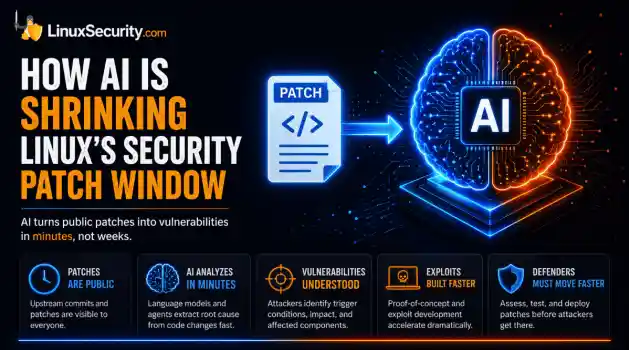
 For decades, Linux defenders relied on a comfortable assumption: a public security patch did not imply an imminent vulnerability. While open-source openness made vulnerability fixes public to everyone on kernel.org or the Linux Kernel Mailing List (LKML), converting a raw commit into a weaponized exploit took a significant amount of manual effort. This delay, estimated in weeks or months, gave businesses enough time to assess exposure, organize testing windows, and push changes across...
 Jul 27, 2026
 security advisory path traversal
 Two newly fixed storage bugs in Kubernetes showed more than just a problem with path traversal. They found a common security flaw in the cloud: powerful parts often think that requests accepted by a higher system are safe to run. This is a simple lesson for the platform and security teams: RBAC can accept a request without showing that its parameters will stay within a certain filesystem boundary. This is clear from a new study from SentinelLabs into flaws in the Kubernetes CSI drivers for NFS...
Jul 24, 2026
 security advisory update
 A large volume of Linux security updates and advisories this week across major distributions once again, but it wasn't just the volume that was the story. Where maintainers and security teams focused their attention was evident in the concentration of fixes targeting Linux kernel updates, identity services, DNS infrastructure, and internet-facing software. . Instead of looking at each advisory in isolation, administrators gain more value from the general trends they reveal about Linux security...
Jul 23, 2026
 identity management security tactics
 For years, we secured our Linux infrastructure by building walls: VPCs, security groups, and hardened SSH configurations. We treated the cloud like a virtual data center, assuming that if we kept the "bad guys" out of the network, our workloads were safe. . That model is no longer sufficient. Today, one of the most common paths from an initial compromise to a major cloud breach is the identity assigned to your Linux workload. When an attacker gains code execution on a Linux instance—through a...
Jul 17, 2026
 security practices patch management
 Most of us don't hear about a kernel vulnerability until a CVE lands in our inbox or the vulnerability scanner starts complaining. By then, the patch isn't new anymore. Kernel developers may have been passing it around for review, arguing over the implementation, or revising it for days before anyone outside that community noticed it. None of those discussions are secret. They're sitting in mailing list archives, Git commits, and patch reviews where they've been the whole time. The strange...
Jul 14, 2026
 Refine features
X Clear Filters
Get the latest News and Insights
Get the latest Linux and open source security news straight to your inbox.
Community Poll
Are host-based firewalls still worth using?
Loading...
Explore Latest Linux Security features
We found -2 articles for you...
102
 security advisorycode executionimportant
CI/CD Pipelines Vulnerabilities in Trusted Execution Paths March 2026
Time and time again, Linux systems execute attacker-controlled code during normal operation, and nothing in the system reports it as a failure. Security models still lean on the idea that something has to break first. An exploit fires, a misconfiguration opens a path, a control fails. But in these cases, there is no breakpoint to trace back to, because the commands being used are valid, expected, and fully trusted by the system. The pattern becomes easier to see in automated environments and is a defining trait of modern software supply chain attacks. CI/CD pipelines run these workflows constantly. They assume the inputs they receive are safe by default, which makes them a clear example of how trusted execution paths turn into execution paths for attacker-controlled code. . CI/CD Pipelines Execute Attacker-Controlled Code Through Rewritten Git Tags In March 2026, a widely used security tool called Trivy was compromised during a routine CI/CD workflow . Nothing was exploited or misconfigured; the system ran exactly as designed, yet still executed malicious code. Pipelines automate tasks like pulling code based on version tags (e.g., v0.69.4). These tags are treated as stable references that should always resolve to the same content. How Git Tags Become Mutable Execution References That trust breaks at the reference level. In the Trivy case, attackers reassigned 76 out of 77 tag pointers to malicious commits. Because Git allows tags to be moved, the system accepted this as a valid state. The pipeline resolved the tag at runtime and executed whatever code it pointed to without verifying if the reference had changed. This is the core issue. The execution path is authorized, so whatever flows through it is trusted by default, even when silently altered. Why Trusted Execution Paths Fail to Verify Content What’s missing here isn’t a failed control. It’s how trust is defined in the first place. Most systems validate access, not whether what they execute is still the samething. If a workflow is allowed to run and the command is valid, the result is treated as trusted by default. That assumption only holds if the thing being executed stays the same. In these environments, it doesn’t. A tag can move, a maintainer can change, or a commit can be rewritten, while the execution path remains untouched. The system validates the path, not the content flowing through it, so nothing fails because nothing appears out of place. The result followed naturally. During execution, the pipeline exposed credentials from environment variables like GitHub tokens and AWS keys, because the process still had full access, and no part of the system recognized that the code being executed was no longer what was originally intended. The Fix: Stop trusting tags. Pin to the exact content using a full commit SHA. Because a SHA is tied to the code itself, the reference cannot be silently reassigned. For external binaries, always validate a checksum before execution. npm install Executes Attacker-Controlled Code During Package Installation While the Trivy case involved manipulated references, the npm ecosystem often suffers from identity failures. Here, the reference remains the same, but the identity behind the code is compromised. This has happened repeatedly. In multiple incidents, such as the phishing compromise of a prolific maintainer , attackers hijacked accounts to publish malicious updates. Because these updates come from the expected publisher, they are installed automatically. This is a fundamental trust gap: the system validates the publisher, not the content. On Linux, this leads to immediate execution. npm install does more than pull files; it automatically runs lifecycle scripts as the current user. This allows attacker-controlled code to execute before the application even starts, granting it access to your files, network, and environment variables—all within a "trusted" workflow. The system doesn’t fail; it simply trusts the wrong thing. The Fix: Breakthe link between retrieval and execution by disabling lifecycle scripts during installation: npm config set ignore-scripts true npm install --ignore-scripts This keeps the package on disk without running its code, so execution does not happen until the code is actually reviewed or invoked. git pull Executes Attacker-Controlled Code From Manipulated Repository History In the Trivy case, the system trusted a reference. In the npm case, it trusted a hijacked identity. With Git, the trust failure shifts to the repository history itself. When you run git pull, you likely check git log to see who made changes. What you see looks like a reliable timeline of names and dates. However, a Git commit is simply a stored object containing unverified fields for author name, email, and timestamp. This is not a hack; it is a core feature. Anyone can use the git commit --author command to set any identity they choose. Because Git does not verify these fields by default, an attacker can rewrite history to include malicious code that appears to be authored by a trusted contributor years ago. When this rewritten history is pushed, and you git pull, your system accepts it as valid input. You aren't just trusting the code; you are trusting unverified metadata. The result is consistent: malicious code is merged because it looks like it belongs. The system didn't fail—it trusted a history that was never authenticated. The Fix: Verify the commit, don't just read it. Enable commit signature visibility to shift trust from easily faked names to cryptographic signatures: Bash git config --global log.showSignature true This ensures the author’s identity and the commit’s integrity are cryptographically proven before you merge. Linux Must Enforce Execution Boundaries When Trusted Workflows Execute Untrusted Code By the time the code reaches your system, the critical decisions have often already been made. A reference was resolved, a package was installed, or a repository was pulled—allthrough trusted workflows that failed to verify the content. This leaves only one place where control still exists: the moment of execution. Linux Executes Untrusted Code With Full Permissions By default, Linux tools run with the same permissions as the user who launched them. Attacker-controlled code inherits your access to files, networks, and environment variables without needing to bypass a single security control. To limit this, isolate execution. Use Podman to run tools inside containers with restricted access, ensuring that even if code runs, it cannot exfiltrate data or modify your host: Bash podman run --rm --network=none -v $(pwd):/apps:ro Processes Automatically Expose Credentials Linux processes inherit environment variables from the parent shell. Tokens, API keys, and cloud credentials exported earlier are passed automatically to new processes. Attackers don't need to "find" your secrets; they are handed to them at startup. Reduce this exposure by using scoped execution via systemd-run or temporary subshells, and avoid exporting sensitive variables globally in files like .bashrc. The Point of Execution is the Point of Truth Whether it's a "latest" tag or an unverified binary, the pattern is consistent: the system isn't being bypassed; it is executing exactly what it was given. To address this, verify the code before it touches your CPU. Use sha256sum to confirm a binary matches its expected value and review commit history for inconsistencies. If the origin of code cannot be cryptographically proven, it must be treated as untrusted. When verification fails at the workflow level, the only remaining safety net is the execution boundary you build within the OS. Execution Without Trust Across all three cases, nothing was exploited, and nothing was misconfigured. The system had access, the workflows were valid, and the commands executed exactly as expected, which is why this keeps happening. The risk is not unauthorized access. It is authorizedexecution from unverified sources, where a tag moves, a maintainer changes, or a commit lies, and the system accepts all of it because it trusts what it sees. Stop trusting what can change: Names and labels Tags Authorship Start verifying what cannot: Commit hashes Signatures Checksums Doing this manually does not scale. That is why teams use tools to track and update pinned versions, so the workflow stays usable while the references stay fixed. If the origin of the code cannot be proven, treat it as untrusted before execution. Because at that point, the system will execute it anyway. . CI/CD tools face major risks as trusted code execution paths allow for attacker-controlled code to execute within workflows.. secure coding practices, CI/CD security, software supply chain, code execution integrity, code review processes. . MaK Ulac
 Mar 31, 2026
•
Mar 31, 2026
•
102
 security advisorynetwork securitysoftware update
Thunderbird 102.9.0 Security Advisory: Critical DoS and Code Issues Fixed
Multiple high-impact network security issues have been discovered in Thunderbird, which could result in Denial of Service (DoS) attacks in network security that lead to server crashes, access restrictions, arbitrary code execution, and spoofing breaches. These findings include a vulnerability that involves incorrect code generation during JIT compilation (CVE-2023-25751) and high-severity memory safety bugs, both of which were present in Thunderbird 102.8 (CVE-2023-28176). . Thunderbird 102.9.0 has been released as a security and bug fix update and the latest stable version of the open-source email client. This article will cover the cybersecurity vulnerabilities recently found in Thunderbird and fixed in version 102.9.0 to equip you with the information you need to protect against potential downtime and system compromise that could result from bugs exploiting your company. Thunderbird 102.9.0 Security Fixes Thunderbird 102.9.0 fixes six moderate-to-high network security issues in email programs. The cybersecurity vulnerabilities addressed in version 102.9.0 include: CVE-2023-25751: Incorrect code generation during JIT compilation could lead to a potentially exploitable cra sh (high severity rating) CVE-2023-28164: URL being dragged from a removed cross-origin iframe into the same tab triggered navigation, potentially leading to user confusion and website spoofing attacks (moderate severity rating) CVE-2023-28162: Invalid downcast in Worklets could lead to a potentially exploitable crash (moderate severity rating) CVE-2023-25752: Potential out-of-bounds when accessing throttled streams may have led future code to be incorrect and vulnerable (moderate severity rating) CVE-2023-28163: Windows Save As dialog resolved environment variables in the context of the current user (moderate severity rating) CVE-2023-28176: Memory safety bugs present in Thunderbird 102.8 showed evidence of memory corruption and could potentially be exploited to run arbitrary code (highseverity rating) The release also includes the following non-security fixes: Notification about a sender's changed OpenPGP key was not immediately visible TLS Certificate Override dialog did not appear when retrieving messages via IMAP using "Get Messages" context menu Spellcheck dictionaries were missing from localized Thunderbird builds that should have included them Tooltips for "Show/Hide" calendar toggle did not display Upgrade to Thunderbird 102.9.0 Now! In order to protect against dangerous exploits in cybersecurity, it is critical that all impacted users upgrade immediately. Existing Thunderbird installations should receive the update automatically as long as the automatic updates functionality has not been disabled by the administrator. For users who prefer to update manually, this can be done by selecting “Help → About Thunderbird,” or by selecting the Settings icon in the new sidebar on the left. Thunderbird displays the installed version in a small overlay window in the interface. The email client performs an update check and will download and install updates that it finds during the check. To stay on top of important updates released by the open-source programs and applications you use, be sure to register as a LinuxSecurity user . Subscribe to our Linux Advisory Watch newsletter and customize your advisories for the distro(s) you use. This will enable you to stay up-to-date on the latest, most significant cybersecurity vulnerabilities impacting the data and network security of your systems. Follow @LS_Advisories on X for real-time updates on advisories for your distro(s). . Uncover pivotal enhancements and patches in Thunderbird 102.9.0 to protect your emails and networks from looming vulnerabilities.. Thunderbird 102.9.0, Email Client Security, Denial of Service, Code Execution Flaws. . Brittany Day
Mar 19, 2023
•

102
 security advisorynetwork securitybuffer overflow
Linux Kernel 4.x: Critical DoS And Code Execution Issues Fixed
Several critical and high-severity network security issues, including multiple use-after-free and stack-based buffer overflow cybersecurity vulnerabilities, were discovered in the Linux kernel. These network security threats could lead to Denial of Service (DoS) attacks, privilege escalation, or the execution of arbitrary code. This article will discuss the Linux kernel issue’s discovery, impact, and protection opportunities. . The Discovery & The Impact The most serious network security issues recently discovered in the Linux kernel are the following critical cybersecurity vulnerabilities: A “use-after-free” vulnerability affecting the function “area_cache_get” of the file “drivers/net/ethernet/netronome/nfp/nfpcore/nfp_cppcore.c” of the component IPsec ( CVE-2022-3545 ). A “use-after-free” vulnerability affecting the function “l2cap_conn_del” of the file “net/bluetooth/l2cap_core.c” of the component Bluetooth ( CVE-2022-3640 ). A stack overflow flaw in the SYSCTL subsystem, how a user changes certain kernel parameters and variables ( CVE-2022-4378 ). A “use-after-free” vulnerability that can be exploited to achieve local privilege escalation ( CVE-2023-0461 ). To reach the vulnerability kernel configuration flag, “CONFIG_TLS” or “CONFIG_XFRM_ESPINTCP” has to be configured, but the operation does not require any privilege. There is a “use-after-free” bug, “icsk_ulp_data” of a struct “inet_connection_sock.” When CONFIG_TLS is enabled, the user can install a tls context (struct tls_context) on a connected tcp socket. The context is not cleared if this socket is disconnected and reused as a listener. If a new socket is created from the listener, the context is inherited and vulnerable. The setsockopt TCP_ULP operation does not require any privilege. A local attacker could exploit these bugs to cause Denial of Service attacks in network security, escalate privileges, or possibly execute arbitrary code. This impacts: linux: Linux kernel linux-aws: Linux kernel for Amazon Web Services (AWS) systems linux-dell300x: Linux kernel for Dell 300x platforms linux-gcp-4.15: Linux kernel for Google Cloud Platform (GCP) systems linux-oracle: Linux kernel for Oracle Cloud systems How Can I Secure My Systems Against Cybersecurity Vulnerabilities? An important kernel security update was released recently, and it fixes these dangerous bugs. Distros have released security advisories for these cybersecurity vulnerabilities, providing instructions on how users can update their systems to protect against them. LinuxSecurity Founder Dave Wreski warns, “We urge all impacted users to update now to protect against attacks leading to downtime and compromise. Patching is an easy and effective way to mitigate the risk of an adversary exploiting these issues to halt productivity and potentially harm your critical systems.” Be sure to register as a LinuxSecurity user , then subscribe to our Linux Advisory Watch newsletter and customize your advisories for the distro(s) you use to stay up-to-date on the latest, most significant network security issues impacting your systems so you can improve security posture as quickly as possible. Follow @LS_Advisories on X for real-time updates on advisories for your distro(s). . Essential security patches for the Linux kernel tackle serious vulnerabilities such as memory leaks and denial-of-service threats.. Linux Kernel Security, DoS Mitigation, Code Execution Risks, Use-After-Free, Cybersecurity Updates. . Brittany Day
Mar 05, 2023
•

Get the latest News and Insights
Get the latest Linux and open source security news straight to your inbox.
Community Poll
Are host-based firewalls still worth using?
Search Topics
Powered By

Linux Security - Your source for Top Linux News, Advisories, HOWTOs and Feature Releases
QUICK LINKS
subscribe to newsletters!
Like staying secure? So do we.
Sign up for updates, tips, and alerts!