Audit Linux privileges now to limit compromise, escalation, and system-wide damage. Review Linux Privileges×


Stay Ahead With Linux Security Features

 security advisory path traversal
 Two newly fixed storage bugs in Kubernetes showed more than just a problem with path traversal. They found a common security flaw in the cloud: powerful parts often think that requests accepted by a higher system are safe to run. This is a simple lesson for the platform and security teams: RBAC can accept a request without showing that its parameters will stay within a certain filesystem boundary. This is clear from a new study from SentinelLabs into flaws in the Kubernetes CSI drivers for NFS...
 Jul 24, 2026
 security advisory update
 A large volume of Linux security updates and advisories this week across major distributions once again, but it wasn't just the volume that was the story. Where maintainers and security teams focused their attention was evident in the concentration of fixes targeting Linux kernel updates, identity services, DNS infrastructure, and internet-facing software. . Instead of looking at each advisory in isolation, administrators gain more value from the general trends they reveal about Linux security...
Jul 23, 2026
 identity management security tactics
 For years, we secured our Linux infrastructure by building walls: VPCs, security groups, and hardened SSH configurations. We treated the cloud like a virtual data center, assuming that if we kept the "bad guys" out of the network, our workloads were safe. . That model is no longer sufficient. Today, one of the most common paths from an initial compromise to a major cloud breach is the identity assigned to your Linux workload. When an attacker gains code execution on a Linux instance—through a...
Jul 17, 2026
 security practices patch management
 Most of us don't hear about a kernel vulnerability until a CVE lands in our inbox or the vulnerability scanner starts complaining. By then, the patch isn't new anymore. Kernel developers may have been passing it around for review, arguing over the implementation, or revising it for days before anyone outside that community noticed it. None of those discussions are secret. They're sitting in mailing list archives, Git commits, and patch reviews where they've been the whole time. The strange...
Jul 14, 2026
 Linux security cyber attacks
 Every Linux server in your fleet produces thousands of events every minute. From journald logs and auditd records to kernel-level eBPF hooks, your systems are constantly talking. Most of that noise is just the mundane churn of system services, CI/CD runners, or routine administrative automation. But among that noise, an attacker might be establishing a foothold, moving laterally, or setting up persistence. The challenge for any security team is: how do you separate the routine from the...
Jul 13, 2026
 Refine features
X Clear Filters
Get the latest News and Insights
Get the latest Linux and open source security news straight to your inbox.
Community Poll
Should Linux servers automatically install security updates?
Loading...
Explore Latest Linux Security features
We found -2 articles for you...
102
 threat detectionscalabilitylog management
How Open Source SIEM Architectures Scale Beyond Single-Server Deployments
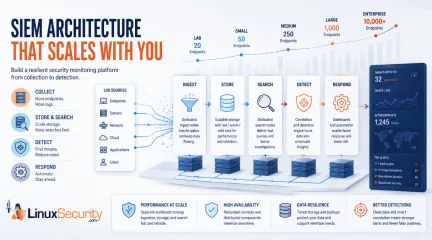
Building a SIEM is easier than scaling one. Most open-source deployments start as a simple "all-in-one" server. It is easy to set up, but that design rarely survives the transition from a lab to a production workload. . A SIEM watching 20 endpoints is not doing the same job as one watching 500. More endpoints mean more logs; more logs require more storage; more storage makes search heavier. Eventually, the very architecture that made your lab easy to deploy becomes the reason your production system fails. Production environments diverge from homelab setups because collection, storage, search, and analytics scale at different rates. Why Open Source SIEM Tools Struggle to Scale A typical first SIEM deployment runs everything on one virtual machine. This works for small environments because the workload is low. However, as the organization grows—adding authentication logs, firewall records, and cloud audit events—that architecture cracks. A Wazuh deployment monitoring 25 endpoints might generate thousands of events per hour, while a much larger deployment with 500 endpoints can process far more events in the same period. The architecture that worked on a single VM struggles with storage growth, indexing delays, and slow searches. SIEM Architecture Pattern #1: Scaling Log Management and Search Most hobby deployments run collection, indexing, storage, and search on the same server because it is simple. Mature environments eventually separate these workloads because each one scales differently. Dedicated ingest nodes receive and process incoming logs before they are indexed. Separating ingestion from storage and search prevents a spike in incoming data from slowing down your investigations or delaying your detections. If You Experience... Immediate Architectural Change Slow searches Move search workloads to separate, dedicated resources Storage filling quickly Implement hot/warm/cold storage tiers Delayed alerts Separate detection workloads from ingestion nodes Event backlogs Scale ingestion capacity horizontally SIEM Architecture Pattern #2: Design for High Availability and Failure Production SIEM architectures assume hardware failures, maintenance windows, and service outages will occur. The goal is not preventing failures; the goal is ensuring one failed component does not take the entire platform offline. Following the Wazuh architecture , environments typically move from a single manager to clustered deployments with redundant managers, distributed indexers, and load-balanced services. Failure Prioritization: Priority Component Reason 1 Storage/Indexing Historical data is often the hardest thing to recover 2 Manager/Controller Processes incoming events and runs detection logic 3 Collection Services Prevents data loss during network outages 4 Dashboard Useful for investigation, but not mission-critical SIEM Architecture Pattern #3: Building a Security Monitoring Pipeline Dashboards are only the view layer. Mature deployments treat the SIEM as a data pipeline. According to the Microsoft Sentinel architecture , data collection, analysis, retention, and automation are key parts of the pipeline. The biggest threat to this pattern is inconsistent data. If your logs aren't normalized—for example, if one source calls a field user and another calls it account_name—your detection rules will fail regardless of how powerful your infrastructure is. Decide: Pick five critical log sources. Verify that usernames, timestamps, hostnames, and source IPs are formatted consistently across all of them. Fix these "data-messy" spots before adding more dashboards. SIEM Architecture Pattern #4: Improving Threat Detection at Scale Morelogs do not automatically mean better security. Effective SIEM architecture best practices focus on what happens after data arrives: correlation and response. If you are building your first SIEM, prioritize detections that identify common attacker behavior rather than rare edge cases. Detection Why It Matters Failed logins followed by success Identifies potential password guessing New administrator account Identifies potential privilege escalation Login from a new system Identifies potential stolen credentials Security tool disabled Identifies potential attacker cleanup Decide: Build five reliable detective rules before adding five new log sources. A small number of working alerts is always more valuable than a massive pile of logs that no one is reviewing. What Leading SIEM Tools (Elastic, Wazuh, and Microsoft ) Get Right About Architecture Major platforms prove that architectural maturity is the only way to scale. Elastic: Their reference architectures focus heavily on workload separation. Scaling collection, indexing, storage, and search independently prevents one workload from overwhelming the platform. Wazuh: Their guidance shows how environments move to clustered deployments with redundant services and distributed indexers. Microsoft Sentinel: They treat the SIEM as a data platform where collection, retention, and automation are treated with the same importance as the alerts themselves. SentinelOne: Their approach emphasizes that detection and response are the ultimate goals, rather than just collecting as much data as possible. A Security Operations Roadmap for Growing SIEM Deployments Do not try to copy an enterprise architecture on day one. Build the next layer your environment actually needs. Environment Size Focus Pattern 1–50 endpoints Reliablecollection and basic detection logic. 50–250 endpoints Separate search resources from ingestion workloads. 250–1,000 endpoints Implement storage tiers and service redundancy. 1,000+ endpoints Full distributed architecture and automation pipelines. Scaling a SIEM is not about making the design complicated. It is about ensuring your collection, storage, search, and detection do not all depend on one fragile box. The organizations that scale successfully rarely start with perfect architectures. They gradually separate workloads, improve data quality, add redundancy, and invest in detection engineering as requirements grow. The sooner those patterns are introduced, the easier it becomes to scale without constantly rebuilding the platform. Related Reading Open Source SIEM Strategies Address Challenges for Small Teams OSSEC for Linux: Enhancing Monitoring and Risk Posture Management Linux Privilege Escalation Patterns and Mitigation Strategies Enhancing Linux Security With Ansible Automation Techniques Comprehensive Linux Security Tools and Hardening Best Practices 2026 AI-Driven Tools Enhance Linux Security Against Emerging Threats . A SIEM watching 20 endpoints is not doing the same job as one watching 500. More endpoints mean more. building, easier, scaling, open-source, deployments, start, simple, 'all-in-o. . Dave Wreski
 Jun 04, 2026
•
Jun 04, 2026
•
102
 log managementsystem loggingmysql integration
Setting Up Centralized Logging for MySQL Using a PHP Interface Now
Msyslog has the ability to log syslog messages to a database. This allows for easier monitoring of multiple servers and the ability to be display and search for syslog messages using PHP or any other programming language that can communicate with the database. . "Since the beginning, life has relied upon the transmission of messages. For the self-aware organic unit, these messages can relay many different things. The messages may signal danger, the presence of food or the other necessities of life, and many other things. In many cases, these messages are informative to other units and require no acknowledgement. As people interacted and created processes, this same principle was applied to societal communications. As an example, severe weather warnings may be delivered through any number of channels - a siren blowing, warnings delivered over television and radio stations, and even through the use of flags on ships. The expectation is that people hearing or seeing these warnings would realize their significance and take appropriate action. In most cases, no responding acknowledgement of receipt of the warning is required or even desired." I never would have guessed that this message came from the Introduction of RFC 3164 The BSD Syslog Protocol . Reviewing and maintaining the system logs on dozens of servers is a daunting task. Logging into each one and running grep or awk on each one can be very tedious and time-consuming. Luckily, there are programs like Logwatch and Logdog that can parse syslog files (and other files) and filter out keywords and send email or pager alerts. Fortunately, Syslog has a feature that allows for remote logging to a central server or servers. This feature allows virtually any unix syslog daemon to send syslog messages to a remote server that is configured to accept syslog messages. On a Linux system, for example, the syslogd daemon can be started with the " -r " option which tells the daemon to listen for incoming syslog messages. The port it listens on is 514 and theprotocol it accepts is UDP. # /usr/sbin/syslogd -r -m 0 " -m 0 " disables the timestamp mark in the syslog file, /var/log/messages on Linux systems. The configuration below is the only client configuration needed. The rest of the article pertains only to the central syslog server. Each client's syslog.conf file is then configured to send alerts to the central syslog server, by adding the line: *.* @julie *.* means to send all syslog messages to the remote syslog server, in this article named julie. Then refresh the syslog daemon: # /sbin/service syslogd restart End client configuration. Now on julie if you run tail -20 /var/log/messages (show the last 20 lines), you should now see the alerts sent with the hostname of the client's that have been configured to send alerts to julie. NOTE: has a program, called NTSyslog, that enables Windows Event Logs to be sent to a Unix syslog server. The process of reviewing multiple servers can be a lot easier using grep, awk, or perl, now that you have a central location where all the messages are sent. To take this one stop further, it can be incorporated with MySQL and PHP . The first thing we need to do is to get the syslog messages to the MySQL server. This is where Msyslog comes into play. Msyslog is a replacement for the standard syslog daemon that comes installed with most unix systems. Msyslog also has a nice feature of cryptographically signing syslog messages to let an admin know if their syslog files have been altered. Using the cryptographic features will be discussed in the next article. For now, the focus is on sending syslog messages to a remote server, logging to a database, and viewing the logs over a web interface using PHP. Finally, you will need to compile Apache, MySQL, and PHP support. Depending on your OS you may have a package manager that will do this work for you. Oh! You know me...I am not going to leave youhanging, my fellow readers. Here is a tutorial that explains how to setup Apache, PHP, MYSQL, and SSL. Just get the latest versions. Configuring Msyslog This was setup by downloading and installing the rpm from the msyslog website at: https://sourceforge.net/projects/msyslog/ The tarball install compiled cleanly on Red Hat 7.0-7.3. # cd msyslog-x.xxx # ./configure # make # make install rpm install: # rpm -ivh msyslog-xxx.rpm The rpm install added a startup script named " msyslogd " to the /etc/rc.d/init.d/ directory. If you installed from source, here is a startup script you can add to your OS's startup directory. The line: # daemon msyslogd $CONFIG $DEBUG $MARK $IM_BSD $IM_DOORS $IM_LINUX $IM_STREAMS $IM_TCP $IM_UDP $IM_UNIX in the " msyslog " startup script was changed by adding the switches " -i udp -p 514 -i om_mysql " # daemon msyslogd $CONFIG $DEBUG $MARK $IM_BSD $IM_DOORS $IM_LINUX $IM_STREAMS $IM_TCP $IM_UDP $IM_UNIX -i udp -p 514 -i om_mysql -i udp -p 514 - Listen on the standard port 514 for incoming syslog messages via udp -i om_mysql - load the mysql support module for logging to a mysql database This was done before the existing syslog daemon is shutdown so that when it is stopped, the settings above will immediately take affect and remote logging will continue. The normal syslog daemon was shutdown and myslogd started up immediately: # /sbin/service syslogd stop ; /sbin/service msyslogd start To ensure everything is still working run " tail -f " on the /var/log/messages file to see if logs from remote servers were being received: # /usr/bin/tail -f /var/log/messages ^C " tail -f " allows data to be viewed while a file is being appended. The logging to mysql was setup by first creating a database called " logd ": # /usr/bin/mysqladmin -p -u root create logd Then the script supplied in the man page for the om_mysql module was loaded into the database. # /usr/bin/mysql -p -u root logd < syslog.sql The syslog.sql file contained this, I modified the supplied sql file to index the host, date, and message fields.: mysql> CREATE TABLE syslogTB ( facility char(10), # OPTIONAL field for facility priority char(10), # OPTIONAL field for priority date date, # date of this log message time time, # time of this message host varchar(128), # host logging, If you have a host with # 128 characters you probably # have other issues to worry about than #someone being l33t. 8-) message text, INDEX host_index (host), INDEX date_index (date), INDEX message_index (message (50)) , #Index the first 50 characters seq int unsigned auto_increment primary key # optional sequencenumber ); #Table to import host names mysql> CREATE TABLE sysloghosts ( hostname varchar(128) # host logging, Same principles as # above for a 128-character hostname. 8-) ); The "sysloghosts" table is used as a dropdown list on the PHP search form. This is only run if new hosts are configured to log to julie. I retrieved the list from the /var/log/messages file with this command: # /bin/awk ' { print $4 } ' /var/log/messages | sort | uniq > /tmp/hosts.tmp # /bin/chown mysql:mysql /tmp/hosts.tmp The mysqld owner must hsve permissions to import the file into the database. Log into the mysql logd database as a root user (not system root), delete the current hosts, and add new hosts file: # /usr/bin/mysql -p -u root logd Enter Password: mysql> DELETE FROM sysloghosts; mysql> LOAD DATA INFILE '/tmp/hosts.tmp' INTO TABLE sysloghosts LINES TERMINATED BY 'n'; mysql> exit Delete the temporary file: # rm -f /tmp/hosts.tmp The user " mysql " is used to insert thesyslog data into the database. Also, the mysql user will be used to select data from the database using PHP. Log into the database as the admin user and grant the user " mysql " rights to edit and update the " logd " database. # /usr/bin/mysql -u root -p logd Enter Password: mysql> GRANT SELECT, INSERT on logd.* TO mysql@localhost IDENTIFIED BY 'dahbadahba'; mysql> FLUSH PRIVILEGES; the mysql user is allowed to select and insert data for the logd database (GRANT SELECT,INSERT on logd.*) from the localhost (TO mysql@localhost) with the password "dahbadahba" (IDENTIFIED BY ' dahbadahba ';) and then the privileges are enabled (Flush privileges;) . Syslog configuration file In order for this to work the password for the database has to be kept in the syslog.conf file. A few changes were made to prevent normal users from viewing the syslog.conf file; thus, revealing the database password. (NOTE: Never use the system's root password for a database password) First, the default permissions, on some unix systems, for /etc/syslog.conf are readable-writeable by root and readable by the group "root" and by the world (644). This was changed to 600: # /bin/chmod 600 /etc/syslog.conf Now it is only readable and writeable by root. Test it by trying to "cat" the file as a normal user : # /bin/cat /etc/syslog.conf Hopefully, the following message will be displayed: # cat: /etc/syslog.conf: Permission denied The options for logging to the mysql database can be added to the bottom of the /etc/syslog.conf file: *.* %mysql -s localhost -u mysql -p dahbadahba -d logd -t syslogTB -D *.* -- log all syslog messages to the mysql database -s - hostname -u - user to log into the database as -p - the database password -d - the database name -t - the database table name -D - delay logging to the database (preventsoverloading the mysql daemon if large numbers of syslog messages are received). Restart the myslogd daemon: # /sbin/service msyslogd restart Watch the directory where your mysql databases are located and see if the file grows. Restricting access to julie: EnGarde Secure Linux EnGarde has everything necessary to create thousands of virtual Web sites, manage e-mail, DNS, and firewalling for an entire organization, and supports high-speed broadband connections all using a Web-based front-end. [ View Screenshots ] [ Buy Online ] [ Feature List ] By default, the syslog daemon will accept syslog messages from any server. Be sure to use firewall rules to only allow syslog messages from the servers that should be logging to it. If your firewall supports it, use a threshold for logging to prevent a Denial-of-Service (DoS) attack. Also, the clients will listen on port 514 when sending log messages to the syslog server so be sure to firewall incoming requests to the client's syslog port, as well. No one should be connecting to the client's syslog port. Only the system adminstrators should have access to julie. One reason is that root passwords and other user's passwords could be echoed into the syslog files because of those with fast fingers may type the password in the "username" or "Login:" field and hit "Enter". Yes I am guilty. . That's the only time I have stopped the syslog daemon, opened /var/log/messages and mnaully deleted an entry. (NOTE: For sanity be sure your syslog files are chmod 600 and owned by root.) The following rules restrict access to particular hosts: (NOTE: the policy is to DENY ALL) # This restricts access to the entire web directory on julie # You can configure as you like Options Includes FollowSymLinks AllowOverride None Order deny,allow deny from all # > 8-) # allow from (space delimited list of allowed hosts or networks) allow from 192.168.0.2 192.168.0.3john.server.com clint.server.com The logs should also be reviewed via the web on julie over a secure connection. Your firewall can block or redirect incoming port 80 requests so access to the server is granted only over a secure connection. Viewing syslog messages Logs are viewed on julie using php to extract the data from the mysql database. Create a directory under your root directory called " web-syslog " # /bin/mkdir /var/www/html/web-syslog Place these .php files there: (syslog-index.txt and syslog-search.txt). Create an include outside of your web directory: # touch /var/www/gsyslog.php Be sure this file is owned by the owner of the httpd daemon and readable-writeable by only that user. If you put this file somewhere else on your filesystem, be sure the owner of the httpd daemon has read access to the directory where it is located. This file will contain the password for the logd database. Add the following: You can also find this script at . A side note (special thanks to Steve Reed ): For those of you running older versions of php, you might need to make the following modifications to syslog-search.php: -$host = trim(addslashes(htmlspecialchars($_GET['host']))); -$message = trim(addslashes(htmlspecialchars($_GET['message']))); -$date = trim(addslashes(htmlspecialchars($_GET['date']))); -$numresults = $_GET['numresults']; -$start = $_GET['start']; +$host = trim(addslashes(htmlspecialchars($host))); +$message = trim(addslashes(htmlspecialchars($message))); +$date = trim(addslashes(htmlspecialchars($date))); +$numresults = $numresults; +$start = $start; Point your browser to: . Hopefully you should see a page where you can select the hosts to retreive records for and an optional date and message field. Other Notes: Disable the standard syslog daemon from starting during bootup. You'll have to check your OS documentation forstarting a stopping services during bootup. On Red Hat you can use the " chkconfig " program or " ntsysv" : # /sbin/chkconfig --level 345 syslog off or # /usr/sbin/ntsysv Uncheck the syslog option. If you upgrade your system then you will have to be sure that the msyslogd daemon starts up and not the standard syslog daemon on julie. Conclusion: Centralized logging and viewing of logs is very valuable, especially when you have dozens of servers to monitor. It can also serve as a place to look for errors if a server has crashed and can't be broke back on line. Take care to ensure that only necessary people are allowed to view the logs and if at all possible view the logs only over a secure connection. A database backend whether mysql, postgres, or whatever database gives you more power and control of how to display and manipulate the data that is being stored. Duane Dunston is a Computer Security Analyst at STG Inc. for the National Climatic Data Center in Asheville, NC. He received his B.A. and M.S. degrees from Pfeiffer University and he has his G SEC certification from SANS. He hangs out at Old Europe Cafe, Early Girl's eatery, Anntony's, and any place with good tea and hot choc olate. Duane has been working in security for 5 years and wishes he had the funding for a "Basic Security Tour" so he could provide the wo rld with hands-on training on how to implement the security recommendations from the Sans Top 20 List of the most common vulnerabiliti es. He knows that applying these recommendations to any network can minimize the most common types of attacks. Not only does he enjoy his work in computer security, he also likes to get involved in its ever-growing technologies. Duane says, "Security is one of those jobs where you have to stay abreast of new technologies and new ways that attackers are compromising computer systems. Security keeps evolving and the industry has to keep up with it, that is why we need well-trained, evolvingsecurity professionals supportive manag ers to help us with this ongoing process". . Centralized logging with MySQL simplifies syslog management across servers, enhancing security and monitoring.. msyslog, ability, syslog, messages, database, allows, easier, monitoring. . Duane Dunston
Feb 13, 2003
•

102
security advisoryaccess controlsecurity risksSecuring Apache Web Server: Effective Logging And Access Control
This is the second installation of a 3 part article on LAMP (Linux Apache MySQL PHP). Apache is the most widely used HTTP-server in the world today. . It is also the most used web server for a Linux system. A web server like Apache, in its simplest fun ction, is software that displays and serves HTML pages hosted on a server to a client browser that understands the HTML code. You must always be careful in knowing the web services that run. Run: [root@aquarius /# netstat -a | grep LISTEN to scan your ports. A secure site should have only ports 22 (SSH), 80 (HTTP) and 443 (SSL) exposed. Log files are another useful utility for monitoring attacks on your server. One must set up a centarlised secure log server so that hackers will not be able to remov e traces of their intrusion so easily. Various logfile analyzers like analog, webaliser help in keeping track of the web server access by people. By installing and configuring a good logfile analyser one can know details about the total traffic across the network and the various files and directories accessed,mod ified,deleted or any such activity. It will also tell you the pages that were visited and by whom. In addition to that are all the resources that are busy with respect to apache. Maintaining Logfiels is such an important task that one must follow in order to keep track of his system's activities.Apache web server logfiles are httpd.log,error _log and access_log These files log all the attempts by a user in order to perform a task,it can be an attempt for compromising the system The daemon syslog must be enabled which is responsible for logging activity. Care must be taken that logging is on for mail and auth privileges in /etc/syslog.conf In typical operation, Apache is started by the root user, and it switches to the user defined by the User directive to serve hits. As is the case with any command th at root executes, you must take care that it is protected from modification bynon-root users. Not only must the files themselves be writeable only by root, but so mu st the directories, and parents of all directories. For example, if you choose to place ServerRoot in /usr/local/apache then it is suggested that you create that directory as root, with commands like these: mkdir /usr/local/apache cd /usr/local/apache mkdir bin conf logs chown 0 . bin conf logs chgrp 0 . bin conf logs chmod 755 . bin conf logs It is assumed that /, /usr, and /usr/local are only modifiable by root. When you install the httpd executable, you should ensure that it is similarly protected: cp httpd /usr/local/apache/bin chown 0 /usr/local/apache/bin/httpd chgrp 0 /usr/local/apache/bin/httpd chmod 511 /usr/local/apache/bin/httpd You can create an htdocs subdirectory which is modifiable by other users -- since root never executes any files out of there, and shouldn't be creating files in there. If you allow non-root users to modify any files that root either executes or writes on then you open your system to rootcompromises. For example, someone could repla ce the httpd binary so that the next time you start it, it will execute some arbitrary code. If the logs directory is writeable (by a non-root user), someone could repl ace a log file with a symlink to some other system file, and then root might overwrite that file with arbitrary data. If the log files themselves are writeable (by a no n-root user), then someone may be able to overwrite the log itself with bogus data. Server Side Includes Server Side Includes (SSI) present a server administrator with several potential security risks. The first risk is the increased load on the server. All SSI-enabled files have to be parsed by Apache, whether or not there are any SSI directives included within the f iles. While this load increase is minor, in a shared server environment it can become significant.SSI files also pose the same risksthat are associated with CGI script s in general. Using the "exec cmd" element,SSI-enabled files can execute any CGI script or program under the permissions of the user and group Apache runs as, as config ured in httpd.conf. That should definitely give server administrators pause. There are ways to enhance the security of SSI files while still taking advantage of the benefits they provide. To isolate the damage a wayward SSI file can cause, a server administrator can enable suexec as described in the CGI in General section. Enabling SSI for files with .html or .htm extensions can be dangerous. This is especially true in a shared, or high traffic, server environment. SSI-enabled files shoul d have a separate extension, such as the conventional .shtml. This helps keep server load at a minimum and allows for easier management of risk. Another solution is to disable the ability to run scripts and programs from SSI pages. To do this replace Includes with IncludesNOEXEC in the Options directive. Note that users may still use to execute CGI scripts if these scripts are in directories desginated by a ScriptAlias directive. Non Script Aliased CGI Allowing users to execute CGI scripts in any directory should only be considered if: You trust your users not to write scripts which will deliberately or accidentally expose your system to an attack. You consider security at your site to be so feeble in other areas, as to make one more potential hole irrelevant. You have no users, and nobody ever visits your server. Script Aliased CGI Limiting CGI to special directories gives the admin control over what goes into those directories. This is inevitably more secure than non script aliased CGI, but only if users with write access to the directories are trusted or the admin is willing to test each new CGI script/program for potential security holes. Most sites choose this option over the non script aliased CGI approach. CGI in General Always remember that youmust trust the writers of the CGI script/programs or your ability to spot potential security holes in CGI, whether they were deliberate or accidental. All the CGI scripts will run as the same user, so they have potential to conflict (accidentally or deliberately) with other scripts e.g. User A hates User B, so he writes a script to trash User B's CGI database. One program which can be used to allow scripts to run as different users is suEXEC which is included with Apache as of 1. 2 and is called from special hooks in the Apache server code. Another popular way of doing this is with CGIWrap. Protecting System Settings To run a really tight ship, you'll want to stop users from setting up .htaccess files which can override security features you've configured. Here's one way to do it. In the server configuration file, put AllowOverride None This prevents the use of .htaccess files in all directories apart from those specifically enabled. Protect Server Files by Default One aspect of Apache which is occasionally misunderstood is the feature of default access. That is, unless you take steps to change it, if the server can find its wa y to a file through normal URL mapping rules, it can serve it to clients. For instance, consider the following example: # cd /; ln -s / public_html If a client accessed , this would allow them to walk through the entire filesystem. To work around this, add the following block to your serve r's configuration: Order Deny,Allow Deny from all This will forbid default access to filesystem locations. Add appropriate blocks to allow access only in those areas you wish. For example, Order Deny,Allow Allow from all Order Deny,Allow Allow from all Pay particular attention to the interactions of and directives; for instance, even if denies access, a directivemight overturn it. htpasswd authentication With apache,you can secure your files and directories in a more simplest way by using any of the authentication methods like basic,digest etc. By using htpasswd one can allow only specific users to access a particular file or a directory like this. Create a file called users and list all the names of the users u want to give access and place it in a location like /etc/httpd/ Use the following command: root# htpasswd -cm /etc/httpd/users username -c is only used the first time For other users you need not use the -c option type the password on prompt You can notice the file users containing the passwords encrypted Now add this in httpd.conf file at the end o fthe file AuthType "Basic" AuthUserFile /etc/httpd/users AuthName "Authorisation Required" require valid-user Whenever a user tries to access /var/www/html/test directory he will be prompted for the username and password and if he is allowed to access only then he will be pe rmitted to enter into the directory and access fiels otherwise he will not be allowed. This is just one way of securing your files with apache. Roopa Rannorey Roopa has been in the IT field in Karnataka, India for about three plus years. Her interests include Linux Security and Networking and she has been at them for a while.. It is also the most used web server for a Linux system. A web server like Apache, in its simplest fu. apache, second, installation, article, (linux, mysql. . Brittany Day
Nov 22, 2002
•

Get the latest News and Insights
Get the latest Linux and open source security news straight to your inbox.
Community Poll
Should Linux servers automatically install security updates?
Search Topics
Powered By

Linux Security - Your source for Top Linux News, Advisories, HOWTOs and Feature Releases
QUICK LINKS
subscribe to newsletters!
Like staying secure? So do we.
Sign up for updates, tips, and alerts!