Audit Linux privileges now to limit compromise, escalation, and system-wide damage. Review Linux Privileges×


Stay Ahead With Linux Security Features
 security advisory vulnerability
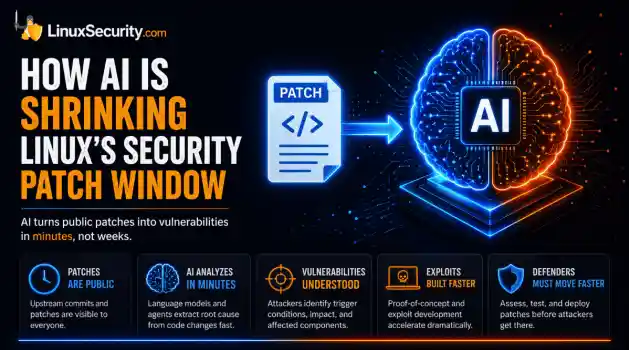
 For decades, Linux defenders relied on a comfortable assumption: a public security patch did not imply an imminent vulnerability. While open-source openness made vulnerability fixes public to everyone on kernel.org or the Linux Kernel Mailing List (LKML), converting a raw commit into a weaponized exploit took a significant amount of manual effort. This delay, estimated in weeks or months, gave businesses enough time to assess exposure, organize testing windows, and push changes across...
 Jul 27, 2026
 security advisory path traversal
 Two newly fixed storage bugs in Kubernetes showed more than just a problem with path traversal. They found a common security flaw in the cloud: powerful parts often think that requests accepted by a higher system are safe to run. This is a simple lesson for the platform and security teams: RBAC can accept a request without showing that its parameters will stay within a certain filesystem boundary. This is clear from a new study from SentinelLabs into flaws in the Kubernetes CSI drivers for NFS...
Jul 24, 2026
 security advisory update
 A large volume of Linux security updates and advisories this week across major distributions once again, but it wasn't just the volume that was the story. Where maintainers and security teams focused their attention was evident in the concentration of fixes targeting Linux kernel updates, identity services, DNS infrastructure, and internet-facing software. . Instead of looking at each advisory in isolation, administrators gain more value from the general trends they reveal about Linux security...
Jul 23, 2026
 identity management security tactics
 For years, we secured our Linux infrastructure by building walls: VPCs, security groups, and hardened SSH configurations. We treated the cloud like a virtual data center, assuming that if we kept the "bad guys" out of the network, our workloads were safe. . That model is no longer sufficient. Today, one of the most common paths from an initial compromise to a major cloud breach is the identity assigned to your Linux workload. When an attacker gains code execution on a Linux instance—through a...
Jul 17, 2026
 security practices patch management
 Most of us don't hear about a kernel vulnerability until a CVE lands in our inbox or the vulnerability scanner starts complaining. By then, the patch isn't new anymore. Kernel developers may have been passing it around for review, arguing over the implementation, or revising it for days before anyone outside that community noticed it. None of those discussions are secret. They're sitting in mailing list archives, Git commits, and patch reviews where they've been the whole time. The strange...
Jul 14, 2026
 Refine features
X Clear Filters
Get the latest News and Insights
Get the latest Linux and open source security news straight to your inbox.
Community Poll
Are host-based firewalls still worth using?
Loading...
Explore Latest Linux Security features
We found -2 articles for you...
102
 open-sourcecybersecuritysecurity model
How Secure Is Linux? Exploring Security Design and User Privilege Models
So, how secure is Linux? That’s a question every sysadmin has probably asked themselves at some point, whether they’re setting up a shiny new server or just letting their mind wander while staring at a terminal. . You’ve likely heard the praise for Linux: open-source, robust, and designed with security baked right in. But what does that actually mean? I mean, we all know no system is impenetrable, but Linux comes pretty close in ways that make it stand out. The kernel itself is packed with features that keep things buttoned up, from user privilege management to mandatory access controls like SELinux or AppArmor. If you’ve spent time hardening a system—tweaking SELinux policies, locking down sysctl.conf, or setting up kernel lockdown—you know there’s a lot of flexibility here. More than most other operating systems can offer, that’s for sure. But here’s the thing: there’s a reason Linux stays ahead in the security game. Its open-source nature means every line of code is out there for anyone to inspect, which is pretty handy when you’re hunting bugs. Compare that to Windows, where security by obscurity leaves you relying on a small team behind closed doors—and they’re not exactly crowdsourcing their fixes. That openness isn’t flawless, but it does give Linux the edge when it comes to spotting and patching vulnerabilities fast. Between the user-driven privilege model (seriously, not everyone is root, unlike in Windows) and the sheer diversity across distros and architectures, Linux makes life hard for attackers trying to exploit systems en masse. It’s not bulletproof, and misconfigurations are still a sysadmin’s Achilles' heel. But when Linux is set up correctly, those attackers are in for an uphill battle. Much of that stability disappears when quiet changes accumulate across permissions, logs, or update chains — a wider pattern commonly described as system drift in Linux . What Makes Linux Secure by Design? When it comes to security, Linux users are ata decided advantage over their Windows- or Mac-using counterparts. Unlike proprietary OSes, Linux is the most secure OS by design, as Linux security features are built into the system. The increasingly popular open-source OS is highly flexible, configurable, and diverse. Linux also implements a strict user privilege model and offers a selection of built-in kernel security defenses to safeguard against cybersecurity vulnerabilities and attacks. Linux source code is transparent to ensure any network security issues are short-lived despite being inevitable on even the most secure OS. Let’s look at Linux's features and how they contribute to robust data and network security. If you want a deeper breakdown of the core features of Linux that shape its security, we cover them in our dedicated guide. The Open-Source Security Advantage Linux security vulnerabilities are generally identified and eliminated very rapidly since their source code undergoes constant, thorough review by the vibrant, global open-source security community. In contrast, vendors like Microsoft and Apple employ a method known as “security by obscurity,” where source code is hidden from outsiders in an attempt to conceal security issues from threat actors. This approach is generally ineffective in preventing modern exploits because it undermines the security of the “hidden” source code by preventing outsiders from identifying and reporting data and network security weaknesses before malicious actors. When it comes to discovering security bugs, a small team of proprietary developers is no match for the worldwide community of Linux user-developers who are deeply invested in helping it maintain its status as the most secure OS. A Superior User Privilege Model Unlike Windows, where “everyone is an admin,” Linux greatly restricts root access through a strict user privilege model. On Linux, a superuser owns all the privileges, and ordinary users are only granted enough permissions to accomplish their tasks. Because Linux usershave low automatic access rights and require additional permissions to open attachments, access files, or adjust kernel options, it is harder to spread malware and rootkits on a Linux system. Thus, these inherent restrictions serve as a key defense against system compromise and attacks on network security. These controls work alongside basic integrity checks such as SHA256 hashing, which we cover in our guide to Linux integrity verification methods . Built-In Kernel Security Defenses The Linux kernel boasts an array of built-in security defenses, including firewalls with packet filters, UEFI Secure Boot firmware verification mechanisms, Linux Kernel Lockdown configuration options, and SELinux or AppArmor Mandatory Access Control (MAC) security enhancement systems. By enabling and configuring these Linux security features, known as Linux kernel self-protection, administrators can maintain the safest possible OS. Security through Diversity Linux environments allow for much diversity, as there are various distros, system architectures, and component companies that businesses can pick to meet their needs. This diversity not only helps satisfy users’ individual requirements but also enhances the secure OS so that attacks in network security are more difficult to achieve and cybersecurity bugs are harder to find. If cloud security breaches are to take place, however, malicious actors cannot use those tactics on a wide range of Linux systems, thanks to their diversity. In contrast, the homogeneous Windows “monoculture” makes these systems relatively easy and efficient attack targets. In addition to the design diversity seen in Linux, certain secure Linux distros are differentiated in ways that specifically address advanced security and privacy concerns shared among pentesters, reverse engineers, and data and network security researchers. Highly Flexible & Configurable There are vastly more configuration and control options available to Linux security administrators than to Windowsusers. For instance, Linux sysadmins have the ability to use SELinux or AppArmor. to lock down their system. These security policies offer granular access controls, providing a critical additional layer of security throughout an already secure operating system. Linux Kernel Lockdown configuration options strengthen the divide between userland processes and kernel code, and admins can harden the sysctl.conf file, the main kernel parameter configuration point for a Linux system, to give their server a sturdier foundation for their secure OS. Why Is Linux an Increasingly Popular Target among Cybercriminals? Linux powers the majority of the world’s high-value devices and supercomputers, and the secure OS’s user base is steadily growing. Unfortunately, cybercriminals have taken note of these cybersecurity trends. Malware authors and operators are targeting Linux systems in their malicious campaigns more frequently. The past few years have been plagued with emerging Linux malware strains. That being said, Linux is still a relatively small target, with 96% of new malware targeting Windows. Also, the recent increase in Linux malware breaches is not a reflection of whether or not Linux is a secure OS. The majority of attacks on Linux systems can be attributed to misconfigurations and poor administration, highlighting a widespread failure among Linux sysadmins to prioritize data and network security. Luckily, as Linux malware continues to become increasingly prevalent and problematic, Linux offers built-in protection against malware attacks through its strict user privilege model and design diversity. A selection of excellent reverse engineering and malware scanning toolkits, like REMnux, Chkrootkit, Rkhunter, Lynis, and Linux Malware Detect (LMD), is available to help admins detect and analyze malware on their systems. Our Final Thoughts: How Secure Am I As A Linux User? Alright, here’s the deal: Linux is an incredibly secure operating system, but let’s not pretend it’s magic. Ifyou neglect your configuration or ignore basic security practices, even the best-built systems will eventually come crashing down. Misconfigured servers, outdated setups, or just plain laziness—these open the door for attackers, no matter how locked down the kernel is. Sure, Linux has the tools: SELinux, AppArmor, Chkrootkit, you name it. But tools don’t mean much if they’re collecting dust. At the end of the day, it’s on the sysadmin to piece it all together, steer clear of the bad habits, and maintain systems with care. It’s not glamorous or exciting, but guess what? That’s how you stay secure. Honestly, security is like a pile of Lego bricks; the potential is there, but someone has to build it right. That said, Linux is still one of the best choices you can make when it comes to online security. No platform is invincible, but Linux gives you more control, more flexibility, and some serious advantages over Windows or macOS. The diversity across distros alone makes it harder for attackers to recycle their tactics or build one-size-fits-all exploits. And while the learning curve can rear its ugly head now and then—yeah, SELinux policies will test your patience—it’s worth it. You trade a bit of convenience for peace of mind, and that’s not a bad deal. As the saying goes (alright, maybe not literally), “The most secure system is the one turned off and tossed to the bottom of the ocean.” You’ve got to strike a balance and configure Linux to be as secure as needed without making it unusable. If you’re willing to put in the effort, Linux can be as close to "locked down" as you want. . You’ve likely heard the praise for Linux: open-source, robust, and designed with security baked ri. secure, linux, that’s, question, every, sysadmin, probably, asked, themselves. . Brittany Day
 Jun 09, 2025
•
Jun 09, 2025
•
102
 security advisorynetwork securityintrusion detection
Proven Strategies to Assess the Security of Your Linux Server Setup
Linux is a widespread OS known for its robust data and network security . That being said, cybersecurity vulnerabilities are inevitable in any OS. Therefore, Linux system administrators must be vigilant about monitoring and verifying the safety of their servers on an ongoing basis in order to protect sensitive data and prevent attacks on network security. After all, the majority of exploits in cybersecurity on Linux systems resulted from poor administration . . The only way to be sure your server is as well protected as needed is to test it and verify it is working as you expect. This article will introduce LinuxSecurity’s top methods and tools for checking that your Linux server security is safe. We will cover port scanning, intrusion detection, penetration testing, reverse engineering, and auditing, and we will guide you in the direction of other valuable resources to help you get started on your journey to stronger security. What Are the Top Methods for Verifying Linux Server Security? Port Scanning Port scanning, or the process of evaluating ports on a server to identify cybersecurity vulnerabilities, is one method that administrators should employ when looking to evaluate the overall security of a Linux server. Port scanning Linux servers reveals what ports are open to receiving information and what security devices exist between the sender and the target. This information can be used to identify potential network security issues that could be exploited by attackers. Linux users have an array of excellent port scanners to choose from. In this section, we’ll introduce our three favorite open-source port scanners and direct you to some helpful tutorials demonstrating how to perform a port scan on your Linux servers. Let’s take a look at three great port scanners available to Linux users: Nmap Nmap , which stands for “Network Mapper,” is by far the most popular and versatile port scanner available, for good reason. The free and open-source port scanner offers an array of optionsfor performing quick, effective scans on both local and remote networks. Nmap can be used for active port scanning to discover open ports on specific networks/hosts, as well as for host discovery to identify potential hosts that are responding to network requests. Linux Nmap’s capabilities extend beyond port scanning, as it can also be used for penetration testing, fingerprinting operating systems, vulnerability scanning, OS detection, and application version detection. Nmap has both CLI and GUI interfaces (the GUI is called Zenmap ) and can also be run from the classic command line terminal. You can learn how to install Nmap on Linux here . Learn how to perform a ping scan, a host scan, and an OS and services scan with Nmap. Unicornscan Unicornscan is the second most popular open-source port scanner after Nmap. It features renowned asynchronous TCP and UDP scanning capabilities as well as non-common network discovery patterns that provide alternative ways to find out important details about remote operating systems and services. Unicornscan can be used for both active and passive remote OS, application, and component identification. The fast, comprehensive port scanner offers custom module support, customized data-set views, and PCAP file logging and filtering. You can download Unicornscan here . Angry IP Scanner Thanks to its multi-thread approach that separates each scan, Angry IP Scanner is known for its impressive scanning speed. The free multi-platform scanner searches for open ports on any remote network and then exports scanned results into either TXT, XML, or CSV files. Angry IP Scanner has other notable features , including its web server and NetBIOS information detection capabilities and its easy, seamless plugin integration with Java. Angry IP Scanner Linux can be downloaded here . Intrusion Detection Intrusion detection , or monitoring a network or system for malicious activity or policy violations, is a critical part of maintaining a secure Linux server. The informationgathered through intrusion detection provides administrators with valuable insight into the attacks in network security that could potentially threaten their servers. This is valuable information to be aware of when setting up preventative defenses. In this section, we’ll examine a few great open-source Linux Intrusion Detection System (IDS) tools and honeypots that can help server administrators proactively identify and respond to network security threats to their systems, thus preventing data theft and system compromise. We’ll then explore the importance of monitoring logs. Snort Snort is the leader in free and open-source Network Intrusion Detection Systems (NIDS). The popular network security toolkit has various modes that can be used to analyze real-time traffic. The intrusion detection mode is based on a set of rules that the user can either create or download from the Snort community . Linux Snort can also be used for port scanning, OS fingerprinting, and detecting attacks in network security using signature-based and anomaly-based techniques. Snort is easy to install and supported by a large, vibrant community, which makes this cloud security scanner and detection service all the more reassuring. Snort can be downloaded here. Learn how to install and use Snort for intrusion detection in this LinuxHint tutorial . OSSEC In the realm of Host-based Intrusion Detection Systems (HIDS), OSSEC dominates. This full-featured open-source IDS tool is highly effective and extensible. OSSEC’s client/server-based management and logging architecture secures sensitive information against exploits in cybersecurity like tampering and theft by delivering alerts and logs to a centralized server. This server can analyze and notify regarding network security threats even if the host system is compromised or offline. A convenient benefit of this client/server design is one’s ability to centrally manage agents from a single server. OSSEC is very lightweight and is backed by a strong, supportive community.OSSEC can be downloaded here. Learn how to install and use OSSEC for intrusion detection in this LinuxHint tutorial . Suricata Suricata is a modern NIDS that employs signature-based, anomaly-based, and policy-driven intrusion detection methods. It features multi-threading capabilities, GPU acceleration, and multiple-model statistical anomaly detection. Suricata can examine HTTP requests, TLS/SSL certificates, and DNS transactions. Suricata is compatible with Snort's data structure, enabling users to implement Snort policies in Suricata. Suricata can be downloaded here. Cowrie Cowrie is a medium interaction SSH and telnet honeypot that logs brute force attacks in network security and shell interaction. The open-source honeypot emulates a Unix system in Python and functions as a proxy to log malicious activity. Cowrie features JSON logging for easy processing in log management solutions. Monitoring Logs Monitoring logs is an essential part of verifying the data and network security of a server. It must be done on a regular basis to ensure that your systems remain secure. Critical Linux log monitoring categories include application, event, service, and system logs. Many Linux distributions offer network security toolkits for automating this ongoing task. The Logwatch Linux application, for instance, sends a daily email report of all of the logs on a server, providing administrators with valuable information, including potential malicious activity, SSH attempts, IPs causing errors, and the number of sent emails in the server. In a large corporate environment, it is a common practice to send Logwatch emails (along with other mail directed to the root user) to a single company email list. Administrators in the company then subscribe to this email list to stay informed of any notifications regarding suspicious activity detected in any of the company’s server logs. Logwatch can be downloaded here. Fail2ban is another excellent application for monitoring logs and detecting intrusionattempts. This intrusion prevention software and cloud security framework keeps servers safe against brute-force attacks in network security by reacting to intrusion attempts. These reactions could be either installing firewall rules to reject potentially malicious IP addresses for a certain amount of time or blocking access to a specific port. Linux Fail2ban can be downloaded here. Penetration Testing Penetration testing (commonly referred to as pen testing or ethical hacking) is the practice of testing a computer system, network, or application to identify cybersecurity vulnerabilities that could be exploited by malicious actors. As you can imagine, information gathered in pen tests is invaluable in verifying the data and network security of a Linux server and preventing attacks. There are an array of excellent pentesting network security toolkits available to Linux users, and there is a certain group of Linux distro for penetration testing . In this section, we’ll introduce our top two distros for Linux penetration testing: Kali Linux and ParrotOS. Kali Linux Kali Linux is one of the most popular Linux distros among pentesters, ethical hackers, and security researchers. The flexible, full-featured distro contains hundreds of pentesting tools, protects sensitive pentesting data with LUKS full-disk encryption, and offers high customization levels. Kali Linux also offers training and support through the Kali Linux Dojo training suite. Key Features & Benefits: Kali Linux uses LUKS full-disk encryption to secure sensitive pentesting data against loss, tampering, and theft. “Forensics” mode makes this distro perfect for investigative work. Users can automate and customize their Kali Linux installations over the network. This flexible distro offers full customization with live-build . On the training suite, Kali Linux Dojo users can learn how to customize their own Kali ISO and learn the basics of pentesting. All of these resources are available on Kali’s website , freeof charge. Kali Linux also offers a paid-for pentesting course that can be taken online with a 24-hour certification exam. Once you pass this exam, you’re a qualified pentester! ParrotOS Parrot OS is a fully-portable laboratory for pentesting, reverse engineering, and digital forensics. The fast, lightweight distro is frequently updated and offers a wide array of hardening and privacy sandboxing options. ParrotOS tools and features are designed to be compatible with the majority of devices via containerization technologies such as Docker or Podman . Key Features & Benefits: ParrotOS provides pentesters and digital forensics experts with a state-of-the-art “laboratory” featuring a full suite of tools accompanied by standard privacy and security features. Applications that run on Parrot OS are fully sandboxed and protected. Parrot OS is fast, lightweight, and compatible with most devices. Reverse Engineering & Malware Scanning Reverse engineering, or the process of deconstructing an artificial environment to gain insight into its design, architecture, and code, can be extremely helpful in securing or verifying the data and network security of a Linux server. This process plays a central role in malware detection and analysis, as it can help administrators identify network security threats like malware on their systems, which they can then study, eliminate, and learn from so they can apply the knowledge to prevent future attacks in network security. In this section, we will profile the six malware scanning and reverse engineering tools Linux favors, as well as some toolkits and utilities. REMnux REMnux is a free, community-powered toolkit for reverse engineering and malware analysis. The toolkit conveniently enables analysts to investigate malware without having to find, install, and configure the tools needed to do so. REMnux offers a distro that can be downloaded as a VM in the OVO format and then imported into your hypervisor, installed from scratch on a dedicatedhost, added to an existing system running a compatible version of Ubuntu, or run as a Docker container . Chkrootkit Chkrootkit is a free and open-source rootkit detector that locally scans for signs of a rootkit and hidden security holes on Unix/Linux systems. The scanner consists of a shell script that checks system binaries for rootkit modification along with a selection of programs designed to scan systems for different network security issues. Chkrootkit can be downloaded here. Rkhunter Rkhunter is a powerful and user-friendly open-source tool designed to scan Linux systems for rootkits, backdoors, and local exploits in cybersecurity. The comprehensive cloud security scanner inspects and analyzes a system to detect hidden security holes. Rkhunter Linux can be downloaded here. Lynis Lynis is a powerful and popular malware and vulnerability scanning and auditing tool for Unix/Linux operating systems. The free and open-source scanner detects network security issues and configuration errors, performs firewall auditing, checks file/directory permissions, and verifies file integrity and installed software. Lynis can be downloaded here . Learn how to scan your Linux system with Lynis in this Opensource.com tutorial . LMD Linux Malware Detect (LMD) is a full-featured, open-source malware scanner designed specifically for hosted environments; however, this tool can be used to detect network security threats on any Linux system. Linux LMD includes a full reporting system, where administrators can view both current and past scan results accompanied by email alerts after every scan and an array of other useful features. The scanner can be integrated with the ClamAV scanner engine for stronger performance and improved security posture. Project Freta Microsoft recently announced Project Freta , a free cloud-based malware scanning tool for Linux. The tool uses snapshot-based memory forensics, comparing thousands of images of Linux VMs to identify previously undetected malware. Auditing Conducting frequent cloud security audits is an essential part of establishing the data and network security of your Linux servers. System auditing Linux enables administrators to discover security bugs, breaches, or policy violations on their systems. In this section, we’ll take a look at the Linux Auditing System (AuditD) and the insight that this valuable feature can provide administrators into the security, stability, and functionality of their systems. What is the Linux Auditing System? The Linux Auditing System (AuditD) is a native feature of the Linux kernel that collects information on system activity to facilitate the investigation of potential network security issues. AduditD works on the kernel level, where it can oversee all system processes and activities and uses the AuditD daemon to log what it finds. In most Linux distributions, AuditD is installed by default and runs automatically with the system. It logs information according to auditing and added rules. AuditD monitors three categories of events: system calls, file access, and select, pre-configured auditable events within the kernel. It enables administrators to audit activity using these categories of events, including authentications, failed cryptographic operations, abnormal terminations, SELinux modification, and program execution. When any one of the audit rules in place is triggered, AuditD outputs a comprehensive record that can be used to investigate the incident. When implementing the Linux Auditing System, you will likely need to create some of your own rules. There are two types of rules that administrators can write: file system and system call rules. System activities like specific scripts executed, userland events, and internal kernel behaviors cannot be triggered using AuditD. When writing rules, it is critical to remember that audit rules work on a “first match wins” basis. In other words, once audited activity matches a rule, no further rules will be evaluated. Thus, the order in which rules arewritten is of utmost importance. To view the audit records generated by a triggered rule, administrators can use the native ausearch and aureport utilities. Ausearch lets you search your audit log files for specific criteria, and aureport creates summary reports from the audit log files. It is crucial for administrators to ensure that AuditD is properly configured and hardened to provide genuine, reliable information. Begin by checking that AuditD’s configuration is immutable using the control option “-e 2.” Then, confirm that logs are stored in a centralized, secure location - ideally, a server dedicated to accepting remote syslog events. AuditD is a very useful and free feature for facilitating investigations, especially historical investigations, in response to an incident. That being said, AuditD does have some serious weaknesses that should be taken into consideration, namely bugginess, excessive overhead, lack of granularity, missing container support, and onerous output. Final Thoughts on Verifying Linux Server Security Regardless of the OS you’re running, securing your servers is an ongoing process that requires vigilant monitoring, testing, verification, and maintenance. In recent years, Linux has become an increasingly popular target among cybercriminals due to its growing popularity. However, the good news is that the majority of attacks in network security on Linux systems can be attributed to poor administration and can thus be prevented with greater attention to security and system hardening. Frequently verifying the data and network security of your Linux servers using methods such as port scanning, intrusion detection, penetration testing, reverse engineering, and auditing is the only way to confirm that your servers are indeed as secure as you need them to be. . The only way to be sure your server is as well protected as needed is to test it and verify it is wo. linux, widespread, known, robust, network, security, being, cybersecur. . Brittany Day
Mar 27, 2023
•

102
 network securitymalwaresecurity tools
Using Reverse Engineering to Secure Linux Against Malware Threats
For many years, Windows users were the only ones at risk of facing malware network security threats; however, cybercriminals have come to view Linux as a viable target for their attacks due to the growing popularity of the open-source OS and the plethora of high-value devices it powers. During 2019 and 2020, dangerous Linux malware variants like CloudSnooper, EvilGnome, and HiddenWasp emerged, and the number of malware strains continued to grow over time as Linux malware operators harbored great success with their malicious malware and phishing campaigns. Thus, taking proactive measures to secure your Linux systems against attacks has never been more critical. . Reverse engineering seeks to deconstruct malware in an artificial environment, such as a Linux system, to gain insight into its design, architecture, and code. It is a highly effective method of malware detection and analysis, which we will examine in this article, highlighting how reverse engineering can be used to secure Linux systems, our favorite network security toolkits for doing so, and malware scanning available to Linux users. How Can Reverse Engineering Detect, Analyze, and Protect against Malware for Ultimate Security? Reverse engineering helps administrators identify, study, and eliminate network security issues and risks on their systems that they can use to gain knowledge on how to prevent future attacks in network security. This process involves disassembling - and sometimes decompiling - malware software programs that threaten to harm a system. By converting binary instructions to code mnemonics (shortcuts within a system) or higher-level constructs, reverse engineers (often referred to as “reversers”) can analyze the characteristics of a malicious program, including its behavior, systems it impacts, and cybersecurity vulnerabilities it exploits. These valuable details can be used to create effective solutions to mitigate the program’s intended malicious results. Dynamic analysis relies on privacy sandboxing malwaretesting to determine the speed and automation offered through reverse engineering. Privacy sandboxing is when a malicious program is intentionally launched into a secure environment so companies can find and fix the cybersecurity vulnerabilities within their system. As emerging malware strains continue to demonstrate increasingly complex techniques, reversers need more time to understand disassembled or decompiled code, which can be an opportunity for cybercriminals to compromise a network with malware. The use of dynamic analysis can make reverse engineering more efficient and effective; however, reversers should not rely solely on dynamic techniques, as sophisticated malware variants are capable of employing evasion techniques that detect whether they are in a sandbox, allowing them the chance to delay or hide malicious activities. The best approach to malware detection and analysis involves combining the previously described methods to work automatically to combat any threat heading a company’s way. Dynamic analysis can be used to automatically analyze the majority of network security threats, while reversers can dedicate their time to acquiring threat intelligence from the most sophisticated attacks. Now that we’ve explored how reverse engineering can help you secure your Linux systems against malware, we can go over the various network security toolkits and utilities that can assist in the process of reverse engineering and malware scanning. Network Security Toolkits and Utilities to Use with Linux Reverse Engineering & Malware Scanning REMnux REMnux is a free, versatile network security toolkit that conveniently allows reversers and analysts to investigate malware without having to find, install, and configure the tools needed. REMnux offers a distro that can be downloaded as a Virtual Machine (VM) in the OVO format and then imported into your hypervisor, installed from scratch on a dedicated host, added to an existing system running a compatible version of Ubuntu, or run as a Dockercontainer . Chkrootkit Chkrootkit is a widely used free rootkit detector. A rootkit is a malware program that gives cyber criminals access to a system from afar. This protection toolkit locally scans for rootkits and hidden security holes on Unix/Linux systems utilizing a shell script that checks system binaries for any rootkit modification through the use of “strings” and “grep” (Linux tool commands) to detect potential network security threats. Chkrootkit can verify an already compromised system through alternative directories or rescue discs. It can also locate deleted entries in the “wtmp” and “lastlog” files, find sniffer records or rootkit configuration files, check for hidden entries in “/proc,” and look at calls to the “readdir” program. Chkrootkit can be downloaded here. Rkhunter Rkhunter is a powerful, user-friendly tool designed to inspect and analyze Linux systems for hidden security holes and scan for rootkits, backdoors, and local exploits in cybersecurity. This tool thoroughly checks files, default directories, kernel modules, and misconfigured permissions, comparing them to the database records that can help identify suspicious programs. Rkhunter can be downloaded here. Lynis Lynis is a popular, free malware scanning and auditing tool for Unix/Linux OSes used to detect security holes and configuration flaws, which could be cybersecurity vulnerabilities. It performs firewall auditing, checks file/directory permissions and integrity, and verifies installed software. Lynis exposes network security threats but provides mitigation suggestions to assist you in taking care of your system. Lynis can be downloaded here. LMD Linux Malware Detect (LMD) is a full-featured malware and cloud security scanner explicitly designed for hosted environments; however, LMD can be used to detect network security threats on any Linux system. The renowned program uses a signature database to identify and rapidly terminate malicious code running on a system. Topopulate its database, LMD captures threat intelligence data from network edge Intrusion Detection Systems (IDS), enabling programs to generate new signatures for malware actively being used in attacks. LMD includes a complete reporting system where administrators can view current and past scan results and receive email alerts after each scan. To improve LMD’s performance, you can integrate it alongside the virus scanner, ClamAV . Keep Learning about Mitigating Network Security Threats Malware is a growing concern for administrators as the prevalence and sophistication of variants targeting Linux systems continue to increase. However, this tends to result from misconfigured servers and poor administration, demonstrating that this rise in attacks is not a result of defective data and network security on Linux’s part. Testing and verifying server cybersecurity projects on an ongoing basis is crucial to preventing attacks. Reverse engineering is an excellent method of detecting and analyzing malware on Linux systems and gathering threat intelligence that can be used to prevent future network security issues. There are various services for reverse engineering and malware scanning available to Linux users that are powerful, user-friendly, and free to download. Have questions about reverse engineering? Currently, are you using one or more of the network security toolkits that we’ve highlighted in this article? We'd love to hear about your experience and/or answer your questions! Please do not hesitate to contact us on social media: Twitter | Facebook . Reverse engineering seeks to deconstruct malware in an artificial environment, such as a Linux syste. years, windows, users, facing, malware, network, security, threats. . Brittany Day
Dec 28, 2020
•

Get the latest News and Insights
Get the latest Linux and open source security news straight to your inbox.
Community Poll
Are host-based firewalls still worth using?
Search Topics
Powered By

Linux Security - Your source for Top Linux News, Advisories, HOWTOs and Feature Releases
QUICK LINKS
subscribe to newsletters!
Like staying secure? So do we.
Sign up for updates, tips, and alerts!