Audit Linux privileges now to limit compromise, escalation, and system-wide damage. Review Linux Privileges×


Stay Ahead With Linux Security Features
 security advisory vulnerability
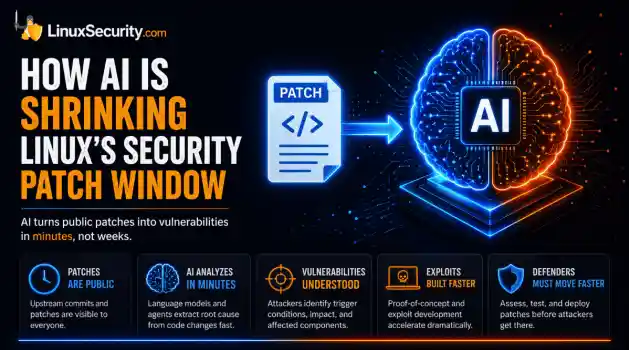
 For decades, Linux defenders relied on a comfortable assumption: a public security patch did not imply an imminent vulnerability. While open-source openness made vulnerability fixes public to everyone on kernel.org or the Linux Kernel Mailing List (LKML), converting a raw commit into a weaponized exploit took a significant amount of manual effort. This delay, estimated in weeks or months, gave businesses enough time to assess exposure, organize testing windows, and push changes across...
 Jul 27, 2026
 security advisory path traversal
 Two newly fixed storage bugs in Kubernetes showed more than just a problem with path traversal. They found a common security flaw in the cloud: powerful parts often think that requests accepted by a higher system are safe to run. This is a simple lesson for the platform and security teams: RBAC can accept a request without showing that its parameters will stay within a certain filesystem boundary. This is clear from a new study from SentinelLabs into flaws in the Kubernetes CSI drivers for NFS...
Jul 24, 2026
 security advisory update
 A large volume of Linux security updates and advisories this week across major distributions once again, but it wasn't just the volume that was the story. Where maintainers and security teams focused their attention was evident in the concentration of fixes targeting Linux kernel updates, identity services, DNS infrastructure, and internet-facing software. . Instead of looking at each advisory in isolation, administrators gain more value from the general trends they reveal about Linux security...
Jul 23, 2026
 identity management security tactics
 For years, we secured our Linux infrastructure by building walls: VPCs, security groups, and hardened SSH configurations. We treated the cloud like a virtual data center, assuming that if we kept the "bad guys" out of the network, our workloads were safe. . That model is no longer sufficient. Today, one of the most common paths from an initial compromise to a major cloud breach is the identity assigned to your Linux workload. When an attacker gains code execution on a Linux instance—through a...
Jul 17, 2026
 security practices patch management
 Most of us don't hear about a kernel vulnerability until a CVE lands in our inbox or the vulnerability scanner starts complaining. By then, the patch isn't new anymore. Kernel developers may have been passing it around for review, arguing over the implementation, or revising it for days before anyone outside that community noticed it. None of those discussions are secret. They're sitting in mailing list archives, Git commits, and patch reviews where they've been the whole time. The strange...
Jul 14, 2026
 Refine features
X Clear Filters
Get the latest News and Insights
Get the latest Linux and open source security news straight to your inbox.
Community Poll
Are host-based firewalls still worth using?
Loading...
Explore Latest Linux Security features
We found -3 articles for you...
102
 backup strategiessecurity policiesmonitoring tools
Enhancing WordPress Security with Containerization and Optimal Practices
Keeping WordPress secure can be challenging, especially when considering Linux security concerns in a typical LAMP stack setup. Most WordPress security issues stem from third-party plugins, insecure coding, and server-level vulnerabilities in a typical LAMP stack setup-Linux, Apache, MySQL, PHP-to build and deploy WordPress. . So, malicious attackers could gain an undue advantage if you don't ensure proper care and security for these weaknesses. This makes it more important than ever to fortify WordPress security. That's where containerization comes in. Nowadays, most WordPress development companies use containers and tools like dockers for robust security. Containerization is a virtual process where all application components are packed as a single unit, supporting Linux cyber security through isolation. On the other hand, Docker allows us to run WordPress in isolated containers, reducing the chances of conflicts and security breaches and making it much easier to manage updates and dependencies. So, knowing how to set up, secure, and manage WordPress and containers is essential. This article will guide you through the basics of containerizing WordPress and explore best practices for maximizing Linux container security and ensuring streamlined management. Let's begin! Benefits of Containerizing WordPress Using containerization for WordPress has a lot of advantages: Isolation and Consistency: Containers allow each application, such as PHP, MySQL , and WordPress, to run in its isolated environment, avoiding conflicts between them. Portability: Containers can operate seamlessly in various environments, including a user’s local machine, cloud servers, or on-premises servers. Scalability and Resource Efficiency: Unlike virtual machines (VMs), which use a separate operating system, containers share the host operating system's kernel. This shared kernel approach makes containers lightweight and easier to deploy and scale. Overall, containerization forWordPress is the best thing you can do because it makes the application more easy to manage, and you can scale independently as per use. Setting Up a Secure WordPress Container To set up a WordPress container, you'll first need to install both Docker and Docker Compose. A basic handle on Linux cyber security commands and system management is a plus, especially configuring permissions, handling files, and troubleshooting activities. With these basics in place, you’re ready to begin setting up your containerized WordPress environment. Step 1: Install Docker and Docker Compose Install Docker and Docker Compose on your system by following the instructions on Docker’s official website. Step 2: Define Containers in Docker Compose You can manage multiple containers in one file. For a WordPress setup, create containers for: WordPress : Runs the WordPress application. MySQL (or MariaDB): Stores WordPress data. Step 3: Start the Containers Run your WordPress environment with the following: bash docker-compose up -d To improve security, it is recommended to use non-root users in containers to minimize risks and limit container permissions to essential access only. Implementing Security Policies with Kubernetes If you’re ready to take security a step further, Kubernetes brings additional tools for container management and protection. When securing your WordPress deployment, Kubernetes offers a powerful way to manage and safeguard containers efficiently. In addition to strong security, Kubernetes provides robust management features. Embedding WordPress containers in a Kubernetes cluster allows you to take advantage of load balancing, auto-scaling, and rolling updates over Kubernetes infrastructure. You can also use Helm Charts, a Kubernetes package manager, to make deployments faster and more customizable by bundling Kubernetes resources into single packages that are easy to configure and reuse. Network Policies to Isolate Workloads Isolatingworkloads helps protect your network by reducing exposure to potential threats. This approach prevents unauthorized containers from accessing sensitive components, strengthening your overall security. Using Security Contexts To Define And Enforce Container-Level Security Measures Security Contexts in Kubernetes allow you to set permissions and security configurations for individual containers or pods. Role-Based Access Control (RBAC) for Managing Permissions and Access Control Role-based access Control (RBAC) allows you to manage who has access to specific resources within a cluster. You can also assign roles and permissions to trusted identities so they can modify or access sensitive configurations. Managing and Monitoring Secure WordPress Containers Engaging in WordPress security best practices is essential to secure your WordPress environment and support Linux vulnerability mitigation. Practical measures for securely managing and monitoring WordPress containers include: Regular Security Audits and Updates Database backups are essential for WordPress sites, and regularly applying Linux security patches is equally crucial to maintaining security. Schedule regular backups of your MySQL or MariaDB data and store them securely. You can automate backups by creating cron jobs on the host system or using a backup container. Regular updates are essential for applying the latest Linux security patches, which keep your containers secure and up-to-date. Keep containers updated with the latest Linux security patches because new vulnerabilities are discovered daily for vulnerability mitigation. For effective Linux vulnerability mitigation, update your WordPress or database container by pulling the latest image and restarting your containers: bash docker-compose pull docker-compose up -d Note: If you are not technical, hire WordPress developers to handle the updates and maintenance professionally. Here’s an example of running a MySQL dump command in a separatecontainer: bash docker run --rm --network container:db -v $(pwd)/backup:/backup mysql:5.7 bash -c \ "mysqldump -h localhost -u user -password wordpress > /backup/backup.sql" This command creates a dump of the WordPress database and saves it in the specified backup directory. Monitoring Tools As with most other things in life, catching issues before they escalate keeps your application running smoothly. Tools such as Prometheus and Grafana are good for monitoring CPU, memory, and network usage in real-time, while Docker's built-in docker stats command gives a live view of container resource usage, so it would be pretty easy to spot any potential problems before they escalate. Tools like WPScan enable WordPress site admins to protect their websites from malware and other security threats. By scanning for malware and potential attacks, WPScan allows admins to detect potential risks like outdated plugins, vulnerable themes, and weak passwords that must be addressed. Installing WPScan is quick and easy, and its vulnerability database updates regularly to safeguard against emerging threats, making your administrative life simpler and more secure. Backup and Disaster Recovery A robust backup and disaster recovery strategy is critical in responding to potential issues and mitigating damage. Admins should know how to properly handle database connection issues and file permission errors they may encounter. These issues should be dealt with in the following way: Database Connection Issues If you see “Error establishing a database connection,” verify that the WordPress container’s WORDPRESS_DB_HOST environment variable points to the correct database container. File Permission Errors WordPress requires specific permissions to upload files and install plugins. If you encounter permission errors, update the volume’s permissions on the host system. Real-World Example of the Benefits of Containerizing WordPress Skybound faced challenges scaling its virtualmachines during peak traffic and struggled with complex code changes. The vast codebase contains many images and other resources, leading to delays and excessive manual effort in setting up new deployments. Solution and Result Skybound used containerization to manage its WordPress site and source code. It leveraged AWS services like ECS, Fargate, and CloudFormation to save each environment as a Docker image in Amazon ECR, efficiently handle resource scaling, and provision infrastructure. Additionally, they adopted Azure's serverless architecture for their database, removing the complexity of traditional database management. This setup allows Skybound to manage high-traffic loads smoothly, deploy code updates seamlessly across environments, and reduce manual infrastructure tasks. Our Final Thoughts on Securely Containerizing WordPress Containerization is necessary to keep any WordPress website safe today. However, using best practices to make your WordPress site more manageable and secure is what matters most . Your WordPress container ecosystem needs regular updates, monitoring, and maintenance for optimal operation. Lastly, if you want a robust and scalable WordPress website, we recommend consulting an experienced WordPress development company to provide further insight and guidance. If you have further questions, please do not hesitate to reach out to us @lnxsec - we're here to help! . Fortify your WordPress security against attackers and learn to securely containerize your application using best practices.. keeping, wordpress, secure, challenging, especially, considering, linux, security, concerns. . Brittany Day
 Dec 18, 2024
•
Dec 18, 2024
•
102
 risk managementdata integritycompliance
Streamlining Third-Party Risk Management: Benefits and Best Practices
Managing third-party risks is critical to business operations, especially in today’s interconnected global economy. With organizations relying on vendors, suppliers, and contractors more than ever, identifying and mitigating risks associated with these external parties is essential. . Meanwhile, keeping up with the latest advancements in linux security and linux news is crucial for IT departments to protect their systems. Traditionally, third-party risk management (TPRM) processes have been manual, resource-intensive, and error-prone. However, technological advancements have ushered in a new era: TPRM automation . Incorporating automation into third-party risk management enhances accuracy and efficiency, helping businesses make faster, data-driven decisions without compromising on compliance. This article explores how TPRM automation can revolutionize risk management and why businesses should automate third-party risk processes. What Is Third-Party Risk Management Automation? Third-party risk management (TPRM) automation refers to using technology to streamline and automate the processes involved in identifying, assessing, and mitigating risks associated with external partners. Instead of relying on manual methods such as spreadsheets, emails, and phone calls, TPRM automation allows companies to centralize and automate these tasks. Automated systems can continuously monitor third parties for risk indicators, analyze data more efficiently, and provide real-time updates. This not only reduces the time spent managing risks but also helps in the early identification of potential issues, allowing businesses to act proactively. Benefits of Automating TPRM There are several advantages to implementing TPRM automation for businesses of all sizes. Let’s dive into some of the key benefits: Increased Efficiency and Speed Manual risk management processes often involve tedious tasks that can slow down the entire workflow. Automation eliminates the need for repetitive data entry,cross-referencing, and manual follow-ups. With automation tools, you can set predefined workflows, enabling quicker identification and resolution of risks. This increased speed allows businesses to respond to potential threats in real-time rather than after the damage has been done. Cost Savings Reducing manual labor leads to significant cost savings. Organizations can reduce the number of employees required to manage risk by automating third-party risk management processes. The system handles much of the legwork, such as gathering information, assessing risks, and generating reports, freeing up employees to focus on higher-level strategic tasks. Furthermore, automation reduces human error, which can be costly in risk management scenarios. Correcting mistakes often requires additional time, effort, and resources, but automation minimizes this risk, ensuring that the processes are carried out accurately the first time. Improved Accuracy and Data Integrity Manual processes are not only time-consuming but also prone to mistakes. Automating TPRM ensures that data is captured consistently and accurately. This means fewer errors in risk assessments and a more reliable system for tracking risks. Automation tools can integrate with multiple data sources to gather relevant information, ensuring the data you’re working with is up-to-date and precise. Scalability As a business grows, so does its network of third-party relationships. Managing the associated risks can become overwhelming if relying on manual processes. TPRM automation provides scalability, allowing companies to efficiently manage an increasing number of third parties without additional administrative burden. Automated systems can handle large volumes of data and scale to meet your business needs. Key Features of TPRM Automation Tools When considering TPRM automation, it’s essential to understand the features that will impact your business most. While each automation tool may differ, certain features are particularly valuablein open-source third-party risk management tools like OpenVAS: Continuous Monitoring One of the most critical features of a TPRM automation tool is the ability to monitor third-party relationships continuously. This means that even after an initial risk assessment, the system will regularly check for any changes in the vendor’s profile that might indicate increased risk. Whether it's financial instability, regulatory non-compliance, or cybersecurity threats, continuous monitoring helps businesses avoid potential problems. Automated Risk Scoring Automated risk scoring is a valuable feature that allows businesses to assess the risk levels of each third party quickly. The system analyzes various factors such as financial health, compliance records, and past performance to assign a risk score. This helps prioritize which vendors or partners need closer scrutiny or additional risk mitigation strategies. Customizable Workflows Every business has unique needs when it comes to third-party risk management. Customizing workflows allows businesses to tailor the automation process to fit their specific requirements. Whether setting different risk thresholds, automating approval processes, or integrating with other systems, customizable workflows ensure that TPRM automation aligns with the company’s risk management strategy. Centralized Risk Management Dashboard A centralized dashboard gives businesses a real-time view of all third-party risk management activities. This feature overviews current risk levels, pending assessments, and ongoing monitoring efforts. With all information in one place, it’s easier for decision-makers to take action and manage risks more effectively. Challenges of Implementing TPRM Automation While the benefits of TPRM automation are significant, businesses may face certain challenges during implementation. Understanding these challenges can help organizations plan accordingly and mitigate any potential obstacles. Integration with Existing Systems One ofthe biggest challenges is ensuring that TPRM automation tools integrate seamlessly with existing systems. Businesses often have multiple platforms handling different aspects of operations, and integrating a new system can sometimes cause disruptions. Companies need to ensure that the automation tool they choose is compatible with their current infrastructure to avoid any implementation hiccups. Data Security and Privacy Concerns Automating third-party risk management involves handling large amounts of sensitive data. While automation tools are designed to improve security, businesses must still be mindful of potential data breaches or privacy concerns. Implementing strong cybersecurity measures and ensuring compliance with data protection regulations is essential when automating TPRM. Initial Costs and Resource Allocation Although automation can lead to long-term cost savings, the initial implementation costs can be significant. Companies must invest in the right technology, train staff, and allocate resources for successful deployment. However, these costs are a necessary investment for improved risk management in the long run. Best Practices for Adopting TPRM Automation For businesses considering automating their third-party risk management processes, here are some best practices to ensure a smooth transition: Assess Your Current TPRM Program Before implementing automation, it’s crucial to assess your current TPRM program. Identify the manual processes that consume the most time and resources and consider how automation can streamline them. Understanding your business's pain points will help you choose the right automation tool. Choose the Right Automation Tool Not all TPRM automation tools are created equal. Research different options to find one that suits your business’s needs, integrates with your existing systems and offers the features that are most important to you, such as continuous monitoring, risk scoring, and customizable workflows. Train Your Team Automation won’t be effective if your team isn’t equipped to use it. Provide training to your staff to ensure they understand how the system works, how to interpret automated risk reports, and how to respond to alerts. Automation Tool Selection Not all TPRM automation tools are created equal. Research different options to find one that suits your business’s needs integrates with your existing systems, and offers the most important features, such as continuous monitoring, risk scoring, and customizable workflows. For instance, staying updated with linux security and linux news can help you choose automation tools that comply with the latest security standards and technological trends. Ensure that the selected tool seamlessly integrates with your business's IT infrastructure, which might be based on Linux environments. Security Considerations While automation tools are designed to improve security, businesses must still be mindful of potential data breaches or privacy concerns . Implementing strong cybersecurity measures and ensuring compliance with data protection regulations is essential when automating TPRM. Following linux security best practices can provide additional layers of protection. Additionally, keeping up with linux news can inform you about the latest vulnerabilities and patches , helping to keep your automated TPRM systems secure. Our Final Thoughts on Streamlining Third-Party Risk Management Third-party risk management automation is no longer a luxury but a necessity for businesses looking to stay competitive in a fast-paced, risk-laden environment. Automating TPRM helps companies save time, reduce costs, and improve accuracy, all while enhancing their ability to mitigate risks effectively. As the business world becomes increasingly complex, adopting TPRM automation ensures that companies can manage third-party risks with greater confidence and agility. . Keeping up with Linux security advancements safeguards business operations and boosts third-party risk managementefficiency.. managing, third-party, risks, critical, business, operations, especially, today’s, interconnecte. . Brittany Day
Oct 11, 2024
•


Get the latest News and Insights
Get the latest Linux and open source security news straight to your inbox.
Community Poll
Are host-based firewalls still worth using?
Search Topics
Powered By

Linux Security - Your source for Top Linux News, Advisories, HOWTOs and Feature Releases
QUICK LINKS
subscribe to newsletters!
Like staying secure? So do we.
Sign up for updates, tips, and alerts!