Audit Linux privileges now to limit compromise, escalation, and system-wide damage. Review Linux Privileges×


Stay Ahead With Linux Security Features
 security advisory vulnerability
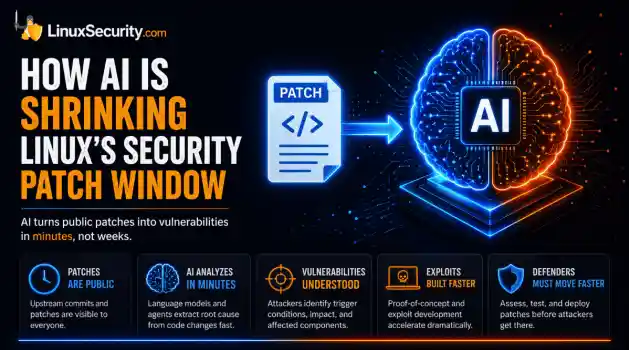
 For decades, Linux defenders relied on a comfortable assumption: a public security patch did not imply an imminent vulnerability. While open-source openness made vulnerability fixes public to everyone on kernel.org or the Linux Kernel Mailing List (LKML), converting a raw commit into a weaponized exploit took a significant amount of manual effort. This delay, estimated in weeks or months, gave businesses enough time to assess exposure, organize testing windows, and push changes across...
 Jul 27, 2026
 security advisory path traversal
 Two newly fixed storage bugs in Kubernetes showed more than just a problem with path traversal. They found a common security flaw in the cloud: powerful parts often think that requests accepted by a higher system are safe to run. This is a simple lesson for the platform and security teams: RBAC can accept a request without showing that its parameters will stay within a certain filesystem boundary. This is clear from a new study from SentinelLabs into flaws in the Kubernetes CSI drivers for NFS...
Jul 24, 2026
 security advisory update
 A large volume of Linux security updates and advisories this week across major distributions once again, but it wasn't just the volume that was the story. Where maintainers and security teams focused their attention was evident in the concentration of fixes targeting Linux kernel updates, identity services, DNS infrastructure, and internet-facing software. . Instead of looking at each advisory in isolation, administrators gain more value from the general trends they reveal about Linux security...
Jul 23, 2026
 identity management security tactics
 For years, we secured our Linux infrastructure by building walls: VPCs, security groups, and hardened SSH configurations. We treated the cloud like a virtual data center, assuming that if we kept the "bad guys" out of the network, our workloads were safe. . That model is no longer sufficient. Today, one of the most common paths from an initial compromise to a major cloud breach is the identity assigned to your Linux workload. When an attacker gains code execution on a Linux instance—through a...
Jul 17, 2026
 security practices patch management
 Most of us don't hear about a kernel vulnerability until a CVE lands in our inbox or the vulnerability scanner starts complaining. By then, the patch isn't new anymore. Kernel developers may have been passing it around for review, arguing over the implementation, or revising it for days before anyone outside that community noticed it. None of those discussions are secret. They're sitting in mailing list archives, Git commits, and patch reviews where they've been the whole time. The strange...
Jul 14, 2026
 Refine features
X Clear Filters
Get the latest News and Insights
Get the latest Linux and open source security news straight to your inbox.
Community Poll
Are host-based firewalls still worth using?
Loading...
Explore Latest Linux Security features
We found -3 articles for you...
102
 network securityremote accessinternet access
Private Internet Access VPN for Linux: Secure Your Privacy and Browsing
As network security threats to digital privacy, safety, and anonymity become a growing concern, organizations and individuals alike are increasingly turning to Virtual Private Networks (VPNs) to bolster security without sacrificing convenience. One of the most economical cybersecurity technologies available today, VPNs are simple to set up and use, and nearly all businesses have a corporate VPN as part of their IT infrastructure. . Implementing a VPN can be an excellent way to protect your privacy, overcome government restrictions, and improve security posture on insecure networks. However, not all VPNs are equally efficient and effective. As security and privacy enthusiasts, we at LinuxSecurity love the Private Internet Access (PIA) VPN. PIA meets all the criteria for being the best available VPN for Linux, as it is fast, flexible, transparent, and secure. This article will explore the importance of using a VPN on Linux to protect your digital privacy, anonymity, and data and network security. It will also explain why PIA is arguably the best VPN available for Linux users. What Is A VPN & How Does It Work? A VPN is a private network that connects remote sites or users through a public network (usually the Internet). It uses "virtual" connections routed through the Internet from the private network or a third-party VPN service to the remote site or person. VPNs help strengthen data and network security and mask online behavior from snooping third parties by creating an encrypted connection (often called a "tunnel") between your device and a remote server operated by the VPN service. This ensures that anyone who intercepts the encrypted data can't read it. What Are VPNs Used For & What Are the Benefits of Using a VPN on Linux? VPNs can be used for different purposes and offer numerous benefits . Here are the reasons why using a VPN on Linux can be beneficial to users: Privacy & Tracking Prevention When browsing the web, you are leaving behind more trails than you realize .Strangers, your apps and services, your ISP, and your government can all access your internet data, which can be collected and sold to advertisers (even if you’re using the “private” browsing function), causing compromise in data or cloud security breaches. Using a VPN will disguise your IP , encrypt your connection to make it anonymous, and add an extra layer of protection for your device by blocking harmful ads, scripts, malware, and trackers before they even have a chance to load. Security & Access Control Public Wi-Fi is convenient but comes at the expense of data network security and anonymity. When using a VPN, you have a new IP address every time you go online, which can be enough to deter DDoS attacks in network security and other network security threats. A VPN also allows remote workers to securely log into the shared company network while providing data protection for projects and files. In addition, VPNs also offer private internet access control options that can be used to make confidential information only accessible to certain employees and groups. Users will need to log in and verify that they have authorization before access is granted. Unblocking Websites & Bypassing Restrictions VPNs can be very helpful in unblocking websites, especially in more restrictive countries. For instance, those living in Europe can't just go to the Hulu webpage and pay for a subscription. The website is off-limits if you're not from the US or Canada. Using a VPN helps users and organizations overcome such restrictions. Torrenting As a Linux user, you rely heavily on P2P networks to exchange OS ISO files. However, these networks tend to be insecure, and you don’t always know what you're downloading. A VPN has privacy-enhancing technology to protect you when downloading and to assist you in avoiding copyright infringement notices. Avoiding Bandwidth Throttling & Improving Internet Speed Some ISPs impose restrictions on a particular type of traffic. If web pages load almost instantlybut downloading files takes forever, chances are the culprit is your ISP. A VPN disguises your traffic type, improving Internet speed by making it impossible for ISPs to restrict based on traffic type. How Open-Source VPN Clients Provide the Highest Level of Security & Transparency The benefit of choosing an open-source VPN is that the code is publicly available, and, as with any type of software , it can be inspected and reviewed by other developers and experts worldwide. Therefore, any data and network security flaws or cybersecurity vulnerabilities are revealed and fixed quickly. Unlike with closed-source VPNs, developers cannot hide potentially risky network security issues. Closed-source software and tools don’t offer the same level of transparency, forcing users to blindly trust that there are no hidden security loopholes that have gone unnoticed. How Private Internet Access (PIA) Meets All Criteria for the Best VPN Available for Linux Private Internet Access (PIA) is the most transparent VPN on the market. With more than 30 million downloads, over ten years of experience, and 100% open-source software, PIA meets all the criteria for the best Linux VPN available, and here is why. Our Favorite Features Here’s what we love most about PIA as security and privacy enthusiasts: Great for the Linux desktop Extremely simple to setup and configure Virtually no difference in performance between VPN enabled and disabled, regardless of the VPN protocol used Open-source design provides additional security assurances “Allow LAN Traffic” option makes it super easy to connect to other local network shares, printers, and other local resources while also encrypting remote traffic Very easy to switch from one VPN server to another without interrupting the streaming DNS leak protection encrypts DNS requests with DNS over HTTPS or DNS over TLS, which prevents the requests from being seen by on-path eavesdroppers, so no one can surmise where you might be going on the Internet Torrenting supported Privacy Protection Online privacy is no longer a given on the Internet and has become a growing concern for users and businesses alike. PIA prioritizes online freedom and digital privacy-enhancing technology. Their VPN reroutes the user’s Internet traffic through an encrypted tunnel, giving the user a new IP address and hiding browsing data from Internet Service Providers, network administrators, and government censors. By using PIA VPN , individuals and organizations can better protect the privacy of their personal identity, geographic location, and Internet traffic. No Usage Logs (Independently Verified No Logs Policy) VPNs offer an encrypted channel for your data, but that doesn’t mean the VPN itself can’t log your personal information. Many leading VPNs like PIA have a no-logging policy, meaning they can’t keep your personal information on record and may even have independent audit certifications for no-logging. PIA never records or stores any usage data, which has been proven multiple times in court. The company also invited an independent audit by Deloitte to verify that their server network and management systems are in full compliance with their No Logs Policy. PIA’s virus and malware protection removes malware without user tracking or logging, making PIA the only antivirus that gives you full control over your data network security and digital privacy. It’s one of the many reasons they're the most transparent VPN on the market, which we value greatly. Smooth Streaming To keep your work, education, and entertainment running smoothly, streaming performance is a critical factor that must be taken into account when evaluating a VPN. Most streaming platforms have some sort of VPN block in place, though that VPN never unblocks everything in the way it promises. PIA apps work with all major streaming services, so you can access more content than ever before from anywhere in the world. In addition, PIA is one of the few VPNs that support P2P file sharingon all servers. When using PIA, you can enjoy an impressive speed. PIA has a global network of VPN servers that’s been optimized for 10 Gbps connection speeds and uses some of the world’s fastest VPN protocols, meaning no more buffering, stuttering, lagging, or freezing. Regardless of how much content you stream, download, or upload, every PIA user receives unlimited bandwidth to ensure that their data and speeds are never limited. PIA’s VPN comes with OpenVPN and WireGuard VPN , the fastest open-source VPN protocols available that are respected for their security and transparency. State-of-the-Art Tech Standard web encryption is great at protecting your passwords, payment details, and other personal information on most websites and apps you visit. However, it falls short of protecting this sensitive information from many third parties (like ISPs) who often collect, store, and sell data regarding your Internet usage. To fully protect this confidential information, you’ll need a trustworthy VPN like PIA. PIA only uses the best available encryption standards (128-bit and 256-bit AES) and VPN protocols (OpenVPN and WireGuard). Their entire infrastructure is top-notch, so you can be confident you’re always getting the best VPN performance. Fully Open Source Choosing an open-source VPN like PIA offers a notable advantage when it comes to data and network security and transparency. Being completely transparent is one of PIA’s guiding principles, so all PIA apps are 100% open-source. As a result, users can always take a look under the hood and see how everything works. Convenient & Completely Customizable Certain apps or websites aren’t VPN-friendly, but luckily PIA’s advanced split-tunneling settings allow you to choose which apps or IP addresses bypass the VPN tunnel, making your VPN experience automated and smooth. Giving users control is a core value of PIA’s, so they’ve made their VPN highly customizable. PIA apps give you complete control over your connection, network, andconfiguration settings as well as provide you with split tunneling. To start protecting your digital life, all you have to do is choose a plan , download Private Internet Access, and tap the “Connect” button. Then you're good to go! Token-Based Dedicated IPs & IP Addresses Available in All 50 States With Private Internet Access, you can get a unique, personal IP address without sacrificing privacy or security. Dedicated IPs can be used to work remotely, see fewer CAPTCHAs, and protect your IoT devices. PIA now has servers in all 50 states in the US . Need to look like you are surfing the web from Oklahoma? They have an IP for that. Do you need to visit a website that can only be accessed within Alaska’s borders? They have an IP address for that, too! With IP addresses available in all 50 states, you can: Avoid sporting event blackouts if your state’s local network opts out of the rights to televise the game. Access local websites that are blocked outside of state borders, including local news stations and online banking details. Watch television premieres before they show up in your time zone (and avoid spoilers!). Our Thoughts on PIA VPN for Linux As digital risks continue to grow and remote work becomes increasingly common, using a VPN has never been more crucial in protecting your security, privacy, and anonymity online. While a VPN is not a silver bullet when it comes to such safety measures, many organizations and users have opted to utilize one to mitigate as many cybersecurity vulnerabilities as possible. Here at LinuxSecurity, we strongly encourage you to make an investment in the online security of your organization, its clients, and yourself. If you are in search of a user-friendly, flexible, efficient, and effective VPN to use for Linux, we recommend that you look into PIA, as it is a VPN that has thoroughly impressed us with its ability to meet all criteria for the best Linux VPN. . Utilizing a Virtual Private Network (VPN) is essential for safeguarding yourprivacy, enhancing security, and promoting safe browsing on Linux systems.. Linux VPN,Pawn Network Security,Digital Privacy Control,Anonymity Protection,Secure Internet Browsing. . Brittany Day
 Mar 06, 2023
•
Mar 06, 2023
•
102
 VPNonline privacyprivacy tools
Ultimate Guide To Preventing Online Tracking With Privacy Tools
Every day in the headlines, we're made aware of how limited our online privacy truly is. These days, it's so easy for apps, websites and search engines to track our every move. While most tracking is done to improve targeted marketing efforts, this can be very annoying and isn't the only way our data is used. Staying private online and avoiding being tracked is the best option to ensure our security while browsing and using apps. . This article will discuss how you are being tracked and what happens to your data. Then we’ll also look at different ways to avoid being tracked online, such as using a datacenter proxy , rotating browsers and using helpful browser add-ons. Keep reading to find out what you can do to keep from being tracked while online. How Are You Being Tracked Online? There are many different ways that you can be tracked online. Your IP address can track you. Your IP address is a unique identifier essential for using the internet. This IP contains a lot of information about you, such as your location, your name (if listed with your ISP), and even details about your devices and operating systems. Not only that, but by tracking your IP address, trackers can get a clear picture of you. They can see where you buy groceries, which doctors you visit, which restaurants you frequent and even where you spend the night. Your IP address isn’t the only way you can be tracked. When visiting websites, they have numerous trackers such as cookies, web beacons, pixel tags, and more stored on your device. As long as they are stored, they can track your online behavior. Another way that you are tracked is through apps and the permissions you give. Many apps track you in some way or another. If you allow an app access to your GPS, they can track your location, if you give an app permission to your files, they can track your documents, and if you give an app permission to your photos, they can use the background information to track your location. What Happens To Your Data? In mostcases, the websites, apps, or browsers use the data collected to improve the user experience. However, there are certain cases where your data ‘may be shared with other third parties, which is a nice way of letting you know your information may be sold. Unfortunately, there are also characters that track your online behavior with malicious intent. This can be to create specific attacks such as phishing or ransomware . In addition to limiting the data that websites and advertisers collect about you, a data removal service can help identify personal information already exposed on people-search sites and data broker databases, reducing the amount of publicly accessible information available for profiling, tracking, or social engineering attacks. How To Avoid Being Tracked Online? Let’s look at a few things you can do to avoid being tracked online. The more precautions you take when it comes to online anonymity, the safer you’ll be. Use Rotating Proxies A rotating datacenter proxy is one of the best ways to ensure your online privacy. These specialized datacenter proxy types rotate the IP address with each new request or after a specific period (such as every ten minutes). A datacenter proxy camouflages your IP address and replaces it with one of theirs. This means that your IP will be changing all the time, making it impossible to track. VPN Using a virtual private network (VPN) is another great tool to ensure online anonymity. These networks extend a private connection across all the devices on your network. Even if the network is a public one, such as the network you might find at the office, by using a VPN you can ensure your connection is private. A VPN is also useful for masking your online identity, encrypting your data and protecting you from snooping parties. Opt Out Of Targeted Advertising Many browsers, such as Chrome, have a default setting enabled that gives them permission to track you for targeted advertising purposes. Luckily, this is a setting which you canopt-out of from within the settings menu in your chosen browser. Look for any options that mention the browser can collect data for advertising purposes and disable any ad personalization options. You’ll have to look closely as this setting can be disguised and could read ‘Show Me Products That Would Interest Me’ or similar. Use Multiple Browsers As we mentioned, browsers store many different trackers on your device as you visit various websites. By frequently changing your browser, they cannot get a clear picture of your browsing behavior. Better yet, clear your browsing history, cache and cookies every time you switch between browsers to be more effective. Use Private Browser, Incognito Mode And Don’t Allow Tracking When deciding which browsers you want to use, try looking at private browsers or browsers that specify that they don’t track users. Examples of these are the Tor browser, DuckDuckGo and similar. For every browser you use, make sure that you enable the ‘Do Not Track’ setting for each browser. You should also try using all your selected browsers in incognito mode, although this mode on its own cannot guarantee you won’t get tracked, when combined with other measures on this list you can make it more difficult to be tracked. Don’t Allow Cookies If you're browsing different websites you might notice pop-ups asking you to allow cookies. Cookies are created by the web server while you browse the website. These contain data and get stored on the user's computer. These cookies are used to track, personalize and save information about each user's session. Use Browser User-Agent Switchers User-agent switchers are another helpful way to increase your online privacy. These useful browser extensions allow users to change the information given to websites and search engines. When entering a website, that website gets information such as the browser you’re using, the device you’re using, and your operating system to display the website optimally. By using a browseruser-agent switcher, you can specify (and frequently change) what information is given to the websites. In other words, you can make the website think you’re using a specific Mac when in fact, you’re using a Windows laptop. Use Add-Ons That Block Trackers There are also add-ons that you can use that actively block trackers. This adds another layer of security and privacy to your online browsing. A few popular browser extensions that block trackers include Privacy Badger, Adblock Plus and Disconnect. Use Secure Passwords Passwords are an important way that people protect their online privacy. However, many users don’t use strong passwords , use the same password for everything, or have been using the same password since they first created a password. This makes it easier for hackers to get through. Instead, you should be using different passwords for all your accounts, make sure that they are strong and completely random and change them frequently. Use Privacy Settings and Permissions Carefully To ensure your online anonymity, you need to carefully review your privacy settings and permissions. Make sure that your social media accounts are set to private and not public as public data can be collected and tracked. Also, check that you enable the ‘Do Not Track’ option in the settings of the browsers you use. Finally, review your app permissions and disable any that aren’t needed. A navigation app doesn’t need access to your photos, for example. Disable Social Media Tracking We’re all aware that social media tracks us while we use them, and even when we don’t. By simply clicking on the share buttons found on other websites these social medias can get information on you. The same for the mobile apps of these platforms. To ensure that you aren’t being tracked you need to disable social media tracking. You can start this process by disabling all permissions from your social media account settings. Furthermore, there are also browser extensions such as Adblock Plus, that cankeep social media pages from tracking you. Use an Encrypted and Anonymous OS For those who are really serious about their online privacy, a secure, encrypted operating system (OS) might be the best solution. Solutions like Tails, a Linux Live Image, can ensure complete privacy and online anonymity. Tails is an encrypted, private OS that includes other privacy tools on a tiny device. This device, once connected to your PC will change the OS to Tails. This OS is widely recognized as the most secure operating system in the world. Final Thoughts The internet, as well as the threats that cybercriminals use to exploit their victims, are constantly evolving and often users will fall short in implementing best practices. Tracking users online is not only seen as a marketing strategy for websites, it is often a resource for third parties to buy your information. Once this information has gotten into the wrong hands, there is a strong possibility of eventually facing a phishing or ransomware attack. Because of this, it is important to have as many safeguards in place as possible and change methods frequently to protect yourself online. Consider Tor and Tor Browser (based on Firefox), a web browser that anonymizes your web traffic when using the Tor network, making it easy to protect your identity online. This can be very appropriate for navigating without being tracked at specific times. . Uncover strategies to bolster your digital privacy and evade surveillance, ranging from the use of virtual private networks to secure browser configurations.. protecting Data, privacy tools, tracking prevention, secure browsing, online anonymity. . Dave Wreski
Apr 08, 2022
•


Get the latest News and Insights
Get the latest Linux and open source security news straight to your inbox.
Community Poll
Are host-based firewalls still worth using?
Search Topics
Powered By

Linux Security - Your source for Top Linux News, Advisories, HOWTOs and Feature Releases
QUICK LINKS
subscribe to newsletters!
Like staying secure? So do we.
Sign up for updates, tips, and alerts!