Audit Linux privileges now to limit compromise, escalation, and system-wide damage. Review Linux Privileges×


Stay Ahead With Linux Security Features

 security advisory vulnerability
 For decades, Linux defenders relied on a comfortable assumption: a public security patch did not imply an imminent vulnerability. While open-source openness made vulnerability fixes public to everyone on kernel.org or the Linux Kernel Mailing List (LKML), converting a raw commit into a weaponized exploit took a significant amount of manual effort. This delay, estimated in weeks or months, gave businesses enough time to assess exposure, organize testing windows, and push changes across...
 Jul 27, 2026
 security advisory path traversal
 Two newly fixed storage bugs in Kubernetes showed more than just a problem with path traversal. They found a common security flaw in the cloud: powerful parts often think that requests accepted by a higher system are safe to run. This is a simple lesson for the platform and security teams: RBAC can accept a request without showing that its parameters will stay within a certain filesystem boundary. This is clear from a new study from SentinelLabs into flaws in the Kubernetes CSI drivers for NFS...
Jul 24, 2026
 security advisory update
 A large volume of Linux security updates and advisories this week across major distributions once again, but it wasn't just the volume that was the story. Where maintainers and security teams focused their attention was evident in the concentration of fixes targeting Linux kernel updates, identity services, DNS infrastructure, and internet-facing software. . Instead of looking at each advisory in isolation, administrators gain more value from the general trends they reveal about Linux security...
Jul 23, 2026
 identity management security tactics
 For years, we secured our Linux infrastructure by building walls: VPCs, security groups, and hardened SSH configurations. We treated the cloud like a virtual data center, assuming that if we kept the "bad guys" out of the network, our workloads were safe. . That model is no longer sufficient. Today, one of the most common paths from an initial compromise to a major cloud breach is the identity assigned to your Linux workload. When an attacker gains code execution on a Linux instance—through a...
Jul 17, 2026
 security practices patch management
 Most of us don't hear about a kernel vulnerability until a CVE lands in our inbox or the vulnerability scanner starts complaining. By then, the patch isn't new anymore. Kernel developers may have been passing it around for review, arguing over the implementation, or revising it for days before anyone outside that community noticed it. None of those discussions are secret. They're sitting in mailing list archives, Git commits, and patch reviews where they've been the whole time. The strange...
Jul 14, 2026
 Refine features
X Clear Filters
Get the latest News and Insights
Get the latest Linux and open source security news straight to your inbox.
Community Poll
Are host-based firewalls still worth using?
Loading...
Explore Latest Linux Security features
We found -3 articles for you...
102
 security advisoryaccess controlauthentication bypass
Control Panel Authentication Failures Expose Entire Linux Servers
Linux security usually comes down to access controls and permissions, but those controls only work if the platform enforcing them holds up. What happens when the control layer most Linux environments depend on fails? . CVE-2026-41940 is an authentication bypass in cPanel/WHM that turns a single entry point into full server access, exposing hosted sites and mailboxes rather than just one account. Once that control layer is compromised, isolation between users doesn’t hold. What should be separated becomes accessible, and that’s where exposure starts to spread. At the time of disclosure, the issue affects cPanel/WHM on Linux systems where the authentication process fails to properly validate session or request state. This isn’t a misconfiguration. It’s a breakdown in how the platform enforces identity at the control level. This blog breaks down how that failure happens, what it exposes in real environments, and what teams should be looking for when a control layer becomes the weakest point in the system. What Actually Happened (Authentication Bypass Explained) The bypass occurs before credential validation completes, allowing unauthorized requests to be treated as authenticated admin sessions. This vulnerability stems directly from an authentication failure in the control panel's access mechanism: Authentication bypass allows access past the login layer No credentials required at any stage Immediate admin access on entry Because cPanel/WHM runs natively on Linux, the access granted by CVE-2026-41940 extends directly into system configurations, user accounts, service accounts, and all hosted domains. It creates severe cybersecurity threats before the incident even registers in the logs. As of now, there is no confirmed attribution tied to active exploitation. The risk comes from how easily a flaw like this can be weaponized once disclosed, especially in widely deployed hosting environments. How the Exploit Path Typically Unfolds In practicalterms, exploitation doesn’t require a complex chain. It follows a short path: The attacker identifies an exposed cPanel or WHM interface on a public-facing server A crafted request is sent that bypasses authentication checks tied to session handling or request validation The system incorrectly treats the request as authenticated Administrative access is granted immediately through the control panel interface From there, the attacker interacts with system-level tools, services, and user environments as a trusted admin No credential theft, no brute force, no lateral movement. The control layer simply accepts the request. Why This Leads to a Data Breach So Quickly When a control panel breaks, it doesn’t degrade gracefully. It just hands over control, and the gap between initial access and a full data breach disappears almost immediately because the system is built to centralize authority over the host. Most cyber attack paths have friction. An attacker lands somewhere low, works laterally, then tries to escalate privileges to reach something useful. That doesn’t apply here. With administrative access through the panel, they drop straight into the highest privilege context on the system, no pivoting, no chaining exploits, just direct control over the environment that server security assumes is trusted. Everything hangs off that identity. The web interface, database layer, and system tools all operate under the same control plane, so once the authentication layer fails the attacker isn’t moving through the network at all, they’re already sitting at the core with access to services, configs, and data paths that normally require multiple steps to reach, which is why this kind of security breach turns into immediate data exfiltration and full system exposure without the usual noise or delay. Authentication Bypass at the Control Panel Level Changes the Impact Control panels like cPanel/WHM are often the single point of access for entire hosting environments.When authentication fails there, it’s not isolated. It can expose every site and mailbox on the server at once. What Happens After a Server Is Compromised Once the attacker controls the Linux host, things don’t explode all at once. It spreads through normal system paths, the same ones admins use every day, which is why it blends in longer than it should. Access to /home directories exposes user data, configs, and credentials across tenants Modification of web root files allows code injection or silent backdoors inside active sites Database access via local services gives direct reads over sockets with no network barrier Cron jobs or scripts added to maintain persistence across reboots System configs altered to weaken controls or suppress logging None of this is exotic. It’s standard interaction with the OS. This is where data loss starts becoming irreversible, because once those layers are touched, the attacker isn’t just passing through. They’re reshaping how the system behaves over time, and that’s what keeps these cybersecurity threats active even after initial access is noticed, while server security controls are still technically “running” but no longer trustworthy. Real-World Impact: When Data Loss Is Permanent The true cost of a cyber attack only becomes clear when the recovery phase begins. Consider a shared hosting server running Linux where the administrative panel is breached. If the attacker wipes the server—deleting user directories, databases, and configuration files—and there are no off-server backups, the impact is absolute. In a Linux shared hosting environment, one compromised server does not mean one lost site. It means tens or hundreds of virtual hosts are wiped out instantly. The data loss is not just about a single company's files; it is a multi-tenant disaster where recovery is impossible if the backups are stored on the same underlying infrastructure. The resulting data breach strips the organization of its digitalpresence, its intellectual property, and its ability to recover, leaving the environment crippled. Why This Is Especially Dangerous in Linux Hosting Environments In Linux web hosting security, the issue isn’t just exposure. It’s how much sits behind that one layer. Shared Infrastructure A single host carries multiple tenants. Different users, different sites, same underlying system and services, which works fine until the control layer breaks and isolation stops being enforced in any meaningful way. Once inside, the attacker isn’t moving between sites. They’re operating underneath them, with visibility and access that cuts across everything at once, and that’s where website security assumptions start to fall apart quietly. Root-Level Access Control panels don’t operate with a limited scope. They execute as root because they’re expected to manage the entire system. When that access is exposed, every filesystem boundary becomes optional. Permissions, ownership, separation between users, all of it can be overridden directly, which turns what looks like a contained entry point into full server control without resistance and shifts the situation from a localized issue into a broader server security failure tied to how privilege is handled. Service Integration Modern panels tie services together tightly. Web servers, mail systems, and databases don’t sit in isolation. They share configs, credentials, and execution paths. That integration simplifies management. It also widens impact. An attacker controlling one layer can reach into others without needing separate access paths, so instead of targeting individual services, they inherit the relationships between them, which is why these cybersecurity risks scale quickly and turn a single compromise into a platform-wide problem rather than a contained event. Why These Cyber Security Threats Keep Happening This pattern repeats. Different bugs, same structure. Admin panels exposed to the internet Singleauthentication layer protecting everything Lack of segmentation between services Delayed patching cycles Exposed management ports common in Linux setups When you rely on a single, internet-facing system for all administrative actions, any flaw in the authentication mechanism translates directly to a massive increase in cybersecurity risks and related cybersecurity threats. How to Reduce Risk Without Overcomplicating Security You don’t need a full redesign. Just fewer assumptions. Restrict WHM and cPanel access via firewall rules like iptables or cloud security groups Limit admin access to trusted IP ranges or VPN endpoints Remove public exposure of admin interfaces entirely where possible Maintain off-server backups that can’t be altered from the host Monitor authentication logs and unusual activity patterns Validate and apply patches quickly, especially for control panels This isn’t about adding layers. It’s about tightening the ones that already exist. Most cyber attack prevention failures come from leaving high-privilege systems exposed longer than intended, and basic website protection and server protection steps still do most of the heavy lifting when applied consistently. Closing Insight The system doesn’t need to fail everywhere. Just once in the right place. A single gap in server security at the control layer turns into a full compromise because everything else trusts that layer to hold, and when it doesn’t, the line between access and ownership disappears quickly across the entire environment, which is why most data breach scenarios tied to control panels aren’t about complex exploits but about one boundary that never got tested under real conditions. Stay ahead of these patterns. Subscribe to the LinuxSecurity newsletter for direct updates on real-world cybersecurity threats, data breach trends, and practical server security insights. Data Breach and Cyber Attack FAQs What is a data breach? A data breach isunauthorized access to sensitive information. In a Linux hosting environment, this often happens when an attacker gains control over system-level access and reads or extracts data from user directories, databases, or configuration files. The impact depends on how much data is exposed and whether it can be recovered, but in shared hosting setups, a single breach can affect multiple sites at once. What happens in a cyber attack? A cyber attack is an attempt to access or control systems without permission. In cases like control panel bypasses, the attacker skips traditional entry methods and uses a flaw in the system itself to gain administrative access, allowing them to modify services, extract data, or disrupt operations without needing additional exploits. What is a security breach? A security breach is the moment protections fail, and unauthorized access occurs. It doesn’t always mean data is stolen immediately, but it creates the condition for it. In server environments, an authentication bypass is a clear example because it removes the primary control layer that protects the system. How do cyber attacks cause data loss? Data loss happens when attackers delete, overwrite, or extract information. With full administrative access, they can remove databases, alter files, or wipe entire systems, and if backups are not isolated, the attacker can remove those too, turning a temporary incident into permanent loss. How to prevent a cyber attack? Prevention focuses on reducing exposure. Restrict access to administrative systems, apply patches quickly, and avoid leaving control panels open to the internet. Strong cybersecurity best practices center around limiting who can reach critical services and verifying those controls regularly. Why are Linux servers often targeted in cyber attacks? Linux servers host a large amount of shared infrastructure. One system can support many websites and services, making it a high-value target, and when misconfigurations or exposed management layers exist,attackers can affect multiple tenants at once without needing to break the operating system itself. . Uncover the risks linked to authentication bypass in cPanel/WHM affecting Linux servers, leading to major data breaches.. Linux security risks,cPanel vulnerabilities,authentication failures,cybersecurity threats,cPanel access control. . MaK Ulac
 May 04, 2026
•
May 04, 2026
•
102
 security advisorybuffer overflowopen source
ASUS Router Authentication Bypass And Buffer Overflow Security Advisory
At a time of rapid technological progress, the security of our digital tools - particularly WiFi routers - has become critical. Recent news from ASUS sent shockwaves through the cybersecurity community when multiple models of their routers were found with critical flaws that exposed an ongoing challenge of protecting networks against intrusions. . Unpacking the Critical Flaw in ASUS Routers According to an extensive report by RedPacket Security, ASUS recently resolved an authentication bypass vulnerability known as CVE-2024-3080, which scored 9.8 on the Common Vulnerability Scoring System scale, indicating its severity. This security hole allowed unauthenticated, remote attackers to access devices for unauthorized gains without authentication, granting them any legitimate privileges whatsoever. Another high-severity buffer overflow flaw, CVE-2024-3079, compounded this security hole by enabling remote attackers with administrative privileges to execute arbitrary commands remotely on devices with administrative rights. These vulnerabilities could constitute an exploit chain compromising all security protection on affected routers. ASUS routers such as the ZenWiFi XT8, RT-AX88U, RT-AX58U, and others were affected. ASUS quickly responded with software updates to address these vulnerabilities. This incident raises a fundamental issue regarding routers' reliance on proprietary software. While manufacturers frequently push out security patches, proprietary programs' closed nature means vulnerabilities remain unseen until a breach occurs, leaving users vulnerable. Embracing Open Source: A Route to Enhanced Security Open-source firmware and operating systems offer an alternative to proprietary router software. Their publicly collaborative development processes make security flaws less likely to go undetected. OpenWRT  OpenWrt is one of the mostwidely used open-source router operating systems available. It provides highly configurable control over performance and security settings, surpassing what most stock router firmware allows. OpenWrt also features an innovative package management system that enables users to add or remove features as desired, making the operating system leaner and more cost-effective than others. Here are five of the best features of OpenWrt: Extensive Hardware Support: OpenWrt supports a wide range of devices, from home routers to professional-grade equipment, making it adaptable to various networking situations. Fully Writeable Filesystem: With its roots in Linux, OpenWrt provides a fully writeable filesystem. Users can modify, add, or delete any file, similar to a traditional Linux distribution, offering unparalleled flexibility. Customizable Packages: OpenWrt allows users to install and remove packages to customize the router for specific needs without bloating the system with unnecessary features. Advanced Network Capabilities: OpenWrt contains many out-of-the-box network features, including IPv6 support, VLANs, traffic shaping, VPN, and firewall configurations, allowing for detailed network management.\ Active Community and Development: The vibrant OpenWrt community and ongoing development mean the firmware is constantly updated. New features are regularly added, and security vulnerabilities are promptly addressed, enhancing your network's functionality and security. These features underscore OpenWrt's flexibility and capabilities, making it a powerful choice for users looking to maximize their router's potential. DD-WRT
 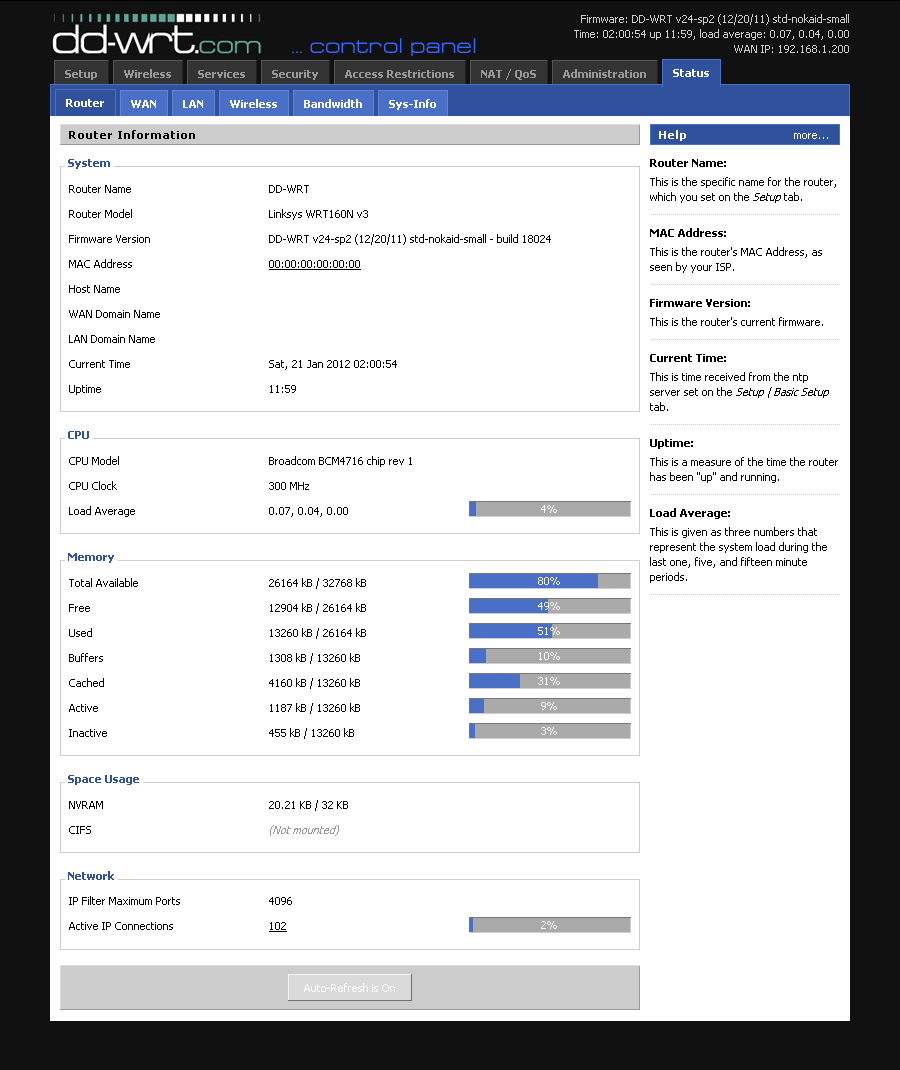 Like OpenWrt, DD-WRT is another Linux-based firmware that enhances routers by improving network stability, range expansion, and security features such as VPN integration and VLAN support. Furthermore, its community is quite active, providingresources and forums for help and advice regarding its usage. The five best features of DD-WRT include: Advanced Quality of Service (QoS): This technology enables intricate control over bandwidth allocation to prioritize traffic or devices for improved network performance. VPN Integration: Facilitates the integration of a Virtual Private Network directly within the router, securing all connected devices without individual configuration. Wireless Bridge and Repeater Modes: Allows routers to function as wireless repeaters or bridges, extending the wireless network's coverage or connecting wired devices to a wireless network. VLAN Support: Supports Virtual LANs for better network segmentation, enhancing security and management, and is especially useful for guest or separate IoT networks. DNS Caching: Stores DNS queries locally to speed up webpage loading times, resulting in a faster internet experience for all network users. Tomato
 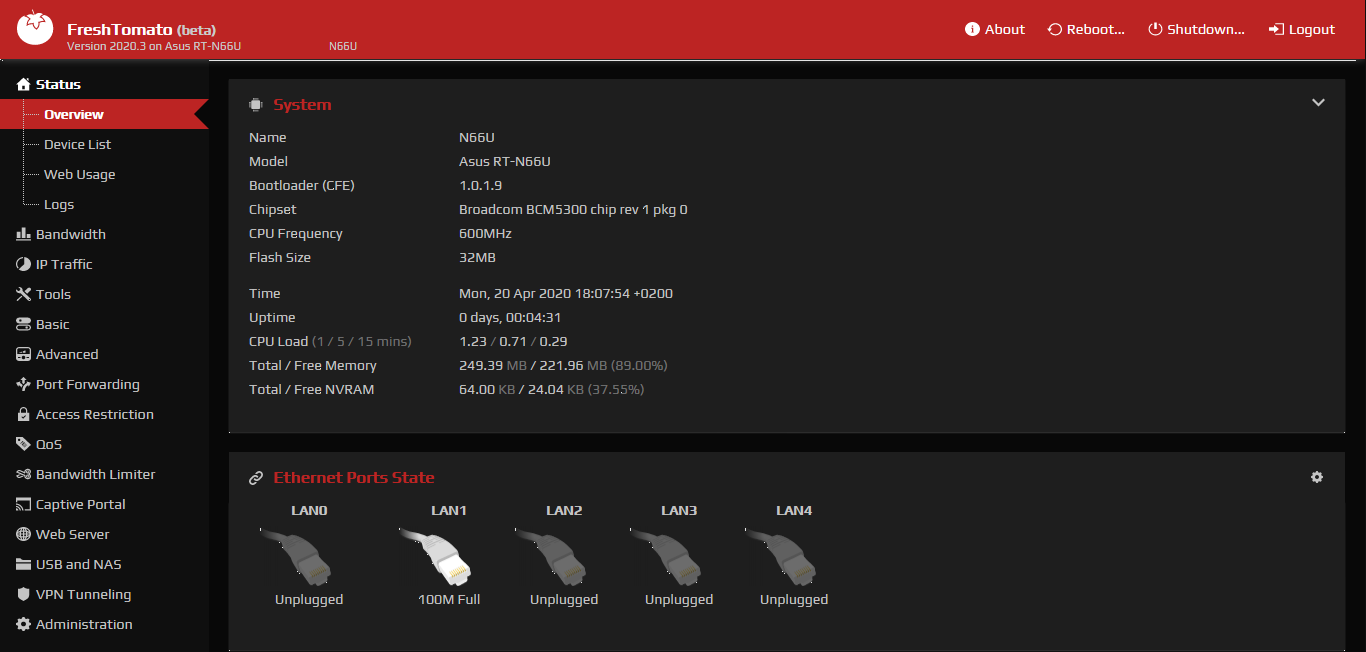 Tomato firmware is known for its user-friendly interface and emphasis on real-time network monitoring, supporting many of the same models as DD-WRT while offering more secure security features than its stock counterpart. Here are five of the best features of Tomato firmware for routers: Bandwidth Monitoring: This allows users to monitor network traffic and bandwidth usage, making it easier to manage network resources effectively. Advanced Quality of Service (QoS) provides detailed settings to prioritize network traffic, which helps optimize performance for critical applications. Access Control: Offers robust options to manage and control access to the network, enhancing security by restricting unauthorized usage. Built-in OpenVPN Server/Client: Integrates support for OpenVPN, enabling secure VPN connectivity for enhanced privacy and secure remote access. IP/MAC Bandwidth Limiter: This tool enables settingbandwidth limits for specific IP addresses or MAC addresses, useful in managing bandwidth consumption per device. These features enhance network management, security, and performance, making Tomato firmware a valuable choice for users with compatible Broadcom-based routers. pfSense
 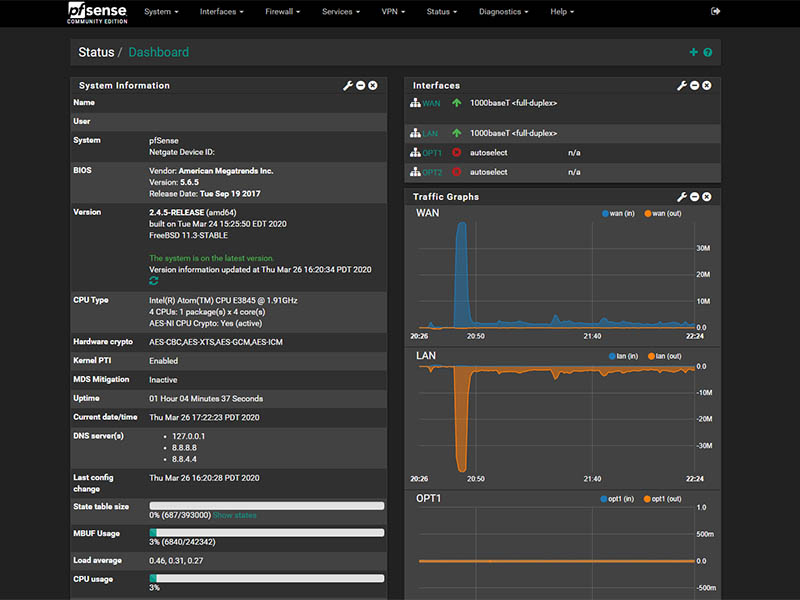 While not specifically for routers, pfSense can transform an old computer into a powerful firewall and router. Based on FreeBSD and widely regarded as one of the safest and most flexible network administration solutions available today, pfSense handles everything from routing and firewalling to VPN provisioning easily. Here are the five best features of pfSense router firmware: Comprehensive Firewall Security: pfSense provides an advanced firewall with stateful packet inspection, anti-spoofing, and more, for robust network protection. Versatile VPN Support: It supports multiple VPN protocols, including IPsec, OpenVPN, and WireGuard, enabling secure and flexible remote access configurations. High Availability and Redundancy: This service offers features like CARP (Common Address Redundancy Protocol) and pfsync to ensure network uptime and reliability through failover and redundancy setups. Traffic Shaping and QoS: This allows detailed control over network traffic, enabling the prioritization of critical services to maintain optimal performance and reduce congestion. Extensibility with Packages: This can be extended with a wide range of packages for additional features, such as Snort for intrusion detection, Squid for web caching, and more, tailoring the system to specific needs. AsusWRT-Merlin: Custom Firmware Powering ASUS Routers
 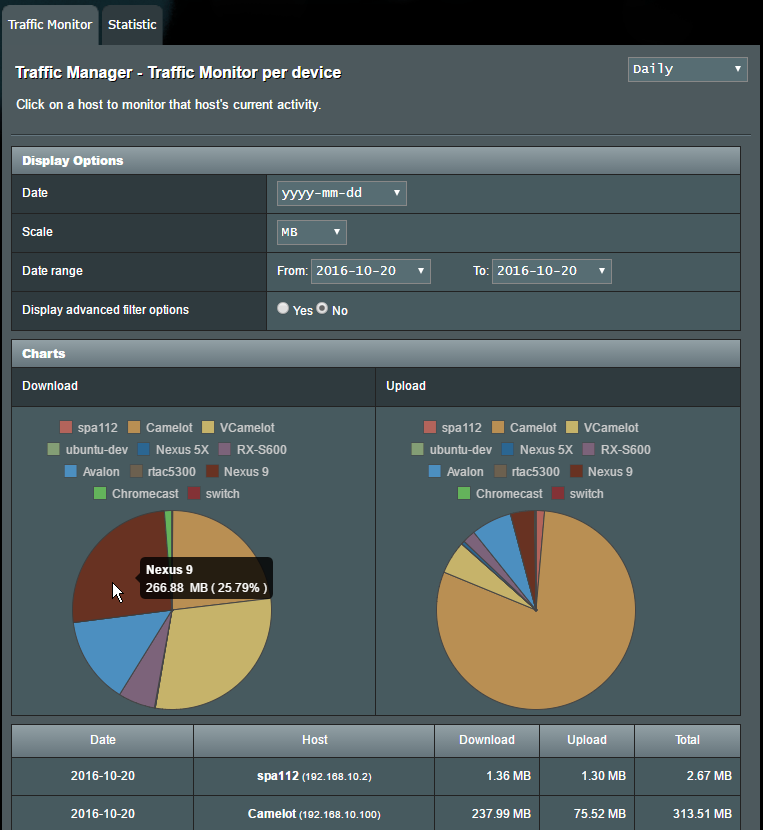 AsusWRT-Merlin is a third-party firmware developed for select ASUS routers by Eric Sauvageau toimprove upon the original AsusWRT firmware without drastically altering its user experience or user interface. Retaining all original features while adding improvements, bug fixes, and occasional new ones; Eric Sauvageau leads the development of AsusWRT-Merlin with support from The Merlin Group, users, and developers who contribute to its ongoing maintenance and enhancement. Their efforts focus on stability, improved performance, and better customization possibilities across ASUS router models supported by this open-source firmware project. Using AsusWRT-Merlin can bring many advantages for users who appreciate open source's philosophy and its associated benefits: Improved Security: Regular updates from the Merlin Group may include security patches which make your router less susceptible to vulnerabilities discovered over time. Enhanced Features: The AsusWRT-Merlin includes additional features not found in its predecessor AsusWRT, such as DNS over HTTPS support (DoH), enhanced Quality of Service capabilities (QoS), and the option to monitor real-time bandwidth usage. Customizability Freedom: Fans looking to tailor their network according to specific needs will appreciate the various settings and tweaks available. Active Community Support: Our vibrant community works tirelessly on improvements and shares knowledge for troubleshooting and advanced configurations. Open Source Firmware Limitations AsusWRT-Merlin keeps users familiar with AsusWRT at ease since its GUI and overall design philosophy are the same as before, helping ease any learning curve. Open-source firmware such as this also comes with some restrictions users should be aware of: Warranty Concerns: Installing third-party firmware could void your device's manufacturer warranty; users should check their warranty terms before proceeding. Limited Support: While community support exists for using third-party firmware such as AsusWRT-Merlin, users will not receive official assistance from ASUS for issues caused by usingsuch third-party solutions. Compatibility and Stability: Not all routers can support third-party firmware, and while open-source firmware tends to be stable, poorly executed updates or incompatible configurations could create stability issues. Learning Curve: For less tech-savvy, understanding all the additional features and configuration options may take more effort than familiarising themselves with stock firmware's user-friendly setups. No Guarantee of Features: Unfortunately, Merlin may not support all the proprietary features found in AsusWRT; some features present may also sometimes be removed if they pose significant bugs or security risks. Although open-source firmware such as AsusWRT-Merlin may have disadvantages, many advanced users find the advantages far outweigh them, particularly its enhanced control and security features. Individuals looking to maximize the potential of their router will discover that this version provides a robust upgrade from the original AsusWRT, offering both familiarity with stock firmware and access to more sophisticated capabilities of fully open-source solutions. Making the Switch to Open-Source Firmware for Enhanced Network Security Transitioning to open-source firmware like AsusWRT-Merlin can be an important strategic move for users who prioritize network security. However, this endeavor must be carefully prepared to ensure a successful transition. Before making the change, you must verify whether or not the open-source firmware you've selected is compatible with your router model. Not all routers support all firmware installations; installing incompatible ones could result in functional severe issues or even brick your device. Once compatibility has been confirmed, backing up existing router settings as a protective measure can prevent data loss and help ensure smooth transition processes. As installation processes can differ between router models, it is wise to refer to an after-installing guide tailored specifically for your router model forafter-installation instructions and potential obstacles related to firmware upgrading processes. Such guides often offer step-by-step guidance and can help address common obstacles encountered during this process. The Bigger Picture The ASUS incident highlights the need for more proactive security measures in network hardware. By turning to open-source solutions, users can take advantage of collective approaches to security where vulnerabilities can be quickly identified and patched by an international community of developers. Transitioning to open-source software might initially appear daunting; however, spending the time and energy learning how to utilize these powerful tools can significantly boost both the security and efficiency of home or office networks. Open source network management represents more than software changes; it represents a wider trend toward transparency and community in cybersecurity—an essential aspect in today's increasingly interconnected society. . ASUS routers face critical vulnerabilities including firmware issues and default passwords, risking network security and unauthorized access for users.. ASUS Router Flaws, Open Source Alternatives, Network Security Enhancements. . Dave Wreski
Jul 06, 2024
•


Get the latest News and Insights
Get the latest Linux and open source security news straight to your inbox.
Community Poll
Are host-based firewalls still worth using?
Search Topics
Powered By

Linux Security - Your source for Top Linux News, Advisories, HOWTOs and Feature Releases
QUICK LINKS
subscribe to newsletters!
Like staying secure? So do we.
Sign up for updates, tips, and alerts!