Overly broad permissions can turn one compromised account into a much larger security problem. Learn how to reduce unnecessary access, review privileges, and apply least privilege across modern Linux systems. Review Linux Privileges×


Stay Ahead With Linux Security Features

 identity management security tactics
 For years, we secured our Linux infrastructure by building walls: VPCs, security groups, and hardened SSH configurations. We treated the cloud like a virtual data center, assuming that if we kept the "bad guys" out of the network, our workloads were safe. . That model is no longer sufficient. Today, one of the most common paths from an initial compromise to a major cloud breach is the identity assigned to your Linux workload. When an attacker gains code execution on a Linux instance—through a...
 Jul 17, 2026
 security practices patch management
 Most of us don't hear about a kernel vulnerability until a CVE lands in our inbox or the vulnerability scanner starts complaining. By then, the patch isn't new anymore. Kernel developers may have been passing it around for review, arguing over the implementation, or revising it for days before anyone outside that community noticed it. None of those discussions are secret. They're sitting in mailing list archives, Git commits, and patch reviews where they've been the whole time. The strange...
Jul 14, 2026
 Linux security cyber attacks
 Every Linux server in your fleet produces thousands of events every minute. From journald logs and auditd records to kernel-level eBPF hooks, your systems are constantly talking. Most of that noise is just the mundane churn of system services, CI/CD runners, or routine administrative automation. But among that noise, an attacker might be establishing a foothold, moving laterally, or setting up persistence. The challenge for any security team is: how do you separate the routine from the...
Jul 13, 2026
 open-source infrastructure risk
 Security scanners flag exposed API keys in public repositories every day. The initial response is usually predictable: delete the commit, revoke the credential, and move on. That’s a mistake. . In a real Linux environment, an API key never stays in one place. By the time it hits a public repo, it’s already everywhere. It’s in the CI/CD pipeline. It’s in your container registry. It’s in the build logs. It’s in the backups. Git makes this worse because the history never dies. Deleting a file in...
Jul 11, 2026
 open-source rootkit
 Most of us think of Linux rootkits as ancient history—the stuff of 90s hacking forums and clunky malware that would crash your system if you looked at it the wrong way. But if you think they’ve gone away, you’re mistaken. They’ve just gotten smarter. . Modern attackers aren't using the noisy tools of the past. Today’s threats are surgical. Many of today’s most advanced Linux rootkits operate at the kernel level or abuse legitimate system features to blend in with normal traffic. They’re...
Jul 09, 2026
 Refine features
X Clear Filters
Get the latest News and Insights
Get the latest Linux and open source security news straight to your inbox.
Community Poll
Should Linux servers automatically install security updates?
Loading...
Explore Latest Linux Security features
We found 41 articles for you...
102
 security advisorybuffer overflowopen source
ASUS Router Authentication Bypass And Buffer Overflow Security Advisory
At a time of rapid technological progress, the security of our digital tools - particularly WiFi routers - has become critical. Recent news from ASUS sent shockwaves through the cybersecurity community when multiple models of their routers were found with critical flaws that exposed an ongoing challenge of protecting networks against intrusions. . Unpacking the Critical Flaw in ASUS Routers According to an extensive report by RedPacket Security, ASUS recently resolved an authentication bypass vulnerability known as CVE-2024-3080, which scored 9.8 on the Common Vulnerability Scoring System scale, indicating its severity. This security hole allowed unauthenticated, remote attackers to access devices for unauthorized gains without authentication, granting them any legitimate privileges whatsoever. Another high-severity buffer overflow flaw, CVE-2024-3079, compounded this security hole by enabling remote attackers with administrative privileges to execute arbitrary commands remotely on devices with administrative rights. These vulnerabilities could constitute an exploit chain compromising all security protection on affected routers. ASUS routers such as the ZenWiFi XT8, RT-AX88U, RT-AX58U, and others were affected. ASUS quickly responded with software updates to address these vulnerabilities. This incident raises a fundamental issue regarding routers' reliance on proprietary software. While manufacturers frequently push out security patches, proprietary programs' closed nature means vulnerabilities remain unseen until a breach occurs, leaving users vulnerable. Embracing Open Source: A Route to Enhanced Security Open-source firmware and operating systems offer an alternative to proprietary router software. Their publicly collaborative development processes make security flaws less likely to go undetected. OpenWRT  OpenWrt is one of the mostwidely used open-source router operating systems available. It provides highly configurable control over performance and security settings, surpassing what most stock router firmware allows. OpenWrt also features an innovative package management system that enables users to add or remove features as desired, making the operating system leaner and more cost-effective than others. Here are five of the best features of OpenWrt: Extensive Hardware Support: OpenWrt supports a wide range of devices, from home routers to professional-grade equipment, making it adaptable to various networking situations. Fully Writeable Filesystem: With its roots in Linux, OpenWrt provides a fully writeable filesystem. Users can modify, add, or delete any file, similar to a traditional Linux distribution, offering unparalleled flexibility. Customizable Packages: OpenWrt allows users to install and remove packages to customize the router for specific needs without bloating the system with unnecessary features. Advanced Network Capabilities: OpenWrt contains many out-of-the-box network features, including IPv6 support, VLANs, traffic shaping, VPN, and firewall configurations, allowing for detailed network management.\ Active Community and Development: The vibrant OpenWrt community and ongoing development mean the firmware is constantly updated. New features are regularly added, and security vulnerabilities are promptly addressed, enhancing your network's functionality and security. These features underscore OpenWrt's flexibility and capabilities, making it a powerful choice for users looking to maximize their router's potential. DD-WRT
 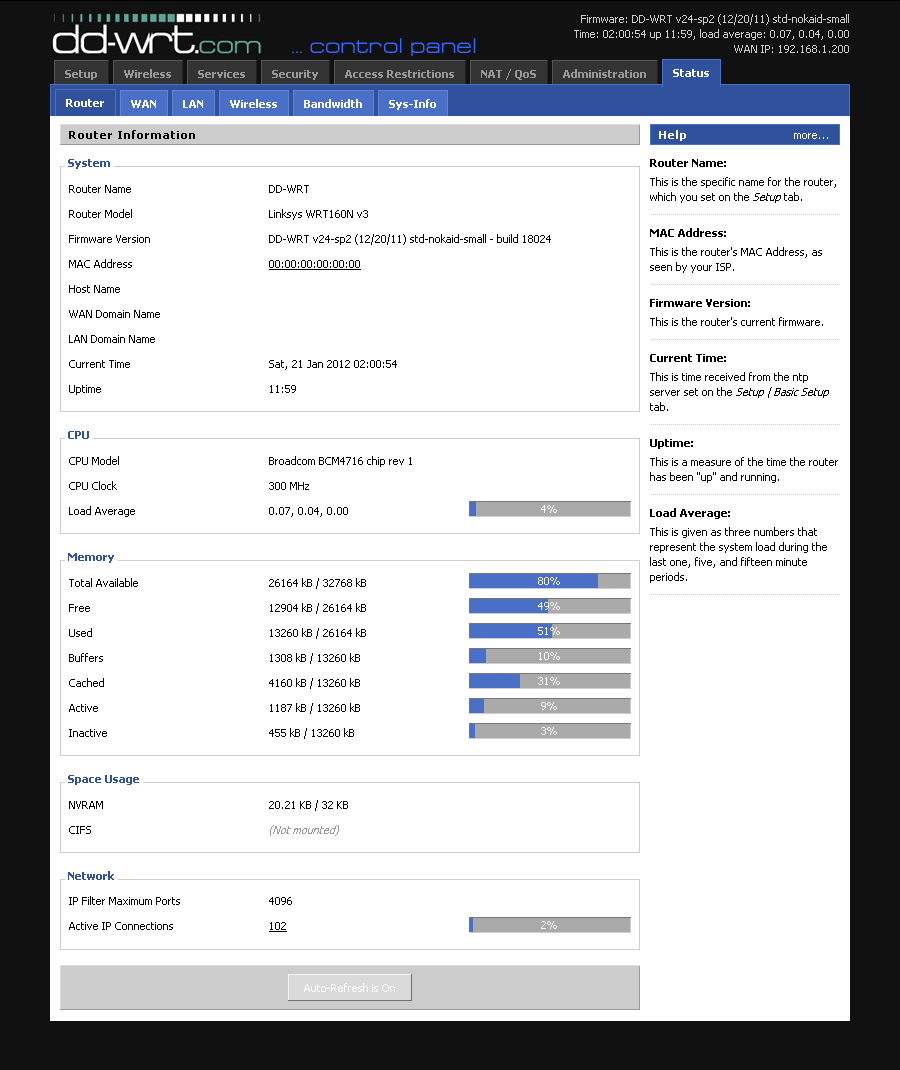 Like OpenWrt, DD-WRT is another Linux-based firmware that enhances routers by improving network stability, range expansion, and security features such as VPN integration and VLAN support. Furthermore, its community is quite active, providingresources and forums for help and advice regarding its usage. The five best features of DD-WRT include: Advanced Quality of Service (QoS): This technology enables intricate control over bandwidth allocation to prioritize traffic or devices for improved network performance. VPN Integration: Facilitates the integration of a Virtual Private Network directly within the router, securing all connected devices without individual configuration. Wireless Bridge and Repeater Modes: Allows routers to function as wireless repeaters or bridges, extending the wireless network's coverage or connecting wired devices to a wireless network. VLAN Support: Supports Virtual LANs for better network segmentation, enhancing security and management, and is especially useful for guest or separate IoT networks. DNS Caching: Stores DNS queries locally to speed up webpage loading times, resulting in a faster internet experience for all network users. Tomato
 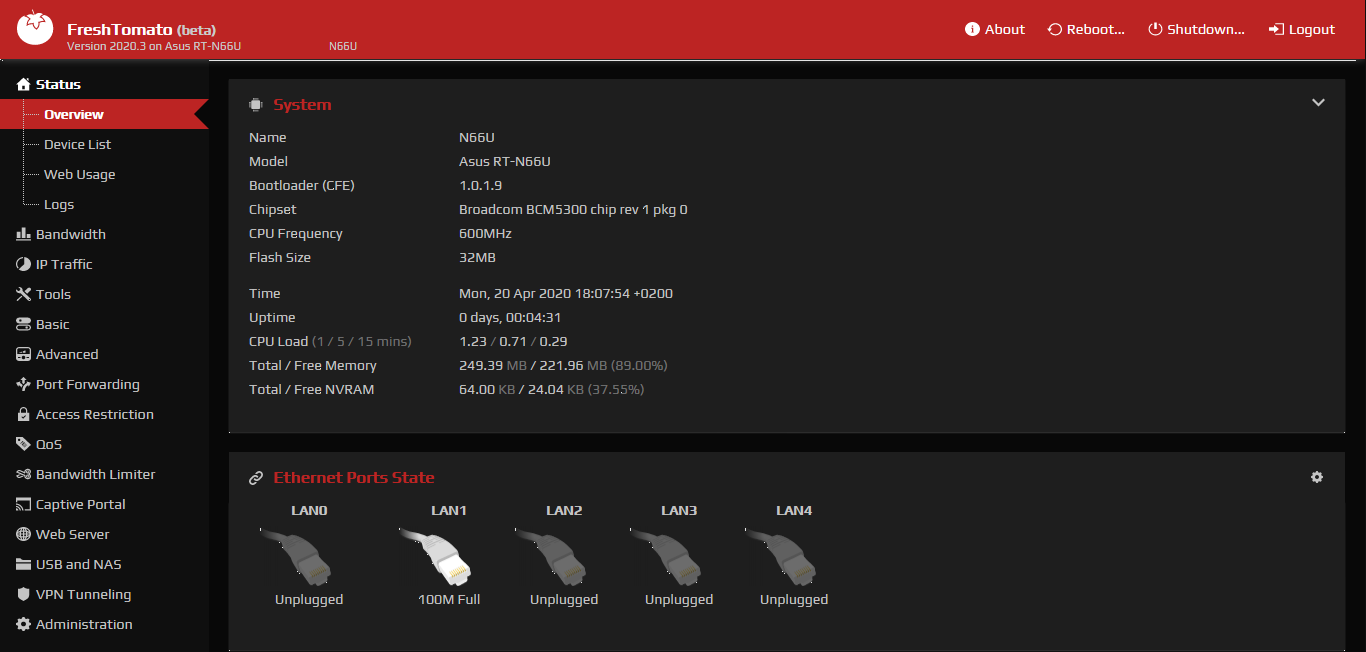 Tomato firmware is known for its user-friendly interface and emphasis on real-time network monitoring, supporting many of the same models as DD-WRT while offering more secure security features than its stock counterpart. Here are five of the best features of Tomato firmware for routers: Bandwidth Monitoring: This allows users to monitor network traffic and bandwidth usage, making it easier to manage network resources effectively. Advanced Quality of Service (QoS) provides detailed settings to prioritize network traffic, which helps optimize performance for critical applications. Access Control: Offers robust options to manage and control access to the network, enhancing security by restricting unauthorized usage. Built-in OpenVPN Server/Client: Integrates support for OpenVPN, enabling secure VPN connectivity for enhanced privacy and secure remote access. IP/MAC Bandwidth Limiter: This tool enables settingbandwidth limits for specific IP addresses or MAC addresses, useful in managing bandwidth consumption per device. These features enhance network management, security, and performance, making Tomato firmware a valuable choice for users with compatible Broadcom-based routers. pfSense
 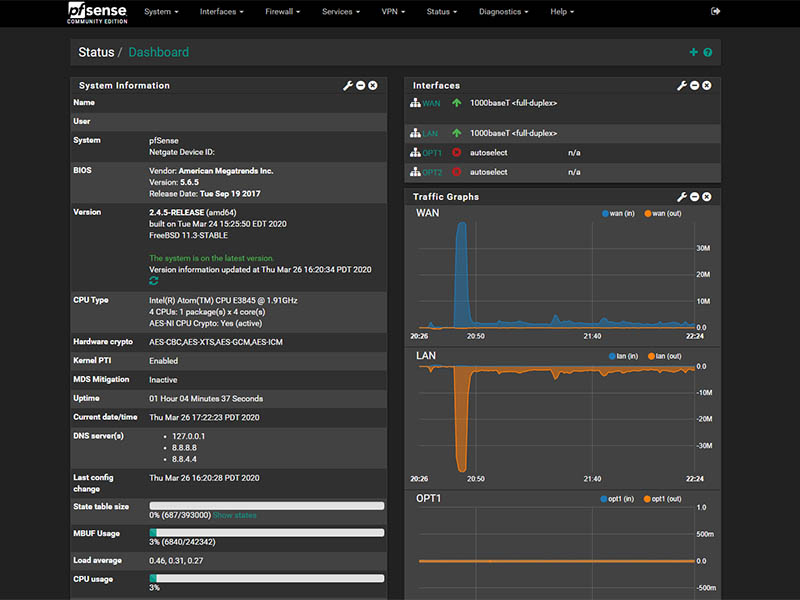 While not specifically for routers, pfSense can transform an old computer into a powerful firewall and router. Based on FreeBSD and widely regarded as one of the safest and most flexible network administration solutions available today, pfSense handles everything from routing and firewalling to VPN provisioning easily. Here are the five best features of pfSense router firmware: Comprehensive Firewall Security: pfSense provides an advanced firewall with stateful packet inspection, anti-spoofing, and more, for robust network protection. Versatile VPN Support: It supports multiple VPN protocols, including IPsec, OpenVPN, and WireGuard, enabling secure and flexible remote access configurations. High Availability and Redundancy: This service offers features like CARP (Common Address Redundancy Protocol) and pfsync to ensure network uptime and reliability through failover and redundancy setups. Traffic Shaping and QoS: This allows detailed control over network traffic, enabling the prioritization of critical services to maintain optimal performance and reduce congestion. Extensibility with Packages: This can be extended with a wide range of packages for additional features, such as Snort for intrusion detection, Squid for web caching, and more, tailoring the system to specific needs. AsusWRT-Merlin: Custom Firmware Powering ASUS Routers
 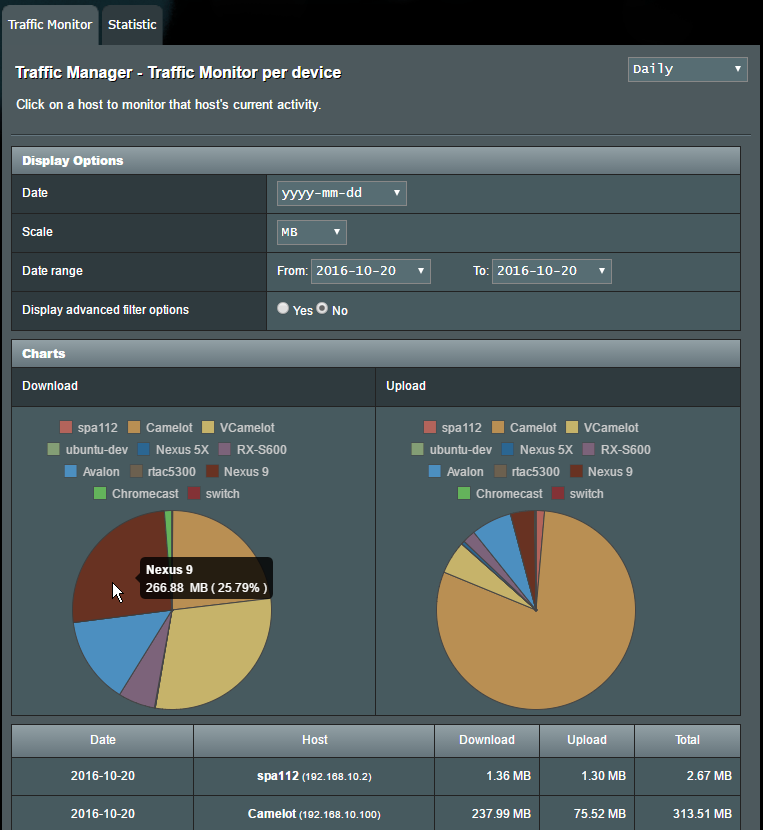 AsusWRT-Merlin is a third-party firmware developed for select ASUS routers by Eric Sauvageau toimprove upon the original AsusWRT firmware without drastically altering its user experience or user interface. Retaining all original features while adding improvements, bug fixes, and occasional new ones; Eric Sauvageau leads the development of AsusWRT-Merlin with support from The Merlin Group, users, and developers who contribute to its ongoing maintenance and enhancement. Their efforts focus on stability, improved performance, and better customization possibilities across ASUS router models supported by this open-source firmware project. Using AsusWRT-Merlin can bring many advantages for users who appreciate open source's philosophy and its associated benefits: Improved Security: Regular updates from the Merlin Group may include security patches which make your router less susceptible to vulnerabilities discovered over time. Enhanced Features: The AsusWRT-Merlin includes additional features not found in its predecessor AsusWRT, such as DNS over HTTPS support (DoH), enhanced Quality of Service capabilities (QoS), and the option to monitor real-time bandwidth usage. Customizability Freedom: Fans looking to tailor their network according to specific needs will appreciate the various settings and tweaks available. Active Community Support: Our vibrant community works tirelessly on improvements and shares knowledge for troubleshooting and advanced configurations. Open Source Firmware Limitations AsusWRT-Merlin keeps users familiar with AsusWRT at ease since its GUI and overall design philosophy are the same as before, helping ease any learning curve. Open-source firmware such as this also comes with some restrictions users should be aware of: Warranty Concerns: Installing third-party firmware could void your device's manufacturer warranty; users should check their warranty terms before proceeding. Limited Support: While community support exists for using third-party firmware such as AsusWRT-Merlin, users will not receive official assistance from ASUS for issues caused by usingsuch third-party solutions. Compatibility and Stability: Not all routers can support third-party firmware, and while open-source firmware tends to be stable, poorly executed updates or incompatible configurations could create stability issues. Learning Curve: For less tech-savvy, understanding all the additional features and configuration options may take more effort than familiarising themselves with stock firmware's user-friendly setups. No Guarantee of Features: Unfortunately, Merlin may not support all the proprietary features found in AsusWRT; some features present may also sometimes be removed if they pose significant bugs or security risks. Although open-source firmware such as AsusWRT-Merlin may have disadvantages, many advanced users find the advantages far outweigh them, particularly its enhanced control and security features. Individuals looking to maximize the potential of their router will discover that this version provides a robust upgrade from the original AsusWRT, offering both familiarity with stock firmware and access to more sophisticated capabilities of fully open-source solutions. Making the Switch to Open-Source Firmware for Enhanced Network Security Transitioning to open-source firmware like AsusWRT-Merlin can be an important strategic move for users who prioritize network security. However, this endeavor must be carefully prepared to ensure a successful transition. Before making the change, you must verify whether or not the open-source firmware you've selected is compatible with your router model. Not all routers support all firmware installations; installing incompatible ones could result in functional severe issues or even brick your device. Once compatibility has been confirmed, backing up existing router settings as a protective measure can prevent data loss and help ensure smooth transition processes. As installation processes can differ between router models, it is wise to refer to an after-installing guide tailored specifically for your router model forafter-installation instructions and potential obstacles related to firmware upgrading processes. Such guides often offer step-by-step guidance and can help address common obstacles encountered during this process. The Bigger Picture The ASUS incident highlights the need for more proactive security measures in network hardware. By turning to open-source solutions, users can take advantage of collective approaches to security where vulnerabilities can be quickly identified and patched by an international community of developers. Transitioning to open-source software might initially appear daunting; however, spending the time and energy learning how to utilize these powerful tools can significantly boost both the security and efficiency of home or office networks. Open source network management represents more than software changes; it represents a wider trend toward transparency and community in cybersecurity—an essential aspect in today's increasingly interconnected society. . ASUS routers face critical vulnerabilities including firmware issues and default passwords, risking network security and unauthorized access for users.. ASUS Router Flaws, Open Source Alternatives, Network Security Enhancements. . Dave Wreski
 Jul 06, 2024
•
Jul 06, 2024
•
102
 security risksopen sourcelegacy systems
Navigating Linux Modernization to Secure Legacy Systems Effectively
Most businesses understand the need for cybersecurity. However, many of those same companies still rely on outdated systems, making it hard to ensure the security they know they need. . Technology moves quickly, so it’s easy to fall behind the latest innovations, especially when facing budgetary constraints. As understandable a problem as it might be, legacy IT poses a host of security issues. Thankfully, modernization through Linux security is possible. We’ll examine how modernization through Linux security can help close the security gap and offer practical advice to help you navigate modern technology and outdated systems and ensure security in your Linux environment. What Are The Security Risks of Outdated Technology? Before you learn how to bridge the legacy security gap with Linux, you must understand why it’s essential. Outdated technology — hardware and software — is a severe threat for three reasons. Unpatched Vulnerabilities The most obvious risk of outdated systems is that they don’t have the latest security patches. Once developers stop supporting an app or operating system (OS), any unpatched vulnerabilities will remain that way. As mundane as software patches may seem, ignoring them can cause much damage. The infamous WannaCry ransomware grew by 53% between 2020 and 2021 despite the necessary patch being around since 2017. In fact, that patch was available before WannaCry hit its peak. All the losses stemming from this ransomware worm are due to outdated software. Of course, new technology can still have vulnerabilities. However, supported versions can eventually get a fix for these issues, whereas legacy software can’t. Cybercriminals know this, so they often target organizations they know will likely use outdated, vulnerable systems. Lack of Modern Protection Similarly, older systems won’t have the same built-in protections as newer alternatives. The more cybercrime has grown, the more seriously businesses have taken it. As a result,cybersecurity best practices have come a long way over time, so outdated IT may lack the defenses you’d expect today. Things like multifactor authentication (MFA) , firewalls, and intrusion detection come standard in many modern hardware. You can’t say the same about older systems; without these protections, you can’t employ the best practices you know you need. More worryingly, it may not be evident that these features aren’t there. Some built-in protections are common enough with new devices you don’t think about anymore. You’d naturally expect them to be there. Consequently, you may not double-check this on an older device or use it the same way out of habit, overlooking the lack of needed protections. Incompatibility With New Resources Sometimes you can install modern protections on an old system when not built in. However, that’s not always possible. As systems age, you’ll find fewer resources supporting them. This incompatibility can cause efficiency problems and create security vulnerabilities at worst. The cloud — which 70% of businesses plan to run some office systems in within two years — isn’t a perfect solution, either. While cloud-based systems largely work around OS limitations, older devices may lack the necessary memory or processing speed to run them efficiently. Cloud platforms won’t reach their full potential if you assess them on outdated systems. Any latency can create openings for cyberattacks. Not all your resources are on the cloud, so even if migration offsets some aging infrastructure, you’d still encounter compatibility issues elsewhere. What Are the Security Advantages of Linux for Older Systems? Given these dangers, it’s easy to see how outdated technology is a considerable risk. Still, upgrading hardware — especially on a companywide scale — can be expensive and complicated. One promising alternative is to remove the outdated OS and install Linux instead. Here’s why. Compatibility When you switch to Linux, you nolonger have to worry about a lack of support for an outdated OS. Many distros are free or low-cost, so it’s cheaper than buying a new proprietary OS but has the same modernization effect. You can install Linux quickly and efficiently to give your old hardware support for new software. Not every application offers Linux support, but many do. Linux fuels over 90% of web servers and internet-connected devices, and enterprise developers are particularly fond of open-source software. That’s all to say you won’t have much trouble finding modern tools you need that can run on Linux. Gaining this compatibility opens the door to newer security systems and interoperability with new hardware. You can use more robust defenses without a lengthy, expensive upgrade process. Open Source Support When you modernize with Linux, you also gain support from the open-source community. This has two main benefits in terms of cybersecurity . First, you have a much wider group contributing to vulnerability patching. Secondly, you don’t have to worry about your software eventually becoming outdated because you have ongoing support. A whopping 89% of IT leaders agree that open-source software is as or more secure than proprietary alternatives. Most say this security stems from confidence that the software is well-tested, thanks to the large community of contributors. With more people analyzing and updating the code, bug fixes are faster, and audibility is easier. Similarly, Linux resembles the as-a-service model in terms of lifetime support. Instead of replacing old versions with new ones, the community keeps improving existing resources. As a result, you can always have the latest Linux version, ensuring you don’t lose compatibility with newer systems. Performance Improvements While Linux won’t change your hardware, it does help you make the most of it. Linux distros are often lightweight and don’t run as many background applications as proprietary systems like Windows or MacOS. As a result, theycan give your old IT a needed performance boost. Independent testing shows that Linux is up to twice as fast as Windows in many processes. That speed means you can use newer cloud or local resources efficiently despite having outdated hardware. Using more modern systems means you can benefit from their security improvements over older versions. These performance boosts also mean your IT systems can respond to security threats faster. Response time is a huge factor in how much damage an attack does, as it lets you stop it before it spreads. That’s particularly important for anyone dealing with highly sensitive data. How Can I Modernize and Protect My Linux Systems? Now that you know why you should modernize your security with Linux, it’s time to learn how. Securing and updating outdated systems looks slightly different in each instance, but there are a few general guidelines to follow. Choose Your Distro Carefully The first step in bridging the legacy security gap with Linux is to choose the right distro. You can choose from hundreds of distros; the best choice for one company may not be the best for you. Start by determining your needs and obstacles, including your budget, hardware constraints, tech skill level, and modernization goals. Ubuntu is the most popular Linux distro and has a reputation for user-friendliness, making it a good choice if your team doesn’t have much tech experience. RHEL is another popular choice for businesses for its security features and scalability. Before choosing a distro, ensure any software or hardware you want to use supports it. It’s also a good idea to read community reviews to learn common problems people have with it and what they like. You should also keep long-term expansion in mind, so look for something with enough update frequency to support your scaling rate. Transition Slowly Compared to other security modernization methods, switching to Linux is relatively easy. Still, it’s best to take a slower, methodical approach than totransition everything simultaneously. Moving to any new system involves a learning curve, so a slower shift will let you work out the kinks without disrupting your entire business. Start with your systems in most dire need of an upgrade. These may be your oldest resources, but they could also be ones that have more significant security issues due to their age. Be sure to back everything up before moving it to Linux. Remember that switching to Linux may look different for various parts of your IT system. You may even want to use different distros for separate functions. Many businesses do. This variation can help you make the most of each part of your operation, but it necessitates doing things one at a time to prevent mix-ups and disruption. Remove Unnecessary Features and Settings Next, you’ll want to look for features or apps you won’t use in your work. While Linux has comparatively little bloatware compared to other operating systems, your distro may still have apps you don’t need. Your tech stack may also include features you don’t require anymore. Removing these unnecessary features serves two critical functions. First, it minimizes the number of ports and potential openings attackers can target. Secondly, it frees resources to ensure better performance, which is especially important for older hardware. Pay special attention to internet-connected apps, as most Linux attacks are web-based. Similarly, you should turn off any unneeded settings. Some distros or apps may have unsafe features like automatic connections to other devices on the network that increase your attack surface. Deactivate anything your team won’t take advantage of to be as safe as possible. Monitor Your Systems Closely Once you have your systems up and running on Linux, remember to monitor them . Ongoing monitoring is a good idea in any context, but it’s more pressing when using older equipment or after switching to a new system. Linux aids these audits by maintaining detailed system logs. Don’toverlook that resource. Review your file and system access history regularly to ensure you catch potential breaches as early as possible. While monitoring your Linux system manually is possible, automated approaches are more efficient. Look for an automatic detection and response platform compatible with your distro to free your IT team’s time and contain potential issues faster. Update Often Finally, as with any software, you should update your systems regularly. Linux’s extensive community support is only advantageous if you take advantage of it. Download and install updates as soon as they’re available to maximize your performance and patch all bugs. Known vulnerabilities as old as 2017 are still more prominent than zero days. It’s far more cost-effective for attackers to target known weaknesses in hopes businesses haven’t patched them than to discover new ways around defenses. Many people also overlook updates, adding more fuel to this fire. Enable automatic updates to stay as safe as possible. Remember, the goal is to modernize your security everywhere you can. You can’t do that if you don’t install the latest software versions when they become available. Final Thoughts on Bridging the Legacy Security Gap Today Legacy systems pose a huge threat to cybersecurity today, but it may be easier to overcome them than you initially think. Linux’s open-source nature, accessibility, security by design, and ongoing support make it an ideal platform to bridge that gap. These steps will help you modernize and protect your outdated systems with minimal disruption but maximum results. . Legacy systems pose significant security threats; discover how adopting Linux can refresh and protect your infrastructure efficiently.. Legacy System Risks, Linux Modernization, Open Source Solutions, Security Practices. . Dave Wreski
Feb 09, 2024
•

102
 phpopen sourceuser experience
LinuxSecurity: Successful Migration to Joomla 4 And PHP 8
LinuxSecurity.com has been using the open-source Joomla Content Management System (CMS) and Hypertext Preprocessor (PHP) scripting language for nearly three decades and recently migrated to the latest versions, Joomla 4 and PHP 8. This allows LinuxSecurity to use new features and optimizations to provide visitors with an enhanced user experience. We’ve decided to pull back the curtain on our experience with the migration to Joomla 4 and PHP 8 to give users planning to migrate their websites insight into the lessons we learned. . What’s New in Joomla 4 & PHP8? Joomla has demonstrated significant strides with the release of Joomla 4 and PHP 8 over the last three years. Joomla 4 is built with modern open-source technologies to become a more robust and easy-to-use CMS platform with an intense focus on network security toolkits and is bringing both user experience and code quality improvements along with it, including: Faster page loading times Features to improve Search Engine Optimization (SEO) Framework 2.0 Bootstrap 5 integration Raising the minimum supported PHP version to PHP 7 New media manager Back-end UI improvements Improved functionality with the removal of previously deprecated functionality Simplified upgrade process with a one-click upgrade for core Limited backward compatibility breaks for extensions The release of PHP8 also brings many new and exciting features and optimizations, including: Named arguments Union types Attributes Constructor property promotion Match expression Nullsafe operator Just In Time (JIT) services for safe access Improvements in the type system, error handling, and consistency IDL Web Inc. Founder and Senior Developer Jacob Hodara explains how Joomla 4 and PHP 8 improve security posture and performance, “The key with any upgrade, whether it is software running on your computer or the web, is security . Without being too technical, both Joomla and PHP offer improved performance,ultimately giving the LinuxSecurity user base an improved and secure experience while visiting LinuxSecurity.com”. Our Migration Experience Overall, our migration to Joomla 4 and PHP 8 went pretty seamlessly. This outcome can be partially attributed to our careful planning, documentation, and team meetings, which helped iron out any possible data and network security issues. Hodara reflects, “We were well prepared with the amount of research, documentation, and testing done before going live with the upgraded site.” Below, we have listed various suggestions to keep in mind if your company plans to migrate to Joomla 4 and PHP 8. Our Top Suggestions for Users Migrating their Websites to Joomla 4 & PHP 8 Planning Check in with your developer to ensure all areas of your Joomla site are PHP 8 compatible, from extensions to templates and plugins. We found it helpful to locate the changelog and scan the document for PHP 8 references. Joomla 3.10.10 offers a Pre-Update Check report to see if it is or is not compatible with Joomla 4. If a system is not ready for Joomla 4, you may have to consider a different extension that offers the same functionality. Staging You will want to set up a staging environment to test PHP 8 and Joomla 4. The testing process can be lengthy, depending on the website's complexity. We recommend using a staging site to test your website correctly. Documentation Document any file modifications made for future reference. More importantly, document the process to launch the site, as you may need to refresh some data or content on the staging site. Testing & More Testing! After you’ve completed either upgrade, be sure to test every part of the website thoroughly. You will want to do a visual and functional check (form testing, user registration, user login, etc.). All of this will be helpful in checking that your company’s data and network security are strong enough after the migration. Final Thoughts on Migrating to Joomla 4 and PHP 8 We’re happyand proud to have completed the migration to Joomla 4 and PHP 8 to provide our users with an enhanced LinuxSecurity.com experience. We hope those planning to upgrade their websites have learned something from our migration experience! You can download Joomla 4 here and upgrade to PHP 8 here . Check out our Feature articles to learn about best practices to secure your Joomla website and best practices for PHP data and network security . Have you completed the migration to Joomla 4 and PHP 8? If so, how was your experience? If you’re considering upgrading, what are your main concerns? What features and optimizations are you most looking forward to? We’d love to hear about your experience in a contributed article ! . LinuxSecurity.com upgraded to Joomla 4 and PHP 8, transforming their platform's performance and user experience with enhanced features and security improvements. Joomla Migration, PHP 8 Features, Website Optimization. . Brittany Day
Sep 25, 2023
•
102
 open sourcee-commercecloud security
Improve E-Commerce Flexibility and Security with Cloud-Based Linux
Perhaps you’re thinking of launching an e-commerce store, or you already have one and are looking for a flexible and secure way to run it. If so, using Linux in the cloud could be highly beneficial for your business. . Cloud-based Linux solutions offer the inherent security and stability of Linux , along with the well-known flexibility of cloud computing. This article will explore why using Linux in the cloud is beneficial for e-commerce stores, along with some potential challenges you may encounter, to equip you with the knowledge you need to make an informed decision. A Cloud-Based Linux Solution Helps Your Store Adapt Today’s e-commerce stores must be flexible. Using Linux in the cloud supports that reality, giving you room to grow. Linux is an open-source operating system that helps you avoid vendor lock-in. You then have more control over the type of infrastructure you want for your e-commerce store and your preferred operating model. In order for your business to succeed and grow, your website must also offer top performance at all times. Otherwise, customers will likely get frustrated, and many will take their business elsewhere given that they have many other options to choose from. Alternatively, customers with consistently excellent experiences at your e-commerce store are more likely to return for future purchases and even recommend it to their friends. Once you begin running your e-commerce site on Linux in the cloud, it’s easy to use website optimization tools to fix problems such as sites that load too slowly. However, it’s critical to keep in mind that while it is a major component, the website experience is not the sole indicator of customer satisfaction. Some cloud-based Linux products also support clients who oversee shared servers. It’s more common for e-commerce customers to benefit from shared servers rather than operate them. That’s because the shared model is typically more affordable and can enhance a website's performance. It’s also ideal ifyou’re on a limited budget and want to build a reliable online presence without overspending. Linux Is a Security-Focused Operating System The general consensus among experts is that Linux is the most secure OS for businesses . Security is built into the design in the Linux environment. It’s also advantageous that the open-source community regularly reviews Linux source code. Because of the constant scrutiny that Linux source code undergoes by this vibrant worldwide community, people are more likely to spot potential vulnerabilities that could lead to outages for your e-commerce store or other sites if left unaddressed. Microsoft made headlines in 2015 when it began offering its cloud-based Azure services to Linux users. The company also relied on Linux to run many of its associated cloud servers. A major tech name such as Microsoft offering these options is a strong approval for Linux and its security-related benefits. Linux Has Tight Safeguards for Administrative Permissions Things can go wrong at your e-commerce company if too many people have administrative privileges. In such cases, there’s a higher likelihood of individuals making mistakes that could severely impact the site’s functionality. Many threat actors also use administrative privileges as gateways to cause damage. One of the main advantages of using Linux is that, unlike Windows, it does not create administrative accounts by default. Users can engage with the home directory without restrictions but must enter root passwords before making system-level changes. Windows users have the option to improve security by properly configuring user permissions, but the reality is that this often doesn’t always happen on Windows machines. Thus, the fact that Linux provides tight administrative controls by default is a marked security advantage. Additionally, if you use Linux in the cloud, your provider will probably have separate user-based permissions to configure after installation, which can provide evenstronger safeguards. However, you should always set aside adequate time to learn about any available security-related cloud features and whether they’re worthwhile for your e-commerce enterprise. Linux Maintains Security With Package Managers and Repositories Getting an app from the Windows or MacOS operating systems usually involves going to an application marketplace, selecting the desired product, and downloading and installing it. However, things work differently on Linux. Linux users use package managers to download the programs they need. These programs come from repositories, which open-source community members usually manage. It takes comparatively longer for packages to be verified and accepted; however, the user experience is ultimately more secure because of this process. There’s also no need to do an Internet search for the package managers. You can find them with simple commands, making the experience more straightforward. Some providers of Linux offerings in the cloud also have dedicated tools for their customers. You might find apps that allow you to boost your e-commerce site’s functionality or give you a better idea of how its traffic levels change from month to month. Cloud Linux Resources Help You Focus on E-Commerce Growth A benefit of operating in the e-commerce industry is that it gives you numerous options for pursuing ongoing growth. You might want to build a progressive web app for your store, believing its fast loading time and offline usability will provide your customers’ desired features. Progressive web apps behave like websites but include several enhancements ideal for e-commerce stores. For example, they’re fully responsive, making them look great across devices and operating systems. The global e-commerce market has seen tremendous growth in recent years and, according to Insider Intelligence, is expected to total $6.3 trillion in 2023. This recent growth was largely due largely to the COVID-19 pandemic that caused manypeople to shop online much more frequently than they previously did. Remote working was another trend spurred by the pandemic, which businesses capitalized on to grow their e-commerce presence. Linux is not a frequent target for hackers due to its niche usage. You can even use open-source monitoring and authentication tools on Linux, helping you secure your store after hiring remote workers. Potential Challenges of Using Linux in the Cloud Company growth becomes more challenging if you spend too much of your time trying to resolve unexpected tech issues. Fortunately, Linux is a highly stable operating system, so you can anticipate using it with few or no delays. Rest assured in the reliability of your chosen technological solution and get back to the details of how to help your e-commerce business succeed. Even so, you should know the potential obstacles you may encounter by moving to a cloud-based Linux solution. The main one is that Linux is not as widely used as the Windows MacOS operating systems. People who are less familiar with it or have not used it at all may be hesitant to use it for their e-commerce store. Similarly, some people need time to get used to the community aspect of open-source products, including Linux. The benefits include getting feedback from community members that could allow you to improve your online store faster. However, if your company has solely or mostly used closed-source software, you’ll undoubtedly need to put time and effort into making a smooth transition. Don’t rush into finding a suitable cloud provider. Account for your budget, employees’ familiarity with the cloud and how much you hope to scale your business over the coming years before finalizing your decision. The more forethought you put into the early stages, the easier it will be to mitigate challenges and view them as valuable learning experiences. A Cloud-Based Linux Product Is Well Worth Your Consideration In this article, we discussed some key reasons that cloud-basedLinux solutions deserve your attention when looking for a way to improve your e-commerce site. These solutions have the potential to help your business adapt and grow, while improving the security of your e-commerce store. No matter what you sell or when you established your online store, it’s easy to find cloud-based Linux products with features and support to help your business run smoothly and achieve lasting success. . Cloud-based Linux solutions enhance e-commerce flexibility and security, offering stability and scalability for online stores.. perhaps, you’re, thinking, launching, e-commerce, store, already, looking. . Brittany Day
May 08, 2023
•
102
 network securityopen sourcecyber defense
Enhance Network Security with Open-Source Honeypots for Threat Detection
Security-savvy Linux sysadmins automatically assume they face online and cloud security breaches, for threats targeting Linux grow increasingly pervasive due to its growing popularity as an Operating System (OS). Linux malware reached an all-time high in 2022. . When detecting and protecting against network security threats, traditional intrusion detection and prevention systems typically dispatch too many false positives. Threat hunters are hard to find and can only catch some risks. As a result, administrators and organizations have turned to active defense or deception technologies to help identify malicious actors within their systems. Honeypots are an invaluable offensive network security toolkit for learning the Blackhat community’s tactics and motives. They share gathered information and insights and can be pretty effective when finding lateral movement and attacks in network security, protecting remotely accessible services, and improving active directory security. This article will explore deception technologies, how they work, and what open-source honeypots you can use for free. What Are Deception Technologies & How Do They Work? Deception technology deceives attackers by setting up decoys and traps that imitate actual environments. This cybersecurity defense strategy is triggered if an attacker gains access to one of these environments, and all actions and events get recorded and monitored. These logs can help determine how attackers plan to gain access to a company’s network and what actions they will carry out once they are inside. This information will assist organizations in defending against these attacks in network security. Companies can use security patching on cybersecurity vulnerabilities and strengthen endpoints so attackers cannot use their deceptive methods during the breach. What Should I Prioritize in an Open-Source Deception Tool? Think about these requirements when choosing your open-source deception tool: Concealment : Limit the severity of attacks byconcealing sensitive data rather than treating the tool as a decoy asset. Redirection : A robust tool will drop the attacker in decoy environments that look believable to the hacker. Coverage : Make sure the tool covers the platforms your company uses, such as cloud-based environments, hybrid, IoT, networks, and so on. Effectiveness : The tool should monitor reconnaissance activity, stolen credentials, AD attacks, lateral movement in general, and more. Comprehensiveness : Understand the tool’s scope by considering the deception lures available, its coverage, and whether it checks endpoints. Authenticity : Ensure the tool can fool anyone, or hackers will not fall for the deception technology. Capabilities : Know how the tool operates, whether you perform tasks manually or automatically and easily or with difficulty. Attack reports : See if the tool can identify attacks in network security without having the patterns or signatures previously recorded, and find out if the information collection has a usable format. What Is a Honeypot & How Does It Work? A honeypot is a type of deception technology attached to a network to attract and study environment-access attempts that could be considered attacks in network security. Virtual Machines (VM) set up honeypots so the tool can mitigate compromised services quickly. More than one honeypot in a server is called a honey farm. Honeypots present themselves as vulnerable targets and then send alerts to monitoring security professionals who can study the hacks to patch cybersecurity vulnerabilities. The leading production network is kept separate from the honeypot, which companies isolate in demilitarized zones on the network where applications and data mimic actual environment behavior. Triggering alerts through attempts to communicate with the honeypot is hostile, as this monitoring gives an organization logged activity to understand network security threats and web application security vulnerabilities. Honeynets focus on datacontrol and capture. Since they are highly customizable and flexible, honeynets can mitigate risks with data control and prevent compromise on non-honeynet systems with data capture. Data collection for honey farms provides organizations with all the data in a central location. Open-Source Honeypots that Detect Threats for Free You must research all the free open-source honeypots available to pick the best option that suits your data and network security needs. Make sure to deploy honeypots with caution because incorrect configurations can lead to easier access and compromise from hackers: Modern Honey Network (MHN) is a user-friendly, easy-to-install honeypot that runs on a centraliz ed server. It combines Snort, Kippo, Dionaea, and Conpot. Honeydrive is a GNU/Linux distribution that comes pre-installed. It offers active defense capabilities, and you can view it as the “anti-Kali.” Cowrie is an SSH honeypot miming an interactive SSH server and customizing command responses. It logs brute force exploits in cybersecurity as well as attacker shell interactions. Dionaea is a multi-protocol honeypot that covers everything from FTP to SIP. It excels in SMB decoys and can simulate malware payload execution to analyze multi-part stagers. Cuckoo Sandbox is a sandbox rather than a honeypot, but it is an excellent tool for malware analysis because it provides a detailed report on executed code. Thug is a “honey client” that emulates a web browser to analyze client-side exploits. MongoDB-HoneyProxy is a honeypot proxy mimicking an insecure MongoDB database, logging all traffic to a dummy MongoDB server. ElasticHoney emulates an elastic search instance and searches for attempted remote code execution. Canarytokens helps you track the activity on your network by positioning decoy data across your systems. Honeything is a honeypot for IoT devices supporting the TR-069 (CWMP) protocol. It acts as a modem/router with a RomPager-embedded web server. Conpot canemulate complex infrastructures to attract attackers to a vast industrial complex. The design is easy to deploy, modify, and extend. Moreover, it comes with a web server that can emulate SCADA HMI. GasPot is suitable for organizations in the oil and gas industry since it mimics a Veeder Root Guardian AST, a familiar concept to those in the industry. Final Thoughts on Open-Source Honeypots that Detect Threats for Free Deception technology is critical in detecting and eliminating modern network security threats in Linux systems to maintain and improve security posture. Honeypots have a low false-positives rate, so you can trust their effectiveness in identifying cybersecurity vulnerabilities. Open-source honeypots can be a free and reliable way to stop malware and attacks in network security before facing any damage. Are you using one of these honeypots? Comment below- we’d love to hear how your experience has been! . When detecting and protecting against network security threats, traditional intrusion detection and . security-savvy, linux, sysadmins, automatically, assume, online, cloud, security, breaches. . Zaid AlBukhari
Dec 12, 2022
•
102
 network monitoringopen sourceIT infrastructure
Top Open Source Network Monitoring Tools For IT Infrastructure Management
It's necessary to monitor your company's network for several reasons. Modern networks can be monitored in a variety of ways. In contrast to application performance management systems, which use agents to retrieve performance information from the application stack, network monitoring tools are specifically made for the purpose of monitoring network traffic and response times. . Regardless of the sector you operate in, you must install some sort of network monitoring if your company relies on a network to function. Linux network monitoring solutions are a priceless resource that gives you the visibility you need to maintain your system's operation. The performance of individual nodes and apps can be monitored using Linux network monitoring solutions. This article provides an overview of Linux network monitoring solutions that can be deployed. Why Are Network Monitoring Tools Important? Linux network monitoring solutions are essential for maintaining networks since they let you monitor all connected devices from a single location. By identifying devices with poor performance, these tools make it easier for you to intervene and troubleshoot the problem at the source. Executing thorough troubleshooting can reduce performance issues and guard against security vulnerabilities. Another benefit of routine network maintenance is preventing disruptions that could send thousands of customers offline. Using a network monitoring tool, you can: Auto-discover connected devices View real-time and past performance data for devices and apps. Set up alerts to notify unusual activities. Analyze network activity through graphs and reports Benefits Of Open Source Monitoring Open-source server monitoring comes with features that keep track of logs and monitor shared server data to improve security. Users of these programs can email service request responses and crash reports. These open-source monitors can also scan the entire server, checking each line of code and piece of data forflaws and making recommendations for how to solve them. Some other benefits include the following: Cost-effective: Most open-source software can be used free of cost. A small expense may be incurred when third-party products, such as plug-ins, are used. However, open-source software is free for anybody to download and use any way they see fit. Flexible: Open-source software is designed with the premise that it can and will be upgraded as users discover bugs and areas for development. Users can patch a bug and upload the program's revised version if they discover a bug. You can continue utilizing the same tools you have been using with open source and add new features as required. Secure: Because open-source code is publicly available and editable, anyone can review it and fix errors. Thus, open-source software has the potential to be highly secure . Top 5 Open Source Network Monitoring Tools Open-source Linux network monitoring solutions that suit your needs are usually influenced by several elements, such as auto-discovery, data mapping, event logging, alarm systems, reporting, and server request management. However, to make your experience better, here is a guide to open source monitoring tools that are considered to be industry leaders by experts. Cacti Cacti is a graphing tool that works as an add-on to RRDTool and is used by many network managers to gather performance information in LANs. To build graphs of traffic data, Cacti supports the Simple Network Management Protocol (SNMP) on Windows and Linux. Data used by Cacti typically comes from user-written programs that ping hosts on a network. Graphs are created using the values that the scripts produced, which are stored in a MySQL database. Depending on the needs, Cacti can additionally customize the servers and dashboard. Cacti also allows users to set a timer for polling and will automatically generate graphs from the gathered data of each poll. Another one of its capabilities is that as a devicemonitoring tool it can automatically scan for and add new devices once they are found. One of Cacti’s available plugins is called Spine and it allows for faster polling, which can especially be helpful for users monitoring larger networks. Cacti also supports users, user groups, and domains, allowing administrators to set different permissions based on only what they need and therefore not risking or compromising the network. Moreover, Cacti is a customizable tool that offers a variety of themes, skins, and languages, as well as around 12 plugins. You can download Cacti here. Nagios As an open-source monitoring system, Nagios provides various features, including the ability to integrate external applications by utilizing an additional plugin. Applications, websites, middleware, and web servers are just a few of the many settings that it can monitor. Additionally, this application includes a problem-response technique that allows you to address website issues and expedite work. With Windows monitoring built in, this tool enables users to manage statistics and retrieve information from the website. A huge volume of requests can be readily handled by Linux monitoring with Linux servers. The application monitoring capability aids in managing traffic coming from the application and extracting data from it. It also has a quick page-fixing detection technology. Nagios uses server-client architecture and operates with MSSQL for data. It can monitor and generate graphs on operating system metrics, services, state as well as a variety of different protocols including SMTP, POP3, HTTPS, and more. Furthermore, Nagios supports around 50 plug-ins, allowing users to do much more when it comes to network monitoring. You can download Nagios here. Sensu There are two versions of Sensu : the basic version and the Sensu Go version, which is designed to meet the needs of diverse users. Thanks to its outstanding features for custom script implementation, this application offers efficient healthmonitoring tactics. It combines plugins and gathers metrics data to produce thorough reports. It offers several integrated capabilities, like Splunk, ElasticSearch, ServiceNow, and many others, that make working more convenient. The process of agent identification is automated and has cutting-edge features like an Active directory. With the help of CRL support, this tool has external PKI verification. Using a productive enterprise data store, it improves working and scalability. Sensu uses transport architecture and uses MSSQL. If using the regular Sensu tool, network monitoring will be in code, however, Sensu Go displays data in different ways including graphs and trees. This tool can monitor servers, services, and applications, and supports more than 50 plug-ins. You can download Sensu here . Zabbix Due to its adaptable network monitoring capabilities, firms like Dell and Salesforce employ Zabbix . You can identify issues that need to be fixed by tracking network statistics, such as network bandwidth utilization , network health and configuration changes. Zabbix connects performance data via SNMP, IPv6, and the Intelligent Platform Management Interface (IPMI). It also allows you to automatically detect devices connected to your network before utilizing an out-of-the-box template to start network monitoring. Like Nagios, the architecture of Zabbix is server-client architecture. It operates with different versions of SQL which are MySQL, PostgreSQL, and SQLite. It can monitor both devices and servers, and generates data on free disk space, CPU load, network traffic statistics, memory consumption, application status, and much more. A great feature of Zabbix is that users can set up actions on remote machines, which are triggered automatically upon the occurrence of predefined events. Zabbix supports 14 plug-ins. You can download Zabbix here . Prometheus Prometheus is a popular open-source network monitoring tool with a sizable community. It was created especially fortime-series data monitoring. Time-series data can be recognized using key-value pairs or metric names. Every time an event is raised, Prometheus' Alertmanager gives you the option to examine notifications. If necessary, you can quiet notifications sent by Alertmanager via email, PagerDuty, or OpsGenie. Excellent visual elements in Prometheus let you choose among the browser, the template language, and the connection with Grafana. To personalize your Prometheus experience, you can incorporate numerous external data sources like StatsD, JMX, and Docker. Each Prometheus server is standalone, meaning they do not rely on remote servers or network storage. It uses PromQL for data, and multiple client libraries to match language used for users’ applications. The official Prometheus libraries include Go, Java or Scala, Python, Ruby, and Rust but there are also many more unofficial third-party libraries such as Bash, C, C++, and more. Prometheus supports 10 official plugins, and such as the client libraries, there are many more unofficial ones that can also be used. You can download Prometheus here . Final Thoughts The market for open-source Linux network monitoring solutions has been steadily expanding, which has paved the way for competition and encouraged developers to create even more effective software. The market for network monitoring is expected to increase from $27.6 billion in 2020 to $50 billion in 2027. While proprietary software may have limitations, open-source alternatives are affordable, powerful, and adaptable business tools. You can maintain your IT network while saving money and enjoying peace of mind by using open-source Linux network monitoring solutions. . Regardless of the sector you operate in, you must install some sort of network monitoring if your co. monitor, necessary, company's, network, reasons, modern, networks. . Brittany Day
Oct 28, 2022
•
102
 security advisoryopen sourcedatabase
RavenDB: A Trusted NoSQL Solution for Secure Data Management
RavenDB , the veteran transactional NoSQL database, is used by hundreds of startups and many Fortune 500 companies around the world thanks to its reputation as an agile , safe , efficient , and stable database. RavenDB can integrate with and complement almost any existing data system with its impressive set of built-in features . . Read on to learn what competitive advantages RavenDB offers and how it has become so trustworthy, effective, and easy to use. We recommend RavenDB for its: Agility Zero to MVP consistently chooses RavenDB over SQL thanks to its adaptability, and over MongoDB thanks to its indexing prowess, which hyper-boosts performance by running operations and calculations in the indexes instead of repetitively in queries. Safety Why are there no known RavenDB breaches , while thousands of MongoDB and MySQL servers get hacked every year on average? Efficiency When e-book giant Rakuten Kobo switched from CouchBase to RavenDB , they saw 80% reduced costs in high-performance cloud usage, query performance improvement in orders of magnitude when under load, and better stability. Similarly, switching from MongoDB to RavenDB enabled IoT Bridge to go from 30 safe transactions/second to 120,000/second and automatically create indexes in response to new types of queries. Stability Beatman has been thriving with RavenDB for over 10 years to give its customers the fastest path to a successful application launch imaginable. In this article: How RavenDB has Earned LinuxSecurity’s Trust High Security is the Default in RavenDB Developer-friendly model of listening to its users Easy onboarding RavenDB 5.4: New Features & Capabilities Instant message streaming via ETL to Kafka Resilient and persistent queuing via ETL to RabbitMQ Data-driven insights, live visualization, and observation via integration with Grafana How RavenDB Has Earned LinuxSecurity’s Trust High Security is the Default in RavenDB. Youwon't likely find examples of hacked RavenDB servers, while thousands of SQL and MongoDB servers are breached every year. Data Security is crucial, so RavenDB makes it quick, easy, and fail-safe to certify, encrypt and back up databases. Basically, RavenDB is intuitive to secure and doesn't allow an unsecured database to run in production. By listening to its users, RavenDB has become a model of what it means to be a developer-friendly database. They offer readily available training and thorough documentation to allow for fast adoption of features. In each release, it utilizes communication from its customers to strengthen its legacy of offering efficient, versatile, stable, and highly secure distributed database services. For over a decade, RavenDB has been leveraging open-source development to pioneer data management innovation. As open source security advocates, we love RavenDB’s open-source approach to managing and securing data. It has enabled the renowned fully transactional, distributed NoSQL document database to surpass competitors in areas including usability, integration, and data security. RavenDB Founder, CEO, and Lead Developer Oren Eini feels that RavenDB’s use of the open-source development model has enhanced the database’s feature set and contributed to its immense popularity. He explains, “It is extremely beneficial to be able to engage in a proper discussion with a customer, and the fact that our entire codebase is open-source and available in our code repository has made it easy to get to the root cause of issues quickly .” RavenDB’s intense focus on usability is another critical factor that enhances the level of security the database offers developers. Eini explains, “Usability and security are closely tied. Our approach to security embodies operational simplicity and automation.” Intuitive Onboarding for New Users thanks to a Unique Philosophy on Support. RavenDB treats onboarding and support as an expense, instead of an actual revenue source. This isdone to force it to be more intuitive and effective. Its CEO and head department engineers are on the support team to provide fantastic tech support while keeping their fingers on the pulse of users’ needs. This positions them to add to or improve its already impressive set of features and onboarding materials. When a customer gets stuck and reaches out for help, it triggers feature enhancements and the improvement of onboarding services, such as documentation, training, code-walkthroughs, and developer advocacy. RavenDB has made it as easy as possible to learn how to set up a safe, efficient, agile, and stable system. See for yourself how easy it is to start a database and implement various features. Click the link for a summarized intro to RavenDB , including comparisons with other leading databases. RavenDB 5.4: New Features & Capabilities RavenDB offers the adaptability of document-based data modeling, with its unique cost and time-saving indexes, and game-changing integrations with other data systems such as OLAP, SQL, and more. The release of RavenDB 5.4 brings various new features and capabilities to the open-source NoSQL document database, most notably Kafka ETL for messaging, RabbitMQ for queueing & Grafana for data visualization and observability. RavenDB can now seamlessly integrate with existing ecosystems, pushing events into Kafka topics, and talking to the RabbitMQ message broker. In addition, those using Grafana can now pull and visualize data from their RavenDB database. Let’s explore these defining new features of RavenDB 5.4 in more depth. ETL to Kafka Kafka is one of the standard solutions for event streaming, used by thousands of companies around the world to build high-performance data pipelines. With RavenDB 5.4, instead of implementing application code pushing messages and events to Kafka, users can now offload this task to their database. Kafka ETL support allows RavenDB to take the role of message producer in a Kafka architecture. This ongoing taskwill extract data from the database, transform it with a custom script, and load the resulting JSON object to a Kafka destination. Not only will this shorten development time, but users will also be able to rely on this persistent mechanism that implements a retry process to resiliently push their messages to Kafka. ETL to RabbitMQ Further supporting the implementation of distributed systems, 5.4 has added Ongoing Tasks that can transform and enqueue documents from RavenDB into RabbitMQ’s queueing infrastructure. Instead of implementing code that would push messages to RabbitMQ, users can rely on a robust and reliable ETL mechanism that will extract documents from their database, transform them with a custom script, and hand them over to RabbitMQ. Not only will this shorten development time, but users will also be able to rely on this persistent mechanism that implements a retry process to resiliently enqueue their messages. With these ETL features, RavenDB opens up a whole new world of architectural patterns and dramatically reduces complexity. Grafana Data Source Plugin Grafana is one of the leading open-source solutions for data visualization and observability. Until this version, RavenDB was offering exposure of telemetry data to Grafana via the Telegraf plugin. With RavenDB 5.4, users can now use their RavenDB database as a Data Source for Grafana. With Grafana’s analytics and interactive visualization capabilities, users can understand their data quickly, observe trends and patterns, and make informed decisions. Final Thoughts Transparency, efficiency, and observability are high-priority characteristics that should be taken into consideration when evaluating a NoSQL database, and RavenDB has demonstrated excellence in all of these key areas. The release of Version 5.4 enhances usability and improves data visualization and observability for clients, making it a fantastic option for developers looking for a fast, secure, and user-friendly database for the development of businessapplications. RavenDB 5.4 can be downloaded download . About RavenDB RavenDB is a fully transactional distributed NoSQL document database that delivers a friction-free development and deployment experience, high availability, and world-class performance with zero effort. Supporting on-premise, cloud deployments, and edge deployments, its multi-master replication allows you to sync your data globally even in hybrid scenarios. For more information, visit https://ravendb.net/ . . Discover the benefits of RavenDB and why it s esteemed as a reliable NoSQL database for secure, efficient data management. NoSQL Database, RavenDB, Open Source Security, Data Management, Transactional Database. . Brittany Day
Aug 24, 2022
•
102
 open sourcesoftware developmentcode review
Understanding The Benefits And Drawbacks Of Open Source Security
This article will explore the key benefits and potential drawbacks of open source security in under a minute. . Open Source Security Basics Open-source software refers to software that has publicly accessible and editable code. While allowing public access to a program’s code does not sound like something that would help improve its security, security has always been a fundamental part of open-source software. In the late 1990s, the think tank Foresight Institute started to promote open-source software in an attempt to improve software security, eventually helping Netscape release the code for Netscape Communicator. Since then, open-source development has become massively popular and is a major focus for software companies such as Adobe, Red Hat, and Google. Open Source Security Benefits One of the main advantages of open-source software is that it makes it easier to develop secure programs. As large-scale software becomes a more important part of daily life, open-source code gives smaller development teams the resources to create these large programs. There are hundreds of open-source libraries that take care of common tasks. For example, most software contains logging, a behind-the-scenes feature allowing a program to record messages, such as errors. Open-source libraries like Log4j allow developers to add these fundamental features to their programs without having to program them from scratch themselves. If every development team had to program basic features like logging without the foundation of open-source code, software development would not only be more tedious but less secure since development teams would have to spread their resources too thin and waste valuable development time programming features that have been programmed thousands of times before. Furthermore, the fact that anyone can contribute to an open-source project helps to increase its security. Open-source code allows the public to update it, and oftentimes allows users to modify and distribute theirown branch of a program. For example, the release of the open-source Linux kernel by Linus Torvalds in 1993 has led to hundreds of independently managed Linux-based operating systems. Programs like bug bounties are also being used to encourage the public to find bugs in open-source software, allowing a fresh set of eyes to look for exploits. Returning to the previous logging example, the fact that libraries like Log4j are public and reviewable by anyone means that bugs and security flaws can be caught and patched rapidly. Potential Security Drawbacks of Open Source Despite the benefits noted above, it is important to mention that open-source software can have security flaws. The aforementioned Log4j library, despite being theoretically more secure, recently made the news for Log4Shell , a massive security exploit found in its code. Because Log4j is used by countless programs, the exploit affected everything from IBM servers to Minecraft. When several projects share code, it is easier for large scale exploits affecting multiple programs to exist. However, it is only because Log4j is open-source that this exploit was found by members of the public in the first place. Log4j was quickly patched, and as long as the latest version is being used, is safe. Know That Open-Source Software Can Have Security Flaws When several projects share code, it is easier for large scale exploits affecting multiple programs to exist. That being said, vulnerabilities in open-source software are often found and fixed rapidly due to the transparency of open-source code. Final Thoughts & Further Resources on Open Source Security Ultimately, letting anyone contribute to an open-source program is beneficial for security. If thousands of programs use the same open-source library, fixing a bug or security exploit in that library will increase the security of thousands of programs. Additionally, since the code is open to public contributions, more people will be able to test andreview the code. Furthermore, using publicly available code also lets developers expand their projects without having to worry about spreading themselves too thin or slacking on bug review. As long as the code they are incorporating is up to date and secure, then they can safely use it to add functionality to their program. LinuxSecurity’s Advisories section is a great resource for making sure you don’t miss critical security updates, and if you want to know more, my previous article details what is being done by developers, organizations, and the government to improve the security of open-source software. . Investigate essential advantages and possible disadvantages of open-source security. Understand how visibility enhances software security.. Open Source Security, Software Development Benefits, Code Review Practices. . Yosef Davidowitz
Jun 13, 2022
•

Get the latest News and Insights
Get the latest Linux and open source security news straight to your inbox.
Community Poll
Should Linux servers automatically install security updates?
Search Topics
Powered By

Linux Security - Your source for Top Linux News, Advisories, HOWTOs and Feature Releases
QUICK LINKS
subscribe to newsletters!
Like staying secure? So do we.
Sign up for updates, tips, and alerts!