Audit Linux privileges now to limit compromise, escalation, and system-wide damage. Review Linux Privileges×


Stay Ahead With Linux Security Features

 identity management security tactics
 For years, we secured our Linux infrastructure by building walls: VPCs, security groups, and hardened SSH configurations. We treated the cloud like a virtual data center, assuming that if we kept the "bad guys" out of the network, our workloads were safe. . That model is no longer sufficient. Today, one of the most common paths from an initial compromise to a major cloud breach is the identity assigned to your Linux workload. When an attacker gains code execution on a Linux instance—through a...
 Jul 17, 2026
 security practices patch management
 Most of us don't hear about a kernel vulnerability until a CVE lands in our inbox or the vulnerability scanner starts complaining. By then, the patch isn't new anymore. Kernel developers may have been passing it around for review, arguing over the implementation, or revising it for days before anyone outside that community noticed it. None of those discussions are secret. They're sitting in mailing list archives, Git commits, and patch reviews where they've been the whole time. The strange...
Jul 14, 2026
 Linux security cyber attacks
 Every Linux server in your fleet produces thousands of events every minute. From journald logs and auditd records to kernel-level eBPF hooks, your systems are constantly talking. Most of that noise is just the mundane churn of system services, CI/CD runners, or routine administrative automation. But among that noise, an attacker might be establishing a foothold, moving laterally, or setting up persistence. The challenge for any security team is: how do you separate the routine from the...
Jul 13, 2026
 open-source infrastructure risk
 Security scanners flag exposed API keys in public repositories every day. The initial response is usually predictable: delete the commit, revoke the credential, and move on. That’s a mistake. . In a real Linux environment, an API key never stays in one place. By the time it hits a public repo, it’s already everywhere. It’s in the CI/CD pipeline. It’s in your container registry. It’s in the build logs. It’s in the backups. Git makes this worse because the history never dies. Deleting a file in...
Jul 11, 2026
 open-source rootkit
 Most of us think of Linux rootkits as ancient history—the stuff of 90s hacking forums and clunky malware that would crash your system if you looked at it the wrong way. But if you think they’ve gone away, you’re mistaken. They’ve just gotten smarter. . Modern attackers aren't using the noisy tools of the past. Today’s threats are surgical. Many of today’s most advanced Linux rootkits operate at the kernel level or abuse legitimate system features to blend in with normal traffic. They’re...
Jul 09, 2026
 Refine features
X Clear Filters
Get the latest News and Insights
Get the latest Linux and open source security news straight to your inbox.
Community Poll
Should Linux servers automatically install security updates?
Loading...
Explore Latest Linux Security features
We found 4 articles for you...
102
 privilege escalationopen-sourcesystem access
Linux Privilege Escalation Patterns and Mitigation Strategies
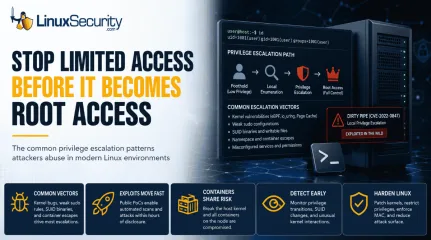
Linux privilege escalation starts once an attacker gets a foothold on a machine. Maybe it is a regular user account. Maybe it is an exposed application that nobody patched, or a reused password from another breach. Root access is usually the next objective. Attackers typically keep digging once inside, looking for a way to gain root privileges and remove the restrictions around them. . That matters because most Linux breaches do not begin with full control. They grow into it. Recent threat intelligence continues to show the same patterns across different environments. Old kernel bugs still get reused, weak sudo rules still get abused, and misconfigured services still open the door for local privilege escalation long after patches are available. Different exploit chains, same general mistakes underneath. This article is not a hacking tutorial or a deep breakdown of exploit development. The goal is simpler than that. We are looking at the common patterns behind modern Linux privilege escalation activity, why these attacks continue to succeed, and what defenders should recognize before a limited compromise turns into full system access. Why Linux Privilege Escalation Still Matters Privilege escalation is rarely the first move in an attack chain. Most compromises begin with restricted access: a web shell, exposed API token, stolen SSH key, or vulnerable CI runner. Attackers use that foothold to map the environment and look for a path toward root. A standard user account still runs into operational barriers. Security tooling continues running. Sensitive files stay restricted. Service credentials remain partially isolated. Root access removes those constraints. Once attackers gain elevated privileges, they can tamper with logs, disable monitoring, harvest credentials from memory, and move laterally through infrastructure that trusted the compromised system. Modern Linux environments amplify the impact. Kubernetes nodes, CI/CD pipelines, cloud workloads, and container hosts all depend heavilyon shared Linux infrastructure. A privilege escalation vulnerability inside one containerized workload may expose the underlying host kernel. From there, the attacker is no longer confined to a single application. Microsoft’s analysis of the Copy Fail vulnerability demonstrated this problem clearly. A local privilege escalation flaw on a shared host is no longer isolated to one machine. In multi-tenant environments, the trust boundary itself starts collapsing. The attack path usually looks familiar: initial foothold local enumeration privilege escalation persistence credential access lateral movement Security teams spend a lot of time defending the perimeter while attackers focus on the transitions happening after access already exists. That gap matters. Common Patterns Behind Modern Kernel Exploit Activity Kernel exploitation trends are not random. The same subsystems keep appearing because they expose complicated functionality directly to unprivileged userspace processes. eBPF is one example. Designed for observability and high-performance packet filtering, it allows user-controlled programs to interact with kernel logic under tightly enforced validation rules. When flaws appear inside the eBPF verifier, attackers sometimes bypass those protections and gain arbitrary kernel-level execution. That combination makes these features attractive: high complexity broad accessibility deep kernel interaction io_uring follows a similar pattern. It was built for performance. Fast asynchronous I/O. Reduced overhead. Better scalability. It also introduced another large attack surface into the kernel. Several recent exploit chains abused memory handling mistakes inside io_uring operations to escalate privileges after gaining a low-level foothold. Complexity keeps winning against isolation boundaries. Attackers also continue targeting netfilter, user namespaces, and page cache handling. The technical details differ between vulnerabilities, but theoperational pattern stays consistent: accessible kernel functionality combined with flawed memory handling. Memory Corruption and Page Cache Abuse Many Linux privilege escalation exploits still revolve around memory corruption. Dirty COW , Dirty Pip e, and newer page cache vulnerabilities all share the same underlying theme: attackers manipulating how the kernel handles protected file operations. Dirty Pipe is a good example because the exploitation chain became operationally trivial once Proof-of-Concept code appeared publicly. The vulnerability affected the Linux pipe implementation and allowed unprivileged users to overwrite read-only files through improper page cache behavior. In practical terms, attackers could modify files they were never supposed to control: /etc/passwd SSH authorized_keys SUID binaries configuration files A low-privileged shell on a vulnerable system was often enough to reach root access within seconds. The bigger lesson was not the bug itself. It was the speed of weaponization. Once public exploit code landed on GitHub, attackers immediately started scanning for vulnerable kernels. Organizations delaying patch cycles by even a few days suddenly had internet-exposed systems vulnerable to fully automated privilege escalation attempts. The technical details changed from Dirty COW years earlier. The operational reality did not. Public Exploit Releases Compress the Timeline The gap between disclosure and exploitation keeps shrinking. Researchers publish advisories. A CVE gets assigned. Patch notes appear. Then, the exploit code lands online, and the environment changes immediately. Threat actors scrape GitHub, Exploit-DB, and Packet Storm, constantly looking for reusable privilege escalation chains. The workflow is brutally efficient: vulnerability disclosed public PoC released scanners updated vulnerable kernels identified exploit deployed automatically Security teams often think about privilege escalation as apost-exploitation problem requiring manual operator skill. That assumption stopped being reliable years ago. Many modern exploit chains are fully automated now. Delayed patching turns operational debt into exposure. Attackers do not need persistence if organizations leave vulnerable kernels online long enough for mass exploitation to work at scale. Containers Changed the Risk Model Containers provide the illusion of isolation. They share the underlying host kernel. That is a massive architectural dependency. If an attacker cracks that shared kernel, the container boundaries vanish. In Kubernetes or multi-tenant clouds, one container escape leads to total cluster compromise. The kernel is the ultimate referee. If the referee is compromised, the isolation rules fall apart. This analysis on defense-in-depth confirms why hardening the kernel is more effective than focusing solely on application-level security. When the foundation is shaky, the walls don't matter. Defenders should pay close attention to: unexpected unshare activity abnormal namespace creation containers spawning host-level processes unusual access to /proc or host-mounted filesystems The isolation model only works if the underlying kernel stays trustworthy. Once that assumption breaks, container boundaries stop helping. How Linux Privilege Escalation Becomes a Real-World Threat Privilege escalation is rarely the entire attack. It is usually the midpoint. Attackers tend to start with exposed services: vulnerable web applications, leaked SSH credentials, weak API authentication, forgotten admin panels, or CI runners that nobody has properly hardened. The initial foothold is often limited, but it gives them enough access to begin mapping the environment. The workflow usually follows a predictable sequence: Enumerate the local environment Kernel versions get checked against public exploit databases. Sudo permissions get reviewed for weak rules or unrestricted shell access. Attackers look forwritable scripts, exposed Docker sockets, SUID binaries, and namespace configurations that make container escape easier. Identify escalation paths Most of this process is heavily automated now. Tools like LinPEAS and resources like HackTricks help attackers quickly identify weak sudo configurations, vulnerable kernels, writable cron jobs, weak filesystem permissions, and exposed container runtimes. Escalate privileges and stabilize access Once root access is gained, the objective changes immediately. Persistence gets installed. Credentials get harvested. Logging pipelines disappear. Security agents stop reporting. SSH keys start appearing in places they should never exist, and service accounts begin authenticating against internal systems they never touched before. That sequence appears constantly during real intrusions. Different malware families. Different operators. Same escalation logic underneath. Practical Linux Security Monitoring for Privilege Escalation Detection Patching matters, but it does not solve everything. Production systems lag behind. Legacy workloads stay pinned to older kernels. Zero-days exist whether defenders like it or not. Detection becomes the fallback layer. Most privilege escalation attempts leave operational traces before attackers fully stabilize access. The goal is catching those transitions early enough to respond before persistence spreads through the environment. Watch for unusual privilege transitions Unexpected sudo execution deserves attention immediately, especially from service accounts or web-facing processes. A web server spawning sudo, pkexec, bash, or sh should never blend into normal activity. Parent-child process relationships matter here. So do timing anomalies. Monitor SUID changes aggressively SUID binaries remain one of the most common privilege escalation and persistence mechanisms on Linux systems. Attackers frequently modify existing binaries or introduce new SUID-enabled files after escalating privileges. Baseline scans help identify suspicious additions: find / -perm -4000 -type f 2> /dev/null Auditd can monitor sensitive binaries directly: auditctl -w /usr/bin/passwd -p wa -k suid-monitor Useful SIEM detections include: new SUID files outside standard system paths unexpected chmod +s service accounts spawning root-owned shells execution chains involving pkexec, sudo, or su Watch kernel interaction patterns Unexpected interaction with eBPF, namespaces, or kernel modules often appears during local escalation attempts. Good detection targets include: non-root execution of bpf() syscalls unexpected unshare or nsenter module loading outside maintenance windows web-facing processes spawning shell interpreters container workloads touching host-mounted paths Modern EDR platforms increasingly detect these patterns behaviorally because static signatures fail against rapidly changing exploit chains. Centralized logging still matters Attackers with root access frequently wipe or tamper with local logs. If logs never leave the host, incident responders lose visibility fast. At minimum: forward audit logs externally centralize authentication events preserve sudo history Monitor kernel logs for crashes or module anomalies Local visibility disappears quickly once root access is gained. Kernel Hardening Strategies That Reduce Linux Privilege Escalation Risk No single configuration stops every exploit. Security relies on layering. You shrink the attack surface to force the adversary into harder, noisier paths. If you rely on one wall, you’ve already lost. Defense-in-depth is the only realistic posture. Use this as your baseline for system configuration. It isn’t exhaustive, but it is operational. Keep kernels updated: This is the baseline. If your kernel is six months old, you are hosting known exploits. Automate the patch pipeline where possible. Restrict unnecessary kernel modules: If you don't need amodule, unload it. Disable kernel module loading entirely on production systems after boot. Disable unused services: Every active service is a potential point of entry. Audit your listening ports. Close anything that doesn't serve a clear business function. Limit user namespace exposure: Attackers frequently abuse unprivileged_userns_clone. Restrict this capability. It prevents many container-based escape attempts. Use SELinux or AppArmor: Mandatory Access Control provides the final layer. Even if an attacker hits a kernel vulnerability, these tools can block them from accessing sensitive files or executing unauthorized binaries. Apply least privilege: Audit your sudoers file. Do not grant broad shell access to service accounts. Every permission granted is a potential escalation path. Segment workloads: Do not mix critical services on the same host. If a container breakout occurs, it should land the attacker in an isolated network segment, not the heart of your data center. Monitor exploit disclosures: Track kernel vulnerability advisories closely. Knowledge is an operational advantage. Harden container environments: Run containers as non-root users. Use seccomp profiles to filter system calls. Treat the container runtime as a high-risk surface. Reality is harsh. A high-impact zero-day will eventually bypass these controls. You cannot eliminate the risk of a kernel vulnerability entirely. You can only make the exploit process costlier and more visible for the attacker. Layered security forces the adversary to chain multiple vulnerabilities together. Each step adds noise. Each step increases the chance of detection. When you combine strict access control with proactive patching and kernel-level hardening, you aren't just making the system "safer"—you are making the cost of exploitation higher than the value of the target. Do not hunt for perfect security. It doesn't exist. Hunt for better operational visibility. Patch the critical gaps. Harden the interfaces thatface the most risk. Defending Against the Privilege Escalation Lifecycle Privilege escalation isn’t an isolated event. It’s the logical progression of an exploit chain. Attackers lean on recurring weaknesses—stale kernels, loose sudo rules, and exposed subsystems—to turn a minor foothold into full system control. Architecture is complex. Exploits remain predictable. Security teams lose ground by chasing individual alerts instead of identifying patterns. Public Proof of Concepts turn academic vulnerabilities into automated threats overnight. If your strategy relies on scrambling to patch after weaponized code hits GitHub, you’ve already ceded the initiative. Threat intelligence must dictate your patching cadence. Prioritize the flaws attackers are actually weaponizing. Resilience requires more than reactive patching. You need visibility into system behavior to spot attackers moving toward root access. Combine kernel hardening with strict access controls to close gaps before they are discovered. Organizations that master these exploit patterns don't wait for the next vulnerability; they build environments that make exploitation noisy and difficult. Recognize the move. Block the path. Stop the escalation. Linux privilege escalation trends keep evolving because Linux environments keep evolving. New kernel features, container runtimes, and orchestration layers introduce new attack surfaces faster than most organizations can harden them. Our newsletter tracks the exploit chains, hardening strategies, and detection patterns defenders actually need to pay attention to. Related Reading Seccomp, AppArmor, SELinux: Where Linux Security Controls Fall Short Securing Linux with SELinux (or AppArmor) SELinux vs AppArmor: The Hard Truth About Linux Security Container Security Fundamentals: AppArmor and SELinux . Preventing Linux privilege escalation requires understanding exploit patterns and implementing effective security measures.. Linux Privilege Escalation,Security Monitoring, Kernel Hardening, Attack Patterns, Exploitation Mitigation. . MaK Ulac
 May 22, 2026
•
May 22, 2026
•
102
 security advisoryprivilege escalationlinux
Linux Server Advisory Unused Kernel Modules Threats CVE-2026-31431
Your Linux server may be carrying kernel code for hardware, filesystems, cryptographic interfaces, and network features it will never use. . That extra flexibility is useful until one of those unused paths becomes part of an attack. Kernel modules help Linux support a wide range of systems, but they also expand what an attacker may be able to reach after gaining local access. In this article, we’ll look at why unused kernel modules deserve more attention, how ModuleJail can help admins reduce unnecessary exposure, and what precautions teams should take before blacklisting modules in production. Why Kernel Modules Deserve More Attention Linux admins already think about patching, SSH hardening, firewall rules, access control, and endpoint monitoring. Kernel modules deserve the same attention. Recent Linux kernel privilege-escalation bugs make this more than a theoretical concern. Microsoft reported that CVE-2026-31431 , also known as “Copy Fail,” is a high-severity local privilege-escalation vulnerability affecting multiple major Linux distributions, including Red Hat, SUSE, Ubuntu, and AWS Linux. Recent kernel bugs show why this matters. CVE-2026-31431, nicknamed “Copy Fail,” gave attackers a path from local access to root on several major Linux distributions. CISA later added it to its Known Exploited Vulnerabilities catalog, which is enough reason for admins to take kernel exposure seriously. This does not mean admins should panic over every kernel module. It does mean they should ask a practical question: what kernel functionality does this server actually need to load? That is where ModuleJail comes in. Instead of asking admins to build a blacklist from scratch, it checks which modules are actually loaded and helps block the ones the system is not using. Admins can keep a baseline list and add their own whitelist so required modules do not get caught in the cleanup. Why Kernel Modules Deserve More Attention A Linux kernel module is code that can beloaded into the running kernel when needed. Kernel modules commonly support hardware drivers, filesystems, network features, cryptographic functions, virtualization support, and other system capabilities. That modularity is one of Linux’s strengths. It lets distributions support a wide range of use cases without forcing every feature into one fixed kernel image. But there is a tradeoff. A general-purpose Linux system may include module support for far more functionality than a specific server needs. A web server probably does not need many desktop hardware drivers. A database server may not need uncommon filesystems. A cloud instance may not need device support intended for physical workstations. A container host may need some kernel features but not every module available in the distribution’s kernel package. Unused functionality can sit quietly for years. Then a vulnerability appears, a proof-of-concept exploit follows, and a subsystem nobody considered becomes part of the attack path. Red Hat’s documentation explains that blacklisting can be used for performance or security reasons to prevent a system from using certain kernel modules. It also notes that this is handled through modprobe configuration files under /etc/modprobe.d/ . For admins, that makes kernel module review a real hardening task, not just a theoretical security idea. Admin takeaway: If a module is not required for the system’s role, hardware, storage, networking, security tools, or recovery process, review it as part of your attack-surface reduction plan. Where ModuleJail Fits ModuleJail is useful because it turns a messy hardening idea into a repeatable workflow. Instead of forcing admins to manually guess which modules should be blocked, ModuleJail looks at the modules currently in use and generates one modprobe.d blacklist file for unused modules, while preserving a baseline and allowing an optional sysadmin whitelist. That matters because kernel module reduction is easy to understandbut hard to do safely. A system may rely on modules for storage, networking, VPNs, containers, backup agents, endpoint tools, hardware monitoring, or recovery access. Blocking the wrong module can create downtime. A safer workflow looks like this: Identify which modules are loaded now. Review what the system needs for boot, storage, networking, security, monitoring, and recovery. Add required modules to a whitelist. Generate or review blacklist entries for modules that should not load. Test the result on a matching staging system. Reboot and validate core services. Roll out through configuration management only after testing. This is where Dave would probably want the article to be very clear: ModuleJail is not a one-click security cure. It is a tool that can help admins start the review process, but the final decision still belongs to the admin who understands the system’s role. Blacklisting Is Not the Same as Patching Blacklisting unused modules can reduce exposure, but it does not replace kernel updates. Treat module reduction as one layer in a defense-in-depth strategy alongside patching, monitoring, access control, and tested recovery plans. What Module Blacklisting Actually Does Linux module blacklisting is usually handled through files in /etc/modprobe.d/ . A basic blacklist entry looks like this: blacklist module_name That tells modprobe not to automatically load that module. In some cases, admins may also use an install rule to prevent a module from being inserted through normal modprobe paths: install module_name /bin/false That stronger approach should be used carefully. It can make sense for modules that should never load on a given system, but it can also break hardware, storage, or security tooling if applied without testing. A good review process starts with visibility: lsmod Use modinfo to inspect an unfamiliar module: modinfo module_name Find available kernel object files for the runningkernel: find /lib/modules/$(uname -r) -type f -name "*.ko*" Review existing blacklist rules: grep -R "blacklist" /etc/modprobe.d/ Check for existing module install overrides: grep -R "^install" /etc/modprobe.d/ After applying a blacklist policy, reboot a test system and confirm the module is not loaded: lsmod | grep module_name If something breaks, rollback should be simple: remove or comment out the relevant blacklist or install rule, then reboot or reload the module if appropriate. For example: sudo sed -i '/module_name/d' /etc/modprobe.d/modulejail.conf sudo reboot The exact file name may differ depending on how the blacklist was created. The important point is that admins should know which file changed before they deploy the policy. How Admins Should Review Kernel Module Exposure Start with inventory, not enforcement. Run lsmod on representative systems and compare results by role. A Kubernetes worker, database server, VPN gateway, backup server, and developer workstation should not automatically share the same kernel module policy. Then investigate unfamiliar modules: modinfo Look for what the module does, which package owns it, whether it has dependencies, and whether it is tied to hardware, storage, networking, filesystems, security tooling, or virtualization. Admins should also check: Boot logs Storage drivers Network interface drivers VPN dependencies Container runtime requirements Filesystem support Backup and restore tools Endpoint detection or monitoring agents Hardware management tools Out-of-band recovery requirements The goal is not to create the shortest possible module list. The goal is to create the safest module list for that system’s actual job. A blacklist policy that breaks remote administration, storage mounting, monitoring, or recovery access is not a security improvement. It is an outage waiting to happen. Safer Rollout Tip Do not apply a new blacklist policydirectly to every production server. Test it first on a matching staging system, reboot, and confirm that networking, storage, monitoring, backups, and remote access still work. Don’t Forget Module Signing Blacklisting unused modules reduces what should be loadable. Module signing helps verify whether a module should be trusted before it loads. The Linux kernel documentation explains that the kernel module signing facility cryptographically signs modules and checks those signatures when modules are loaded. It can increase security by making it harder to load unsigned modules or modules signed with an invalid key. These controls solve different problems. Blacklisting is about reducing unnecessary exposure. Module signing is about trust and integrity. Used together, they can make kernel module abuse harder. Admins in higher-security environments should also review Secure Boot, kernel lockdown mode, vendor module policies, and how third-party drivers are handled. Out-of-tree modules from vendors, monitoring agents, storage tools, or security products may need special attention. Practical Hardening Checklist Use this as a starting point for a kernel module review: Run lsmod to identify currently loaded modules. Use modinfo to investigate unfamiliar modules. Find available modules with find /lib/modules/$(uname -r) -type f -name "*.ko*" . Review existing rules with grep -R "blacklist" /etc/modprobe.d/ . Review install overrides with grep -R "^install" /etc/modprobe.d/ . Group systems by role before creating policies. Review storage, network, VPN, container, monitoring, and backup dependencies. Create a whitelist for required modules. Test blacklist changes in staging first. Reboot after changes and validate core services. Confirm remote access still works before broad deployment. Track /etc/modprobe.d/ changes through configuration management. Keep kernel patching as the first priority. Consider module signing where appropriate. Revisit module policies after kernel upgrades, hardware changes, new agents, or major application changes. This process gives admins a practical middle ground. It does not require rebuilding the kernel or redesigning infrastructure. It starts with visibility, then moves toward controlled reduction. Why This Matters Now Most servers are not custom-built from the kernel up. They start with a general-purpose distribution, which means they often inherit support for hardware, filesystems, and drivers that have nothing to do with the workload they actually run. That broad support is convenient. But convenience can create unnecessary exposure. Kernel vulnerabilities will continue to appear. Some will affect common subsystems. Others will involve functionality that many admins did not realize was present or reachable. The best response is not only to patch faster, but also to reduce the amount of unnecessary kernel functionality exposed in the first place. That is what makes ModuleJail interesting. It gives admins a concrete way to ask a better security question: what does this machine actually need to load? The Bottom Line Unused kernel modules are easy to forget because most admins rarely interact with them directly. But attackers do not care whether a vulnerable subsystem is part of your normal workflow. They care whether it can help them gain access, escalate privileges, or weaken the system. ModuleJail brings attention back to a practical Linux hardening habit: know what your systems load, know what they need, and restrict what they do not. For Linux admins, the best next step is not to blindly blacklist half the kernel. It is to start a disciplined review of module exposure across critical systems. Patch your kernels. Audit your modules. Test your blacklist policies. Keep a whitelist. Document rollback steps before production deployment. And for more practical Linux hardening guidance, subscribe to the LinuxSecurity newsletter for weekly security updates, adminchecklists, and real-world defense strategies. Related Articles Ubuntu Copy Fail High Local Privilege Escalation Kernel Exploit 2026-31431 Linux Kernel Fragnesia Critical Privilege Escalation CVE-2026-46300 Exploring Kernel Hardening Trends for Enhanced Upstream Security Controls Comprehensive Linux Security Tools and Hardening Best Practices 2026 Secure Boot: Enhancing Linux Security from Firmware to Kernel . Learn how to harden your Linux server by managing unused kernel modules and reducing your attack surface effectively.. Linux server hardening,kernel module security,ModuleJail access control. . MaK Ulac
May 19, 2026
•

102
 security advisorycriticalprivilege escalation
Linux Kernel Fragnesia Critical Privilege Escalation CVE-2026-46300
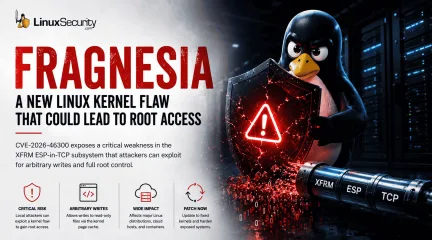
Linux administrators are once again dealing with a familiar problem: a local Linux foothold that can potentially become full root access. . A newly disclosed kernel vulnerability called Fragnesia ( CVE-2026-46300 ) affects the Linux kernel’s XFRM ESP-in-TCP subsystem and could allow unprivileged attackers to escalate privileges to root on vulnerable systems. The issue matters because modern Linux attacks rarely begin with root access. Attackers typically compromise a lower-privileged process first, then use local privilege escalation vulnerabilities to take over the underlying host. At first glance, the vulnerability may sound similar to Dirty Frag . But Fragnesia is being tracked separately and has received its own patch. That distinction matters because it highlights an ongoing issue inside Linux environments: kernel networking and page-cache attack surfaces are still producing serious privilege escalation risks. And for administrators, local privilege escalation bugs are rarely “minor.” What You Need To Know Fragnesia is tracked as CVE-2026-46300 The flaw affects the Linux kernel’s XFRM ESP-in-TCP subsystem Researchers say it may allow arbitrary byte writes into the kernel page cache of read-only files Successful exploitation could allow local attackers to gain root privileges Systems using ESP/XFRM-related functionality may require special mitigation considerations Administrators should prioritize official kernel patches from Linux vendors Why Local Privilege Escalation Still Matters Modern Linux attacks usually do not start with root access. An attacker gains a small foothold first. Maybe through a vulnerable application, exposed service, stolen credentials, container breakout, or compromised developer account. From there, the goal is escalation. That is where vulnerabilities like Fragnesia become dangerous. Once an attacker reaches root, the entire system changes hands. Security tools can be disabled Persistence can beestablished quietly Credentials, containers, workloads, and neighboring systems all become easier targets This matters even more in environments like cloud infrastructure, container hosts , CI/CD runners, shared Linux systems, developer workstations, and Kubernetes environments. In those environments, attackers do not necessarily need remote kernel exploitation. They only need a local foothold that can be turned into something bigger. What Makes Fragnesia Important One of the more significant details in the disclosure is that Fragnesia reportedly does not require a race condition to corrupt the page cache. That lowers complexity. Race-condition exploits are often harder to execute reliably because timing matters. Remove the race condition, and exploitation becomes more predictable under the right circumstances. The vulnerability also affects a subsystem many administrators may not actively monitor day to day: ESP/XFRM networking functionality tied to IPsec behavior. That creates a practical problem. Vulnerable components can sit quietly inside production systems without drawing much attention until a disclosure like this appears. In large Linux environments, especially cloud-heavy ones, many teams may not immediately know whether affected functionality is enabled, exposed, or actively being used. That delay matters during patch cycles. What Admins Should Check Right Now Administrators should begin by identifying whether affected networking modules are loaded on exposed systems. lsmod | grep esp lsmod | grep xfrm Teams should also verify currently running kernel versions: uname -r Additional priorities should include: Reviewing Linux vendor advisories for patched kernels Validating updates for cloud images and managed infrastructure Prioritizing shared Linux systems and container hosts Reviewing Kubernetes worker nodes and CI/CD infrastructure Confirming whether IPsec VPN dependencies could be impacted by temporary mitigations Patching Is the Priority Fragnesia has received its own patch, and administrators should rely on official kernel updates from their Linux distribution rather than attempting manual kernel changes. Organizations should closely monitor advisories and updated packages from vendors including: Red Hat Ubuntu Debian Fedora SUSE AlmaLinux Rocky Linux Cloud image providers and managed infrastructure platforms should also be monitored closely as updated kernels become available. As with most kernel vulnerabilities, delayed patching expands the window for attackers. Local privilege escalation flaws become significantly more dangerous once attackers already have access somewhere inside the environment. Temporary Mitigations May Affect VPNs For organizations unable to patch immediately, temporary mitigations reportedly follow the same general approach associated with recent ESP/XFRM-related issues. That may involve blocking or unloading affected modules such as esp4 or esp6. Administrators should be careful here. Disabling ESP/XFRM-related modules can interfere with IPsec VPN functionality , encrypted tunnels, and secure network communications that rely on those components. In production environments, aggressive mitigation steps can create operational problems if applied broadly without testing. That tradeoff is one of the more difficult realities of kernel vulnerability response. Security fixes are not always operationally clean, especially when networking infrastructure is involved. Why This Matters for Kubernetes and Cloud Environments Consider a Kubernetes worker node running multiple workloads. If an attacker compromises a vulnerable containerized application and gains limited local access to the underlying host namespace, a privilege escalation vulnerability like Fragnesia could potentially allow escalation to root on the node itself. From there, attackers may gain access to credentials, neighboring workloads, orchestration tooling, or cluster secrets. That is one reason local privilege escalation vulnerabilities continue to matter heavily in modern Linux infrastructure. Why Linux Kernel Bugs Continue To Matter Linux systems now sit underneath nearly every modern environment. They power containers, cloud workloads, CI/CD infrastructure, virtualization platforms, enterprise applications, and internet-facing services. Attackers know that, and increasingly, Linux attacks do not rely on noisy malware or obvious system crashes. Many operate quietly inside normal administrative activity until privilege escalation opens the door to full control. That is why vulnerabilities like Fragnesia deserve attention even when they require local access first. Because in modern infrastructure, attackers rarely need to start with root. They just need a reliable path to get there. Immediate Actions for Linux Admins Patch affected kernels immediately Verify whether ESP/XFRM modules are loaded Review IPsec VPN dependencies before mitigation Prioritize shared systems and container hosts Monitor vendor advisories for updated kernels Want more Linux security breakdowns and kernel vulnerability analysis? Subscribe to our newsletter for weekly infrastructure and security updates. Related Reading: Dirty Frag Linux Privilege Escalation Explained How To Secure the Linux Kernel Against Exploits Container Escape Vulnerabilities Explained for Linux Admins Linux Security Hardening Tips for Keeping Servers Safe Dirty Pipe: One of Linux’s Most Serious Recent Vulnerabilities . A newly disclosed kernel vulnerability called Fragnesia (CVE-2026-46300) affects the Linux kernel’. linux, administrators, again, dealing, familiar, problem, local, foothold. . MaK Ulac
May 14, 2026
•
102
 security advisoryprivilege escalationpatch management
When LKML Patches Signal Exploitation Risk Before CVE Assignment
Think about Linux security like a product recall. A manufacturer starts fixing the issue before the public notice goes out. If you catch those early signals, you can act before it becomes a known problem. . Fixes show up in the kernel, the core engine behind the operating system, before anyone calls them a security vulnerability. That time gap is what you’re really working against. Most teams rely on CVEs for vulnerability management. That’s fine, but the real signal usually shows up earlier in the patch activity. You don’t need a new process, just better prioritization inside your patch management to keep Linux security tight. Why Linux Vulnerabilities Show Up Before CVEs Open-source doesn’t hide much. Fixes and discussions happen out in the open, usually on places like the Linux Kernel Mailing List , where you can see changes as they happen. This creates a kind of "fishbowl effect." You are watching the system evolve in real time, including fixes for a Linux kernel vulnerability that hasn't been flagged yet. A CVE isn't the discovery—it’s just the classification paperwork that happens later. A vulnerability can exist as a simple patch. The official label might not show up for days, sometimes longer. That transparency cuts both ways. It helps defenders, but if nobody’s watching the feed, attackers get the early read. The Disclosure Gap: Why Official CVEs Often Lag Behind There is a natural sequence to how issues become “official,” and it isn't built for speed. It usually follows this path: A patch gets committed. Developers discuss and refine it. A CVE gets assigned later. The Before and After of Your Visibility: Before (Reactive): You wait for the CVE assignment. By this time, the patch has already been public for days or weeks, giving attackers an "exploitation window" where they know the fix, but you are still waiting for the alert. After (Proactive): You monitor the patch activity. You see the "security hardening" or"privilege escalation" notes as they hit the kernel. You patch based on the fix , not the paperwork . This academic study on vulnerability disclosure timing documents exactly how these delays happen. The short version? Code fixes move fast, but classification moves slowly. That delay creates a blind spot. Your systems might be exposed to cybersecurity threats even though no CVE vulnerability has been announced to warn you. What This Means for Everyday Linux Systems This isn’t just theory. It affects your day-to-day operations. If you only look at official advisories, your patch management cycle starts later than the actual risk. This changes how you schedule maintenance and how you prioritize your updates. You don’t need to be a kernel expert; you just need to recognize the timing. Most teams are already patching, but the difference is deciding what gets fixed first when everything looks urgent regarding security vulnerabilities. Lessons from “Dirty Pipe”: A Real-World Look at the Disclosure Lag “Dirty Pipe” is a perfect example because it followed this exact pattern, just more visibly than most. It was a major flaw that allowed someone to take control of a system. The fix was already out there before most people realized there was a serious issue. It followed this timeline. Event Status Visibility Patch Committed Fix live in kernel High Public Disclosure Technical details emerge Increasing CVE Assignment Official "Critical" label Peak By the time the CVE vulnerability was officially assigned, the patch was already live. The signal was there; it just wasn't labeled "critical" yet. Analysis from Recorded Future shows that this gap between visibility and classification is exactly where attackers operate, specifically because they know most defenders wait for a formal alert regarding cybersecurity threats. Decoding Security Signals: How to Spot Risks in Daily Updates You don’t have to read raw kernel code to see these warning signs. Most of the signal is actually sitting right there in plain language if you know what you’re looking at. The info is usually in the places you already check—like your apt, yum, or dnf update outputs, your distro’s security advisories, or simple package changelogs. When you're doing your normal patch review, just keep an eye out for phrases that sound a bit more serious than a standard update. I usually watch for things like: “Security hardening” “Privilege escalation” “Memory management fixes” “Out-of-bounds write/read” “Use-after-free” They sound like routine maintenance, but they often aren't. This analysis on patch signal detection shows that these patterns often point to real security vulnerabilities long before they are formally named. If you aren't sure how a specific patch might affect your environment, cross-reference it with our LinuxSecurity Advisory Database . It provides the context you need to decide if an update is a "routine fix" or a critical security imperative. The best part is that this doesn’t add extra work to your day. It just changes how you interpret what you’re already seeing. When you spot one of those keywords, just bump that patch into your next available maintenance window instead of leaving it for your standard monthly cycle. For all the other stuff—the minor bug fixes or performance tweaks—you can just keep your normal schedule. By using those patch notes as a quick triage signal, you’re not changing your process; you’re just adding a filter that lets you act before the official alarm bells go off. It really is the difference between waiting for a memo and actually staying ahead of the risk. Smart Prioritization: Integrating Early Signals Into Your Routine This process doesn't add extra work; it just changes how you prioritize. You are already reviewing theseupdates—now, you are simply looking at them differently. The Old Way: You treat every update as equal until a CVE alert forces an emergency. The New Way: You scan your update logs for "privilege escalation" or "security hardening." You move those patches to the front of the line immediately. This small shift makes your vulnerability management faster and more effective without needing to buy new tools or change your entire workflow. To automate this intelligence-gathering, sign up for our LinuxSecurity Newsletter . We highlight the most important Linux security developments, helping you spend less time scouring changelogs and more time actually securing your infrastructure. Why You Should Use CVEs for Compliance and Early Signals for Faster Security CVEs still matter. They are the standard for reporting, compliance, and tracking across your team. They make audits possible and give your vulnerability management structure. But remember: they only confirm risk after it’s already visible. Early signals—like watching your patch activity—give you the speed you need to respond to cybersecurity threats before the formal classification comes in. When you use them together, you get fewer surprises. That is usually the difference between just reacting to security vulnerabilities and actually staying ahead of them. . Monitor patch activity to stay ahead of Linux security risks and improve vulnerability management with proactive strategies.. Linux kernel patches, patch management, exploit detection, vulnerability assessment. . MaK Ulac
Apr 16, 2026
•
102
 security advisoryunauthorized accesscritical
Nvidia: CVE-2025-23359 critical: Container Toolkit RCE threat
Nvidia recently disclosed a critical vulnerability in their Linux Container Toolkit and GPU Operator (CVE-2025-23359) that allows malicious actors to execute unauthorized code, disrupt services, escalate privileges, and access or tamper with sensitive data. . Affected versions include the Nvidia Container Toolkit up to version 1.17.3 and GPU Operator up to version 24.9.1. To protect your systems quickly from potential harm, taking immediate steps against potential attacks should be a top priority. For optimal infrastructure protection, admins impacted by this flaw should immediately upgrade to the latest patched versions of Nvidia Container Toolkit 1.17.4 and GPU Operator 24.9.2 . Its is essential to ensure configurations meet Nvidia security guidelines, regularly conduct security audits, and robustly monitor suspicious activities. By remaining proactive and informed, you can reduce risks while safeguarding against this significant threat. To help you better understand how to mitigate your risk, I'll share practical measures you can implement to secure your systems and data against compromise. Exploring the Technical Details of this Vulnerability This Time-of-Check Time-of-Use (TOCTOU) vulnerability enables a malicious container image to potentially gain unauthorized access to the host system's filesystem. If an adversary designs a container image with harmful intent, they could manipulate it to break out of the container environment and access or tamper with files on the host system. This flaw allows an attacker to run arbitrary code on a targeted system. As a result, they could potentially: Access sensitive data or systems by running commands as a privileged user. Exploit the flaw to elevate their privileges and perform actions beyond their initial access. Steal, modify, or delete data within the containerized environment. Take Immediate Action & Apply Patches! Timely patching is one of the easiest and most efficient ways to protect systems againstthis recent Nvidia vulnerability. Nvidia has released updates that address vulnerabilities present in affected versions, so security admins should upgrade to Nvidia Container Toolkit version 1.17.4 or later as soon as possible and GPU Operator version 24.9.2 or beyond. Both patches contain essential fixes that reduce the risk associated with this vulnerability. It is critical to note that the default behavior of the toolkit is altered. CUDA compatibility libraries in the container will not be mounted by default to specific paths now. While a feature flag (allow-cuda-compat-libs-from-container) can revert to the old behavior, we strongly advise against it as this exposes patched systems to this vulnerability again. Admins should ensure this flag is disabled to ensure robust security. Beyond simply applying patches, administrators should create a culture of regular updates and maintenance within their organizations. Patching is one of the simplest yet often forgotten aspects of cybersecurity hygiene. We admins must ensure our systems always run the latest software versions from vendors like Nvidia that contain security enhancements and fixes for known vulnerabilities in updates. Adopt Secure Configuration Practices Patching may address known vulnerabilities, but ensuring secure configurations is equally vital. Administrators must review their current setups to ensure they adhere to Nvidia's recommended security settings - particularly concerning --no-cntlibs being enabled in production environments. This flag ensures container libraries are not accidentally exposed and decreases the attack surface available to potential threats. Configuration reviews must be part of any comprehensive security protocol, with regular assessments to detect misconfigurations or vulnerabilities across your entire architecture. Including team members trained in security and best practices will offer invaluable insights for optimizing settings. The Need for Regular Security Audits Conducting regular securityaudits is an indispensable component of maintaining a secure infrastructure. Audits allow organizations to identify any vulnerabilities or areas for improvement that require urgent action. Audits may be conducted internally or through third-party specialists who offer impartial assessments of your system's security posture. Security audits examine various aspects of your operational infrastructure, such as application security, data protection practices, network vulnerabilities, and user access policies. By proactively addressing weaknesses identified through an audit, threat actors will no longer be able to exploit your systems. Furthermore, audits help strengthen a culture that prioritizes security within an organization and keeps everyone aware of threats and effective defense strategies against them. The Power of Awareness and Training Human error is frequently the weakest link in cybersecurity defenses. Hence, enhancing awareness and providing comprehensive training to users and administrators working in Linux Nvidia environments is crucial to mitigating vulnerabilities. Such training should include topics like recognizing potential security threats, best practices for system configuration and updates, and discussing any newly announced vulnerabilities like this recent one disclosed by Nvidia. Establishing a culture of security involves encouraging open dialogue. Team members should feel at ease reporting potential issues or asking questions to better comprehend security policies. Incorporating regular updates and training sessions will ensure everyone understands potential threats while also being empowered to act accordingly to secure digital environments. Vigilance Through Monitoring Although regular patching and maintenance activities are essential, continuous monitoring further strengthens a system's defenses. By setting up monitoring tools that detect unusual or unauthorized activities, Linux security admins can respond swiftly and prevent potentially destructive breaches. Monitoring technologies and practices may include intrusion detection systems, logging tools, and Security Information and Event Management (SIEM) solutions to provide actionable insights and maintain complete visibility over your operational environment. Regularly reviewing logs and alerts facilitates immediate threat detection and builds intelligence regarding the threats in your digital environment. The Importance of Network Segmentation and Access Controls Network segmentation and access controls are often underestimated strategies for strengthening security against vulnerabilities. Network segmentation involves breaking a network into individual, isolated segments to limit any attackers who gain entry. This approach can significantly lessen the adverse consequences of breaches by isolating sensitive or critical systems from less secure or irrelevant segments. By implementing access controls, administrators can limit the capabilities and movement of users within a system based on their necessity and clearance levels. Granting only what users need to perform their jobs significantly reduces accidental or malicious misuse of system resources. Reviewing access rights periodically ensures they reflect changes in roles or tasks accordingly. Our Final Thoughts on Staying One Step Ahead of Nvidia Security Bugs Multiple flaws in Nvidia's Container Toolkit and GPU Operator have recently been identified that require Linux security administrators to remain alert and agile. By prioritizing immediate patching, secure configuration practices, regular security audits, awareness training programs, vigilant monitoring practices, network segmentation strategies, and security awareness training as part of an adaptive defense strategy for our organizations, we can establish comprehensive yet adaptive defense mechanisms against any threats to network integrity. Linux security admins must recognize the value of developing an ongoing cybersecurity posture that anticipates and mitigates risks proactivelyrather than reacting to vulnerabilities that appear. This ensures their organizations respond effectively to current threats and are prepared for new ones. . Nvidia disclosed a critical vulnerability affecting Container Toolkit and GPU Operator. Urgent action needed!. nvidia, recently, disclosed, critical, vulnerability, their, linux, container, toolkit, operator. . Brittany Day
Feb 17, 2025
•
102
 security advisorydenial of serviceprivilege escalation
Intel: CVE-2023-23583 Critical Update For Reptar Privilege Escalation
It was discovered that a sequence of processor instructions for some Intel processors leads to unexpected behavior that could allow an authenticated local user to escalate privileges ( CVE-2023-23583 ). This bug, dubbed "Reptar," could expose sensitive information or cause system crashes, resulting in denial of service attacks leading to loss of system access. . More recently, another Intel Microcode privilege escalation flaw was discovered. Researchers identified that a sequence of processor instructions leads to unexpected behavior for some Intel(R) Processors that may allow an authenticated user to escalate privileges ( CVE-2023-23583 ). This vulnerability also severely threatens impacted users’ sensitive data and system availability. What Is Google's Analysis of Reptar? According to Google Cloud, "The impact of this vulnerability is demonstrated when exploited by an attacker in a multi-tenant virtualized environment, as the exploit on a guest machine causes the host machine to crash, resulting in a Denial of Service to other guest machines running on the same host. The vulnerability could also lead to information disclosure or privilege escalation." Google security researcher Tavis Normandy also analyzed Reptar and concluded that the flaw could be exploited to corrupt the system state and force a machine-check exception. What Can I Do To Stay Safe? An important Intel Microcode update has been released to mitigate this severe bug. Given this vulnerability's damaging repercussions on impacted systems, we urge all affected users to update now to protect against information disclosure and loss of access to their critical systems if left unpatched. Debian , Debian LTS Fedora , Oracle , and Ubuntu have released important security advisory updates addressing Reptar. To stay on top of essential updates released by the open-source programs and applications you use, register as a LinuxSecurity user , subscribe to our Linux Advisory Watch newsletter, and customize youradvisories for your distro(s). This will enable you to stay up-to-date on the latest, most significant issues impacting the security of your systems. Follow @LS_Advisories on X for real-time updates on advisories for your distro(s) . . AMD has rolled out recent firmware enhancements targeting critical security vulnerabilities. Ensure you upgrade promptly to safeguard your information from potential breaches.. Intel Microcode Update, Privilege Escalation, Denial of Service, Security Advisory. . Brittany Day
Dec 31, 2023
•
102
 security advisorybuffer overflowcritical
Linux Kernel: CVE-2023-45871 Critical Severity DoS Buffer Overflow Risk
Two critical vulnerabilities were recently discovered in the Linux kernel, which both received a National Vulnerability Database base score of 9.8 out of 10 due to how simple they are for attackers to exploit and their severe threat to impacted systems. . CVE-2023-45871 is a buffer overflow vulnerability due to improper validation of received frames larger than the set MTU size in the Intel(R) PCI-Express Gigabit (igb) Ethernet driver in the Linux kernel. CVE-2023-25775 exists because the InfiniBand RDMA driver in the Linux kernel does not properly check for zero-length STAG or MR registration. How Do These Vulnerabilities Affect Linux Systems? These impactful bugs could enable a remote attacker to escalate privilege via network access and execute arbitrary code or carry out denial of service attacks, leading to loss of system access. In the worst-case scenario, these bugs could allow attackers to obtain sensitive data or even gain complete control of an impacted system or network. What Can You Do to Stay Safe? Essential updates for the Linux kernel have been released to mitigate these critical flaws. Given these vulnerabilities’ severe threat to affected systems, if left unpatched, we urge all impacted users to apply the updates released by Mageia , Slackware , and Ubuntu as soon as possible. Doing so will protect against downtime and system compromise. To stay on top of essential updates released by the open-source programs and applications you use, register as a LinuxSecurity user , subscribe to our Linux Advisory Watch newsletter, and customize your advisories for your distro(s). This will enable you to stay up-to-date on the latest, most significant issues impacting the security of your systems. Follow @LS_Advisories on X for real-time updates on advisories for your distro(s) . . Critical weaknesses lead to threats of system overload and illicit entry, necessitating prompt patching of software.. Linux Kernel Issues, Buffer Overflow Risks, Denial ofService Attacks, Privilege Escalation, Security Updates. . Duane Dunston
Dec 14, 2023
•
102
 security advisorynetwork securityprivilege escalation
CISA Advisory: Looney Tunables Critical glibc Threat and Mitigation
The GNU C Library on Linux systems can be compared to the control tower at a busy airport; while the tower is essential to overseeing everything at the airport, if a criminal were to enter, they could hijack a plane and put many people at risk. Threat actors have been utilizing a severe vulnerability dubbed "Looney Tunables" ( CVE-2023-4911 ) to infiltrate GNU C Libraries (glibc), stunting functions like network and memory access, file I/O, and more.. Let's discuss how this vulnerability can impact your servers and the best practices to improve security posture. How Can Looney Tunables Pose a Risk to My Linux Systems? The Looney Tunables vulnerability exists in the glibc dynamic loader ld.so as it processes the GLIBC_TUNABLES environment variable. This network security threat can give cybercriminals full root privileges on major distributions like Fedora, Ubuntu, and Debian. Threat actors can expand their impact from here by infecting other servers and computers. The security researchers who discovered the vulnerability say: "This environment variable, intended to fine-tune and optimize applications linked with glibc, is an essential tool for developers and system administrators. Its misuse or exploitation broadly affects system performance, reliability, and security." Looney Tunables can severely damage business operations, reputation, and communication, leading to clients discontinuing their interactions with the organization. Companies can expect to face cloud security breaches and other data and network security-related system compromises that harm employee productivity and consumer trust. Kinsing threat actors have begun utilizing Looney Tunables in exploits in cybersecurity regarding a “new experimental campaign” they are using in cloud security breaches. The Kinsing threat group also has malware threats that combine Python-based and PHP-related network security risks. Security researchers state: "This recent development suggests a potential broadening of their operational scope,signaling that the Kinsing operation may diversify and intensify in the near future, thereby posing an increased threat to cloud-native environments." CISA recently added Looney Tunables to its Known Exploited Vulnerabilities (KEV) catalog and has ordered federal agencies to fix these cybersecurity vulnerabilities by December 12, 2023. How Can I Maintain Data and Network Security Against This Vulnerability and Others? Debian , Fedora , Gentoo , Oracle , and Ubuntu have released critical glibc security updates to mitigate this severe network security threat. We have urged impacted users to update their systems immediately to protect against attacks in network security focused on privilege escalation, which could lead to significant downtime and compromise. Organizations must employ network security toolkits with security patching, cloud security scanners, and Linux Intrusion Detection Systems to prevent cybercriminals from moving forward once entering your system. Stay on top of the latest essential updates by registering as a Linux Security user and subscribing to our Linux Advisory Watch computer security newsletter. Customize your advisories based on company distros. Keeping up-to-date on the most recent cybersecurity trends will enable you to prevent significant network security issues from impacting your systems more. Follow @LS_Advisories on Twitter for real-time updates on secure Linux distros advisories . . Understanding the Looney Tunables glibc vulnerability and its implications on Unix-like environments is crucial for maintaining system security.. glibc Vulnerabilities, Network Security Threats, Security Updates. . Anthony Pell
Nov 25, 2023
•

Get the latest News and Insights
Get the latest Linux and open source security news straight to your inbox.
Community Poll
Should Linux servers automatically install security updates?
Search Topics
Powered By

Linux Security - Your source for Top Linux News, Advisories, HOWTOs and Feature Releases
QUICK LINKS
subscribe to newsletters!
Like staying secure? So do we.
Sign up for updates, tips, and alerts!