Overly broad permissions can turn one compromised account into a much larger security problem. Learn how to reduce unnecessary access, review privileges, and apply least privilege across modern Linux systems. Review Linux Privileges×


Stay Ahead With Linux Security Features

 identity management security tactics
 For years, we secured our Linux infrastructure by building walls: VPCs, security groups, and hardened SSH configurations. We treated the cloud like a virtual data center, assuming that if we kept the "bad guys" out of the network, our workloads were safe. . That model is no longer sufficient. Today, one of the most common paths from an initial compromise to a major cloud breach is the identity assigned to your Linux workload. When an attacker gains code execution on a Linux instance—through a...
 Jul 17, 2026
 security practices patch management
 Most of us don't hear about a kernel vulnerability until a CVE lands in our inbox or the vulnerability scanner starts complaining. By then, the patch isn't new anymore. Kernel developers may have been passing it around for review, arguing over the implementation, or revising it for days before anyone outside that community noticed it. None of those discussions are secret. They're sitting in mailing list archives, Git commits, and patch reviews where they've been the whole time. The strange...
Jul 14, 2026
 Linux security cyber attacks
 Every Linux server in your fleet produces thousands of events every minute. From journald logs and auditd records to kernel-level eBPF hooks, your systems are constantly talking. Most of that noise is just the mundane churn of system services, CI/CD runners, or routine administrative automation. But among that noise, an attacker might be establishing a foothold, moving laterally, or setting up persistence. The challenge for any security team is: how do you separate the routine from the...
Jul 13, 2026
 open-source infrastructure risk
 Security scanners flag exposed API keys in public repositories every day. The initial response is usually predictable: delete the commit, revoke the credential, and move on. That’s a mistake. . In a real Linux environment, an API key never stays in one place. By the time it hits a public repo, it’s already everywhere. It’s in the CI/CD pipeline. It’s in your container registry. It’s in the build logs. It’s in the backups. Git makes this worse because the history never dies. Deleting a file in...
Jul 11, 2026
 open-source rootkit
 Most of us think of Linux rootkits as ancient history—the stuff of 90s hacking forums and clunky malware that would crash your system if you looked at it the wrong way. But if you think they’ve gone away, you’re mistaken. They’ve just gotten smarter. . Modern attackers aren't using the noisy tools of the past. Today’s threats are surgical. Many of today’s most advanced Linux rootkits operate at the kernel level or abuse legitimate system features to blend in with normal traffic. They’re...
Jul 09, 2026
 Refine features
X Clear Filters
Get the latest News and Insights
Get the latest Linux and open source security news straight to your inbox.
Community Poll
Should Linux servers automatically install security updates?
Loading...
Explore Latest Linux Security features
We found 3 articles for you...
102
 open-sourcesecurity risksautomation
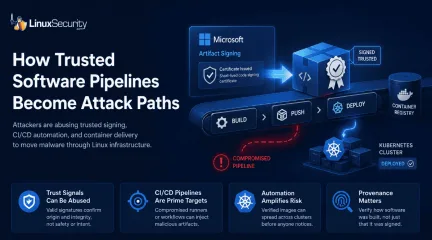
Microsoft Just Showed How Easily Trusted Software Pipelines Can Be Abused
Microsoft announced this week that it disrupted a malware-signing operation that helped cybercriminals distribute ransomware disguised as legitimate software. According to the company, a threat actor called Fox Tempest abused Microsoft Artifact Signing to generate short-lived code-signing certificates for malicious payloads. . The operation highlights a growing problem across modern Linux infrastructure. Signed packages, trusted repositories, container registries, and automated CI/CD pipelines now move software through production environments with almost no friction. If an artifact is signed and passes verification checks, most systems assume it belongs there. Attackers are learning how to abuse that trust directly. Instead of bypassing security controls, they are starting to move through the same trusted software channels administrators rely on every day. Modern Linux Infrastructure Was Built to Trust Signed Software Modern Linux ecosystems run on layers of cryptographic trust. RPM and DEB packages rely on GPG verification. OCI image signing is now common across Kubernetes environments. GitHub Actions, GitLab CI, and Jenkins pipelines automatically build and publish software into production registries with very little manual review once workflows are established. Most of the time, this works exactly as intended. The problem is that signatures only verify origin and integrity. They do not guarantee that software is safe, that a build pipeline was uncompromised, or that a maintainer account upstream was not hijacked. In many environments, malicious code no longer needs to break into production directly. It only needs to arrive through infrastructure that the organization already trusts. That shift matters because Linux environments increasingly deploy software automatically. GitOps workflows, Kubernetes image verification policies, OCI registries, and CI/CD automation were all designed to remove friction from delivery pipelines. Attackers have started treating that automation itselfas the attack surface. Attackers Are Weaponizing Trusted Software Pipelines The Fox Tempest operation arrives alongside a growing wave of software supply chain security incidents targeting ecosystems that Linux teams use every day. Threat actors continue poisoning npm and PyPI packages, compromising developer environments, abusing CI/CD infrastructure , and hijacking dependencies trusted by thousands of downstream systems. Recent campaigns tied to malicious PyPI packages, the Shai-Hulud npm compromise, and repository hijacks involving VS Code extensions all followed the same pattern. Attackers inserted malicious code into trusted delivery paths and let automation handle the distribution. These attacks succeed because modern infrastructure trusts software automatically . If a package is signed or published through a recognized pipeline, many security controls treat it as legitimate before any deeper inspection occurs. Attackers understand this now. Instead of trying to evade trust systems, they are beginning to weaponize them. Why Kubernetes and CI/CD Pipelines Became Supply Chain Attack Paths Containerized infrastructure sped the entire cycle up. CI/CD pipelines now push workloads directly into Kubernetes clusters, cloud registries, and GitOps workflows with barely any human interaction once deployment logic is wired together. Signed OCI images move between development, staging, and production continuously. In many environments, nobody touches the release path unless something fails. The issue is that container signing only proves identity. A Sigstore Cosign signature confirms who signed the image . It does not prove the container was built securely or that the contents are trustworthy. Vulnerable dependencies, exposed secrets, poisoned build artifacts, and malicious packages can still move through the pipeline fully signed and fully verified. A compromised GitHub Action inside a production CI/CD pipeline could inject cloud credentials into a container layer during build time,sign the final image automatically, and push it into an internal registry trusted by Kubernetes admission policies. From there, GitOps automation may deploy the workload across clusters before anyone realizes the pipeline itself was compromised. That is what modern software supply chain attacks actually look like operationally. The pipeline stays green. The deployment succeeds. Kubernetes pulls and runs the image exactly the way it was designed to. Production just inherits the compromise automatically. Why SBOMs Are Not Enough Software bills of materials became the industry's answer to visibility problems. SBOMs help organizations track dependencies inside applications and containers, which is useful, especially in large Kubernetes environments where dependency sprawl gets out of control quickly. But SBOMs only describe contents. They do not prove build provenance, software attestation, or CI/CD pipeline integrity. An SBOM can tell you a malicious package exists inside an image after the fact. It cannot prove whether the build runner was compromised, whether a maintainer account upstream was hijacked, or whether a trusted release workflow injected something malicious during artifact generation. Verification without context creates blind trust. That is increasingly where attackers operate. CI/CD Pipelines Are Now Prime Targets for Supply Chain Attacks Build infrastructure quietly became one of the most sensitive attack surfaces in modern Linux environments. GitHub Actions runners, GitLab pipelines, Jenkins servers, artifact signing systems, and Kubernetes deployment automation often hold privileged access across entire organizations. Compromising one part of the release chain can allow attackers to distribute malware through systems already trusted by production workloads. Attackers no longer need to bypass security controls if they can become part of the trusted software delivery process itself. This is why building provenance and software attestation frameworks like SLSAis getting more attention. Organizations are realizing that verifying software signatures alone is no longer enough. They also need to verify how the software was built, where it originated, and whether the release workflow itself remained trustworthy. How Linux Teams Should Secure Their Software Pipelines The answer is not abandoning software signing or automated deployments. Linux ecosystems still depend on them. But organizations need to stop treating “signed and verified” as the end of the security conversation. Teams running Kubernetes should start enforcing Kubernetes image verification and OCI image signing policies at admission time instead of relying solely on registry trust. Tools like Kyverno and OPA Gatekeeper can block unsigned or untrusted container images before they ever reach production clusters. CI/CD pipeline security also needs stronger isolation. GitHub Actions runners and GitLab CI systems should be treated like production infrastructure, not disposable automation. Immutable runners, short-lived credentials, restricted secrets access, and hardened build environments reduce the blast radius when pipelines get compromised. Container scanning needs to continue after deployment as well. Trivy and Grype help detect vulnerable packages during build stages, but runtime visibility matters just as much. Falco can detect suspicious process execution, shell access, privilege escalation attempts, or unexpected network activity inside running Kubernetes containers. Linux teams should also verify software provenance directly. Sigstore Cosign, in-toto attestations, and the SLSA framework provide ways to validate how software was built, where artifacts originated, and whether release workflows were tampered with somewhere inside the CI/CD pipeline. Most importantly, organizations need to reduce automatic trust wherever possible. Signed software should still be inspected. Build systems should still be monitored. Deployment pipelines should still be treated as attack surfaces. Because attackers already are. The Dangerous Assumption Linux Needs to Rethink For years, signatures served as one of the strongest trust signals in software distribution. If code was signed, verified, and distributed through a recognized repository or trusted OCI registry, many organizations assumed it was safe enough to deploy automatically. Linux infrastructure was built around that assumption. Attackers are increasingly learning how to hide inside it. The next major supply-chain compromise probably will not arrive as an obviously malicious binary or a noisy intrusion attempt. It will arrive the same way trusted software always does: signed, verified, pushed through CI/CD automation, and deployed into production by infrastructure designed to trust it. Related Reading Linux Supply Chain Attacks Threaten DevOps Teams and Security Why CI/CD Pipelines Became Targets in Software Supply Chain Attacks RubyGems Attack Highlights Open Source Supply Chain Risks for Linux Teams The Next Wave of Supply Chain Attacks: NPM, PyPI, and Docker Hub Incidents Set the Stage for 2026 Why Software Supply Chain Security Matters in Linux Systems Understanding Security Threats In Open-Source Software Supply Chains . The operation highlights a growing problem across modern Linux infrastructure. Signed packages, trus. microsoft, announced, disrupted, malware-signing, operation, helped, cybercrimina. . MaK Ulac
 May 20, 2026
•
May 20, 2026
•
102
 network securitysecurity riskssecurity techniques
Keylogging in Linux (Part 2): Advanced Techniques in the Linux GUI and X Server
Why Advanced Keylogging Techniques Depend on the Linux GUI Advanced keylogging leans on the Linux GUI because once a user signs into a graphical session, the input path stops being simple. The GUI decides which window receives focus, how toolkits interpret the keystrokes, and when events get redirected or buffered, so the attacker’s visibility changes. The hardware layer still shows the raw signal. It just doesn’t reflect how people actually work on a desktop, and that gap is exactly where more capable keyloggers operate. . Capturing device events is useful, but it only tells you what the keyboard produced , not what the system delivered to an application. That difference is why we’re stepping into the GUI stack. Desktop environments reshape input constantly, and those transformations create opportunities for interception that never appear at the device layer. Teams studying adversary behavior look at these layers because this is where real workflows live, and where visibility can quietly break. So we focus on how keystrokes move through the X server and the rest of the graphical stack. This stays within authorized research, the kind defenders use to understand how attackers abuse X11’s trusted client model or how Wayland tightens the rules as it becomes the default in Fedora, Ubuntu sessions, and GNOME. Some applications still run under XWayland and behave a bit differently, which adds one more wrinkle for anyone mapping these input paths. What Is the Linux GUI Stack? The Linux GUI works as a set of stacked components rather than one built-in interface from the OS. The kernel handles raw input at the bottom, the X server manages windows and display surfaces above it, and toolkits like GTK, Qt, and WxWidgets turn those low-level signals into the controls users interact with. Desktop environments pull those parts together into the workspace people expect. It’s a simple structure on paper, but the layers change how keystrokes move once the system is fully up. Keyboard eventsstart in the kernel’s input subsystem and reach the X server before anything else touches them. From there, Xlib hands events to applications, toolkits reshape them into widget actions, and the desktop environment overlays shortcuts and policies that can shift routing. That’s why GUI-level keylogging exposes behavior. Device-level capture won’t surface. The earlier walk-through of device-event keylogging in the Complete Guide to Keylogging in Linux: Part 1 sets that baseline, so the differences here land cleanly. +---------------+ +--------------+ | Display:2 | | WxWidget |-----+ +---------------+ | | +--------------+ | | | | +---------------+ | | +--------------+ | | Display:1 | | Qt |-----+ +---------------+ | | +--------------+ | | | | +---------------+ | | +--------------+ | | Display:0 | | GTK+ |-----+ +---------------+ | | +--------------+ | | | | update +-------------+--+ ---=---> +-----+--------+ send data | +------=--| X Server | | xlib |
Nov 13, 2025
•

102
security riskslinux distributionopen source securityWhy Software Supply Chain Security Matters in Linux Systems
For Linux users, software supply chain security means protecting the entire path from source to install. It covers who authors and reviews the code, how it is built, how artifacts and metadata are signed, where they are mirrored, and which keys the client trusts. In short: provenance, freshness, and scoped trust across the package pipeline. . Signatures and HTTPS are not enough. The distribution layer still introduces risk through build system breaches, website-level distribution swaps, stale or broken mirrors, mismanaged repository keys, and community repositories without strong guarantees. Each of these failures bypasses cryptography without breaking it. We see the same patterns repeat in open source supply chain security: outdated packages served from mirrors, keys that expire or sprawl, community packages that look legitimate but were never vetted, and infrastructure that turns trusted delivery into an attack path. The problem isn’t the math. It’s the systems around it. The fix is not “turn on HTTPS and move on.” It requires signed metadata and verifiable provenance, sane mirror freshness policies, and per-repository key isolation on the client. That is the baseline for modern software supply chain security. Why Software Supply Chain Security Matters for Linux Users Open source supply chain security isn’t a theoretical problem — it shapes how Linux systems run and how secure they remain for administrators, security teams, and everyday users alike. Admins and engineers: Stale mirrors and expired keys don’t just raise warning messages. They break deployments, block updates, and in some cases allow corrupted or even malicious packages to slip through. Security teams: Attackers rarely waste effort trying to break cryptography itself. They target the weak spots around it — mirrors, build systems, or community repositories — where they can bypass signatures and HTTPS without ever touching the math. Everyday users: A package downloaded over HTTPS and signed with avalid key can still be malicious if the repository serving it is compromised. The surface looks safe, but the content underneath isn’t. At LinuxSecurity , we’ve seen these risks play out in real-world incidents for years. That history is what makes them so important to understand. The following case studies show how each of these weak points has been exploited in practice. Incidents That Shaped Open Source Supply Chain Security Incidents span more than a decade, and they fall into two groups. From early cases like FreeBSD 2012 and Linux Mint 2016 to recent compromises, the same risks have continued to surface across Linux ecosystems. FreeBSD 2012 Infrastructure Compromise: Build System Breach This incident illustrates the failure mode of compromised build infrastructure. As one of the legacy cases, the 2012 FreeBSD breach demonstrated early on how fragile the build environment could be. Several package-building servers were compromised, creating the possibility that malicious code could be introduced during the build process. According to the project’s official postmortem , the intrusion affected servers used to prepare software distributions. While signed binaries continued to be produced, the compromise showed that signatures mean little if the system generating those binaries has already been tampered with. Provenance becomes critical in open-source supply chain security, as delivery integrity cannot compensate for poisoned origins. The takeaway is clear: provenance and build isolation are essential to any credible security model. T o us at LinuxSecurity , The real weakness isn’t the signatures. It’s the build environment itself. Once attackers reach that layer, they can turn out validly signed malware, and every downstream control fails with it. Some argue that identifying and disclosing such errors proves the system works. In reality, an infrastructure compromise demonstrates how brittle the trust model is when attackers reach inside thebuild environment itself. FreeBSD proved that when the build system itself is poisoned, provenance collapses no matter how strong the signatures. Distribution adds a different weakness: the servers users depend on to fetch software can be turned against them. The Linux Mint hack in 2016 was the most evident proof of that. Linux Mint Hack (2016): Distribution-Layer Compromise Back in 2016, a major compromise showed how fragile the distribution infrastructure could be. Attackers breached the Linux Mint website and quietly replaced official ISO download links with images containing a backdoor. The project later confirmed on its site that modified ISOs had been served directly from the distribution page. HTTPS and GPG were technically intact, but once attackers controlled the download portal, those checks offered no real protection. Trojanized ISOs spread quickly to users who believed they were following best practices. This showed how software supply chain security depends on delivery paths as much as code. It’s tempting to write incidents like this off as rare. The reality is that every breach, no matter how isolated, maps directly to a weakness that will surface again if left unaddressed. At LinuxSecurity, we’ve long pointed to the Mint hack as evidence that signatures can’t defend a broken delivery path. Infrastructure has to be guarded with the same rigor as the code itself. Mint showed how delivery can be subverted after the build. XZ exposed an even deeper cut: compromise at the source, where the maintainer workflow itself became the entry point. XZ Utils Backdoor (2024): Maintainer Workflow Compromise In 2024, malicious code was discovered in XZ Utils versions 5.6.0 and 5.6.1, compromising the maintainer workflow. What set this attack apart was patience. The attacker spent years inside the project, sending patches and building credibility until they were treated as a trusted maintainer. By the time the backdoor landed, it blended in as just another update. Thatlong game is what made the compromise so effective — the usual safeguards never triggered, because the attacker was already on the inside. CISA confirmed the incident as CVE-2024-3094 , rating it CVSS 10.0 and warning of impacts across Debian, Fedora, and Ubuntu development channels. Technical analysis later explained how the backdoor worked and why it was so dangerous: payloads persisted even when downstream container images were rebuilt, allowing the compromise to spread beyond the original packages. HTTPS and valid signatures never failed, but software supply chain security collapsed when provenance did. With the maintainer account compromised, the backdoor entered as an “official” change, collapsing trust before cryptographic checks or delivery controls could even play a role. Some argued the damage was limited because stable users were not affected. In reality, timing and vigilance prevented worse fallout. The lesson stands: modern compromises can emerge from trusted maintainers, and when they do, the usual assurances of signatures and HTTPS cannot contain the risk. The XZ case was caught quickly, but discovery didn’t erase the damage. Once malicious code is released, it clings to downstream images and caches. That persistence was exactly what surfaced in 2025, when Docker Hub continued to distribute backdoored versions long after the upstream fix. XZ Persistence in Docker Hub (2025): Downstream Amplification The 2024 XZ backdoor didn’t disappear once patched. It carried into 2025, embedded in Docker Hub base images and derivative containers. This was the failure mode of downstream persistence, where compromised artifacts spread and linger across caches and builds long after the upstream fix. Binarly’s report found more than 35 public Docker images still shipping the backdoored XZ Utils library, including Debian-based ones. The problem didn’t stop there — “second-order” images built on top of those bases multiplied the exposure. This isn’t mirror staleness.Container ecosystems replicate tainted binaries indefinitely, giving compromised artifacts a half-life of years, not weeks. Because these images inherit directly from upstream distributions, the weakness cascades across the ecosystem. What persistence reveals Once poisoned, artifacts replicate through container bases and derivatives. There is no recall mechanism to purge compromised libraries. Risk spreads silently, infecting and building long after the upstream issue is fixed. Persistence is one of the hardest problems in software supply chain security. Once an artifact is embedded in Docker or similar ecosystems, it doesn’t fade out quickly — it lingers. That cascading effect points to another gap in open source supply chain security: not just persistence of bad code, but the trust we extend to code that enters the ecosystem in the first place. AUR Chaos RAT Malware (2025): Community Trust Failure This case illustrates the failure mode of community trust. Unlike official repositories, the Arch User Repository (AUR) accepts user-submitted packages without upstream review. In 2025, several of those packages were found to deliver the Chaos RAT malware. Malicious versions of utilities such as arch-wiki-lite and vim-patchupdate were uploaded and distributed through the AUR. The scope of the compromise was detailed in Chaos RAT in AUR , where users expecting benign tools instead installed a remote access trojan. Community reaction captured by Linuxiac reflected the ongoing debate over whether the AUR should be treated as part of the distribution or as an inherently untrusted space. Open-source supply chain security has to account for where software originates, not just how it is transported. Some argue that AUR use is a personal choice, but package managers blur those boundaries — once a malicious package circulates, the risk spreads. What this shows Community repos bypass upstream review Signatures only confirm delivery, not trustworthiness Risk spillsover into the broader ecosystem Community repos revealed how extending trust too far can poison the ecosystem, proving once again that software supply chain security is about provenance, not just signatures. Community repos revealed how extending trust too far can poison the ecosystem. But risk isn’t limited to the edges. Research in 2025 showed that even the official infrastructure behind Fedora and openSUSE carried exploitable flaws. Fedora & openSUSE Build Services (2025): Modern Infra Risks In 2025, new research exposed critical weaknesses in the infrastructure behind major Linux distributions. Investigations into Fedora’s Pagure forge and the Open Build Service (OBS) used by openSUSE revealed vulnerabilities in the very systems responsible for managing and building packages. This represents modern build and repository infrastructure risks, echoing the lessons first seen in the FreeBSD compromise of 2012. One of the most severe findings was CVE-2024-47516 , a critical argument injection vulnerability in Pagure that enabled remote code execution during repository history retrieval. At the same time, research from Fenrisk showed how the source service in OBS could be manipulated to alter package sources directly. Together, these disclosures confirmed that infrastructure-level compromises are not just historical anomalies. The same class of risk persists today, nearly identical in nature to the problems uncovered more than a decade earlier. For software supply chain security, the implications are clear. Even if signing keys are properly managed, poisoned binaries can slip through when the systems that assemble and distribute them are insecure. Provenance collapses if attackers can compromise the build process itself. Building infrastructure remains one of the weakest points in the Linux supply chain. Some dismissed these as proofs-of-concept, but that misses the point — if today’s core build services can be modeled as exploitable, the system is already brittle. The onlyvariable left is timing. Why the Same Failures Repeat Across Incidents A decade’s worth of incidents makes the pattern clear. Incident Weak Point Why Crypto Didn’t Help Lesson FreeBSD 2012 Build infra compromise Signed binaries were still malicious Even valid signatures can’t protect if the build environment itself is poisoned. Linux Mint 2016 Website compromised HTTPS and GPG were intact but irrelevant A trusted download site turned hostile, showing the distribution layer is as critical as the code it serves. XZ Utils 2024 Maintainer workflow Crypto verified poisoned binaries as “legit” Provenance collapsed when a maintainer account was abused, proving trust can fail at the source. DockerHub Persistence 2025 Mirrors, caches, derivatives Tainted images lived on after removal Without recall, poisoned artifacts persist and spread downstream long after the fix. AUR Chaos RAT 2025 Community repo trust Signatures delivered malware anyway Community repositories bypass review, proving that provenance matters as much as delivery. Fedora/OBS 2025 Build service flaws Vulnerable infrastructure could sign bad code Even in 2025, core build services can still be modeled as exploitable, showing how brittle the foundation remains. These incidents show that software supply chain security is not a problem cryptography can solve on its own. It depends on securing the entire delivery chain, from build systems and distribution sites to mirrors, caches, and community repositories. Why Mirrors and Metadata Integrity Matter in Open Source Supply Chain Security The last set of incidents showed how attackers plant malicious code at different points in the chain. Mirrors and metadata integrity represent adifferent risk. They determine whether those compromises fade quickly or linger long after the initial breach. Fedora Metalink Freshness Checks: Freshness Enforcement Fedora treats mirror freshness as a security control, not just an uptime concern. This is the failure mode of stale mirrors, and Fedora’s answer is to enforce “freshness” at the metadata level. As described in the Fedora infrastructure blog , package delivery depends on repomd.xml checksums and timestamp validation. If a mirror falls out of sync, Fedora clients reject it. To users, the result looks like downtime, but the outages are a defense at work. Mirror staleness is more than an inconvenience. It is a vector for replay and rollback attacks. That’s why freshness enforcement is a core part of software supply chain security. For open-source supply chain security, keeping metadata fresh is as critical as key management. Outages here are intentional safeguards. At LinuxSecurity , we’ve pointed out that this is exactly the kind of control missing in earlier incidents like FreeBSD’s 2012 compromise. The same risks seen more than a decade ago still shape modern infrastructure. Some argue that mirrors are simply an availability issue. In reality, without enforced freshness, outdated packages can be replayed as if they were current, and cryptographic checks alone will not stop it. Fedora demonstrates proactive enforcement. Debian shows the opposite, where brittle checks allow the problem to surface in practice. Debian SecureApt: Rollback Fragility In Debian, open-source supply chain security relies on SecureApt and its Valid-Until mechanism. This represents the failure mode of rollback fragility: protections against stale mirrors that can also lock users out when freshness checks break down. As detailed in the Debian security manual , Release and InRelease files are signed and include a Valid-Until field. When a mirror drifts or a system clock slips, users see the familiar error: “Release file expired.” Itprotects against rollback but also shows how brittle the system becomes when mirrors lag. Some argue that these errors simply prove the system is working. That is true, but it also demonstrates how fragile the trust model can be when enforcement collides with real-world infrastructure. Debian’s model shows the price of enforcing freshness when mirrors drift: security holds, but usability breaks. That tension is what pushed projects to rethink key hygiene in the years that followed. Key Hygiene and Isolation on the Client Side Attacks on infrastructure and mirrors show where the chain can be poisoned. Key management on the client side decides how far that poison spreads. apt-key Deprecation: Trust Scope Failure For years, Ubuntu and Debian-based systems used apt-key to manage repository signing keys. It worked, but it was insecure: a single trusted key meant a compromise in one repository could affect them all — the failure mode of trust scope. Canonical announced the deprecation of apt-key in its Discourse post . The replacement uses deb822 source entries with the Signed-By option, which lets each repository define its own key. The move acknowledged what the community already knew: shared trust anchors undermine software supply chain security, while scoped keys and isolated trust boundaries reduce the blast radius of a compromise. Shared keys created a global blast radius. Per-repo keys isolate trust, reducing fallout when one key is exposed. Key hygiene failures are dangerous because they fail silently until compromise has already spread. Per-Repository Key Isolation: Trust Scope Failure With deb822 and the Signed-By directive, each repository now carries its own signing key. This model directly addresses the failure mode of trust scope, where a single global key once had authority over every source. Benefits of per-repo key isolation: Limits compromise to one repository rather than the entire system Reduces systemic risk if a single key is exposed Encouragesbetter hygiene and accountability across maintainers This shift matters because software supply chain security depends on limiting how far a compromise can travel once it begins. Isolating keys ensures that a poisoned source does not cascade across unrelated repos. For open-source supply chain security, it is the difference between a local breach and an ecosystem-wide incident. Some argue that key isolation is overkill. In practice, one bad key under the old model meant global compromise. Scoped trust prevents that outcome and keeps failure contained. This is why key hygiene sits at the heart of modern software supply chain security. Client-Side Controls Show Their Own Weak Points Mirrors, keys, and client-side controls show that failures aren’t only upstream — they play out on end-user systems as well. Incident Weak Point What Users Saw Security Trade-off Failure Mode Fedora Metalink Stale or broken mirrors Outages when mirrors drifted Enforced freshness stopped rollback, but at the cost of availability Freshness Enforcement Debian SecureApt Expired Release files “Release file expired” errors Valid-Until blocked stale repos, but also locked users out Rollback Fragility apt-key Deprecation Shared global key One key is trusted everywhere Convenience created a global blast radius Trust Scope Failure Per-Repo Keys Poor key isolation Each repo now has its own key Scoped trust prevents cascades, improves maintainer accountability Trust Scope Failure Together, these cases reinforce the main point: software supply chain security cannot be reduced to signatures and HTTPS. Even when cryptography is intact, weaknesses in mirrors, metadata, and key hygiene expose users to rollback, replay, and trust-scope failures. Opensource supply chain security has to account for every layer, from upstream build systems to client-side validation. How to Improve Open Source Supply Chain Security: Practical Fixes The incidents made one thing clear: distribution is where the chain most often fails. Provenance, freshness, and scoped trust are the controls that matter. Signed metadata and provenance keep packages traceable and stop poisoned repositories from masquerading as legitimate. Mirror freshness policies block rollback and replay by rejecting outdated files before they spread. Per-repository key isolation contains a compromise to a single source instead of exposing an entire system. Our perspective: These aren’t advanced features. They are the baseline. They don’t close every gap, but they stop the failures that have defined the last decade of attacks. Enterprise ecosystems like Microsoft and Red Hat enforce provenance and freshness through centralized infrastructure. Open source has the same needs but depends on fragmented adoption, which leaves room for the same failures to resurface. These aren’t optional add-ons. They are the foundation of modern software supply chain security, and without them, open source software supply chain security will keep repeating the same incidents we’ve already seen. Conclusion: Rethinking Open Source Supply Chain Security The failures we’ve traced don’t come from broken cryptography. Signatures and HTTPS hold up. What fails is distribution — the systems, mirrors, workflows, and trust models that deliver code. From FreeBSD’s compromised build servers to Linux Mint’s website breach, from XZ’s maintainer compromise to Docker and AUR persistence, the same pattern repeats. The fix is not new crypto, but a focus on provenance, freshness, and scoped trust. Without that, software supply chain security will keep failing in predictable ways. . Explores risks in Linux software supply chain security and the importance of securing the entire packagedelivery process.. linux, users, software, supply, chain, security, means, protecting, entire, source. . MaK Ulac
Oct 01, 2025
•
102
 security riskssecurity auditsvulnerability detection
Examining Open-Source AI Risks: Mitigation Strategies for Security Admins
Taking advantage of open-source AI's benefits while mitigating potential associated risks is an ongoing struggle and balancing act for security admins. While leaders such as Hugging Face CEO Clem Delangue highlight open-source AI's ethical transparency and sustainability , other experts, including Geoffrey Hinton , caution against its misuse by bad actors. Real-world vulnerabilities, including malicious packages in PyPI and npm repositories, highlight the necessity for robust security measures as open-source AI development continues to advance. . In this article, I'll examine the inherent risks of open-source AI, offering Linux and open-source security administrators actionable strategies to safeguard their systems. From thorough vetting processes for open-source libraries to regular audits identifying vulnerabilities, we'll explore comprehensive mitigation techniques to ensure your AI implementations remain safe and trustworthy. Let's begin by discussing the pros and cons of open-source AI. The Promise and Perils of Open Source AI Open-source AI holds significant promise due to its transparency and collaborative innovation, according to Clem Delangue, CEO of Hugging Face. Rahul Roy-Chowdhury of Grammarly praises Open Source for helping ensure ethical transparency while being a more sustainable long-term strategy. According to him, its transparency compels developers to prioritize responsible decision-making over performance. Similarly, Rahul Roy-Chowdhury commends open source for bringing light into a sometimes dark world of AI development while assuring safety and trustworthiness. An esteemed AI pioneer, Geoffrey Hinton, has expressed grave reservations about open-sourcing AI models. Hinton worries that bad actors could use open-source models for malicious purposes like creating bioweapons. Indeed, recent hacking cases on repositories like PyPI and npm demonstrate the dangers posed by open-source vulnerabilities being exploited maliciously. Security Threats in Open-SourceRepositories Open-source repositories such as PyPI and npm introduce an unprecedented security risk when used extensively for AI development. While they provide developers with invaluable code libraries, their openness makes them prime targets for attackers looking to introduce malicious packages, which may spread quickly, potentially causing widespread damage before being identified and removed by admins. These malicious packages, often appearing to be legitimate ones, are designed to carry out harmful activities, such as installing backdoors or exfiltrating sensitive information from systems globally. With millions of downloads daily, malicious PyPI and npm packages could cause irreparable harm and compromise system security. Mitigation Strategies for Developers & Security Administrators Given the inherent vulnerabilities associated with open-source AI implementations, security admins must employ robust strategies to minimize risks. Below are key approaches we recommend security administrators take when protecting open-source AI implementations. Thorough Vetting Processes for Libraries Implementing a rigorous vetting process for open-source libraries is key in mitigating risks. Before adding any library to their project, security admins should conduct thorough investigations of its source, maintainers, and community reputation. Opting for verified packages is typically safer, and cross-referencing libraries against multiple sources and tools with health metrics for packages assist in making more informed decisions. Developers should adhere to best practices when choosing libraries for their projects, such as using reliable sources. Examining dependency trees regularly to understand which packages are being called into projects can help detect any vulnerabilities associated with these dependencies, helping protect against potential security threats. Regular Security Audits Security audits are essential to maintaining the integrity of AI systems. Auditing involves reviewing andassessing systems systematically to detect vulnerabilities. Security admins should conduct regular codebase audits when new libraries are added to a codebase. This helps detect any unauthorized changes or malicious code if present. Collaborating with independent security firms to conduct comprehensive assessments provides a more objective review of your system's security posture and may bring fresh perspectives, potentially uncovering previously overlooked vulnerabilities. Monitoring codebase changes with periodic comprehensive security reviews helps keep systems robust against emerging risks. Use Tools to Detect Vulnerabilities Given the increasing sophistication of attacks, manual checks alone cannot keep up. Security admins should leverage advanced tools to detect vulnerabilities in open-source software, such as static and dynamic analysis tools that scan large amounts of code efficiently for security flaws that might otherwise go overlooked during regular review processes. Tools like OpenSCAP can help evaluate compliance with security policies and identify any misconfigurations, providing real-time feedback about the security status of codebases and enabling timely interventions if needed. Furthermore, tools like Dependabot and Snyk that specifically monitor dependencies for vulnerabilities can also be invaluable in maintaining a secure environment. Education and Training It is essential to equip development and security teams with the knowledge and skills to use open-source AI safely. Regular training sessions on secure coding practices , threat detection, and response will equip these teams to identify and mitigate risks effectively. Staying abreast of the latest AI security developments and creating an organizational culture of security awareness can significantly strengthen your overall security posture. Balance Innovation with Security The debate surrounding open-source AI is far from over. According to Mark Zuckerberg , open-sourcing AI models can democratize accessto their benefits while opening them up to greater public scrutiny and improvement. Unfortunately, however, this democratization exposes AI innovations to misuse by bad actors. Finding a balance between innovation requirements and stringent security measures remains a complex challenge for security administrators. Navigating this difficulty requires an approach that embraces the collaborative nature of Open Source while protecting against its risks. Admins and developers can ensure safe and sustainable AI development projects by employing comprehensive vetting processes, regular security audits, advanced vulnerability detection tools, and creating an atmosphere of security awareness among Linux and open-source security admins. Our Final Thoughts on Secure AI Development Practices Open-source AI offers both remarkable opportunities and distinct risks. As security admins, we are responsible for protecting AI projects against potential threats while simultaneously encouraging innovation. Gaining an in-depth knowledge of these risks, employing comprehensive mitigation strategies, and practicing continuous vigilance will play a pivotal role in maintaining open-source AI safely as its development continues to evolve. . Explore the risks of open-source AI and essential strategies for security admins to safeguard their systems effectively.. taking, advantage, open-source, ai', benefits, while, mitigating, potential, associated, risks. . Brittany Day
Feb 18, 2025
•
102
 kernel securityrootkitsecurity risks
CrowdStrike Incident Overview: Kernel Security Risks and Safety Measures
Balancing strong security measures while minimizing operational risks is a constant juggling act in cybersecurity. The recent global outage caused by that bad CrowdStrike update underscores the risks of relying on kernel-level modules for security. . In this article, we'll dive into that incident, discuss the dangers of kernel-level security, and look at some examples of Linux rootkits and kernel security modules. Plus, we'll share some handy tips to help Linux administrators prevent such disasters in the future. What Happened to CrowdStrike’s Kernel Module? CrowdStrike released a software update in July 2024 for its Falcon monitoring product. Falcon is a kernel-level security module for Windows, which means it operates extremely deep within the operating system. This update was flawed and proved to be disastrous. The bug caused a chain reaction that brought down critical systems worldwide. The compromised systems at airports caused massive delays. Given the nature of their work, you can imagine how terrifying it is for hospitals to experience operational disruptions. Even banks were not spared. This led to financial chaos and downtime. This incident is a stark reminder of the risks associated with integrating security modules at a deep level. This can have devastating, sweeping effects when something goes wrong on the kernel level. This is a perfect example of the high-stakes game we play regarding cybersecurity. One minor glitch can bring critical infrastructures around the world to a halt. It warns everyone in the tech and security industries about the importance of rigorous testing and careful deployment, especially with something as fundamental as kernel-level software. Understanding Kernel Drivers Windows and Linux are built around a component called the "kernel." The kernel is responsible for critical functions, such as managing system resources and controlling hardware operations. The kernel can be modified to support new hardware and functionalities using "drivers."Drivers are usually required for new hardware like GPUs, but they can also perform other functions, such as cybersecurity. Kernel Level Security Modules Security software uses Kernel-level drivers to operate at a very low level of the OS. They can monitor and control basic operations like network connections and file access, allowing a comprehensive defense from malware and other cyber threats. However, embedding the security functionality within the kernel poses substantial risks. Unlike typical software bugs, kernel code flaws can cause severe system failures, which may only cause isolated crashes. What Does This Mean for System Administrators? The CrowdStrike failure highlights the risks that system administrators face, especially those who manage Linux environments and rely on security integrations at the kernel level. The risks include widespread system instability, complicated recovery processes, cascading failures, and complex recovery procedures. Linux administrators are at greater risk due to the custom kernels they use, their reliance on dependencies from open-source, and the need for careful patch management. This incident highlights the importance of robust testing, progressive updates, and diverse security measures to protect system stability and integrity. Kernel-level Integration Risks The risks of kernel-level integrations for system administrators and Linux users cannot be understated. System Stability Kernel drivers have full access to all critical system functions. One bug can cause widespread system failures. Recovery Is Complex: Fixing problems often requires manual intervention, such as booting in recovery mode and applying low-level fixes. This can be laborious and time-consuming. Cascading Failures: As shown in the CrowdStrike case, kernel-level bugs can cascade failures on interconnected systems, increasing the impact. Linux Administrators are at Risk As a Linux admin, I quickly learned that managing security was a complex challenge. Acolleague working as an administrator for a mid-sized company discovered that the network had been compromised by a sophisticated rootkit at the kernel level. The rootkit was undetectable despite the company's strict security protocols, allowing the attacker to steal sensitive customer data over weeks. Only after noticing abnormal network traffic patterns was the breach detected. This experience highlighted the specific risks we, as Linux administrators, face. We must always stay on top of the evolving threats. Kernel vulnerabilities can be devastating, giving attackers access to deep and often undetectable information. To ensure that the systems I manage remain as secure as they can be, I no longer just rely on routine patches and updates but also take advanced measures such as implementing robust security modules, performing regular audits, and ensuring continuous monitoring. This story is a constant reminder to remain vigilant and maintain the integrity and safety of Linux environments. Linux's stability and robustness are often its greatest strengths, but these can be vulnerabilities if kernel-level security modules are involved. Customized Kernels: Many Linux systems use kernels tailored to meet specific needs. Third-party kernel drivers may disrupt these carefully tuned systems. Open-Source Dependencies: Linux administrators rely on many open-source components that may need to be tested rigorously for compatibility with the latest kernel modules. Patch Management: Linux distributions are decentralized, so updates and patches must be managed carefully. This is because they must ensure stability. Linux Rootkits and Their Effects In my research into the effects of Linux Rootkits, I've looked at several famous examples that have historically compromised Linux Systems. Adore , Knark , and Phalanx2 are three examples that demonstrate remarkable abilities to conceal malicious activities and avoid detection. Adore, which provided hidden backdoors to intruders, wasespecially insidious. Knark, on the other hand, manipulated kernel operations to remain undetected. Phalanx2 was notable for its combination of hiding abilities and keylogging, allowing it to steal sensitive data efficiently. These studies have shown rootkits can lead to prolonged unauthorized access and significant data breaches. Rootkit: Adore (2000) Adore is one of the first well-known rootkits available for Linux. It allows an attacker to hide files, processes, and network connections. Effect: Administrators discovered hidden backdoors, which compromised the integrity of systems. Adore’s ability to conceal its presence rendered traditional detection methods useless, and many systems were unknowingly exposed to long-term spying. Rootkit: Knark (2001) Knark manipulates the Linux kernel to intercept and control calls. It could hide users, files, processes, and even admin tools from standard admin tools. Effect: Infected systems are virtually undetectable, which allows attackers to conduct covert operations like data exfiltration or extended control of the compromised system. Rootkit: Phalanx2 (2003) Phalanx2 has been designed as a sophisticated rootkit to backdoor Linux. It can hide directories, files, and processes and log keystrokes. Phalanx2 combined its hiding abilities and keylogging to cause severe data breaches. These included the theft of sensitive credentials and intellectual property, which extended the attacker's ability to control the infected system. Rootkits: A Parallel Threat Rootkits are another issue that Linux administrators should be concerned about when it comes to kernel-level integration. These malicious programs insert themselves insidiously into the Linux kernel, avoiding detection and maintaining persistent control over the computer. Rootkits: How Do They Work? Rootkits can hide their presence by altering core operating system components: Rootkits can hide themselves by injecting code into the kernel. They can interceptsystem calls, modify kernel data structures, and evade anti-virus tools. File and Process Hider: Rootkits can hide files, directories, and processes, making detection more difficult. Keystroke Logging & Credential Theft: Rootkits often include functionality that allows them to steal sensitive information, such as user credentials, data, and other sensitive information, directly from operating systems. Rootkits: How Do They Impact Security and Integrity Rootkits compromise vital components and allow attackers to alter system files or hide from detection mechanisms. This section highlights the potential threats, including data breaches, unauthorized data manipulations, and possible system downtimes. The section also highlights the broader implications of IT environments for trust and reliability. This report highlights the need for proactive measures such as regular audits and advanced detection tools. Comprehensive security protocols are also necessary to reduce these risks. A rootkit is a serious threat to the integrity and security of any system. Invisibility: Because rootkits are so low-level, they may be undetectable by traditional security tools. This allows the attacker to remain undetected in the system for long periods. Data Integrity: Rootkits can alter system logs, monitor traffic, and change application behavior, making it difficult to trust data or activities on a compromised machine. They grant attackers root-level privileges, which allows them to take any action they want on the system, including exfiltrating information or deploying more malware. Examples of Linux Kernel Security Modules There are several examples of how Linux kernel modules can enhance system security. SELinux and AppArmor are three prominent solutions. SELinux uses mandatory access controls to enforce strict policies. On the other hand, AppArmor uses path-based control to specify file permissions. TOMOYO, on the other hand, focuses more on policy learning to create customsecurity profiles that are tailored to specific system behavior. In my research, I've learned how these modules collectively strengthen the security of Linux systems by providing robust mechanisms for managing permissions and enforcing security policies. Module: SELinux (Security-Enhanced Linux) Purpose : Designed to provide a robust and flexible Mandatory Access Control (MAC) mechanism for Linux. Function : SELinux enforces security policies that limit program and user capabilities, tightly controlling access permissions to reduce the risk of system exploitation. Module: AppArmor (Application Armor) Purpose : Provides a security framework that protects operating systems and applications from external or internal threats. Function : AppArmor uses profiles to define permissible actions for applications, preventing them from performing unauthorized actions. Module: Seccomp (Secure Computing Mode) Purpose : Designed to limit the system calls that applications can make, thereby reducing the attack surface. Function : Seccomp is used to sandbox programs by allowing them to execute only a specific subset of system calls, making it harder for attackers to exploit vulnerabilities within those applications. Kernel Security Issues: How Can I Reduce Risk? Kernel-level security issues can pose significant risks to your Linux systems, making it crucial to have a strong defense strategy. As a Linux admin, you know these vulnerabilities can lead to severe consequences, including system breaches and data loss. This guide provides practical recommendations to help you mitigate these risks and protect your systems from potential rootkit threats. Let's dive into some essential steps you can take to fortify your kernel security. Secure Your Policies Establish and enforce sound security policies based on the principle of least privilege. Access to critical resources should only be granted on a need-to-know basis. Regularly review and update your policies to stayon top of new threats. Stay up to date with the latest updates. It is essential to keep your system updated. Developers patch kernel vulnerabilities regularly, so you want to keep your system safe. Automate updates whenever possible and create a bulletproof process for emergency patches. Use Advanced Security Modules Frameworks such as SELinux and AppArmor can boost your system's safety. These advanced modules enforce strict access controls, making breaches harder to commit. Make sure they are configured correctly and monitored. Real-Time Monitoring and Auditing Continuous monitoring and auditing will help you monitor your system's activities. Tools such as an Intrusion Detection System (IDS) and security Information and Event Management (SIEM) are used to detect suspicious behavior before it becomes a problem. Layer your security measures. Adopt a defense-in-depth strategy, layering several security controls to avoid a single failure point. When one security measure fails, other measures can keep your system safe. Perform Regular Security Audits Conduct security audits and risk assessments regularly to detect potential vulnerabilities. Third-party security experts provide unbiased views and can make actionable suggestions for improving your defenses. Use rootkit scanners to detect possible exploits. Containerization and Virtualization Virtualization and containerization are great ways to separate workloads. By isolating services and applications, you can reduce the risk that a single security breach will compromise your entire system. Keep in touch with the Security Community. Engage with the cybersecurity community to stay informed about the latest threats. Participate in forums, open-source projects, and security conferences for insights and to keep up with possible risks. Follow these guidelines to reduce the risk of rootkits. Layered, comprehensive security will make your system resilient and ready for anything. Keep Learning about Rootkits and KernelSecurity Modules CrowdStrike poignantly reminds us of the dangers of relying solely on kernel-level modules for security. Rootkits are a parallel threat, highlighting the need to be cautious when extending the kernel. Kernel-level security provides unparalleled control and access, but the possibility of catastrophic failures should something go wrong requires a balanced approach. Linux administrators must be vigilant due to the OS's decentralized nature and customization ability. Organizations can improve their security posture by implementing rigorous tests, adopting phased deployment strategies, leveraging diverse tools, maintaining robust recovery protocols, and being vigilant about rootkits. The ultimate goal is to build a flexible and resilient security framework capable of coping with the threats it was designed to counter and the vulnerabilities it might inadvertently introduce. . The CrowdStrike case emphasizes the need for strong kernel-level security for Linux admins to protect systems from privilege escalation, module manipulation, and data exposure risks. Kernel Security, Rootkit Threats, CrowdStrike Risks, Linux Administrators, Security Modules. . Dave Wreski
Jul 21, 2024
•
102
 security risksopen sourcelegacy systems
Navigating Linux Modernization to Secure Legacy Systems Effectively
Most businesses understand the need for cybersecurity. However, many of those same companies still rely on outdated systems, making it hard to ensure the security they know they need. . Technology moves quickly, so it’s easy to fall behind the latest innovations, especially when facing budgetary constraints. As understandable a problem as it might be, legacy IT poses a host of security issues. Thankfully, modernization through Linux security is possible. We’ll examine how modernization through Linux security can help close the security gap and offer practical advice to help you navigate modern technology and outdated systems and ensure security in your Linux environment. What Are The Security Risks of Outdated Technology? Before you learn how to bridge the legacy security gap with Linux, you must understand why it’s essential. Outdated technology — hardware and software — is a severe threat for three reasons. Unpatched Vulnerabilities The most obvious risk of outdated systems is that they don’t have the latest security patches. Once developers stop supporting an app or operating system (OS), any unpatched vulnerabilities will remain that way. As mundane as software patches may seem, ignoring them can cause much damage. The infamous WannaCry ransomware grew by 53% between 2020 and 2021 despite the necessary patch being around since 2017. In fact, that patch was available before WannaCry hit its peak. All the losses stemming from this ransomware worm are due to outdated software. Of course, new technology can still have vulnerabilities. However, supported versions can eventually get a fix for these issues, whereas legacy software can’t. Cybercriminals know this, so they often target organizations they know will likely use outdated, vulnerable systems. Lack of Modern Protection Similarly, older systems won’t have the same built-in protections as newer alternatives. The more cybercrime has grown, the more seriously businesses have taken it. As a result,cybersecurity best practices have come a long way over time, so outdated IT may lack the defenses you’d expect today. Things like multifactor authentication (MFA) , firewalls, and intrusion detection come standard in many modern hardware. You can’t say the same about older systems; without these protections, you can’t employ the best practices you know you need. More worryingly, it may not be evident that these features aren’t there. Some built-in protections are common enough with new devices you don’t think about anymore. You’d naturally expect them to be there. Consequently, you may not double-check this on an older device or use it the same way out of habit, overlooking the lack of needed protections. Incompatibility With New Resources Sometimes you can install modern protections on an old system when not built in. However, that’s not always possible. As systems age, you’ll find fewer resources supporting them. This incompatibility can cause efficiency problems and create security vulnerabilities at worst. The cloud — which 70% of businesses plan to run some office systems in within two years — isn’t a perfect solution, either. While cloud-based systems largely work around OS limitations, older devices may lack the necessary memory or processing speed to run them efficiently. Cloud platforms won’t reach their full potential if you assess them on outdated systems. Any latency can create openings for cyberattacks. Not all your resources are on the cloud, so even if migration offsets some aging infrastructure, you’d still encounter compatibility issues elsewhere. What Are the Security Advantages of Linux for Older Systems? Given these dangers, it’s easy to see how outdated technology is a considerable risk. Still, upgrading hardware — especially on a companywide scale — can be expensive and complicated. One promising alternative is to remove the outdated OS and install Linux instead. Here’s why. Compatibility When you switch to Linux, you nolonger have to worry about a lack of support for an outdated OS. Many distros are free or low-cost, so it’s cheaper than buying a new proprietary OS but has the same modernization effect. You can install Linux quickly and efficiently to give your old hardware support for new software. Not every application offers Linux support, but many do. Linux fuels over 90% of web servers and internet-connected devices, and enterprise developers are particularly fond of open-source software. That’s all to say you won’t have much trouble finding modern tools you need that can run on Linux. Gaining this compatibility opens the door to newer security systems and interoperability with new hardware. You can use more robust defenses without a lengthy, expensive upgrade process. Open Source Support When you modernize with Linux, you also gain support from the open-source community. This has two main benefits in terms of cybersecurity . First, you have a much wider group contributing to vulnerability patching. Secondly, you don’t have to worry about your software eventually becoming outdated because you have ongoing support. A whopping 89% of IT leaders agree that open-source software is as or more secure than proprietary alternatives. Most say this security stems from confidence that the software is well-tested, thanks to the large community of contributors. With more people analyzing and updating the code, bug fixes are faster, and audibility is easier. Similarly, Linux resembles the as-a-service model in terms of lifetime support. Instead of replacing old versions with new ones, the community keeps improving existing resources. As a result, you can always have the latest Linux version, ensuring you don’t lose compatibility with newer systems. Performance Improvements While Linux won’t change your hardware, it does help you make the most of it. Linux distros are often lightweight and don’t run as many background applications as proprietary systems like Windows or MacOS. As a result, theycan give your old IT a needed performance boost. Independent testing shows that Linux is up to twice as fast as Windows in many processes. That speed means you can use newer cloud or local resources efficiently despite having outdated hardware. Using more modern systems means you can benefit from their security improvements over older versions. These performance boosts also mean your IT systems can respond to security threats faster. Response time is a huge factor in how much damage an attack does, as it lets you stop it before it spreads. That’s particularly important for anyone dealing with highly sensitive data. How Can I Modernize and Protect My Linux Systems? Now that you know why you should modernize your security with Linux, it’s time to learn how. Securing and updating outdated systems looks slightly different in each instance, but there are a few general guidelines to follow. Choose Your Distro Carefully The first step in bridging the legacy security gap with Linux is to choose the right distro. You can choose from hundreds of distros; the best choice for one company may not be the best for you. Start by determining your needs and obstacles, including your budget, hardware constraints, tech skill level, and modernization goals. Ubuntu is the most popular Linux distro and has a reputation for user-friendliness, making it a good choice if your team doesn’t have much tech experience. RHEL is another popular choice for businesses for its security features and scalability. Before choosing a distro, ensure any software or hardware you want to use supports it. It’s also a good idea to read community reviews to learn common problems people have with it and what they like. You should also keep long-term expansion in mind, so look for something with enough update frequency to support your scaling rate. Transition Slowly Compared to other security modernization methods, switching to Linux is relatively easy. Still, it’s best to take a slower, methodical approach than totransition everything simultaneously. Moving to any new system involves a learning curve, so a slower shift will let you work out the kinks without disrupting your entire business. Start with your systems in most dire need of an upgrade. These may be your oldest resources, but they could also be ones that have more significant security issues due to their age. Be sure to back everything up before moving it to Linux. Remember that switching to Linux may look different for various parts of your IT system. You may even want to use different distros for separate functions. Many businesses do. This variation can help you make the most of each part of your operation, but it necessitates doing things one at a time to prevent mix-ups and disruption. Remove Unnecessary Features and Settings Next, you’ll want to look for features or apps you won’t use in your work. While Linux has comparatively little bloatware compared to other operating systems, your distro may still have apps you don’t need. Your tech stack may also include features you don’t require anymore. Removing these unnecessary features serves two critical functions. First, it minimizes the number of ports and potential openings attackers can target. Secondly, it frees resources to ensure better performance, which is especially important for older hardware. Pay special attention to internet-connected apps, as most Linux attacks are web-based. Similarly, you should turn off any unneeded settings. Some distros or apps may have unsafe features like automatic connections to other devices on the network that increase your attack surface. Deactivate anything your team won’t take advantage of to be as safe as possible. Monitor Your Systems Closely Once you have your systems up and running on Linux, remember to monitor them . Ongoing monitoring is a good idea in any context, but it’s more pressing when using older equipment or after switching to a new system. Linux aids these audits by maintaining detailed system logs. Don’toverlook that resource. Review your file and system access history regularly to ensure you catch potential breaches as early as possible. While monitoring your Linux system manually is possible, automated approaches are more efficient. Look for an automatic detection and response platform compatible with your distro to free your IT team’s time and contain potential issues faster. Update Often Finally, as with any software, you should update your systems regularly. Linux’s extensive community support is only advantageous if you take advantage of it. Download and install updates as soon as they’re available to maximize your performance and patch all bugs. Known vulnerabilities as old as 2017 are still more prominent than zero days. It’s far more cost-effective for attackers to target known weaknesses in hopes businesses haven’t patched them than to discover new ways around defenses. Many people also overlook updates, adding more fuel to this fire. Enable automatic updates to stay as safe as possible. Remember, the goal is to modernize your security everywhere you can. You can’t do that if you don’t install the latest software versions when they become available. Final Thoughts on Bridging the Legacy Security Gap Today Legacy systems pose a huge threat to cybersecurity today, but it may be easier to overcome them than you initially think. Linux’s open-source nature, accessibility, security by design, and ongoing support make it an ideal platform to bridge that gap. These steps will help you modernize and protect your outdated systems with minimal disruption but maximum results. . Legacy systems pose significant security threats; discover how adopting Linux can refresh and protect your infrastructure efficiently.. Legacy System Risks, Linux Modernization, Open Source Solutions, Security Practices. . Dave Wreski
Feb 09, 2024
•
102
 network securitysecurity riskssystem migration
CentOS 8 End Of Support: Options For Securing Your Network
In December 2021, CentOS support ended so the company could focus on CentOS Steam instead. Companies with long-term contracts with CentOS may have had issues converting to another program with such short notice, and if they could not grab one in time, their business faced network security issues, compliance risk, and minimal availability. Fortunately, CentOS 7 is still available until 2024. However, there was no way to upgrade CentOS 7 as a short-term solution for CentOS 8 in the interim. . This article will discuss what CentOS 8 is and alternatives that can benefit your company through their use. What is CentOS 8, and What Caused it to Be Shut Down? CentOS 8 was one of various cybersecurity projects launched through Linux as a free and popular option different from Red Hat Enterprise Linux (RHEL). It was an open-source computing platform that supported the community and was compatible with RHEL, with whom they worked separately and together. Released in 2004 as CentOS 2 as a version of RHEL, it sought to improve community engagement between parties with Cento's domains. Upon developing CentOS Steam, however, CentOS 8 faced the termination of development resources that would have kept the services going had CentOS continued to support it. Unfortunately, this decision was made at the last minute, leaving many CentOS 8 users scrambling. The below options were available to companies should they need them. What Are My Options? Continue Using CentOS 8 Unsupported Companies may have the skills and resources required to maintain CentOS 8 support in-house. Should that be the case for your business, continue monitoring for new cybersecurity vulnerabilities , researching network security threats, and investigating how to ensure data and network security. Unfortunately, this option comes with a variety of network security issues and risks: Compatibility and Reliability: An operating system encompasses the kernel, associated utilities, and integration with third-party applications. In-housesecurity patching may lead to unintended consequences or incompatibilities that could severely harm the safety of your business. Security: cybersecurity vulnerabilities appear daily, and security holes accumulate fast without regular updates and fixes. This can compromise the entire CentOS installation and infrastructure beyond repair. Compliance: Security standards stipulate allowable windows for unpatched network security issues. In-house security patching cannot demonstrate conformity to standards and can lose the system compliance status that customer contracts may depend on. Migrate to a Supported Operating System CentOS has historically been derived from RHEL, and each version has a corresponding number. Unfortunately, This link is broken due to transitioning to CentOS Steam, which will receive updates before being incorporated into RHEL services. CentOS 8 cannot be replaced entirely by CentOS Stream; some significant network security issues regarding compatibility are at risk should you decide to make this migration. Small businesses can switch to RHEL with a free licensing option provided to companies with 16 or fewer system installations. Larger companies, however, will not be able to take advantage of these services. Oracle Linux, AlmaLinux, and RockyLinux are binaries derived from RHEL and compatible with CentOS 8. They offer a simple solution with minimal changes required to package management, tooling, monitoring, and scripts. Non-binary consistent distributions like Debian or Ubuntu will require potentially significant changes to infrastructure elements due to their inherently different architecture. Regardless of the choice, migrating can be risky, so be incredibly careful to avoid as many cybersecurity vulnerabilities as possible upon switching. Use Third-Party Support to Sustain CentOS 8’s Life Span Use a third-party support system that allows organizations to use CentOS 8 beyond its termination from RHEL. TuxCare’s Extended Lifecycle Support (ELS) forCentOS 8 provides comprehensive support, including security patching to handle all data and network security issues. This protects against cybersecurity vulnerabilities and eliminates the compliance, security, and availability risks of running an end-of-life operating system. ELS is also significantly faster than vendor support and can be implemented for up to 4 years following the closure of CentOS. This should give any Enterprise sufficient time to plan their migration to the best alternative option. Final Thoughts on How To Proceed as a CentOS 8 User While this service is no longer operable, making the best, safest decision possible when figuring out where you will transfer your company’s system is incredibly important. Using unsupported CentOS 8 postpones the stress of switching but could introduce various network security issues. Migration could take a long time and exploit cybersecurity vulnerabilities. Using a third-party service to maintain CentOS is faster and probably safer than the other options described. Be sure to consider all your options before deciding how to proceed with your data and network security. . With CentOS 8's end of life, users should explore safe alternatives like AlmaLinux, Rocky Linux, and Oracle Linux to maintain network security while migrating.. CentOS Alternatives, Linux Migration Options, Network Security Threats, Extended Lifecycle Support, Supported Operating Systems. . Aleksandra Mitroshkina
Sep 13, 2021
•
102
 security advisoryaccess controlsecurity risks
Securing Apache Web Server: Effective Logging And Access Control
This is the second installation of a 3 part article on LAMP (Linux Apache MySQL PHP). Apache is the most widely used HTTP-server in the world today. . It is also the most used web server for a Linux system. A web server like Apache, in its simplest fun ction, is software that displays and serves HTML pages hosted on a server to a client browser that understands the HTML code. You must always be careful in knowing the web services that run. Run: [root@aquarius /# netstat -a | grep LISTEN to scan your ports. A secure site should have only ports 22 (SSH), 80 (HTTP) and 443 (SSL) exposed. Log files are another useful utility for monitoring attacks on your server. One must set up a centarlised secure log server so that hackers will not be able to remov e traces of their intrusion so easily. Various logfile analyzers like analog, webaliser help in keeping track of the web server access by people. By installing and configuring a good logfile analyser one can know details about the total traffic across the network and the various files and directories accessed,mod ified,deleted or any such activity. It will also tell you the pages that were visited and by whom. In addition to that are all the resources that are busy with respect to apache. Maintaining Logfiels is such an important task that one must follow in order to keep track of his system's activities.Apache web server logfiles are httpd.log,error _log and access_log These files log all the attempts by a user in order to perform a task,it can be an attempt for compromising the system The daemon syslog must be enabled which is responsible for logging activity. Care must be taken that logging is on for mail and auth privileges in /etc/syslog.conf In typical operation, Apache is started by the root user, and it switches to the user defined by the User directive to serve hits. As is the case with any command th at root executes, you must take care that it is protected from modification bynon-root users. Not only must the files themselves be writeable only by root, but so mu st the directories, and parents of all directories. For example, if you choose to place ServerRoot in /usr/local/apache then it is suggested that you create that directory as root, with commands like these: mkdir /usr/local/apache cd /usr/local/apache mkdir bin conf logs chown 0 . bin conf logs chgrp 0 . bin conf logs chmod 755 . bin conf logs It is assumed that /, /usr, and /usr/local are only modifiable by root. When you install the httpd executable, you should ensure that it is similarly protected: cp httpd /usr/local/apache/bin chown 0 /usr/local/apache/bin/httpd chgrp 0 /usr/local/apache/bin/httpd chmod 511 /usr/local/apache/bin/httpd You can create an htdocs subdirectory which is modifiable by other users -- since root never executes any files out of there, and shouldn't be creating files in there. If you allow non-root users to modify any files that root either executes or writes on then you open your system to rootcompromises. For example, someone could repla ce the httpd binary so that the next time you start it, it will execute some arbitrary code. If the logs directory is writeable (by a non-root user), someone could repl ace a log file with a symlink to some other system file, and then root might overwrite that file with arbitrary data. If the log files themselves are writeable (by a no n-root user), then someone may be able to overwrite the log itself with bogus data. Server Side Includes Server Side Includes (SSI) present a server administrator with several potential security risks. The first risk is the increased load on the server. All SSI-enabled files have to be parsed by Apache, whether or not there are any SSI directives included within the f iles. While this load increase is minor, in a shared server environment it can become significant.SSI files also pose the same risksthat are associated with CGI script s in general. Using the "exec cmd" element,SSI-enabled files can execute any CGI script or program under the permissions of the user and group Apache runs as, as config ured in httpd.conf. That should definitely give server administrators pause. There are ways to enhance the security of SSI files while still taking advantage of the benefits they provide. To isolate the damage a wayward SSI file can cause, a server administrator can enable suexec as described in the CGI in General section. Enabling SSI for files with .html or .htm extensions can be dangerous. This is especially true in a shared, or high traffic, server environment. SSI-enabled files shoul d have a separate extension, such as the conventional .shtml. This helps keep server load at a minimum and allows for easier management of risk. Another solution is to disable the ability to run scripts and programs from SSI pages. To do this replace Includes with IncludesNOEXEC in the Options directive. Note that users may still use to execute CGI scripts if these scripts are in directories desginated by a ScriptAlias directive. Non Script Aliased CGI Allowing users to execute CGI scripts in any directory should only be considered if: You trust your users not to write scripts which will deliberately or accidentally expose your system to an attack. You consider security at your site to be so feeble in other areas, as to make one more potential hole irrelevant. You have no users, and nobody ever visits your server. Script Aliased CGI Limiting CGI to special directories gives the admin control over what goes into those directories. This is inevitably more secure than non script aliased CGI, but only if users with write access to the directories are trusted or the admin is willing to test each new CGI script/program for potential security holes. Most sites choose this option over the non script aliased CGI approach. CGI in General Always remember that youmust trust the writers of the CGI script/programs or your ability to spot potential security holes in CGI, whether they were deliberate or accidental. All the CGI scripts will run as the same user, so they have potential to conflict (accidentally or deliberately) with other scripts e.g. User A hates User B, so he writes a script to trash User B's CGI database. One program which can be used to allow scripts to run as different users is suEXEC which is included with Apache as of 1. 2 and is called from special hooks in the Apache server code. Another popular way of doing this is with CGIWrap. Protecting System Settings To run a really tight ship, you'll want to stop users from setting up .htaccess files which can override security features you've configured. Here's one way to do it. In the server configuration file, put AllowOverride None This prevents the use of .htaccess files in all directories apart from those specifically enabled. Protect Server Files by Default One aspect of Apache which is occasionally misunderstood is the feature of default access. That is, unless you take steps to change it, if the server can find its wa y to a file through normal URL mapping rules, it can serve it to clients. For instance, consider the following example: # cd /; ln -s / public_html If a client accessed , this would allow them to walk through the entire filesystem. To work around this, add the following block to your serve r's configuration: Order Deny,Allow Deny from all This will forbid default access to filesystem locations. Add appropriate blocks to allow access only in those areas you wish. For example, Order Deny,Allow Allow from all Order Deny,Allow Allow from all Pay particular attention to the interactions of and directives; for instance, even if denies access, a directivemight overturn it. htpasswd authentication With apache,you can secure your files and directories in a more simplest way by using any of the authentication methods like basic,digest etc. By using htpasswd one can allow only specific users to access a particular file or a directory like this. Create a file called users and list all the names of the users u want to give access and place it in a location like /etc/httpd/ Use the following command: root# htpasswd -cm /etc/httpd/users username -c is only used the first time For other users you need not use the -c option type the password on prompt You can notice the file users containing the passwords encrypted Now add this in httpd.conf file at the end o fthe file AuthType "Basic" AuthUserFile /etc/httpd/users AuthName "Authorisation Required" require valid-user Whenever a user tries to access /var/www/html/test directory he will be prompted for the username and password and if he is allowed to access only then he will be pe rmitted to enter into the directory and access fiels otherwise he will not be allowed. This is just one way of securing your files with apache. Roopa Rannorey Roopa has been in the IT field in Karnataka, India for about three plus years. Her interests include Linux Security and Networking and she has been at them for a while.. It is also the most used web server for a Linux system. A web server like Apache, in its simplest fu. apache, second, installation, article, (linux, mysql. . Brittany Day
Nov 22, 2002
•

Get the latest News and Insights
Get the latest Linux and open source security news straight to your inbox.
Community Poll
Should Linux servers automatically install security updates?
Search Topics
Powered By

Linux Security - Your source for Top Linux News, Advisories, HOWTOs and Feature Releases
QUICK LINKS
subscribe to newsletters!
Like staying secure? So do we.
Sign up for updates, tips, and alerts!